
Your new phone is ready, but the old one's still in a drawer with family photos, banking apps and a battery that barely lasts until lunch. You'd like the space back and some money towards your upgrade, but handing over a device full of personal information can feel uncomfortable.
The best way to trade in your old phone starts before you request a quote: check whether a repair would serve you better, then protect your data before the device leaves your hands. Our Declutter your e-clutter and Safe data initiatives support that practical approach, making it easier to let go of unused tech without rushing either decision.
Table of Contents
- Decide Whether Trading In Beats Repairing First
- Online Instant Quote or In-Store Appraisal
- Back Up Your Photos, Chats and Accounts
- How to Erase Your Phone Securely, Step by Step
- Pack, Ship or Drop Off Your Phone Safely
- Redeem Your Trade-In Credit or Voucher
- Confirm Your Trade-In and Keep Your Proof
Decide Whether Trading In Beats Repairing First
A drawer phone with a dying battery isn't automatically ready for retirement. Start by deciding whether you want its resale value or its remaining usefulness.
Which route suits your phone's condition
| Phone condition | Likely best route | Why |
|---|---|---|
| Works well, healthy battery, released in the last three to four years | Trade in or sell now | A relatively recent, usable model is a stronger resale candidate |
| Works, but battery drains fast | Replace the battery, then get a new quote | A battery replacement may restore useful daily service |
| Cracked screen, still powers on | Compare an as-is quote with the screen repair price | Repair only pays financially if the improved offer covers the cost |
| Charging port or back glass damaged | Repair first if the cost is modest | Get a clear repair price before deciding |
| Dead, water-damaged or will not boot | Wipe data if possible, then recycle through the e-waste channel | Protect inaccessible data before releasing the device |
| Older model with weak demand | Expect a low quote; recycle if offers are poor | Repair spending may be difficult to recover through resale |
Singapore's replacement cycle has lengthened to roughly three to four years, while one repair chain reported a 46% increase in repairs between 2023 and 2025, according to CNA's reporting on phone repair and trade-in. Batteries, screens and charging ports were among the common repairs.
Compare usefulness with net value
Don't repair purely to improve a quote without checking the arithmetic. Repaired offer minus repair cost must beat the as-is offer, unless you're repairing because you want to keep using the phone.
Ask yourself:
- Remaining life: Will it still run the apps and security updates you need?
- Repair cost: What's the written price, and what warranty covers the work?
- Backup value: Would keeping it spare prevent an inconvenient emergency purchase?
Our mobile phone repair guide can help you identify what needs attention before committing.
Record the model, storage size and cosmetic damage. On iPhone, check Settings > Battery > Battery Health & Charging; on Android, use the manufacturer's battery diagnostics where available. A replacement battery won't fix outdated software or weak resale demand.
Online Instant Quote or In-Store Appraisal
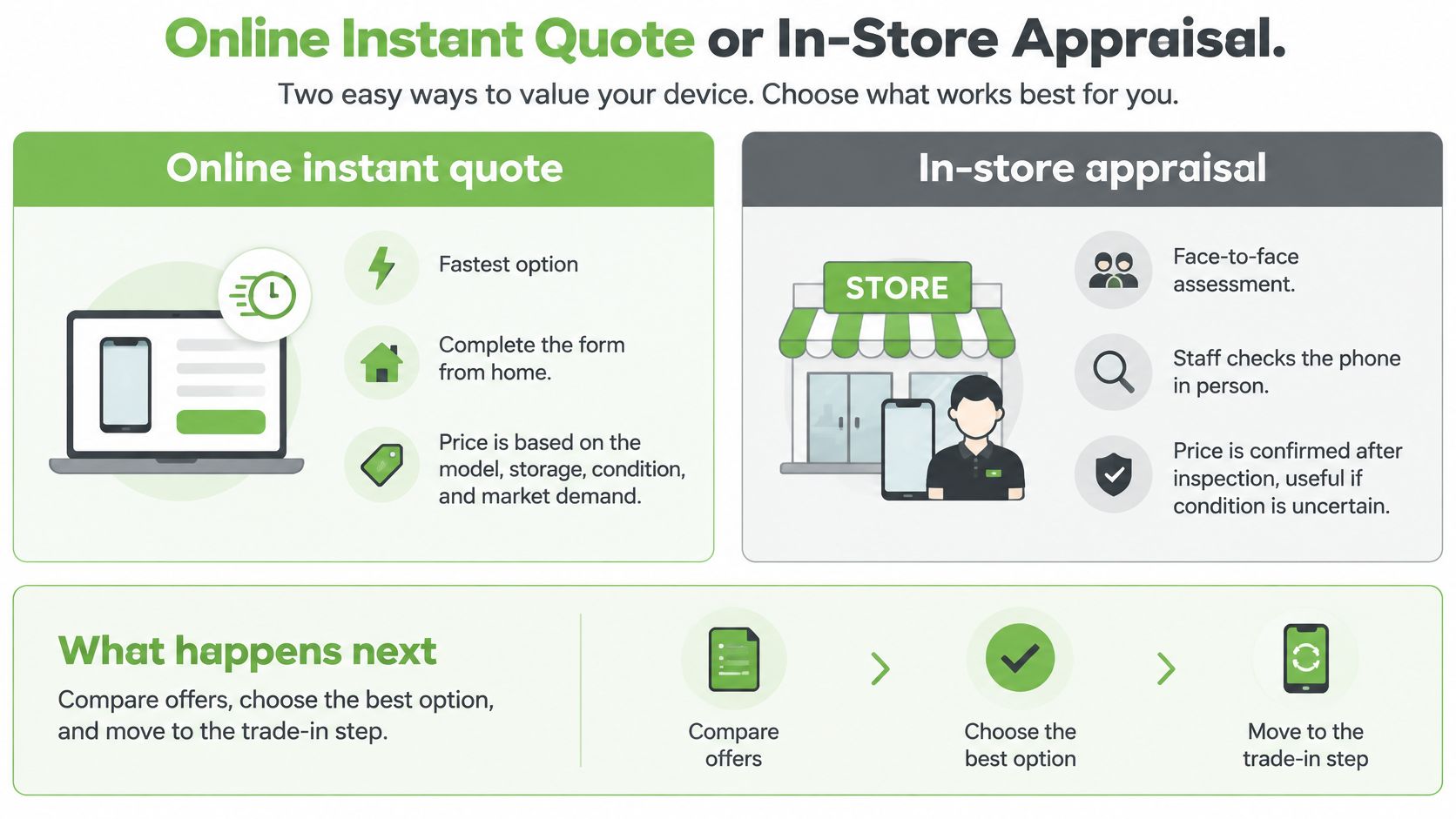
A tidy-looking phone can still have hidden damage, and a repair may change whether trading in is worthwhile. Once you've considered the repair-first check, choose the valuation route that best matches how clearly you can describe the device. Customers can sell their existing phone to myhalo and get an instant quote.
| Factor | Online instant quote | In-store appraisal |
|---|---|---|
| Speed | Complete the web form from home | Assessed in person at a myhalo store |
| How the price is set | Model, storage and your condition answers | Hands-on check of the device before the offer is confirmed |
| Condition check | Self-reported, sometimes with photos | In-person assessment of the device |
| Risk of a changed offer | The offer may change if the phone differs from your answers | Ask about any deductions before accepting the offer |
| Best for | Clean, working phones with no visible damage | Damaged phones or anyone who wants an in-person assessment |
Get an estimate that survives inspection
- Select the exact device. Check the model in Settings rather than relying on its appearance, then confirm the storage capacity.
- Answer condition questions accurately. Include screen or back-glass damage, battery behaviour, previous repairs, network restrictions and Apple or Google account locks.
- Save the offer and its validity terms. Keep a screenshot or confirmation message, including any conditions.
- If you can't confidently answer a question, arrange an in-person appraisal rather than choosing the most favourable response.
Remove the case and inspect the phone under good light. Test touch response, cameras, speakers, charging and buttons. Disclose third-party replacement parts, even if they appear to work normally.
A case can hide cracked back glass. If you select a better condition category because the damage isn't visible, an in-person assessment may result in a lower offer.
Practical rule: Describe faults precisely. A disclosed crack is easier to price fairly than an unexpected one found during assessment.
For readers dealing with a phone in Australia, CTF Mobile Phones & Computer Repairs' guide to sell your used phone in Australia offers a local starting point. Its estimates may not apply in Singapore, where the buyer, currency and acceptance terms differ.
Before accepting an offer, ask what happens if the assessed value changes, including any return arrangements or charges if you decline. Keep those terms with your saved offer.
Back Up Your Photos, Chats and Accounts
Treat backup preparation like a pre-flight routine: make sure everything you need can travel without the old phone. A backup marked complete isn't enough if you can't access the account that holds it.
What to save and what to remove
| Data or account | Where it lives | Action before trade-in |
|---|---|---|
| Photos and videos | Gallery, iCloud Photos or Google Photos | Back up and check a file opens from the cloud |
| WhatsApp and message history | Chat backup settings | Back up, then confirm restoration |
| Two-factor authenticator apps | Authenticator app | Transfer or re-enrol accounts on the new device first |
| Passkeys and saved logins | Google Password Manager or iCloud Keychain | Sync supported credentials, then remove the old device |
| eSIM and mobile wallets | SIM settings, banking apps, Apple Pay or Google Wallet | Transfer mobile service, remove the old eSIM and delete wallet cards |
| Find My or Google device lock | Apple account or Google account settings | Turn off Find My or remove the Google account before erasure |
| Work email and company apps | Mail, Slack, VPN | Sign out and hand company devices to IT |
PayNow isn't a wallet card stored on your phone. Retain your bank registration unless you intend to change it, and follow your bank's process for moving app access or digital tokens.
Save first, then test access
- Check photos independently. Open an older image through the cloud on another device. Don't delete synced photos manually to clear the phone, because that can also delete cloud copies.
- Run a device backup to iCloud, Google or a computer. Our iPhone backup walkthrough explains the Apple options.
- In WhatsApp, use Settings > Chats > Chat backup, then follow the supported transfer or restore process. Keep any encrypted-backup password or key accessible.
- Move authenticator accounts and save recovery codes securely. Some banking tokens need reactivation rather than ordinary backup restoration.
- Sign out of work email and VPN access. Company-managed phones should follow IT's release process, not just your personal checklist.
A phone that won't boot usually can't create a fresh ordinary backup. Check existing cloud or computer backups; if irreplaceable files are missing, ask about recovery before authorising erasure.
Signing out of an app also doesn't necessarily revoke trusted-device status. Review account device lists and sessions from your replacement phone.
Finish with a quick test: can you access your main email and banking app without touching the old phone? If not, pause the handover.
How to Erase Your Phone Securely, Step by Step
Erasure has two parts: preparing the phone correctly and verifying the sanitisation method. A blank-looking screen doesn't establish that your personal information is unrecoverable.
The PDPC's guide to securing personal data in electronic media tells organisations to securely delete, erase or destroy stored personal information before exchange or disposal. It warns that ordinary deletion or reformatting may leave recoverable information, and describes dedicated erasure software or physical destruction where secure deletion isn't possible.
Use the sequence below only after testing your backups and replacement-device access.
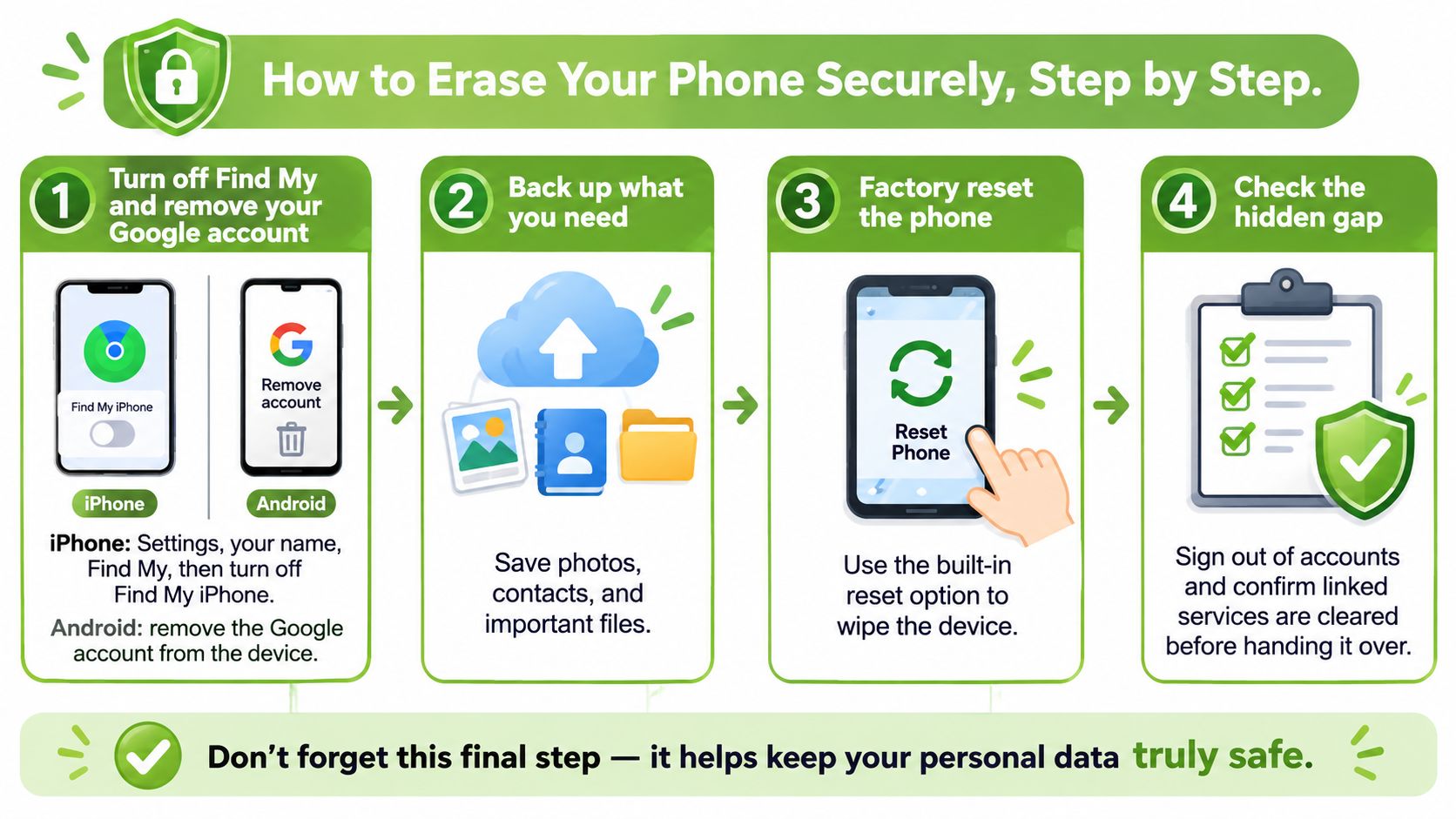
Complete the owner-side wipe
- Release account locks. On iPhone, open Settings > your name > Find My > Find My iPhone and turn it off using your account credentials. On Android, remove your Google account and any manufacturer account that could prevent reactivation.
- Remove removable storage and mobile service. Take out the physical SIM and memory card, then remove the old eSIM profile after confirming service works on your replacement.
- On iPhone, select Settings > General > Transfer or Reset iPhone > Erase All Content and Settings. Follow the prompts carefully, including those concerning eSIMs.
- On Samsung, look under Settings > General management > Reset > Factory data reset. Other Android phones commonly use Settings > System > Reset options > Erase all data; wording differs by software version.
- Restart and inspect the result. Confirm the phone opens at its welcome or setup screen. Don't sign back in to test it, and resolve any previous-owner account prompt before release.
- Document the sanitisation. Request written evidence identifying the model, IMEI or serial number, date, method and outcome. Agree how verification will happen before handing over the phone.
Close the verification gap
A reset alone isn't proof of erasure. Verify that the method suits the device and that the process completed successfully.
Modern encrypted phones don't all require the same treatment as older storage media. A supported reset can perform cryptographic erasure on suitable devices, but don't assume that an unfamiliar wiping app or repeated resets provide stronger protection.
Ask which method applies to your particular phone. Our secure data destruction guide explains what to discuss before authorising treatment.
If the phone won't boot, disclose that immediately rather than repeatedly trying resets. Request specialist assessment, and agree whether secure erasure is possible or whether storage destruction is necessary; physical destruction sacrifices resale and should never be attempted at home.
For a broader computer-disposal comparison, the Nerds 2 You Edmonton disposal guide from Nerds 2 You Edmonton offers an overseas reference. Use Singapore guidance and device-specific procedures for your actual handover.
Pack, Ship or Drop Off Your Phone Safely
Choose your handover route around the phone's physical condition, not just convenience. A damaged battery needs different handling from a sound device ready for resale.
This packing visual is useful for an intact phone that the recipient has agreed to accept.
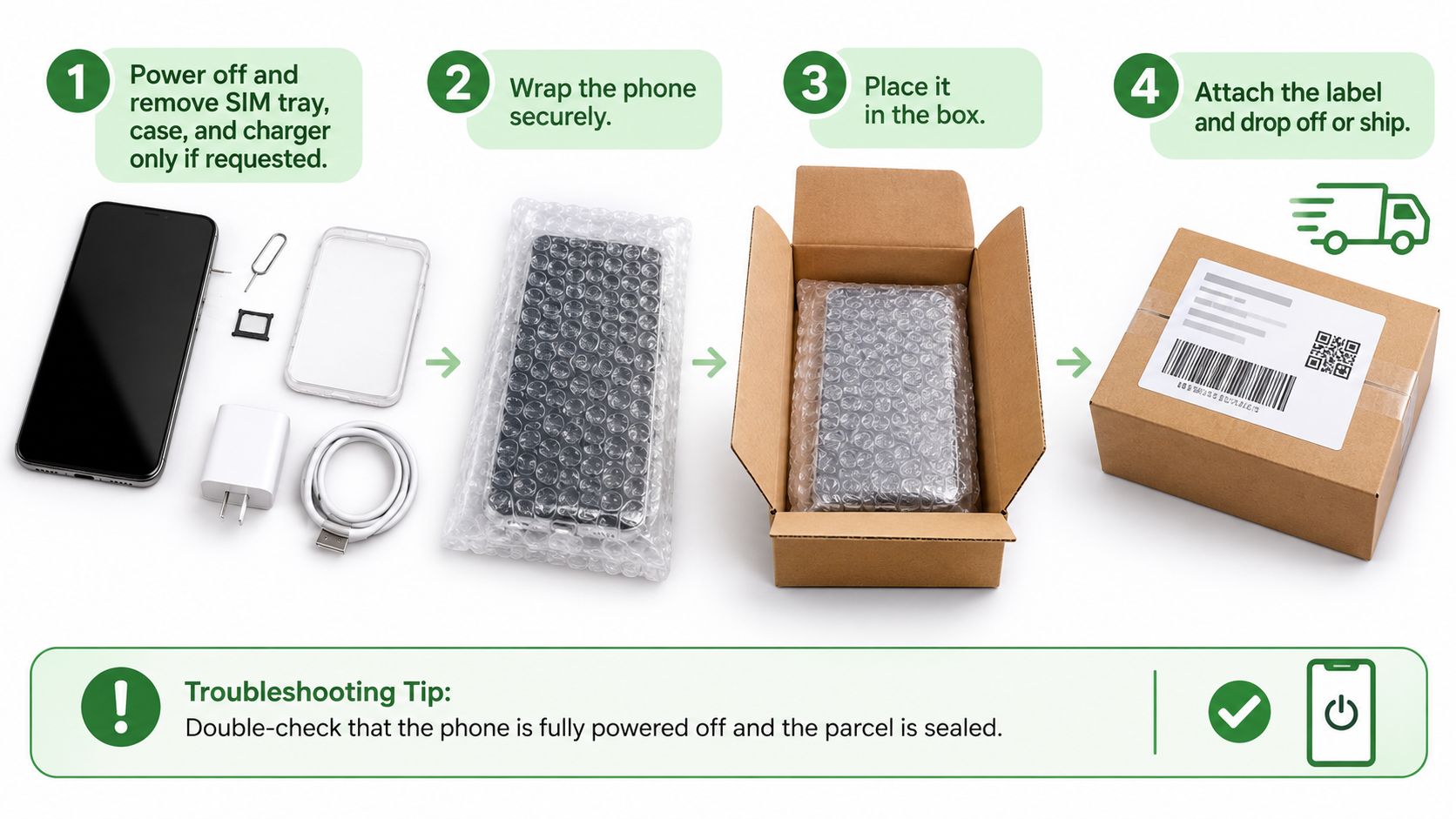
Prepare a secure handover
- Power off the phone. Remove your case and SIM, then refit the empty SIM tray. Include a charger only when requested.
- Wrap the device in cushioning and place it in a rigid box so it can't move. A padded envelope alone offers limited protection against crushing.
- Stop if the battery is swollen, hot or smells unusual. Don't charge, compress or ship it through an ordinary parcel service. Contact the recipient and follow the carrier's damaged-battery rules.
- Photograph the screen, back and packaging before sealing. Keep these images private, especially if they show device identifiers.
- Use tracked delivery and retain the dispatch receipt. Check acceptance and return terms before booking.
- For drop-off, keep the phone and requested accessories together. Bring identification if the receiving service requires it, without leaving unnecessary identity copies inside the parcel.
If you're choosing cushioning materials, Material Handling USA packing supplies provides examples from Material Handling USA. Follow your carrier's battery requirements rather than assuming ordinary packing materials make every phone safe to send.
Handle delays and rejected devices
If the quote changes after receipt, ask for a written explanation and inspection photographs before accepting. If the parcel is delayed, check tracking first, then contact the carrier with the dispatch receipt and notify the recipient.
For a visual accompaniment to device handling, watch the video below.
When trade-in isn't suitable, Singapore has a regulated fallback: the NEA's e-waste management system-system-for-e-waste-management-system) classifies mobile phones as regulated ICT equipment and accepts suitable items through designated 3-in-1 bins with a 500 mm by 250 mm slot, collection drives and doorstep collection.
Resolve data protection first, and request special handling for damaged batteries. Ship an intact accepted device for convenience, drop off when you want a discussion, and recycle responsibly when reuse isn't viable.
Redeem Your Trade-In Credit or Voucher
The offer matters only if you can use what you receive. Cash, restricted credit and a purchase discount aren't interchangeable, even when their headline values look similar.
Choosing how to take your trade-in value
| Outcome | What you get | Watch out for |
|---|---|---|
| Cash or bank payout | Agreed offer value paid to you | Confirm payment form and account details before handover |
| Store credit or voucher | Value to spend with the store | Check expiry, minimum spend and eligible items |
| Discount on a new purchase | A reduction in today's purchase price | Check promotion compatibility and whether any balance carries forward |
Check the terms before committing
- Confirm the payout form. Don't assume an advertised trade-in value means unrestricted cash.
- Read voucher conditions, including expiry, minimum spend, eligible products and promotion exclusions. Ask whether unused value survives a partial redemption.
- Save the offer reference and date. Keep the written acceptance alongside the final assessed value.
- For bank payment, double-check the account name and number through the agreed channel. Never share a banking password, PIN or one-time password to receive payment.
- Apply credit to the intended purchase and inspect the checkout total before paying.
- File the evidence together. Retain the receipt, erasure confirmation and trade-in documents until everything is settled.
Compare the amount you actually pay
Say you choose a replacement phone and receive an eligible trade-in voucher. Subtract the accepted voucher value from the phone's checkout price, then add any delivery charges or accessories you've chosen: that total is your remaining payment.
If the voucher only covers selected accessories, it doesn't reduce the handset price. If another shop sells your preferred handset for less without a trade-in arrangement, compare the complete transactions rather than the voucher amounts alone.
A smaller-than-expected offer doesn't require an immediate decision. Ask for the deductions, check whether your condition answers matched the inspection, and establish whether the assessed price includes everything promised.
You can then compare another buyer, keep the phone, or reconsider repair. Don't buy something you didn't need just to avoid wasting a voucher; useful value matters more than a larger number on paper.
Confirm Your Trade-In and Keep Your Proof
A completed handover should leave you with a clear record, not a loose promise. Check the accepted offer, the device identifier and who now holds responsibility for the phone.
Keep your confirmation documents together so any follow-up is straightforward.
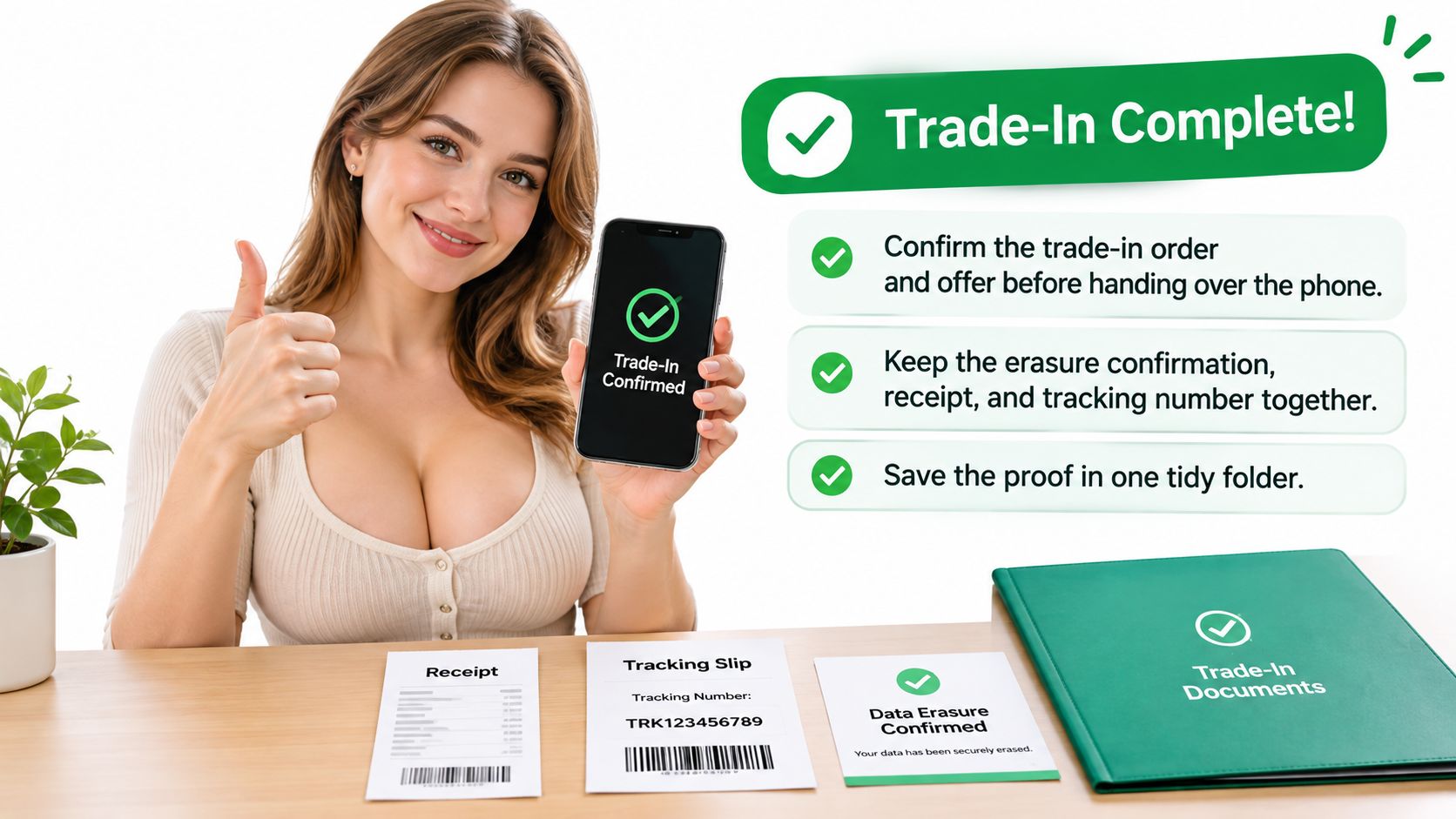
Close the transaction properly
- Confirm acceptance: Match the order reference and agreed offer to the device you handed over.
- Keep your evidence: Store the receipt, erasure record, correspondence and tracking details in a private folder.
- Check settlement: Verify that cash or credit arrives within the timeframe stated in your agreement.
- Resolve rejection: If the phone isn't accepted, obtain clear return instructions or authorise an appropriate e-waste route.
For company phones, records need to follow the asset beyond the employee's desk. Our chain-of-custody documentation guide explains how to track who handled a device and what happened to it.
Buyback / Sell at myhalo gives you cash for your device. To confirm an offer or clarify your next step, contact myhalo CircularXchange on WhatsApp at +65 8068 0100.
Make privacy part of the finish line
Our Safe data promise puts privacy at the centre of letting go of old tech. Ask for the applicable secure-erasure process and its evidence, rather than relying on reassurance alone.
Declutter your e-clutter supports the same goal for homes and offices: clear unused devices conveniently, safely and responsibly. If a damaged phone still holds precious memories, Save data focuses on recovery before irreversible treatment is authorised.
A trade-in is complete only when the data is gone and the credit is in hand.
You don't need to empty every drawer at once. Start with the phone you no longer need, choose its next use carefully, and keep the paperwork that confirms a responsible outcome.
myhalo helps you assess whether to repair, sell or responsibly upcycle your old phone, with support for protecting data or recovering important files. Visit myhalo to explore your options and arrange your next step. Let's clear out those unused devices together and make a zero e-waste lifestyle easier to join.