
You may have a drawer at home, a cupboard in the office, or a storeroom in Singapore filled with retired laptops, phones, hard drives, and networking equipment. They're not being used, but they haven't been forgotten either. The hesitation is understandable: an old device can still contain photos, customer information, passwords, business files, or personal data.
That's where chain of custody documentation matters. It turns a vague assurance, “I think we handled it,” into a record you can defend, “I can show who had this device, when they received it, what happened to its data, and where it went next.” For households, SMEs, and larger organisations, that simple trail supports privacy, responsible recycling, and a zero e-waste approach without making decluttering feel overwhelming.
Table of Contents
- That Drawer Full of Old Laptops Has a Story to Tell
- What Chain of Custody Documentation Is
- The Fields Every Custody Record Must Capture
- Following a Device from Pickup to Certificate
- Sanitisation Levels and the Evidence They Leave Behind
- Corporate ITAD Versus a Home Declutter Workflow
- Keeping Records Audit-Ready and Closing the Loop
That Drawer Full of Old Laptops Has a Story to Tell
A small Singapore business replaces its laptops before a team moves into a new office. The devices are placed beside the loading bay, a courier collects them, and everyone returns to the move. Later, someone asks whether a particular laptop was wiped before it left the premises. The team remembers the pickup, but the paperwork only says “old electronics”.
At home, the situation looks smaller but follows the same pattern. A home-office user has an old phone, a slow laptop, and an external drive in a cupboard. The devices may still contain work documents, browser sessions, saved passwords, or family photographs. Keeping them indefinitely feels safer than throwing them away, yet the drawer creates its own problem because nobody can say exactly what is stored on each device or who might eventually handle it.
The risk isn't limited to the moment of disposal. Every unrecorded handoff creates uncertainty. A device can be misplaced, added to the wrong collection, stored in an unsecured area, or sent down an unsuitable recycling route. If an organisation later faces a client query, an internal review, or a privacy concern, memory won't reconstruct the journey reliably.
Singapore's legal treatment of physical exhibits shows why this matters. In Muhammad Hamir b Laka v Public Prosecutor, the Court of Appeal explained that chain of custody exists to establish identity continuity, so the item seized is the item later analysed, and that a claimed break must be supported by evidence raising doubt about the exhibit's identity (Singapore Courts case brief). In drug cases, the prosecution must account for movement from seizure to analysis beyond a reasonable doubt.
Practical rule: If a device is sensitive enough to erase securely, it's sensitive enough to track individually.
For a business, the result is a controlled record from retirement to final disposition. For a household, it might be a photographed serial number, a dated receipt, and confirmation of the selected data treatment. Both approaches replace uncertainty with evidence. That's the heart of myhalo's Declutter your e-clutter idea, making device retirement convenient, safe, and responsible while protecting the data people are understandably worried about.
What Chain of Custody Documentation Is
A laptop collected from a Singapore office carries two connected histories: the physical device and the information stored on it. Chain of custody documentation records both by showing what an asset is, who controlled it, where it was, when custody changed, and what happened to it afterwards. A pickup receipt covers acceptance of a load, but may leave individual laptops, drives, or phones indistinguishable within it.
The process works like a forensic sample moving from a collection site to a laboratory. The first handler records the sample's identity and condition. A driver signs for the transfer, the receiving officer checks the seal and arrival, and an analyst logs the examination. Each stage has an accountable person, and every handoff leaves evidence that the next person can verify.
An ITAD workflow follows the same logic:
- Identify the device. Record its serial number, asset tag, IMEI, or another unique identifier.
- Record the handoff. Capture the date, time, location, sender, receiver, and signatures.
- Control the movement. Log the transport method, seal condition, storage location, and any exception.
- Document treatment. Connect the device to its sanitisation, destruction, reuse, or recycling record.
- Close the file. Issue the final record, such as a Certificate of Destruction or release document.
A missing signature, unexplained time gap, or unrecorded transfer does not by itself establish that a device was altered or replaced. It does make the organisation's account more difficult to support. Singapore's Court of Appeal reiterated in a 2023 decision that exhibit movement must be accounted for at every point. The linked 2023 Singapore Court of Appeal decision also reflects the principle that no moment should remain unexplained if it could affect an exhibit's identity.
The same discipline supports business data handling under PDPA-related obligations. A company needs evidence of a controlled journey, rather than relying only on a vendor's assurance. The device and its data are separate but connected threads. Tracking the box without recording data treatment leaves an information gap. Recording the wipe without tracking custody leaves a physical-control gap.
This approach also applies to confidential paper records. Myhalo's guidance on document paper shredding shows how disposal records can support a wider information-disposal process. For sensitive work that requires accountable handling, the resource on when to hire a professional for a reinforces the value of clear responsibility and documented transfers.
The Fields Every Custody Record Must Capture
A custody record should let a person who was absent reconstruct one device's journey without interviewing everyone involved. The form can stay simple. Its entries must be specific, consistent, and tied to the individual asset.
Device identity
Begin with the details that separate one device from another. Record the serial number, internal asset tag, or IMEI where available. Add the make, model, device type, and relevant media information, such as whether the laptop contains an SSD or removable drive.
Use one date and time format throughout the record. Include the pickup location and the device's condition on receipt. “Laptop” leaves too much uncertainty. “Lenovo ThinkPad, recorded serial number, received with cracked casing” gives the next handler a description that can be checked.
Handler chain
A company name alone does not identify who accepted responsibility. For each custody change, record the sender, receiver, date, time, location, signature, and transport method. If the device travels in a sealed container, add the seal reference and record its condition when it arrives.
Internal storage movements also belong in the record. A device may be traceable at pickup, then become difficult to locate after moving from a loading area to a sorting bench and later to a secure cage. Each move should create a custody event, much like a parcel receiving a scan at every depot.
Treatment record
The final group records what happened to the asset after intake. Note the sanitisation method, responsible technician, completion time, verification outcome, and final disposition. Possible outcomes include internal redeployment, resale preparation, reuse, recycling, or physical destruction.
| Field Group | Field | Why It Matters |
|---|---|---|
| Device identity | Serial number, asset tag, or IMEI | Connects every later record to the correct device |
| Device identity | Make, model, media type, and condition | Helps verify the asset and explain exceptions |
| Handler chain | Pickup and drop-off locations | Establishes where custody changed |
| Handler chain | Named handlers and signatures | Shows who accepted responsibility |
| Handler chain | Timestamp and transport method | Creates a chronological movement trail |
| Treatment record | Storage location and seal status | Supports physical security and exception review |
| Treatment record | Sanitisation method and technician | Shows which control was applied and by whom |
| Treatment record | Final disposition and certificate reference | Closes the lifecycle with asset-specific evidence |
Auditors and privacy reviewers often find the same weak points first: missing serial numbers, gaps in timestamps, and unsigned handovers. The record should use one asset-level structure whether the job involves a small office clear-out or an enterprise decommissioning. The number of devices may change, while the identity, handoff, treatment, and outcome fields remain understandable.
The device documentation guide offers a practical way to organise custody records with other lifecycle documents. Keep the record connected to the asset register, rather than filing it as an isolated pickup form. That connection changes a general statement, “we collected some devices”, into evidence for a particular asset: “we can account for this device, its handlers, and its treatment.”
Following a Device from Pickup to Certificate
The cleanest way to test a custody process is to follow one laptop through it. Start before the vehicle arrives. The organisation compares its pre-pickup asset register with the equipment physically staged for collection, including serial numbers, rack positions where relevant, and classification. Any missing, extra, or unidentified device becomes an exception before it leaves the site.
The handoffs that carry the story
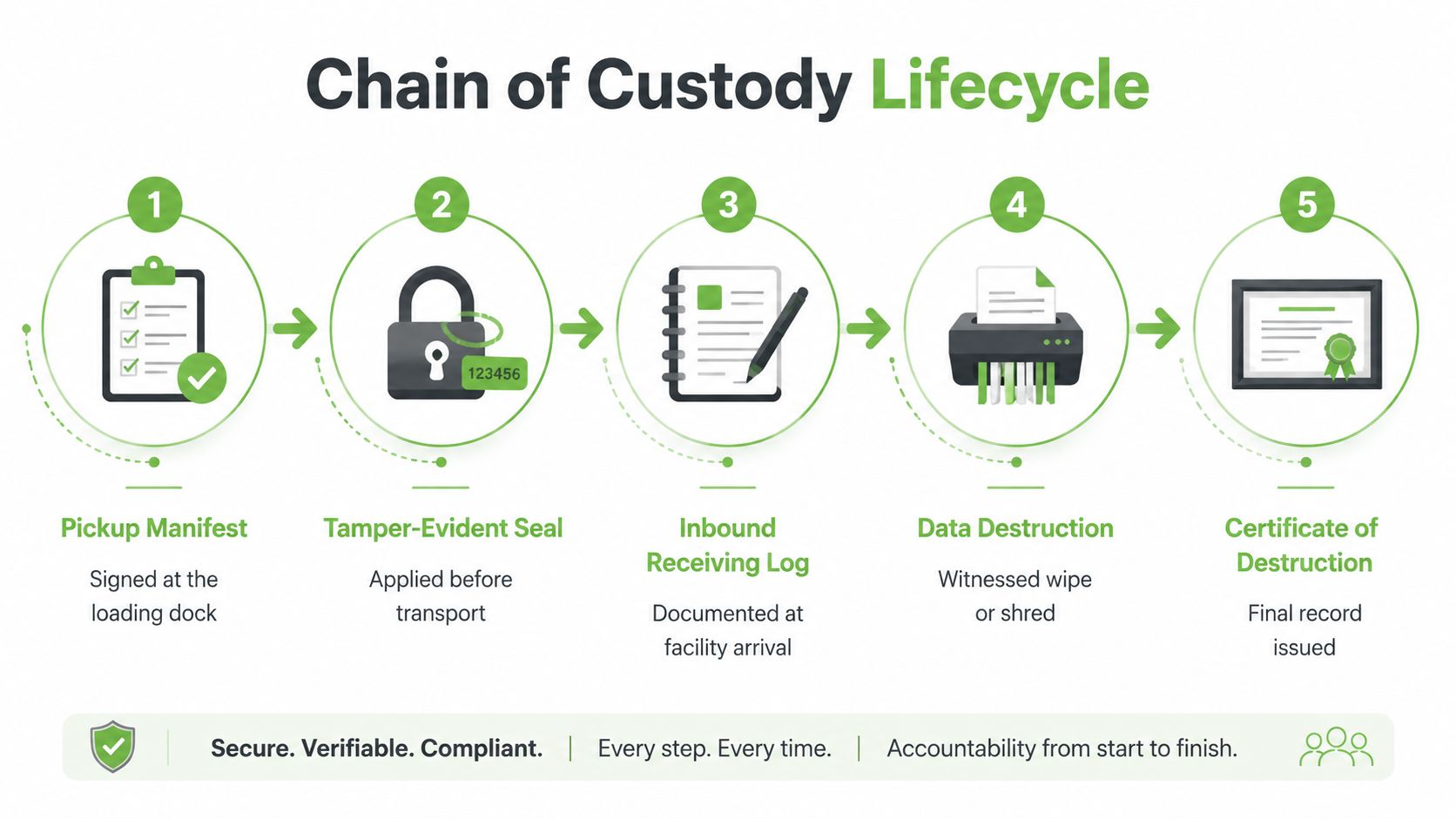
At the loading dock, the pickup manifest is checked against the physical device list. The authorised site representative and receiving handler sign the transfer, and the record captures the date, time, location, condition, and any discrepancy. The asset's identifier travels with the manifest, not just with a box or pallet count.
Before transport, the container or load receives a tamper-evident seal. The seal reference and condition are recorded, then checked when the load reaches the receiving facility. GPS-tracked transport can add another layer of movement evidence, particularly where a business needs to show a controlled route between collection and processing.
At intake, the facility verifies the seal, photographs or records the received condition where appropriate, and reconciles each serial number against the manifest. The laptop then receives a sorting or storage location. When it enters the sanitisation queue, the queue entry must still point back to that same identifier.
Where records commonly fail
The chain often weakens through small administrative shortcuts:
- Forgotten seal references: Staff record that a load was sealed but omit the number needed to verify it later.
- Batch-only entries: A report states that “laptops were destroyed” without tying the event to individual serial numbers.
- Unclear authority: A signature appears, but the record doesn't show whether the person was authorised to release or receive the equipment.
- Unlogged exceptions: A device arrives without a matching serial number and proceeds through processing without a documented decision.
After sanitisation or destruction, the technician records the method, timestamp, identity, and verification result. The final Certificate of Destruction or release record then links back to the laptop's serial number, rather than merely summarising the entire project.
For teams that need a broader reference on handling sensitive evidence, Paradigm International Inc.’s defensible evidence handling guide provides useful context for controlled collection, transfer, storage, and documentation.
A good auditor should be able to select one laptop and follow a single thread: asset register, pickup signature, seal check, facility intake, processing log, verification, and final certificate. The paperwork isn't there to create administrative theatre. It exists so the organisation can demonstrate integrity at every touchpoint.
Sanitisation Levels and the Evidence They Leave Behind
Data sanitisation is the point where the custody record must explain not only what happened, but why that treatment matched the device and data risk. Singapore-oriented ITAD guidance commonly maps sanitisation to NIST 800-88 Rev. 1 categories: Clear for internal redeployment, Purge when an asset leaves organisational control, and Destroy for maximum-security or regulated environments (Singapore data-centre decommissioning guidance).
Clear
Clear applies a logical sanitisation process intended for a device that remains within an organisation's control. The custody file should identify the tool or process used, the technician, the completion timestamp, and the verification result. A tool report or screenshot can help show that the operation completed rather than merely being scheduled.
The justification matters. A device approved for internal redeployment may need a different treatment from one leaving the organisation, and that decision should be visible in the record.
Purge
Purge uses a stronger method, such as cryptographic erasure or degaussing where appropriate. The record should capture the selected method, technician identity, time, verification, and any relevant tool or certificate reference. For a self-encrypting drive or SSD with an embedded controller, the technician should document why the chosen method is suitable instead of assuming that a conventional overwrite proves complete erasure.
Destroy
Destroy physically renders the media unusable through a method such as shredding, crushing, incineration, or disintegration. The evidence file can include the destruction record, device-to-batch reconciliation, photographs where used, and confirmation of downstream transfer if another party handles the material.
| Sanitisation Level | Required Evidence Fields |
|---|---|
| Clear | Device identifier, selected logical method, technician, tool record, timestamp, and verification |
| Purge | Device identifier, cryptographic erasure or degaussing method, technician, tool or certificate reference, timestamp, and verification |
| Destroy | Device identifier, physical destruction method, completion record, reconciliation evidence, and downstream handoff where applicable |
A stronger method doesn't always create more confusion. It can create a clearer endpoint because the physical result is easier to verify. What matters is that the selected level, method, and evidence remain connected to the asset.
For a focused explanation of one physical sanitisation method, the guide to degaussing a hard disk can help readers understand why magnetic media and modern SSDs shouldn't be treated as interchangeable.
Corporate ITAD Versus a Home Declutter Workflow
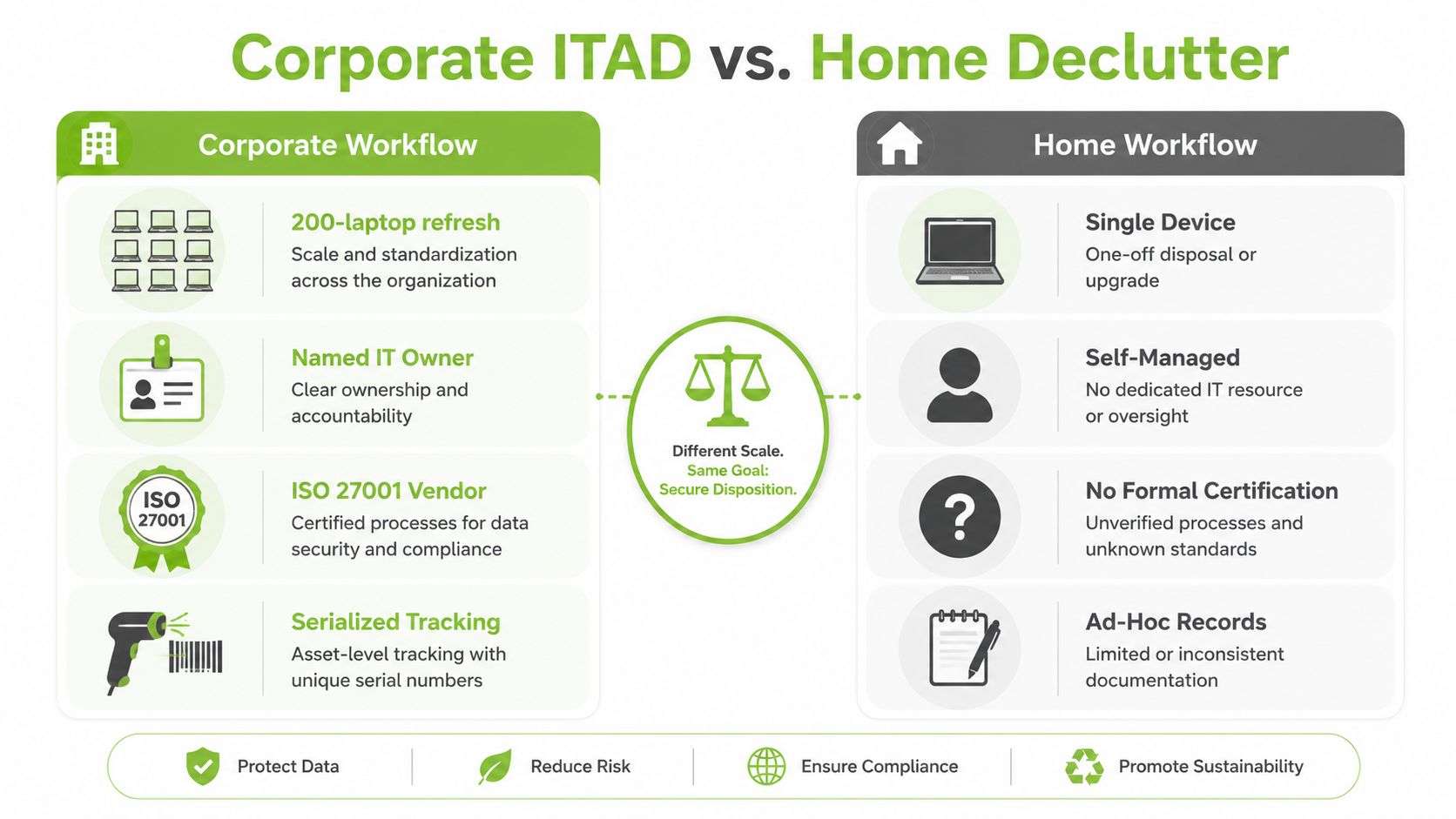
The vocabulary stays the same, but the workflow changes with scale. A corporate ITAD programme may involve a rolling refresh of 200 laptops, a named IT asset owner, scheduled pickups, a vetted vendor with ISO 27001 and AAA NAID certifications, and integration with a CMDB or asset register. A home-office user may have five personal devices, no formal asset register, and a neighbourhood e-waste drop-off with a short paper or digital receipt.
The corporate version
Corporate teams need a process that survives staff changes and audit questions. The IT asset owner confirms the retirement list, the vendor records each device, and the asset register remains the source for reconciliation. Scheduled collection, controlled transport, facility intake, sanitisation, and final disposition should each leave a linked record.
A vendor's certification can support due diligence, but it doesn't replace asset-level evidence. The organisation still needs to know which handler received each device, which method was applied, and which final document closes the record.
The home version
A household doesn't need to recreate an enterprise system. It can still take sensible steps:
- Photograph the identifiers: Capture the serial number, IMEI, or asset label before handing over the device.
- Record the handover: Note the date, location, receiving counter, and device description.
- Ask for acknowledgement: Request a stamped paper receipt or digital confirmation.
- Separate concerns: If a device contains important files, arrange recovery before sanitisation or disposal.
The principle remains unchanged: the person releasing the device should have evidence of who received it and what service was requested. The controls become lighter, not meaningless.
A corporate team can also use a structured IT asset disposition service when it needs documented collection, certified data destruction, recycling, and completion records. For an individual, a clear receipt and a verified handover may be proportionate. Both workflows protect the same basic idea, an unbroken, witnessed path from ownership to the next responsible outcome.
Keeping Records Audit-Ready and Closing the Loop
An auditor asks for one laptop's history. The team should be able to move from its asset register to the handover, treatment record, certificate, and final destination without relying on memory. Audit-ready chain of custody documentation rests on three habits: know what to keep, know where it lives, and know how to retrieve it.
Singapore-focused guidance recommends retaining custody records through any warranty or liability period plus six years. PDPA-related documentation should also be kept for at least six years to cover the limitation period for legal actions. Organisations should align this baseline with contracts, internal policies, and legal advice.
What to keep
Store the asset register, signed manifests, transfer records, seal checks, intake evidence, sanitisation logs, Certificates of Destruction, release documents, vendor certifications, and downstream recycling records. Map every item to the device serial number or asset identifier.
A batch summary can leave important questions unanswered. The record should show what happened to the particular laptop or drive, who handled it, which method was applied, and what document closed the process.
Where to keep it
Use a controlled digital repository with access restrictions, backups, and version history. Signed PDFs should be protected from casual replacement. If a physical master file is required, assign a custodian and record its storage location.
A practical folder structure can group records by project, site, or asset register reference, supported by a searchable serial-number index. Hash values may provide tamper evidence for selected digital records, but people still need to own the process. One person should know which file is authoritative and who may approve a correction.
How to retrieve it
Log discrepancies as soon as they appear. If a serial number is missing at intake, record the exception, investigate it, and document the resolution rather than trying to reconstruct events at quarter-end.
During an audit, export the complete thread for the requested device, including movement, treatment, and final outcome. Teams reviewing their process can consult this overview of common audit trail pitfalls, especially incomplete entries, unclear ownership, and records that cannot be retrieved consistently.
The myhalo approach connects secure handling with a zero e-waste world. Its services cover device lifecycle management, ITAD, secure data destruction with certificates on request, repair, resale, buyback, and upcycling. This gives an organisation documented options for reuse, recovery, or destruction while keeping the data obligation visible.
The record is complete only when the device, its data treatment, and its final destination all point to one another.
For a first-time reader, the process may seem large. Start with one accurate register, one responsible custodian, and one documented handoff. Apply the same care to a home drawer or an office refresh, and the custody story remains understandable to the team, the client, and your future self.
myhalo can help turn unused laptops, phones, drives, and other devices into a documented lifecycle outcome through secure data handling, ITAD, repair, reuse, and responsible recycling. Visit myhalo to explore a convenient, safe, and responsible way to clear out old devices.