
You know the feeling. A stack of old laptops sits in the storeroom, a few phones are waiting for trade-in, and someone in finance is asking for proof that every device was wiped before it left the office. In Singapore, that's not just an admin headache, it's a real compliance risk, because device documentation now sits at the intersection of privacy, e-waste handling, and operational accountability.
The good news is that a clean paper trail makes the whole process far less stressful. With the right records, you can show what the device was, who handled it, how data was treated, where it went next, and why that decision was defensible. That's the difference between a smooth handover and a messy explanation during an audit.
Table of Contents
- Why Device Documentation Matters More Than You Think
- Essential Types of Device Documentation
- Singapore Compliance Requirements for Device Records
- Required Fields and Documentation Templates
- Audit-Ready Documentation vs Basic Record Keeping
- Retention Periods and Secure Storage Requirements
- Best Practices for Device Handover and Resale
- How Professional Services Handle Documentation Complexity
- Implementation Checklist and Quick Reference Guide
Why Device Documentation Matters More Than You Think
A device leaves a lot behind when it changes hands. A laptop sold too early can come back with recoverable data still on it. An audit request can arrive with no chain-of-custody record, no sanitisation proof, and no approval trail for the transfer. In both cases, the issue is not the hardware. It is the missing evidence around what happened to it.
Singapore businesses also have to treat device records as part of their compliance trail, not as a file cabinet task. Under the PDPA, records tied to intake, use, transfer, sanitisation, and disposal help show that personal data was handled properly across the device lifecycle. If you handle laptops, phones, or storage media without clear documentation, you leave gaps that are hard to defend later. For a practical process view on what disciplined records should look like, the 2026 documentation guide is a useful reference, and IT asset management best practices gives a grounded view of how good asset control supports that work.
Practical rule: if you cannot show the device's path from intake to final disposition, you will have trouble defending the decision later.
Records also need to support environmental reporting and reuse decisions. Singapore's waste and e-waste figures show why disposal trails matter, because recovery, reuse, and recycling only count when they can be traced back to specific assets and actions. A wiped device with no record is hard to classify, hard to audit, and hard to trust when a buyer, recycler, or regulator asks what happened to it. The point is simple. Documentation is what turns a handover into an accountable process, and that matters just as much as the wipe itself.
If a team's process is basically “erase it and keep the receipt,” that leaves too much out. Auditors usually want to see the asset identity, who approved the change, what data treatment was performed, and where the device ended up. Good documentation answers those questions without forcing anyone to reconstruct the story from email threads, spreadsheets, and memory.
Essential Types of Device Documentation
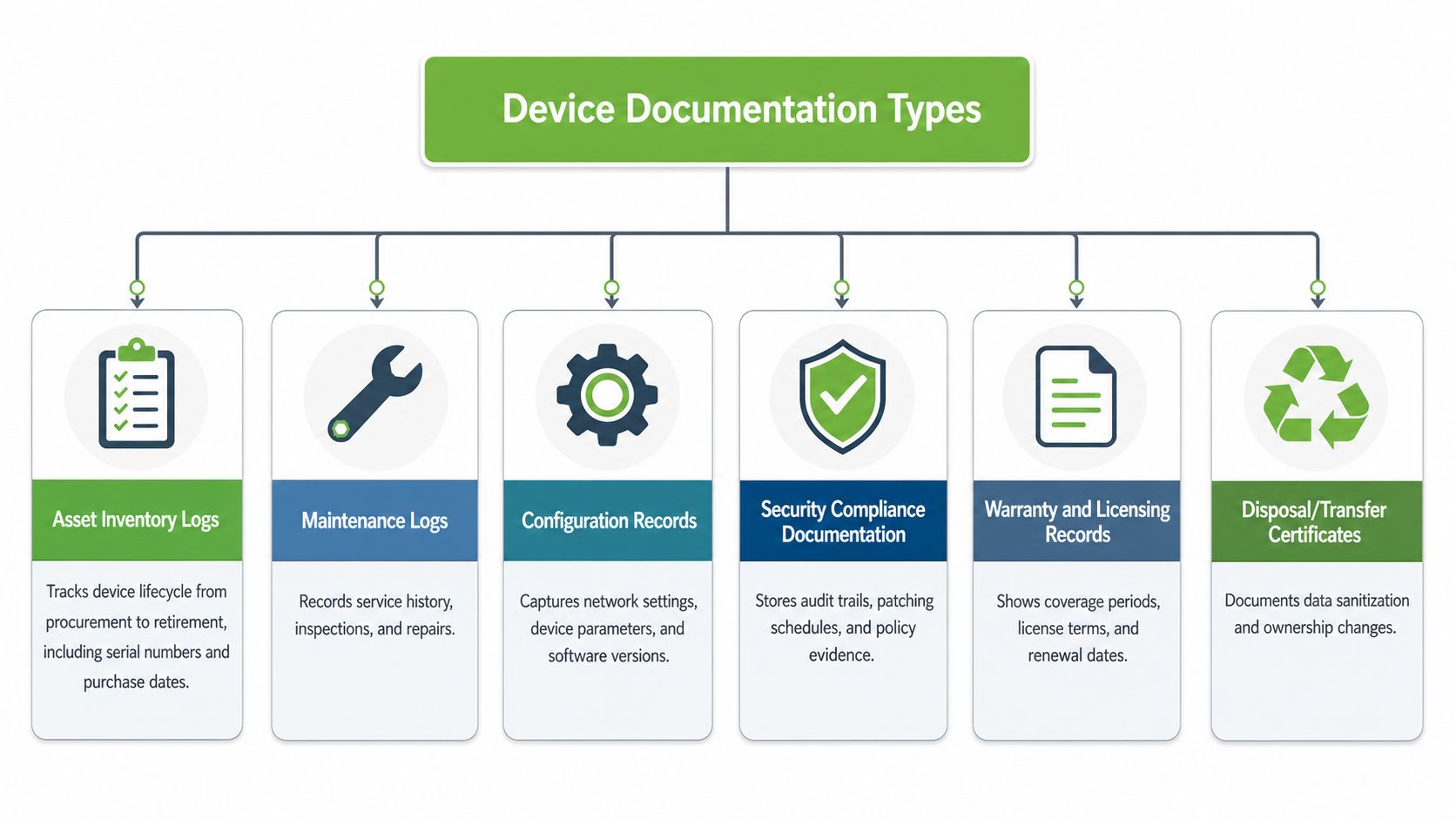
A usable device trail starts with six record types. They cover the asset itself, the work performed on it, the data state at the point of handoff, the transfer path, the ownership change, and the end-of-life outcome. Leave out one of those pieces, and the record set stops telling a complete story.
The core record set
- Asset inventory logs: These follow a device from procurement through retirement. At minimum, they should capture the serial number, model, purchase date, assigned user, location, and current status. In practice, they are the base record for reconciliation, handover checks, and dispute resolution.
- Maintenance and repair logs: These show what was diagnosed, what was replaced, and what was tested after service. If a machine returns with the same fault, this is the record that shows the pattern and the work already done.
- Data-erasure certificates: These confirm that the device was securely deleted, erased, or destroyed before reuse or disposal. Singapore's PDPC guidance specifically calls for collection and destruction records, and notes that service-provider certificates may exist, but internal records still need to be kept for auditability PDPC disposal guidance.
- Chain-of-custody forms: These record every handoff. The useful detail is not just that the device moved, but who had it, when they had it, and the condition it was in at each transfer point.
- Trade-in or sale receipts: These establish the ownership transfer. They matter when accounting, tax, or warranty questions surface later, because they show that the device left the organisation through a recorded transaction.
- End-of-life certificates: These confirm responsible recycling or destruction. In Singapore, that aligns with the practical requirements of the Extended Producer Responsibility framework for regulated electronics, which began on 1 July 2021 e-waste regulation context.
Simple test: if the document does not help you answer “what happened to this device, and when?”, it is not carrying its weight.
Repair-heavy workflows expose the difference quickly. A maintenance log can explain a battery replacement, but it does not prove the drive was sanitised before the machine changed hands. A sale receipt shows money changed hands, but it does not prove lawful disposition. The records have to support one another, because auditors and compliance teams look for the full sequence, not isolated paperwork.
Singapore Compliance Requirements for Device Records
A Singapore device handover that looks tidy on paper can still fail an audit if the record trail does not show who handled the device, what data risk existed, and how disposal or transfer was controlled. That is the practical standard here. PDPA obligations reach across the full device lifecycle, so the documentation has to support privacy protection from active use through wipe, transfer, resale, or disposal.
The 2020 PDPA amendments raised the operational pressure through mandatory breach notification and stronger enforcement powers. A vague entry such as “old laptop disposed of” is not enough. A defensible file ties the asset to a named custodian, records the sanitisation action, and keeps evidence that the action was completed. If the organisation cannot produce that chain, it has a gap.
Singapore's e-waste framework adds a separate obligation. Electronic recovery still sits low in the overall recycling mix, which is why regulators care about traceability, not just collection volume NEA waste context. Under the Extended Producer Responsibility framework, regulated producers must collect and route specific consumer electronics into approved treatment paths. That makes the collection route, device condition, serial number, and downstream handling the fields auditors expect to see.
Public-sector ICT controls set a useful reference point for private organisations as well. The government's data-protection control catalogue requires sanitisation of hardware that stores data at rest and points to witnessed sanitisation or destruction using recognised methods such as secure deletion, shredding, incineration, and degaussing government control catalogue. In practice, that means the record should show more than a policy statement. It should show what method was used, who carried it out, and how the organisation can prove the device was no longer recoverable.
For Singapore businesses, the record set needs to answer three questions cleanly, what happened to the data, who had the device at each handoff, and what final treatment the device received. If those details are missing, the paperwork may satisfy an internal filing habit, but it will not satisfy a regulator, customer, or buyer asking for proof.
Required Fields and Documentation Templates
The fastest way to improve device documentation is to standardise the fields. Most audit problems come from missing basics, not from exotic legal edge cases. A template that gets used every time beats a form that people skip when they're busy.
For a simple inventory record, include the device type, manufacturer, model, serial number, purchase date, assigned user, location, and current status. For repair history, record the date, technician ID, diagnostic findings, parts replaced with part numbers, labour hours, and post-repair testing results. For chain-of-custody, capture sender and receiver details, transfer date and time, condition at handoff, and signatures. For a data-erasure certificate, the minimum useful set is device identifier, erasure method, verification method, date, technician certification, and confirmation that sanitisation was complete.
The same logic applies to trade-in and disposal records. A sale or transfer receipt should identify the asset clearly, show the agreed value or transfer basis, and connect to the custody trail. An end-of-life certificate should show the chosen route, whether that was destruction, recycling, or component harvesting, and should link back to the original asset record. If the device is being processed through a structured programme, keep the reference number with the certificate so the chain doesn't split later.
Here's a practical structure that teams can adapt to their own forms.
| Document Type | Required Fields | Retention Period |
|---|---|---|
| Asset inventory log | Device type, manufacturer, model, serial number, purchase date, assigned user, location, current status | Lifecycle of the asset, plus legal hold if needed |
| Repair log | Date, technician ID, diagnostic findings, parts replaced, labour hours, test results | Lifecycle of the asset, plus audit retention |
| Data-erasure certificate | Device identifier, erasure method, verification method, date, technician certification, sanitisation confirmation | Entire lifecycle, plus six years after disposal |
| Chain-of-custody form | Sender, receiver, transfer date and time, condition at handoff, signatures | Through liability or warranty period, plus six years |
| Trade-in or sale receipt | Asset identifier, transfer date, parties, agreed value, condition summary | Seven years for financial recordkeeping |
| End-of-life certificate | Device identifier, final treatment route, date, receiving party, destruction or recycling evidence | Lifecycle of the asset, plus audit retention |
For a practical reference on structured erasure workflows, see myhalo's data erasure methods.
Audit reality: an auditor rarely wants a long story. They want to match a serial number, a date, a method, and a sign-off across the relevant documents.
The best templates stay boring. They don't try to be clever. They force the right fields to be captured before the device moves on.
Audit-Ready Documentation vs Basic Record Keeping
Basic record keeping tells you something happened. Audit-ready device documentation proves exactly what happened, who did it, and whether the outcome was valid. That difference sounds small until someone asks for evidence months later and the only note is “laptop wiped before sale.”
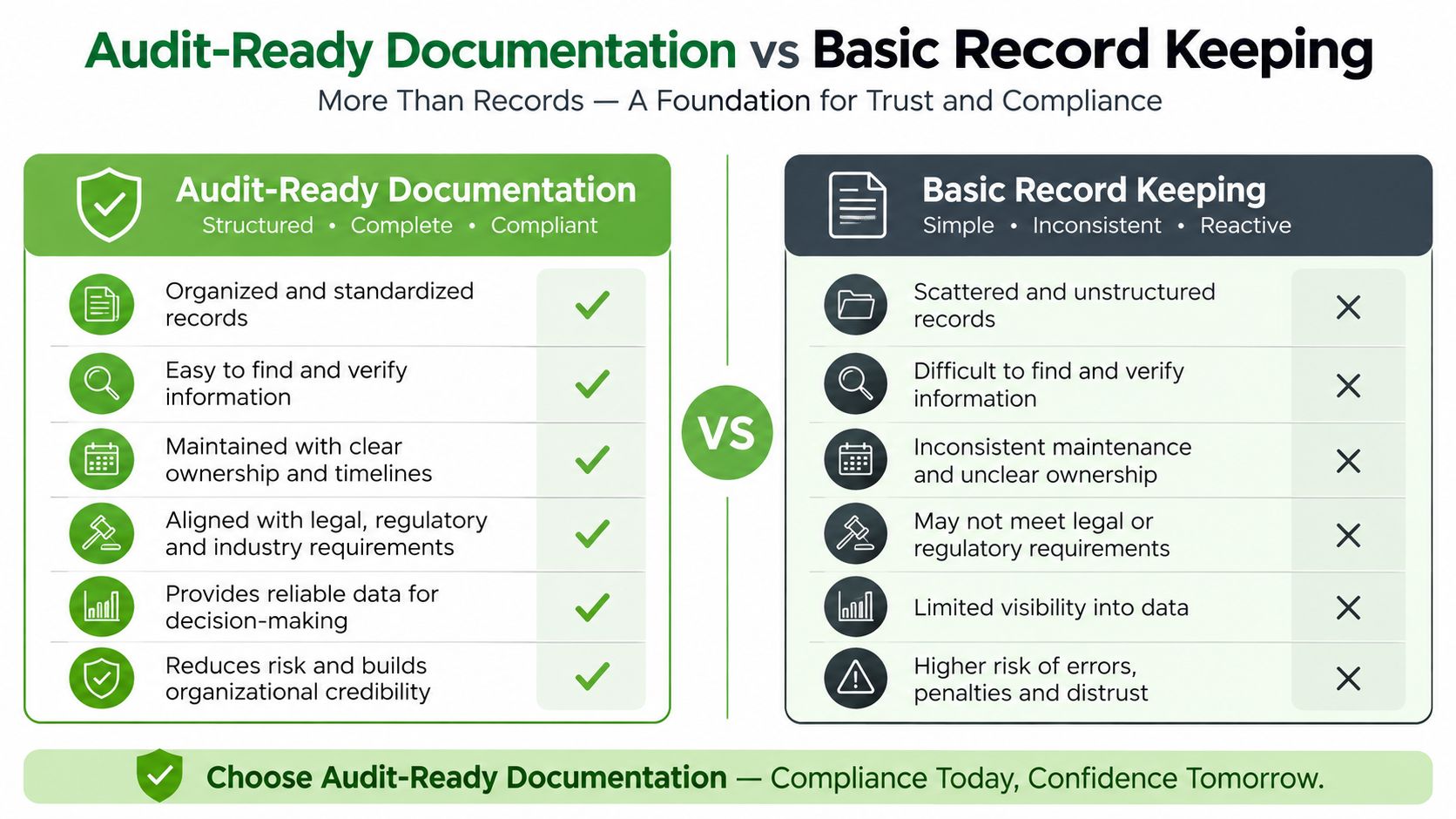
An audit-ready trail is built on specificity. It names the device, states the sanitisation method, shows the verification method, records the date and time, identifies the technician, and preserves the chain-of-custody signatures. Basic records usually stop at the outcome, which leaves too many blanks for a reviewer to trust the process.
That gap matters most when the record set is inconsistent. A missing serial number breaks reconciliation with the asset register. An unsigned custody transfer leaves nobody clearly accountable for the device at that point in time. A vague note like “data removed” doesn't show whether the erase was complete or whether the media was physically destroyed because verification was uncertain. Missing timestamps make incident reconstruction harder, especially when several devices move on the same day.
The quality issue is similar to what data teams call poor data quality, where missing or inconsistent fields make downstream decisions unreliable. For a broader framing of that problem, what is data quality is a useful companion read, because the same logic applies here. If the source records are incomplete, the audit trail inherits that weakness.
The cleanest way to review your own process is to ask one question at each handoff. Could someone outside the team prove, from the file alone, that the device was handled correctly? If the answer is maybe, the record is still too thin.
For more on secure retirement workflows, myhalo's internal guide on secure data destruction is a useful companion.
Retention Periods and Secure Storage Requirements
Once the forms are right, the next risk is losing them. A certificate sitting in someone's inbox is not a retention strategy, and a spreadsheet on a shared desktop doesn't count as secure storage. Good records need both a time horizon and a protected home.
Use the retention period that matches the record's purpose. PDPA-related documentation should be kept for at least six years to cover the limitation period for legal actions. Financial records, including trade-in receipts, should be kept for seven years for tax purposes. Data-erasure certificates should stay on file for the device's entire lifecycle plus six years after disposal. Chain-of-custody records should be retained through any warranty or liability period, plus six years.
Security matters as much as duration. Encrypted cloud repositories work well when access is tightly controlled and logging is enabled. Physical archives still make sense for signed originals or documents that need to be kept offline, but they should be stored in a location with restricted access and a clear index. In either case, the key people are the people who need the records, not everyone who happens to ask.
Keep the record where it can be found, but only by the people who are allowed to see it.
Backups are part of retention too. If a certificate can disappear because one employee leaves or one mailbox is deleted, the system isn't resilient enough. Teams should keep a secondary copy of critical documents and test that they can retrieve it when needed. That applies especially to disposal and transfer evidence, because those records often become important only after the device is already gone.
The point is simple. Retention is not passive storage. It's controlled preservation with a purpose, and in Singapore that purpose often includes privacy defence, tax support, and proof of lawful handling.
Best Practices for Device Handover and Resale
The cleanest handovers happen when no step is left to memory. I've seen too many transfers go wrong because someone assumed the data team, procurement team, or recycler had already captured a document. The safer pattern is to block each move until the previous record is complete.
For employee departure handovers, the sequence should be predictable. Verify the backup, confirm account deprovisioning, inspect the device condition, generate the sanitisation certificate, and then update the asset register. If the laptop is going to be reassigned, that reassignment shouldn't happen until the wipe evidence and sign-off are both in place.
Trade-ins need the same discipline, just with a customer-facing finish. Capture the pre-handover backup, run secure erasure with independent verification, document the device's condition with photos, complete the chain-of-custody at drop-off, and issue the receipt with the device details and agreed value. The paperwork has to follow the device, not the other way around.
For corporate IT asset disposition, bulk work creates a different kind of risk. Inventory reconciliation has to come first, then secure transport with custody tracking, then certified data destruction for each device, then environmental compliance records, and finally the disposition report. If devices are moved in batches, keep the tracking granular enough to tie each serial number to its outcome.
A useful way to tighten the process is to write it as a checklist instead of a policy paragraph. Teams are much more likely to follow a numbered path than a general statement about responsibility. For a practical point of view on documentation habits, opinionated document management tips is a solid reference to compare against your own setup.
The trade-off here is obvious. Faster handovers feel efficient in the moment, but they often create cleanup work later. Slower, documented handovers usually save time overall because nobody has to reconstruct the trail after the fact.
How Professional Services Handle Documentation Complexity
Teams don't want to become documentation specialists. They want the devices handled correctly, the records completed properly, and the audit trail ready if anyone asks. That's where structured service providers reduce friction, because they can generate the paperwork as part of the workflow instead of leaving it as a separate task.
In repair and rescue work, the value is in the service log. Diagnostic findings, parts used, and testing results can be captured as the device moves through the bench process, which is much easier than trying to recreate that history afterwards. For certified resale, a documented history helps show original purchase details, prior repairs, and the current condition grade, which gives the next owner a clearer view of what they're buying.
For trade-in and buyback, the whole chain matters. From initial quote to secure erasure confirmation to final sale receipt, each stage needs a link back to the same device identity. Corporate ITAD adds even more layers, including collection records, secure destruction certificates, and environmental compliance documents. In practice, that kind of stack is where structured providers earn their keep.
myhalo's IT asset disposition services sit in that category, because the service is built around documented collection, erasure, and end-state handling rather than ad hoc disposal. That matters for organisations that need the paperwork to be as reliable as the physical process.
Practical advantage: when the service workflow generates the record, the documentation is less likely to be skipped, lost, or rewritten later.
The same principle applies to lifecycle subscriptions. Ongoing maintenance history is easier to trust when it's captured continuously, not assembled after a problem appears. That's the value of professional services in this space, they turn documentation from a side job into part of the operating model.
Implementation Checklist and Quick Reference Guide
The cleanest way to handle device documentation is to complete the record before the next handover, not after someone starts asking for proof. A short, repeatable checklist keeps the process moving and gives staff a clear stop point. Nothing should move ahead until the basic fields are filled in and the supporting documents are attached.
Pre-disposal checklist
- Verify the backup: Confirm that important files, photos, and work documents are copied and accessible, and record who checked them.
- Deprovision accounts: Remove access to email, cloud tools, and corporate apps before the device leaves control, then note the time and responsible staff member.
- Erase and certify: Run the approved sanitisation method, capture the wipe reference, and attach the certificate to the asset record.
- Clean the device: Record the physical condition, including visible damage, missing parts, or any accessories that did not return.
- Close the register entry: Mark the asset as disposed, transferred, sold, or recycled in the inventory system, with the final date and outcome.
Trade-in preparation checklist
- Gather original records: Pull the inventory entry, purchase note, and previous repair history together so the asset file tells one consistent story.
- Match the identity: Confirm that the serial number and model match the asset register, and note any mismatch before the device leaves the site.
- Complete the backup: Make sure the user has confirmed data recovery needs before handover, especially for work files that may still sit locally.
- Prepare the transfer form: Bring chain-of-custody fields, recipient details, condition notes, and signature lines with the device.
- Save the receipt: Store the trade-in confirmation with the asset file and finance records so the disposal trail stays intact.
Corporate ITAD checklist
- Reconcile the inventory: Check every listed device against the physical asset pool and flag anything missing, duplicated, or already retired.
- Review data sensitivity: Flag devices with regulated or PDPA-sensitive data before transport, since auditors will want to see that decision documented.
- Arrange secure movement: Keep custody tracking active from pickup to processing, including who collected the device and where it went next.
- Select the right outcome: Use verified erasure where possible, and destruction where verification is uncertain or the device cannot be cleared to policy.
- Collect all certificates: Keep destruction, recycling, and compliance records together for later review, not split across departments or inboxes.
If you need a one-page control sheet, keep the required fields close to the team that touches the device. Serial numbers, dates, signatures, method notes, and final outcome should sit in one place, because that is what auditors check first. For teams that want help with device handling, myhalo offers repair, certified resale, buyback, and documented IT lifecycle services through myhalo. Explore how myhalo can help reduce your paperwork burden while keeping your audit trail intact.