
That old phone in your drawer still feels harmless until you remember what's inside it. Family photos, banking apps, saved passwords, work chats, scanned NRICs, maybe years of messages. The same goes for an office storeroom full of retired laptops and failed hard drives waiting for “one day” to be sorted out.
That uncertainty is common in Singapore. Many people still wonder whether deleting files, emptying the recycle bin, or doing a factory reset is enough. Often, it isn't. In Singapore's 2023/24 Data Breach Trends report, the Personal Data Protection Commission found that 42% of all reported data breaches involved lost or stolen physical devices containing personal data (PDPC Data Breach Landscape 2023/24).
Secure data destruction matters because privacy and sustainability should work together, not compete. If you want to recycle, resell, repair, donate, or dispose of a device responsibly, you need to know your data won't come back to haunt you. If you're new to the topic, myhalo's explanation of wiping data before recycling a device is a helpful starting point.
Table of Contents
- Introduction to Secure Data Destruction
- Understanding Secure Data Destruction
- Methods of Secure Data Destruction
- Compliance and Certification Requirements
- Step-by-Step Checklists for Consumers and IT Teams
- Chain-of-Custody and Certificates Explained
- Choosing Between DIY and Professional ITAD Services
- Conclusion and Next Steps
Introduction to Secure Data Destruction
Secure data destruction means making data irretrievable, not just invisible. That difference matters. A file can disappear from your screen while still sitting on the storage device underneath.
Consider the difference between clearing a dining table versus removing the food from the house. The table looks clean, but the food still exists somewhere. Basic deletion often works the same way. The labels are gone. The underlying data may still remain.
For consumers, this usually becomes a problem when selling an old phone, donating a laptop, or throwing away a damaged drive. For IT teams, the risk grows fast because every retired device can carry customer records, employee files, emails, or internal documents.
Practical rule: If a device ever held personal or business data, treat end-of-life handling as a privacy task first and a recycling task second.
Good secure data destruction also supports a zero e-waste lifestyle. If a device can be reused safely, that's better than destroying it blindly. If it can't be reused safely, then destruction has to be thorough and documented.
Understanding Secure Data Destruction
Why deletion feels enough but isn't
Digital housekeeping is often learned through simple actions. Delete the file. Empty the recycle bin. Reformat the drive. Factory reset the phone. Those steps sound final, so it's easy to assume the data is gone for good.
The problem is that many of these actions only remove the signposts that tell the device where the file sits. The data itself may still be recoverable until it is overwritten, cryptographically purged, or physically destroyed. That's why secure data destruction is less like throwing away a document and more like making sure nobody can piece it back together.
A helpful analogy is a whiteboard. Deleting a file can be like wiping off the words. If someone has the right tools, they may still detect traces. Physical destruction is like breaking the board into pieces so there's nothing left to read.
Singapore's guidance is especially clear on this point. Under the Personal Data Protection Act, organisations must protect personal data and stop keeping it when it is no longer needed. In practice, that means retired devices cannot be treated like ordinary clutter. They must be sanitised or destroyed so the data is no longer recoverable.
What the law expects in Singapore
The legal side often confuses readers because “disposal” sounds like a facilities issue. It isn't. It's a data protection issue.
The PDPC states that organisations must securely destroy, sanitise, or render unrecoverable all personal data on retired equipment before disposal, in line with the Protection Obligation and Retention Limitation Obligation under the PDPA (PDPC disposal guidance). That applies whether the device is sold, donated, reused internally, or discarded.
Here's where people often get stuck:
“But I'm reselling the device, not disposing of it.”
Resale still requires proper sanitisation. The data risk doesn't disappear just because the hardware still works.“But the laptop is broken.”
A broken screen or dead battery doesn't mean the storage is unreadable. The drive may still contain accessible data.“But I already did a quick format.”
A quick format changes structure. It does not automatically make recovery impossible.
Secure data destruction isn't about being paranoid. It's about finishing a device's life in your hands without passing your data to the next person.
For households, that protects privacy. For organisations, it also protects reputation, audit readiness, and customer trust.
Methods of Secure Data Destruction
Clear, Purge, degauss, destroy
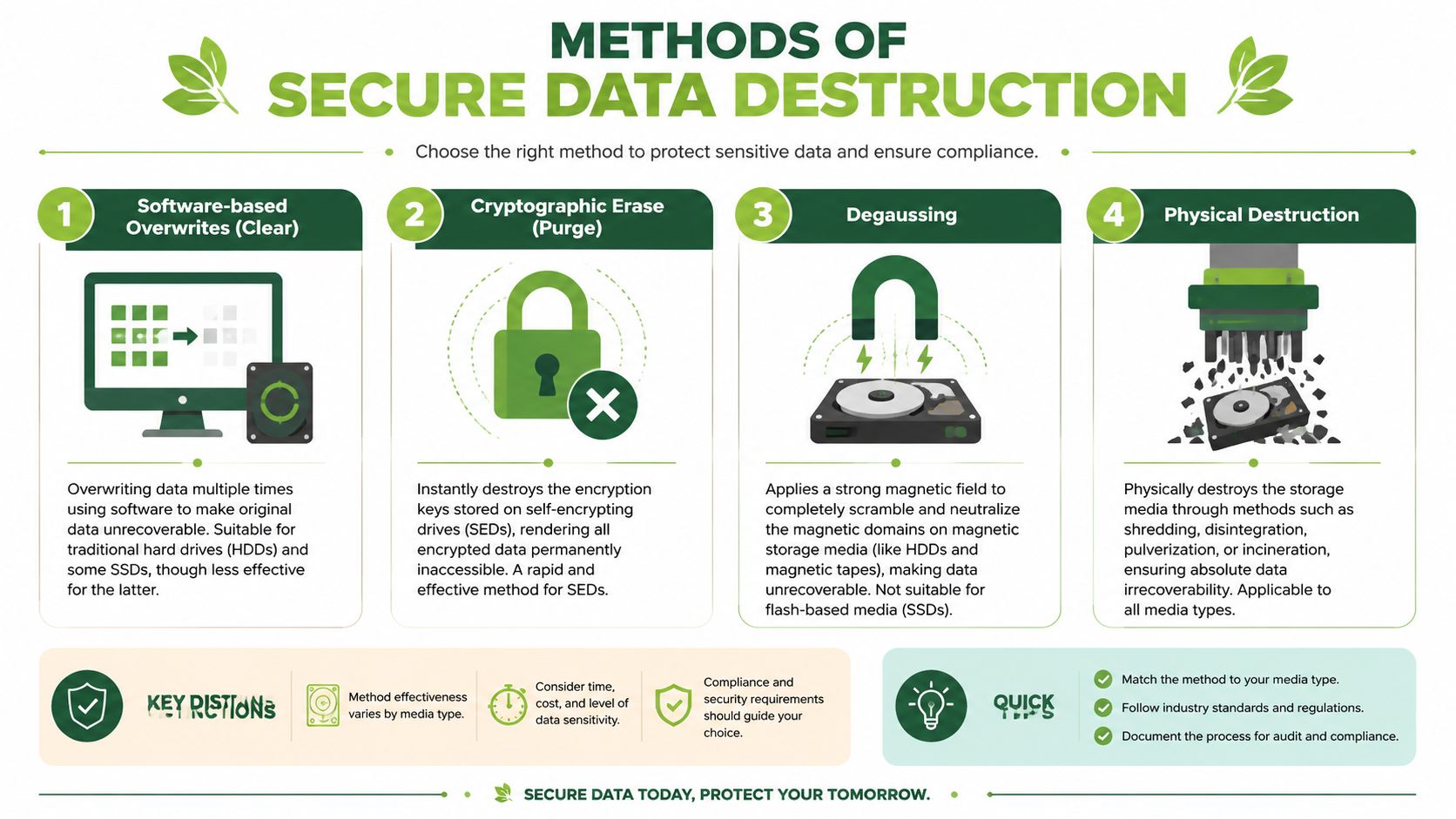
Singapore guidance commonly groups sanitisation into Clear, Purge, and Destroy. That simple model is useful because it helps you choose a method based on the device and the sensitivity of the data.
According to Singapore's IMDA guide, over 60% of organisations that dispose of electronic devices without professional secure destruction services fail to overwrite every storage cell, leaving recoverable data fragments (IMDA disposal of personal data from physical media). That's one reason casual wiping often falls short.
Here's the practical breakdown:
| Method | Best for | Main idea | Key limitation |
|---|---|---|---|
| Clear | Some HDDs and certain reuse cases | Overwrite accessible data areas | May not reach all hidden or inaccessible areas |
| Purge | Encrypted devices or supported storage | Use secure erase or destroy encryption keys | Only reliable if the underlying conditions are met |
| Degaussing | Magnetic media such as HDDs and tapes | Apply a strong magnetic field to scramble data | Doesn't work for SSDs or flash storage |
| Physical destruction | High-sensitivity data or failed devices | Shred, crush, incinerate, or otherwise destroy media | Device cannot be reused |
If you want a deeper look at magnetic media handling, this guide to degaussing hard disks explains where degaussing fits and where it doesn't.
A short explainer can also help if you're comparing methods visually:
How to match the method to the device
Traditional hard drives (HDDs) respond differently from solid-state drives (SSDs). That's where many DIY attempts go wrong.
- HDDs store data magnetically. That means overwriting can work in some cases, and degaussing can be highly effective when done properly.
- SSDs and NVMe drives use flash memory. They spread data across memory cells in ways that software wipes may not fully reach. That makes them harder to sanitise reliably with simple tools.
- Phones and tablets often rely on built-in encryption and factory reset processes, but the result still depends on the model, configuration, and whether verification is possible.
- Damaged devices are a special case. If a drive won't respond properly, software-based sanitisation may not be verifiable at all.
If you can't verify the wipe, don't assume the wipe worked.
For low-risk personal devices that you plan to keep within your home, basic clearing may feel acceptable. For regulated business data, HR files, finance records, or customer information, organisations usually need a stronger and better-documented path. In those cases, purge or destruction is often the safer route.
Physical destruction is the most final method, but it also removes the chance of repair, resale, or reuse. That's why the best outcome isn't always “destroy everything”. The smarter goal is to choose the least destructive method that still makes the data irrecoverable and auditable.
Compliance and Certification Requirements
The rulebook in plain language
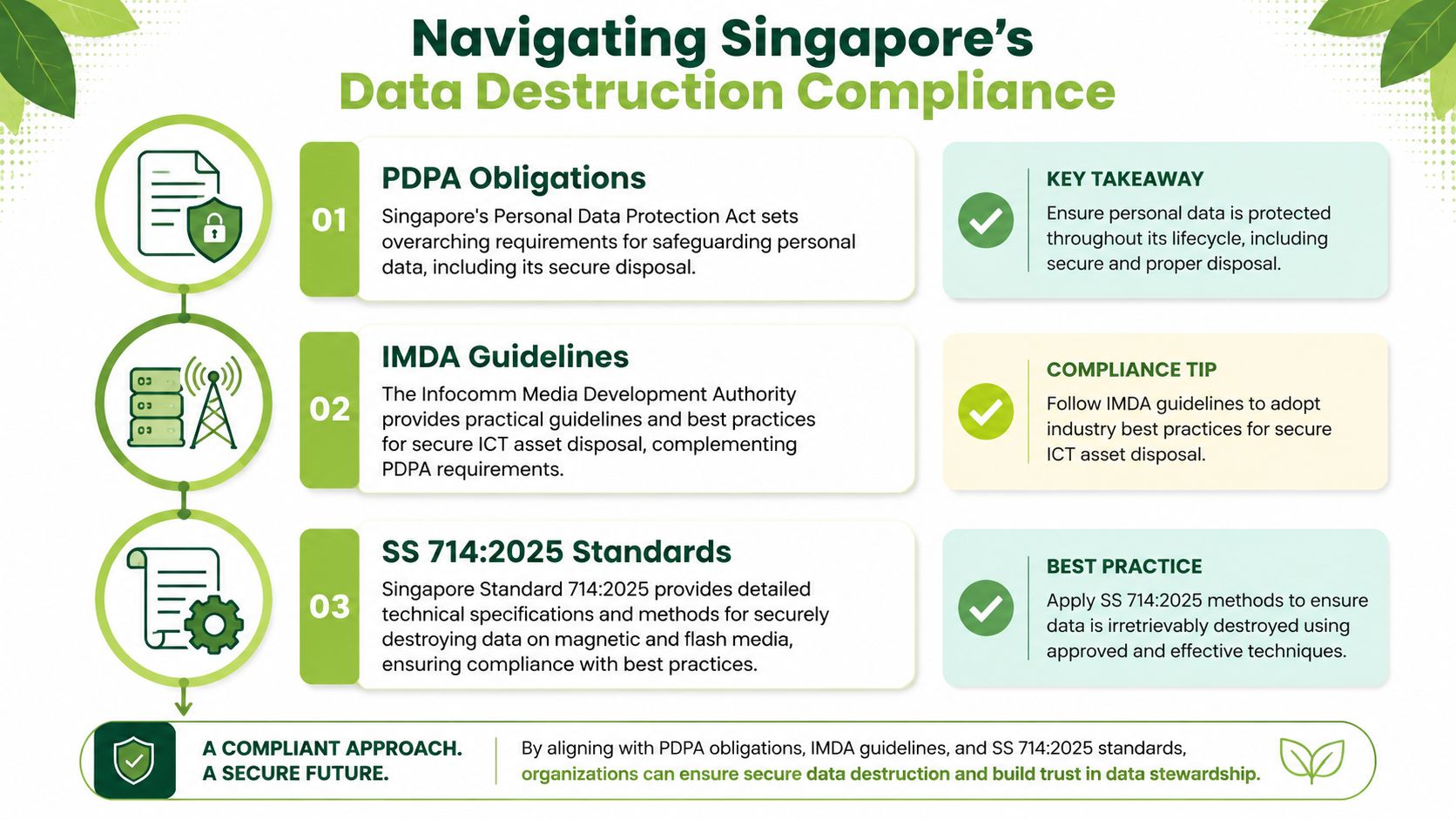
Singapore's compliance environment can sound intimidating because it mixes law, technical standards, and operational documentation. It helps to separate them into layers.
At the top sits the PDPA, which creates the obligation to protect personal data and handle it properly at end of life. Then come IMDA guidelines, which describe practical disposal and sanitisation approaches. Beneath that sit more specific standards, including SS 714:2025 for secure data destruction processes and SS 587 for ICT asset management records.
One technical detail matters a lot for magnetic media. In Singapore, secure data destruction for HDDs and SSDs must align with SS 714:2025, which requires physical destruction such as degaussing at ≥1.4 Tesla for magnetic media when logical erasure is insufficient (SS 714 standard reference from IMDA). That benchmark exists because weak or incomplete degaussing may not fully disrupt the magnetic pattern on a drive.
For teams working under information security programmes, myhalo's explanation of ISO 27001 data destruction under Control 8.10 is a useful summary of how Clear, Purge, and Destroy are treated in a risk-based framework.
When records matter as much as the wipe
A compliant process isn't just about the act of destruction. It's also about proving what happened, when it happened, and which asset it happened to.
That's why record retention and audit evidence matter. If your internal policy says data should be retained for a period before disposal, the destruction event has to line up with that policy. Teams that handle regulated records often compare technical disposal requirements with broader retention planning. For a useful example from another regulated context, these Saskatchewan HIPA data retention guidelines show how retention rules and disposal controls often need to work together.
A practical compliance checklist looks like this:
- Match method to media type: HDD, SSD, phone, tape, and paper records each need different handling.
- Decide based on sensitivity: High-sensitivity data may require destruction even if reuse is technically possible.
- Keep auditable records: Logs, serial numbers, and dates matter during reviews.
- Verify overseas handling: If assets leave Singapore for processing, the chain-of-custody and site controls need scrutiny.
- Align with policy: Destruction should happen at the right time, not just the first convenient time.
A compliant outcome has two parts. Data must be irrecoverable, and your organisation must be able to prove it.
Step-by-Step Checklists for Consumers and IT Teams
Consumer checklist
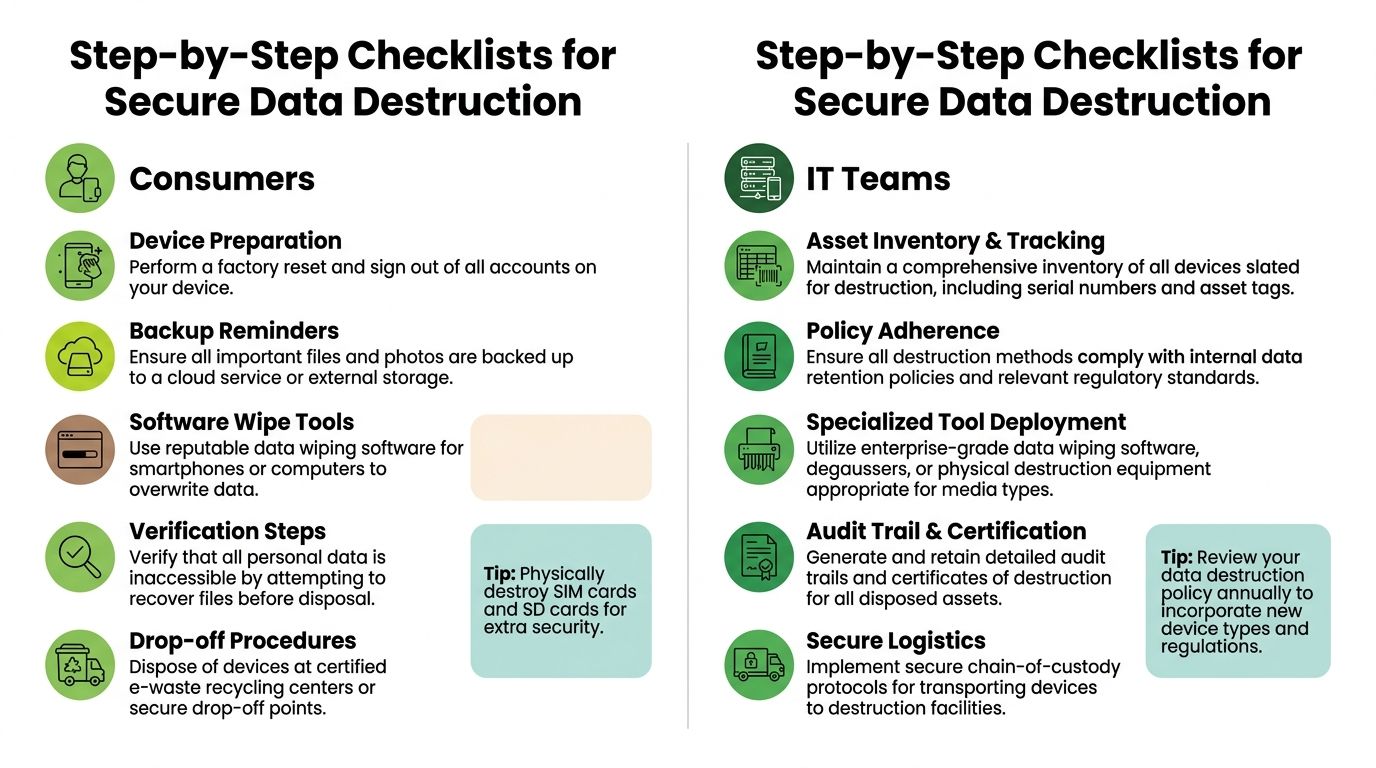
If you've got one old phone, a cracked tablet, or a laptop you're about to trade in, the process doesn't need to be complicated. It does need to be deliberate.
Back up first.
Move your photos, chats, notes, and documents to a trusted cloud account or external drive before you touch the device. Many people realise too late that a proper wipe also removes the things they wanted to keep.Sign out of accounts.
Remove Apple ID, Google account, Microsoft account, messaging apps, banking apps, and password managers. This reduces lock issues for resale and lowers the risk of account-linked data staying behind.Disable device tracking where needed.
Features such as activation locks can affect handover. A device can be clean from a data perspective but still unusable to the next owner if account locks remain active.Run the strongest built-in reset available.
Use the manufacturer's factory reset process after sign-out. If the device supports encrypted storage and secure erase options, use them.Verify before handover.
Restart the device and check what appears. If it opens to setup screens without your data, accounts, or photos, that's a good sign. For computers, try accessing folders and browser history after the wipe.Choose the right endpoint.
If the device still has value, sanitisation for resale is usually better than destroying it. If it's dead or the wipe can't be verified, secure destruction may be safer.
A factory reset is a step, not a guarantee. The real question is whether the data is recoverable after the reset.
IT team checklist
Corporate workflows need more than a reset button. They need repeatable control.
Build an asset list before collection.
Record serial numbers, asset tags, assigned users, device type, and storage type. This stops mystery devices from entering the process untracked.Classify by sensitivity.
A meeting room tablet doesn't carry the same risk as a finance manager's laptop or a server backup drive. Classify first, then choose the sanitisation method.Choose a method that can be verified.
Use enterprise-grade wiping for supported media, cryptographic erase when appropriate, and physical destruction where verification is impossible or risk is too high.Separate reuse from destruction lanes.
Devices intended for resale or redeployment need documented sanitisation and read-back verification. Devices headed for destruction need secure storage until destruction is complete.Control logistics.
Seal collection containers, log every handoff, and document transport details. If a provider collects in Singapore but processes elsewhere, ask how they secure transit and foreign-site handling.Close the audit trail.
Update the asset register after completion. Note whether the device was sanitised for reuse, dismantled for parts, or physically destroyed.
A simple internal worksheet often helps:
| Asset status | Recommended action |
|---|---|
| Working and suitable for reuse | Sanitise, verify, document, then redeploy or resell |
| Working but highly sensitive | Consider purge or destruction based on policy |
| Failed drive or unreadable storage | Move to physical destruction |
| Cross-border processing required | Apply enhanced chain-of-custody checks |
Some organisations also use a specialist provider for the operational part. For example, myhalo offers corporate ITAD and secure data management with documented processes and certificates on request, which can fit teams that need a local workflow tied to reuse, resale, or end-of-life handling.
Chain-of-Custody and Certificates Explained
What chain-of-custody actually means
A chain-of-custody is the documented journey of a device from the moment it leaves your control to the moment the data is sanitised or the media is destroyed. It matters because a perfect wipe at the end doesn't help much if the device went missing halfway there.
The cleanest way to think about it is as a relay race with signatures. One person hands over the asset. Another receives it. Storage is logged. Transport is logged. Processing is logged. Final outcome is logged. Any gap creates doubt.
For packaged drives or boxed laptops, tamper-evident handling is useful. Many teams use numbered seals and strong packing materials so they can spot interference during transit. Even simple operational items such as professional packaging tapes can help standardise secure sealing when assets are boxed for movement between sites.
What to check on a certificate
The certificate is your proof that the process reached a proper endpoint. Corporate ITAD processes in Singapore must produce a Certificate of Destruction compliant with SS 587, requiring line-by-line matching of serial numbers, destruction methods, and dates to an auditable asset register (SS 587 certificate guidance).
When you review a certificate, check for:
- Asset identification: Serial numbers or unique device references should match your own records.
- Method used: It should state whether the asset was wiped, degaussed, shredded, or otherwise processed.
- Date of completion: This matters for audit trails and retention alignment.
- Scope clarity: The certificate should show which assets were covered, not just a vague batch description.
- Provider traceability: You should be able to tell who handled the destruction.
If a certificate can't be matched back to your asset register, it's paperwork, not proof.
For devices sanitised for reuse rather than destroyed, ask for equivalent evidence of the sanitisation outcome and verification steps. A resale pathway still needs a defensible record.
Choosing Between DIY and Professional ITAD Services
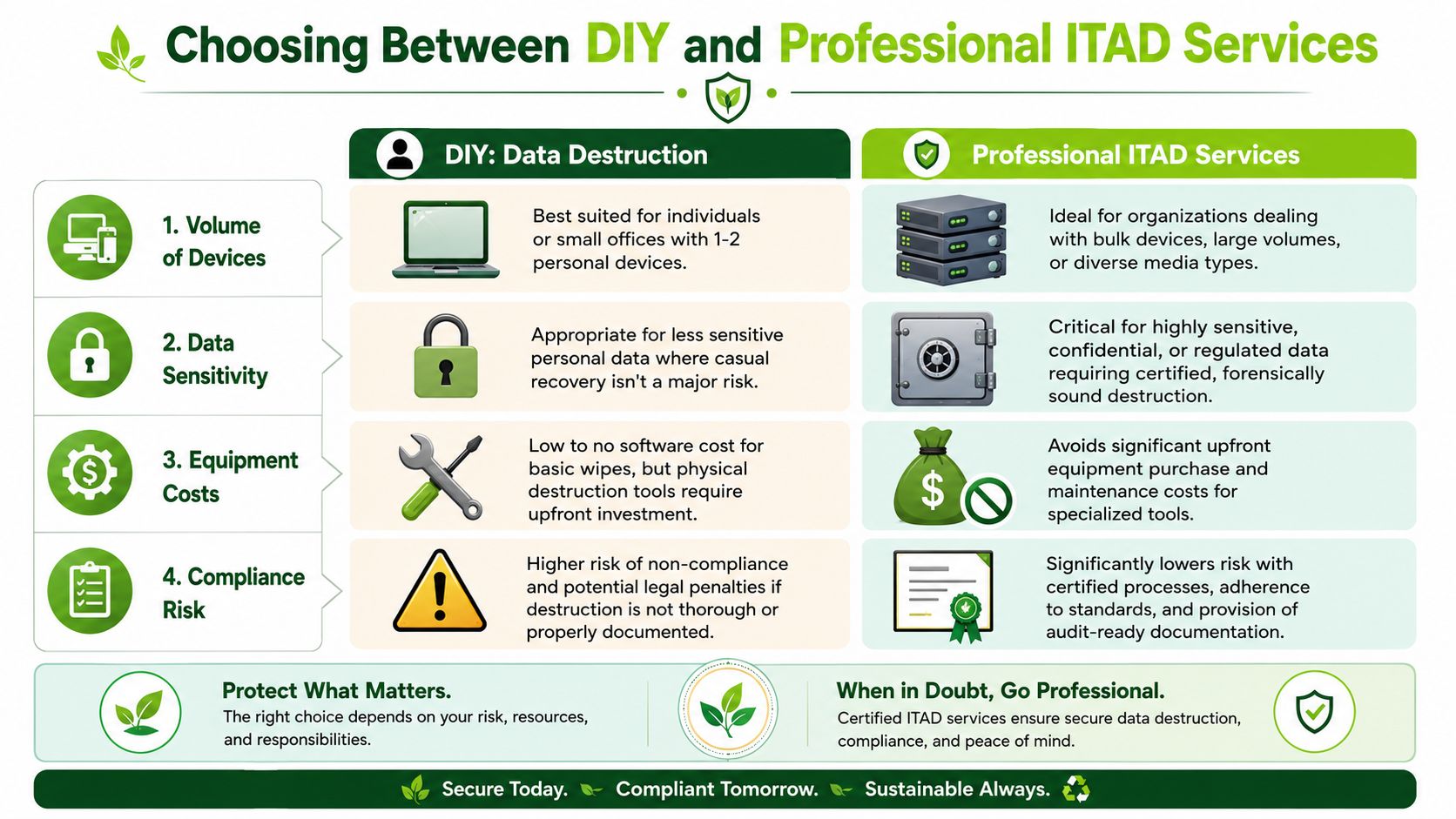
When DIY is reasonable
DIY can work for a small number of low-risk personal devices if you're careful, patient, and willing to verify each step. A single home laptop, an old phone you fully control, or a tablet used mainly for streaming is easier to manage than a cupboard of mixed business assets.
DIY makes the most sense when:
- You have very few devices
- The data is personal but not highly sensitive
- The device is still functional enough to wipe properly
- You don't need formal audit records
- You understand the limits of factory reset and formatting
Even then, the Singapore-specific wrinkle is resale. Most local guides focus on destruction, but that misses a huge real-world need. IMDA requires secure overwrite and read-back verification for devices returning to the market, which is why sanitisation for resale needs more than a quick reset (IMDA guidance on reuse and resale sanitisation).
When professional help makes more sense
Professional ITAD becomes the stronger option when the process needs to be repeatable, auditable, and safe across different device types.
A few signs point in that direction:
| Situation | DIY risk | Professional value |
|---|---|---|
| Mixed fleet of laptops, phones, and drives | Easy to apply the wrong method | Better media-specific handling |
| Sensitive HR, finance, or customer data | Higher consequence if sanitisation fails | Stronger controls and evidence |
| Device intended for resale | Verification may be inconsistent | More defensible sanitisation records |
| Failed or locked devices | Wipe may not run or complete | Safer decision on purge versus destruction |
| Regional or overseas processing | Tracking gets harder | Better chain-of-custody discipline |
Cross-border processing adds another layer. When assets are collected in Singapore but processed elsewhere, organisations need to ask harder questions about locked containers, foreign-site controls, incident reporting, and evidence for each handoff. That's not impossible to manage, but it is harder to verify.
If your team is comparing providers, this guide to certified ITAD and secure e-waste disposal in Singapore gives a practical view of what to look for in a documented service.
Conclusion and Next Steps
Secure data destruction starts with a simple truth. Deleting files isn't the same as making data disappear. Once you understand that, the rest becomes a series of sensible choices. Match the method to the media. Decide whether the device should be reused or destroyed. Keep records if the device belongs to a business. Check the chain-of-custody when someone else handles your assets.
For consumers, the key habit is to stop treating old devices like harmless clutter. For IT teams, the key habit is to treat end-of-life handling as part of data governance, not an afterthought.
A zero e-waste lifestyle doesn't mean cutting corners on privacy. It means doing both properly. Keep what matters. Wipe what can be safely reused. Destroy what can't be verified. Document the outcome.
Your precious files and memories matter to us. Whether you need to protect your privacy with Safe data through myhalo or rescue lost files with Save data, our caring team is right here to help. Reach out today and make secure, responsible device handling feel simple.