

Is a four-year-old 5G phone finished, or is it just waiting for a second life? Most write-ups stop at the launch sheet. They rarely ask whether a Redmi Note 10 5G still registers on the networks you use in Singapore, what a tired battery does to a buyback offer, or when recycling is the wrong call.
If yours has sat in a drawer because you worry about photos, banking apps, or a Google account lock, that worry is fair. A careful wipe, or a Safe data service that destroys data for you, is what lets you declutter your e-clutter without a knot in your stomach. Save data is the route when the phone will not switch on and the files still matter.
Practical rule: Judge this handset by what it still does for you this month, not by the year on the box.
Table of Contents
- Redmi Note 10 5G Specs at a Glance
- 5G Bands and Network Support in Singapore
- Performance and the Apps It Handles Well
- Common Faults, Symptoms and Fixes
- Battery Life and When to Replace It
- How to Prepare Your Phone for Sale or Repair
- What Your Redmi Note 10 5G Is Worth
- Repair, Sell, Recycle or Keep Using Your Phone
Redmi Note 10 5G Specs at a Glance
Xiaomi Singapore's official spec page lists the figures below for the local unit, and every row feeds a practical decision: whether a repair is worth the money, what a fair resale price looks like, and which replacement part has to match.
| Specification | Singapore Redmi Note 10 5G | Why it matters to owners |
|---|---|---|
| Display | 6.5-inch Full HD+ (2400 × 1080), 90Hz AdaptiveSync | Test touch response and refresh behaviour at intake |
| Processor | MediaTek Dimensity 700, 7nm, octa-core up to 2.2GHz | Mid-range chip suited to everyday use |
| Graphics | Mali-G57 GPU | Limits demanding 3D games |
| Memory and storage | 8GB RAM and 128GB storage (launch configuration) | Confirm the variant before quoting a price |
| Battery | 5,000mAh | Capacity ages with charge cycles |
| Charging | 18W fast charging | Check the charging port and cable at intake |
| Rear cameras | 48MP main, 2MP macro, 2MP depth | Camera module condition affects grading |
| Software at launch | MIUI 12 on Android 11 | Security updates have stopped, see the preparation section |
| SIM and network | Dual-SIM with 5G | Band support is covered in the next section |
| Build | About 190g, 8.92mm thick | Helps identify the unit during intake |
The 6.5-inch Full HD+ panel can run at 90Hz instead of the 60Hz many phones of that period used. A smooth scroll is only useful if the glass still answers every tap, so a touch test beats a pretty photo of the screen.
The Dimensity 700 is a budget-to-mid-range chip on a 7nm process, with an octa-core CPU up to 2.2GHz. Treat it as an everyday part: messaging, maps, and video sit comfortably within its limits, while heavy titles push the Mali-G57 past them first. That ceiling is also why the phone still earns its keep as a second handset or a backup, even if it no longer leads anyone's gaming rig.
Memory is the row that catches sellers out.
8GB of RAM and 128GB of storage was the Singapore launch configuration, so confirm both on the phone before anyone quotes you. A different figure is a different device and a different price. The 5,000mAh cell starts large and then ages with every charge cycle, which is why two identical units can feel a day apart in stamina. 18W charging is modest, and a dirty port or a tired cable is easy to mistake for a bad battery.
The 48MP main camera, backed by 2MP macro and depth sensors, means a foggy lens or a failed module shows up plainly in the grade. The body, about 190g and 8.92mm thick, is also how a counter matches the right parts to the right unit. Software left the factory as MIUI 12 on Android 11, and both SIM slots can use 5G when the plan and coverage allow it.
Open About phone, confirm the model, RAM, and storage, and only then read on. If those three do not match the table, you are pricing the wrong unit.
5G Bands and Network Support in Singapore
A 5G logo on the box does not tell you whether calls, texts, and data still work on your SIM. Xiaomi Singapore's support note lists the 5G bands below, plus wide 4G coverage, and VoLTE when the operator and local coverage permit it.
| 5G band | Status on Singapore listings |
|---|---|
| n1 | Supported |
| n3 | Supported |
| n7 | Supported |
| n8 | Supported |
| n20 | Listed by Xiaomi Singapore, not on spec sheet |
| n28 | Supported |
| n38 | Supported |
| n40 | Supported |
| n41 | Supported |
| n66 | Supported |
| n77 | Supported |
| n78 | Supported |
n20 shows up on that support listing and not on the spec sheet, so treat it as something to confirm with your operator rather than a promise. Provisioning, firmware region, coverage, and how hungry 5G is on the battery often matter more than the headline radio.
A ten-minute test on your own SIM
- Place a call and let it run past a minute.
- Send an SMS and wait for delivery.
- Load a normal web page on mobile data, with Wi-Fi off.
- Watch whether the phone falls back from 5G to 4G at home, at work, and on the commute.
- Swap the two SIM slots and repeat the call.
An imported regional unit can carry a different band set even when the retail name matches. Check the model number on the box against the Singapore listing before you assume the table applies.
If 5G is patchy where you live and work, stable 4G is the more useful spec. That is the fact that should steer a repair, a sale, or another year of daily use.
Performance and the Apps It Handles Well
Chat, maps, streaming, and the everyday shuffle between apps are where this phone still earns its keep. Sustained 3D gaming is where it runs out of road.
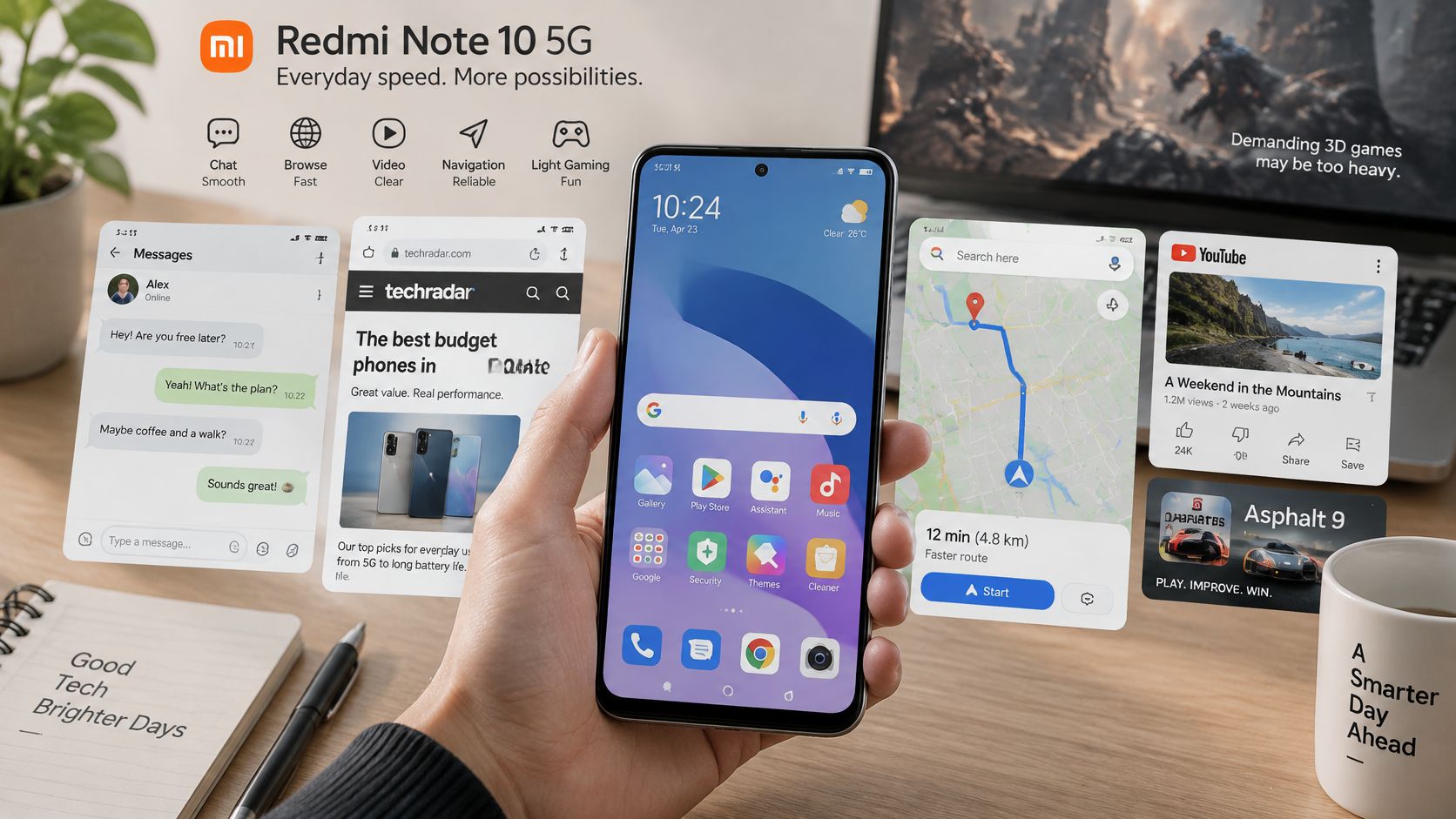
Xiaomi's product page pairs the Dimensity 700 with two faster Cortex-A76 cores at up to 2.2 GHz and six efficient Cortex-A55 cores at up to 2.0 GHz, plus the Mali-G57. The 90Hz AdaptiveSync mode can refresh the screen up to 90 times a second, which makes scrolling feel smoother. It does not promise 90 frames per second inside a game.
Day-to-day apps run acceptably on this hardware. The Mali-G57 is the limit under sustained 3D load, and benchmark results vary by software build, so there is no single score reliable enough to quote to a buyer. Judge the unit in front of you instead.
- Messaging and social apps: Comfortable. Chat, photos, and short video should feel ordinary.
- 1080p streaming: Fine on Wi-Fi or a solid mobile connection, as long as the phone doesn't get hot in a case.
- Maps and light multitasking: Usable. Keep a few apps open, not a dozen heavy ones.
- Casual games: Playable at modest settings.
- Heavy 3D games: A poor fit. Frame rate and heat will show the GPU's limit.
How to grade a unit before you price it
Run a 15-minute video or a light game, then feel the back and watch for stutter. You're checking heat, frame stability, and slowdown, plus battery behaviour, refresh, charging, cameras, speakers, and 5G or LTE registration. If an app misbehaves only on this handset, write reproducible mobile app bug reports that record the model, the steps, and what you expected. A buyer can trust that note more than "runs well".
A short look at real-world behaviour helps more than a spec list:
Price and describe the phone for students, parents, and light users. Gamers will be disappointed, and a disappointed buyer becomes a return.
Common Faults, Symptoms and Fixes
A cheap symptom can look like a dead phone. Before assuming the Redmi Note 10 5G needs a replacement part, separate software problems, accessory faults and coverage issues from genuine hardware failures.
| Symptom | Likely cause | Fix or next step |
|---|---|---|
| Touch lag, ghost taps or dead spots | Display or touch fault | Restart, then test in safe mode; display repair if it persists |
| Cracked glass with touch problems | Physical screen damage | Display replacement by a technician |
| Phone charges slowly or intermittently | Dirty or worn charging port | Clean the port, test with another cable, then port repair |
| Blurry photos or camera app errors | Dirty lens or failed camera module | Clean the lens, then camera module check |
| Drops to 4G or no 5G at all | Band setting, weak coverage or SIM plan | Reset network settings, test elsewhere, check with operator |
| Crackling or quiet speaker | Debris in the grille or failed speaker | Clean the grille, then speaker replacement |
| Overheating while charging | Worn battery or uncertified charger | Swap charger, then battery check (see battery section) |
What you can check at home
Restart, then use safe mode: If ghost taps or touch lag disappear in safe mode, an installed app is the likely cause. Remove recent or suspicious apps before blaming the display.
Clean the charging port: Power the phone off first. Use a wooden toothpick or a short burst of compressed air to clear lint, then test with a different cable. Do not poke the port with metal.
Rule out the accessory: Try a known-good cable and charger. Slow or intermittent charging caused by an accessory should not be confused with a worn port or battery.
Check the lens and speaker: Wipe the camera lens with a clean cloth and take a test photo. For weak sound, gently clear the speaker grille and play audio again before arranging a repair.
Separate the network from the phone: Toggle airplane mode, reset network settings and test the handset in another location. A second SIM can also show whether the fault follows the phone or the mobile plan.
Display, charging-port, camera-module and speaker work belongs with a technician. Loose glass and a swollen battery are not home jobs. Stop using the phone and do not press on the back.
Treat the decision like a resale calculation. First identify whether the problem is software, the accessory or the hardware. With security patches no longer arriving, a software glitch that appears years later is unlikely to receive another fix, so plan around the physical parts.
For a hardware fault, our Xiaomi phone repair guide explains what a repair bench checks. Check with Xiaomi Singapore or a technician about official repair options for this model before you book, and compare any quote with the phone's trade-in value.
Do not write off or recycle a handset because of lint, a bad cable or a misbehaving app. If the repair costs more than the phone is worth to you, or the device cannot be made safe, stop and choose resale or responsible recycling instead.
Battery Life and When to Replace It
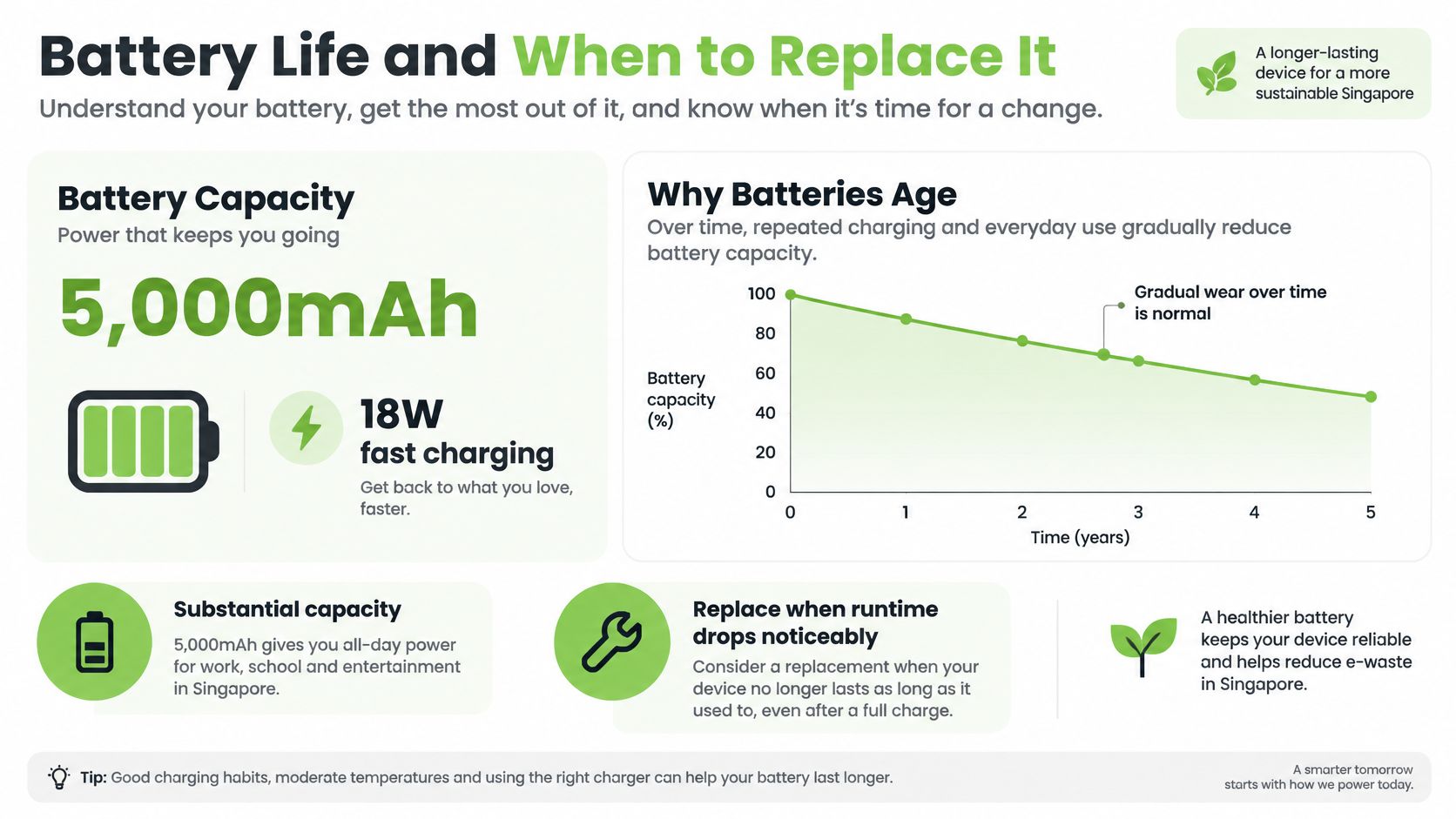
The number that still matters is the 5,000mAh cell and its 18W charge rate. Capacity is the size of the tank when the phone was new. Health is how much of that tank is left after years of cycles. A phone that once lasted a full day can fade to a few hours without any app having "gone bad".
Signs the cell is done
- Early shutdown: It dies while the meter still shows 20% or more.
- Heat on charge: The back warms up fast on a normal charger.
- Short days: Light use empties a full charge before evening.
- A lifting back or screen: The pack is swelling. Stop charging and take it to a technician. That is a safety issue, not a settings tweak.
A diagnostic app or a repair counter can read health. Many shops treat about 80% as the practical point to replace, because runtime and resale grade both fall off after that. Our phone battery care and replacement notes cover the habits that slow the slide: the original 18W charger or a certified equivalent, no charging in a hot car or direct sun, and no heavy gaming while the cable is in.
A fresh battery usually lifts both the day you get from the phone and the grade a buyer will pay for. I would replace the cell before a trade-in whenever the rest of the phone still works.
How to Prepare Your Phone for Sale or Repair
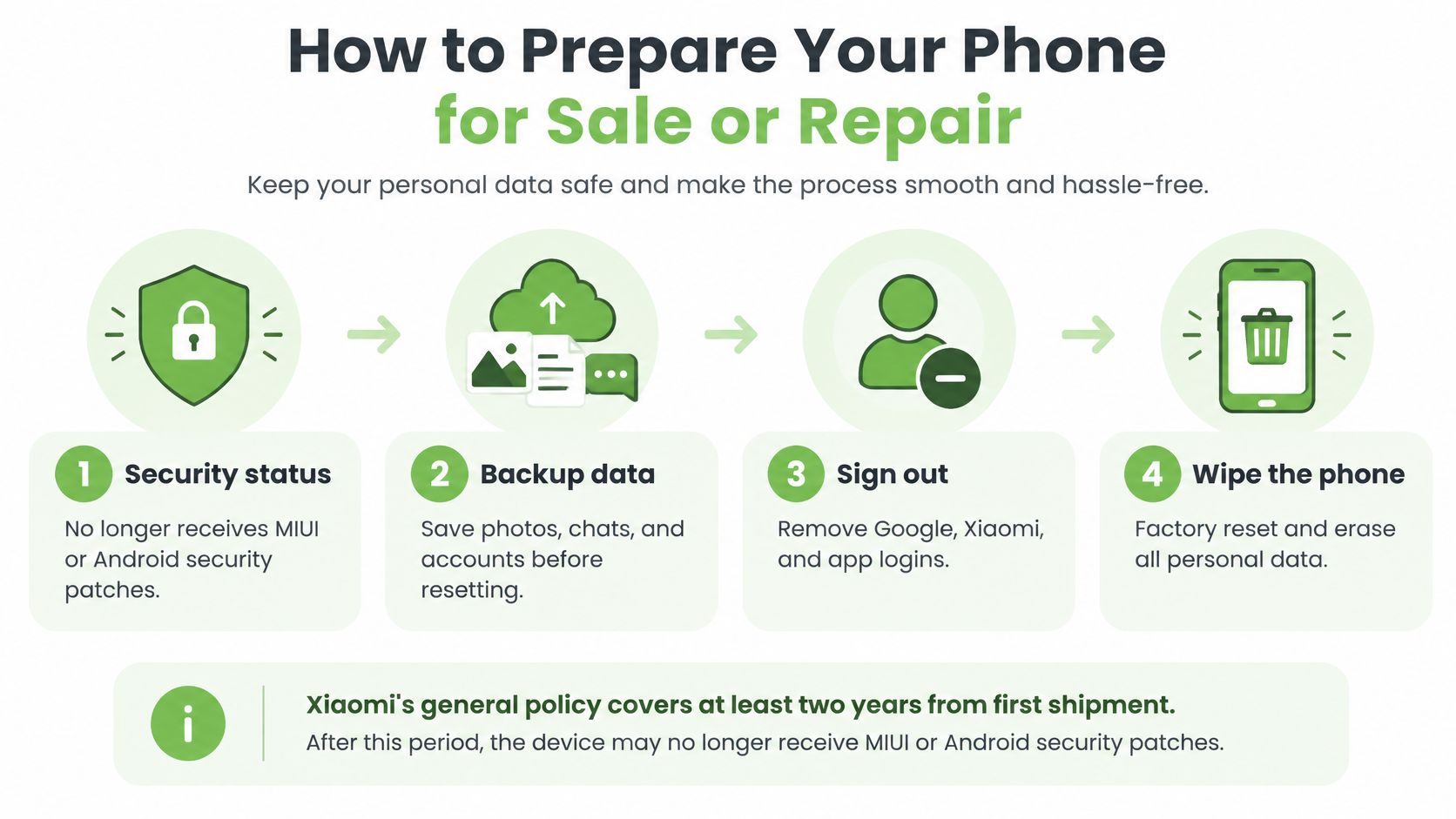
Xiaomi's support guidance states that the Redmi Note 10 5G no longer receives MIUI or Android security patches. Xiaomi's general policy keeps smartphone security updates running for at least two years after a model's first shipment, and the device page tells you to check announcements if nothing newer is listed. The phone still handles everyday tasks. Unsupported software is exactly why your data has to be fully gone before it changes hands.
The order that actually clears the phone
- Back up first. Copy photos, contacts, messages, and documents to Google Drive, Mi Cloud, or a computer. A reset cannot be undone, and a computer copy is the safer place for a large photo gallery.
- Sign out of Mi Account and remove the Google account. A Google account left on the phone can block setup for the next owner, and that lock is the most common reason a "working" unit gets declined at a counter.
- Remove the SIM and any microSD card. The SIM moves to your next phone. The card is easy to forget inside the tray.
- Turn off screen lock, fingerprint, and face recognition. Sign out of banking and password apps so no live session stays on the handset.
- Turn off Find device. Confirm the phone no longer shows as linked to your account, or the next owner cannot finish setup.
- Factory reset from Settings. Let it run to the end with the charger connected. Interrupting the wipe can leave the phone in a state you can no longer check.
- Power on and look at the setup screen. You want the welcome flow with no account name on it, then power off.
- Note the IMEI and the storage size. Write both down before the phone goes in a bag, and dig out the original box and charger if they are still around.
For a repair, do steps 1 to 4 and tell the technician which passcode they need. Skip the factory reset if the fault only shows while you are signed in, because a wiped phone is much harder to diagnose.
If the phone will not boot far enough to reset, or you would rather leave the wipe to someone else, devices traded in or recycled through myhalo go through secure data management and destruction, with certificates available on request. Our guide to preparing your phone for trade-in follows the same order and works well as a checklist beside the phone.
Do it once, in order, and the handset leaves your hands clean: no account lock, no leftover data, nothing for its second owner to untangle.
What Your Redmi Note 10 5G Is Worth
A working Redmi Note 10 5G still has resale value. Condition and demand set the offer, not nostalgia for the launch tag. HardwareZone's launch report put the Singapore price at S$329 for the 8GB and 128GB configuration on 29 May 2021. That figure is a baseline for history, not a quote for today.
You can sell your existing phone to us and get an instant quote before you travel, so you see a number while the phone is still in your hand.
What moves the grade
- Identity: Exact model and storage. A mismatch ends the quote.
- Battery health: A tired cell pulls a working unit down a grade.
- Screen and touch, including 90Hz: Dead zones or a stuck refresh rate cost more than light scratches.
- Cameras, front and rear: Blur, spots, or a camera that won't open.
- 5G and 4G registration: No service on a healthy SIM is a hardware or firmware fault.
- Charging port and back glass: Intermittent charge or cracked glass.
- Cosmetic wear: Honest marks are fine. Hidden cracks are not.
- Account or carrier lock: Either one can mean we decline the unit.
- Box, charger, and cable: Included kit helps. Missing kit shouldn't be a surprise at the counter.
Think in three bands. A working unit powers on, holds a charge, and has clean radios and cameras. Fair means it works with a declared fault, such as a crack or a weak battery. Parts-only means it won't stay on, the board is dead, or the pack is swollen. Locks, water ingress, and swelling are the usual reasons a device is priced down or turned away.
Clean the phone, photograph it in daylight, and write down every fault you already know. A quote can change if inspection finds something you didn't declare, so say it before you arrive. Our Singapore phone trade-in guide shows how that inspection usually runs.
Repair, Sell, Recycle or Keep Using Your Phone
Pick the row that matches the phone in your hand. Most owners only need one.
| Situation | Best route | Why it fits |
|---|---|---|
| Battery drains fast, everything else works | Battery replacement, then keep using | Restores daily use at a lower cost than a new budget phone |
| Screen cracked, display and touch still work | Repair the display or trade in as-is | Compare the repair quote with the trade-in value |
| Charging port loose or failing | Port repair | Often a low-cost fix that protects the resale grade |
| Camera or 5G faults on every network | Diagnose first, then repair or sell | Hardware faults lower the grade quickly |
| Working but no longer needed | Trade in or sell for buyback | Puts the phone back into use with another owner |
| Water damage or swollen battery | Certified recycling or parts recovery | Unsafe to reuse, so route it through certified channels |
A repaired phone usually beats a new budget model on both cost and waste. TelcoNews Asia cited a 2025 report estimating 2.9 million unused smartphones in Singapore, a local replacement cycle of 2.7 years versus 3.5 years globally, and 90% of residents willing to reuse, recycle, or return devices if the process were simpler and more secure. A Redmi Note 10 5G that still registers on local networks belongs in someone's pocket. Recycling earns its place when the phone cannot be saved, such as a swollen pack, a dead board, or water through the chassis.
Reuse adds up. In 2024, upcycling, rescuing, and reloving devices avoided 2020 MTCO2e of carbon emissions, made up of 960 MTCO2e from smartphones, 890 from laptops, 90 from tablets, and 80 from desktops. A working unit we take in can go back out as a certified ReLoved device, tested and graded for its next owner. If you'd like a person to talk it through, WhatsApp us on +65 8068 0100.
The rule of thumb stays simple. If the repair costs less than the value the phone still gives you, repair it. If it doesn't, sell it or trade it in while the grade still holds.
Ready to feel lighter and do good? Clear out those old devices through our trade-in and buyback service, and get an instant quote on the spot. If the files and memories on the phone matter, our data recovery and secure data destruction services can save what you need and wipe the rest.
Bring your Redmi Note 10 5G in for a straight look at repair, buyback, or certified reuse, and we'll help you keep a working phone in circulation instead of in a drawer. Visit myhalo when you're ready, and we'll take the next step with you.