
Your Xiaomi phone always seems to fail at the worst possible time. The screen cracks on the MRT gate, the battery drops to zero before lunch, or the phone freezes on the Mi logo while you're trying to leave for dinner. That panic is normal, but it doesn't have to turn into a bad repair decision.
For a lot of Singapore users, the right move is not to replace the phone straight away. Xiaomi sits in the mainstream repair flow, not some rare edge case, and that matters because fast, transparent service is realistic when you know what to check first. If you're also sorting out accessories while you keep the phone alive, the Xiaomi Watch Band options at Nothing But from Nothing But Bands are a useful place to look while you decide what the handset itself needs. For general phone-damage triage, the practical guide at what you can do when your phone breaks is worth a read before you rush into any fix.
Table of Contents
- The Moment Your Xiaomi Phone Lets You Down
- A Five-Minute Diagnostic Flow Before You Touch Anything
- The Four Faults Almost Every Xiaomi Owner Meets
- When DIY Stops Saving Money and Starts Costing More
- Safety, Backup, and Data Protection Before Any Repair
- How myhalo Repairs Your Xiaomi Phone the Stress-Free Way
- Your Xiaomi Repair Cheat Sheet Before You Book Anything
The Moment Your Xiaomi Phone Lets You Down
The first few seconds after a Xiaomi phone fails are always the same. You stare at the damage, tap the power button a few more times than you should, and start bargaining with a screen that clearly isn't listening. A cracked display, a dead battery, a charging port that only works at one angle, or a boot loop on the logo all trigger the same thought, which is, “Can I still save this without making it worse?”
That's the right question. Don't start with tools. Start with the symptom, because Xiaomi repairs usually reward calm diagnosis more than frantic opening of the device. In Singapore, that matters even more because the phone often plays a daily role, not just a backup role, and a quick, clean repair is usually the smarter option than living with a half-working device for weeks.
Practical rule: if the phone still powers on, shows signs of life, or responds to charging, pause before opening it. A rushed repair turns a small fault into a bigger one very quickly.
Xiaomi also isn't some fringe repair category. A widely cited repair-analysis report put Xiaomi at a 13% failure rate, second among major brands, with the Xiaomi Redmi 4 the worst-performing model in that dataset at 9% showing problems. The same report noted after-sales support in some markets could resolve 95% of cases within 4 hours and 84% within 2 hours (Moneycontrol report). That's not Singapore-specific, but it does tell you something useful, Xiaomi repair is common enough that speed and clarity matter.
For local buyers, there's another reason to keep a clear head. Xiaomi ships in huge volume globally, with over 168 million unit shipments in 2024 and more than 13% global market share (Statista topic page). A big installed base means a real repair ecosystem, and it means your cracked screen or draining battery is probably more ordinary than it feels in the moment.
A Five-Minute Diagnostic Flow Before You Touch Anything
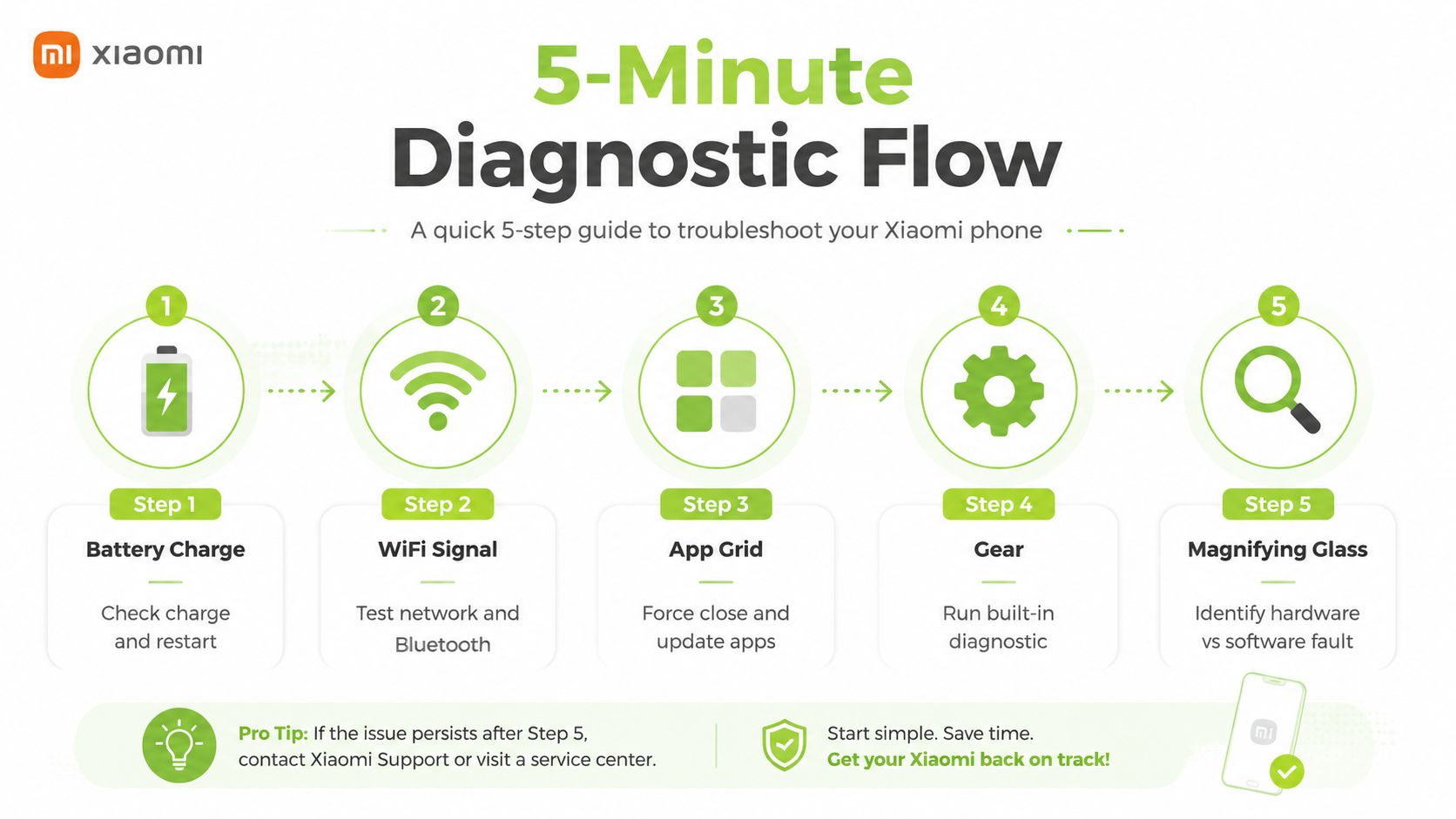
Step 1. Check charge and restart
Plug the phone into a known-good charger, then leave it alone for a short moment. If it wakes up, the fault may be simple power loss, not a deeper board issue. If it shows no charge symbol, try a different cable and charger before you decide the battery is dead.
Step 2. Test network and Bluetooth
A phone that “looks broken” can be dealing with a software hitch. Toggle Wi-Fi and Bluetooth, then see whether the issue is limited to connectivity or whether the whole phone is misbehaving. If only one app or one function is broken, you're more likely looking at a software fault.
Step 3. Force close and update apps
App crashes can mimic hardware failure. Force-close the misbehaving app, update it, then test again. If the phone only fails in one place, don't open the device yet.
Step 4. Run the built-in diagnostic
Use any built-in Xiaomi diagnostic or self-check tool the model provides. Xiaomi's own self-repair guidance says to follow the model-specific manual, prepare the right tools and materials, and test the phone after reassembly. That same habit works here, check before you change parts.
Step 5. Identify hardware versus software fault
If the phone still overheats, won't charge, or keeps dying after a restart, treat it as hardware. If the issue changes after a reset or app update, keep it on the software side a little longer.
Quick decision: if the phone is swelling, hot, or physically damaged, stop DIY. If it responds normally after a reboot, you've probably saved yourself a repair charge.
The Four Faults Almost Every Xiaomi Owner Meets
A Xiaomi phone usually fails in a small number of repeat ways, and the first clue is usually obvious if you look past the panic. A cracked screen may still respond to touch, but once the glass starts lifting or the panel has visible pressure marks, you are dealing with more than a cosmetic problem. Keep the phone still, back it up if it still responds, and leave the frame alone unless you already know how that model comes apart.
Battery swelling and fast drain
A battery that drops too quickly is irritating. A battery that pushes the back cover up, makes the screen sit unevenly, or warms the phone for no good reason is a stop signal. Do not keep charging it, and do not press the casing flat to “test” it. On Xiaomi phones, repair work often starts with battery isolation, softening the rear adhesive, lifting shields, and disconnecting parts one by one before any deeper inspection, because that order lowers the chance of making the fault worse (Xiaomi self-repair guidance).
Charging ports and boot loop symptoms
Charging problems often begin with lint, grime, or a worn port. A careful clean with a soft, non-metal tool and a second cable gives you a clean first check before you blame the main board. Boot loops are a different beast. If the phone keeps landing on the Mi logo, restarts on its own, or refuses to stay on after a forced restart, you are past simple port cleaning and into deeper fault territory.
Camera and focus faults
Camera trouble shows up in a few familiar ways. The lens looks clear, but the image stays blurry. Autofocus hunts and never settles. The camera app opens, closes, or freezes for no clear reason. On older Mi and Redmi flagships, that can point to a loose module or connector, not just a bad app. Keep testing after restarts if you want, but once the same fault repeats across a clean reboot, the phone needs proper inspection.
The repairability reality behind these faults
The hardware in some Xiaomi models is workable, but it is not forgiving. A Mi 11 teardown reported by Android Authority noted iFixit gave the phone a repairability score of 4 out of 10, compared with 3 out of 10 for the Galaxy S21 Ultra and the same score as the standard Galaxy S21 (Android Authority teardown report). That is why small mistakes on flex cables, screws, or connectors turn a straightforward job into a bigger mess. If the phone has signs of water ingress or board trouble, read the water-damaged phone repair cost breakdown before you decide to keep pushing through the repair yourself.
A broken Xiaomi is not always a disaster, but it is rarely random. Screen damage, battery problems, charging faults, and camera issues are the four repeat offenders, and each one has a point where DIY stops being sensible. For jobs that look simple but turn messy fast, the benefits of professional phone repair are plain enough once you have seen a few failed attempts on the bench.
When DIY Stops Saving Money and Starts Costing More
DIY looks cheap right up until the second mistake. You buy a tool kit, then the wrong adhesive, then a weak part, then another charger because the first test gave you no clear answer. One failed opening adds more cost, and time matters in Singapore when the phone is your boarding pass, payment wallet, and work device in one slab of glass.
The cost of a bad guess
There comes a point where the phone should leave your desk. If you see water damage indicators, board-level shorts, or a phone that still heats up after a forced shutdown, stop there. A repair shop can test under magnification, isolate the fault, and keep a recoverable device from turning into a dead one. If the phone has taken in liquid, read the water-damaged phone repair cost breakdown before you keep pushing ahead. For a broader view of why professional repair makes sense in cases like that, the benefits of professional phone repair are laid out clearly on Repair My Crack.
Routine jobs such as screen or battery replacement typically take 30 to 60 minutes, while more complex work such as motherboard soldering or data recovery may take 1 to 3 days (Singapore Xiaomi repair guide). That gap matters. A fast part swap is one thing. A board fault can swallow an entire working day if you guess wrong.
| Repair Type | DIY Time | DIY Risk | Pro Time | Typical SG Cost |
|---|---|---|---|---|
| Screen replacement | A few hours if you've done it before | High, fragile panel and adhesive | 30 to 60 minutes | Usually around S$100 to S$300, depending on model and panel type |
| Battery replacement | A few hours | High if the cell is swollen | 30 to 60 minutes | Often around S$50 to S$120 |
| Charging port fault | Variable | Medium to high, depends on port access | 30 to 60 minutes | Commonly around S$60 to S$150 |
| Motherboard or data recovery | Not sensible for most users | Very high | 1 to 3 days | Often starts from S$150 and can go much higher if board work is needed |
If the repair touches the logic board, assume the job is no longer “cheap DIY.” It is now a controlled technical task.
Replacing the phone immediately is rarely the right move. If the device is still usable enough to back up and the issue is clearly cosmetic or simple power loss, DIY can make sense. If the phone smells burnt, gets hot, has liquid exposure, or keeps failing after a restart, pay for proper diagnosis and stop pretending a YouTube fix is a plan.
Safety, Backup, and Data Protection Before Any Repair
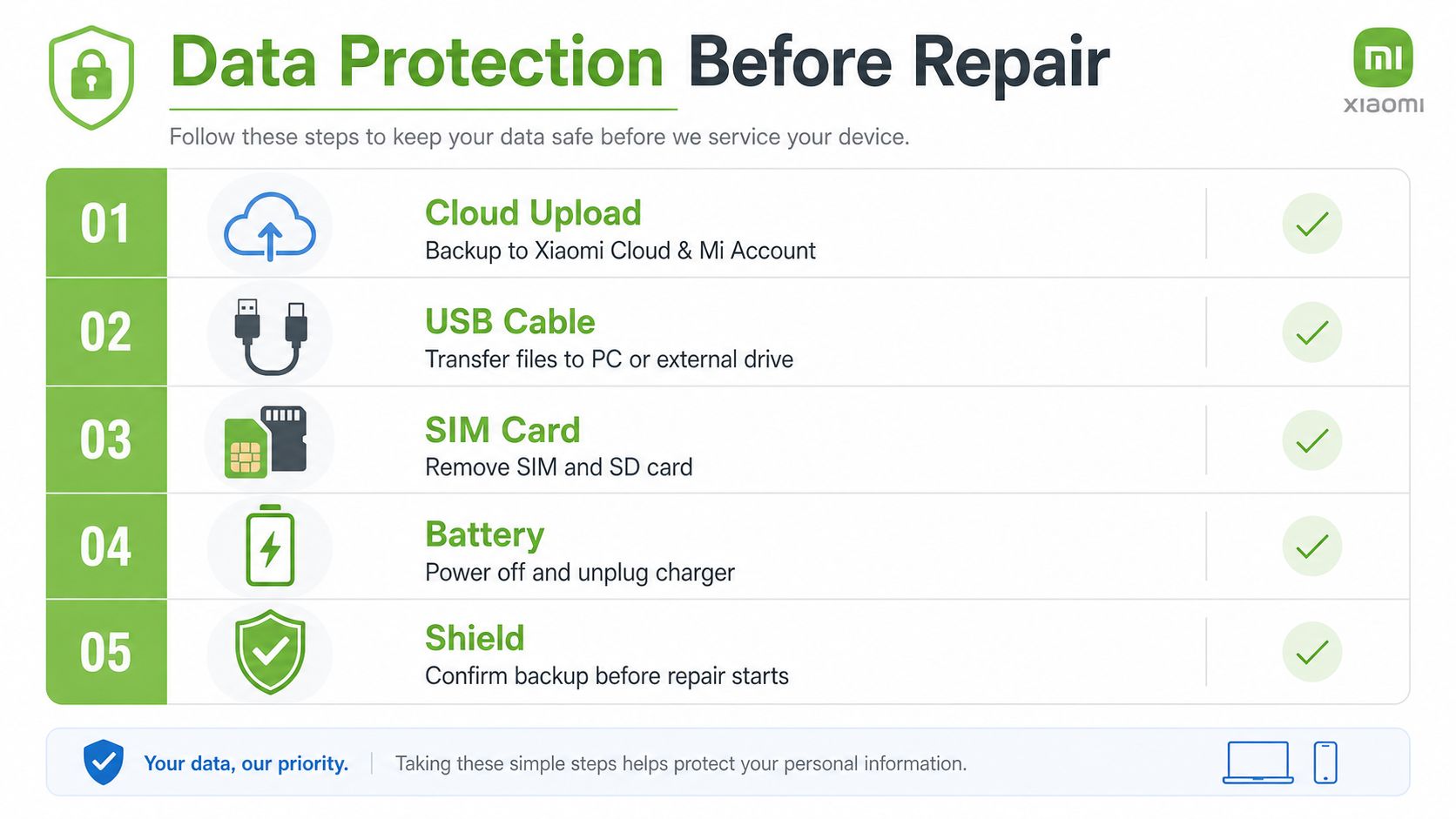
Back up before anything else
Backup comes first, not last. Use Xiaomi Cloud or Mi Account if the phone still works, then copy important files to a PC or external drive. If the screen is broken but the phone still responds, connect it to a computer and pull off photos, notes, and documents before any part swap.
Remove storage and power cleanly
Take out the SIM and SD card before repair starts. Power the phone off, unplug the charger, and leave the battery alone until you know what you're dealing with. A swollen battery should never be pressed, punctured, or folded back into shape.
A good backup routine is not just for phones. If you keep family photos, work files, or two-factor codes on the device, treat that data as irreplaceable. For a broader backup mindset, Networking2000 data backup solutions offers a useful reference point for how seriously data protection should be taken before any device work.
An official repair manual excerpt also specifies a 60-second press during assembly using a crimping tool, then recommends calibrating and inspecting the device after reassembly so faults can be caught before the phone goes back into use (manual excerpt). That's the kind of detail home repairs often skip, and it's exactly why a phone can seem fixed, then fail again the next day.
Practical rule: if you haven't confirmed the backup, don't call the repair finished. A working phone without your data is still a bad outcome.
For a more complete reminder on why preparation matters, the earlier note on backing up data before repair pairs well with this checklist.
How myhalo Repairs Your Xiaomi Phone the Stress-Free Way
myhalo's repair flow fits the way Singapore uses phones. You can drop off a Xiaomi device at Bugis Junction #03-25/26 or Sim Lim Square #03-40, get an instant quote through its AI-backed pricing algorithm, and decide whether repair, trade-in, or resale makes more sense for the handset. That's the right structure for a city where people want a clear answer fast, not a long lecture.
The practical benefit is simple. A phone that just needs component-level work gets repaired. A phone that no longer makes economic sense to fix can move into a reuse path instead of staying broken in a drawer. That lines up with the zero e-waste idea without forcing anyone into a complicated process.

What the handover looks like
The phone is assessed, the fault is checked, and the repair path is confirmed before work starts. myhalo also states ISO-aligned data handling and certified data management, which matters if the device contains photos, work files, or account access you can't afford to leak. Its published repair service also says repaired devices come with a 30 to 90 day warranty on parts and uses genuine parts in its repair process.
For people who'd rather not keep guessing, the internal service page at myhalo phone repair is the direct route to the repair and rescue offering. If the phone has become too damaged to justify repair, the same broader device-lifecycle model also supports recovery, resale, and responsible exit paths.
Your Xiaomi Repair Cheat Sheet Before You Book Anything
The quick call
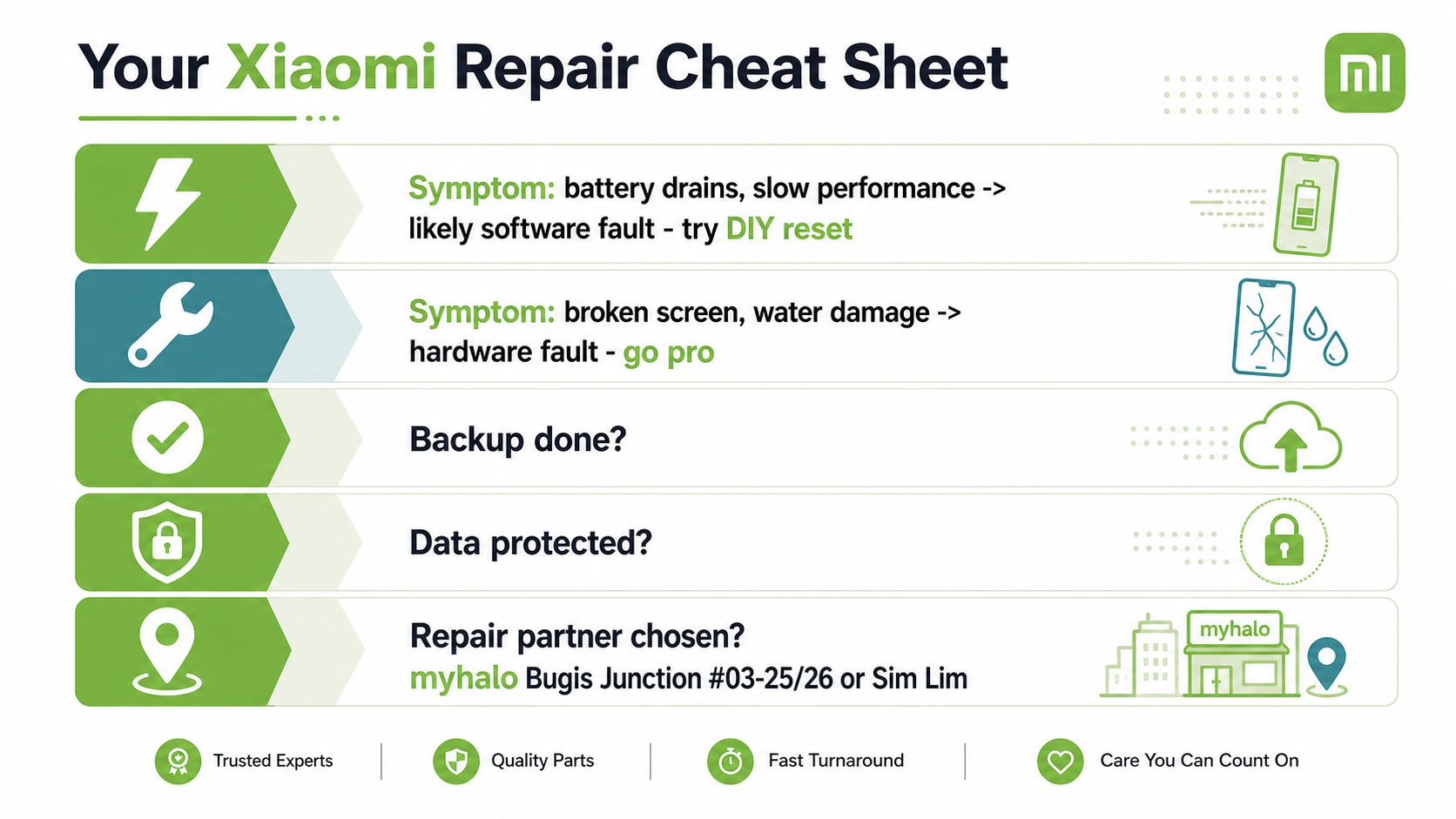
- Battery drains fast, phone feels slow: treat it as a likely software or ageing battery issue, then try a clean restart and app check first.
- Screen cracked, phone still works: protect the glass, back up the data, and move to repair rather than forcing more DIY.
- Water damage or odd heating: stop using it and go professional.
- Backup done: don't move forward until that box is ticked.
- Data protected: confirm the files you care about are already off the phone.
- Repair partner chosen: use a shop that can handle Xiaomi faults without guessing.
A Xiaomi repair doesn't need to be dramatic. The sensible path is always the same, identify the symptom, protect the data, decide whether the fault is software or hardware, then stop DIY at the first sign of risk. That mindset saves phones, saves time, and saves a lot of unnecessary stress.
If you want a final sanity check before booking, think in this order. First, can the phone still be backed up. Second, does the fault look simple enough to test safely. Third, is the device worth repairing rather than replacing. If any answer is fuzzy, don't improvise.
Need a calm, no-nonsense answer for a cracked screen, dead battery, or data recovery worry? Visit myhalo for repair, rescue, and responsible device handling in Singapore. If your Xiaomi still has life in it, the right team can help you save the phone, protect your files, and keep one more device out of the drawer.