
You're staring at a dead laptop in your HDB flat, the night before an important deadline. The charger light is on, the screen is black, and every possibility feels expensive. Is it the battery, the charger, a damaged charging port, or something deeper inside the machine?
The phrase motherboard replacement can sound like a final verdict. It isn't always. A board may be repairable, the storage may still contain your files, or the device may be better suited for certified reuse than another major repair. This guide will help you understand what the job involves, why boards fail, how the decision differs between a desktop, laptop, and phone, and how to protect your data throughout the process.
You'll also get a practical way to think about local repair economics and Singapore's regulated e-waste system. If you need help choosing a repair route, this guide to Singapore repair shops for mobile phones, laptops, PCs and tablets can help you prepare the right questions before handing over your device.
Table of Contents
- When Your Device Stops Working and You Wonder What Comes Next
- What a Motherboard Actually Is and What Replacement Means
- Common Reasons Motherboards Fail Across Devices
- How Replacement Looks Different for PC, Laptop and Phone
- Compatibility and Parts Sourcing Without the Headache
- Cost, Labour and When Replacement Makes Sense
- Data Risk and Recovery Around a Board Swap
- Your Decision Checklist and a Kinder Way Forward
When Your Device Stops Working and You Wonder What Comes Next
A laptop that suddenly dies creates two separate problems. You need the machine back, and you need to know whether your files, accounts, and money are safe. Those concerns often get mixed together, which makes a technical diagnosis feel more frightening than it needs to be.
Start with the symptoms rather than the repair name. A laptop that shows no charging light may have a failed adapter, port, battery, power circuit, or motherboard. A computer that powers on but shows no image may have a display, memory, graphics, firmware, or board fault. A phone stuck in a boot loop could have a software problem, storage failure, liquid damage, or a logic-board issue.
Practical rule: Don't approve a motherboard replacement until the technician has explained what simpler faults were ruled out.
A proper assessment should separate diagnosis from replacement. The technician may test the charger, battery, external display, memory, storage, charging port, and signs of liquid or impact damage. That matters because a faulty connector or power component can sometimes be repaired without changing the entire board.
Think in terms of the device's next chapter
Motherboard work is a device-lifecycle decision, not just a hardware swap. If the screen, keyboard, battery, chassis, storage, and operating system are all in good condition, a replacement board may extend the device's useful life. If several parts are already worn, putting a scarce board into that machine may not be the most sensible use of your money or materials.
Singapore's repair and recycling infrastructure gives you more than one responsible exit. The National Environment Agency's e-waste information describes islandwide collection routes for ICT equipment, including computers, laptops, mobile phones, tablets, network devices, and desktop monitors. It also lists public collection points across town centres, shopping malls, government buildings, Residents' Committee Centres, community centres, supermarkets, and retail outlets, along with quarterly residential collection drives and doorstep collection options.
That means the decision isn't “repair or throw it away”. You can repair, replace a board, recover data, resell a working device, harvest usable parts, or send the remaining equipment through an organised collection route. The rest of this guide turns those choices into a calm checklist, with plain explanations and no pressure to choose the most expensive option.
What a Motherboard Actually Is and What Replacement Means
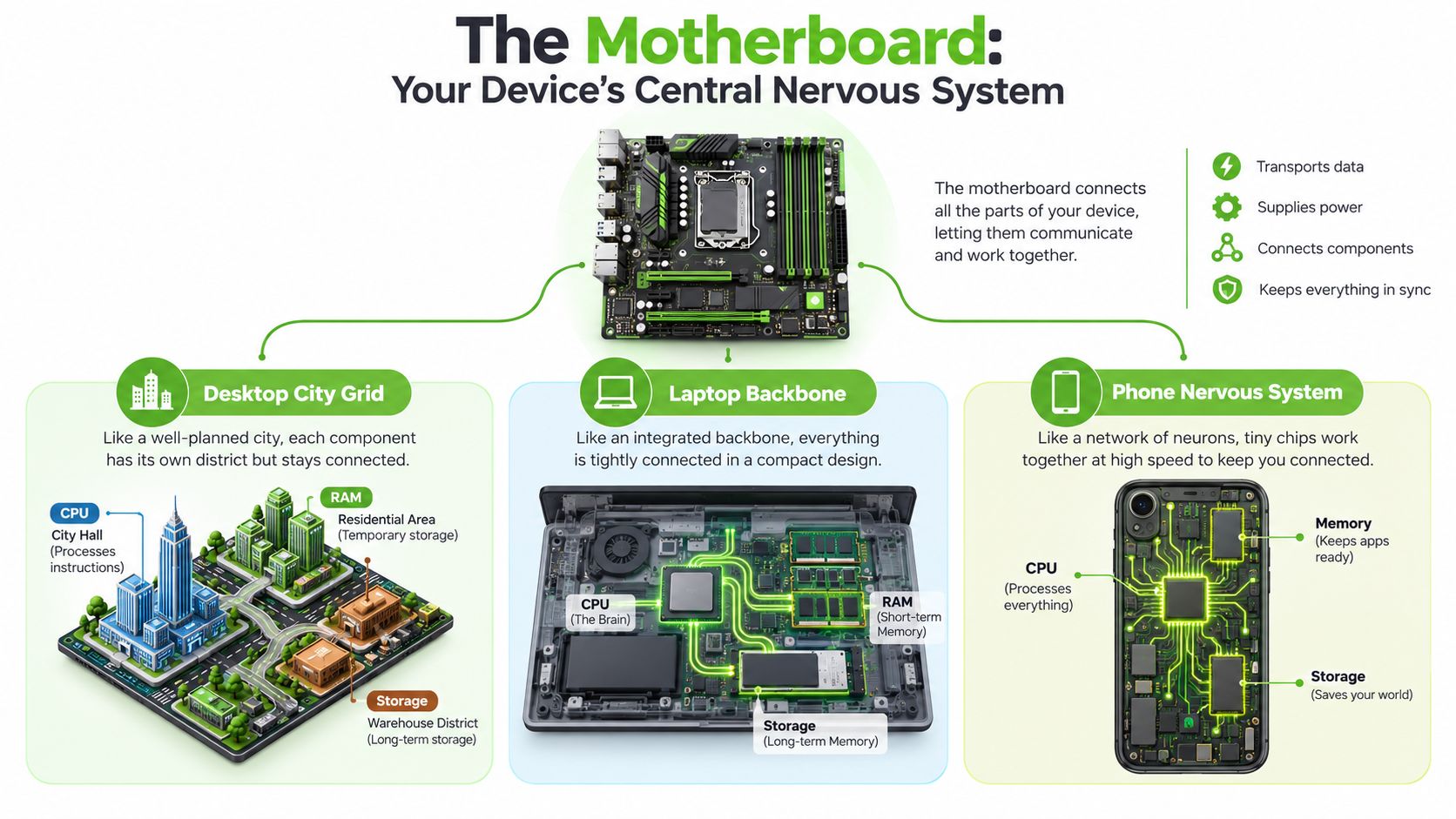
Think of the motherboard as your device's central nervous system. In a desktop, it resembles a city grid that connects the CPU, RAM, storage, graphics card, power supply, USB ports, and expansion slots. In a laptop, it's a compact backbone that routes power and signals through a tightly integrated chassis. In a phone, the logic board is a tiny nervous system packed with processors, memory, storage controllers, radio components, and power-management chips.
The board doesn't merely hold parts in place. It allows those parts to communicate. When you open an app, save a photo, connect to Wi-Fi, or charge the battery, the motherboard coordinates the relevant circuits.
What the replacement involves
Desktop PC: A desktop board usually follows a standard form factor, such as ATX or Micro-ATX. A technician disconnects the power cables, expansion cards, storage leads, front-panel connectors, and cooling hardware, then fits the compatible replacement board into the case. The CPU and RAM may be reusable if the new board supports them.
Laptop: A laptop motherboard is normally designed for a particular family of chassis. The technician may need to remove the bottom cover, battery, keyboard assembly, speakers, cooling system, display cables, Wi-Fi hardware, and storage. Many laptop CPUs are soldered directly to the board, so replacing the board can also mean replacing the processor platform.
Phone: A phone's logic board sits beneath shields, adhesive, cameras, displays, batteries, and small flex cables. Shops often investigate or repair a charging sub-board, power-management circuit, or damaged connector rather than replacing the complete logic board. Some parts may be paired to the phone, so a board swap can affect features, calibration, or identification.
Replacement is different from a small repair
A fan replacement, charging-port repair, loose connector, or failed capacitor may address one part of the problem. A board replacement changes the central platform that connects many components. It can also affect warranty status, software activation, device identity, and the handling of storage that remains on the old board.
If the original storage leaves the device, treat that as a data-governance event. Singapore organisations should plan secure sanitisation, account removal, and documented handling under PDPC-focused secure data destruction guidance, because the privacy risk follows the storage media, not the motherboard label.
Common Reasons Motherboards Fail Across Devices
Motherboards rarely fail for one universal reason. A laptop used beside a cup of kopi faces a different risk from a gaming desktop with a failing power supply, while a phone can suffer microscopic damage after a drop that looks harmless from the outside.
Liquid damage is one of the easiest causes to understand. A spill can travel beneath laptop keys and reach power rails, connectors, or surface-mounted components. In a phone, liquid can enter through charging openings and create corrosion around the USB-C or Lightning circuit. The device may keep working for a while before random shutdowns, charging problems, or boot loops appear.
Heat creates a slower pattern. Repeated heating and cooling can stress solder joints and board connections. Dust-blocked laptop heatsinks, demanding desktop workloads, and poorly ventilated spaces may produce freezes, graphics glitches, sudden restarts, or a system that switches off under load. Humidity and condensation can add another layer of risk, especially when a cold device is brought into a warm room.
Failure patterns worth recognising
| Cause | Desktop PC | Laptop | Phone |
|---|---|---|---|
| Liquid damage | Spill around the case or front ports can reach the board | Kopi or water beneath the keyboard can corrode circuits | Moisture around charging and microphone openings can affect the logic board |
| Heat and thermal cycling | Dust, blocked airflow, or graphics-card heat may cause crashes | Cooling blockage may produce fan noise, shutdowns, or display faults | Intensive use can expose an already weakened power or charging circuit |
| Power problems | Unstable adapters, damaged cables, or a failing power supply can stress the board | Incorrect USB-C chargers or damaged adapters may affect charging circuits | Port strain and poor accessories may damage charging paths |
| Physical impact | A dropped tower or bent expansion card can damage slots and traces | Drops can crack solder joints, connectors, or the chassis | A fall can damage board layers or flex connections beneath the screen |
| Ageing or component defects | Capacitors, slots, and firmware components may degrade | Soldered chips and board-level power components may weaken | Tiny power-management, storage, or radio components may fail |
A swollen battery is especially important on a laptop or phone. It can press against nearby components and make the device unsafe to keep charging. Stop using the device if you see swelling, burning smells, unusual heat, or liquid residue, and don't press the case back into shape.
Use symptoms as clues, not proof
Random shutdowns point towards power, heat, memory, storage, or board faults, but they don't identify the exact part by themselves. A phone that loops at the logo may have a software issue or a damaged storage circuit. A desktop with graphics glitches may have a graphics card, cable, monitor, driver, or motherboard problem.
A qualified technician should test the whole system before recommending a replacement. That approach protects your wallet and increases the chance of saving a board through component-level work.
How Replacement Looks Different for PC, Laptop and Phone
The same phrase, motherboard replacement, describes very different jobs depending on the device. A custom-built desktop is usually the most modular. A laptop is more integrated, and a phone can combine board replacement with part pairing, adhesive removal, and data complications.
Desktop PC
Take a home-built gaming rig with a standard case. The board may be secured with accessible screws, and the CPU cooler, RAM, graphics card, and drives may transfer to a compatible replacement. The technician still needs to check the CPU socket, chipset, firmware support, memory compatibility, case layout, and power connectors.
A desktop swap may be straightforward, but compatibility errors can create a machine that powers on without starting correctly. The board also needs testing with the existing components, followed by operating-system checks, driver installation, and confirmation that storage and licences still work.
Laptop
A three-year-old work laptop is a different proposition. The board may carry the CPU, graphics processor, memory, charging circuit, display connector, keyboard interface, and storage pathway on one custom assembly. A replacement can require substantial disassembly, careful cable routing, thermal compound work, and post-repair testing.
Glued or tightly clipped chassis parts increase the risk of cosmetic damage during access. Vendor-specific boards may also vary between revisions of the same model, even when the model name looks identical.
Phone
A water-damaged iPhone illustrates the most delicate scenario. The logic board sits under layers of shields and adhesive, and a technician must protect the display, battery, cameras, Face ID-related components, and tiny flex cables during removal. A shop may recommend repairing the damaged board or a sub-board instead of replacing the entire assembly.
| Device type | Typical labour time | Parts availability | Downtime expectation |
|---|---|---|---|
| Desktop PC | Varies with the build and testing required | Often broader because standard components are available | Usually shorter when the correct board is ready |
| Laptop | Usually more labour-intensive because of integration and disassembly | Model-specific and revision-sensitive | Can be longer if an OEM board must be sourced |
| Phone | Delicate board work and part-pairing checks may be required | Highly model-specific, with some assemblies difficult to source | Depends on board availability and data-handling needs |
These are practical patterns, not guarantees. A technician should confirm the exact model and fault before promising a completion time.
Compatibility and Parts Sourcing Without the Headache
Ordering a board before confirming the exact device is a common way to waste money. Start with the model number from the base label, system information screen, or original purchase record. For laptops and phones, photograph every serial sticker and board label before disassembly if possible.
A calm compatibility checklist
- Confirm the chassis: Two devices with similar names may use different internal layouts, display connectors, or board revisions.
- Match the platform: A desktop board must support the existing CPU socket, chipset generation, RAM type, storage interface, and graphics configuration.
- Check firmware: Some CPU and memory combinations need a compatible BIOS before the system will start. Ask whether the replacement board has been tested with your exact processor.
- Inspect storage paths: Compare NVMe slot positions, SATA connections, eMMC arrangements, and removable SSD support. A new board may not place storage in the same location.
- Verify wireless hardware: Laptop Wi-Fi cards can use different pinouts, antenna arrangements, or vendor-specific connections.
- Treat phones as identified assemblies: Logic boards may be tied to the phone's IMEI and paired components. A board that physically fits may still create feature or activation issues.
OEM, aftermarket, and refurbished choices
An OEM board follows the manufacturer's original design and is usually the safest physical fit. It may cost more and can be harder to obtain. An aftermarket board may be suitable when the supplier has verified the revision, but quality and firmware support need careful checking.
A refurbished board can be a sensible reuse option when it has been tested properly. Ask for a burn-in test report, the board's serial details, the included warranty, and the conditions that would void that warranty. A seller who warranties only the sale transaction, rather than the fitted board, offers less protection.
For phones, parts quality and pairing deserve particular attention. This phone repair parts guide can help you understand why a visually similar part isn't automatically a compatible one.
Ask before approval: “Will my existing CPU, RAM, storage, display, and biometric features work after this board is fitted?”
That single question encourages the technician to discuss the whole system rather than quoting only the board number.
Cost, Labour and When Replacement Makes Sense
When a device suddenly stops working, the board price is only the starting point. Labour may cover diagnosis, disassembly, thermal re-paste, chassis reseating, software and driver setup, data migration, and post-replacement testing. A cheaper board can become an expensive repair if its history is unclear or it fails during installation.
For a practical guide to one common case, see this laptop motherboard replacement cost guide. It helps frame the quote around the whole repair rather than the spare part alone.
Singapore consumers also face a comparison problem. There is no clear, standardised repairability benchmark for laptops and motherboards, while public discussion has called for a national repairability framework and standardised ratings. Singapore-focused motherboard repair coverage shows why owners can struggle to judge repair value against replacement value.
Compare the routes, not just the quote
| Option | Indicative SGD range | Best when | Watch out for |
|---|---|---|---|
| Repair the existing board | Ask for a diagnosis-based quote | Damage appears limited to a connector, capacitor, power circuit, or other replaceable component | Some faults may return if the underlying board damage is extensive |
| Replace the motherboard | Request a complete parts-and-labour quote | The rest of the device is healthy and the correct board is available | OEM parts, pairing, firmware, warranty, and storage handling can change the final value |
| Buyback or certified resale | Request an assessment rather than assuming a fixed value | Multiple components are failing, the chassis is worn, or the device is out of warranty | Data must be removed securely, and the device's condition affects its reuse pathway |
A fixed price cannot decide whether your machine is worth saving. The useful comparison depends on the exact model, board availability, physical condition, and the value of the working components around it. A desktop swap may make sense when the CPU, RAM, graphics card, and drives remain strong. A laptop replacement is harder to justify when its battery, screen, hinge, and keyboard are also near the end of their useful lives.
A simple decision test
Choose board replacement when the chassis is sound, the display and input parts work, the storage remains healthy, and the replacement board includes a clear warranty. Choose board-level repair when the technician can isolate the fault to a smaller component. Consider buyback, certified resale, or parts recovery when several systems are failing together.
The repair choice also affects the device's next life. Singapore introduced its regulated e-waste management system in July 2021 under an Extended Producer Responsibility approach, placing collection and treatment responsibilities on producers. The local e-waste policy discussion highlights NEA's recommendation to repair electronics where feasible. Repair therefore supports a regulated reuse or recovery pathway when it keeps the wider device useful, while secure data sanitisation protects the owner before handover.
Data Risk and Recovery Around a Board Swap
A motherboard replacement can leave your files untouched, move them to a new board, or make them difficult to access. The outcome depends on where the storage sits and what caused the failure. Desktop SSDs are often removable, while laptop storage may be a removable NVMe module, soldered storage, or a chip integrated with the board. Phones may use tightly integrated storage that cannot be unplugged.
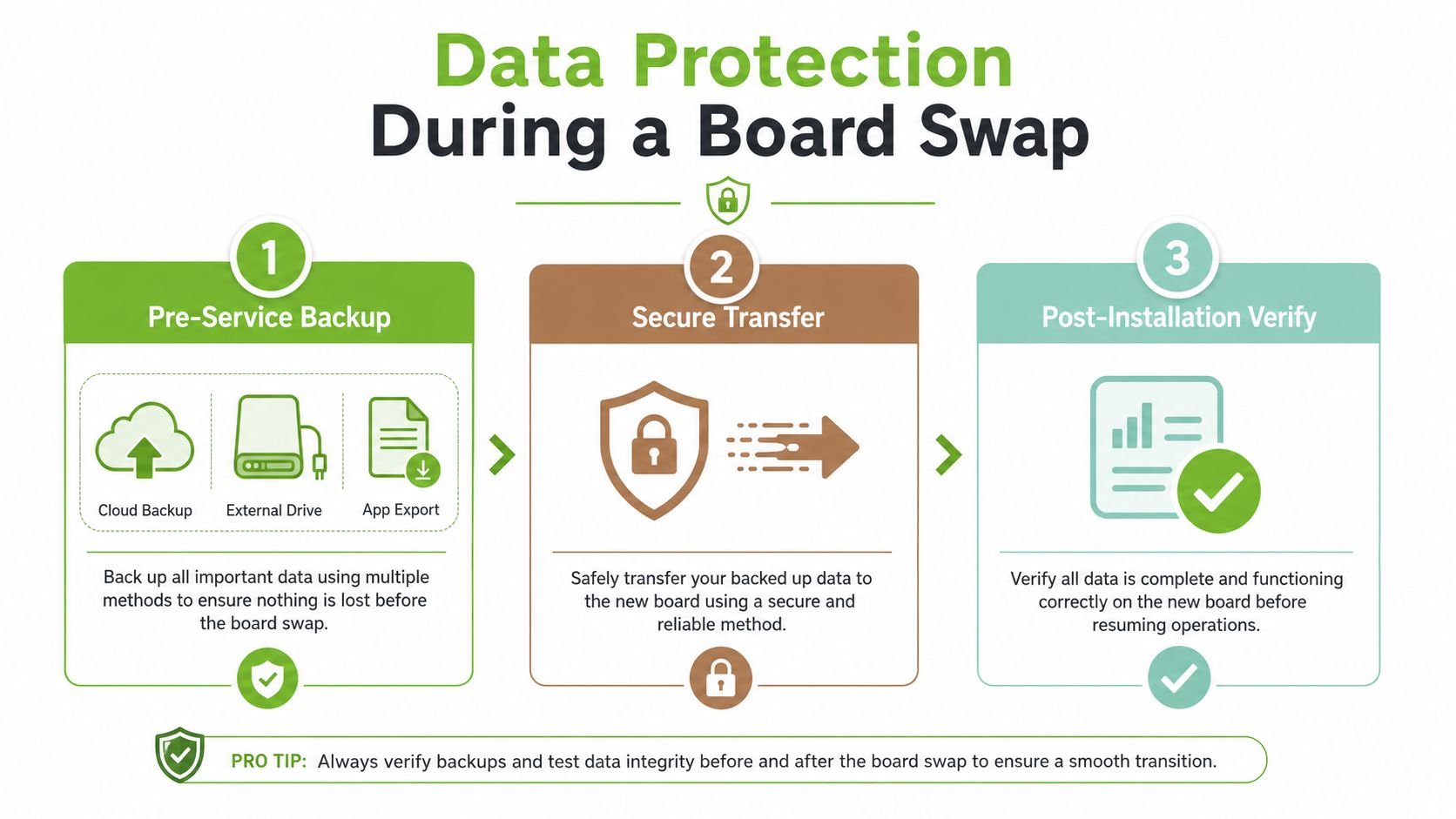
Stage one starts before service
Back up while the device still works. Sync important folders to a trusted cloud account, create an external-drive copy, and export app-specific information such as password-manager vaults, messaging histories, or accounting records according to each app's process.
Remove the SIM card and external storage before handover. Log out of accounts where practical, record the device passcode through an approved secure method if the technician needs it for testing, and tell the shop which files must not be altered.
Stage two is the physical handover
Ask exactly what will happen to the original storage. Will the technician move the NVMe drive to the replacement board? Is the phone's eMMC storage part of the failed assembly? Will the old board be retained, returned, repaired, resold, or recycled?
If the device contains irreplaceable photos or work files, stop repeated power attempts after a serious hardware failure. A data-recovery specialist may need to image the storage carefully before further testing. For removable media concerns, this SD card data recovery guide offers useful background on why recovery attempts should be handled cautiously.
For a broader local overview, see this Singapore data recovery guide. The key point is simple: repair and recovery aren't always the same job, so say clearly which outcome matters most before service begins.
Here's a short visual reminder of the routine:
Stage three closes the privacy loop
If the original storage stays with you, confirm that accounts are removed and the device is reset only after your backup is verified. If the storage or whole device leaves your control, request secure sanitisation or physical destruction appropriate to the media, together with chain-of-custody records and a certificate when required.
A factory reset may be suitable for some consumer devices, but organisations should use a documented sanitisation decision rather than treating file deletion as proof of destruction. Singapore-focused recycling guidance recommends wiping or physically destroying data-bearing media and removing SIM cards and external storage before material recovery, as described in e-waste recycling and privacy guidance.
Your Decision Checklist and a Kinder Way Forward
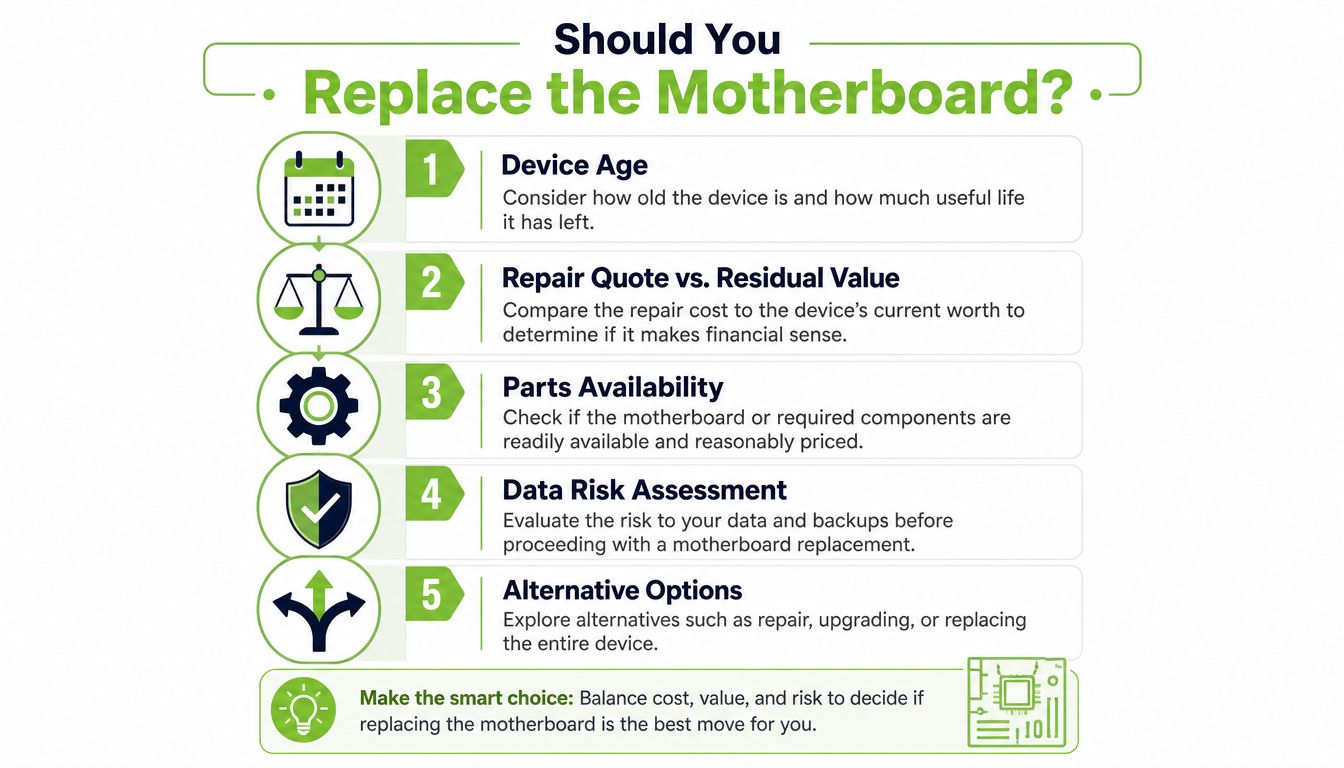
When a device refuses to boot, a motherboard replacement can feel like the obvious answer. Treat it as a device-lifecycle decision instead. Check these points before approving the work:
- Device age: Are the display, battery, keyboard, camera, storage, and chassis still usable?
- Repair quote versus residual value: Will the repair restore a useful device, or are other ageing parts likely to need work soon?
- Parts availability: Is the replacement board compatible with the exact model revision, tested, and covered by a clear warranty?
- Data sensitivity: Does the device hold photos, passwords, customer records, or company information requiring documented handling?
- Alternative options: Could board-level repair, certified resale, buyback, or parts harvesting preserve more value and create less waste?
Singapore's regulated e-waste system moves ICT equipment through managed collection and treatment channels. Repair and reuse remain sensible choices when they are practical. Singapore's reported e-waste context reports a local recycling rate of 6% per year and estimates global e-waste generation at 50 million tonnes annually, with about 20% properly disposed of or recycled. These figures strengthen the case for repairing a board, harvesting usable parts, or choosing certified reuse instead of replacing a device automatically.
Ask for a no-obligation assessment. Confirm whether board-level repair is possible, whether the replacement is tested, and how storage and personal data will be handled. If the device leaves your control, request documented sanitisation and ask about the available reuse or regulated recycling pathway.
myhalo provides repair assessment, data protection, recovery, buyback, certified resale, upcycling, and secure data services. The suitable route depends on the device's condition and the owner's priorities.
Your files and memories matter. You can contact the team about Safe data protection or Save data recovery, then choose the next step with clearer information.