

If the motherboard really is the fault, a typical Singapore benchmark is S$300 for the part and S$150 for labour, or S$450 before GST when both are charged separately. That number is the right starting point, but it's not the whole story, because the final bill depends on the laptop class, part availability, and whether the shop can fix one bad chip instead of replacing the entire board.
Table of Contents
- What a Laptop Motherboard Replacement Really Costs in Singapore
- Why the Motherboard Is the Heart of Your Laptop
- What Actually Drives the Price Up or Down
- Symptoms That Point to a Motherboard Fault
- Repair, Replace, or Walk Away
- How to Get an Accurate Quote Without Getting Burned
- Smart Ways to Bring the Cost Down
- Frequently Asked Questions About Motherboard Replacement in Singapore
What a Laptop Motherboard Replacement Really Costs in Singapore

You're probably staring at a dead laptop, a blinking power light, and three very different quotes. Ignore the noise and start with the Singapore benchmark, S$450 before GST for a laptop motherboard replacement, split into S$300 for the board and S$150 for labour under the IMDA Consumer Price Guide reference used to reduce price ambiguity in consumer repairs. That's the cleanest anchor you'll get in this market, and it matters because motherboard work sits among the more expensive common laptop repairs in Singapore. Consumer Price Guide reference on laptop motherboard replacement
Treat the quote as a starting line, not a verdict
A quote near that benchmark can be fair for a mainstream machine, but it can also be too high if the fault is localised to one chip. Regional repair-market data shows chip-level fixes for power-rail faults, blown fuses, or EC chips often fall around ₹2,500 to ₹8,000, while full board swaps are typically ₹8,000 to ₹25,000. On high-end MacBook-class boards, prices can rise to ₹45,000 to ₹95,000, which tells you how fast repair economics change once the board is tightly integrated. Motherboard repair cost guide
The practical point is simple. If a shop talks only about “motherboard replacement” without checking whether the fault is chip-level, they may be quoting the most expensive path first.
Practical rule: ask whether the fault is isolated, because a local repair can beat a full replacement by a wide margin when the board is still structurally sound.
The rest of the decision is about fit. On a cheap or older laptop, a big motherboard bill can swallow too much of the machine's remaining value. On a modular business laptop or a newer supported model, the same bill can still make sense if the board is available and the rest of the device is healthy.
Why the Motherboard Is the Heart of Your Laptop

Think of the motherboard as the city map. The CPU is city hall, the SSD is the warehouse district, RAM is short-term memory, and the board itself is the road network, traffic lights, and power lines that let everything talk to each other. When that network fails, the whole machine can look dead even if one or two parts are still fine.
Why modern laptops make this expensive
Thin-and-light laptops changed the game. In many models, the CPU, GPU, and RAM are soldered onto the board, so a single fault can drag multiple functions down with it. That's why the repair isn't just “swap one board and move on”, it often means full disassembly, exact part matching, and careful reassembly with thermal work.
A desktop motherboard swap is usually more straightforward because the parts are modular. A laptop is tighter, thinner, and more specific. That makes the labour harder and raises the risk that a cheap-looking fault turns into a complex board-level job.
The board is not just a part. It's the platform every other part depends on.
That's also why chip-level repair and full replacement are not the same animal. Chip-level work targets one failed section, like a bad power rail or controller. Full replacement means you're changing the entire network, which is cleaner in some cases but far more expensive when the problem was local all along.
If you understand that difference, quotes start making sense. You're not just paying for a board. You're paying for diagnosis, board access, exact compatibility, and the shop's willingness to take on the risk of a delicate repair.
What Actually Drives the Price Up or Down
The laptop class sets the ceiling
A replacement board for a basic consumer laptop sits near the lower end of the market. A gaming board, a premium ultrabook board, or an Apple-class board can be far more expensive because the part is more specific and often harder to source. A UK buying guide based on 42 verified listings collected between October and December 2024 found replacement motherboard prices ranging from £7.49 to £501.22, with professional installation usually adding £40 to £80 unless the user installs the board themselves. Acer laptop motherboard prices guide
That spread is exactly why Singapore owners should stop asking, “What does a motherboard replacement cost?” and start asking, “What class of laptop am I dealing with?” Entry-level machines usually cluster closer to the local benchmark. Gaming or premium machines can run much higher because the board is more specialised and the labour is less forgiving.
Parts, labour, and diagnostics all move the bill
Here's the cost logic that matters:
| Typical motherboard replacement ranges by laptop class | Part range | Labour | Indicative total |
|---|---|---|---|
| Entry-level consumer laptop | Near the local benchmark | Near the local benchmark | Around the Singapore benchmark |
| Mainstream business laptop | Moderate | Moderate | Above the benchmark when sourcing is harder |
| Gaming or premium laptop | High | High | Often far above the benchmark |
| Apple-class or tightly integrated board | High to very high | High | Usually at the top end |
The bill rises when the board is soldered, model-specific, or tied to exact firmware matching. It also rises when the shop must fully strip the machine, move thermal parts, and test every port again after reassembly. If a shop is importing the part from overseas, you may also pay for sourcing time and shipping risk.
Ask about the hidden line item
Diagnostic fees matter more than people think. A careful shop should tell you whether the diagnostic is waived if you proceed. If they won't answer that plainly, keep shopping. You want a written split between parts, labour, and GST, not a blurry total that leaves you guessing.
Symptoms That Point to a Motherboard Fault
A dead charger looks like a dead motherboard more often than people realise. A tired battery, a loose DC jack, or a corrupted power controller can fool you the same way. Before you agree to a board swap, do the boring checks first.
Triage before you pay for the big fix
Start with the simple stuff. Use a known-good charger if you can, because no power at all can still be a power supply problem, not a board problem. Try a known-good battery too, since a bad battery can mimic deeper failure. Reseat the SSD and RAM, then reset the EC or CMOS if the model allows it. A laptop that powers on but gives no video may still have a board fault, but it can also be a display path issue.
If the charger, battery, RAM, and SSD all check out, the odds of a motherboard fault go up fast.
The symptoms that really point to the board
The classic signs are no power at all even with a known-good charger, random shutdowns under light load, no display with the fans spinning, and multiple port failures across different devices. Bulging or leaking capacitors are a red flag too, because they point to actual board damage rather than a software issue. At that stage, you are not dealing with a simple setting problem. You are dealing with hardware failure.
Liquid damage changes the whole call. If water hit the keyboard, the board, or the power area, the chance of multi-zone failure climbs sharply. Read what to do when you spill water on your laptop before you keep powering it on.
If you also manage a fleet of devices at work, use the same hard-headed approach. The practical upgrade guide for managers is useful for deciding whether a failing laptop should be repaired, traded in, bought back, or stripped for parts instead of fixed the expensive way.
What a real board fault feels like
A true motherboard issue usually feels messy, not neat. The machine might wake once, fail the next time, then only charge on one side, then refuse to start at all. That inconsistency is what makes these repairs expensive, because the technician has to separate the board fault from everything else before touching the main board. If the fault keeps moving around like that, you should treat the laptop as a repair-versus-exit decision, not just a repair quote.
Repair, Replace, or Walk Away
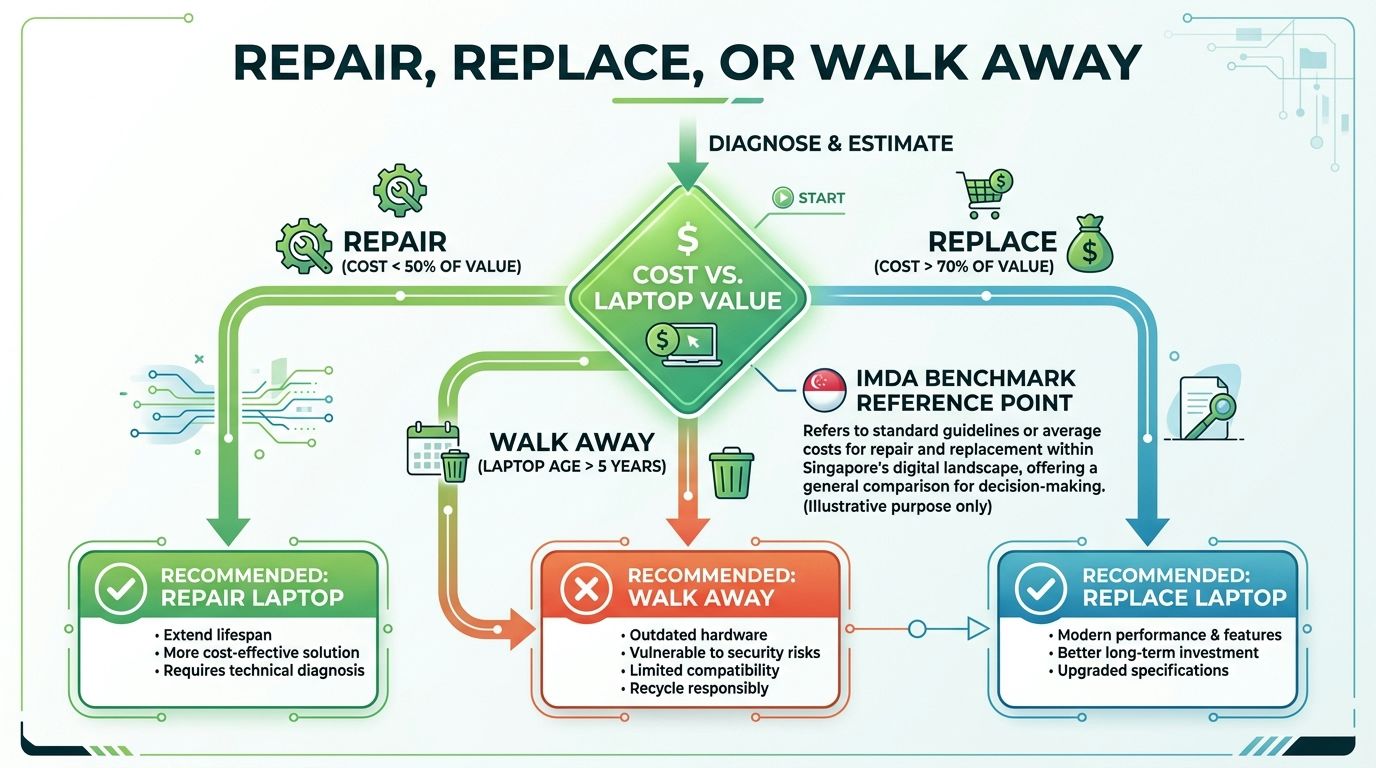
The core question is simple. Is this motherboard worth fixing, or are you better off spending that money on a different plan? Use the S$450 before GST local benchmark as your anchor, then judge the quote against the laptop's remaining value, its age, and how much use you still expect to get from it.
Use value, age, and urgency together
A hard rule works best here. If the motherboard quote starts swallowing too much of the laptop's remaining value, repair stops making sense. That is even clearer when the machine is older, the board is awkward to source, or you need the laptop back only for convenience rather than necessity.
| Decision point | What to ask yourself | Likely move |
|---|---|---|
| Cost is clearly below value | Is the machine still worth it? | Repair |
| Cost is close to the machine's worth | Am I paying for convenience, not value? | Compare carefully |
| Cost is too close to the machine's resale value | Will this just delay the inevitable? | Walk away |
Chip-level repair can still be the smarter play if the fault is isolated and a local technician can fix the board without replacing the whole assembly. If you need a place to start, the guide on where can I repair my laptop in Singapore helps narrow the repair route before you commit. The moment the damage spreads across the board, though, a full replacement becomes the honest answer, even if it hurts the wallet.
The third door people forget
Trade-in, buyback, and part harvesting are real exits, not throwaway options. A dead laptop can still have value if the screen, storage, casing, or other usable parts can be moved into another build or sold on.
That matters even more when the repair quote sits too close to what you can recover from the machine. If you are dealing with a gaming model, expert MSI repair solutions is worth a read because repairability changes a lot by model family, especially when parts are scarce or the board layout makes labour heavier. The same logic applies across the market, some laptops are worth repairing because their parts are still in demand, and some are better sold, stripped, or traded in while they still have value.
If the laptop still holds work files, photos, or login data, factor in data handling before you decide. A repair that keeps your files intact may justify a higher spend. A clean buyback or trade-in that gets the machine out of your hands without drama may be the better move if the board is already a lost cause.
How to Get an Accurate Quote Without Getting Burned
Bring the right details before you ask for a price
Walk in with the exact model number, serial number, and CPU or GPU spec. Say only “it's a Dell” or “it's an MSI gaming laptop”, and the quote will be vague from the start. The clearer the identification, the less chance you get priced for the wrong board or pushed into a bigger repair than you need.
Use this script in plain English:
- Ask whether the diagnostic fee is waived if you proceed. If not, ask how much the diagnostic costs and what it covers.
- Request an itemised quote. You want parts, labour, and GST separated.
- Ask for written warranty terms. Check the warranty on the replacement board and on the labour.
- Ask how they handle your data. Your laptop may hold years of photos, work files, and logins.
- Compare at least two or three shops. Include one that can do chip-level repair, not just full replacement.
That is how you keep the quote honest. In Singapore, a laptop motherboard job should still be read against the wider repair benchmark set by the IMDA Consumer Price Guide, because the board swap is only one line item in a market shaped by labour, part quality, and the age of the machine. If the quote looks too close to the laptop's remaining value, stop treating it as a pure repair question and start treating it as a repair-versus-exit decision.
Make the shop say the important things in writing
If the technician says the repair includes a replacement board, ask what happens if the part fails again. If they say the repair is “subject to availability”, ask how long they will hold the quote. If they refuse to put the terms in writing, walk.
You also want the shop to state whether the motherboard will be new, refurbished, or pulled from another unit. That detail changes the risk profile immediately. A quote that hides the part source is not a proper quote.
The simplest way to avoid surprises is to ask for a written repair quote through myhalo's repair quote page. That gives you a clear paper trail before your laptop leaves your hands.
Back up before you hand over the machine. That small habit saves a lot of grief.
Where to get the quote
If you want face-to-face explanation, go to a counter that can inspect the machine on the spot and talk through the options clearly. If you are short on time, an online quote form is fine, as long as it asks for the right model details and gives you a reply you can compare later.
Do not hand over the laptop until you have backed up what matters and written down any passwords the shop will need for testing. If the board is badly damaged and the repair number is ugly, ask about trade-in, buyback, or part harvesting before you approve the job. A dead machine can still carry value, and you should use that value instead of throwing it away for free.
Smart Ways to Bring the Cost Down
The cheapest motherboard replacement is often the one you avoid. That sounds blunt, but it's the truth in a repair market where part sourcing, labour, and device age all matter at the same time.
Use cheaper paths before you buy a brand-new board
Refurbished or pulled motherboards can be a sensible option when the shop has a trusted source and the warranty terms are clear. A pulled board from the same model can make even more sense on a modular business laptop, because the fit is better and the parts family is easier to match.
Chip-level repair is the other big lever. If the problem is one bad controller, one damaged rail, or one local fault, that route can save you from paying for a full board swap. The earlier section on price spread already showed why that matters, because full replacement and local repair live in very different cost worlds.
Don't ignore exit value
Trade-in, buyback, and upcycle pathways can turn a dead laptop into something useful instead of landfill. myhalo's trade-in Singapore page is one route if you want to recover value from still-usable hardware or move a machine into a cleaner exit path.
There's also a wider zero-e-waste angle here. If you choose a longer-life refurbished device instead of replacing a board on a machine that's already nearing the end, you may spend less overall and create less waste. That isn't idealism, it's just better lifecycle thinking.
Match the fix to the device
- Trust the board repair when the laptop is still valuable, the model is supported, and the fault is local.
- Choose part harvesting when the machine family is common and the parts are reusable.
- Exit through trade-in or buyback when the quote makes no sense next to the laptop's remaining value.
- Consider certified resale or upcycle when the device still has components worth saving.
If you do it this way, you're not just chasing the lowest sticker price. You're choosing the least wasteful path that still makes financial sense.
Frequently Asked Questions About Motherboard Replacement in Singapore
Is it worth replacing a motherboard on a laptop under three years old
Sometimes, yes. It depends on the model, the remaining value, and whether the board fault is isolated or part of a bigger liquid-damage mess. A newer laptop with strong resale value can justify repair, especially if the alternative is buying a much more expensive replacement machine.
How long does a motherboard replacement take
That depends on part availability and how much disassembly the laptop needs. Faster doesn't always mean better, because board work still needs proper diagnosis, matching, and post-repair testing. If a shop promises speed without asking for your exact model, be careful.
What should happen to my data before and after repair
Back up first, always. Before repair, ask how the shop handles logins, storage devices, and data access. After repair, confirm that any temporary files or test accounts are removed and that you've changed passwords if the device was out of your hands for long.
What if the laptop is beyond repair
Then stop trying to resurrect it just because it turns on sometimes. Trade-in, buyback, part harvesting, and certified resale are cleaner options than dumping it. Those routes keep usable components in circulation and reduce the chances that a half-dead machine becomes permanent clutter.
If you want help choosing the next step without the stress, look at safe data handling and decluttering options before you decide. A responsible exit can be just as valuable as a repair when the board has already crossed the line.
Your precious files and memories matter to us. Whether you need to protect your privacy with Safe data or rescue lost files with Save data, our caring team is right here to help. If you're facing a tough repair-versus-exit choice on a laptop motherboard, visit myhalo and take the next step with a team that understands repair, trade-in, and responsible device recovery in Singapore.