

A lot of people read about phone repair parts only after something has already gone wrong. Your phone slips out of your hand on the MRT, the screen goes black even though it still vibrates, or the battery drops so fast that you start carrying a power bank everywhere. In that moment, the questions pile up quickly. What broke? Is it the screen, the battery, the charging port, or something deeper inside?
That confusion is normal. Phones are packed with tiny parts, and repair listings can make everything sound more complicated than it really is. Terms like OLED, OEM, flex cable, display assembly, and logic board can feel overwhelming when all you want is a phone that works again.
The good news is that understanding phone repair parts doesn't require an engineering background. Once you know what the main parts do, how they fail, and what to check before buying replacements, you can make much calmer decisions. Repair can save money, reduce waste, and help a device stay useful much longer instead of ending up forgotten in a drawer.
If you're dealing with a freshly damaged device, this practical guide on what you can do after breaking your phone is a helpful first read before deciding on parts or repair.
Table of Contents
- That Heart-Sinking Moment Your Phone Breaks
- Your Phone's Anatomy A Tour of Key Repair Parts
- Playing Detective How to Diagnose the Faulty Part
- The Quality Question OEM vs Aftermarket vs Recycled Parts
- Sourcing Your Parts Where to Buy and What to Verify
- The Big Decision DIY Repair vs a Professional Fix
- Join the Zero E-Waste Movement with myhalo
That Heart-Sinking Moment Your Phone Breaks
That first second after a drop feels awful. You pick the phone up, hoping it's only the screen protector, then you notice the spreading crack, the green lines, or the touch that no longer responds where you need it most.
The reason for panic isn't an affection for gadgets. It's that a phone holds daily life together. Banking apps, family photos, two-factor logins, work chats, school portals, ride bookings, and notes are all inside one slim device.
A broken phone also creates a money question straight away. In Singapore, screen replacement is the most common phone repair, and average costs for popular models range from SGD 150 to SGD 400 depending on whether the device uses a standard LCD or an OLED display according to Lite Mobile's overview of average phone repair prices in Singapore. That range matters because a simple crack can turn into a very different repair depending on the part technology inside your model.
Practical rule: Don't judge a repair quote by the crack alone. Two phones with similar-looking damage can need very different parts.
When people hear "screen repair", they often imagine one piece of glass being swapped. In reality, many phones use a display assembly, which can include the glass, touch layer, and display panel as one bonded unit. That's why one repair feels straightforward while another becomes more expensive and more delicate.
Repair isn't only about getting back online quickly. It's also one of the clearest ways to stretch the value of the device you already own. If the rest of the phone is healthy, replacing one failed part can keep a perfectly good device in use and keep more electronics out of the waste stream.
Your Phone's Anatomy A Tour of Key Repair Parts
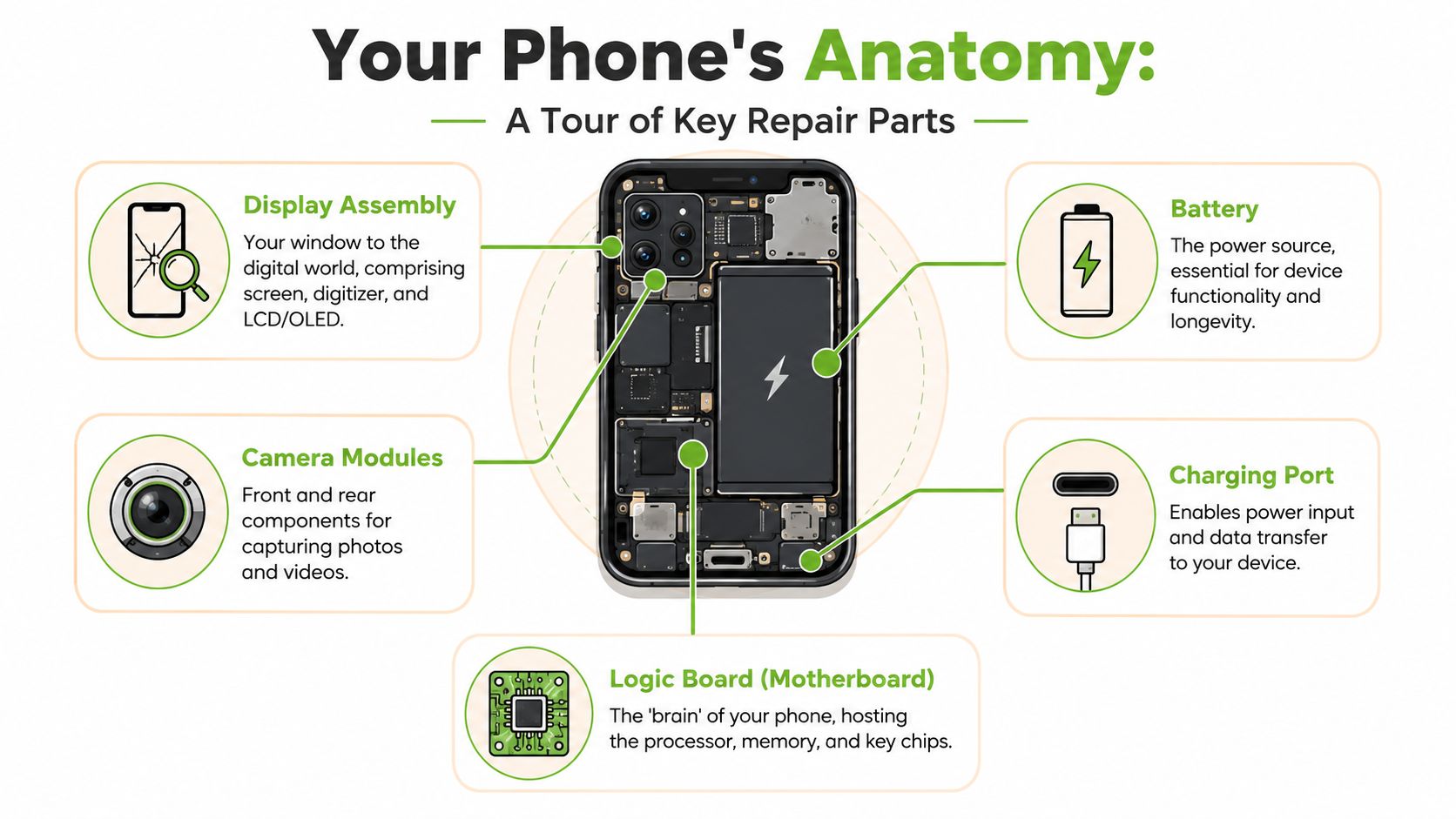
Phones look simple from the outside. Inside, they're more like a tiny team working together. If one part fails, the symptom you see on the outside can point to a very specific component.
The parts you hear about most
Display assembly
This is your phone's visual front end. It usually includes the panel that creates the image and the touch layer that responds to your finger. If you see flickering, dead spots, colour lines, black patches, or touch failure, this assembly is often the first suspect.
Battery
Think of the battery as the phone's heart. It stores energy and feeds the whole device. When it weakens, you may notice fast battery drain, random shutdowns, overheating during normal use, or a phone that works only when plugged in.
Charging port
This is the phone's doorway for power and data. Dust, bent pins, corrosion, or worn connectors can stop charging or make the cable feel loose. Many people replace a battery first when the actual problem is that the phone isn't receiving power properly.
Camera modules
Your front and rear cameras are separate parts. A cracked lens cover can affect image quality, but so can a failed camera module inside. If the app won't open, keeps switching to black, or photos look permanently blurry, the problem may be more than surface damage.
A phone can still turn on and vibrate even if the display assembly has failed. That doesn't always mean the whole device is dead.
The smaller parts that cause big headaches
Some of the most frustrating faults come from parts people rarely hear about.
- Flex cables connect major components together. If one tears or comes loose after a drop, the phone may have intermittent faults like touch issues, charging problems, or a camera that works only sometimes.
- Speaker and microphone parts handle calls, voice notes, alarms, and media audio. Dust, liquid exposure, or impact damage can lead to muffled sound or silence.
- Buttons and button cables may stop responding after wear or impact. A power button fault can make a healthy phone feel completely unusable.
- Logic board or motherboard is the control centre. It hosts the processor, memory, and key chips. When this part is damaged, symptoms can look random because many systems depend on it.
The more you understand these parts, the easier it becomes to describe a problem clearly. That helps whether you're buying phone repair parts for a DIY attempt or talking to a technician who needs accurate symptoms.
Playing Detective How to Diagnose the Faulty Part
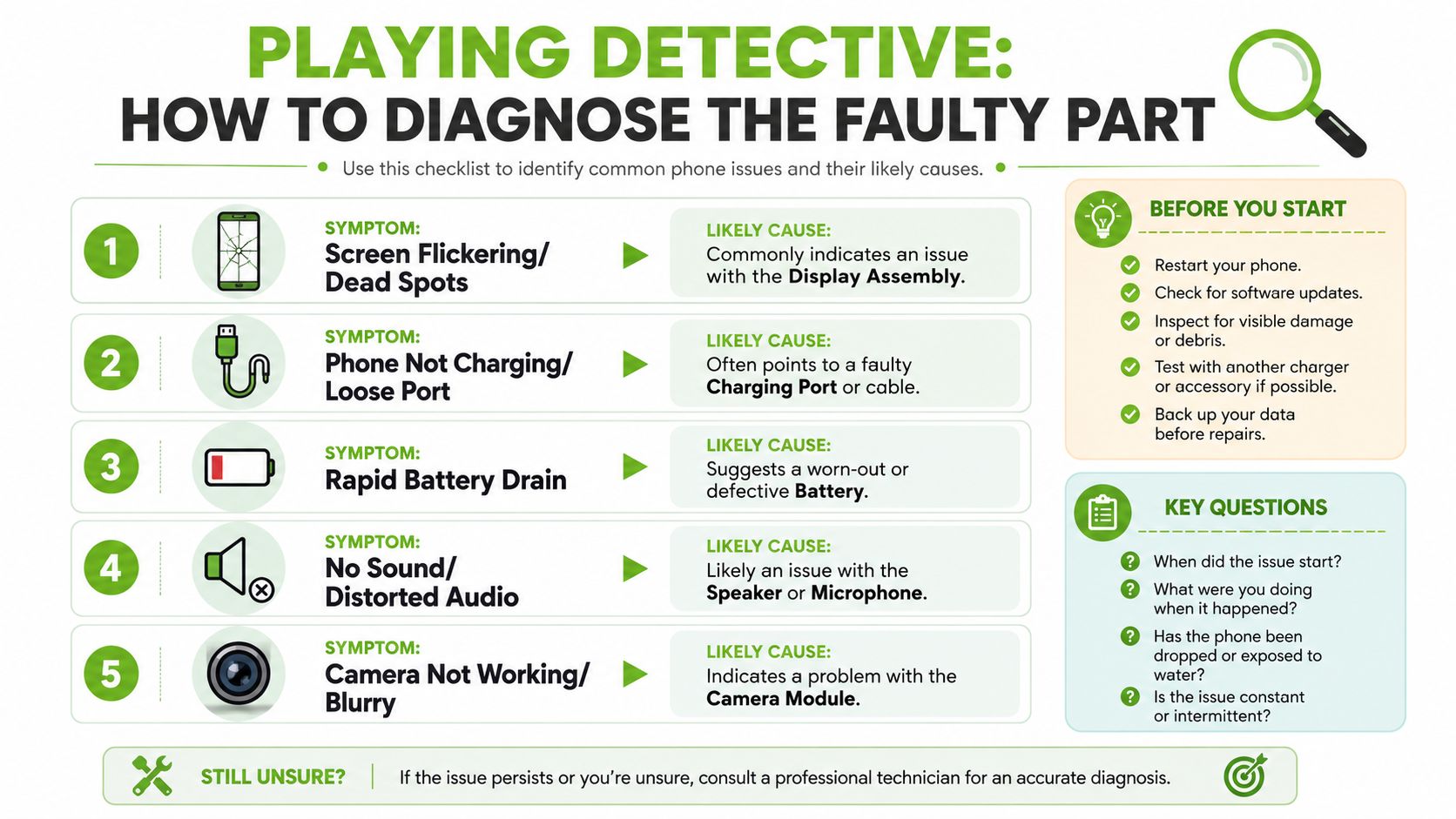
Good diagnosis saves time, money, and frustration. A lot of people replace the wrong part first because they match the repair to the most obvious symptom instead of the most likely cause.
If you're dealing with a damaged display, this deeper guide to LCD screen repair can help you tell the difference between surface damage and a full display issue.
Screen and touch problems
Start with what the phone still does.
If the glass is cracked but the image looks normal
The display panel may still be functioning. Some models allow separate glass repair, but many modern phones use bonded assemblies, so the full front unit is usually replaced.If the screen is black but the phone vibrates or rings
The phone may be powered on while the display assembly has failed. This often happens after impact.If part of the touch works and part doesn't
The digitiser, which reads touch input, may be damaged. On many phones it's part of the same assembly as the screen.If there are green lines, ink-like black patches, or flicker
That usually points to panel damage rather than software trouble.
Power and charging clues
Power faults often get mixed up because the battery, cable, adapter, and charging port all affect the same result.
| Symptom | Most likely part to check first | Why |
|---|---|---|
| Cable only charges at one angle | Charging port | The connector may be worn or obstructed |
| Battery drops quickly after a full charge | Battery | Energy storage has likely weakened |
| Phone shows charging icon but gains little power | Battery or charging circuit | It may receive power but fail to store it properly |
| No charging response at all | Cable, adapter, then port | Always rule out external accessories first |
Before buying parts, do the simple checks:
- Try another cable and adapter so you don't blame the phone for an accessory fault.
- Inspect the port with good light because compacted lint can block full contact.
- Notice heat patterns. A battery issue often shows up as unusual warmth during normal use or charging.
- Watch restart behaviour. Random shutdowns under light use often point toward battery health rather than display trouble.
If a swollen battery is suspected, stop pressing on the screen or trying to force the phone closed. Lithium-ion batteries need careful handling.
Sound and camera checks
A sound problem isn't always one sound problem. During diagnosis, separate the functions.
- If music is quiet but calls are fine, the loudspeaker may be the issue.
- If people can't hear you on calls or voice notes, the microphone path is more likely.
- If the rear camera is blurry but the front camera is normal, the fault probably sits in a specific camera module, not the whole phone.
- If camera focus hunts constantly after a drop, internal camera components may have shifted or failed.
This kind of detective work doesn't guarantee a perfect home diagnosis, but it does narrow the possibilities. That makes it much easier to choose the right repair path and the right phone repair parts.
The Quality Question OEM vs Aftermarket vs Recycled Parts
The biggest confusion in phone repair often isn't the fault. It's the replacement part. Two parts can be listed for the same model, look almost identical in photos, and still differ in fit, feel, brightness, battery behaviour, or long-term reliability.
Why part quality feels confusing
There is a real information gap in Singapore around part quality tiers. No Singapore-centric content clearly explains the cost and risk trade-offs between Apple Genuine Parts with protocol-based diagnostics and Grade A OEM or Grade A AMOLED assemblies, despite widespread consumer confusion, as noted in this LinkedIn discussion of the Singapore smartphone repair market. That gap matters because screens and batteries are common repairs, yet many buyers still don't get a plain-language comparison of what they're paying for.
Here's the simplest framework.
Genuine parts are parts supplied through the brand's official pathway. On some devices, especially newer Apple models, genuine replacement can also involve software or diagnostic pairing steps.
OEM parts usually means parts made to original-equipment standard or sourced from the same manufacturing ecosystem, but not always sold through the official branded channel. In practice, the label gets used loosely, which is why buyers need to ask careful questions.
Aftermarket parts are third-party alternatives. Some are decent. Some are poor. The label alone doesn't tell you enough.
Recycled parts come from donor devices. If harvested carefully from working originals, they can be an excellent fit for repairs where compatibility and sustainability both matter.
Phone Part Quality Comparison
| Part Type | Pros | Cons | Best For |
|---|---|---|---|
| Genuine | Strong compatibility, closer alignment with brand expectations, useful for owners who care about official pathways | Usually costs more, may be harder to source, may involve model-specific restrictions | Newer premium devices, users concerned about official repair status |
| OEM or Grade A equivalent | Can offer a good balance of cost and performance when sourced well | Terminology can be inconsistent, quality depends heavily on supplier honesty | Out-of-warranty devices where value matters |
| Aftermarket | Wider availability, often cheaper, useful for older models | Bigger quality spread, fit and display performance may vary | Budget-conscious repairs when the supplier is transparent |
| Recycled | Original fit from donor devices, lower waste, helpful when new parts are scarce | Condition must be screened carefully, availability varies by model | Sustainability-minded users and hard-to-source models |
A useful example is the screen market. Some sellers advertise "Grade A" in a way that sounds nearly identical to genuine. That doesn't automatically make the part bad. It does mean you should ask what "Grade A" refers to. Display brightness, touch response, colour balance, in-screen fingerprint support, and long-term durability can all differ.
A similar issue shows up in batteries. The challenge isn't only whether a battery fits physically. It's whether the phone reads it properly, charges consistently, and behaves safely over time.
For people considering second-life devices, refurbished phones in Singapore are a useful way to understand how tested components, grading, and responsible reuse fit together.
Sourcing Your Parts Where to Buy and What to Verify
Buying phone repair parts online feels easy until the parcel arrives and the connector, frame, or model code doesn't match your device. That's one reason the parts market can feel risky even for careful buyers.
What to verify before you buy
A projected 2026 Alibaba report says Southeast Asia's repair market faces a "trust deficit" due to incompatible parts and recommends publishing model-specific compatibility charts to build high-trust segments, as described in Alibaba's mobile phone repair parts market article for Southeast Asia. That advice is especially relevant when listings only mention a broad model family and skip the exact regional or board variant.
Before you buy, verify these points:
- Exact model identity. "Samsung S23" isn't always enough. Storage version, regional variant, and sub-model can matter.
- What is included. A screen listing may include the full display assembly, or only the panel without frame, adhesive, or small components.
- Part grade language. If a seller says OEM, original, Grade A, or service pack, ask what those labels mean in practical terms.
- Return conditions. Some parts can only be returned if protective films remain intact and installation hasn't been attempted.
- Testing status. Ask whether the part was tested for display output, touch response, charging, or camera function before sale.
Buyers get into trouble when they confirm the phone name but not the exact variant.
If a seller can't tell you the exact compatibility basis, that's a warning sign. A cheaper part becomes expensive once you've paid for shipping, lost time, or damaged another component during a second disassembly.
The myhalo Promise
We believe that joining the zero e-waste movement should feel good and be completely effortless. Through our Safe data guarantee, your privacy is perfectly protected, while our Declutter your e-clutter program makes recycling your old devices completely convenient, safe, and responsible.
That bigger picture matters. Repair isn't only a parts transaction. It's also a trust decision about compatibility, workmanship, privacy, and whether a device gets a real second life instead of becoming e-waste too early.
The Big Decision DIY Repair vs a Professional Fix
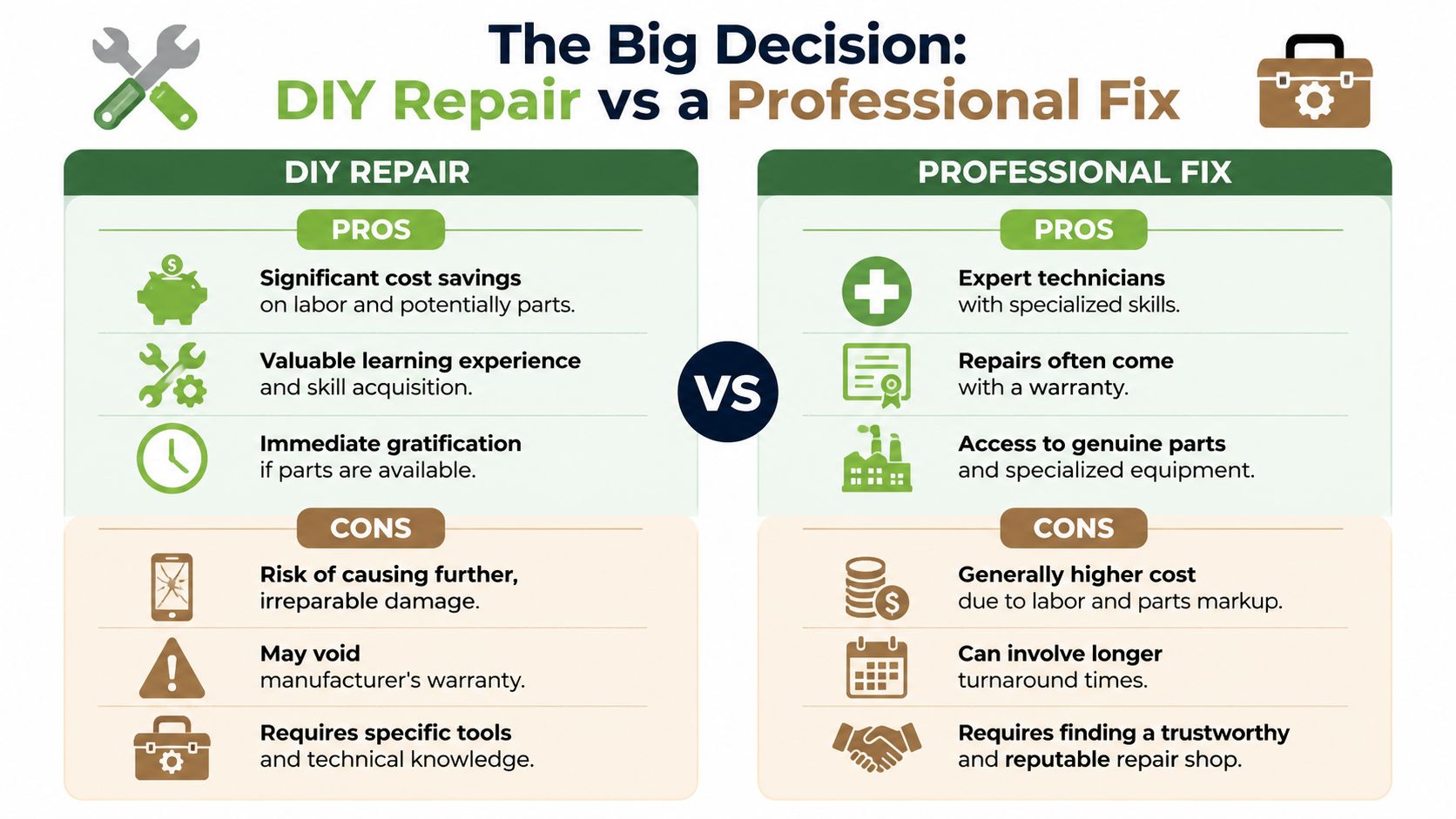
DIY repair has real appeal. You save on labour, learn something useful, and get the satisfaction of bringing a device back to life with your own hands. But the decision changes once you factor in part quality, tools, risk, and the value of the phone itself.
A screen replacement is the most common example. In Singapore, screen replacement for popular phone models typically ranges from SGD 150 to SGD 400 depending on whether the device uses LCD or OLED, based on average local repair pricing compiled by Lite Mobile. That range can make DIY look attractive, especially if you find a part online at a lower price.
When DIY makes sense
DIY tends to make the most sense when the phone is older, the part is easy to access, and you're comfortable following careful instructions.
A good DIY candidate often looks like this:
- The device is already out of warranty and you accept the risks.
- The repair is straightforward such as a simpler battery or charging port job on a model with available guides and parts.
- You have the right tools rather than improvising with knives, pins, or household screwdrivers.
- You can afford a failed attempt without turning a daily-use phone into a bigger emergency.
This short clip gives a useful visual sense of what hands-on repair work can involve:
When a professional fix is the safer call
Professional repair usually wins when the phone is valuable, the failure is uncertain, or the repair touches fragile layers like waterproof seals, face sensors, tightly bonded displays, or lithium-ion batteries.
Here are the decision points that matter most:
Complexity
Modern phones aren't built like old removable-back models. Adhesive, tiny screws, hidden clips, and layered cables make mistakes easy.Data protection
Many people worry only about the hardware, but privacy matters too. For trade-ins and device processing, myhalo states that it uses a strict 30-point diagnostic check and an ISO-aligned data wipe before devices reach the warehouse, according to myhalo's trade-in page. For enhanced security, there is also an official data erasure certification at S$10, with two-stage erasure covering an initial on-site wipe and a second secure warehouse erasure, as described in myhalo's FAQ page.Safety
Batteries are not beginner-friendly when swollen, punctured, or strongly adhered. One slip with a metal tool can turn a cheap repair into a dangerous situation.True cost
DIY isn't only the price of the part. Add tools, adhesive, time, failed first attempts, and the possibility of ordering the wrong component.
A balanced approach works best. If you're curious and careful, DIY can be rewarding. If the phone is important and the fault is fiddly, professional help often protects both your device and your peace of mind.
Join the Zero E-Waste Movement with myhalo
A repaired phone does more than light up again. It stays useful, keeps materials in circulation, and delays the need to replace a device before it's finished. That choice supports your wallet, but it also supports a cleaner tech ecosystem.

Repair keeps value in circulation
Not every broken device is scrap. A phone with a damaged screen may still have a healthy board, camera, speaker, or housing. A device that can't be restored fully may still help rescue another one through responsible part harvesting and upcycling.
That way of thinking is central to a zero e-waste lifestyle. Repair first. Reuse when possible. Harvest working parts when full repair no longer makes sense. Recycle only after the useful value has been exhausted.
The most sustainable device is often the one you already own, repaired thoughtfully and kept in use a little longer.
If you have old gadgets building up at home, the same mindset applies beyond repair. Decluttering responsibly turns forgotten electronics into reuse, resale, recovery, or proper end-of-life handling instead of drawer clutter or premature disposal. This is why community education around tech care matters so much, and why broader efforts like myhalo's declutter tech initiative for zero e-waste in Singapore are worth paying attention to.
A practical next step in Singapore
For people who want an in-person option, myhalo operates two physical repair hubs in central Singapore at Bugis Junction (#03-25/26) and Sim Lim Square (#03-40), both offering walk-in diagnostic assessments and component-level repairs for smartphones, tablets, and laptops, as shown in myhalo's location overview video. If your issue isn't only a phone issue, local laptop repair costs also vary widely. A standard laptop screen replacement in Singapore costs S$150 to S$350, high-refresh gaming screens cost S$350 to S$550, OLED or 4K panels cost S$400 to S$700, battery replacements cost S$86 to S$250, and motherboard repairs start around S$250 depending on complexity, according to Terris's Singapore laptop repair pricing guide.
Those numbers are a helpful reminder that repair decisions should be made with context. Sometimes a targeted part replacement is the smartest move. Sometimes trade-in, secure data handling, or upcycling is the more sensible path.
The encouraging part is that you don't need to guess blindly anymore. Once you understand the main phone repair parts, the symptoms they create, and the quality checks that matter, you're in a much stronger position to choose well.
Ready to protect your device, your data, and the planet at the same time? Visit myhalo to explore repair, trade-in, Safe data support, Save data help, and simple ways to declutter your e-clutter while moving closer to a zero e-waste lifestyle.