

You’re replying to a message, checking a map, approving a payment, or trying to call someone. Then your phone slips. You hear that sharp little crack, pick it up, and your stomach drops.
A broken screen feels bigger than “just” broken glass. You’re suddenly thinking about your photos, banking apps, work chats, notes, and all the little parts of daily life sitting behind that damaged display. That stress is real. In Singapore, 68% of users prioritise data recovery over repair when screens fail, yet few guides clearly explain how to protect access to that data, according to Samsung support information for Singapore.
That’s why a good LCD screen repair guide shouldn’t stop at “replace the panel and move on”. It should help you understand what’s broken, what it may cost, how to avoid making things worse, and how to make a choice that protects your data, your wallet, and the planet. At myhalo, we care about all three because a zero e-waste world starts with calm, informed decisions, not panic purchases.
Table of Contents
- That Heart-Stopping Moment Your Screen Cracks
- A Quick Guide to Diagnosing Your Screen Damage
- The DIY vs Professional Repair Decision
- Understanding LCD Repair Costs and Times in Singapore
- How to Choose a Repair Provider You Can Trust
- Protecting Your Device and Embracing a Zero E-Waste Future
That Heart-Stopping Moment Your Screen Cracks
That first minute after a drop is usually the worst. You’re not only looking at the crack. You’re also trying to answer three urgent questions at once. Can I still use it? Is my data safe? How expensive is this going to be?
In that moment, what’s needed isn’t a lecture, but a calm path forward. Start with this: a cracked screen doesn’t automatically mean your phone is finished, and it definitely doesn’t automatically mean your files are gone.
The first thing to do
Before pressing everything wildly, pause and do these basics:
- Check if the phone still powers on. If you hear sounds, vibrations, or notifications, the main system may still be working.
- Avoid repeated forceful tapping. If the display is already damaged underneath, extra pressure can spread the problem.
- Keep it dry and protected. If the glass is shattered, tiny openings can make the device more vulnerable.
- Don’t rush into replacing the whole device. Screen issues often look worse than they are.
Practical rule: If the phone is still alive, your next priority is controlled handling, not speed.
Why screen damage feels so personal
A broken display isn’t like a scuffed case. The screen is how you access almost everything. If touch stops working, people immediately worry they’ve lost photos, contacts, chat history, and login access. That worry makes perfect sense.
This is also where many guides fall short. They tell you what a screen is, but not what to do when your real concern is getting back to your life safely. If the motherboard still works, there may still be a path to access, preserve, or recover what matters. That’s one reason people often look for support that includes both secure handling and data recovery options, rather than a basic parts swap alone.
Repair can be a smarter choice than replacement
A damaged screen often pushes people towards an impulsive upgrade. But repair is frequently the more grounded option. It can reduce disruption, avoid unnecessary waste, and give a working device more life.
That’s the heart of a zero e-waste mindset. If a device can be rescued safely, it deserves that chance. Repair is not only about fixing a display. It’s also about keeping useful technology in use for longer, instead of sending it into storage drawers or disposal streams too early.
A Quick Guide to Diagnosing Your Screen Damage
Not every cracked screen needs the same fix. Some phones have damage only on the outer glass. Others have injury deeper in the display layer. If you can tell the difference, you’ll ask better questions and get a more accurate repair quote.
Here’s a visual guide to the most common signs.
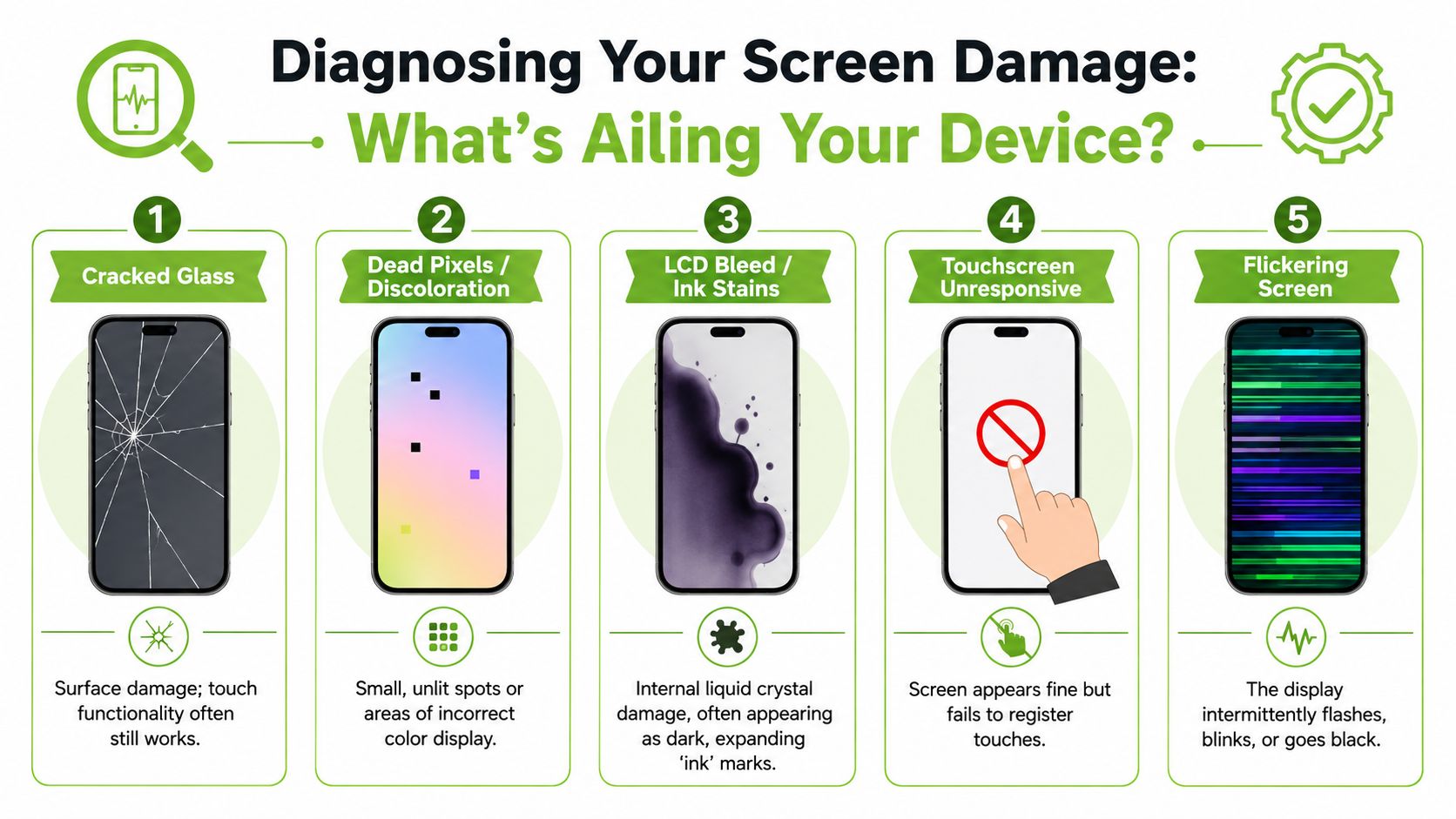
If you’re dealing with a notebook rather than a phone, this guide on whether your laptop screen needs repair or replacement can help you think through similar symptoms on a larger display.
What you can spot with your eyes
A good home check starts with appearance. Don’t worry about technical terms yet. Just notice what the screen is doing.
-
Cracked glass
You see clear fracture lines on the surface, like a spiderweb. The image underneath may still look normal, and touch may still respond. -
Dead pixels or discolouration
These look like tiny black dots, coloured specks, or small odd patches that don’t match the rest of the display. -
LCD bleed or ink-like stains
This usually looks like a dark blotch under the glass. It can spread or appear like liquid trapped inside. That often points to internal display damage, not just surface cracking. -
Touchscreen unresponsive
The picture may look fine, but swipes and taps don’t register properly. You might only get partial response in one area. -
Flickering or intermittent blackout
The screen flashes, blinks, dims, or briefly goes dark. Sometimes this appears after a drop even when the outer glass doesn’t look severe.
If the screen looks like broken glass only, the repair path may be simpler. If it looks like ink, lines, or missing image areas, the display layer is likely involved.
Simple checks before you ask for a quote
You don’t need a repair bench to do a few useful tests. You just need a careful routine.
| Check | What to do | Why it helps |
|---|---|---|
| Brightness test | Turn brightness up and down | Reveals dim zones, flicker, or hidden patches |
| Touch test | Drag an app around the screen | Shows whether some areas ignore input |
| Colour test | Open a white or bright screen | Makes black spots, lines, and stains easier to see |
| Angle test | Tilt the phone gently | Helps you distinguish surface cracks from deeper display damage |
A simple way to describe the issue
When speaking to a technician, try this format:
- What happened: dropped from hand, sat on it, bag pressure, unknown
- What you can still do: power on, access device, call, charge
- What looks wrong: cracks, black patches, green lines, flicker, no touch
- What matters most: access to data, urgent use for work, keeping costs down
That short description usually gets better results than saying, “My screen is spoiled.”
The DIY vs Professional Repair Decision
DIY screen repair has obvious appeal. A toolkit arrives, a video makes the process look tidy, and you think, maybe I can handle this. Sometimes that instinct comes from wanting to save money. Sometimes it comes from not wanting to leave your device with someone else.
Both are understandable. But LCD screen repair is one of those jobs that looks easier on screen than it feels in your hands.
When DIY feels tempting
The upside of DIY is straightforward:
- Lower upfront spending if you already have tools or can source parts cheaply
- Control over the process because the device stays with you
- A learning experience if you enjoy repairing gadgets
There are situations where a confident hobbyist may be comfortable opening a device. If you’ve repaired electronics before, understand connectors, and know how to organise screws and cables, DIY might feel reasonable.
For some people, a replacement device may also be part of the decision. If repair costs start to feel too high, comparing them against alternatives like refurbished Apple iPhones can be useful, especially if you want another working phone without jumping straight to a brand-new model.
Why professional repair often wins
The risk in DIY isn’t only “I might fail”. It’s “I might turn one repair into several”.
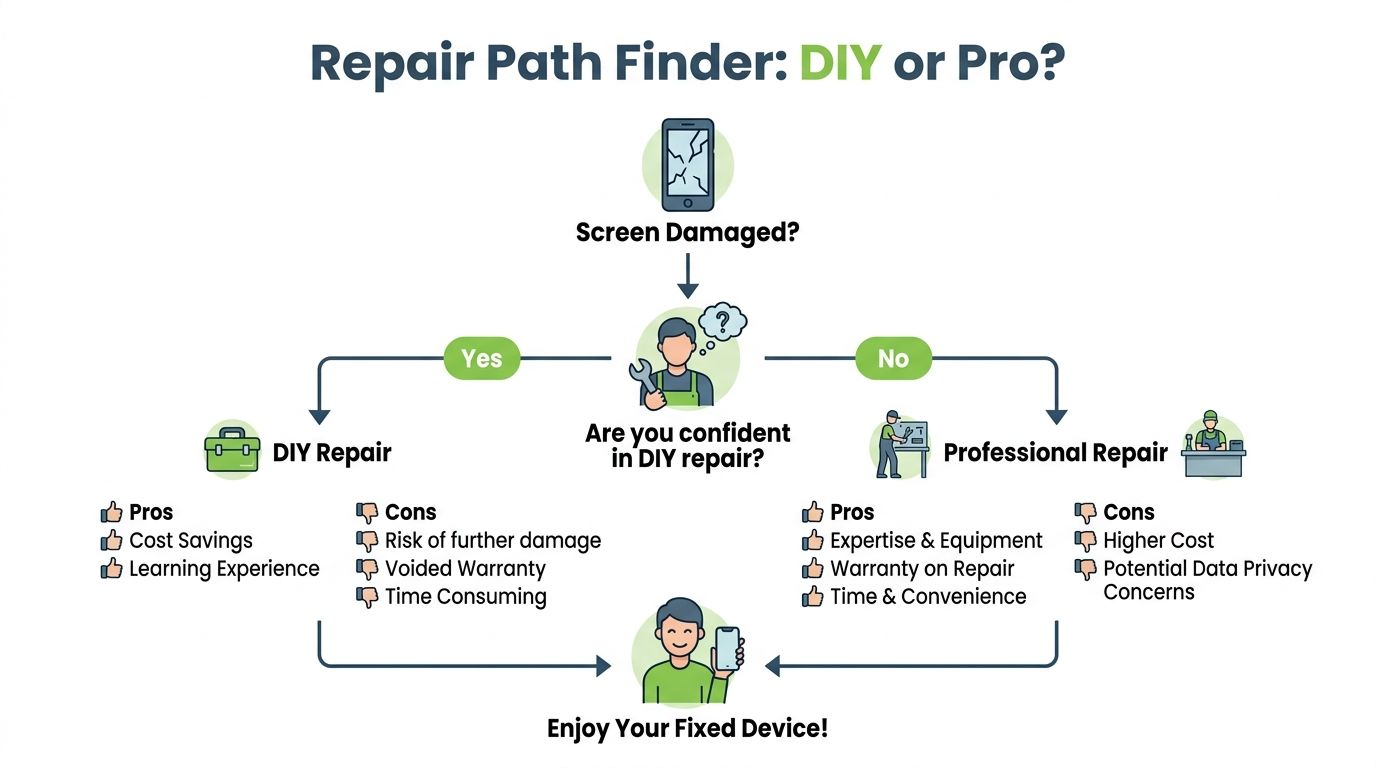
A close look at how delicate screen repairs can be makes the trade-off clearer:
- Certified technicians in Singapore exceed 90% success rates with OEM-grade panels, while nearly 40% of user-reported DIY failures stem from improper cable reconnection or unnoticed damage during reassembly, based on Lenovo Singapore’s laptop screen repair glossary.
- Tiny connectors can tear.
- Adhesive can be unevenly heated or removed.
- Internal cables can look fine but sit loose after reassembly.
- A phone that was “just cracked” can come back with face recognition, sensors, or touch behaving strangely.
If you’re still considering a home fix, it helps to first read practical advice on putting a screen protector on a cracked screen, because many people can stabilise a device briefly before deciding on full repair.
A professional repair route also gives you something DIY can’t easily replicate. Accountability. That includes clear diagnostics, parts quality, and a place to return if something isn’t right after repair.
Here’s a helpful repair walkthrough to see what the process can involve before you decide:
For most daily users, the safest question isn’t “Can I open this phone?” It’s “Do I want to risk the phone, the data inside it, and the time it takes to redo the job if anything goes wrong?”
Understanding LCD Repair Costs and Times in Singapore
Screen repair quotes can feel random until you know what affects them. The biggest difference usually comes down to the type of display and the specific model.
For phone repairs in Singapore, repairing a common IPS LCD screen typically costs between SGD $60 and $100, while a newer OLED display ranges from SGD $129 to $378. Most repairs are completed in 45 to 90 minutes, according to myhalo Singapore screen replacement guide.
What phone screen repairs usually cost
Those price ranges tell a useful story. Not every “screen” is priced the same because not every screen is built the same.
| Screen type | Typical Singapore repair range | Typical timing |
|---|---|---|
| IPS LCD | SGD $60 to $100 | 45 to 90 minutes |
| Newer OLED display | SGD $129 to $378 | 45 to 90 minutes |
If your device is older or uses a simpler display, the repair is often more affordable. If it’s a newer premium model, the display itself is usually costlier and more delicate.
Why one screen costs more than another
A few practical reasons explain the gap:
-
Panel type
OLED displays are usually pricier than IPS LCD panels. They can also be more delicate to handle. -
Model availability
Newer models may need parts that are harder to source. -
Assembly complexity
Some phones are built in ways that make separation and reassembly more demanding. -
Calibration and fit
Higher-end displays often require more careful alignment and testing.
A cheap quote isn’t automatically a good quote. If the provider isn’t clear about the part quality or what exactly is being replaced, ask more questions.
Time matters too
One of the nicest surprises for many customers is that modern repair timing is often much faster than expected. A damaged display no longer always means giving up your phone for days. For many routine jobs, same-visit service is possible.
That matters in a city where your phone is your wallet, work tool, camera, transport planner, and contact list. Fast repair isn’t just convenient. It reduces the awkward in-between period where you’re trying to manage life through a half-working screen.
If you’re comparing repair with full replacement, the time factor can make repair even more attractive. Buying a new device often means setup, data transfer, app logins, banking re-verification, and accessory compatibility checks. A successful LCD screen repair can avoid that entire reset.
How to Choose a Repair Provider You Can Trust
When you hand someone your phone or laptop, you’re not only handing over hardware. You’re handing over access to messages, photos, work apps, browser logins, and private records. That’s why trust matters just as much as technical skill.
A good repair provider should make you feel informed, not rushed.
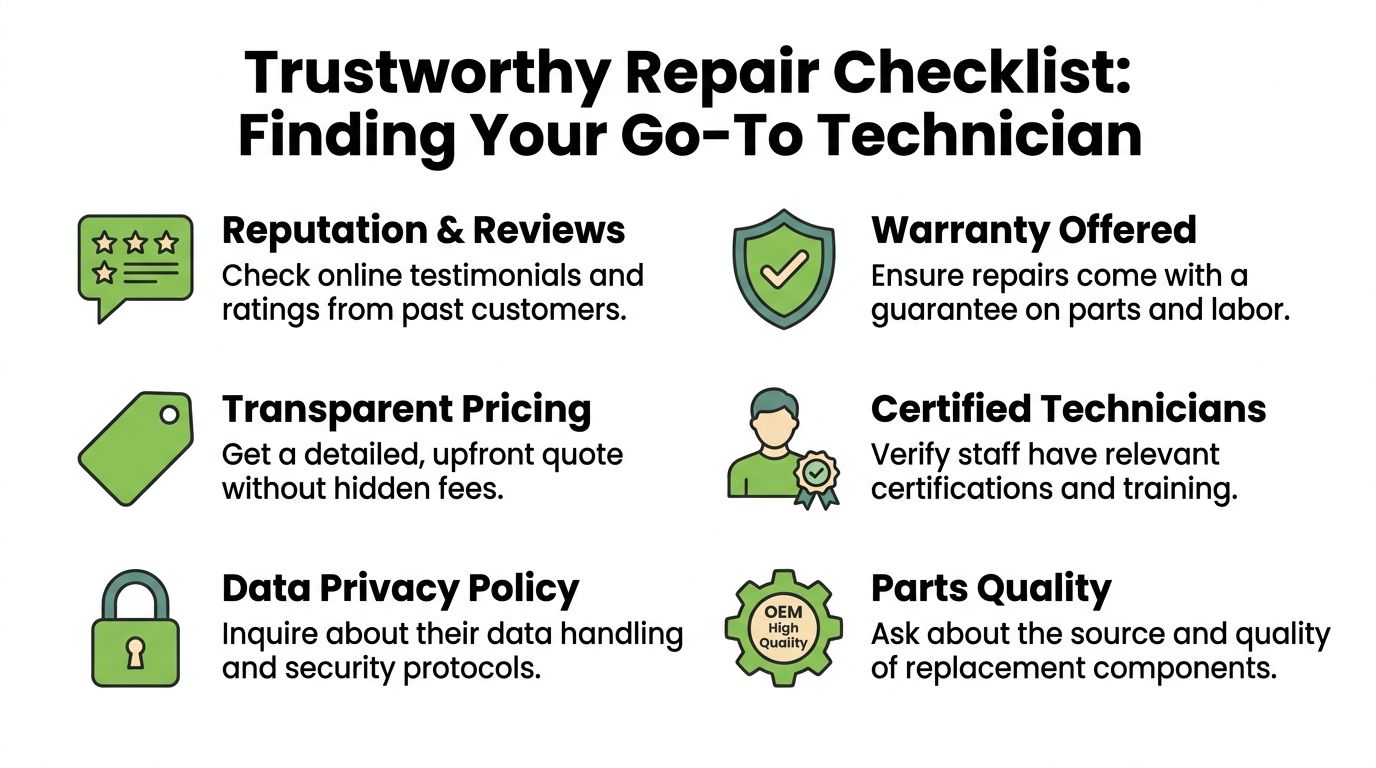
If you’d like another local reference point while comparing options, this article on where to find the best phone repair service gives a broader look at what to evaluate.
Questions worth asking before you hand over your device
Use a short checklist. You don’t need to interrogate anyone. Just cover the basics clearly.
-
What part are you replacing exactly
Ask whether they mean outer glass, full screen assembly, or a deeper display component. -
What kind of replacement part is used
“OEM-grade” and “high-quality compatible” are not the same thing. Ask them to explain in plain language. -
Is there a warranty on parts and labour
A provider who stands behind the repair should be able to explain what happens if the issue returns. -
How is pricing explained
You want an upfront quote, not a vague range that keeps changing after the device is opened. -
What happens to my data while the device is with you
This question matters even if you think “it’s only a screen job”.
Why data handling matters as much as the screen itself
A provider can be technically competent and still weak on privacy. That’s a problem. Repair often requires temporary physical possession of a fully logged-in personal device.
myhalo is one repair and device lifecycle option in Singapore, and its published data handling standard is specific: it holds ISO 27001 certification, with device data securely wiped in a restricted, locked area accessible only to trained staff, and encrypted records stored for up to two years, as described by Vulcan Post’s coverage of myhalo’s operations.
The best repair experience is boring in the right way. Clear quote, clear process, clear privacy handling, no surprises.
Look for providers who can explain their intake process calmly. They should tell you whether your passcode is needed, whether they test only display functions, and how they handle devices that also need data recovery or secure erasure. If they get vague when you ask about privacy, treat that as useful information.
Protecting Your Device and Embracing a Zero E-Waste Future
Your phone is working again. That brings relief. It also gives you a chance to avoid the same stress, protect the data still living on the device, and make choices that create less waste.
A repaired screen is a bit like a fresh bandage on a healing cut. It does its job best when the area around it is protected too. Small habits after repair can stretch the life of your device and save you from another expensive drop.
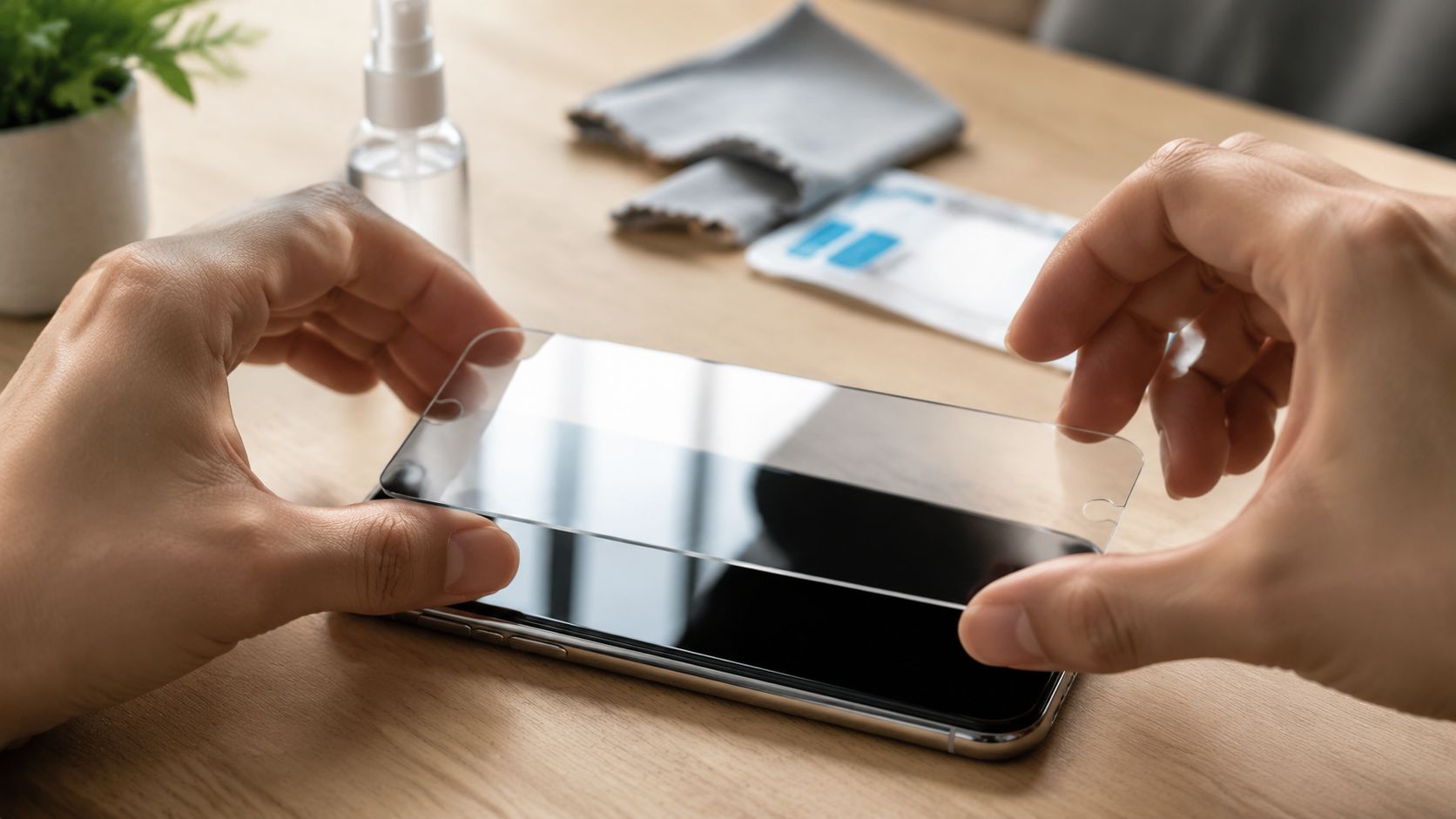
Aftercare that helps your repair last
A little prevention goes a long way.
-
Use a proper case
A raised-edge case helps absorb impact before the glass hits the floor or the table edge. -
Add a screen protector
It will not stop every break, but it can reduce scratches and soften minor knocks. This guide on screen protectors and scratch versus crack protection explains what a protector can and cannot do. -
Keep pressure off the screen
Back pockets, overstuffed bags, and tight storage spaces can bend the phone slightly. That pressure can stress a newly repaired display. -
Pay attention during the first few days
If the screen flickers, becomes unusually warm, or stops responding properly, return to the repair shop promptly and ask for a check.
What to do with the old devices still sitting at home
A broken screen often reminds people of another problem. Old phones and tablets tend to collect in drawers, cupboards, and desk corners.
Those devices are easy to ignore because they are out of sight. But they still matter. Many contain photos, messages, account logins, or work files. Some can be repaired and reused. Others are better suited for data recovery, parts harvesting, or responsible recycling.
myhalo has described this idea as “Declutter your e-clutter,” and the phrase is useful because it gets to the heart of the matter. Old tech is not just clutter. It is also a privacy responsibility and an e-waste decision.
A practical way to sort old devices is:
- Still usable: repair it, reuse it, or pass it on.
- Not usable but important: recover the data before doing anything else.
- End of life: send it through a responsible recycling path instead of leaving it forgotten at home.
For households or companies trying to reduce unnecessary disposal, this broader guide for businesses on e-waste offers a useful starting point.
Your screen repair does not have to be the end of the story. It can be the moment you choose longer device life, safer data handling, and less waste.
If you need help deciding what to do next, whether that means protecting private information or recovering files from an older device, our team is here to help. Reach out to us today.