
Logical laptop recovery in Singapore typically takes 1–3 days and costs S$180–350, while physically failing SSD or NVMe cases can take 3–21 days and cost S$450–900 or more. If your laptop has just frozen, clicked, gone black, or suffered a spill, stop using it immediately and arrange a write-blocked diagnostic before trying repeated restarts.
You might be in a Tampines café with a thesis deadline, or in Tiong Bahru with a client presentation due before lunch, when your laptop suddenly freezes, makes an unfamiliar sound, and goes dark. The panic is understandable, especially when the files on it include years of photos, work documents, or an almost-finished project.
The safest response is calm triage. Hold the power button to cut power, unplug the charger, and resist the urge to keep booting the machine. Continued attempts can worsen a damaged file system, stress a failing hard drive, or turn a recoverable storage fault into permanent data loss. If liquid is involved, follow this guide to what to do after spilling water on your laptop rather than testing whether it still turns on.
Laptop repair and data recovery belong to the same decision journey. A technician first protects the information, then identifies whether the laptop needs a battery, screen, board, or storage repair, and finally helps you decide whether repair, recovery, reuse, or secure destruction makes the most sense. The right path depends on the failure type, the condition of the original drive, the value of the files, the available parts, and how securely the device must be handled.
Table of Contents
- When Your Laptop Goes Wrong and the Clock Starts Ticking
- Common Laptop Failure Modes Explained Without the Jargon
- What Really Happens During a Professional Diagnostic
- Repair or Replace How Singapore Users Can Decide
- Realistic Timelines and Cost Bands for Data Recovery
- Keeping Your Data Safe Before During and After Repair
- Choosing a Singapore Provider You Can Actually Trust
When Your Laptop Goes Wrong and the Clock Starts Ticking
A failed laptop doesn't always mean failed data. The machine may have a dead charger, damaged motherboard, broken display, corrupted operating system, or exhausted battery while the storage remains readable. The danger comes from guessing, restarting repeatedly, or allowing an unstable drive to keep running.
Hard drives use spinning platters and moving heads. If the head assembly is failing, every power cycle can increase the chance of surface damage. SSDs have no moving platters, but their controller, NAND memory, and translation layer can fail in ways that make normal software recovery unsuitable. A laptop that appears to have a simple boot problem may therefore need a storage assessment before anyone attempts a repair.
Practical rule: If the files matter, preserve the original device state before troubleshooting. Recovery should begin with a read-only or write-blocked assessment, not a repair utility.
A professional intake should record the laptop model, serial number, symptoms, recent events, and what happened immediately before the failure. A spill, fall, failed update, unusual clicking sound, or sudden shutdown each points towards a different diagnostic path. Tell the technician whether the files are backed up, whether the drive is encrypted, and whether you already tried a reset, format, or recovery tool.
The process then becomes manageable:
- Stop further use. Don't keep pressing the power button, reinstalling Windows, or opening a clicking hard drive.
- Protect the device. Keep it unplugged and dry, and avoid home remedies that can spread corrosion or cause additional damage.
- Prioritise the files. Tell the provider which folders are essential, such as a thesis, accounting records, client work, or family photographs.
- Separate recovery from repair. The laptop may be repairable even when its drive isn't, and the drive may be recoverable even when the laptop isn't worth fixing.
- Approve work only after assessment. Ask for the likely method, estimated timeline, cost band, and the point at which you can stop.
This approach protects both your data and your budget. It also supports a zero e-waste outcome, because a laptop that can be repaired, reused, or harvested for safe parts doesn't need to become waste just because one component failed.
Common Laptop Failure Modes Explained Without the Jargon
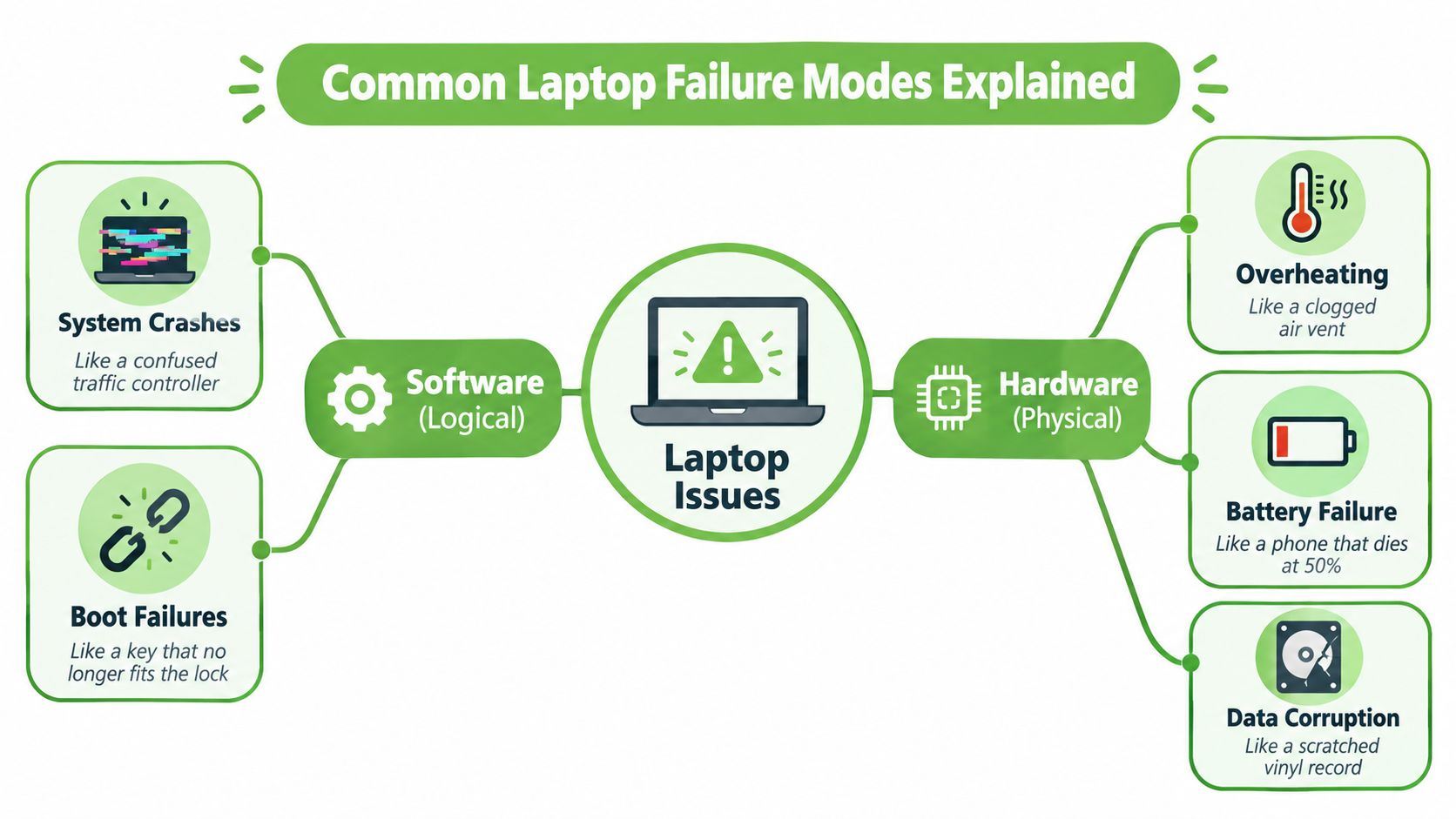
Most laptop failures fit into either logical problems, where the hardware may still work but the information is organised incorrectly, or physical problems, where a component has failed. The distinction matters because software tools can help with a healthy drive and a damaged file system, but they can make a physically failing drive work harder.
Logical faults are filing problems
A failed Windows or macOS update can leave the system unable to start even though your documents remain on the drive. Driver conflicts, damaged system files, accidental deletion, and malware that locks files can produce similar symptoms. Think of the drive as a filing cabinet. The folders may be mixed up, the index may be damaged, or a drawer may appear empty, but the underlying papers may still be present.
File-system corruption can happen after an interrupted update, sudden power loss, or unsafe disconnection. A technician may work from a sector-by-sector image, rebuild access to the volume, or extract files without changing the original media. For general background on diagnosing everyday computer errors, this practical resource on computer troubleshooting from Networking2000 can help you understand the difference between a software symptom and a hardware fault.
Physical faults need a gentler response
A clicking HDD is like a scratched vinyl record where the needle keeps jumping. A serious head crash is more than an annoying sound. It can involve the read head scraping the platter, so stop powering it on and don't run recovery software against it.
An SSD can fail without warning. Its controller acts like the traffic manager between your files and the NAND chips, while the flash translation layer keeps track of where information is stored. If that controller, translation layer, or the NAND itself is compromised, ordinary recovery software won't be enough.
Liquid damage is common in Singapore, whether the cause is kopi, rain on the way from the MRT, or a bottle knocked over in a bag. The motherboard is the laptop's brain. When corrosion or a short takes it offline, the storage may still be intact, but powering the device can spread the damage.
Other faults are easier to recognise. A weak charger or charging port prevents power delivery, an exhausted battery causes sudden shutdowns, overheating points to blocked airflow or thermal problems, and a damaged hinge affects the screen assembly and surrounding cables. You can compare your symptoms with this guide to common laptop problems and repair options before arranging an assessment.
What Really Happens During a Professional Diagnostic
A good diagnostic should feel like a controlled handover, not a mystery box. The technician records the laptop's condition, identifies the likely fault, and separates safe testing from actions that might alter the original data.
The intake creates a clear starting point
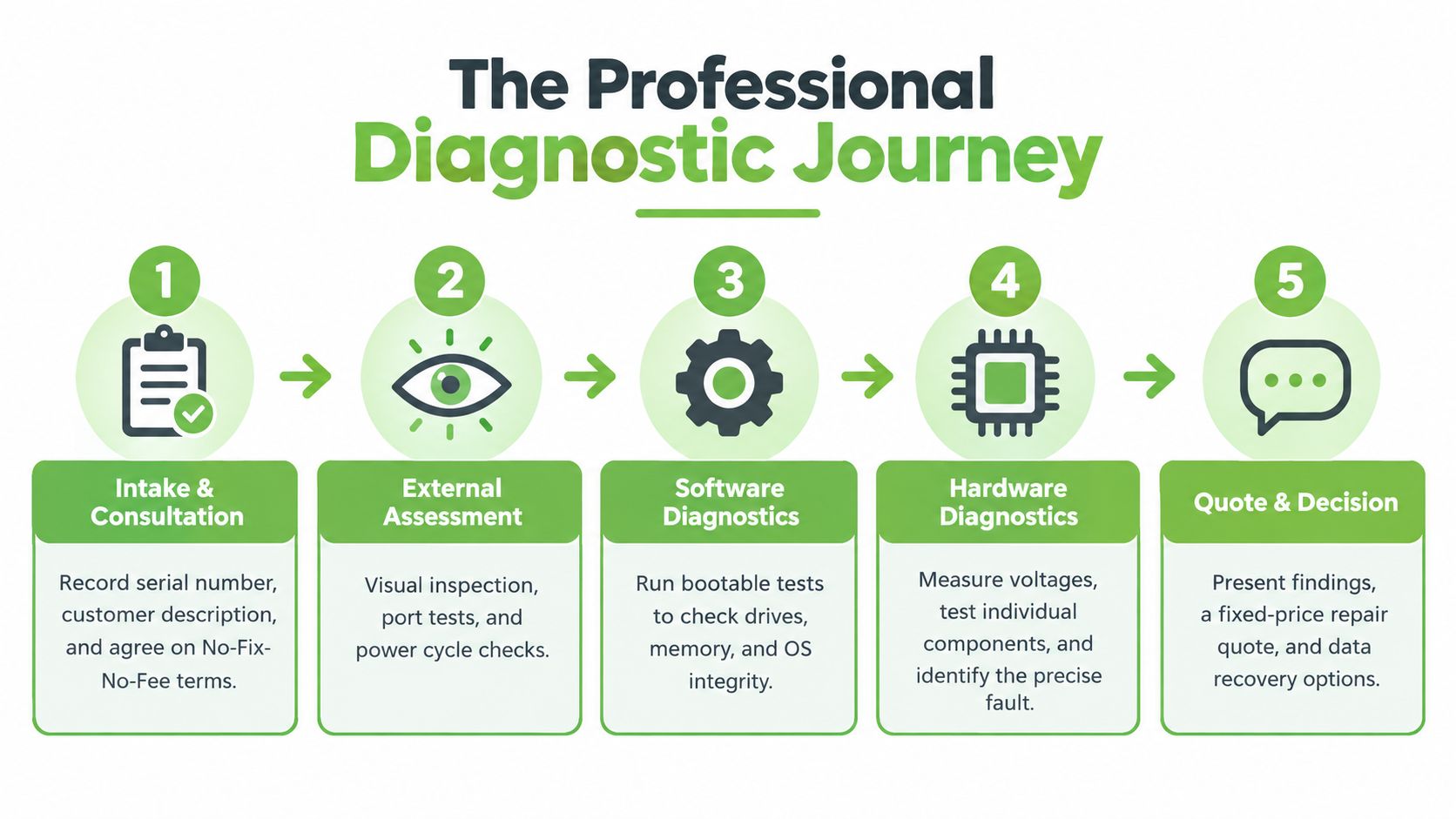
At intake, provide the serial number, your fault description, and the events leading up to the failure. Mention any spill, drop, unusual noise, failed update, or previous repair. Ask whether the provider offers a no-fix-no-fee arrangement and request confirmation of what that means before work begins.
The technician then performs an external inspection. They look for liquid residue, a swollen battery, burnt components, cracked ports, bent chassis parts, and signs of impact. They may also check the charger, charging port, indicator lights, fan response, and display behaviour.
Write-blocking protects the original drive
For a recovery case, the technician should connect the storage through a write blocker. This allows the system to read the drive while preventing diagnostic software from writing changes back to it. That matters because an automatic repair, operating-system update, or simple file-system action can overwrite information that recovery depends on.
The safest starting point is usually an image, sometimes called a clone, made sector by sector. The technician works from that copy wherever possible, reducing stress on unstable media and preserving the original state for further attempts.
The workshop may also perform voltage checks, observe POST behaviour, test memory and power delivery, and interrogate SSD firmware. These checks help distinguish a laptop-level fault from a drive-level fault. A black screen with a healthy drive calls for a different response from an SSD that isn't detected at all.
A responsible provider should then give you a written report covering:
- Observed condition: What the technician found and what remains uncertain.
- Recommended method: Repair, imaging, logical extraction, board work, or component-level recovery.
- Expected outcome: A realistic success range rather than a guaranteed promise.
- Time and cost: The applicable band and what could change it.
- Decision point: The exact stage where you can approve, pause, or stop.
This short video offers a visual look at the kinds of steps involved in technical assessment:
Repair or Replace How Singapore Users Can Decide
Repair shouldn't be a guess based only on the laptop's age or the price of a replacement. Start with the fault, then consider parts availability, warranty rights, data risk, and the total cost of returning to work.
If a single component is faulty and the rest of the laptop is sound, repair often supports both affordability and lower e-waste. A battery, charging port, keyboard, fan, or display can be a sensible repair when the model remains useful and the replacement part is available.
A motherboard fault, bent chassis, unavailable board, or failing storage changes the calculation. A replacement may be more practical when the repair would leave you with an unreliable platform, when the necessary component is difficult to source, or when important files require separate recovery before the machine is retired.
Singapore consumers should also check their purchase documents and applicable rights. CASE explains that, under the Lemon Law framework, consumers may seek repair, replacement, price reduction, or rescission when goods don't conform to the contract. This doesn't mean every old laptop qualifies, so keep invoices, warranty details, and repair records.
Singapore's Government describes right-to-repair as a nascent issue and says it is monitoring global developments. Access to parts, documentation, and specialist diagnostics can therefore vary significantly between models and providers. A repair decision should reflect the exact device in front of you, not a generic lifecycle rule.
| Decision Factor | Lean Toward Repair | Lean Toward Replace |
|---|---|---|
| Parts availability | The correct component is available and the repair path is defined. | The part is unavailable, excessively delayed, or only available as an uncertain substitute. |
| Warranty or consumer rights | Warranty coverage or a valid Lemon Law remedy may reduce the repair burden. | Coverage has ended and the expected repair cost offers little value. |
| Overall condition | The chassis, display, keyboard, battery, and storage are otherwise healthy. | Several major systems are failing, or the chassis and board have suffered serious damage. |
| Data risk | The drive can be imaged safely before or during repair. | The drive is failing and recovery must take priority over restoring the laptop. |
| Total ownership cost | Repair avoids migration, accessories, setup time, and unnecessary disposal. | Replacement offers a dependable platform after repair, recovery, migration, and downtime are considered. |
A useful rule is simple: repair when one defined fault can restore a sound laptop, replace when multiple core systems or data risks make the outcome uncertain.
Realistic Timelines and Cost Bands for Data Recovery
Recovery pricing becomes easier to understand once you separate logical recovery from physical intervention. Deleted files, formatted partitions, and corrupted file systems generally sit in the simpler category. A physically failing SSD or NVMe drive may need controller repair, chip-off work, or reconstruction of its flash translation layer, which requires a different level of care.
For Singapore laptop cases, a published local process places logical recovery at S$180–350 with a typical 1–3 day timeline, while physically failing SSD or NVMe cases fall at S$450–900 or more and 3–21 days, depending on damage severity. See this guide to timelines by data loss type for another plain-language explanation of why failure type affects turnaround.
| Fault Type | Typical Timeline | Indicative Cost Band (SGD) |
|---|---|---|
| Logical issue, such as deleted files, formatted partitions, or file-system corruption | 1–3 days | S$180–350 |
| Physical SSD or NVMe failure, including controller repair, chip-off work, or FTL reconstruction | 3–21 days | S$450–900+ |
Consider two familiar situations. A Windows notebook dropped on a hawker-centre table may have a damaged connector, board, or HDD, so repeated testing can worsen the media. A MacBook with a swollen battery and an unreadable SSD may need the power fault isolated first, followed by a write-blocked storage diagnostic.
The quoted band should come from an assessment, not a guess made over the phone. Before authorising work, ask:
- What was tested: Was the storage assessed, or was the price based only on the laptop model?
- What method is proposed: Will the provider image the drive before attempting repair?
- What is included: Does the price cover diagnostics, donor components, imaging, extraction, and the destination drive?
- What happens if recovery fails: Is there a no-recovery-no-charge clause, and are diagnostic fees separate?
- How will files be returned: Will the recovered data go to an external drive, secure transfer, or another agreed destination?
You can also review this Singapore data recovery guide covering cost and success considerations before contacting a provider. A credible quote should reflect the condition of the original media and the work required to protect it.
Keeping Your Data Safe Before During and After Repair
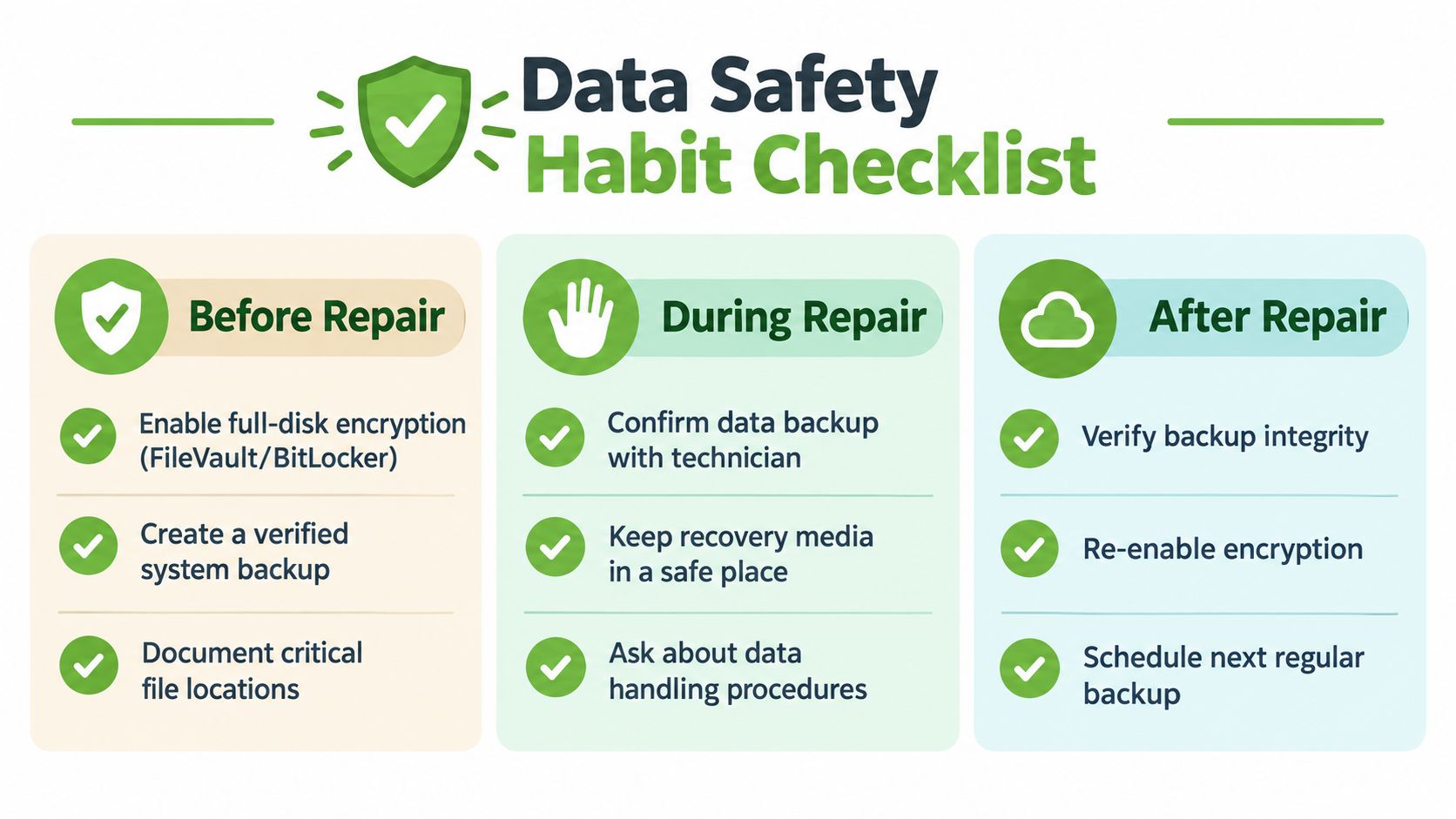
Data security works best as a routine, not a frantic final step. On a healthy laptop, enable full-disk encryption such as FileVault or BitLocker, keep a verified backup in a separate location, and record where your most important files live. A backup helps you resume work. Recovery is the emergency route when the usual copy is missing, inaccessible, or unreliable.
Before handing over a device, sign out of banking, email, cloud storage, and work accounts where practical. Tell the provider if the drive contains confidential client information, personal records, or regulated data. If the repair doesn't require the storage drive, ask whether it can remain with you or be removed before the laptop enters the workshop.
Deleting isn't the same as secure erasure
A factory reset is useful for ordinary reuse and resale workflows, but it shouldn't automatically be treated as forensic-grade sanitisation. Deleted files and formatted volumes can leave traces, and SSD wear-levelling can move data between physical blocks in ways that a simple reset may not fully address.
Singapore's national recycling guidance recommends backing up data and performing a factory reset where possible before recycling. It also says ICT equipment smaller than 500 mm × 250 mm can be dropped into accepted e-waste bins in Singapore, but that recycling step doesn't replace a documented secure-destruction process for sensitive devices.
For organisations, Singapore's PDPC guidance says personal data should be securely deleted, erased, or destroyed before retired devices are disposed of. The practical sequence is:
- Recover first. Triage a failed laptop before disposal if its files may still be needed.
- Sanitise deliberately. Use a verified erasure method when the device is suitable for reuse.
- Destroy when necessary. If secure deletion isn't possible, use an appropriate destruction route such as shredding, degaussing for magnetic media, or incineration.
- Keep evidence. Retain handling records, supervision details, and destruction confirmation.
The data recovery and backup guide can help you build a less stressful routine. For corporate devices, ask for chain-of-custody records, technician confidentiality arrangements, a clear data-handling policy, and a Certificate of Destruction where destruction is selected.
Choosing a Singapore Provider You Can Actually Trust
The strongest provider treats your laptop as one lifecycle responsibility rather than a handoff between unrelated shops. That means the same service journey can address the immediate fault, protect the data, decide whether repair remains sensible, and route the device towards reuse, parts recovery, or secure destruction.
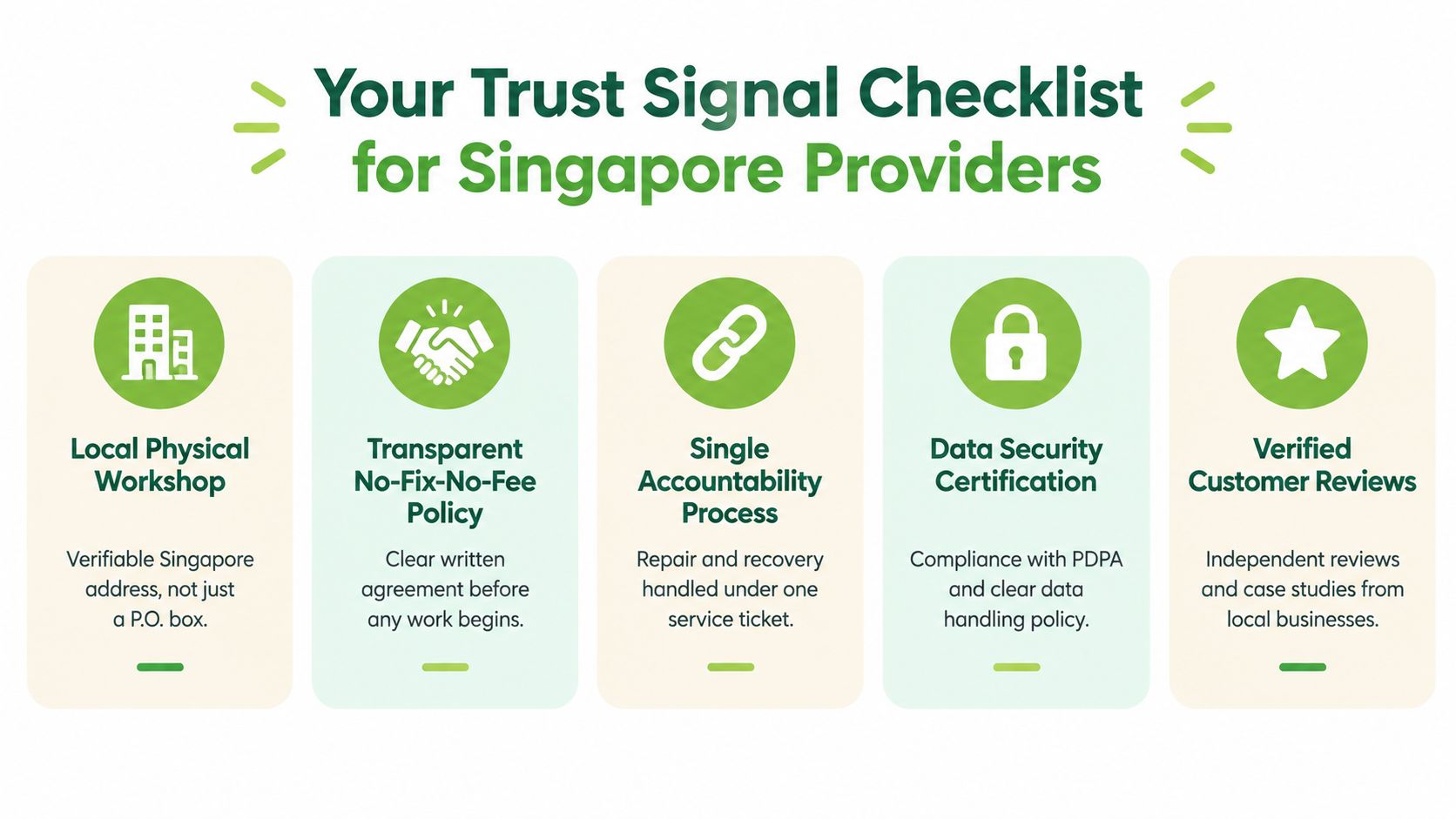
Look for a local physical workshop with a verifiable Singapore address and a clear way to contact the team handling your device. A local provider gives you a more traceable handover than sending a storage device overseas and trying to follow chain of custody across multiple organisations.
Trust signals that matter
A trustworthy Singapore provider should be able to explain its process without hiding behind technical language:
- Write-blocked assessment: The team can explain how it prevents unnecessary writes to the original storage.
- Written findings: You receive the observed fault, recommended method, cost band, and approval point before recovery work begins.
- Clear charging terms: No-fix-no-fee or no-recovery-no-charge terms are written plainly, including any separate diagnostic fee.
- PDPA-aware handling: The provider explains who can access files, how devices are tracked, and how data is deleted after the agreed retention period.
- Documented asset disposition: End-of-life devices move through collection, chain of custody, licensed recycling, and destruction confirmation where required.
- Repair and recovery under one ticket: You don't have to repeat your story to several teams or wonder where the original drive went.
- Reuse before disposal: Safe repairs, parts harvesting, certified resale, and upcycling are considered before the device is discarded.
Singapore Standard SS 714:2025 says secure disposal should be proportionate to the sensitivity of the information and calls for records, supervision, and confirmation of destruction. The Personal Data Protection Act framework also requires organisations to protect personal data from unauthorised access, loss, disposal, or disclosure, and to stop retaining it once it is no longer needed. These principles make documented handling more important than a casual promise that files will be “deleted”.
A Singapore lifecycle provider can also connect environmental responsibility to practical service. Components that are safe to repair keep a laptop useful, working devices can return to circulation, and unusable equipment can be routed through responsible recycling or certified destruction. That is the bridge between Safe data, Save data, and Declutter your e-clutter.
The myhalo Promise is straightforward. Through its Singapore device-lifecycle services, myhalo supports repair and data recovery, secure data management and destruction, documented IT asset disposition, reuse, and responsible recycling pathways. The aim is to make letting go of old technology convenient, safe, and responsible, while giving your files the care they deserve.
Your precious files and memories matter to us. Whether you need to protect your privacy with Safe data or rescue lost files with Save data, our caring team is right here to help. Reach out to us today!