
Mum sends a worried WhatsApp message from the MRT: she's dropped her phone, the screen has cracked, and she's afraid her photos are gone. Meanwhile, your own phone only charges when the cable sits at a particular angle. Before either of you buys a replacement, pause. A sensible mobile phone fix starts with identifying the fault, protecting the data, and deciding whether the device is still worth keeping.
Table of Contents
- When the Panic Sets In on a Singapore Phone
- The Four Singapore Phone Problems You Will Actually Meet
- DIY or Professional Repair The Two-Minute Decision Test
- Why Replacement Is Often the Wrong Default in Singapore
- Protecting Your Data Before a Single Screw Turns
- After the Repair How to Know It Actually Worked
- Your Next Step Repair Trade-In or Rehome
When the Panic Sets In on a Singapore Phone
A cracked screen before a meeting feels urgent because your phone isn't just a phone. It's your transport booking, work chat, banking access and family photo album. When it stops cooperating, replacing it immediately can feel like the easiest escape.
But a damaged display doesn't automatically mean damaged storage, and a phone that won't charge doesn't automatically need a battery. The symptom tells you where to investigate, not which part to buy. That distinction can save you from paying for a repair that never addresses the problem.
This is a familiar moment on a crowded commute.

Slow down the spending, not the safety response
Singapore's IMDA Singapore Digital Society Report recorded smartphone ownership at 97% in 2022, its highest recorded level at the time, with ownership among seniors reaching 89%, up from 74% in 2017. Repair decisions therefore matter across generations, including parents who may need help navigating backups and account access.
Your immediate job is to preserve your options:
- Record what happened. Note the drop, kopi spill, charging problem or unexpected shutdown before you forget the sequence.
- Check whether your data is backed up. Don't assume that seeing a cloud icon means your latest photographs have uploaded.
- Avoid approving parts on a guess. Ask for diagnosis, a written quote and an explanation of what the repair will resolve.
Start here: If the battery is swollen or the phone becomes abnormally hot, stop using and charging it. Arrange professional assessment rather than trying another cable.
For a phone sitting unused because you're worried about privacy, Safe data and Declutter your e-clutter offer separate ways forward: secure handling of sensitive information and a responsible route out of the drawer. You don't have to choose between keeping clutter forever and handing over your memories without answers.
The Four Singapore Phone Problems You Will Actually Meet
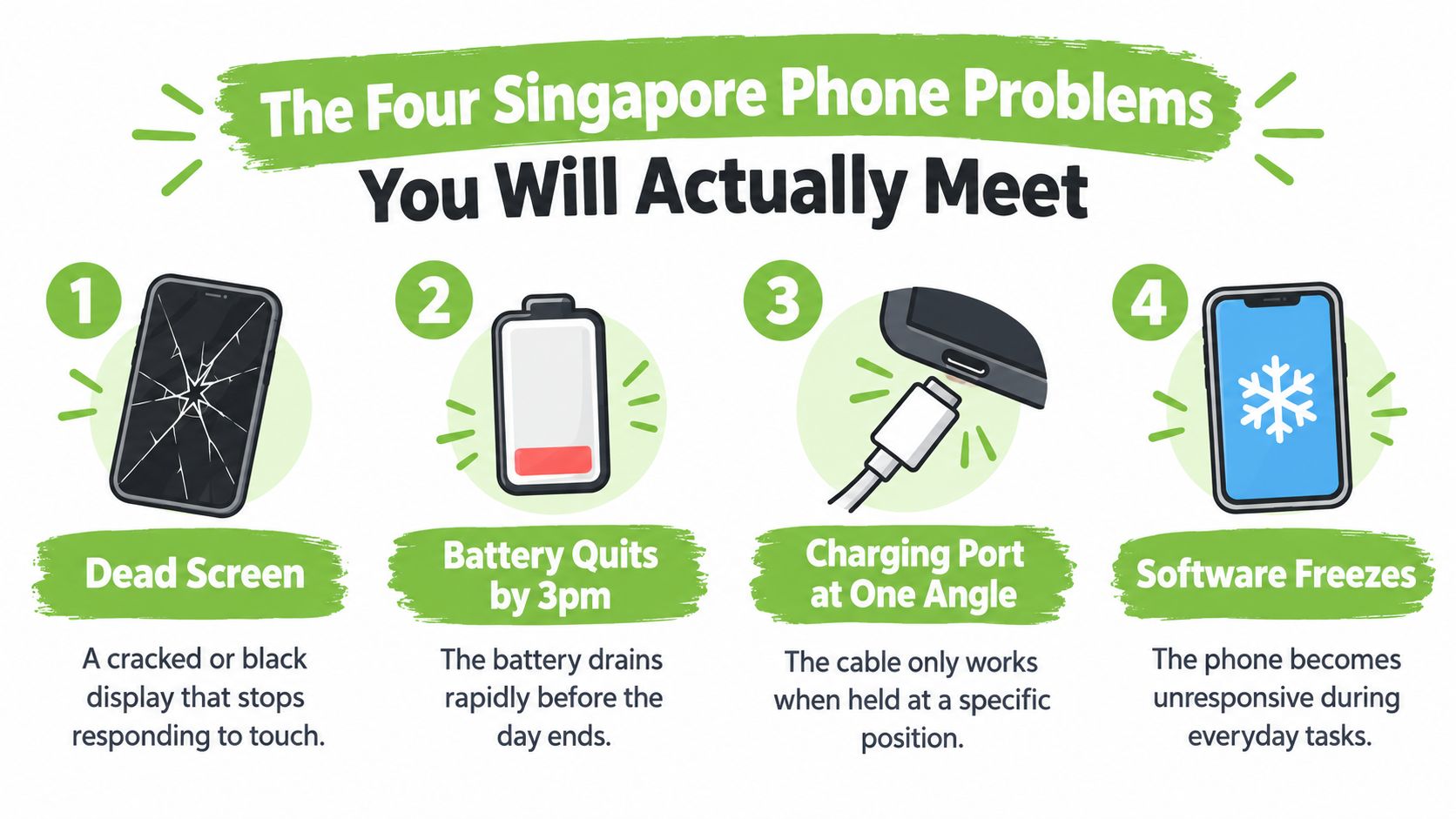
Name the problem before choosing the fix. A black display, fast-draining battery, unreliable charging connection and frozen app need different checks, even when they all leave you saying that your phone is broken.
Use this checklist to describe the symptom at the repair counter.
Screen and battery symptoms
A cracked or black screen: Start by checking whether the phone still rings, vibrates or produces notification sounds. If you can safely use the display, test touch across its surface rather than only tapping the centre. Tell the technician whether the problem appeared after an MRT drop, and don't press on damaged glass to make it respond.
A battery that quits before your day does: Look at battery-health information if your model provides it, then record whether the phone loses charge while idle or only during use. A technician should assess battery condition alongside temperature, charging behaviour and power-management faults. A battery replacement shouldn't be authorised because the phone shuts down.
A bulging back or lifted display is a stop-use warning. Don't blame a humid afternoon, squeeze the case shut or try to open it yourself.
Charging and software symptoms
For charging trouble, keep the checks gentle:
- Try a known-working cable and charger. This helps separate an accessory problem from a fault inside the phone.
- Inspect without digging. Look for visible damage or debris, but don't insert metal objects into the port.
- Describe intermittent contact. If charging depends on cable position, report that behaviour rather than repeatedly bending the connector.
The charging-port replacement guide is useful preparation for discussing the difference between a connector fault and a deeper charging problem.
Software freezes: If PayNow stops responding, check whether other apps also freeze. Record the error, restart using your model's normal procedure, and review available storage and updates. Don't erase the phone as your opening move, especially when the only copy of important data is still on it.
Mention liquid contact even if the phone recovered after a kopi-shop spill. Repair diagnosis needs the history, not just today's symptom.
The environmental reason to investigate is substantial: a historical NEA e-waste study found that Singapore generated more than 60,000 tonnes annually, equivalent to about 73 mobile phones per resident. That's all e-waste expressed as a comparison, not a count of discarded phones.
DIY or Professional Repair The Two-Minute Decision Test
DIY makes sense for reversible checks. Professional repair makes sense when you're opening the device or taking responsibility for its safety. You don't need to prove your technical confidence by peeling apart a sealed phone at the kitchen table.
Before doing anything invasive, apply these tests.
Check coverage, safety and parts
- Warranty or insurance status: Ask the provider what assessment and repair routes are covered before you authorise work elsewhere. Read the actual terms rather than assuming every cracked screen qualifies.
- Safety and damage history: Swelling, charging heat, liquid entry or suspected corrosion should move the decision towards professional diagnosis. Corrosion means damage to internal metal connections, not merely a stain on the outside.
- Suitable replacement parts: Ask what part will be fitted, how it will be tested and whether any functions need calibration, meaning adjustment so the replacement works correctly with the phone.
OEM means original equipment manufacturer. It's a description worth understanding, but a parts label alone doesn't prove that the diagnosis or installation is sound. The phone repair parts guide can help you prepare specific questions about the proposed replacement.
DIY vs Professional Repair at a Glance
| Fault Type | DIY Friendly | See a Professional |
|---|---|---|
| Damaged screen protector | Replace it carefully if the display beneath is intact | Glass damage, black patches or failed touch |
| Unreliable charging | Test a known-working cable and charger | Loose port, abnormal heat or persistent failure |
| Fast battery drain | Review settings and record symptoms | Battery replacement or unexplained shutdowns |
| Frozen software | Restart and check updates after protecting data | Persistent freezing or an inaccessible device |
| Dirty charging opening | External inspection and gentle surface cleaning | Compacted debris or anything requiring tools inside |
| Liquid exposure or swelling | No opening or charging experiments | Safety assessment and internal diagnosis |
A factory reset belongs at the end of a software troubleshooting process, after a verified backup and account-access plan. It's not a harmless test when you might erase the only copy of a file.
A repair video shows the procedure on someone else's device. It doesn't tell you whether your phone has the same fault, whether your replacement part is suitable, or whether your data will survive.
Singaporeans replace smartphones about every 2.7 years, compared with a global average of roughly 3.5 years, according to The Straits Times report on keeping phones in use longer. Don't let an upgrade habit become your repair decision. Ask whether a controlled fix will leave you with a dependable device you want to keep.
Why Replacement Is Often the Wrong Default in Singapore
Repair first is a useful starting position, not a promise that every phone deserves saving. A targeted repair preserves working components you've already paid for. Replacing the whole device because its charging port fails is a bigger purchase than the fault itself demands.
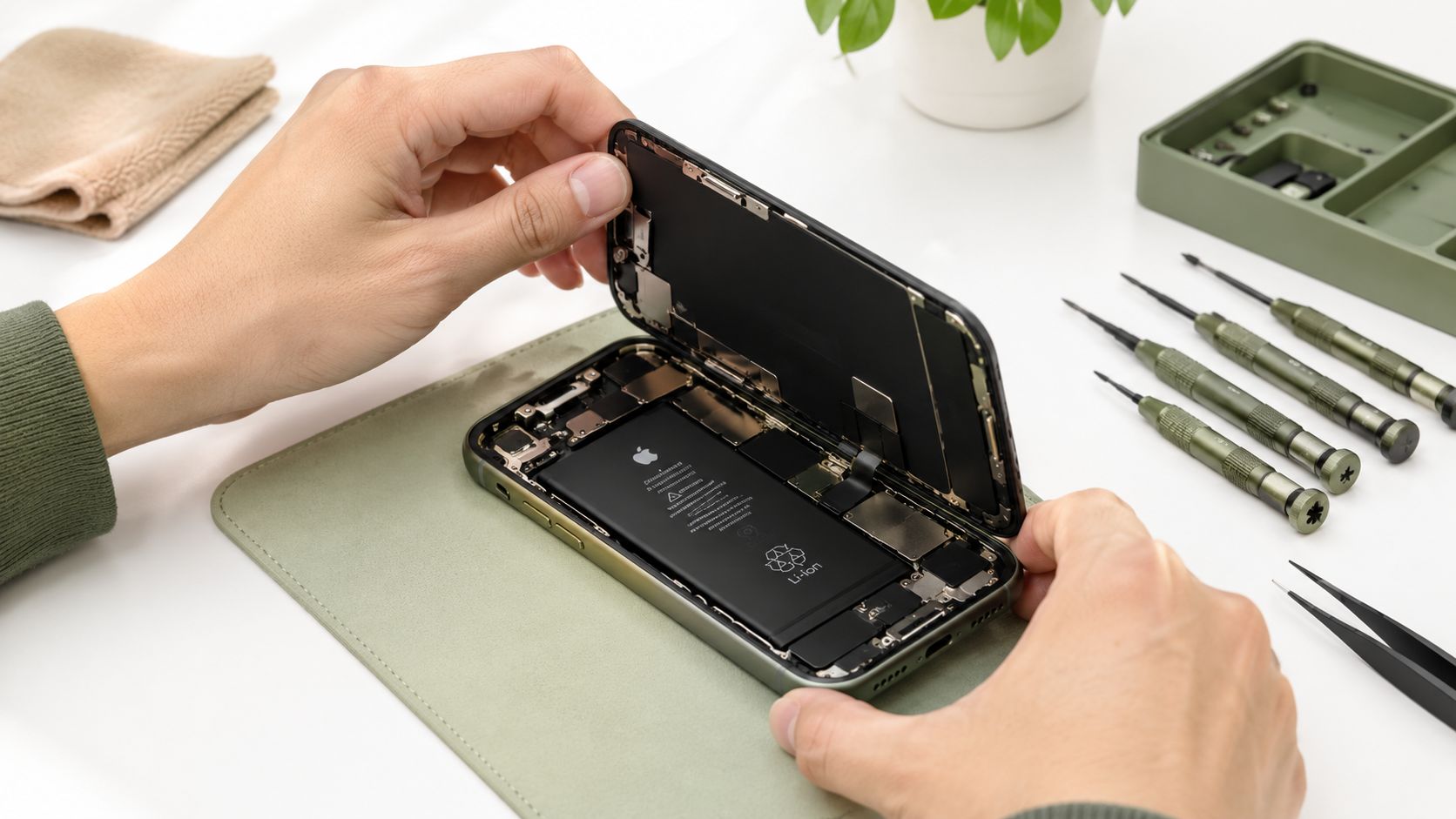
A careful repair begins with access and diagnosis, not a shopping list of parts.
Compare useful value, not the original receipt
Your phone's launch price isn't the right benchmark. Find the current second-hand value of the same model, storage capacity and condition, then compare the repair quote with the cost of a usable equivalent replacement. Include any additional work already known to be necessary.
Next, check remaining software support on the manufacturer's information for your exact model. A repaired phone needs to remain suitable for the apps and security requirements you depend on. A working display doesn't solve an unsupported device.
Use this decision framework:
| Factor | Repair looks sensible when | Replacement deserves consideration when |
|---|---|---|
| Repair cost and residual value | The quote buys worthwhile continued use | The quote approaches a usable replacement's value |
| Software support | The model remains supported for your needs | Support no longer meets your requirements |
| Overall condition | The fault is isolated and the rest tests well | Several faults need work or keep returning |
| Data risk | The proposed repair preserves access to needed files | Device replacement and data recovery need separate plans |
| Parts and reliability | Suitable parts and validation are available | Parts are unavailable or severe corrosion limits confidence |
The environmental argument is practical: keep the working display, cameras and processor in service instead of replacing them unnecessarily. But don't approve an unreliable repair merely to feel greener. A phone that repeatedly fails your workday isn't a useful outcome.
Know when to stop funding repairs
Severe board corrosion, repeated faults and uncertain parts availability deserve a firm pause. The board is the internal assembly connecting and controlling the phone's main functions. Ask whether the quote restores dependable everyday use or merely gets the device running long enough to retrieve data.
Here's another way to consider the repair process before committing.
If replacement is justified, a tested and graded certified ReLoved handset is an alternative to buying new. Separate the replacement decision from the fate of your old device, especially if it still holds valuable information.
Protecting Your Data Before a Single Screw Turns
Privacy is part of the repair, not paperwork to finish afterwards. Your photographs, work messages and banking access deserve an explicit handling plan before the phone leaves your possession.
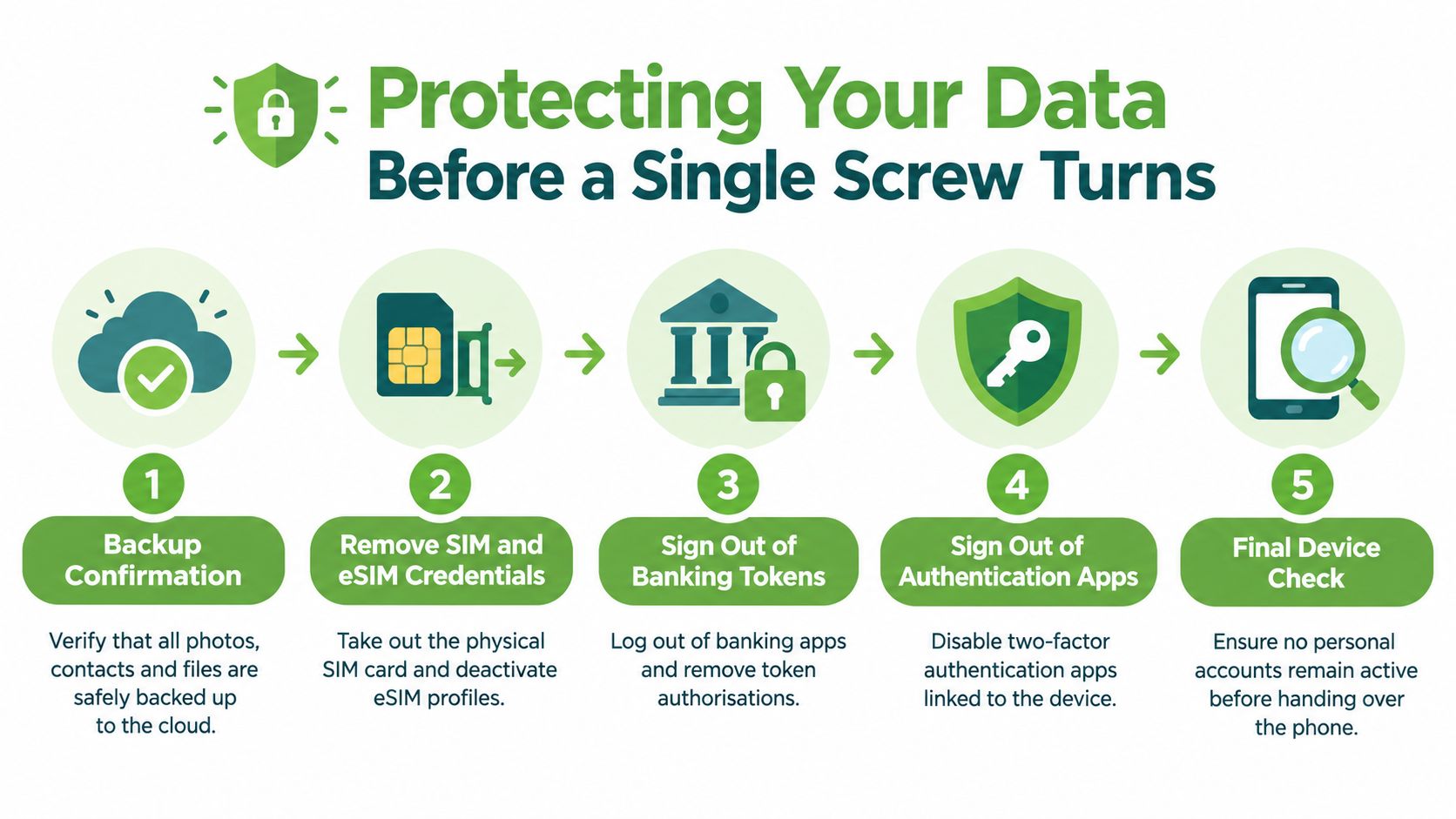
Use this checklist, but adapt account removal to whether you're repairing, recovering data or permanently handing over the device.
Prepare access without losing access
Verify your backup. Open recent photographs, contacts and essential files from another trusted device. For work phones, confirm the approved backup route with IT rather than copying company material to a personal account.
Plan SIM and eSIM handling. Remove the physical SIM where appropriate. An eSIM is a mobile subscription profile stored on the phone, so confirm the operator's transfer or reactivation process before deleting it.
Secure banking and authentication access. Follow your bank's procedure for removing device authorisation if needed. Transfer authentication apps or obtain recovery methods before removing them, otherwise you could lock yourself out of accounts.
Account reminder: Deleting a banking app isn't a substitute for checking its device-token authorisation. Confirm the bank's procedure and your replacement access first.
Don't remove activation locks blindly for an ordinary repair. Ask whether removal is necessary, why it's needed and when you can restore protection.
Document the handoff and the final outcome
- Set diagnostic consent. Photograph external damage and record the model, symptoms and whether the phone is locked. Ask who will handle it, whether it will leave the premises, what access testing requires and whether any proposed operation could erase data.
A test account or supervised check is preferable to unrestricted access. Technicians should minimise exposure to personal information rather than browsing files to demonstrate that the phone works.
- Agree on data-status closure. Repair, data recovery and disposal require different permissions. Request a record of replaced parts and device handoffs, and specify whether you need proof of secure erasure or destruction if the device won't return to you.
For a broken screen or phone that won't boot, don't authorise wiping before deciding whether you need recovery. The Android data recovery guide helps frame that conversation. Save data addresses rescuing files and memories; it shouldn't be confused with erasing them.
For organisations, PDPC's guidance on disposing of personal data explains the Section 24 PDPA obligation to make reasonable security arrangements against unauthorised access, disclosure, copying, modification and disposal. IMDA's data protection checklist also addresses deleting confidential information before hardware disposal.
A factory reset alone may not meet corporate or high-sensitivity requirements. Singapore's regulated e-waste rules require licensed recyclers to permanently erase or destroy data on data-bearing devices before the specified onward handling, but that protection isn't a blanket guarantee for every informal repair or resale handoff.
After the Repair How to Know It Actually Worked
A bright screen at the counter proves that the display turns on. It doesn't prove that charging is stable, the microphone works or the phone behaves normally while idle.
Ask for validation of the original fault and the functions disturbed during repair. If a battery was replaced, the technician should investigate abnormal heat or drain, not just show you a higher charge reading.
Test the phone as a complete device
Before accepting the repair, work through these checks with the technician:
- Display and touch: Test across the screen, including edges, brightness adjustment and normal gestures.
- Calls and recording: Make a call and record a voice note to check microphones, speakers and the earpiece.
- Cameras and connections: Check front and rear cameras, mobile connectivity, Wi-Fi and Bluetooth.
- Biometric access: Confirm Face ID, fingerprint recognition or the equivalent feature works as agreed.
- Charging and temperature: Ask what charge-and-discharge observation was completed, then monitor ordinary use for unexpected drain or heat.
- Sealing limitations: Obtain a clear explanation of water-resistance limitations after opening. Don't assume the original protection remains unchanged.
Ask the repairer to put unresolved limitations in writing. That's more useful than a cheerful assurance that everything looks fine.
Judge the service by how it handles returns
A service centre's first-time-fix rate describes how often the initial repair resolves the reported fault. A repeat-return rate records devices brought back with problems, while parts-caused rework identifies jobs that need repeating because of replacement components.
Ask whether the repairer tracks these outcomes over a defined return period, what counts as a return and how many jobs the figures cover. A percentage without that underlying job count isn't enough to judge quality, and there's no reason to treat one shop's figures as Singapore-wide evidence.
Keep the receipt, parts description and written warranty terms. Report recurring symptoms with observations rather than approving another speculative replacement.
If the phone can't be restored, its next route still matters. Singapore introduced its regulated e-waste system on 1 July 2021 under Extended Producer Responsibility, with covered ICT equipment, including mobile phones, channelled to licensed recyclers through the regulated system, as explained by NEA's e-waste management guidance. Ask whether the device is suitable for reuse, parts recovery or regulated recycling after its data status is resolved.
Your Next Step Repair Trade-In or Rehome
Tonight, choose the next action rather than leaving the phone in limbo. Book diagnosis if the fault looks repairable, request a recovery assessment if inaccessible files matter, or compare a Singapore phone trade-in route when continued use no longer makes sense.
- Repair: Take your symptom notes and data-handoff checklist.
- Trade in or rehome: Confirm condition, ownership and account-removal requirements.
- Recycle: Resolve sensitive data before using an appropriate collection route.
NEA's EPR collection framework-system-for-e-waste-management-system) accepts mobile phones and tablets in 3-in-1 e-waste bins for suitable items fitting a 500 mm by 250 mm slot, alongside categories including printers, modems and small televisions.
Keeping a useful phone working is a practical contribution towards a zero e-waste world. When it can't stay with you, give it a documented next step.
myhalo offers Repair and Rescue diagnostics, trade-in, certified ReLoved devices and Declutter your e-clutter pathways, with drop-off counters at Bugis Junction and Sim Lim Square. Bring your phone and symptom notes, and ask about Safe data secure handling or Save data recovery before authorising work. Join the zero e-waste community by choosing a convenient, safe and responsible next step for the device you already own.