
You're scrolling through a refurbished phone listing when the price makes you pause. It looks spotless, the model is still capable, and the savings are tempting. Then a small worry appears: will the battery last, will every feature work, and are someone else's photos or login details still hidden inside?
That hesitation is sensible. A second-life device has already been used, repaired, or returned, so a quick glance can't tell you enough. Quality assurance testing turns that uncertainty into evidence. It helps decide whether a phone, tablet, or laptop is safe to use, suitable for resale, and ready for another useful chapter instead of an early trip to the e-waste stream.
Table of Contents
- Why Quality Assurance Testing Matters Before You Buy a Refurbished Device
- What Quality Assurance Testing Really Means for a Second-Life Device
- The Functional Checks That Decide If a Device Is Truly Ready
- Cosmetic Grading and Battery Health in Plain English
- Data Sanitisation and What Happens to Your Old Files
- From Individual Checks to a Final QA Workflow
- Standards, Regulations, and Customer Expectations in Singapore
- Your Quick Buyer Checklist and the Zero-E-Waste Connection
Why Quality Assurance Testing Matters Before You Buy a Refurbished Device
A refurbished device can look almost new and still hide a serious fault. A clean phone may have a touchscreen dead zone near the edge. A laptop may charge only when its cable is held at an awkward angle. A device that starts normally may contain a tired battery or storage that fails under sustained use.
Quality assurance testing catches these less visible problems before the item reaches a buyer. It's similar to a pre-purchase inspection for a used car. The paint matters, but so do the brakes, engine, lights, and service records. For electronics, the equivalent checks cover function, condition, battery safety, connectivity, and data privacy.
The cost of skipping the checks
Without a documented process, refurbishment can become a guessing exercise. A seller might test whether the device powers on, wipe the screen, and list it as “like new”. That approach doesn't tell the buyer whether the microphone works during a call, whether the camera focuses correctly, or whether the charging port remains reliable after repeated use.
Quality assurance testing also protects the seller. A clear record shows what was checked, which parts were repaired, what cosmetic grade was assigned, and why the final price is fair. If a customer later reports a fault, the team can review the original findings instead of relying on memory.
Practical rule: A refurbished device earns trust through repeatable checks and recorded evidence, not through appearance alone.
Singapore's wider conformity-assessment system reflects this same principle. Enterprise Singapore's Quality and Standards programme promotes testing, inspection, and certification to assure clients of product and service quality. The Singapore Accreditation Council's description of the TIC sector also connects conformity assessment with verification, validation, operational efficacy, mutual recognition, and trust.
For buyers, the lesson is straightforward. Ask what the seller tested, how the result was recorded, and what happens when a device fails. A properly tested phone isn't guaranteed to last forever, but it has passed a meaningful decision process before it reaches your hands.
What Quality Assurance Testing Really Means for a Second-Life Device
Quality assurance testing for a refurbished device is best understood as a health check with a paper trail. The technician isn't only asking, “Does it turn on?” They're asking whether the device is safe, usable, accurately described, and free from the previous owner's information.
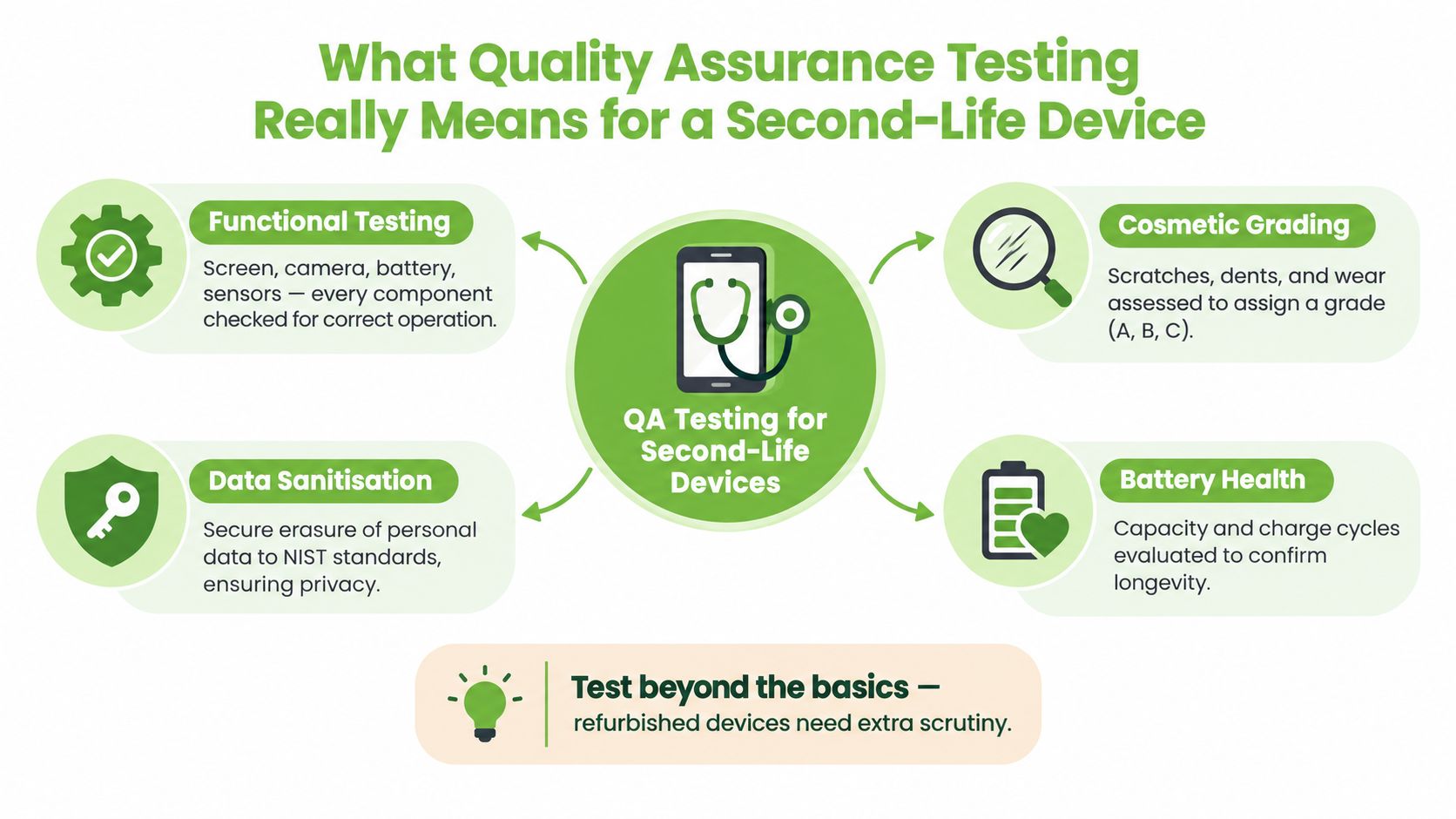
A practical process has four connected pillars:
- Functional testing checks whether the device performs its essential jobs. On an iPhone, that can include the display, touch response, cameras, microphones, speakers, buttons, charging, sensors, Wi-Fi, Bluetooth, and mobile connection.
- Cosmetic grading records visible wear. Scratches, dents, marks, and cracks affect what the buyer should expect and help separate an honest description from an optimistic one.
- Battery health examines whether the battery can support normal use safely. A battery can hold a charge today and still show signs that it needs replacement.
- Data sanitisation removes the former user's content and verifies that the process worked. It protects private photos, messages, documents, account details, and business information.
Why documentation matters
Each pillar should produce a clear outcome, such as pass, fail, repair required, or not applicable. A technician may note that the touchscreen responds across its full surface, the charging port holds the cable securely, and both cameras focus correctly. If the port disconnects during testing, the device shouldn't move to resale. It should go to repair, retesting, or a different end-of-life route.
This approach is more disciplined than a checklist completed from habit. The test method needs to suit the device, the intended buyer, and the risk involved. A phone sold to a student may need a different usage profile from an enterprise laptop that previously stored client records, but neither should skip core safety and privacy checks.
Singapore's laboratory quality infrastructure provides a useful reference for this evidence-based mindset. HSA's quality-management information describes validated methods, reference materials, strict quality control across sample management and reporting, and inter-laboratory proficiency testing in accredited laboratory work. The same principle applies here: reliable decisions depend on controlled methods, suitable equipment, and results that another person can understand and review.
The Functional Checks That Decide If a Device Is Truly Ready
Functional testing starts with basic operation, then moves into the features people depend on every day. A technician shouldn't stop after seeing the Apple logo or Windows desktop. The useful question is whether the device behaves consistently under realistic use.
| Test Category | What Is Checked | Pass Signal Example | Fail Signal Example |
|---|---|---|---|
| Display and touch | Screen brightness, colour, dead pixels, touch response, and edge sensitivity | Touch responds across the full test area without missed input | A strip of the screen ignores taps or swipes |
| Audio and calls | Microphone, earpiece, speakers, vibration, and recording | Test recording plays back clearly and a call test has two-way audio | Microphone cuts out or one speaker grille produces no sound |
| Cameras and sensors | Front and rear cameras, focus, flash, proximity, and motion sensors | Images focus at different distances and the proximity sensor reacts correctly | Camera remains soft, flashes inconsistently, or fails to focus |
| Ports and buttons | Charging socket, USB-C or Lightning connection, power button, volume keys, and other controls | Cable remains seated and charging continues while the device is moved gently | Charging stops unless the cable is held at an angle |
| Connectivity | Wi-Fi, Bluetooth, mobile signal, and device pairing | Connections pair, remain stable, and transfer data normally | Bluetooth drops repeatedly or Wi-Fi disconnects during use |
A pass signal should be specific. “Working” doesn't tell the next person much. “Touchscreen responsive on full grid, speakers clear, charging stable, buttons responsive” gives the record practical value. A fail signal should also describe the behaviour, because intermittent problems can be harder to repair than obvious ones.
Testing the repaired device again
A replacement part doesn't automatically mean the job is complete. If a charging port is replaced, the technician should test charging, data transfer, cable fit, and physical stability again. If a screen is replaced, the team should repeat touch, brightness, camera, proximity, and biometric checks where relevant.
Connectivity deserves its own attention. A refurbished phone may pass local Wi-Fi testing but fail to hold a mobile signal, while a laptop may connect to Bluetooth headphones but struggle with its wireless network. These checks reflect how buyers use devices, rather than treating each component as isolated.
For a more detailed laptop-specific examination, see this guide to advanced tests for a refurbished Windows laptop. The important habit is to connect every result to a decision. A clean pass moves the device forward, a failure triggers repair or review, and an uncertain result needs further investigation rather than an assumption.
Cosmetic Grading and Battery Health in Plain English
Cosmetic grading answers a visual question: what will this device look and feel like when it arrives? It shouldn't be confused with functionality. A phone with visible scuffs may work perfectly, while a pristine-looking phone may have a serious internal fault.
A simple A-to-C scale can make the description easier to understand:
| Grade | Cosmetic Descriptor | Battery Health Threshold |
|---|---|---|
| A | Looks close to new, with only very light hairline marks | Confirm the seller's stated battery requirement and test result |
| B | Visible scuffs or light dents, with no misleading “like new” presentation | Confirm that the battery meets the seller's resale standard |
| C | Heavy wear or visible cracks, provided the device is otherwise safe and functional | Ask whether the battery is being sold as-is or replaced |
The grade should stay attached to the device through inspection, listing, packing, and customer service. That prevents a Grade B laptop from becoming “excellent condition” in a later sales description. Buyers can then choose based on priorities. Someone who uses a phone with a protective case may favour a lower cosmetic grade, while a business buying staff laptops may want a more consistent appearance.
Battery figures need context
Battery health can refer to several different measurements. Cycle count indicates how many full-use equivalents the battery has experienced. Design capacity is what the battery was intended to hold when new, while full charge capacity is what it can hold now. The gap between those figures helps show wear.
Many refurbishers use an 80% threshold when deciding whether to resell a battery as-is or replace it. That figure is a common industry practice rather than a universal rule, so ask the seller what standard they apply and whether the result is documented.
A battery report should also mention swelling, unusual heat, charging behaviour, and unexpected shutdowns. Capacity alone isn't enough to assess safety. If you're considering a MacBook with poor endurance, review the guidance on MacBook battery replacement and ask whether the quoted condition reflects the original battery or a replacement.
Data Sanitisation and What Happens to Your Old Files
A factory reset is useful, but it isn't automatically proof that every old file is unrecoverable. Data sanitisation is the controlled process of removing information from storage and checking that the chosen method matches the device and its next destination.
Singapore's Resource Sustainability regulations for general waste disposal facilities require a licensed e-waste recycler to ensure that data stored on data-bearing devices it receives is properly handled. The PDPA security obligation explained for Singapore organisations also requires reasonable security arrangements to protect personal data.
Three familiar sanitisation choices
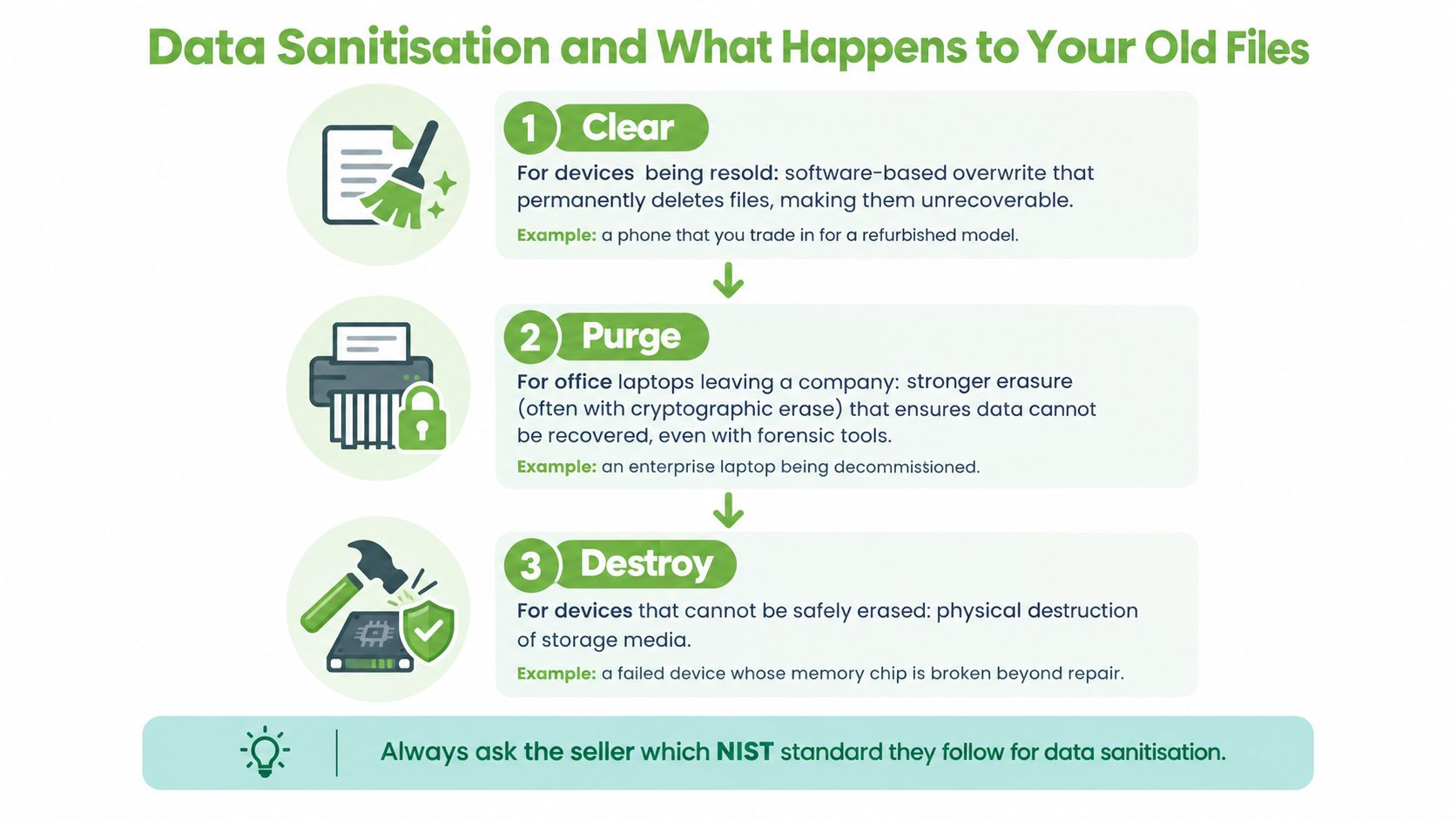
NIST SP 800-88 terminology is commonly used in Singapore device-disposal practice:
- Clear is suitable for a device staying within a controlled environment or being prepared for ordinary resale, using software-based methods appropriate to the storage technology.
- Purge is a stronger method for hardware leaving an organisation's control. Cryptographic erasure can remove the keys that make encrypted data readable, while other approved methods may apply to the drive.
- Destroy is used when storage can't be safely erased or the risk requires physical destruction. Shredding or disintegration makes the storage media unusable.
The right method depends on whether the device will be reused, whether it leaves organisational control, what type of storage it contains, and how sensitive the information is. A personal phone being traded in and an office laptop used by a finance team shouldn't necessarily follow the same route.
Verification completes the process. The operator records the asset identity, method used, result, and any exception. If the drive fails sanitisation, it shouldn't proceed to resale. It should be escalated for a stronger method or physical destruction.
For a practical explanation of the process, see this guide to secure data destruction. If you're handing over a device, ask for evidence rather than relying only on the words “factory reset”.
From Individual Checks to a Final QA Workflow
A strong QA workflow is a chain, not a collection of disconnected checks. The device enters with an identity and condition, moves through repair and testing, receives a transparent grade, completes data sanitisation, and leaves with a final sign-off.
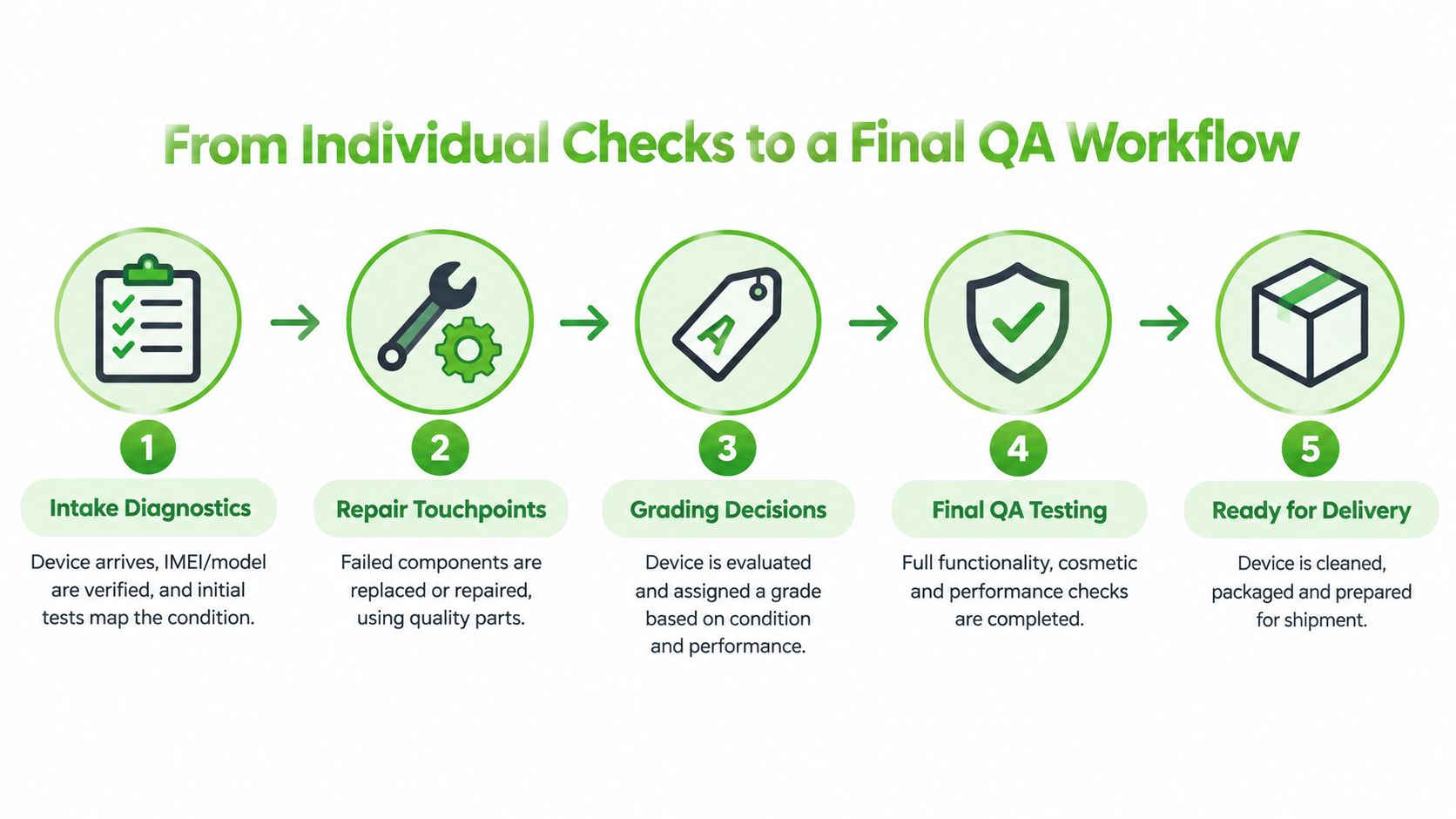
Take a used business laptop as an example. At intake, the team verifies its model and serial details, records visible wear, checks whether it powers on, and identifies the installed storage. If the keyboard has missed inputs or the battery shows concerning behaviour, those findings become repair touchpoints rather than hidden defects.
After repair, the laptop goes through functional checks again. The technician tests the display, keyboard, trackpad, ports, webcam, microphone, speakers, Wi-Fi, Bluetooth, charging, and operating-system setup. The team then assigns the cosmetic grade and records the battery result in language a buyer can understand.
The final record
Data sanitisation happens before the device is released for a new user. The operator links the sanitisation result to the device identity and records whether the process passed. If an organisation requires a certificate, that evidence can be retained with the asset record.
A final reviewer checks that no failed test remains unresolved, the listing matches the physical device, accessories are correctly described, and the warranty or return terms are ready to share. device documentation practices become valuable here. Good records support customer questions, corporate procurement reviews, and future service decisions.
A QA report doesn't promise that a second-life device will never need maintenance. It shows that the seller made a disciplined decision about its condition before sale.
The same workflow supports repair, resale, trade-in, and upcycling. A device that passes can serve another user. One that fails a repairable check can return to the bench. One that can't be safely reused may provide parts for another device, with data and environmental responsibilities handled separately.
Standards, Regulations, and Customer Expectations in Singapore
Singapore's quality infrastructure treats testing, inspection, and certification as formal conformity-assessment activities. For refurbished electronics, that means QA is more than a final visual check. It's a system for traceability, verification, validation, and defensible decisions.
ISO/IEC 17025 is the recognised international standard for the technical competence of testing and calibration laboratories. Singapore institutions including HSA laboratories and the National Centre for Food Science publicly describe quality systems based on SAC-SINGLAS and ISO/IEC 17025. In relevant works, LTA specifications also require testing by SAC-SINGLAS-accredited or approved laboratories where applicable. These examples show why method control, calibration, and independent competence matter when results carry commercial or compliance weight.
| Standard / Regulation | What It Covers | Why It Matters for Buyers |
|---|---|---|
| PDPA Section 24 | Reasonable security arrangements for personal data | Your previous information needs controlled handling before resale |
| Resource Sustainability regulations | Proper handling of data stored on received data-bearing devices | E-waste processing includes privacy responsibilities |
| ISO/IEC 17025 and SAC-SINGLAS | Technical competence in testing and calibration laboratories | Test results can be supported by controlled methods and traceable processes |
| Surveyor reports for reuse | Evidence that used electrical and electronic equipment is in working condition and intended for reuse | Resale and refurbishment claims can be tied to documented inspection |
For corporate buyers, serial or IMEI traceability, sanitisation certificates, repair records, and surveyor reports can support internal governance. Individual buyers can ask simpler questions: What was tested? What battery information is available? What does the cosmetic grade mean? What warranty and return terms apply?
Those questions aren't difficult or confrontational. They help both sides agree on what “refurbished” means before payment.
Your Quick Buyer Checklist and the Zero-E-Waste Connection
Use this short checklist before buying a refurbished phone, tablet, or laptop:
- Request the test report: Ask for the functional checks, including screen, camera, battery, sensors, ports, and connectivity.
- Confirm the cosmetic grade: Find out whether A, B, and C have written definitions, and check the actual photos.
- Verify data sanitisation: Ask how the previous owner's information was removed and whether the result was recorded.
- Check battery information: Request the available capacity, cycle-count information, and replacement status.
- Review warranty and returns: Understand the cover, exclusions, return process, and support route before you buy.
Quality assurance testing gives sustainability a practical foundation. When a device passes careful inspection, repair, battery review, and data sanitisation, it can stay useful for another owner. When it fails, a responsible operator can repair it, recover suitable parts, or direct it to an appropriate recycling route instead of presenting it as ready for sale.
Choosing refurbished is easier when the evidence is clear. Declutter your e-clutter at home or in the office, protect your privacy through Safe data, and recover important files through Save data when a damaged device still holds precious memories or essential work.
Ready to feel lighter and do good? myhalo helps with repair, certified refurbished devices, trade-in, secure data destruction, and responsible device lifecycle services in Singapore. Visit myhalo to clear out old technology safely, keep useful devices in circulation, and take part in the zero e-waste movement.