

A MacBook battery is officially considered worn once its maximum capacity drops below 80 percent, Apple's own replacement threshold in Singapore. Out-of-warranty MacBook battery service starts at S$149, while AppleCare+ can cover replacement at no extra charge when the capacity falls below that threshold.
You may notice the warning long before you book a repair. Your MacBook percentage falls quickly during a meeting, the charger seems to stay connected all day, or the computer suddenly powers off while you still have charge showing on screen. If the trackpad feels raised or the case is separating, stop using the MacBook and arrange professional service promptly.
Battery replacement doesn't have to mean losing your files or sending a usable laptop into the waste stream. The sensible path combines a proper diagnosis, safe battery handling, secure data practices, and responsible routing for the removed battery. That approach supports a more practical zero e-waste lifestyle, one device at a time.
Table of Contents
- Why Your MacBook Battery Might Be Telling You Something
- The 80 Percent Threshold and What Battery Health Really Means
- MacBook Battery Replacement Cost and Turnaround in Singapore
- OEM Genuine Parts vs Third-Party Options
- What a Professional MacBook Battery Replacement Actually Looks Like
- Warranty Coverage and Safety Considerations You Should Not Skip
- What Happens to Your Old Battery and Your Old Data
- How myhalo Makes the Whole Journey Simple, Safe, and Responsible
Why Your MacBook Battery Might Be Telling You Something
A Singapore workday can expose a fading battery quickly. You join a video meeting with a comfortable charge level, watch the percentage slide while Safari and video calls run together, then reach for the charger before lunch. A single short runtime doesn't prove that the battery needs replacement, but repeated patterns deserve attention.
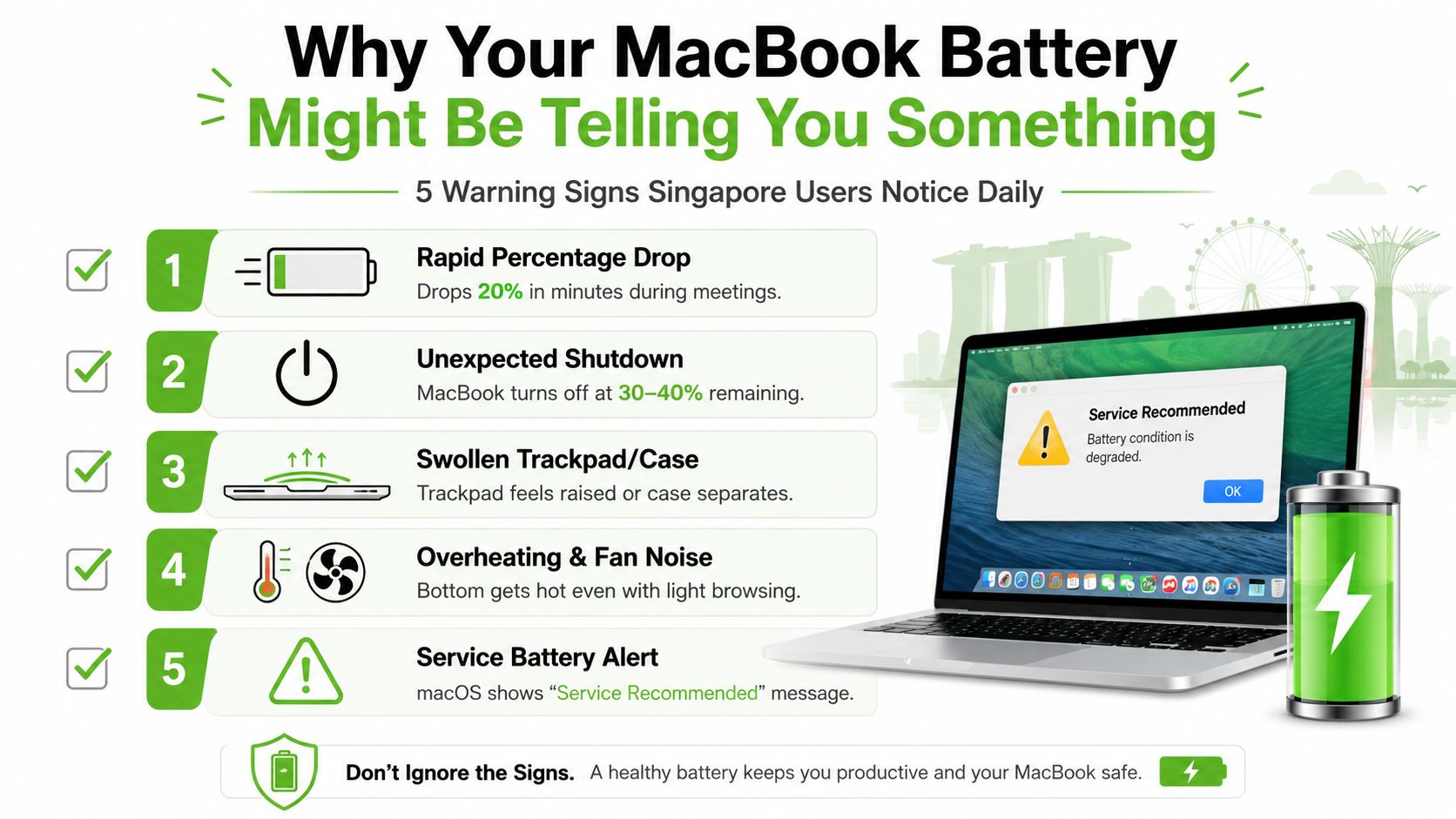
Four signals that deserve a closer look
- Sudden shutdowns: If the MacBook turns off while the menu still shows charge, the battery may no longer deliver stable voltage under load. The displayed percentage is an estimate, not a guarantee that every cell can provide usable power.
- A raised trackpad or separating case: Swelling can press against the trackpad from underneath. Don't press the area down, puncture the battery, or continue charging a visibly distorted machine.
- Restarts during demanding work: Video calls, exports, games, and other intensive tasks draw more power than light browsing. A weakened cell can fail when demand rises, even if the MacBook appears normal while idle.
- “Service Recommended”: macOS is telling you that its battery readings or condition have crossed a service concern. It isn't always a complete diagnosis, but it should prompt a professional check.
Touch Bar MacBook Pro models from 2016 to 2019 are often discussed in connection with swelling symptoms, while an M1 MacBook Air may show calibration drift, where the percentage reading doesn't match the runtime you experience. These model observations don't replace testing. A charger, charging port, power-management issue, or software process can also affect battery behaviour.
Safety first: A swollen battery is a physical warning, not a notification to dismiss. Shut the MacBook down, disconnect power, and keep it away from heat until a qualified technician assesses it.
The reassuring part is that these symptoms have understandable causes and established repair paths. A technician can compare the health reading with charging behaviour, cycle information, physical condition, and startup performance before recommending macbook battery replacement.
The 80 Percent Threshold and What Battery Health Really Means
Apple uses below 80 percent maximum capacity as the practical milestone for battery service in Singapore. AppleCare+ battery coverage applies at that point, provided the relevant plan and service terms apply, while owners outside coverage may need to pay for service. You can review Apple's Singapore Mac repair and battery service terms before booking.
Maximum capacity compares the battery's present full-charge capability with the capacity it had when new. It isn't the same as the charge currently shown in the menu bar. A MacBook can display a full charge while that “full” represents less stored energy than it once did.
Finding the reading on your Mac
On macOS Ventura and later, open:
- Apple menu
- System Settings
- Battery
- Battery Health
On Big Sur and Monterey, use About This Mac, then System Report, followed by Power. Apple's Battery Health guidance for Mac notebooks provides the menu context for checking this information.
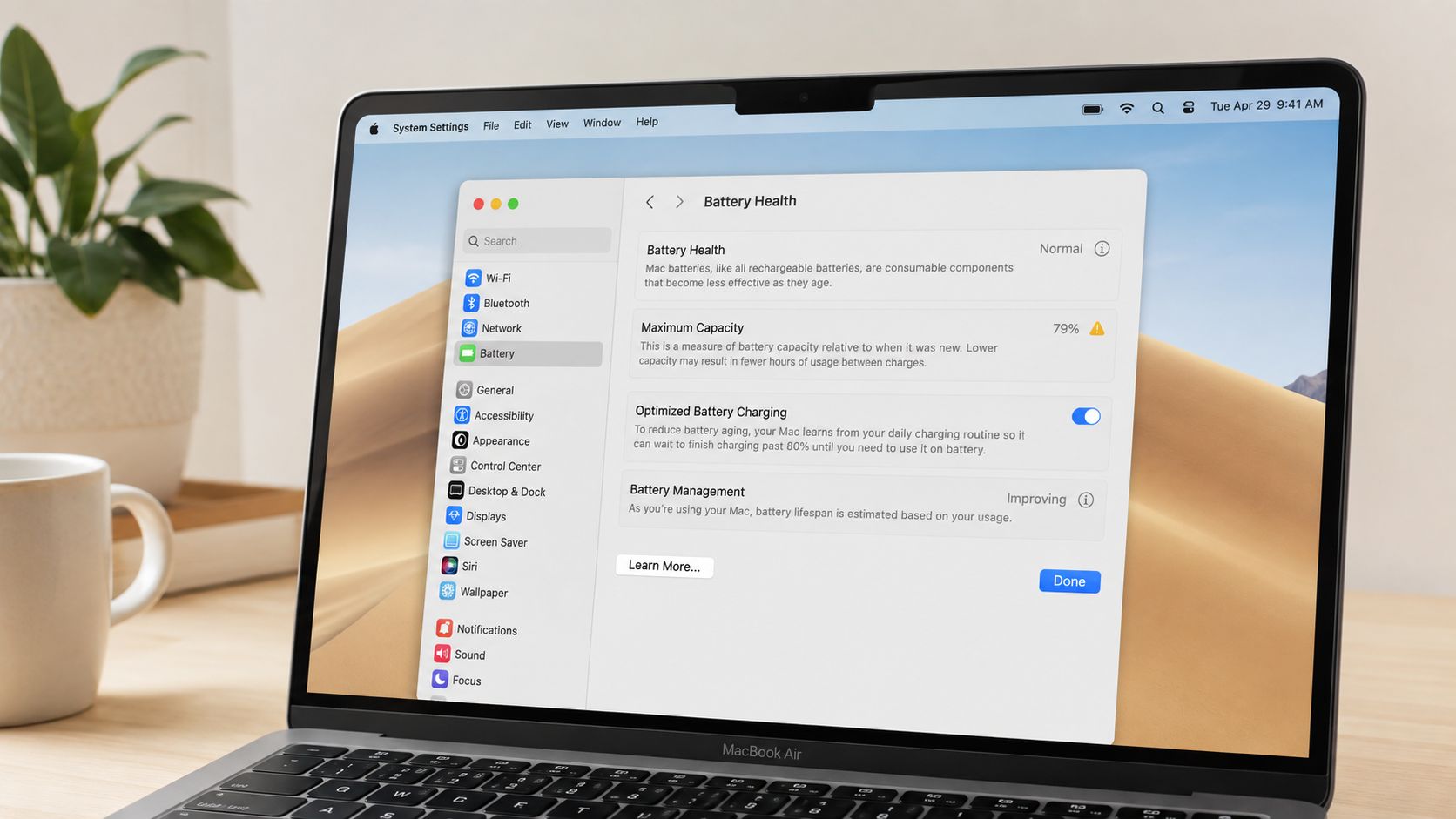
Cycle count, capacity, and calibration
A cycle count records battery usage over accumulated discharge, instead of counting each time you connect the charger. For example, using part of the battery, recharging, and later using the remaining portion can collectively add up to a cycle. The number helps a technician understand usage history, but it shouldn't be the only reason to replace a battery.
Calibration myths cause unnecessary worry. Modern macOS manages charging and battery estimation without requiring regular deep-discharge routines. You don't need to deliberately run a healthy battery to zero to “reset” it, and doing so repeatedly can add avoidable stress. For habits that support longer ownership, see this guide on how to extend your laptop lifespan.
MacBook Battery Replacement Cost and Turnaround in Singapore
Singapore owners usually compare three routes: an Apple Authorised Service Provider, an Apple Store appointment at Orchard, or an independent specialist workshop. The right choice depends on coverage, model construction, part preference, data concerns, and how quickly you need the MacBook back.
Apple's published Singapore information lists S$149 for out-of-warranty MacBook battery service and notes that battery replacement can be free under AppleCare+ when maximum capacity falls below 80 percent. Apple also publishes an out-of-warranty service figure of S$219 on its Mac repair terms, so confirm the current quote for your exact model before approving work. Prices can vary by model and service route.
The requested model-by-model price bands cannot be stated responsibly here because the verified information doesn't provide those bands. A workshop should quote from the model identifier rather than from “MacBook Air” or “MacBook Pro” alone.
| MacBook Model | AASP Price Range, SGD before GST | Independent Workshop Price Range, SGD | Typical Turnaround | Top Case Required? |
|---|---|---|---|---|
| MacBook Air, M1, M2, or M3 | Confirm by model and coverage | Confirm by model and part choice | Confirm at booking | May depend on design and repair method |
| MacBook Pro 13-inch, Intel or M-series | Confirm by model and coverage | Confirm by model and part choice | Confirm at booking | May be required on some Retina designs |
| MacBook Pro 14-inch or 16-inch | Confirm by model and coverage | Confirm by model and part choice | Confirm at booking | May be required on some designs |
A top-case replacement can be a hidden cost driver because the battery, keyboard, and upper housing may be supplied or serviced as a combined assembly on some Retina MacBooks. Ask directly whether the quote covers only the battery pack or the complete top case.
Before booking, prepare the model identifier, serial number, warranty status, and confirmation that your important files are backed up. If you're comparing local options, this battery replacement service guide can help you frame the right questions without treating a headline price as the whole decision.
OEM Genuine Parts vs Third-Party Options
People often use OEM and genuine Apple as if they mean exactly the same thing. In everyday repair conversations, OEM usually points to a part made to the original equipment specification, while a genuine Apple part is supplied through Apple's own parts and service ecosystem. A technician should explain what each option is, who supplied it, and what warranty accompanies the repair.
Genuine Apple batteries are designed to work with Apple's battery management and reporting systems. That generally supports clearer system recognition, charging behaviour, and health information. A third-party battery may work well, but some can produce a “Service Recommended” or unknown-part warning, offer less complete cycle-count telemetry, or vary in cell quality.
| Factor | Genuine Apple | Third-Party |
|---|---|---|
| System recognition | Usually aligned with Apple's service ecosystem | Can vary by battery and controller |
| Battery Health reporting | More likely to provide expected system readings | May show warnings or limited information |
| Safety controls | Installed through an Apple-authorised or qualified process | Quality depends heavily on supplier and technician |
| Upfront cost | Often higher | Often lower |
| Warranty | Confirm the written service terms | Confirm the written service terms |
| Best fit | Owners prioritising compatibility and long-term predictability | Older devices or budgets where the trade-off is understood |
Cost matters, especially when an older MacBook also needs keyboard, display, or port work. A lower repair price isn't automatically poor value if the laptop has limited remaining use, and a genuine part isn't automatically the right financial choice if the logic board or display is already failing.
Match the part to the MacBook's role
For a primary work computer that carries important documents, reliable health reporting and predictable charging may justify choosing a genuine Apple battery. For a secondary home MacBook, a carefully sourced compatible part may be reasonable if the workshop explains its origin, testing process, safety controls, and written warranty.
Apple says MacBook, MacBook Air, and MacBook Pro models with built-in batteries should have battery replacement performed by an Apple Authorised Service Provider, Apple Store, or Independent Repair Provider using genuine Apple parts. That guidance is especially relevant if you want Apple service support to remain straightforward.
What a Professional MacBook Battery Replacement Actually Looks Like
A careful repair is more than removing the bottom cover and fitting a battery. The technician needs to understand the MacBook's starting condition, protect the logic board from static discharge, manage adhesive safely, and verify that the finished machine charges and reports correctly.
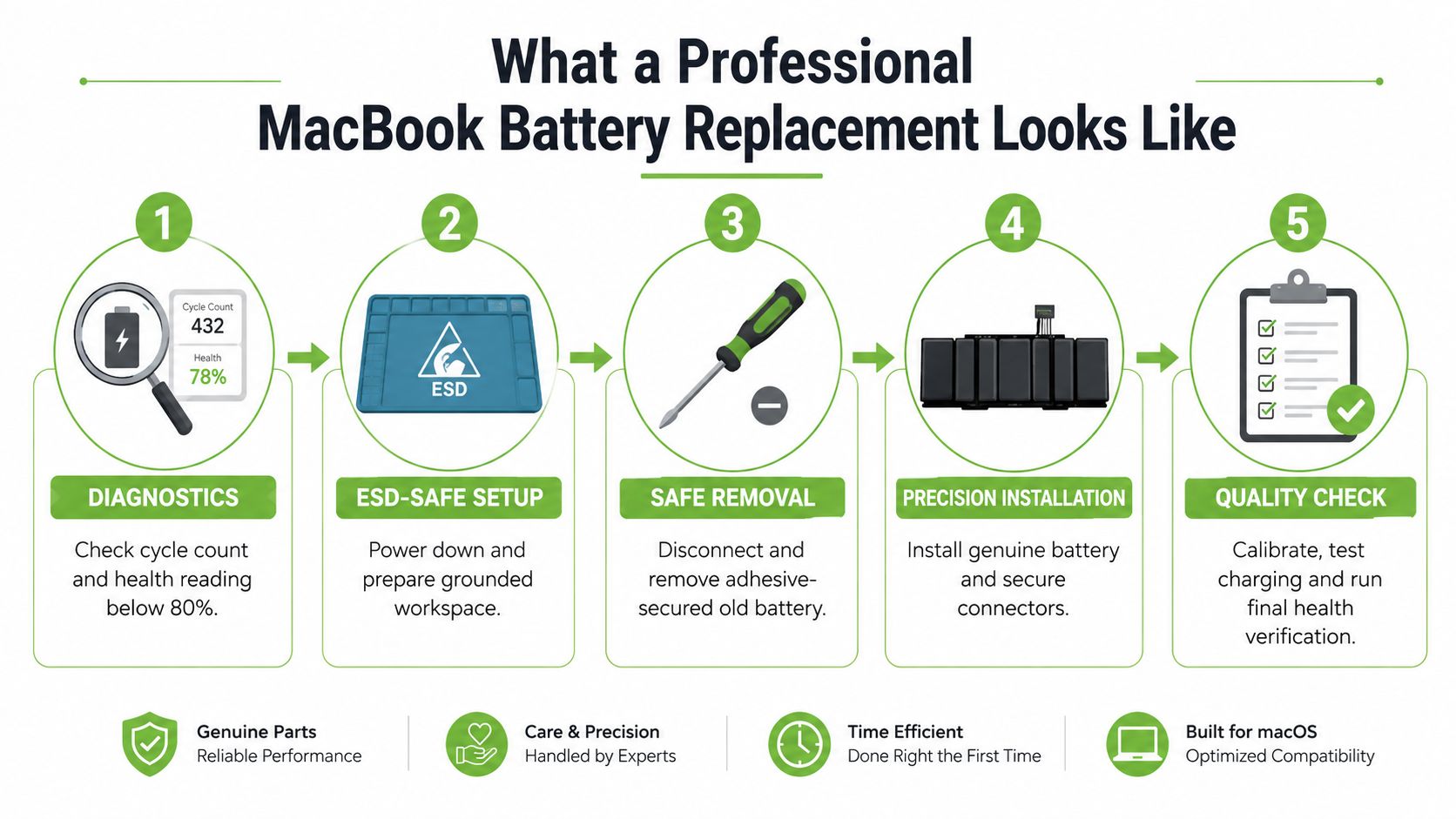
The workflow behind a safe repair
- Initial diagnostics: The technician records battery health, cycle count, charging response, startup behaviour, and any swelling. This creates a baseline and helps separate a battery fault from a charger or board problem.
- ESD-safe preparation: ESD means electrostatic discharge, the small electrical shock that can damage sensitive components. The MacBook is powered down in a grounded workspace with suitable protective equipment.
- Controlled opening: The case is opened with the correct drivers and tools. Clips, seals, cables, and adhesive are handled carefully rather than forced.
- Battery isolation and removal: The battery management connection is disconnected before the pack is removed. Adhesive-secured cells require patience because bending, puncturing, or shorting a charged lithium-ion pack can create a thermal event.
- Installation and verification: The replacement pack is secured, connectors are cleaned and seated, and the case is reassembled with appropriate fastener pressure. Charging, startup, sleep, power draw, and health reporting are checked after the repair.
Apple's MacBook battery safety guidance says battery replacement should be handled by technicians with the proper knowledge, experience, and tools. It also instructs repairers to fully discharge the battery first, because a discharged battery is less susceptible to a thermal event.
The process doesn't require erasing your files. A battery swap normally leaves the storage and operating system untouched, although you should still maintain a current backup before any physical repair.
Ask for the final check: A trustworthy workshop should tell you what it tested, not simply say that the battery was changed.
For a model-specific reference, this guide to MacBook 13 battery help from We Fix can help you understand why model details affect the repair process.
You can also review the MacBook battery replacement service to see the types of diagnostic and post-repair checks a specialist may include.
Warranty Coverage and Safety Considerations You Should Not Skip
Warranty decisions should come before the screwdriver. Apple's Singapore support terms identify the 80 percent capacity threshold as the practical point at which battery service becomes relevant under AppleCare+ terms, while an owner outside coverage may face a paid repair. Check your purchase records and current Apple coverage rather than assuming that an older MacBook has no support left.
An unauthorised opening or non-genuine component can affect how future service is handled. The exact outcome depends on the fault, the device, and the applicable terms, so ask the provider to explain whether third-party work changes any remaining Apple coverage before you approve it.
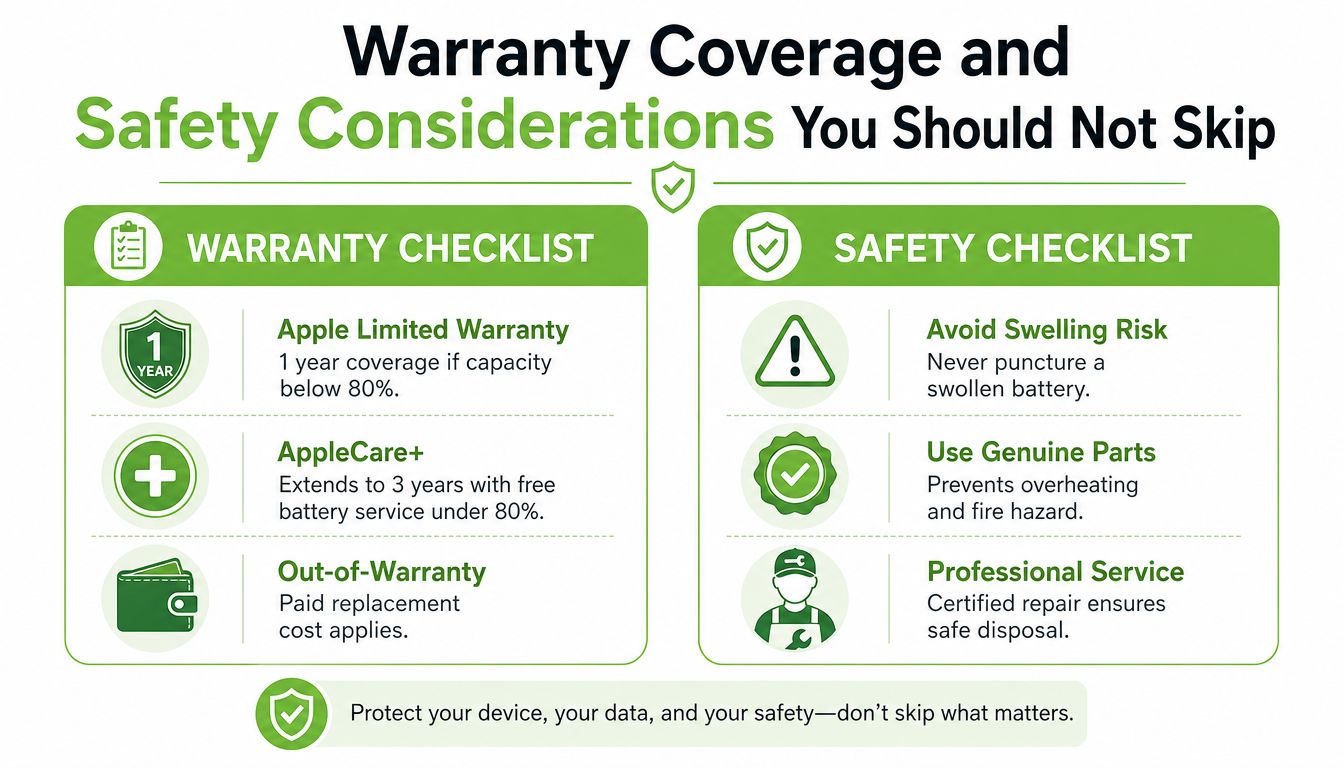
Three questions to ask before service
- Who will perform the work? Confirm whether the provider is an Apple Store, Apple Authorised Service Provider, Independent Repair Provider, or another specialist.
- Which part will be installed? Ask whether it's a genuine Apple battery, a compatible third-party pack, or a top-case assembly.
- What warranty is written on the invoice? Clarify the coverage period, what it includes, and what happens if the warning returns.
Physical safety is part of the quote
A swollen case, raised trackpad, unusual heat, chemical smell, damaged cable, or visible battery puncture calls for caution. Don't squeeze the battery, pierce it, place it under heavy objects, or continue testing it at home. Apple's safety guidance and the Singapore lithium-ion battery guide both support treating damaged cells as a specialist matter.
NEA advises Singapore residents not to put rechargeable batteries in general bins or blue recycling bins. Before recycling, tape the battery ends to reduce short-circuit risk, and place a leaking battery in a leak-proof container or bag. A repairer should take responsibility for safe handling after removal, so you aren't left carrying a damaged pack around Singapore.
What Happens to Your Old Battery and Your Old Data
The removed battery is not ordinary household rubbish. Singapore's e-waste framework places collection and treatment responsibilities on large producers, while consumers are encouraged to use approved routes for regulated e-waste. NEA specifically advises against putting rechargeable batteries in general bins or blue recycling bins, and recommends taping the ends before recycling to reduce short-circuit risk.
A responsible downstream process begins when the workshop labels and separates the removed pack. A suitable waste partner can then handle battery materials through appropriate treatment and recovery channels. The important point for you is not to accept a vague promise that the battery will be “recycled”. Ask who receives it, how the handover is recorded, and whether a traceability record is available.
Your files need a separate plan
Battery work doesn't automatically expose your files, but a workshop may need to handle an accessible computer during diagnostics. Modern MacBooks commonly integrate storage closely with the logic board, so removing the battery doesn't necessarily mean removing the storage. Personal photos, browser sessions, cached credentials, account tokens, and work documents may still be present.
Before handing over the MacBook:
- Back up important files: Use Time Machine or another trusted backup, then verify that key folders open from the backup.
- Sign out where appropriate: Review Apple ID, iCloud, Find My, messaging, and other services if the repairer needs the device accessible.
- Use FileVault: Full-disk encryption helps protect stored data if the MacBook is lost or accessed without the login password.
- Create a temporary account: If diagnostics need a live session, ask whether a temporary administrator or standard account can be used instead of sharing your personal password.
- Request written handling terms: Ask how the workshop stores, accesses, and deletes any diagnostic data, and whether it can confirm storage-media handling after service.
Privacy and recycling belong in one handover: The safest workflow records both who handled your data and where the removed battery went.
This is the gap many battery articles miss. A repair can preserve the laptop, protect your privacy, and keep the old battery out of unsuitable waste streams, but only when the workshop treats all three as part of the same job.
How myhalo Makes the Whole Journey Simple, Safe, and Responsible
A practical booking should feel like one clear handover rather than a chain of separate errands. You share the MacBook model and symptoms, the technician checks battery health, cycle count, charging behaviour, and swelling, and you receive a recommendation based on the device's condition.
The data conversation happens before work starts. You can confirm whether the MacBook contains sensitive material, whether a backup is ready, and what access the technician needs for testing. For organisations, the same principle supports a more organised IT asset workflow, with secure data handling and documented end-of-life decisions.
From replacement to traceable recovery
The repair stage includes fitting a suitable battery through trained technicians, then checking charging, battery detection, startup, and general power behaviour. A completed job should leave you with a clear record of the part used, the tests performed, and the applicable service warranty.
The environmental handover matters just as much. The removed battery can be logged and routed to an appropriate downstream partner instead of being treated as an afterthought. That gives consumers and IT teams a way to request evidence of the handover and keep battery replacement aligned with a zero e-waste goal.
myhalo brings repair, secure data support, device reuse, and responsible recovery into a Singapore-based service model. Its wider programmes include Declutter your e-clutter, Safe data, and Save data, helping people clear unused technology, protect private information, or recover important files before a device leaves their hands.
For a MacBook owner, the benefit is simple: you don't need to coordinate a battery repairer, a data-security provider, and an e-waste route without knowing whether they connect. You can ask for one workflow that treats the machine, your information, and the removed battery with care.
Your precious files and memories matter to us. Whether you need to protect your privacy with Safe data or rescue lost files with Save data, myhalo can help coordinate a MacBook battery assessment with secure handling and responsible next steps. Reach out today, and let's make your repair convenient, safe, and kinder to Singapore's zero e-waste future.