
You're clearing a storeroom in your HDB flat when you find an old laptop under a stack of boxes. It still powers on, but the battery is tired, the casing has seen better days, and your first thought isn't even the price. It's the data inside. Photos, saved passwords, work documents, browser sessions, and old accounts can make a simple Singapore laptop trade in feel surprisingly stressful.
The good news is that you've got more than one sensible route. You can check an instant quote, compare cash with repair or upcycle options, and prepare the laptop properly before handing it over. With a little planning, clearing your e-clutter can be convenient, safe, and responsible, while giving the device a chance to serve someone else instead of sitting forgotten in a drawer.
Table of Contents
- Why Singapore Laptop Trade In Feels Stressful and How to Fix It
- How a Singapore Laptop Trade In Actually Works
- How AI Backed Quotes Calculate Your Laptop Value
- In Store Versus Online Trade In Across Singapore
- Eligibility and Grading for Laptops in Singapore
- From Trade In to ReLoved and Upcycle Voucher Flows
- Data Security and Paperwork Before You Hand Over Your Laptop
- Your Next Step Toward a Zero E Waste Drawer
Why Singapore Laptop Trade In Feels Stressful and How to Fix It
A laptop trade in usually starts with three competing questions: should you sell it, repair it, or send it for recycling? Then comes the worry that an online form will undervalue it, followed by the less visible hassle of signing out of accounts and making sure nothing personal remains on the drive.

An instant quote can remove much of the uncertainty. You enter the brand, model, specifications, and condition through a Singapore trade-in portal, then receive a price indication without visiting a shop first. That doesn't mean the first figure can never change, because a physical inspection may uncover faults that weren't visible in the questionnaire. It does give you a clear starting point before you spend time arranging collection or transport.
Start with a realistic value check
Laptop value is highly specification-sensitive. Current local estimates place full-working Intel Core i5 and i7 laptops from the 9th to 12th generation, broadly associated with 2019 to 2022, at about S$80 to S$350, while 13th-generation and newer units can reach about S$250 to S$700. Faulty laptops with cracked screens can fall to about S$0 to S$50 or S$10 to S$150, depending on the assessment, as shown in current Singapore laptop trade-in estimates.
That spread explains why a blanket “old laptop” price isn't very useful. Processor generation, whether the laptop works, and whether the display is intact often matter more than the fact that the device is a few years old.
A calmer handover starts before the quote. Back up your files, sign out of accounts, and ask how the recipient handles data before you pass over the device.
For practical preparation ideas, this guide to making a device trade-in easier is a useful companion. The main aim is simple: turn an uncertain chore into a short, organised errand, with a price check and data plan ready before you leave home.
How a Singapore Laptop Trade In Actually Works
The process is easier when you know what happens at each door. You're not expected to arrive with perfect technical knowledge, and you shouldn't need to guess whether your laptop belongs in a cash, refurbishment, or recycling pathway.
Follow the device from quote to payout
Select the laptop. Choose the brand and model on the trade-in portal. If you're unsure, check the model name on the underside, in system settings, or on the original purchase record.
Answer the condition questions. Describe whether it powers on, whether the screen has cracks, whether the keyboard and trackpad work, and whether the battery behaves normally. Be honest here. A careful description makes the initial quote more useful and reduces surprises during inspection.
Review the instant quote. An AI-backed pricing system can produce a quote within minutes based on the information supplied. Treat it as a firm starting offer subject to verification, not as an unconditional promise if the laptop's actual condition differs.
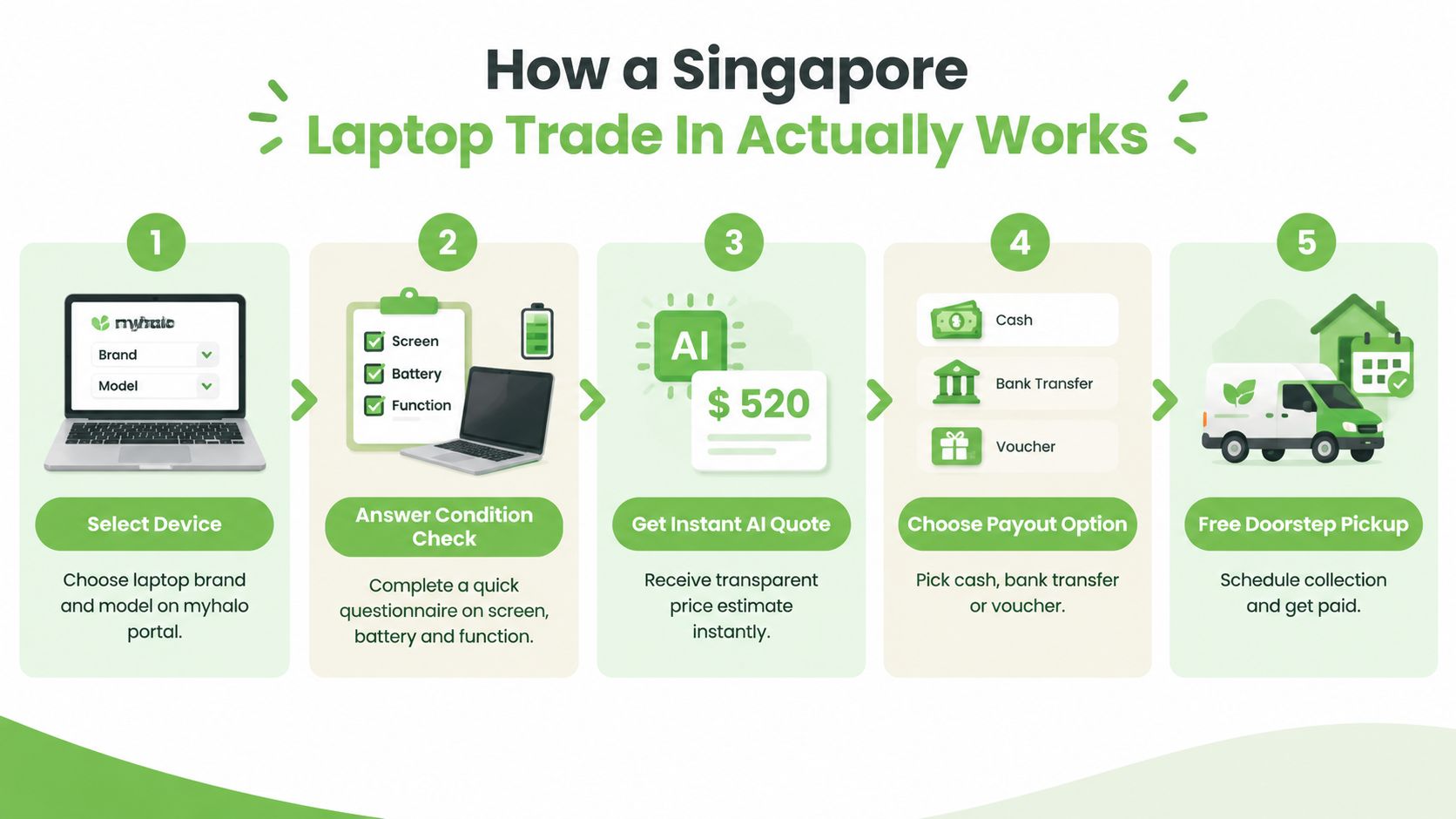
Choose handover. You can arrange courier collection or bring the laptop to a Bugis or Sim Lim counter. A counter visit gives you face-to-face contact and lets staff inspect the device while you're there.
Complete inspection and accept the final offer. Staff check the laptop against the declared condition. If the quote changes, ask which specific issue caused the revision. You can then accept the revised amount, choose another route, or take the device back, subject to the operator's process.
Bring the basics, not a whole storeroom
Bring the laptop, charger if you still have it, and a suitable form of identification if the payout process requires verification. Keep your own backup until you're satisfied that the handover is final. Depending on the selected route, payment may be made through PayNow, bank transfer, or an upcycle voucher.
The online route is designed for people who'd rather arrange collection from home, while a counter suits someone who wants to see the inspection happen. You can also read this Singapore guide to selling an old phone, tablet, or laptop before deciding which handover style feels more comfortable.
How AI Backed Quotes Calculate Your Laptop Value
You submit two laptops for an instant quote. One is an Intel i5 10th-generation model with 8GB RAM. The other is an Intel i7 12th-generation model with 16GB RAM and an NVMe SSD. Both may look similar on a desk, but the second usually has stronger resale potential because its processor, memory, and storage support newer workloads.
The details that move the number
AI-backed pricing uses the details you enter as a starting point. It considers the processor generation, RAM, storage, screen, battery, hinges, and visible chassis damage, then produces an estimate for inspection. The brand matters, but it is only one part of the picture.
The two example laptops would therefore sit at different points within the applicable market range. The i5 model may receive a lower offer if its battery is worn or its screen has marks. The i7 model may receive a higher offer when it boots reliably, has a clean display, stable hinges, and no major damage. An estimate is like a first map of the route. The physical inspection checks whether the road conditions match the map.
Storage also needs a simple explanation. An NVMe SSD is a fast solid-state drive, while an older HDD uses spinning magnetic disks. Capacity and drive health affect everyday use and the work needed before resale. A laptop that starts reliably and needs fewer replacement parts is easier to prepare for its next owner.
A practical range, not a promise
| Laptop Model | Working Condition (SGD) | Faulty / Non-Booting (SGD) |
|---|---|---|
| Intel Core i5 or i7, 9th to 12th generation | S$80 to S$350 | S$0 to S$150, depending on damage |
| Intel 13th generation or newer | S$250 to S$700 | Assessment required |
| Other laptops | Depends on model and condition | Assessment required |
These ranges are broad because a category cannot show every detail of a particular machine. A cracked screen, failed charging port, or non-booting system can change the outcome sharply, while a clean, working laptop may qualify for a stronger offer. The figures are Singapore laptop trade-in pricing estimates, not a universal price list.
For a clearer explanation of the assessment, read how a laptop quote is assessed. Once you see the offer, compare the practical outcome, not just the amount. A trade-in may suit a quick handover or an upcycle voucher, while repair, upcycling, or a straightforward cash sale may serve you better if the laptop still has useful life.
In Store Versus Online Trade In Across Singapore
The best channel depends on what you value most. Someone rushing to clear a laptop before an upgrade may prefer a nearby counter, while a busy parent or office worker may choose collection from home.
| Factor | In-Store, Bugis or Sim Lim | Online, myhalo Portal |
|---|---|---|
| Quote | Generated through the online or in-store assessment process | Generated online from the device details |
| Handover | Bring the laptop to a counter for inspection | Arrange collection after submitting the device |
| Main advantage | Face-to-face verification and possible immediate cash payout | No travel and convenient doorstep collection |
| Inspection | Completed while you're at the counter | Completed after the device is received |
| Payout choices | Cash may be available, subject to the confirmed offer | Bank transfer or other available payout routes |
| Sustainability option | Upcycle voucher may be available | Upcycle voucher may be available |
Choose the counter when certainty matters most
Bugis and Sim Lim Square are practical choices if you want to speak with someone, watch the inspection, and resolve questions immediately. This is especially helpful when the laptop has a damaged hinge, intermittent charging, a replacement screen, or another fault that's difficult to describe online.
An in-store visit can also suit someone who needs a confirmed cash outcome rather than waiting for a courier handover and post-receipt assessment. Bring the charger if you have it, because demonstrating charging behaviour can help staff understand the laptop's actual condition.
Choose online when travel is the real obstacle
Online trade in is useful when the laptop is bulky, you're handling several devices, or you don't want to cross Singapore for a quote. You submit the details, arrange free doorstep pickup where available, and wait for inspection before accepting the confirmed offer and payout route.
If cash isn't your priority, ask about an upcycle voucher through either channel. That option may suit someone who wants to direct the value towards a future ReLoved purchase or another trade-in instead of treating the handover as a one-off sale.
Eligibility and Grading for Laptops in Singapore
Eligibility isn't limited to pristine ultrabooks. Apple MacBooks, Samsung Galaxy Books, and gaming laptops from ASUS, Razer, Lenovo Legion, and MSI can all be considered, although the final route depends on condition, specification, and repairability.
A useful way to think about grading is to separate function, structural condition, and resale potential. A laptop with light scratches but a healthy screen may remain attractive. A newer laptop with a cracked display may need a much deeper price adjustment, even if its processor is strong.
What inspectors look for
- Screen: Cracks, dead areas, heavy pressure marks, and display failure can move a laptop into a lower-value route.
- Keyboard and trackpad: Missing keys, sticky input, and unreliable gestures affect daily usability.
- Battery: A tired battery doesn't always disqualify a laptop, but replacement cost matters.
- Hinges and casing: Loose hinges, dents, and broken panels can affect safety and refurbishment effort.
- Power and ports: The laptop should ideally boot, charge, and recognise essential ports and components.
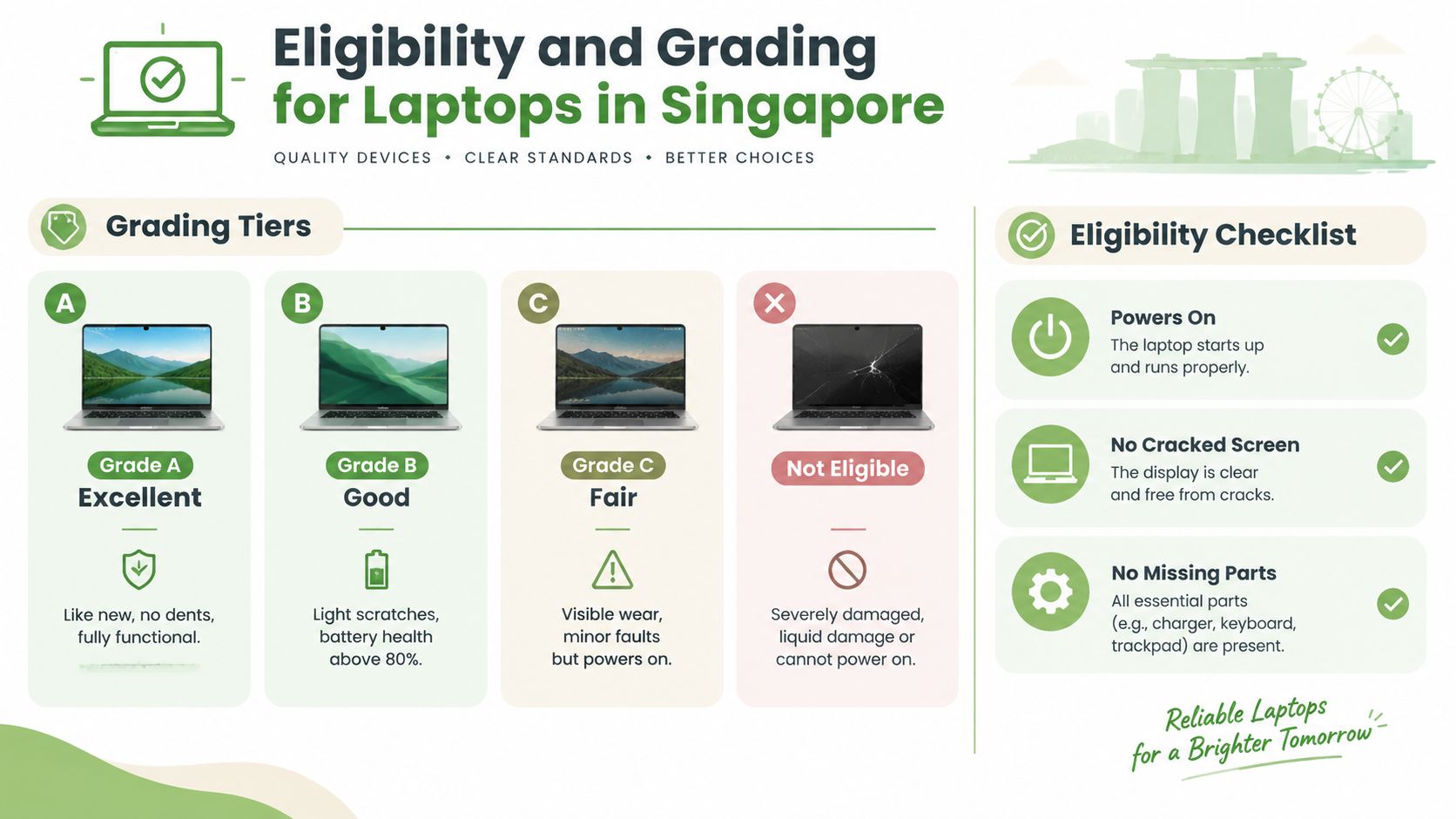
The grading labels in the visual provide a helpful mental model. Grade A means excellent, like new, and fully functional. Grade B allows light scratches and describes battery health above 80%. Grade C covers visible wear or minor faults where the laptop still powers on. Severe damage, liquid damage, or a machine that cannot power on may be treated as not eligible for a standard cash route.
That last category doesn't automatically mean “throw it away”. Faulty, water-damaged, or bricked laptops can still receive an assessment, often at a lower tier. The device may be more suitable for parts recovery, an upcycle voucher, or another responsible end-of-life pathway than direct resale.
Gaming laptops deserve a separate thought because dedicated graphics cards can support stronger resale demand than basic office machines. Still, the GPU doesn't cancel out a cracked screen, swollen battery, or damaged motherboard. Condition remains part of the value equation.
From Trade In to ReLoved and Upcycle Voucher Flows
A cash offer answers one question, what you receive now. A circular pathway asks a wider question, what useful life can the laptop still provide after you hand it over?
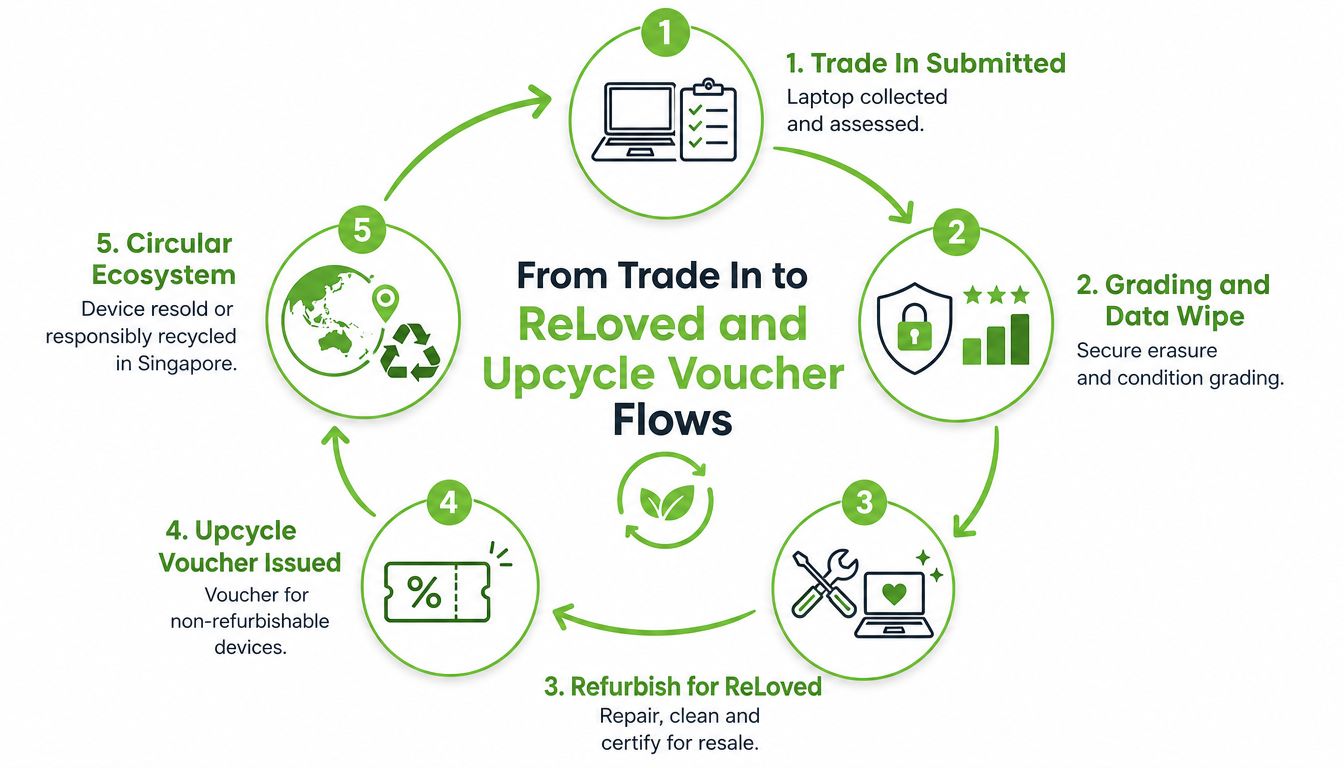
A refurbishable laptop can be assessed, graded, securely wiped, repaired where necessary, cleaned, and prepared for resale as a ReLoved certified device. That gives another buyer access to tested hardware without requiring a brand-new unit, while the original owner avoids leaving the laptop idle in a drawer.
When refurbishment isn't the right fit
Some laptops have too little resale value to justify a straightforward refurbishment. A failed board, severe liquid damage, missing parts, or extensive structural damage can make repair uneconomical. In those cases, parts harvesting and material recovery can still keep useful components in circulation.
An upcycle voucher gives the owner another choice. Instead of taking a small cash amount, the owner can receive credit towards a future ReLoved purchase or trade-in, depending on the available programme terms. That can be more meaningful when the old laptop's resale value is low but the owner expects to buy another device later.
The practical distinction is important:
- Cash buyback: Best when the laptop has clear resale value and you want immediate financial return.
- ReLoved refurbishment: Best when the device can be repaired, tested, and resold as usable equipment.
- Upcycle voucher: Best when direct resale is weak but you want the device's remaining value to support another circular purchase.
- Parts recovery: Best when the laptop can't reasonably return as a complete working machine.
Singapore's refurbished laptop market was estimated at USD 43.25 million in 2024 and projected to reach USD 78.8 million by 2033, according to the refurbished gaming laptop market discussion. The wider point is that recovered devices can meet real demand. Trade in isn't only about clearing space. It can help move hardware from one owner to another with less waste.
Data Security and Paperwork Before You Hand Over Your Laptop
A factory reset is helpful, but it shouldn't be your entire privacy plan. Singapore's Personal Data Protection Commission says organisations should securely delete, erase, or destroy electronic personal data before storage media is redeployed, exchanged, or disposed of. The guidance calls this process sanitisation, and the result should no longer identify or relate to an individual. You can read the PDPC guidance on disposal of personal data for the formal principle.
Complete this before handover
Back up first. Copy documents, photos, browser bookmarks, and licence information to your personal cloud or an external drive. Open a few files afterwards so you know the backup works.
Sign out everywhere. Remove iCloud, Google, Microsoft, Adobe, and other accounts. On a MacBook, turn off Find My and Activation Lock. On Windows, remove personal accounts and check whether device encryption is enabled.
Remove workplace controls. If the laptop came from an employer or school, ask the administrator to remove any mobile device management profile. A reset may not remove an organisation's ownership lock.
Reset and sanitise. A normal reset removes access to the operating system, but secure erasure requirements can differ between HDDs and SSD or NVMe drives. A simple reformat isn't sufficient for higher-assurance erasure on every type of storage.
Record the handover. Keep the trade-in receipt, the confirmed offer, and any ownership transfer or data-destruction documentation provided.
CNA reports that laptops sent to licensed recyclers in Singapore undergo data sanitisation and physical dismantling, while the Resource Sustainability framework requires licensed e-waste recyclers to permanently erase or destroy data on data-bearing devices before reuse or recycling. That distinction matters because storage that can be safely reused may support a higher-value refurbishment route, while other media may need destruction.
Common questions, answered plainly
Is a factory reset enough? It may be appropriate for ordinary preparation, but don't assume it meets every secure-erasure requirement. Ask the recipient what sanitisation process they use and whether documentation is available.
Should I remove the SSD? Don't remove components without asking first. A missing drive can change eligibility and may prevent a complete inspection, although it may also be handled as a parts or recycling case.
What paperwork might I need? A receipt is useful for your records. Corporate or higher-risk handovers may involve identity verification, chain-of-custody records, and a certificate describing the destruction method. This guide to chain-of-custody documentation explains why that paper trail matters.
For business assets, a documented IT asset disposition process commonly includes an inventory, controlled collection, storage-device erasure or destruction to a defined standard, licensed recycling, and a Certificate of Destruction with an asset and methods report. That level of paperwork may be more than an individual needs, but the underlying habit is sensible: know who has the device, what happens to its data, and what record you receive.
Your Next Step Toward a Zero E Waste Drawer
An unused laptop is not neutral. It takes up space, loses value over time, and remains disconnected from someone who could use it for study, work, entertainment, or parts. Singapore's national e-waste system accepts laptops through collection points, and the network includes more than 1,000 collection points in malls, supermarkets, and community clubs. Many bins have a 50cm by 25cm slot that fits a laptop, phone, or router, but not a tower or large monitor, as explained in this Singapore e-waste collection guide.
You've got three realistic choices for an older laptop:
- Take an instant cash route. Check the quote and bring the device to a Bugis or Sim Lim counter if you want an in-person inspection.
- Choose an upcycle voucher. This can direct a low-value device's remaining worth towards a future ReLoved purchase or trade-in.
- Use a refurbishment or donation pathway. A laptop that isn't valuable as a cash sale may still help another user after repair, secure wiping, and grading.
The sensible choice depends on the machine, not just your preferred payout. Repair may be better if a battery or storage replacement can restore a capable laptop. Trade in may make more sense when the device is working and you're ready to upgrade. Upcycling or responsible recycling is the safer direction when damage makes reuse impractical.
A wider Singapore reuse challenge sits behind these decisions. The country generates about 60,000 tonnes of e-waste annually, and cited reporting describes only a small fraction entering recycling pathways. Refurbished demand and secure handover practices therefore matter alongside the immediate quote. Every properly prepared device has a better chance of moving into repair, resale, parts recovery, or regulated recycling instead of remaining forgotten at home.
You don't need to become an electronics expert. Start by finding the model, checking whether it boots, backing up your files, and deciding whether you want cash, a circular voucher, or a responsible recovery route. That small sequence makes the next step much less intimidating.
myhalo helps Singapore owners clear unused laptops through instant quote assessments, counter drop-off, repair, ReLoved refurbishment, secure data handling, and upcycle pathways. Run a quote, prepare your device safely, or visit the Bugis or Sim Lim service points through myhalo, and join the Declutter your e-clutter community to make your next upgrade convenient, safe, and responsible.