

A key sticks halfway through an urgent report. Another stops responding during an online lesson. Then a drink tips over beside your laptop, and suddenly the worry isn't only about the keyboard. You may also be thinking about lost work, repair cost, personal files, and whether opening the device will make the damage worse.
That stress is understandable. A keyboard can look like a simple set of buttons, but the repair depends on what sits underneath those buttons, how the keyboard connects to the computer, and whether the fault affects only one key or the wider assembly. A careful keyboard repair service should make those differences clear before any work begins.
This guide explains how laptop and external keyboards function, what common symptoms mean, why Singapore repair prices vary, and how technicians decide between cleaning, component repair, and replacement. It also covers what you can do immediately after a spill, what information helps a technician quote accurately, and how responsible repair can support a lower-waste way to manage electronics. If you're still deciding where to seek help, this guide to laptop repair options in Singapore can help you compare the next step.
Table of Contents
- Introduction When Your Keyboard Lets You Down
- How Laptop and External Keyboards Actually Work
- Common Keyboard Faults and What Causes Them
- Repair or Replace How to Make the Smart Choice
- Inside a Keyboard Repair Service From Diagnosis to Testing
- Pricing and Turnaround Times in Singapore
- Keep Your Keyboard Healthy Longer and Next Steps
Introduction When Your Keyboard Lets You Down
The first useful detail is the symptom. A single loose key points to a different problem from a row of dead keys, a keyboard that works only after reconnecting the cable, or a laptop that begins typing by itself. Describing what happened, when it started, and whether the device suffered a fall or spill gives a technician a much clearer starting point.
If liquid has reached the keyboard, switch the device off, disconnect the charger, and avoid repeatedly pressing keys to “see whether it works”. Power can help corrosion spread across contacts and circuits. Don't use force to remove a stubborn keycap, either. Small clips and stabilisers can break, turning a clean repair into a larger parts issue.
Practical rule: After a spill, protect your data first and test the keyboard later. Continued use can create more damage than the original accident.
Owners of external keyboards often have more flexibility because the keyboard can usually be disconnected and replaced separately. A laptop keyboard is different. The keyboard may be attached to a ribbon cable, backlight layer, palm rest, trackpad, or full top-case assembly. That construction is one reason a quick key fix and a full replacement can produce very different quotes.
A responsible repair decision should also consider the device's wider life. If repair makes sense, restoring the existing keyboard keeps a working laptop in use. If replacement is unavoidable, parts may still be useful elsewhere, while secure handling matters if the device contains personal or company information. myhalo's Declutter your e-clutter approach focuses on convenient, safe, and responsible device lifecycle choices, while its Safe Data principles address privacy when equipment changes hands.
The aim isn't to push you towards the most expensive option. It's to help you understand the likely fault, ask sensible questions, protect your files, and choose a repair path that fits your device and daily needs.
How Laptop and External Keyboards Actually Work
Start with a simple picture. A keyboard is a grid of switches. When you press a key, the switch changes an electrical path, and a small controller translates that change into a signal the computer's operating system understands.
That signal travels through a cable or wireless connection. On a laptop, it usually passes through a thin ribbon cable into the motherboard. On an external keyboard, the controller and connection socket are commonly housed inside a separate case, so the keyboard can be unplugged, replaced, or serviced without opening the computer itself.

The switch beneath the key
Different keyboards use different switch designs.
- Membrane keyboards use flexible layers with conductive contact points. Pressing a key pushes the layers together, rather like completing a tiny circuit.
- Scissor keyboards use a low-profile support mechanism common in laptops. The scissor structure keeps the key stable while transmitting pressure to the contact layer.
- Mechanical keyboards use separate physical switches. Each switch can sometimes be removed or replaced, depending on how it is mounted and wired.
These categories explain why “one broken key” doesn't always mean “replace one key”. A missing keycap may be a small physical parts issue. A failed membrane contact may require access beneath the keyboard layer. A mechanical switch may be replaceable, but only if the board and switch design allow it.
Why backlights and assemblies matter
Backlit keyboards contain additional layers for lighting. A key may still register normally while its light fails, or the light may behave differently across a group of keys. That adds another circuit and another possible fault area.
Many modern laptops integrate the keyboard into the upper housing, called the top case. The top case can include the palm rest and trackpad, and in some designs it may also involve other internal parts. External keyboards tend to be more modular, while thin laptops often prioritise compact construction over easy part separation.
Singapore treats electronics repair as a recognised industry category rather than an isolated hobby activity. IBISWorld's Singapore electronic and optical equipment repair industry profile tracks historical and projected local information across 2015 to 2032, with its 2026 report covering the repair segment. Keyboard work is commonly handled within broader electronics repair operations, which is why local technicians encounter different architectures and service requirements.
Common Keyboard Faults and What Causes Them
Keyboard symptoms often reveal more than the owner expects. A single dead key, for example, suggests a different investigation from a whole row that stops working. The useful approach is to note the pattern rather than reporting that “the keyboard is faulty”.
Match the symptom to the likely cause
A single dead key may have a damaged switch, worn contact, broken scissor mechanism, or debris beneath the key. If the keycap feels loose or uneven, the problem may be mechanical. If it feels normal but never registers, the technician will usually examine the switch or contact path.
Several keys in a pattern can point towards a shared circuit route, ribbon connection, or membrane section. The pattern matters because keyboard controllers scan groups of keys rather than treating every button as an entirely separate system.
Repeating or chattering keys register more than one input from a single press. Mechanical wear, contamination, liquid residue, or a failing switch can create this behaviour. Software settings can sometimes affect input behaviour, but repeated input that persists across applications deserves hardware testing.
Sticky keys after a spill need prompt attention. Sugary drinks and other liquids can leave residue that interferes with movement and electrical contacts. Even when the keyboard appears to recover after drying, remaining moisture or residue can create later corrosion.
After a spill, don't keep using the laptop just because the screen still works. The keyboard and motherboard may not fail at the same moment.
Backlight failure can affect one key, a zone, or the whole lighting system. If typing remains normal, the repair may concern the lighting layer or its connection rather than the key switches themselves.
Intermittent connection problems can come from a partially seated ribbon cable, damaged connector, faulty USB socket, or wireless pairing and module issue. A keyboard that works after being moved or reconnected gives the technician an important clue.
This short video can help you recognise the kinds of physical symptoms that often lead people to seek keyboard servicing.
What to tell the technician
Before visiting a repair counter, record the laptop or keyboard model, the affected keys, when the issue began, and whether the device was exposed to liquid, dust, heat, or impact. Mention whether the fault appears in every application and whether an external keyboard works with the laptop.
Don't pry beneath a laptop keyboard without knowing the construction. Clips, ribbons, backlight sheets, and top-case fittings can be delicate. A clear description and a few photos are safer and often speed up diagnosis.
Repair or Replace How to Make the Smart Choice
A keyboard fault does not automatically mean a new laptop. If one key has stopped responding but the rest of the device works normally, a targeted repair may be sensible. Replacement becomes more practical when the keyboard is bonded into a larger assembly, several related parts have failed, or the required component is difficult to source.
Architecture often decides the quote. A modular external keyboard or laptop keyboard may let a technician replace one switch or the keyboard module. An ultrabook or MacBook-style design may attach the keyboard to the top case, palm rest, or trackpad. In that situation, a few faulty keys can lead to a larger part replacement, with higher cost and a longer turnaround. Ask which assembly the technician expects to change before comparing prices.
Use this matrix as a starting point, not as a substitute for diagnosis.
Repair versus replacement
| Option | Best When | Cost Indication | Sustainability Impact |
|---|---|---|---|
| Individual key, switch, or contact repair | The fault is isolated and the underlying keyboard is sound | Usually lower than an assembly replacement, subject to model and access | Keeps the existing device and part in use |
| Full keyboard replacement | The keyboard module has failed or several keys are affected | Depends on modular or integrated design | Extends the laptop's useful life |
| Top-case assembly replacement | The keyboard is bonded into the upper housing | Higher because the assembly may include the palm rest and trackpad | Avoids replacing an otherwise usable laptop |
| New external keyboard | A separate keyboard is faulty and replacement is readily available | Compare the replacement price with repair feasibility | The old unit may be repaired, reused, or harvested for parts |
| New laptop | Repair is impractical and the device has broader serious faults | Depends on the chosen device | Responsible resale, trade-in, or part recovery can reduce waste |
Fault type affects timing as well as price. Cleaning or reseating a connection may be relatively contained. Liquid exposure, corrosion, or a bonded top-case design can require more inspection and parts. A standalone external keyboard may be easier to replace than repair, especially if a comparable new unit is readily available.
Consider purchase protection
If you bought the device recently and it does not conform to the contract, Singapore's Lemon Law may allow you to request repair, replacement, a price reduction, or rescission. The Consumers Association of Singapore's Lemon Law guidance explains that the protection covers electronics and other general consumer products purchased in Singapore.
Keep the receipt, purchase record, and service correspondence. If the seller is responsible for a non-conforming product, a warranty or consumer-law route may be more suitable than paying for independent repair immediately.
myhalo's guide to laptop repair and data recovery can help you consider the wider question when a keyboard fault appears alongside a damaged laptop or inaccessible files. Preserve the device, protect important data, and compare the full repair scope rather than choosing only the lowest headline price.
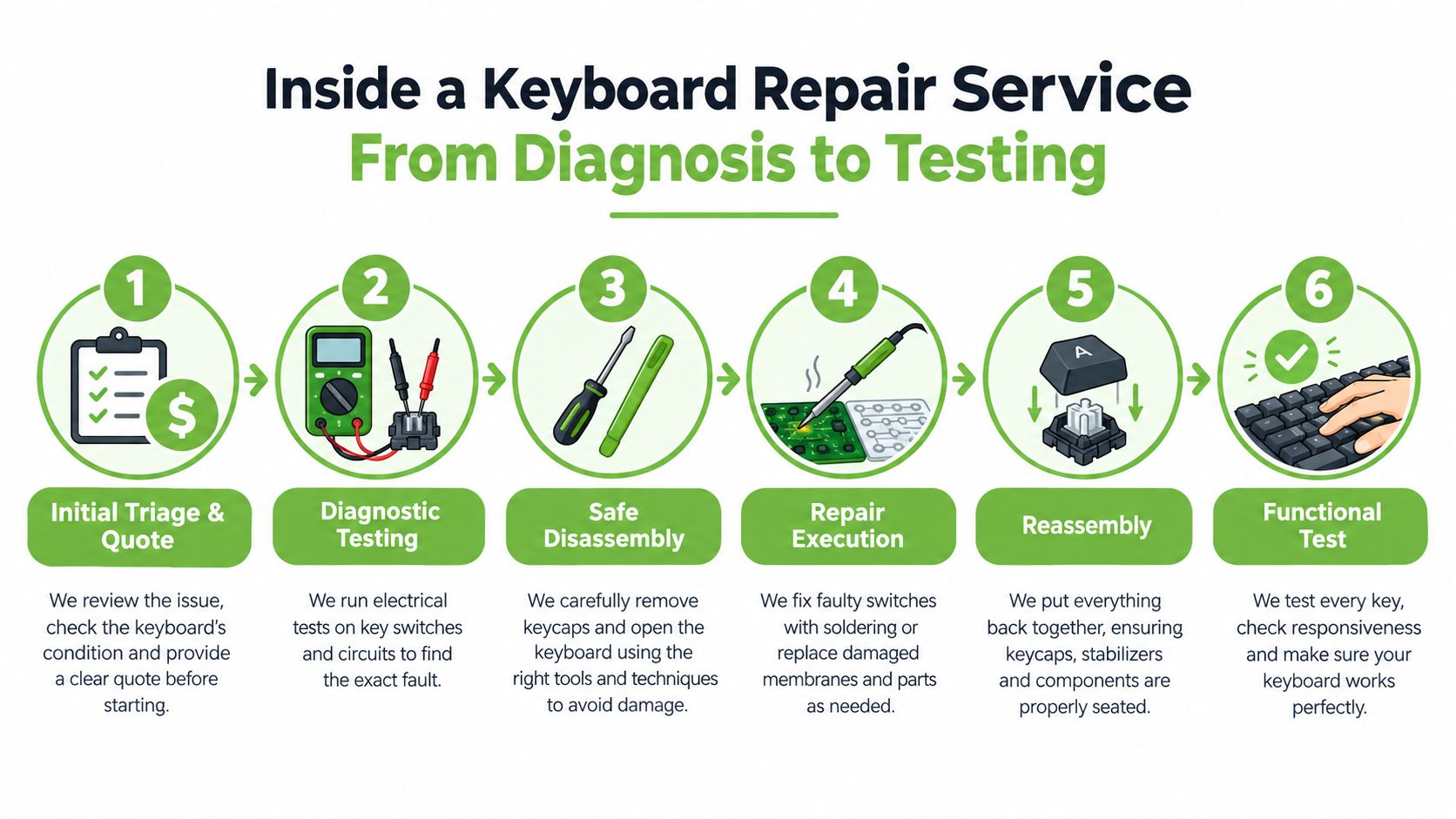
Inside a Keyboard Repair Service From Diagnosis to Testing
A key stops responding before an important meeting. You bring the laptop to a repair shop, explain what happened, and want two clear answers: what failed, and what the repair will involve. A professional service should reach those answers through inspection, not guesswork. The keyboard's design also matters. A modular keyboard may need a focused part replacement, while a bonded top case can turn the same dead key into a larger job.
The service journey
Initial triage and quote: The technician records the model, checks its visible condition, and asks about spills, drops, and earlier repairs. Photos of the model label and affected keys can support an online quote. Liquid damage or unusual construction may still require an in-person inspection.
Diagnostic testing: Each affected key is tested, along with key groups, the backlight, connection points, and related functions. On a laptop, testing may include the trackpad and other top-case behaviour because these parts can share one assembly. This helps separate a failed key mechanism from a cable, keyboard module, or wider board issue.
Safe disassembly: The device is opened using the correct tools and sequence. Hidden screws, clips, ribbon locks, and adhesive differ between models, so forcing the case can create damage that was not part of the original fault.
Repair execution: The work may involve cleaning, reseating a ribbon cable, replacing a key mechanism, changing a keyboard module, or replacing a bonded top case. The technician should explain which part is being changed and why. For MacBook owners, this MacBook keyboard repair guidance can clarify why certain models require broader assembly work.
Reassembly and testing: Cables are secured, the keyboard is rebuilt, and keys are checked for consistent movement. Spill-related repairs need drying and soak-testing before collection. A few successful keystrokes immediately after cleaning do not prove that residue or moisture has stopped being a risk.
Convenience and data care
A hybrid service helps when travel is difficult. myhalo provides online quote channels and physical drop-off points at Bugis Junction and Sim Lim Square, so customers can choose remote assessment or an in-person counter visit.
Ask about data handling before handing over a laptop. Check whether a login is required, how the device is protected, and what happens if testing reaches storage. ISO-aligned handling and a clear Safe Data process can reduce worry around work devices, family photos, and documents.
If liquid has affected storage or the laptop no longer starts properly, the job may extend beyond keyboard repair. Safe Data support focuses on attempts to retrieve important files from damaged devices. Tell the technician about those files before approving work that could alter the device's condition.
Singapore's consumer framework also affects the next step. If a defect appears within six months of purchase or delivery, it is presumed to have existed at delivery unless the seller proves otherwise, as explained in Singapore's guidance on defective goods. Keep your records and consider approaching the seller before arranging paid repairs.
Pricing and Turnaround Times in Singapore
A keyboard quote can vary because technicians aren't pricing only the visible key. They may be pricing access, the keyboard architecture, backlight layers, a complete top-case assembly, liquid-cleaning work, and the testing needed to return the device safely.
Singapore price references list laptop keyboard replacement at about SGD 90 to SGD 240 in a 2026 guide. A more detailed local guide lists SGD 130 to SGD 190 for serviceable non-backlit keyboards, SGD 170 to SGD 250 for backlit keyboards, SGD 260 to SGD 430 for bonded Windows top cases, and SGD 300 to SGD 480 for MacBook top-case assemblies. These ranges come from Singapore laptop and device repair pricing guidance.
Why architecture changes the quote
A modular business laptop may allow the keyboard module to be changed without replacing the whole upper housing. A thin laptop with a bonded keyboard can require the palm rest, trackpad, and sometimes the battery to be handled as part of the assembly. That is why two devices with the same dead key can receive very different quotes.
Backlighting is another cost factor. The technician may need to match a compatible lit keyboard and verify both typing and illumination after installation. Liquid damage adds cleaning, drying, inspection, and reliability testing rather than a simple part swap.
| Repair Type | Price Range SGD | Typical Turnaround |
|---|---|---|
| Laptop keyboard replacement, broad guide range | SGD 90 to SGD 240 | Depends on model and part availability |
| Serviceable non-backlit keyboard | SGD 130 to SGD 190 | Separate jobs may take 45 to 90 minutes |
| Backlit keyboard | SGD 170 to SGD 250 | Some jobs can be completed the same day |
| Bonded Windows top case | SGD 260 to SGD 430 | Depends on assembly availability and testing |
| MacBook top-case assembly | SGD 300 to SGD 480 | Depends on model, part, and testing |
| Spill-related keyboard work | Quote depends on damage | Often 2 to 5 days for cleaning, drying, and soak-testing |
The source guide states that separate serviceable keyboard jobs typically take 45 to 90 minutes and can often be completed the same day, while spill-related work can take 2 to 5 days because cleaning, drying, and soak-testing are required. Treat those as useful expectations, not guarantees. A fair quote should explain the part, labour, risk, and likely collection time.
Keep Your Keyboard Healthy Longer and Next Steps
Small habits protect the keyboard you already own. Keep drinks away from laptops, clean gently with the device powered down, and avoid forcing dirt deeper beneath the keycaps. A suitable keyboard cover can reduce dust exposure, while a safe storage place keeps an external keyboard away from pressure and accidental drops.
Software checks still have a place. If the keys work physically but behave strangely, update the appropriate drivers or operating-system software before assuming the hardware has failed. For broader laptop care, these steps to extend your laptop's lifespan provide a useful maintenance reference. If you're managing support questions for a digital tool alongside device issues, you can also find Sculpty support through its support resources.
The useful takeaway
The keyboard's design predicts much of the repair experience. Local Singapore guidance places modular Windows keyboard replacement at S$120 to S$220, while keyboards bonded into a top case rise to about S$220 to S$480, because the work can include the palm rest, trackpad, and sometimes the battery as part of the assembly. See the Singapore laptop keyboard replacement guide for that architecture-based comparison.
Before booking, write down the model, affected keys, spill history, and whether the laptop still starts normally. A technician can then separate a keycap problem from a circuit, ribbon, backlight, or top-case issue. Repairing the device first supports a zero e-waste lifestyle, while Declutter your e-clutter, responsible reuse, parts harvesting, and secure data destruction provide sensible next steps when repair isn't viable.
Your precious files and memories matter to us. Whether you need to protect your privacy with Safe Data or rescue lost files with Save Data, our caring team is right here to help. Visit myhalo for a transparent keyboard repair quote, online support, or convenient drop-off at a central Singapore counter.