

Your iPhone was fully charged in the morning. By lunch, it's already flirting with red battery. By the time you're heading home on the MRT, you're carrying a power bank, turning brightness down, and hoping the phone doesn't die during payment, maps, or a family call.
That's the point where payphone owners in Singapore start asking the same questions. Is the battery worn out, or is it just heavy app use? Is battery service worth it, or should you replace the phone? Will your photos, chats, and notes stay safe when you hand the device over?
Battery problems feel small until they start affecting the whole day. They can also push people into replacing a phone that still works well in every other way. For many users, iPhone battery service is less about fixing a single part and more about making a smart lifecycle decision. Repair the part that's ageing, keep the rest of the device working, and avoid creating unnecessary e-waste.
That fits the zero e-waste spirit beautifully. A battery replacement can keep a useful iPhone in circulation longer, whether you continue using it, pass it to a family member, or eventually move it into a responsible reuse pathway. If you're also weighing wider repair options, this guide to mobile phone repair in Singapore can help you compare the bigger picture.
Table of Contents
- Introduction to iPhone Battery Service in Singapore
- How to Tell Your iPhone Battery Needs Service
- Preparing Your iPhone Before Battery Service
- What Happens During iPhone Battery Service and How Long It Takes
- Understanding iPhone Battery Service Costs and Warranty Coverage
- Keeping Your New Battery Healthy and Next Steps With myhalo
Introduction to iPhone Battery Service in Singapore
A common local scenario goes like this. Your iPhone still looks fine, the camera still works, and your apps still run. But battery life has become unpredictable. You leave the office for a quick errand and start checking the percentage every few minutes because you no longer trust it.
That's when battery service starts to make sense as a maintenance decision, not a panic decision. A battery is a consumable part. It wears down over time, even if the phone itself is still perfectly usable. Replacing that ageing part can be the difference between “I need a new phone” and “this one still suits me”.
Why battery service matters beyond daily convenience
The first reason is practical. A healthier battery usually means fewer charging interruptions, less stress about shutdowns, and a phone that feels more dependable during normal use.
The second reason is financial. Official battery service in Singapore sits in a meaningful repair band, so it's worth comparing against the cost of replacing the whole device rather than assuming a new phone is the only answer.
The third reason is environmental. Extending device life supports a more responsible tech habit. That lines up with a Convenient, Safe, Responsible approach to electronics and with the broader goal of building a zero e-waste world.
The myhalo Promise: We believe that joining the zero e-waste movement should feel good and be completely effortless. Through our Safe data guarantee, your privacy is protected, while Declutter your e-clutter makes it easier to move unused devices into responsible next steps.
What usually worries people before service
Most readers don't just worry about the battery. They worry about three things at once:
- Cost clarity: Will this be a manageable repair or an unpleasant surprise?
- Downtime: Can the phone be serviced without losing a full day?
- Data safety: Will photos, messages, and accounts remain private and intact?
Those concerns are normal. They're also manageable once you understand how to check battery health, how coverage works in Singapore, and how to prepare your iPhone before handing it over.
How to Tell Your iPhone Battery Needs Service
You leave home with 82 percent, answer a few messages on the MRT, check maps in town, and by late afternoon your iPhone is suddenly struggling. On a busy day, that can feel worrying. Still, one bad battery day does not always mean the battery is worn out.
A battery usually ages in patterns, not random moments. The goal is to spot the difference between heavy use, temporary software drain, and a battery that is nearing the point where service makes more sense than charging more often.
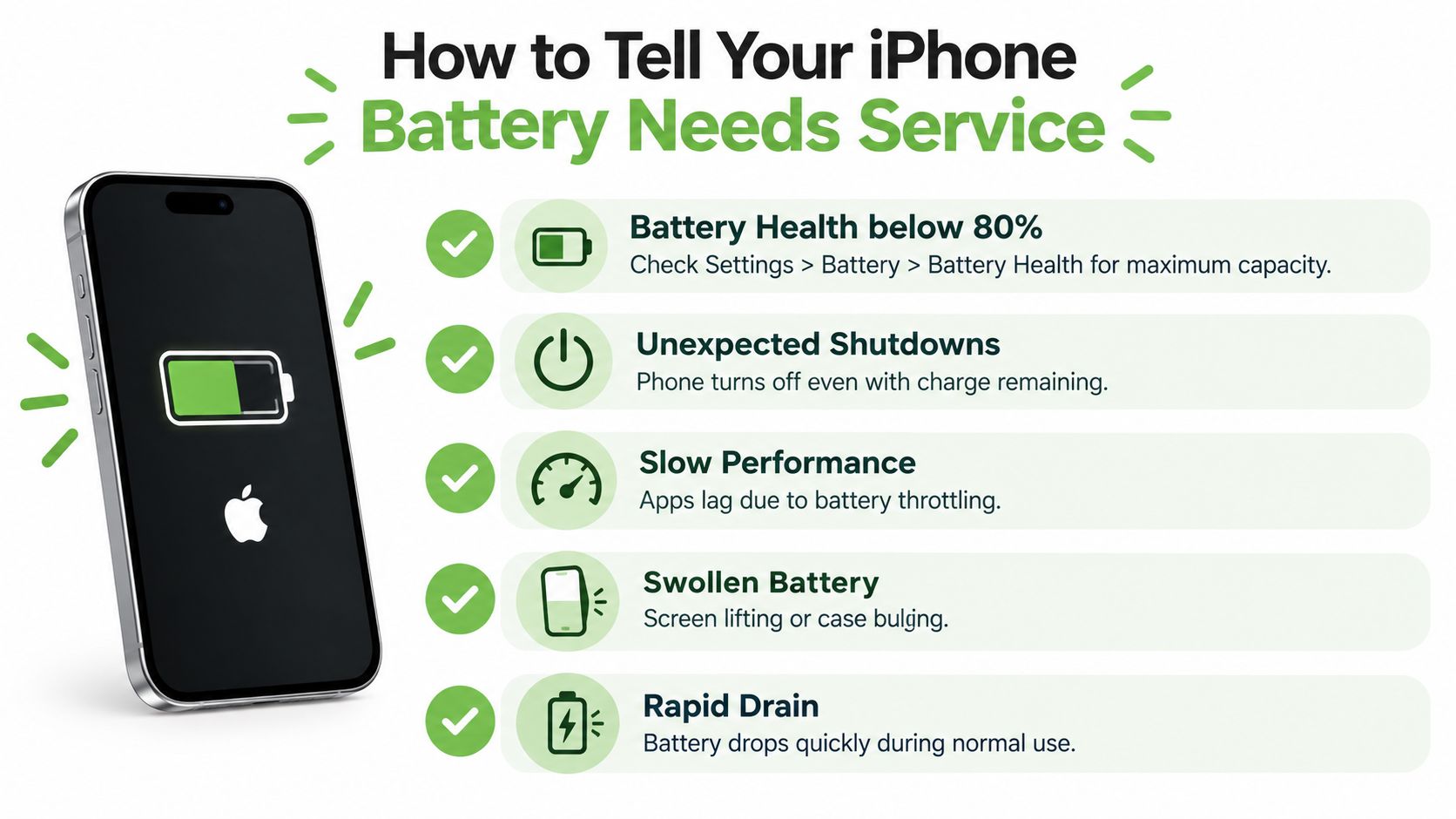
A good first check is Battery Health in Settings. Open Settings > Battery > Battery Health & Charging and look at Maximum Capacity. In Singapore, 80% maximum capacity is the common line people watch because AppleCare+ battery coverage may apply below that level. Treat it as a service signal, not a panic signal. If your phone still lasts through your day and performs normally, you may not need immediate action. If the number is low and daily use has become frustrating, battery service becomes the more practical lifecycle step.
Here's a simple visual summary of the signs to watch.
The clearest signs to look for
Several signs matter more than one number on its own.
- Maximum Capacity is low: If Battery Health has fallen near or below Apple's service threshold, the battery has less stored energy than before. A simple way to read this is to picture a water bottle that used to hold more. The phone can still work, but it cannot hold the same amount of charge it once did.
- Unexpected shutdowns: If the iPhone turns off while battery percentage is still showing, the battery may be struggling to deliver steady power.
- Slower everyday performance: Apps taking longer to open, stutter during simple tasks, or reduced responsiveness can appear when iPhone performance management is trying to prevent shutdowns.
- Fast drain during normal use: Quick drops during messaging, browsing, music, or light navigation can point to battery wear, especially if this happens day after day.
- Physical changes to the phone: A screen that lifts slightly, a case that no longer sits flat, or pressure from inside the device can suggest a swollen battery.
Physical swelling needs prompt attention. If you have noticed those warning signs, this guide on iPhone battery swelling explains what to look for and why it should not be ignored.
One sign can be misleading. A cluster of signs is much more useful.
Battery ageing versus software drain
Battery ageing and software drain can look similar at first. Both can make the percentage fall faster than expected. The difference is consistency.
After an iOS update, the phone may do extra background work for a while. Some apps also use much more power than others. Maps, camera, gaming, and social media apps are common examples. In those cases, the battery is being used heavily, but the battery itself may still be in decent condition.
Use this quick check:
- One or two apps are responsible for most of the drain: Review app activity and settings first.
- Battery life feels weak across many ordinary tasks: Battery wear becomes more likely.
- Poor battery life comes with shutdowns, lag, or swelling: Arrange a proper battery assessment soon.
Later in this section, this short video helps make the signs easier to recognise in real life.
A practical decision rule
A battery service decision works best when you look at the whole phone, not just the percentage. If your iPhone still does what you need and the battery is the main frustration, servicing the battery is often the sensible choice. You keep the device you already know, restore day to day reliability, and avoid replacing the whole phone earlier than necessary.
If the phone also has other major issues, such as a badly damaged screen, charging faults, or age-related problems in several areas, replacement may be the better long-term move.
That is why many people in Singapore compare three things together. Current battery health, overall device condition, and whether genuine parts and warranty terms are clear before they book. A support path like myhalo can help you make that decision safely, with attention to data privacy, convenience, and responsible next steps rather than pushing a full device replacement too quickly.
Preparing Your iPhone Before Battery Service
Most battery appointments go more smoothly when the prep is done at home. This isn't about technical skill. It's about protecting your memories, reducing delays at intake, and making sure there's no confusion when you hand over the phone.
The most important job is backup. Before any hardware service, save what matters. That includes photos, videos, chats, notes, and app data. If you need a refresher, this guide on backing up an iPhone walks through common backup routes in plain language.
What to do before you head out
A smooth drop-off usually comes down to a few habits:
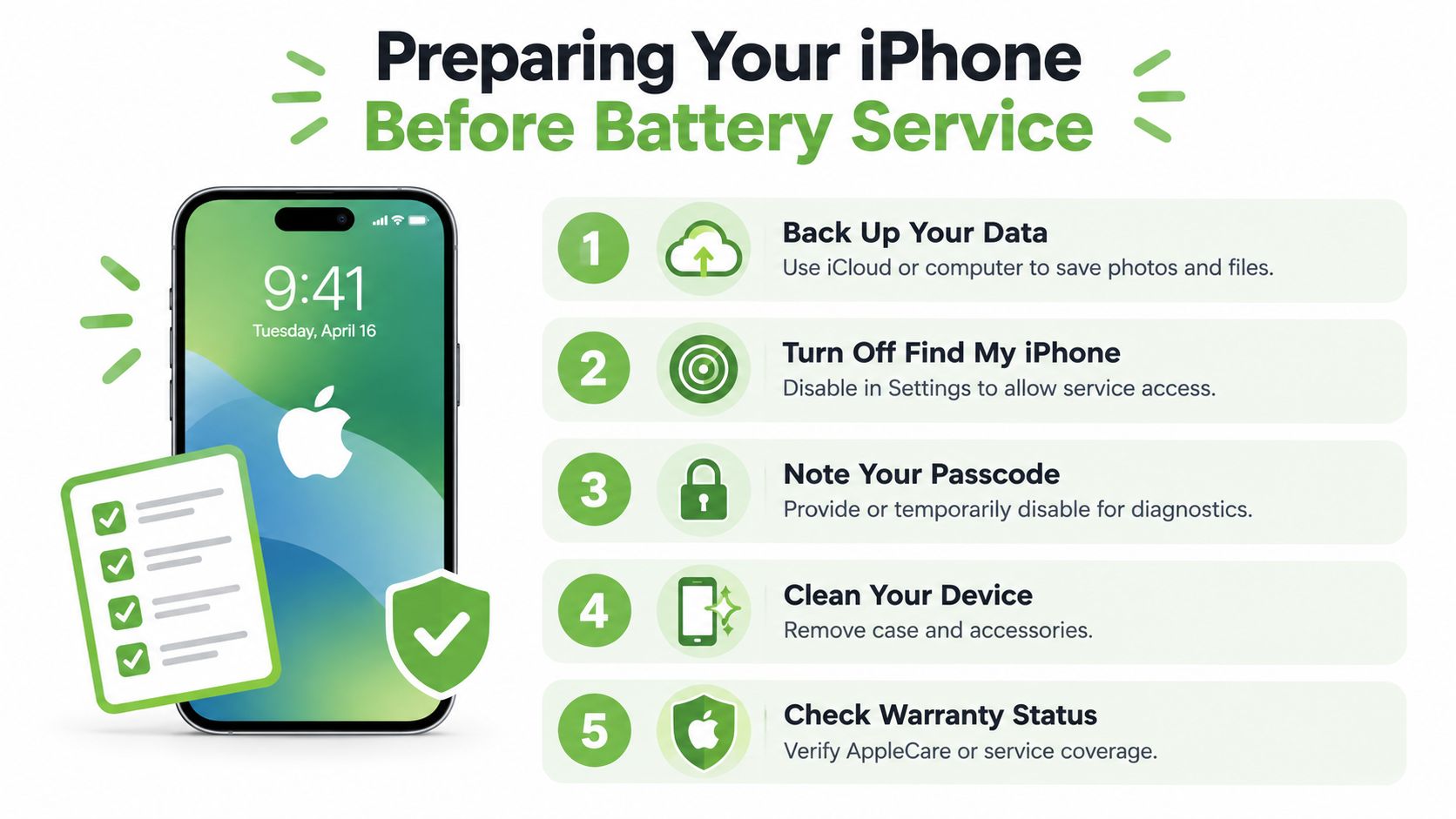
- Back up first. Use iCloud or a computer, depending on what you normally trust and use.
- Check whether Find My needs to be turned off. Some service workflows may require this before repair can proceed.
- Make sure you know your passcode and Apple ID details. Even if you don't need to share everything, you don't want to be locked out of key steps.
- Remove accessories. Cases, screen add-ons, card holders, charging attachments, and charms can get in the way.
- Note any existing issues. If the screen already has a crack or Face ID has an intermittent problem, mention it during intake.
Why data handling matters so much
People often worry more about privacy than the repair itself. That's understandable. Your iPhone carries messages, banking apps, work email, family photos, and years of personal habits.
A good service experience should make data handling expectations clear. Ask how the device is checked, what access is needed, and how customer privacy is handled. A Safe Data mindset means treating your phone like a container of personal information, not just a piece of hardware.
Practical rule: Back up anything you'd be upset to lose, even if the repair sounds routine.
A simple pre-drop-off checklist
Use this quick list before leaving home:
- Battery prep: Charge the phone enough that it can be received and checked easily.
- Access prep: Confirm you can access the device if basic testing is required.
- Account prep: Keep your Apple account details available in case you need them.
- Physical prep: Remove the case, lanyard, SIM accessories, and anything attached to the phone.
- Peace of mind prep: Decide what questions you want answered before the device leaves your hands.
That last point matters more than people think. When customers feel rushed, they forget to ask about timing, coverage, or data precautions. A short checklist helps you stay calm and organised.
What Happens During iPhone Battery Service and How Long It Takes
Many people delay battery service because the process feels fuzzy. They know a battery gets replaced, but they don't know what happens between drop-off and collection. Once you see the flow, it feels much less disruptive.
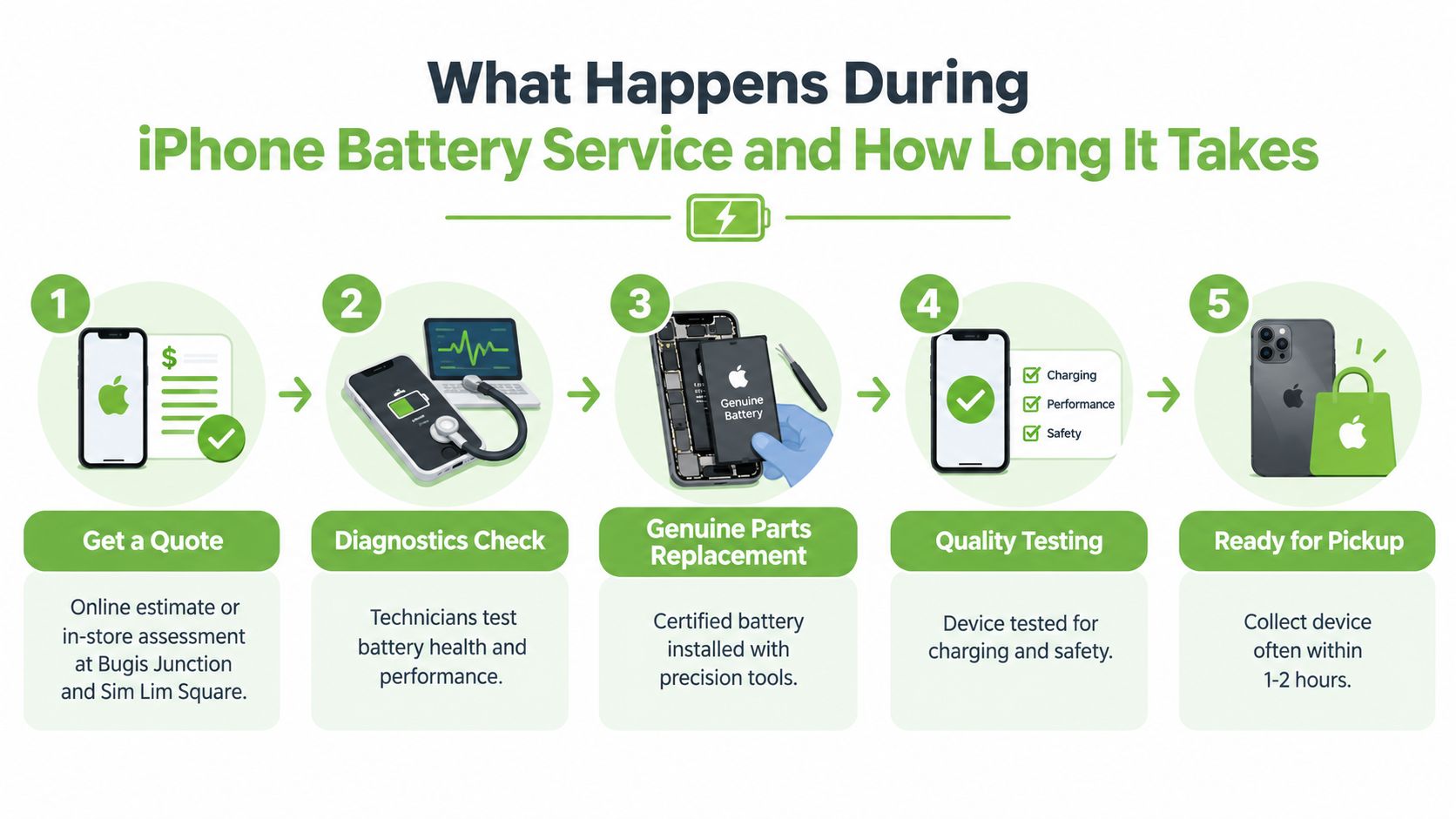
A typical service journey starts with an estimate or inspection. Some customers begin online, others walk in. In Singapore, there are also hybrid options that let you check quotes digitally and then visit a physical counter. myhalo, for example, supports device intake through its online channels and at Bugis Junction and Sim Lim Square for customers who want an in-person handover.
The flow from assessment to collection
The first part is confirmation. The technician or service team checks the iPhone model, battery symptoms, and any visible physical issues. If the device has swelling, lifting, or unrelated damage, that may affect how the repair is handled.
Next comes diagnostics. That means checking battery behaviour and basic device function so the team understands whether the battery is the main issue or whether something else needs attention too.
Then the battery is replaced. When people talk about genuine parts, they usually mean parts that match the intended service standard for that repair route. In plain language, it means the replacement battery should be appropriate for the iPhone model and installed with the proper tools and handling.
After replacement, the phone is tested. Charging, power behaviour, and basic function are checked before release. A careful provider doesn't just fit the battery and pass the phone back immediately.
How long should you expect
Time varies by repair route, appointment load, and device condition. Some services are fairly quick when the issue is straightforward. Others take longer if diagnostics raise extra questions or if queue volume is high.
What helps most is asking the service team two practical questions before you commit:
- What is the likely same-day outcome?
- What issues could extend the turnaround?
That gives you realistic planning around work, school, or errands.
Genuine parts and a proper test matter because battery service isn't only about getting the phone to switch on. It's about making sure the device charges and behaves normally afterwards.
What's usually included in battery service
Battery service often includes more than the battery itself. Depending on the provider and service route, you may see a package that covers:
- Initial assessment: Basic confirmation that the battery is the likely cause
- Battery replacement work: Opening the phone, removing the old battery, and fitting the new one
- Post-repair checks: Verifying charging and normal operation
- Service guidance: Advice on charging habits and what to monitor after collection
It also helps to ask about warranty in plain terms. Not every customer means the same thing when they say “warranty”. Sometimes they mean AppleCare+ coverage eligibility. Sometimes they mean the repair provider's workmanship or parts assurance. Clarifying which warranty applies avoids disappointment later.
Why the service experience matters
The battery itself is only one part of the decision. Convenience matters too. If the process is clear, the handover feels safe, and you know when you're likely to get the phone back, the repair feels much easier to choose.
That convenience is part of device lifecycle care. A clear service path helps people repair first instead of shelving the phone in a drawer or replacing it too early.
Understanding iPhone Battery Service Costs and Warranty Coverage
You check your battery health, see the number dipping, and the next question comes fast. Is this a sensible repair, or is the phone reaching the point where replacement makes more sense?
In Singapore, that decision usually comes down to three things. Your battery health, your coverage status, and the overall condition of the iPhone.
If you have AppleCare+, battery service may be covered when the battery has fallen below Apple's qualifying threshold, as noted earlier in the article. That is why it helps to check coverage first. A quick eligibility check can change the cost from a paid repair to a covered one.
If the iPhone is out of warranty, battery pricing is usually tied to the model rather than one flat national rate. Apple's published Singapore service pages show that some models sit at the lower end, while newer or higher-end models can cost more. You can confirm the latest range on Apple's Singapore battery replacement page and broader Apple repair pricing in Singapore.
That pricing structure is easier to understand if you treat battery service like tyre replacement on a car. If the car still runs well, new tyres are maintenance. If the engine, gearbox, and suspension all need work too, replacing only the tyres may not be the best use of money. An iPhone battery works in a similar way. A weak battery alone often makes service worthwhile. A weak battery plus major screen damage, storage limits, or multiple faults can push the decision toward replacing the phone instead.
iPhone Battery Service Cost Scenarios in Singapore
| Scenario | What it usually means | Indicative Cost |
|---|---|---|
| AppleCare+ battery service | Battery falls below the qualifying capacity threshold and coverage is active | S$0 if the service qualifies under plan coverage |
| Apple out-of-warranty older or lower-priced model | No qualifying coverage. Price depends on model | Often at the lower end of Apple's published range |
| Apple out-of-warranty newer or higher-end model | No qualifying coverage. Price depends on model | Often at the higher end of Apple's published range |
Warranty can also mean two different things, which confuses many iPhone owners. One meaning is Apple coverage, such as limited warranty or AppleCare+. The other is the repair provider's own workmanship or parts warranty. Before you hand over the phone, ask which one applies, how long it lasts, and what it covers if the battery behaves abnormally after service.
Genuine parts and clear warranty terms matter because battery service is part of a longer device lifecycle decision, not just a one-day fix. If your iPhone still does what you need, replacing the battery can buy you useful time and delay a bigger spending decision. If the phone no longer meets your needs even after a fresh battery, replacing the device may be the cleaner path.
For a broader local guide to budgeting, model differences, and what Singapore users typically compare, you can read this explainer on iPhone battery replacement cost.
If you are unsure which path fits your phone, myhalo can help you check the condition first, explain the likely cost route, and keep the process clear and safe so you can choose repair or replacement with confidence.
Keeping Your New Battery Healthy and Next Steps With myhalo
Once the battery has been replaced, the goal changes. You're no longer trying to diagnose a problem. You're trying to keep the new battery in good shape for as long as practical.
That doesn't require obsessive habits. It usually comes down to steady, sensible use. Avoid prolonged heat, keep iOS updated, and pay attention if the phone starts feeling unusually warm during ordinary tasks. Heat and repeated stress tend to be harder on batteries than seems obvious.
Habits that support battery lifespan
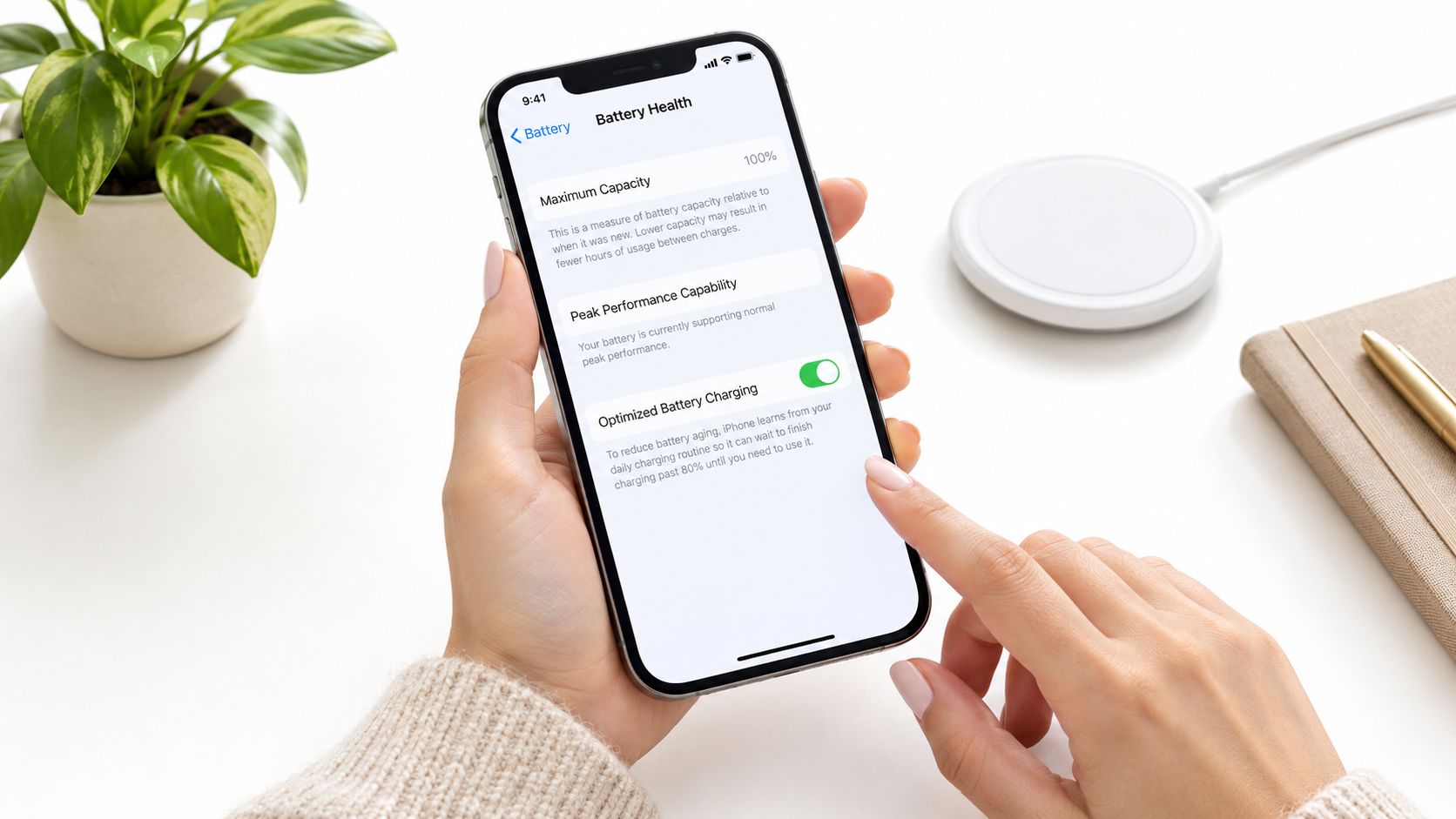
- Use charging features built into the iPhone: Settings that reduce unnecessary charging strain can help over time.
- Be careful with temperature: Don't leave the phone in direct sun, in a hot car, or near heat sources for long periods.
- Watch for changing behaviour: If the phone starts draining unusually fast again, check usage patterns before assuming the battery is failing.
- Revisit Battery Health occasionally: You don't need to check it daily, but it's useful as a periodic maintenance habit.
Think in terms of device lifecycle, not just one repair
A battery replacement is one decision in a longer device story. You might keep using the iPhone. You might pass it on. You might later trade it in, resell it, or move it into a responsible recovery pathway.
That's where a zero e-waste mindset becomes practical. Repair what still has life in it. Reuse what still serves someone. Recover value and protect data when it's finally time to let go.
If your phone use involves events, field teams, or community programmes, it can also help to plan backup power more thoughtfully. For organisations looking for practical charging support, you can order custom power banks for events so people aren't relying on failing phone batteries during long days out.
Your battery is only one part of your digital life. Good support should also make it easy to protect your data, recover files when needed, and move old devices on responsibly.
That's why battery service often connects naturally with wider support paths such as Safe data, Save data, and Declutter your e-clutter. A repair today can extend the device. A secure handover tomorrow can keep private information protected. A responsible off-ramp later can prevent another forgotten gadget from sitting in a drawer.
If your iPhone is still good except for battery life, myhalo offers a practical path that fits repair, data care, and responsible device lifecycle support in Singapore. Whether you need help checking the battery, protecting personal files through Safe data, or deciding what to do with older tech through Declutter your e-clutter, their team can help you move forward without the usual stress.