
You've just upgraded to a sleek new smartphone, and the old one is still sitting in a drawer, fully charged but untouched. You know it could bring in useful cash, yet low offers, privacy worries, and confusing trade-in forms make leaving it alone feel easier.
That hesitation is common in Singapore. National statistics report 9.96 million mobile phone subscriptions in 2024, while 2.9 million unused smartphones were sitting in homes and people replaced phones every 2.7 years on average. (Singapore Department of Statistics) The practical answer is to sell while the device is still current, prepare it carefully, compare the quote mechanics, and treat data erasure as part of the sale, not an afterthought.
If you're searching for how to sell your phone in Singapore, the process can be straightforward. The right steps help you protect your information, improve the phone's condition grade, and choose a reuse or recycling route that supports a zero e-waste lifestyle.
Table of Contents
- Introduction to Selling Your Mobile Phone in Singapore
- Preparing Your Phone for Sale
- Getting an Instant Quote Online
- Comparing Trade-In and Buyback Options
- Erasing Data and Getting Certificates
- Tips to Maximize Your Sale Value
- Conclusion and Next Steps
Introduction to Selling Your Mobile Phone in Singapore
Your upgraded phone may still be easy to sell today, yet its resale value can weaken while it sits unused. Battery wear, dust, forgotten account locks, and newer model releases can affect inspection results. Delaying also makes it easier to misplace accessories or overlook a fault that should be disclosed.
Singapore's high smartphone ownership supports an active market for resale, refurbishment, and buyback. Ownership reached 96.47% among residents aged 18 and over in 2024, including 99.79% among residents aged 18 to 39, 99.54% among those aged 40 to 59, and 88.93% among seniors aged 60 and above. Singapore's official smartphone ownership data This means sellers are usually offering devices from an upgrade cycle, while buyers can choose from phones with different ages, conditions, and prices.
The practical sequence is straightforward. Check the phone before requesting an offer, describe its condition accurately, and compare cash buyback with trade-in credit. Review how each channel grades damage, handles accessories, and changes the quote after inspection. Timing matters too, since a newer model launch can affect demand for the previous generation.
For a clearer overview of the process, see this guide to selling your phone in Singapore. Complete a verified data wipe before handing over the device, then ask how it will be routed after sale. myhalo's Safe Data approach and Declutter your e-clutter programme address secure handling and responsible pathways, including reuse, parts recovery, donation, or recycling.
Preparing Your Phone for Sale
A clean, complete, working phone is easier to inspect and easier for a buyer to place into resale. Preparation won't turn a damaged device into a perfect one, but it can prevent avoidable deductions and make your online description match the unit that arrives for verification.
A 2025 survey reported that 60% of consumers keep their old devices after upgrading, while 32% of those who keep them leave the devices unused indefinitely. (TelcoNews Asia's Singapore circular-tech coverage) That's a lot of value trapped in drawers. Use this checklist before requesting an offer.
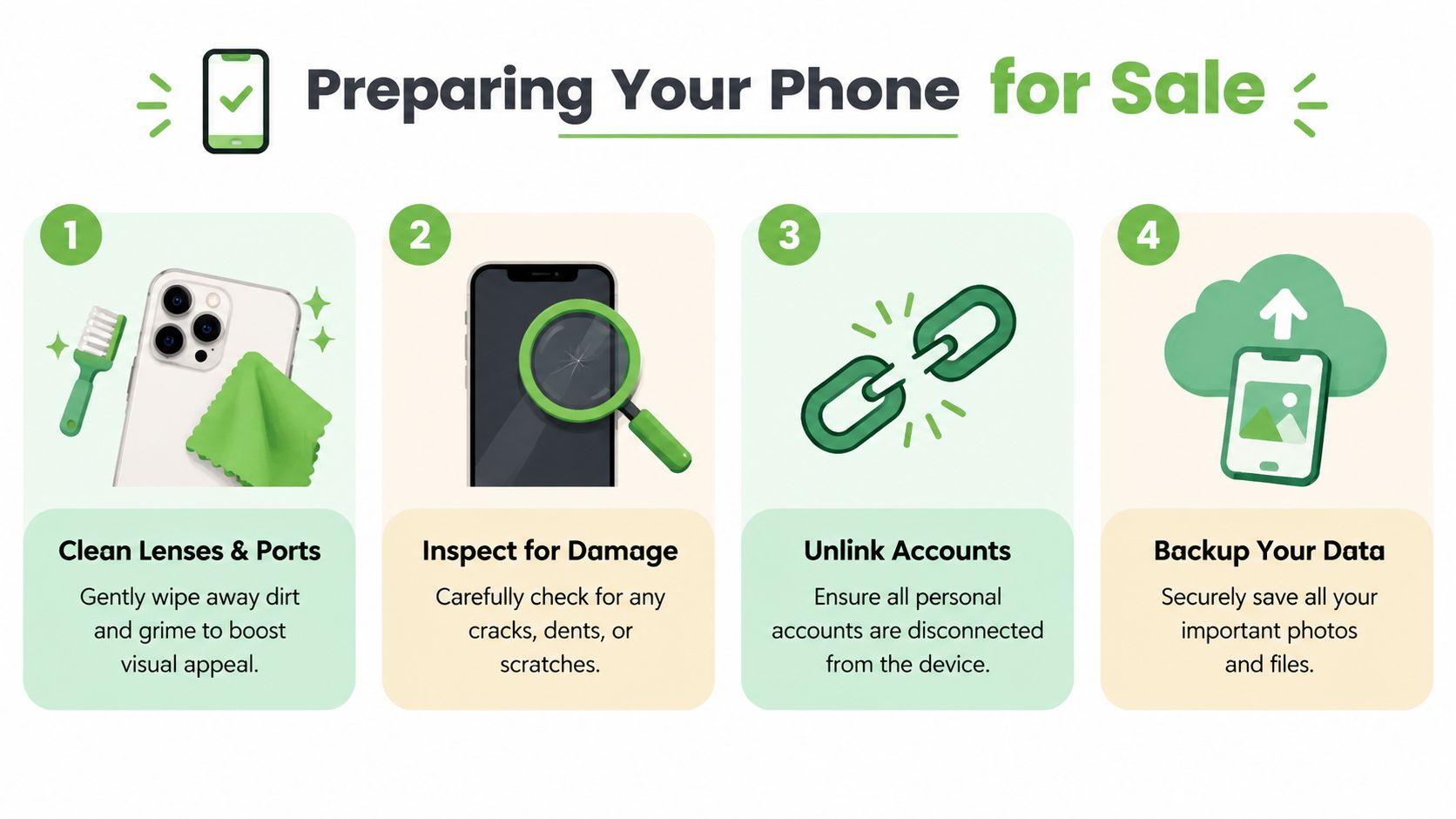
Complete a practical inspection
Clean the exterior: Use a soft, dry cloth on the screen, camera lenses, frame, and back panel. A clean charging port and lens make the phone look cared for, but don't push metal objects into the port or apply liquid directly.
Check visible damage: Look for cracks, dents, deep scratches, camera haze, loose buttons, and screen discolouration. Be honest about anything you find. Condition bands usually depend on cosmetic appearance as well as working condition, so an accurate description reduces the risk of a revised offer.
Test the essentials: Power the phone on, check the touchscreen, cameras, speakers, microphone, charging, Wi-Fi, Bluetooth, biometric features, and cellular connection. If the battery-health menu is available, record what it shows. A buyer can verify these functions, and missing problems may slow the assessment.
Install available updates: An updated operating system can help the next owner use the phone securely and may prevent avoidable compatibility issues. Don't update if the device is already unstable without backing up first.
Protect your information
Back up photos, contacts, messages, authentication details, and work files before removing anything. This phone backup guide can help you organise the process. Then remove your Apple ID, Google account, Samsung account, and any other services tied to the handset, and take out the SIM and memory card.
Pack it sensibly: Include the original box, charging cable, charger, and accessories when you still have them. They may not transform the quote, but a complete package is easier to present and can support a stronger condition assessment. For protection during delivery, sturdy small postal boxes are more suitable than a loose paper envelope.
Practical rule: Photograph the phone from several angles before handing it over. Keep the quote details and the device's condition notes until payment is complete.
For a visual walkthrough of the preparation flow, use the following guide:
Getting an Instant Quote Online
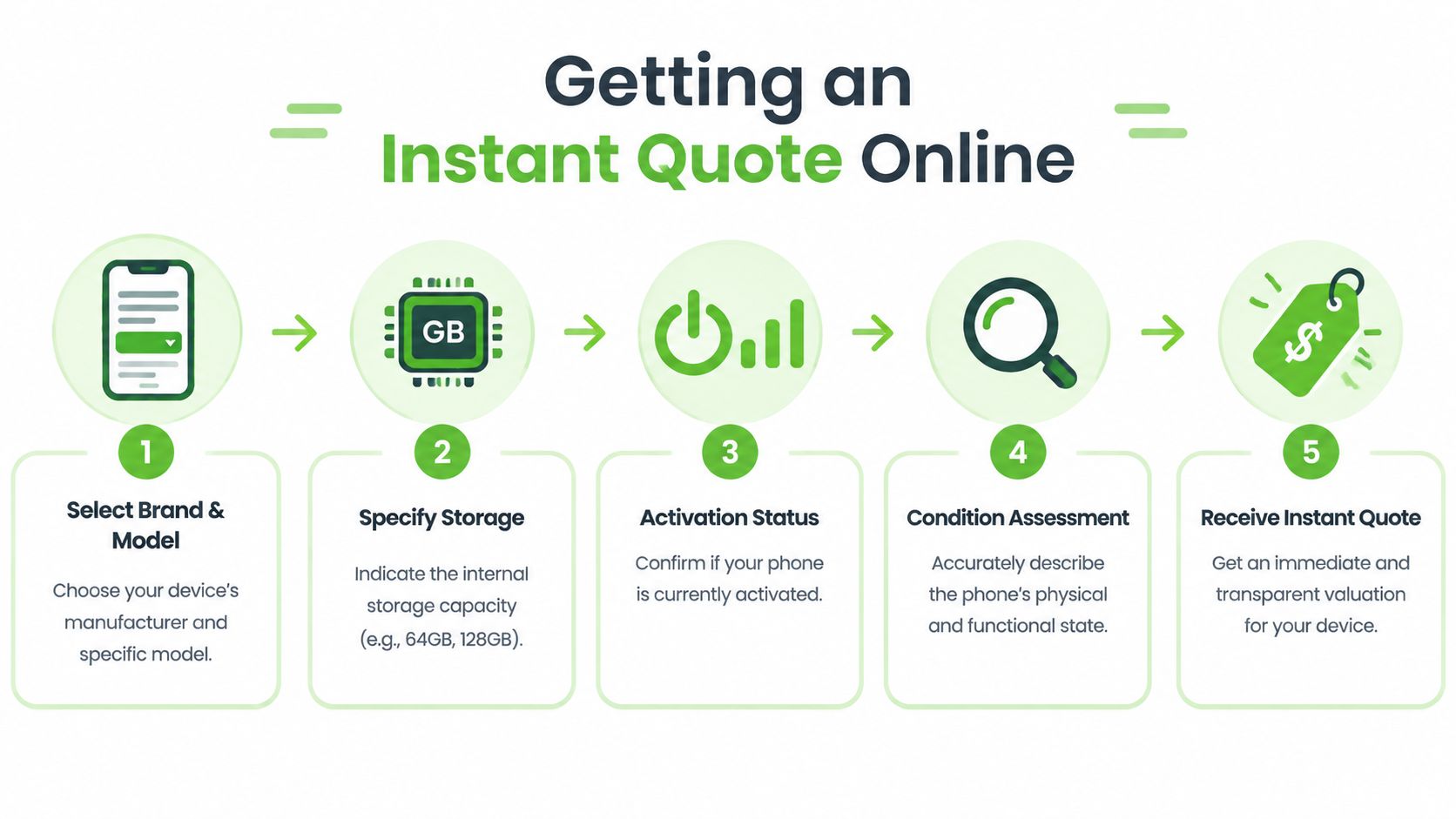
An online quote gives you a useful starting figure, provided the details match the phone you will hand over. Buyers usually assess brand, model, storage capacity, activation status, and condition band, so choosing a similar-looking option can lead to a lower offer after inspection.
myhalo separates its online prices by brand, model, condition, and whether a phone is brand new or activated. It also displays a 7-day price lock and offers instant PayNow payment after verification, according to its published process. Treat a locked quote as time-sensitive, rather than as a permanent measure of market value. Timing matters because a short lock period may not suit sellers who are still comparing channels.
Enter details carefully
Select the exact model: Choose the manufacturer, model, and variant, rather than only the product family. An iPhone Pro Max, standard iPhone, and different Samsung Galaxy variants can attract different offers.
Confirm storage: Check the capacity in the phone's settings before selecting an option. Avoid relying on memory or packaging when the device menu provides the answer.
State activation status: Mark the phone as new, activated, or used. The applicable pricing band can change with activation status.
Grade the condition accurately: Report cracked glass, dents, scratches, camera problems, battery concerns, and functional faults. If photos are requested, use bright, even lighting and show the screen, back, corners, and camera area.
Review the payout: Confirm whether the offer is cash, store credit, or PayNow, and check the price-lock period. Save the confirmation page or email before sending the phone.
Use this Singapore mobile price list to compare current model references before accepting an offer. It cannot replace an individual quote, since the final amount still depends on the exact model and condition.
Online or in person
Online quoting suits sellers who want a quick figure without travelling. An in-person assessment can work better if visible damage is difficult to describe or you want assistance during inspection. myhalo lists counters at Bugis Junction and Sim Lim Square. Bring the phone, relevant accessories, identification if requested, and the quote reference.
The practical trade-off is convenience versus direct discussion. Online forms save travel time, while a counter visit may resolve condition questions immediately. Whichever route you choose, submit accurate details and keep the quote record until the device has been verified and payment is complete. Compare the result with other channels before deciding, especially if the offer expires soon.
Comparing Trade-In and Buyback Options
Trade-in and buyback suit different selling goals. A trade-in applies the phone's assessed value to another purchase, while a buyback provides a direct payout without requiring you to replace the device through the same provider.
| Option | Works well when | Trade-off |
|---|---|---|
| Trade-in | You're already buying a replacement phone from the provider | The value may be limited to that retailer, brand, or purchase |
| Buyback | You want cash, PayNow, or freedom to decide what happens next | You'll need to arrange your next device purchase separately |
Trade-in promotions can look generous beside the price of a new phone. Check the conditions before accepting, including activation status, storage capacity, cosmetic grade, and campaign requirements. A credit bonus makes sense if you already plan to buy from that retailer. It may offer less practical value when the shop's pricing or device range does not fit your needs.
Buyback works better if you have already upgraded, received a replacement as a gift, or are clearing unused technology. You can compare cash offers from different buyers without linking the sale to another purchase. PayNow settlement after verification can also shorten the wait associated with a private listing, though you should confirm when payment is released and what happens if the inspection changes the quote.
Pricing can vary across Singapore sales channels. The myhalo's Singapore trade-in market reference places the iPhone 15 Pro Max across platforms at SGD 1,000 to SGD 1,100. That range shows why the headline model price is only a starting point. Compare the condition band, quote validity, verification process, and payout method. Timing matters too. A promotional trade-in may suit an immediate upgrade, while a buyback quote can be more useful when you want to sell first and choose your next phone later.
Before accepting, ask what happens if the inspected condition differs from your online description. A transparent buyer should explain any adjustment clearly, including whether you can reject the revised offer and how the phone will be returned.
Erasing Data and Getting Certificates
Selling a phone without properly securing its data creates an avoidable privacy risk. A factory reset is an important step, but it shouldn't be treated as the entire process, especially when the phone contains corporate records, customer information, financial documents, or sensitive personal files.
Singapore's e-waste framework requires licensed recyclers to permanently erase or destroy data stored on data-bearing devices before further processing. (Singapore's e-waste regulations) IMDA guidance also describes making data irretrievable through appropriate overwriting software or physical destruction, depending on the storage medium. (IMDA guidance on personal-data disposal)
Follow a complete wipe sequence
Back up first: Confirm that your photos, contacts, messages, files, and authentication access are available elsewhere.
Remove accounts: Sign out of Apple ID, Google, Samsung, Microsoft, and other accounts. Disable Find My iPhone or equivalent device-lock features. This prevents activation-lock problems for the next user.
Remove SIM and memory cards: A reset won't erase a removable SIM or memory card. Keep them with you or destroy them through an appropriate channel.
Run the factory reset: Use the phone's settings menu and wait until the welcome screen appears. Don't hand over a phone that still opens directly into your home screen.
Request documented erasure where needed: For a corporate or sensitive asset, ask the service provider whether it can perform a secure wipe and issue a disposal or destruction certificate. Keep the serial number, asset tag, and certificate with your internal records.
Deletion alone isn't the same as permanent erasure. Flash storage handles data differently from old magnetic drives, so don't rely on manually deleting photos or emptying the recycle folder.
For a deeper explanation of secure handling, see this guide to secure data destruction. If the handset can't be reused, a practical cell phone disposal guide from Reworx Recycling offers additional context on responsible end-of-life routes.
After assessment, a suitable device may move into reuse, upcycling, donation, or recycling. Singapore's formal system recognises reuse and directs residents towards organised collection and recovery channels through the NEA e-waste recycling guidance. The point is to keep a working phone in circulation where possible and send damaged units to controlled recovery instead of leaving them in a drawer.
Tips to Maximize Your Sale Value
Singapore has steady demand for used smartphones, but demand alone does not guarantee a strong offer. The final payout usually reflects the model's popularity, storage capacity, activation status, physical condition, and how quickly you sell. A phone that is easy to verify and still current gives buyers fewer reasons to reduce the quote.
Sell while the phone is current
Start requesting quotes soon after upgrading. Once a newer replacement reaches the market, interest in the previous model can soften. Waiting also gives scratches, battery wear, or forgotten account locks more time to affect the assessment. A price lock may give you time to decide, but read its validity period, inspection conditions, and adjustment rules first.
Improve the condition band
Clean the handset, test its cameras, speakers, buttons, charging port, and connectivity, then provide clear photos. Include the original box or accessories if you still have them. Describe cracks, dents, battery issues, and repairs accurately. An honest condition grade reduces the risk of a revised quote after inspection and saves time on both sides.
Small presentation details matter. A complete, clean device is easier to assess than one covered in fingerprints with missing information.
Compare the mechanics, not just the headline
Get more than one assessment when the difference is meaningful. Compare cash with store credit, immediate settlement with delayed payment, and a fixed price-lock period with an estimate that can change after inspection. A higher displayed figure may be less useful if verification is unclear, deductions are poorly explained, or payment takes longer than expected.
Remove friction before inspection
Charge the phone, back up your data, remove account locks, take out the SIM card, and keep the serial number ready. These steps help the buyer confirm the handset without avoidable delays. For a mailed sale, use protective packaging and retain the delivery record until payment is confirmed.
Check the next destination
Your decision affects more than the payout. Ask whether the device will be resold, refurbished, used for parts, donated, or sent for recycling. If the phone cannot be reused, choose a channel that can explain its e-waste pathway and provide documented data handling when privacy matters. This pricing and timing approach helps you secure a fairer assessment while keeping a usable device in circulation and damaged electronics out of general waste.
Conclusion and Next Steps
Selling a mobile phone in Singapore doesn't need to involve guesswork. Prepare the device, enter accurate quote details, compare trade-in and buyback terms, and complete a secure data wipe before handover. You'll have a better chance of receiving a fair assessment while keeping a usable phone in circulation and directing damaged electronics into proper recovery channels.
myhalo's online quote flow and counters at Bugis Junction and Sim Lim Square give sellers practical ways to begin. Its Safe Data and Declutter your e-clutter programmes also connect the payout with privacy protection and zero e-waste goals.
Ready to clear the drawer and turn an unused phone into useful value? Visit myhalo for an instant quote, secure data handling, and convenient buyback or trade-in support in Singapore. Bring your old device into the zero e-waste movement, whether it's ready for resale, parts recovery, or responsible recycling.