

A tablet slips off a Grab seat, catches the edge of the MRT floor, or slides from a study desk at home. You pick it up and see the familiar spider-web crack. The first instinct is usually to search for the cheapest tablet screen replacement in Singapore. That's the wrong first step.
Before spending anything, answer three questions. Is only the protective glass damaged, or has the digitizer underneath failed? Does the LCD or OLED still show a clean picture without lines, black spots, or flickering? Is the tablet covered by a manufacturer warranty, AppleCare+, or Samsung Care+? Those answers decide whether you need a glass repair, a full display assembly, or a replacement device.
A cracked tablet isn't automatically a write-off, either. The sensible decision compares the repair quote with the tablet's condition, resale value, remaining usefulness, and data inside it. If you're trying to keep a device in service instead of sending it into the waste stream, even temporary protection advice such as whether a screen protector can go over cracked glass can help while you arrange a proper assessment.
Table of Contents
- That Cracked Screen Moment
- What Actually Broke Inside Your Tablet
- DIY Repair or Call a Professional
- How Tablet Screen Replacement Actually Works
- Real Costs and Turnaround in Singapore
- Data Safety Before and After the Repair
- Choosing a Certified Service You Can Trust
That Cracked Screen Moment
A student may still be using the tablet for notes even though one corner is fractured. A parent may have a working iPad with a crack running across the video-call area. A business user may see a black patch spreading across a tablet that was perfectly usable yesterday. These situations look similar from a distance, but they can require very different repairs.
Start with the three-question diagnosis:
- What physically broke? Check whether the top glass is cracked while touch still works everywhere. If taps, swipes, and typing remain accurate, the damage may be limited to the glass.
- What does the picture look like? Lines, black blobs, colour distortion, or a completely dark panel point to LCD or OLED damage rather than a cosmetic crack.
- What cover applies? Check the manufacturer warranty and any AppleCare+ or Samsung Care+ plan before a third-party technician opens the chassis. Coverage rules can affect your safest and most economical route.
Use those answers to create a decision tree, not an automatic repair bill. A clean image with responsive touch suggests a narrower repair scope. A dead touch area may need digitizer work. Display damage usually means a full assembly replacement, while a very old tablet with several faults may deserve trade-in, donation, upcycling, or recycling instead.
Practical rule: Don't approve tablet screen replacement from a photograph alone. Ask the service centre to identify the failed layer and itemise the repair scope.
Singapore pricing makes this distinction important. Published listings show iPad screen replacement at S$65 for iPad 7 and iPad 8, S$135 for multiple iPad Pro 11-inch generations, S$205 to S$225 for iPad Pro 12.9-inch models, and S$150 for iPad Mini 7, according to Singapore iPad repair pricing. The same listing says most iPad screen and LCD replacements are completed on the same day, commonly within 60 to 90 minutes, depending on the model.
The right question isn't “Can this crack be fixed?” It's “Which part failed, what will that part cost, and does fixing this tablet preserve more value than replacing it?”
What Actually Broke Inside Your Tablet
Most modern tablet displays behave like a layered sandwich. The top layer is protective glass. Beneath it sits the digitizer, the touch-sensitive layer that detects your finger. At the bottom is the LCD or OLED panel that produces the image you see.
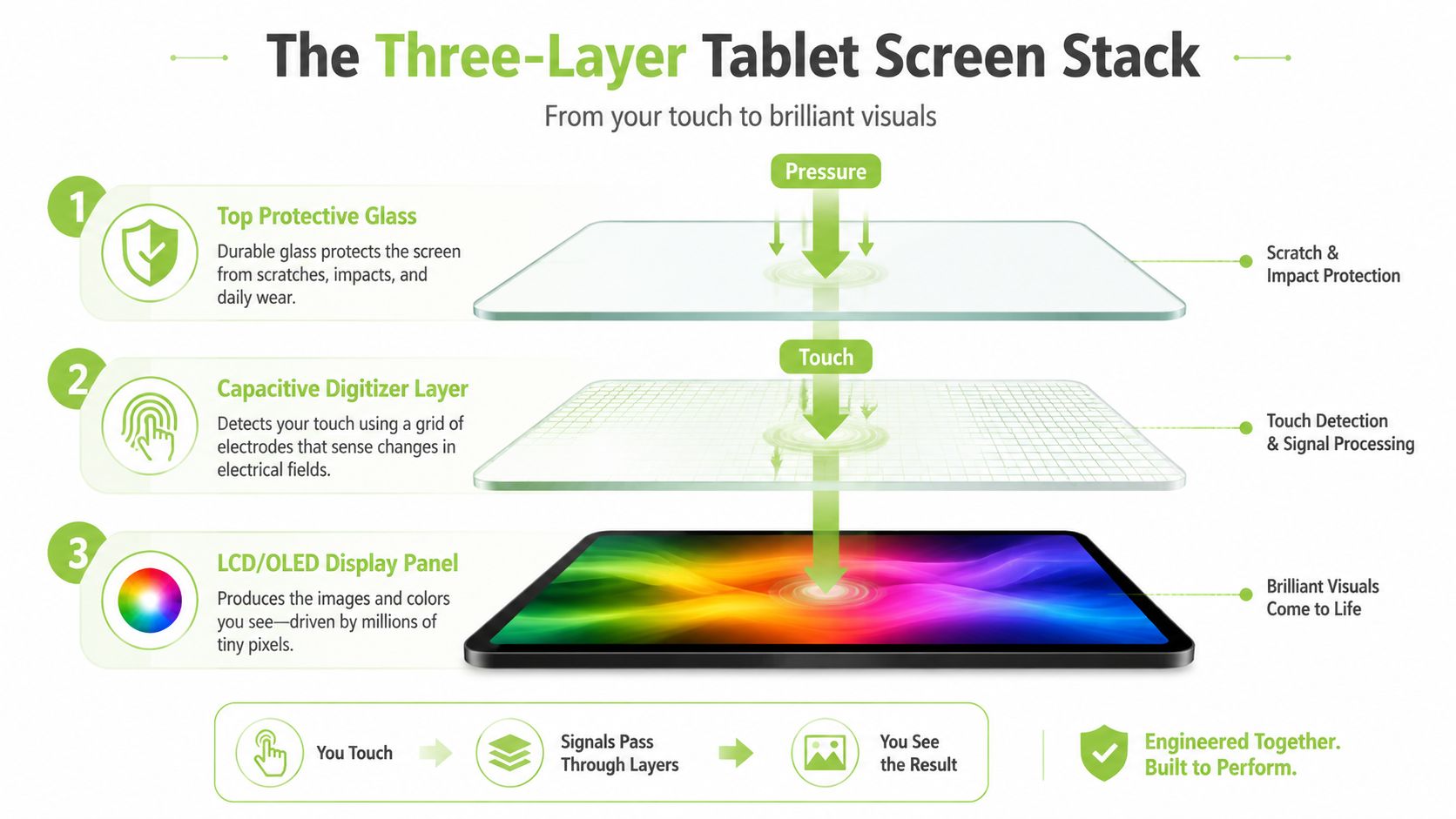
Technicians need to separate these layers conceptually even when the manufacturer bonds them together physically. A tablet can have a badly cracked surface while the touch layer and display remain usable, or it can look intact while a hidden connector or panel has failed.
Match the symptom to the repair
- Hairline or surface cracks, with normal touch and a clean picture: The glass is the likely failure. A glass-only repair may be possible, although many laminated tablets require specialist separation equipment.
- A perfect image, but dead touch zones or missed swipes: The digitizer is probably damaged. The repair may involve replacing the touch layer or the complete bonded assembly, depending on the model.
- Coloured lines, black patches, distorted colours, or no image: The LCD or OLED panel has likely suffered impact damage. Expect a full screen assembly replacement rather than a simple glass swap.
- Flickering after the drop, especially when the tablet moves: A display connector may be loose or damaged. A technician should test the connection before ordering an expensive panel.
Singapore repair listings describe common failure triggers as cracked glass, shattered screens, unresponsive touch, distorted images, and no image at all. They also separate screen replacement, LCD replacement, and battery replacement into distinct repair categories, as shown by common tablet repair services in Singapore.
Before booking, power the tablet on if it's safe to do so. Test the entire touch surface, open a plain white or grey image, check the corners for dark areas, and look for flicker while gently changing the viewing angle. Don't press hard on loose glass, and don't continue using a tablet if the panel is lifting or the battery appears swollen.
For a broader list of iPad symptoms and fixes, you can also review common iPad problems and repair options. The aim isn't to diagnose a bonded display perfectly at home. It's to give the technician useful information and stop you from approving the wrong part.
DIY Repair or Call a Professional
Tablet screen replacement looks simple in a kit photograph. In practice, the screen is often held with strong adhesive, the display flex cables are delicate, and the battery sits close to the work area. A small mistake can turn a glass problem into a display, connector, or motherboard problem.
A DIY kit for an older iPad or Samsung tablet is described in the plan as costing S$40 to S$120, but that amount must be treated as a permitted estimate for the decision, not a universal Singapore price. The risk matters more than the kit price. A fractured LCD, snapped flex cable, or Touch IC failure can make a smaller repair much more expensive.
| Factor | DIY Repair | Professional Repair |
|---|---|---|
| Parts and tools | You buy the part, heat source, suction tools, spudgers, adhesive, and cleaning supplies. | The workshop sources a model-matched part and uses specialist tools already on hand. |
| Damage risk | Incorrect heat or leverage can damage the LCD, cables, frame, or battery. | A trained technician follows a controlled opening, isolation, replacement, and testing process. |
| Warranty and care plans | Opening the device can affect manufacturer warranty, AppleCare+, Samsung Care+, or insurance eligibility. | An authorised route is the safer choice when active cover applies. |
| Time and outcome | The repair may take longer if clips, screws, or adhesive cause trouble. | The service centre can provide a quote, repair scope, testing, and written terms. |
My recommendation is straightforward. First-time repairers should use a certified service. Hands-on tinkerers can consider DIY only with an older, out-of-warranty tablet they're prepared to lose. Anyone with an active premium care plan should use the authorised channel before a third party opens the device.
Companies managing fleets also need more than a one-off fix. They should document part provenance, repair outcomes, data handling, and end-of-life decisions, using resources such as repair data for compliance teams to support a more organised process. For readers comparing parts and repair approaches, phone repair parts guidance can provide useful background, although tablet components and opening procedures still vary by model.
The break-even question comes next. If the repair consumes too much of the tablet's remaining value, put the money toward a replacement, trade-in, or certified refurbished device instead.
How Tablet Screen Replacement Actually Works
A professional repair follows a controlled sequence because bonded displays leave little room for improvisation. Singapore repair services commonly describe a workflow built around adhesive softening, digitizer removal, component isolation, frame realignment, and resealing. Those steps protect touch accuracy and reduce the chance of dust entering the display stack after reassembly.
Phase one involves diagnosis and safe opening
The technician powers on the tablet, confirms the display fault, tests touch response across the panel, and checks for related damage. After powering down, they use tools such as plastic spudgers, suction cups, and controlled heat to soften the original adhesive without attacking the battery or frame.
Phase two is the component swap
The battery is disconnected before the broken LCD or OLED assembly is removed. Residual adhesive is cleaned from the midframe with isopropyl alcohol, then the technician transfers model-specific parts such as the home button, earpiece mesh, and flex cables where applicable.
The exact job depends on the tablet. Some repairs separate the glass from the display. Others replace the complete bonded screen assembly because the layers can't be economically separated without specialised equipment.
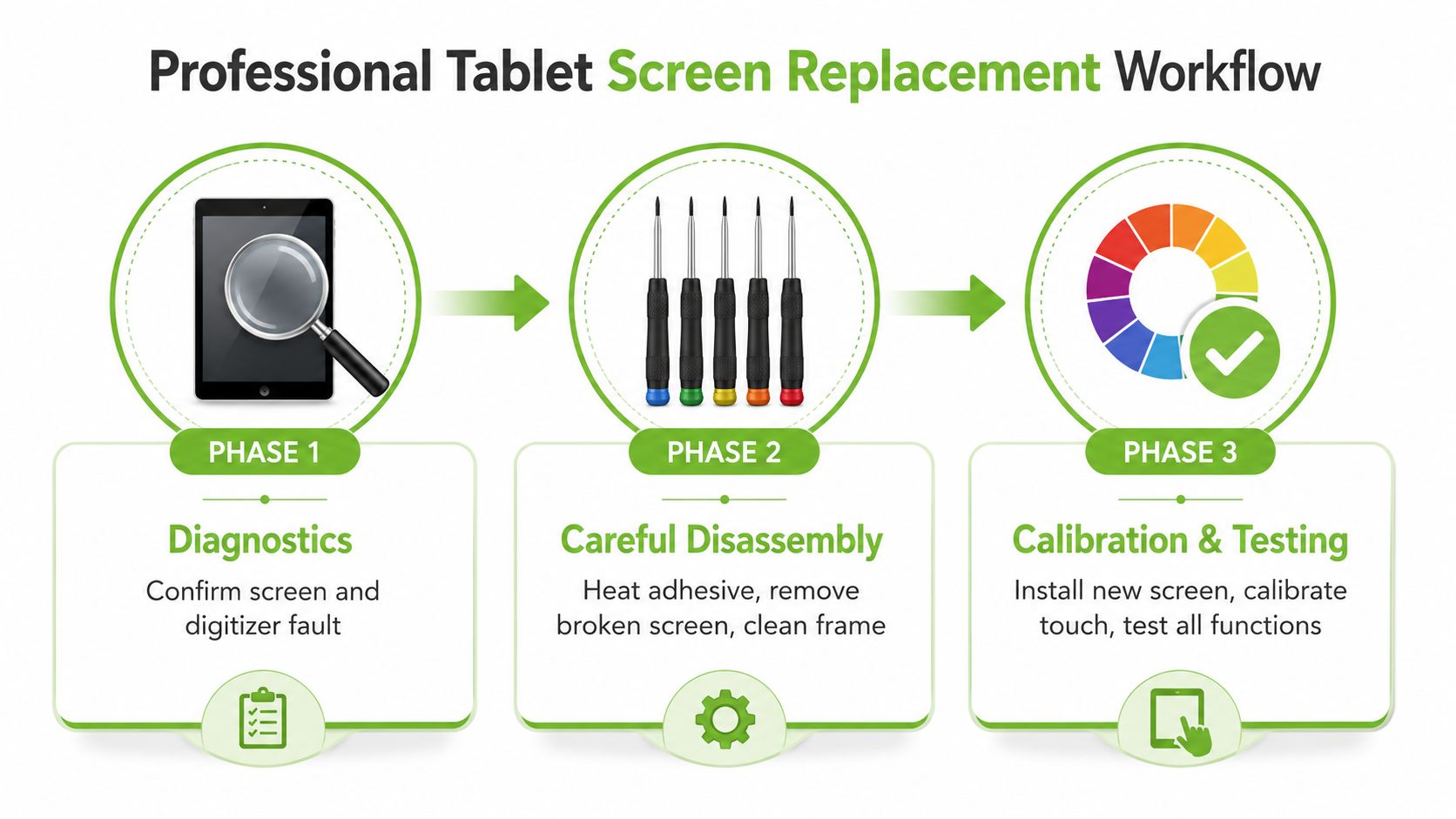
Phase three covers resealing and testing
The technician applies fresh B-7000 adhesive or a pre-cut adhesive gasket, reseats the connectors, and powers on the tablet to test the image, touch response, and colour or True Tone functions where supported. The frame is realigned and held under weight while the adhesive cures.
Skipping testing creates avoidable problems. Ghost touch, uneven edges, dust ingress, and a screen that lifts later can all follow rushed reassembly. A structured tablet repair service should confirm the correct replacement part before installation and test touch and display functions after the work.
This is why a same-day service promise needs a condition attached. The part must match the exact model, it must be in stock, and the tablet must not need motherboard-level intervention.
For a visual walkthrough of the workflow, watch the repair-process video below.
Real Costs and Turnaround in Singapore
Singapore tablet repair pricing is model-dependent, and that's not a sales tactic. A basic iPad glass job, a laminated iPad Pro assembly, a Samsung AMOLED panel, and a budget Android screen have different parts, labour requirements, and failure risks.
Published local listings show a broad spread. Samsung Galaxy Tab screen replacement is listed at S$100 to S$250, depending on model and whether the job involves glass-only work or a full LCD replacement, according to Samsung Galaxy Tab screen replacement pricing. Another local listing gives Samsung tablet screen repairs at about S$78 to S$438, while iPad listings commonly range from S$133 to S$490, as described in Singapore tablet repair guidance.
Here's the financial lens I use. Compare the repair quote with the tablet's current resale value, not what you paid for it. Then consider battery health, storage, software support, accessories, and whether the device still meets your needs. If a quote is close to the value of a working replacement, repair stops making economic sense even when the technician can complete it.
| Tablet Model | Estimated SG Repair Cost (SGD) | Typical Turnaround | Repair vs Replace Recommendation |
|---|---|---|---|
| iPad 7 or iPad 8 | S$65 | Same day where the part is available | Repair if the tablet works well beyond the crack |
| iPad Pro 11-inch | S$135 | Same day where the part is available | Repair when the display, battery, and chassis remain sound |
| iPad Pro 12.9-inch | S$205 to S$225 | Model and part dependent | Compare carefully with resale and replacement value |
| iPad Mini 7 | S$150 | Same day where the part is available | Repair if you prefer the form factor and other functions work |
| Premium Apple tablet listing | S$588 for screen, S$1,068 for LCD | Quote and part dependent | Replacement or trade-in may be more sensible |
| Some Samsung tablet models | S$278 for screen, about S$438 to S$508 for LCD | Quote and part dependent | Compare the complete assembly price with current value |
The same local iPad listing says most screen and LCD replacements take 60 to 90 minutes, and advertises a $25 flat doorstep repair fee across Singapore. Another Singapore repair page says iPad replacements usually take 1 to 2 hours. Timing is attractive, but only after the technician confirms the exact model and part.
If the quote feels too close to the tablet's value, ask about trade-in, resale, donation, or part harvesting. A functioning tablet with a damaged display may still have value, while a device with several failures is usually a stronger candidate for responsible recovery than another costly repair.
Data Safety Before and After the Repair
A repair shop needs to test your tablet. That doesn't mean it needs access to your photos, messages, banking apps, work files, or saved passwords. Data protection starts before handover, and you should make the backup decision while the tablet still turns on.
Use this checklist:
- Back up the device: Enable iCloud backup for an iPad or Google Drive backup for an Android tablet. Open the backup settings and verify the most recent successful timestamp.
- Create a second copy: Export irreplaceable photos, notes, documents, and school or work files to another cloud account or an external drive.
- Remove sensitive access: Sign out of banking apps, corporate email, password managers, and other services that expose private information.
- Prepare for testing: Disable Find My iPad or Factory Reset Protection only when the service centre explains why it's required and you're satisfied with the intake process.
- Record the condition: Photograph the tablet, note its serial or model information, and keep the written quotation.
A reputable provider should explain its privacy process clearly. Look for a written data policy, a signed privacy acknowledgement, controlled repair areas, and a promise that technicians won't browse personal content. For business devices, ask how the provider documents access, erasure, and collection.
After pickup, restore from your backup and check that your files, photos, notes, and essential apps work. Reset app permissions, review signed-in sessions, and run a brief security check. If the tablet stopped working before you could back it up, a specialist route for recovering lost data may be more appropriate than repeatedly powering it on.
Singtel's screen-repair FAQ is also a useful reminder that common screen-only programmes may exclude tablets, iPads, and Apple Watch, and may not apply when the device has additional damage. Check the terms of your own cover rather than assuming a phone policy extends to a tablet.
Choosing a Certified Service You Can Trust
A repair shop earns your confidence before the technician touches the tablet. The quote should identify the device model, the suspected failed component, the part type, labour, turnaround, warranty, and any condition that could change the price.
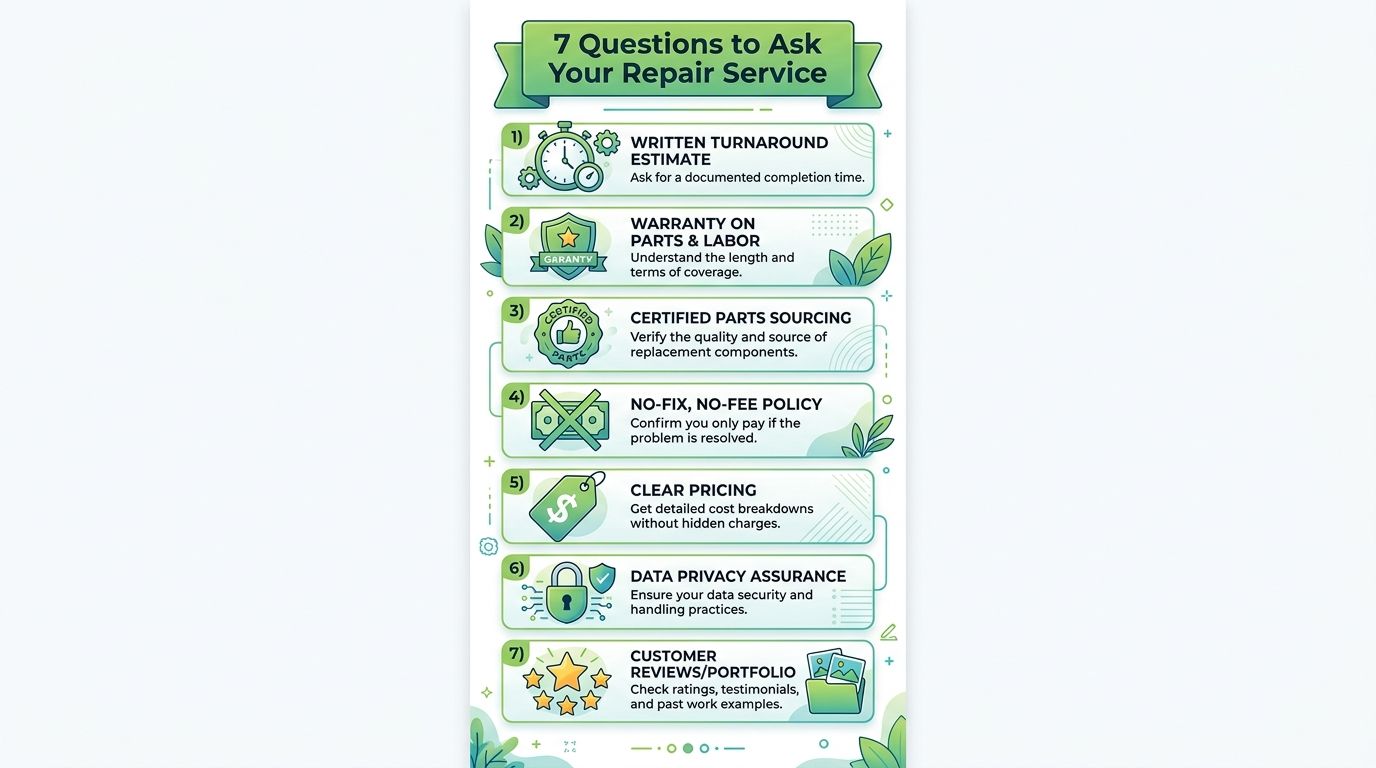
Ask these questions before booking:
- Can you provide a written turnaround estimate? Ask whether same-day service is available only for in-stock parts and whether diagnosis could reveal a longer repair.
- What warranty covers parts and labour? The plan recommends looking for 90 days minimum, but read the exclusions. A workmanship warranty shouldn't be confused with protection against another drop or liquid damage.
- Where do the parts come from? Ask whether the replacement is OEM, an original pulled part, or aftermarket. The provider should disclose the choice instead of using vague terms such as “premium quality”.
- How will you protect my data? Request the written data policy and ask whether the technician can complete testing without opening personal content.
- Are the technicians certified or brand-authorised? Certification and authorisation aren't identical, so ask which applies and who stands behind the work.
- Can I see recent customer feedback? Check public Google and Carousell reviews from the last six months, and look for comments about the same tablet family, not only phone repairs.
- What exactly am I paying for? The quote should separate glass, digitizer, LCD or OLED assembly, adhesive, labour, and diagnostics. Reject a service that refuses to itemise the work or pressures you to decide immediately.
A serious workshop quotes from the model number, not from a quick glance at a cracked corner. It should explain whether the digitizer and LCD are separate, whether the frame is bent, whether a battery or connector needs attention, and what happens if the correct part isn't available. Be cautious with pop-up kiosks that can't provide a written warranty, clear business details, or a traceable repair record.
Repair also needs to fit the wider device lifecycle. Singapore's official e-waste guidance encourages repair, reuse, and donation before recycling, while NEA and the national recycling portal stress backing up data, factory resets, and choosing the right route for repair, resale, or recycling. That means a cracked tablet has more than one responsible outcome.
Choose the right path for the tablet
- Repair: Choose this when the tablet's core functions work, the repair quote is sensible, and you'll keep using it.
- Trade in: Choose this when repair costs approach the device's value but the tablet still has resale or parts value.
- Donate: Choose this when the tablet remains functional and a school or community refurbisher can use it.
- Recycle: Choose this when the device is at end of life, using a licensed NEA collection route.
Treat each tablet as an asset with a service plan, not a disposable accessory. A proper diagnostic puts a number on the decision, while a repair, trade-in, donation, or upcycle route keeps useful materials in circulation.
For Singapore households and organisations, myhalo provides repair and rescue diagnostics, device buyback and trade-in routes, certified refurbished devices, data recovery, secure data handling, and upcycling options that can redirect usable parts away from disposal. Its services fit the practical choice you need to make after a cracked screen, repair the tablet, recover its value, or move it on responsibly.
Your precious files and memories matter to us. Whether you need to protect your privacy with Safe data or rescue lost files with Save data, myhalo's caring team can help you assess the tablet, choose a responsible next step, and keep your device journey convenient, safe, and responsible.