
Large-scale data breaches reported within a year rose 41% in Singapore, according to the PDPC's 2023–2024 data-breach landscape, which defines large-scale incidents as affecting more than 500 individuals. The report also attributes 82% of enforcement actions to cyber incidents and identifies ransomware in 62% of the relevant reported cases. These figures describe broader data-security exposure, not breaches specifically caused by discarded devices, but they give us a good reason to take personal information seriously right through to retirement.
If you've kept old phones in a drawer because you're worried about private photos, or left laptops in an office storeroom because staff files might remain, that hesitation is understandable. Secure data destruction standards help turn that worry into a practical decision: protect the information, prove the result, and preserve useful technology whenever it's safe to do so.
Table of Contents
- What Unrecoverable Means Before a Device Leaves
- The Standards Behind a Proper Wipe
- How to Choose Wipe Degauss or Shred
- Records That Prove the Data Is Gone
- How Schools and Offices Handle Exceptions
- Put the Right Standard to Work
What Unrecoverable Means Before a Device Leaves
A laptop in a Singapore storeroom, a phone beside your charging cables, and a hard drive holding old student records have something in common. They need a deliberate data-handling decision before someone repairs, resells, donates or recycles them. Moving the device doesn't make its information disappear.
Unrecoverable means more than being unable to see your files on screen. The chosen process must make the stored information inaccessible through recovery, rather than hide it from ordinary use.
Start with the retention decision
Under Section 25 of the PDPA, there isn't a universal retention period expressed in days or years: organisations should stop retaining personal data when its original purpose is no longer served and retention is no longer necessary for legal or business purposes, as explained in the PDPC's Retention Limitation Obligation guidelines. Retention has ceased when neither the organisation, its agents nor its data intermediaries can access the documents and personal data.
That means an office needs a retention schedule tied to actual obligations, not a blanket promise to keep everything indefinitely. Before clearing a device, establish which records must be preserved elsewhere and which should no longer exist.
For a home user, the practical starting point is simpler: save the photos and documents you want to keep, confirm that the backup opens, then arrange secure removal of the device's remaining data. Don't start an irreversible process while you're still unsure whether your only copy of a family video is on that phone.
Why familiar shortcuts fall short
Deleting a file is like removing a library catalogue card while leaving the book on its shelf. A quick format can similarly change how storage is organised without reliably removing its previous contents.
The PDPC's ICT systems guidance identifies secure erasure and destruction approaches, including cryptographic erasure, which removes access by securely discarding the full-disk-encryption key.
Common shortcuts leave unanswered questions:
- An emptied recycle bin: The files have disappeared from normal view, but that isn't proof of sanitisation, meaning a process that makes stored data unrecoverable.
- An unverified factory reset: A completion screen alone doesn't establish that the method was appropriate for that device.
- A drive broken into large pieces: Damage to the casing doesn't necessarily eliminate readable storage surfaces or chips.
The physical work should be controlled, not improvised.
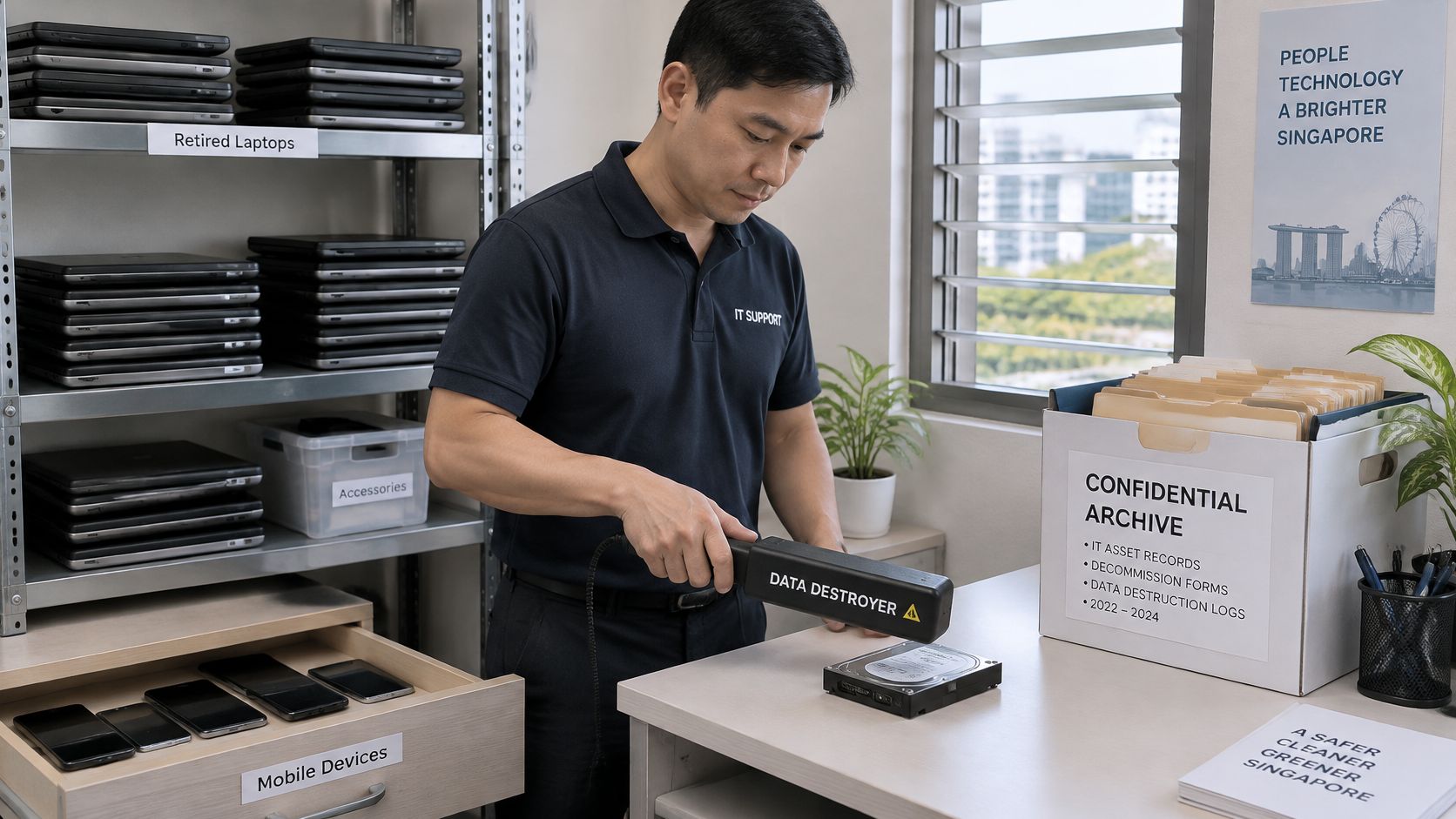
Practical rule: Choose a method for the actual storage medium and information sensitivity, then keep evidence that it finished successfully.
Disposal belongs alongside everyday security controls, not outside them. Purple's explanation of security safeguards for enterprise WiFi networks provides useful context for protecting information while systems remain active; retired equipment needs its own controlled exit process.
The Standards Behind a Proper Wipe
Secure data destruction standards and where they fit
A proper wipe is defined by the result it achieves, not by how many times a program runs. Choosing the right method means matching the storage technology and intended outcome. That matters when a device may be repaired, resold or reused, because destroying every device can prevent those options even when its data could have been securely sanitised.
| Standard or method | What it does | Best for | Main limit |
|---|---|---|---|
| NIST SP 800-88 Clear | Logical sanitisation intended to prevent recovery using simple tools | Reusable hard drives and supported devices | May not prevent advanced recovery on every medium |
| NIST SP 800-88 Purge | Stronger sanitisation, including cryptographic erase | SSDs, encrypted drives and redeployment | Needs suitable encryption or supported sanitisation commands |
| NIST SP 800-88 Destroy | Physically destroys the storage medium | Failed or highly sensitive media | The destroyed medium and its parts cannot be reused |
| DoD 5220.22-M | Named overwrite method listed in Singapore government ICT controls | Magnetic hard drives | Not a reliable method for modern SSDs |
| Bruce Schneier algorithm | Named secure-deletion approach in the same control | Magnetic media where overwriting can be trusted | Slow and unsuitable as a universal flash method |
| Peter Gutmann method | Historical multi-pass overwrite for older magnetic encodings | Legacy magnetic disks | Unnecessary for many current uses and not a universal SSD method |
| PDPC software overwrite | Overwrites a full drive or selected files | Electronic media that still functions | Deleting or formatting alone is not enough |
| PDPC degaussing | Disrupts magnetically recorded information | Hard disks and tapes | Does not sanitise SSDs or most phones |
| PDPC physical destruction | Crushes, drills or shreds storage media | Media that cannot be trusted to software sanitisation | Large fragments may still be readable |
| NAID AAA | Accreditates a provider's destruction processes, not a wipe pattern | Checking a destruction vendor's controls | A logo does not prove a particular serial was sanitised |
Understand what the names actually promise
NIST SP 800-88 is a sanitisation guideline, not the name of one wiping program. Its Clear, Purge and Destroy categories describe different outcomes and approaches. A quotation that says only “NIST” leaves you without a clear answer about which method applies.
NAID AAA concerns a provider's destruction processes. It does not tell you what software should write to a drive, and it does not replace a record for the particular asset being handled.
Singapore's government ICT and Smart Nation data-protection control directs storage intended for retirement to shredding or incineration and names Peter Gutmann Secure Deletion, the Bruce Schneier algorithm and DoD 5220.22-M among secure-deletion approaches. That policy context matters: a government instruction for retiring storage should not be treated as a universal requirement to shred every consumer device being prepared for reuse.
The PDPC disposal-of-personal-data guidance covers software overwriting, degaussing and physical destruction. Each method suits different situations; the labels are not interchangeable. Secure, verified sanitisation can protect data while keeping repair, resale and parts recovery possible.
Why the storage technology matters
A hard-disk drive, or HDD, records information magnetically on spinning platters. A solid-state drive, or SSD, stores it in flash-memory chips.
An overwrite program sends replacement data to storage locations. On an SSD, wear levelling means the controller spreads writes across memory cells. As a result, an ordinary overwrite may not reach every location that previously held information.
A long overwrite pattern is therefore not automatically stronger for modern flash storage. A method designed around magnetic disks can be unsuitable even if its name sounds reassuringly technical. Degaussing has a similarly clear boundary: it disrupts magnetic recordings, while flash chips do not store information that way.
When comparing a policy with a vendor quotation, identify the applicable method, the device it supports and the evidence that sanitisation succeeded. IT compliance requirements place that decision within the wider organisational process.
How to Choose Wipe Degauss or Shred
- Inventory every data-bearing item. Include phones, memory cards, external drives and storage inside printers or connected equipment. Don't assume the visible computer is the only place information lives.
- Record the intended outcome. Mark each item for reuse, repair or retirement, and identify the sensitivity of its information.
- Check its condition and encryption. Confirm whether it powers on, whether its storage responds and whether all relevant encryption-key copies can be securely discarded.
- Sanitise working media using a verifiable method. Select a supported process rather than repeatedly trying a generic wiping application.
- Destroy media that cannot meet the required result. Failed sanitisation or exceptional sensitivity needs a documented escalation, not permission to release the device.
This approach reflects the PDPC's disposal guidance, which distinguishes overwriting, degaussing and physical destruction and recommends physical destruction where secure deletion isn't possible.
The decision flow is useful as a starting point, provided the storage technology is confirmed before choosing degaussing.
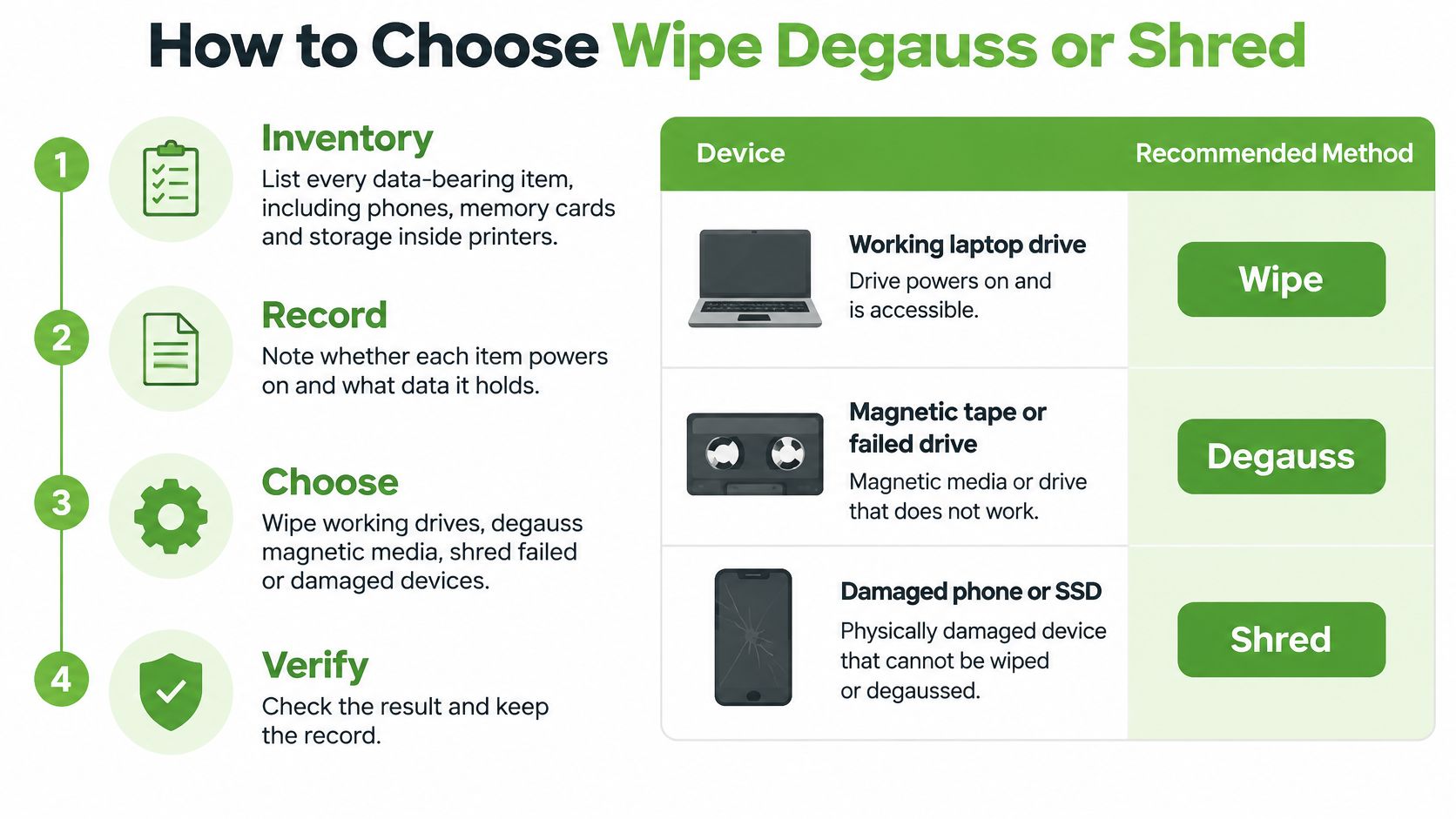
Match the route to the device
Method by device condition and intended outcome
| Device situation | Preferred path | Suitable method | Destroy instead when |
|---|---|---|---|
| Working hard drive for resale or repair | Reuse | Verified overwrite aligned with Clear | The wipe fails or the data is exceptionally sensitive |
| Encrypted laptop SSD that still works | Reuse | Cryptographic erasure, then verify | The key cannot be destroyed or the drive is faulty |
| Phone or tablet | Reuse | Vendor erase, account removal and crypto erase where supported | It's locked, damaged or the wipe cannot be verified |
| Backup tapes | Retire | Degauss, then shred if policy requires | Retirement policy requires destruction or degaussing cannot be confirmed |
| Failed or clicking drive | Destroy | Shred, crush or drill thoroughly | Software sanitisation cannot be trusted |
| Printers, IoT gear and memory cards | Inventory first | Remove or overwrite embedded and removable storage using a supported method | The storage fails verified sanitisation |
Cryptographic erasure is useful only when the encryption implementation and key handling support the intended outcome. Confirm that the data was protected by suitable full-disk encryption and that recoverable key copies won't remain elsewhere.
For magnetic media, our explanation of hard-disk degaussing helps distinguish the equipment and process from ordinary software wiping. A failed drive isn't automatically suitable for degaussing merely because it no longer works; first identify whether it's magnetic or flash-based.
Keep the useful device where possible
Shredding everything can feel reassuring, but it also removes useful repair, resale and parts-recovery opportunities. Destroying a failed storage component doesn't necessarily mean destroying the laptop's screen, keyboard or other reusable components.
If a drive fails sanitisation, quarantine it. Don't return it to saleable stock with a note to try again later; it needs a controlled exception process before anyone changes its disposition.
The video below accompanies the practical handling of data-bearing equipment.
Reuse requires a verified, media-specific result, not a factory-reset sticker.
Records That Prove the Data Is Gone
A certificate is a summary of work, not proof by itself. A PDF saying data wiped leaves the most important questions open if it doesn't identify the storage medium, method and result.
The PDPC's guide to securing personal data in electronic media supports a stronger workflow: identify and control the asset, choose an appropriate method, verify completion and connect the evidence to the device. It also cautions that anonymisation isn't automatically irreversible, because combining retained information with other information can create re-identification risks.
Build an asset-level evidence package
Keep the details together so an auditor or colleague can follow the decision without guessing:
- Asset identity: Record the equipment serial number and the storage-media identifier where available.
- Data classification: State whether the device held customer, employee, student or other sensitive information.
- Method used: Identify the actual sanitisation or destruction process, including relevant tool settings.
- Verification result: Preserve completion logs, checks and any failure messages.
- Operator, date and location: Record who performed and checked the work, and where it happened.
- Chain of custody: Document each transfer from collection through processing and final release.
A visual checklist can help teams collect these details consistently.
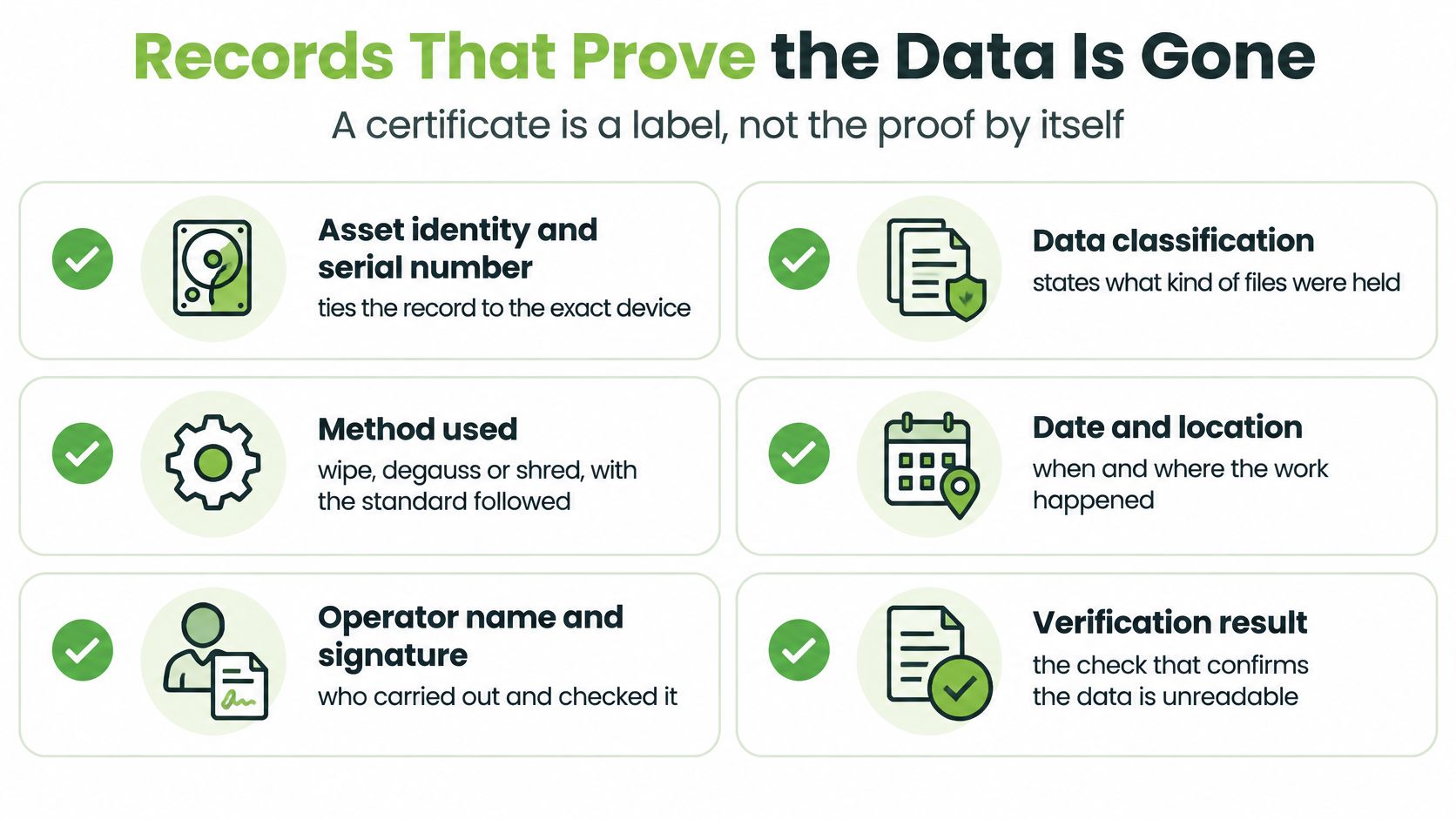
Check the result, not just the paperwork
Match the erasure tool's completion log to the storage serial, not merely to a batch name such as office laptops. For a failed drive, retain the failed-wipe result alongside its subsequent destruction record.
A sample check that the old operating system no longer boots can flag an obvious processing error, but it doesn't prove sanitisation on its own. Use the verification appropriate to the selected method, and keep exceptions physically separate from cleared stock.
Our guide to chain-of-custody documentation explains how to keep those handovers traceable. We strictly adhere to ISO-certified data management processes when handling customers' devices, so documentation should be considered part of controlled handling rather than an afterthought.
Avoid leaving an anonymised export on a device just because names have been removed. Assess the retained dataset separately, including whether other available information could identify the people within it.
Contract checklist: Specify the named method, require a serial-level result, document the route for failed assets, and agree how long the records will be retained.
These terms make the expected deliverable concrete. They also prevent a certificate of collection or processing from being mistaken for evidence that the data was successfully sanitised.
How Schools and Offices Handle Exceptions
A school clears a laptop lab
Say a school is retiring a lab of laptops. Its IT coordinator records each machine and storage serial before collection, then marks the functioning devices for sanitisation and possible repair or reuse.
Some drives fail the approved process. Rather than place those laptops beside cleared equipment, the coordinator labels them as exceptions and sends the affected storage for thorough shredding.
- Evidence to retain: A certificate or asset schedule listing every serial, with the successful sanitisation result or the failed-wipe and destruction outcome.
- Useful distinction: A storage failure doesn't automatically rule out repairing the rest of the laptop.
The school can then account for the whole batch without pretending every device followed an identical route.
An SME founder has a clicking drive
A founder wants to pass an old laptop to a new employee, but its hard drive clicks and repeatedly disconnects. The priority is to decide whether any important files still need recovery before authorising irreversible destruction.
If no recovery is needed and trusted sanitisation can't complete, the drive stays out of circulation and goes to destruction. The laptop may still be repairable with replacement storage.
- Evidence to retain: The failed asset's identity, the reason sanitisation was abandoned, the destruction result and the separate decision about the remaining laptop.
- Boundary to maintain: Don't let a repair handover become accidental permission to resell uncleared storage.
This is a manageable exception, not a reason to keep the whole machine in a cupboard indefinitely.
A company uses several handling partners
A company might use a collector, a repairer and a recycler. Each handover creates a point where someone needs to confirm what arrived, what left and which assets remain unresolved.
The PDPC's guidance on disposing of personal data on physical media addresses secure disposal and third-party handling risks. Outsourcing can improve capability, but it doesn't remove the organisation's governance responsibility.
Contracts should therefore include custody logs, audit rights and an agreed failure path. A practical IT asset disposition process keeps the owner's register connected to downstream processing instead of ending accountability at collection.
The easy misses deserve explicit checks: cloud-synchronised phones may retain account access, memory cards can remain in laptop sleeves, and printers may contain embedded storage. Assign each item an identity and outcome, including anything discovered after the original inventory.
Keep the exception visible until someone records its final, verified outcome.
The same habit helps a home user with a single phone and an IT team managing a storeroom: someone owns the unresolved item until it is safely cleared or destroyed.
Put the Right Standard to Work
Choose reuse after verified, media-specific sanitisation, or destruction when verification fails or the information is too sensitive for the medium to leave intact. That decision supports Singapore's disposal expectations without treating every working laptop, phone and drive as something to shred.
For organisations, the useful outcome is a controlled handover with an asset-level result. For households, it's confidence that private information has been addressed before a device moves on.
Make the handover easier
Prepare what you can before handing equipment over:
- Separate what must be saved: Confirm which photos, documents and business records need to survive.
- Identify ownership and access: Gather device details and resolve account access through legitimate owner-authorised steps.
- Flag concerns clearly: Label damaged devices, unresolved storage and anything holding particularly sensitive information.
If you need to recover precious memories or essential files, make that decision before authorising erasure. Recovery and destruction serve opposite purposes, so the order matters.
Privacy and reuse belong together
At myhalo, our vision is a zero e-waste world, supported by a community that makes sustainable device choices convenient, safe and responsible. That doesn't mean promising that every broken item can be reused; it means preserving value where safe handling makes that possible.
You can use our online route or visit our counters at Bugis Junction and Sim Lim Square to begin that conversation. Explain whether you're clearing a home drawer, preparing a device for repair or retiring workplace equipment, and identify any files you still need.
Clearing old technology should leave you with fewer worries, not another unexplained technical label. The right outcome is specific: your information has an appropriate protection plan, and your equipment has a responsible next destination.
Our IT Lifecycle Management service safely upcycles and recycles corporate IT assets and provides regulatory-compliant data destruction, with certificates available on request. For home devices, Declutter your e-clutter and Safe data support responsible clearing and privacy, while Save data offers recovery help for important files before irreversible processing. Visit myhalo to arrange your next step online or at Bugis Junction or Sim Lim Square, and join us in making a zero e-waste lifestyle convenient, safe and responsible.