
A cupboard full of retired laptops, tablets, phones, and hard drives can feel like a cupboard full of unanswered questions. Can the team reuse them? Has the data really gone? Is a recycler responsible for the final handover, or is the organisation still accountable? Many Singapore businesses keep old devices because disposal feels risky, costly, or confusing. That hesitation is understandable, but it can also leave personal data, business information, and valuable equipment sitting in limbo.
IT compliance requirements become much easier to manage when you treat every device as part of one lifecycle, from purchase and deployment to retirement and responsible reuse. A secure process protects customers and employees, creates evidence for audits, and helps keep usable technology in circulation. If you're clearing a home office or an entire fleet, this guide to recycling electronics in Singapore will help turn uncertainty into a calm, repeatable routine.
Table of Contents
- The Moment You Realise Your Old Laptop Is a Compliance Problem
- What IT Compliance Requirements Mean
- The Major Frameworks You Will Meet in Real Life
- Singapore-Specific Rules That Change the Conversation
- Choosing Between Sanitisation and Physical Destruction
- A Practical Device Lifecycle Roadmap
- How SMEs, Schools, and Corporate Teams Put This to Work
- Your Friendly Compliance Readiness Checklist and Next Step
The Moment You Realise Your Old Laptop Is a Compliance Problem
A small agency owner closes the office for the evening and notices a stack of unused laptops beside the storeroom door. One device still contains old client emails. Another belongs to a former employee. A third won't start, so nobody knows whether its drive can be accessed. The team wants the equipment gone, but placing everything in a general recycling bin feels reckless.
That moment captures the challenge. Compliance isn't only a policy document on a shared drive. It affects the physical devices people touch every day, including laptops, phones, tablets, servers, USB drives, and backup media. Holding onto them doesn't automatically make the risk disappear. It can make asset ownership, data retention, and disposal decisions harder to track.
Practical rule: Treat an old device as a live information asset until someone has documented what happened to its data.
Singapore's privacy requirements connect data retention with secure disposal. Under Section 25 of the PDPA, an organisation must stop retaining documents containing personal data, or remove the means of association, when the original purpose no longer applies and retention isn't needed for legal or business reasons. The rule doesn't prescribe one fixed retention period. Once retention ends, the organisation must destroy, anonymise, or otherwise make the information irretrievable. PDPC guidance on disposing of personal data also says electronic data should be securely deleted, erased, or destroyed before storage media is redeployed, exchanged, or disposed of.
The reassuring part is that a good process doesn't need to be dramatic. Identify the device, decide whether it can be reused, choose a suitable sanitisation or destruction method, record the handover, and retain evidence. That same workflow can protect privacy while supporting a zero e-waste approach.
What IT Compliance Requirements Mean
A laptop reaches its final day at an organisation. Before someone sells it, recycles it, or passes it to another employee, the team needs to answer a practical question: what information remains, and can it prove how that information was handled?
In plain English, IT compliance requirements are the rules and controls that show an organisation handles technology responsibly. They cover access to information, protection against misuse, incident response, and the steps taken when equipment is repaired, replaced, or retired. This connects privacy, security, and e-waste decisions across the device lifecycle, rather than treating disposal as an afterthought.
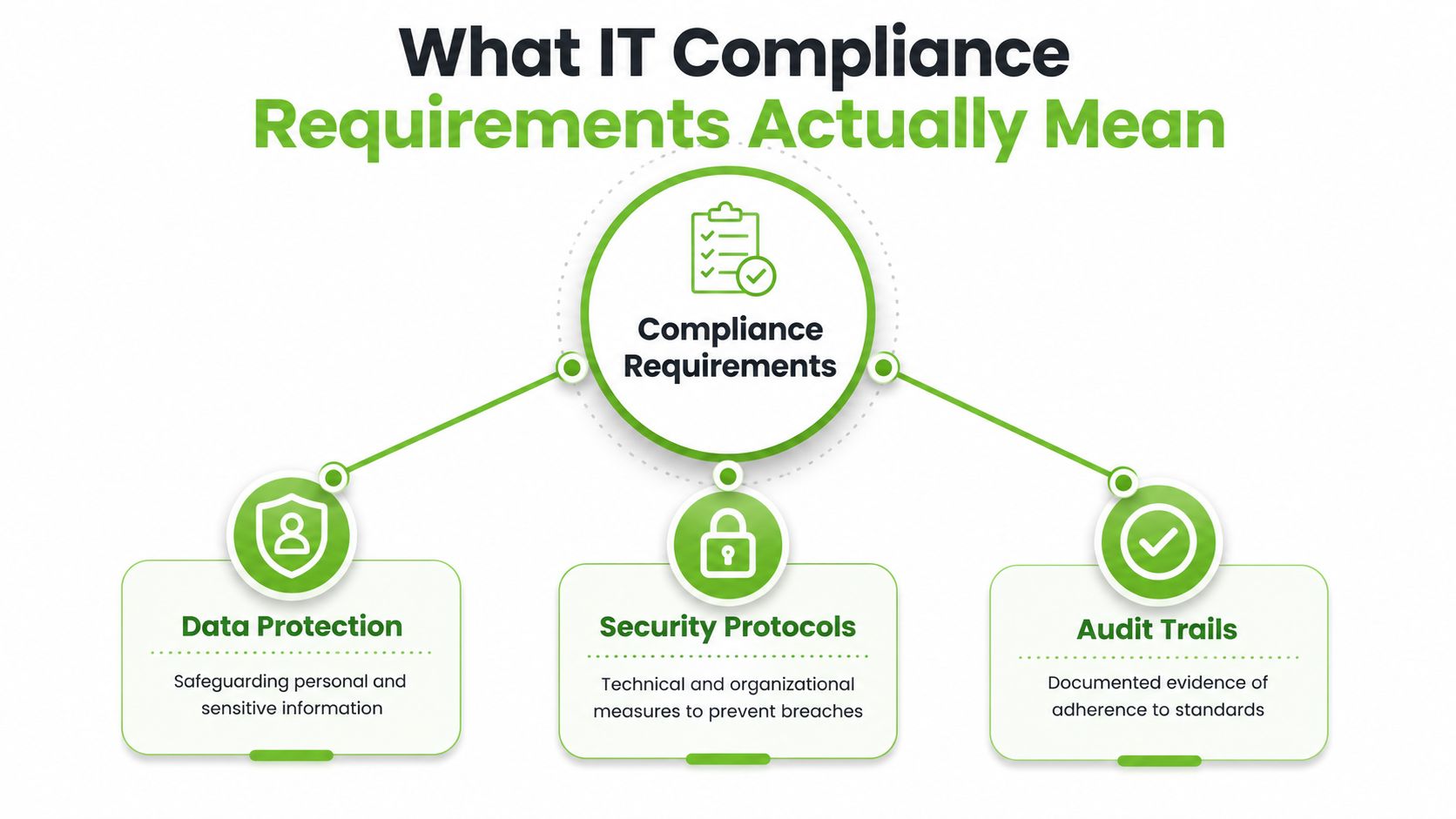
Three connected layers
- Data protection: Keep personal and sensitive information safe, restrict access, and remove it when there is no valid reason to retain it.
- Security protocols: Use technical and organisational measures such as access controls, encryption, patching, backups, and secure disposal.
- Audit trails: Keep records showing what happened, who approved the action, which device was processed, and what evidence was produced.
These layers work together. A wiped laptop with no asset record leaves a gap in accountability. A detailed record of disposal cannot compensate for weak erasure. A workable process therefore links the control, the action, and the evidence.
Singapore's PDPA is a legal requirement for organisations handling personal data. ISO 27001 is different. It is an international information security management standard that organisations may adopt and certify against to structure governance, risk management, and continual improvement. A business can have PDPA obligations without ISO 27001 certification, while an ISO 27001 programme can organise the controls and records that support disciplined information security. The practical relationship between the standard and retired equipment is explained in ISO 27001 and data destruction.
Other frameworks answer different questions. The NIST Cybersecurity Framework helps organise cybersecurity risk activities, while SOC 2 is an auditing approach service providers use to demonstrate controls related to trust and security expectations. Teams can also consult the WorkSignal compliance page to connect workplace processes and evidence with broader compliance programmes.
Compliance isn't a certificate sitting on a wall. It's a lifecycle discipline supported by repeatable actions and reliable evidence.
The Major Frameworks You Will Meet in Real Life
A procurement team may ask for one standard while a privacy officer checks another. Each framework answers a different question, so the right approach is to match the framework to the device lifecycle stage, from purchase and use through retirement.
Singapore PDPA
The Personal Data Protection Act provides Singapore's privacy requirements. It applies to organisations handling personal data and covers collection, use, disclosure, retention, protection, and disposal. For an old laptop, the practical question is whether its drive still holds personal data and whether the organisation can show that it handled that data properly.
GDPR
The EU General Data Protection Regulation is a European privacy regime that can also affect organisations handling information about people in the European Union. It addresses rights, lawful processing, accountability, security, and data governance. A Singapore company serving European customers may therefore need to assess GDPR exposure separately from its PDPA responsibilities.
ISO 27001
ISO 27001 sets out a management-system structure for information security. It asks an organisation to assess risks, define controls, assign responsibility, monitor results, and improve its processes. For equipment, that may mean maintaining asset registers, reviewing suppliers, controlling access, recording incidents, and documenting the destruction or reuse of storage media.
NIST Cybersecurity Framework
The NIST Cybersecurity Framework organises cybersecurity work around outcomes such as identifying assets and risks, protecting systems, detecting problems, responding to incidents, and recovering operations. A startup can use this structure to connect everyday actions, such as configuring a work laptop or responding to a lost phone, with broader risk management.
SOC 2
SOC 2 is an auditing standard for service-provider controls. A cloud platform, software provider, or managed service company may use it to show customers how security and related controls operate. Customers often review SOC 2 reports during vendor selection, but the report does not replace Singapore's legal obligations or the organisation's responsibility for retired devices.
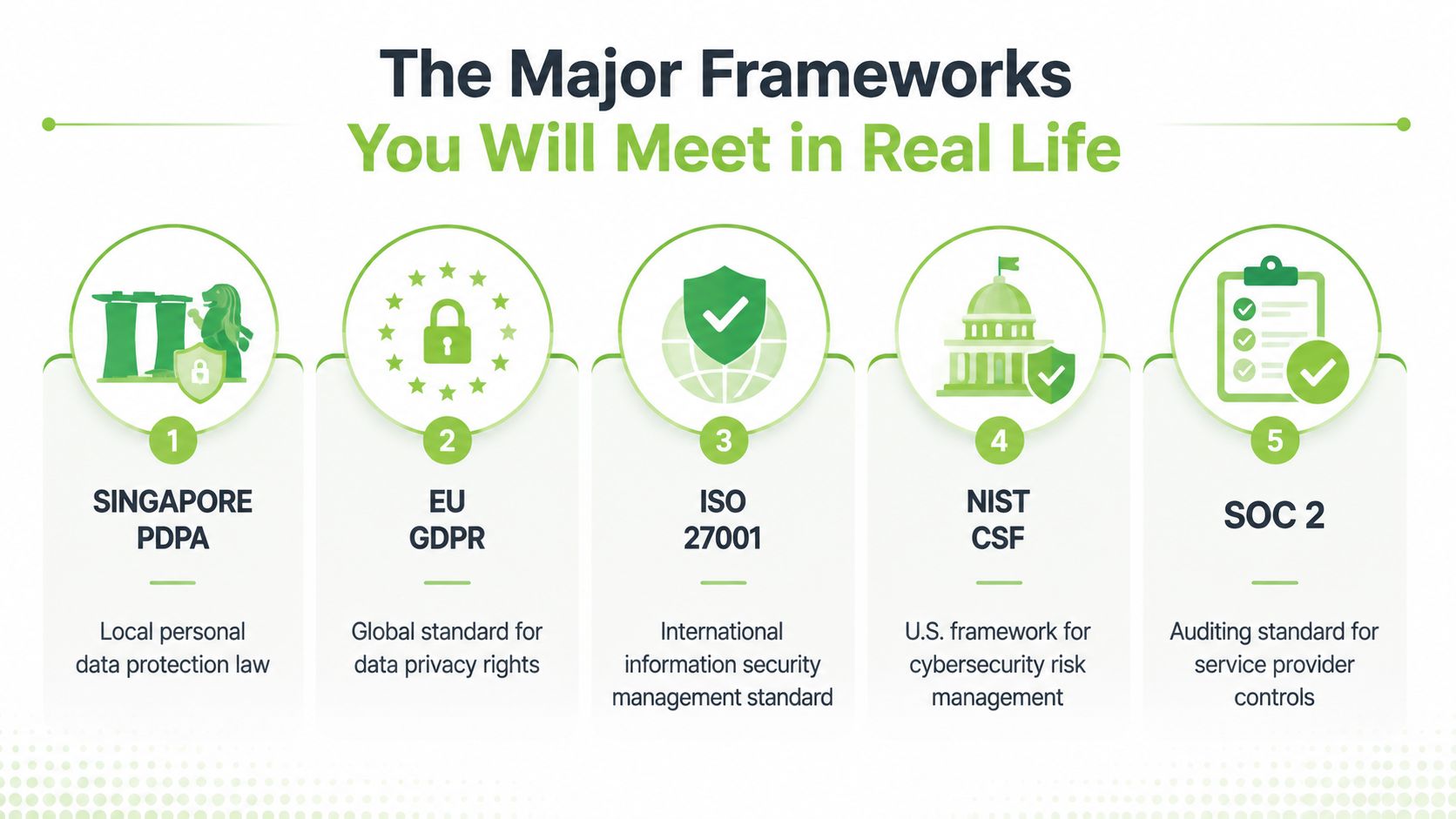
Together, these frameworks form a practical map. PDPA and GDPR describe privacy responsibilities, ISO 27001 organises the management system, NIST structures cybersecurity activities, and SOC 2 provides an audit-based view of service-provider controls. Your contracts, sector, customers, and location determine which combination applies, while your device process must connect data protection with secure retirement and downstream handling.
Singapore-Specific Rules That Change the Conversation
Generic compliance guides often stop at privacy and cybersecurity. Singapore adds an important physical layer through its regulated e-waste system, which connects environmental responsibility, data security, and vendor accountability.
Singapore's Extended Producer Responsibility system for e-waste commenced on 1 July 2021. Under this approach, producers are responsible for the collection and treatment of their products at end of life, making the route from corporate device retirement to downstream treatment part of a wider lifecycle system. The NEA overview of Singapore's e-waste management explains this producer-responsibility approach.
A licensed e-waste recycler must permanently erase or destroy data stored on a data-bearing device before the device is prepared for reuse, recycled, disposed of, or transferred to another recycler or disposal facility. That requirement applies to devices such as laptops, phones, tablets, servers, and storage drives. It means a simple handover receipt isn't enough if it doesn't establish what happened to the data.
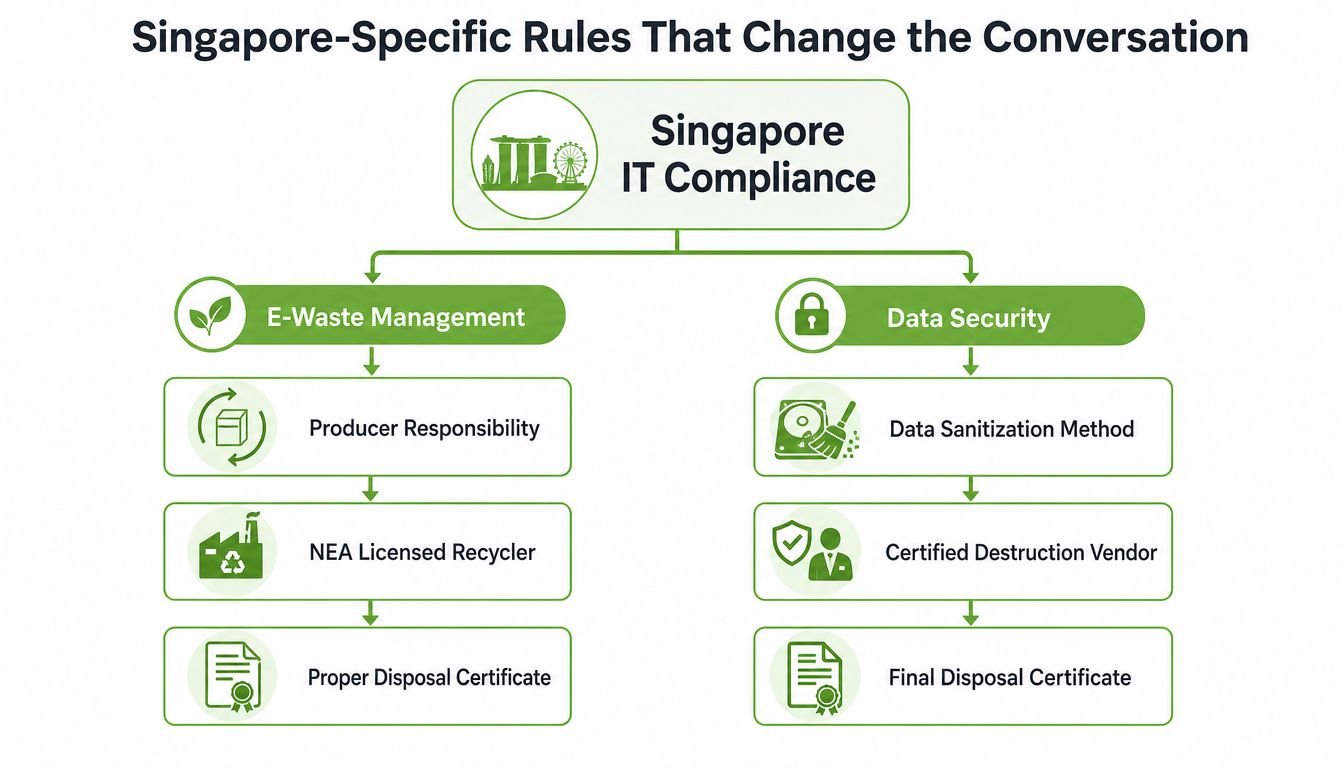
What the workflow should capture
- Device identity: Record serial numbers, asset tags, model details, and the responsible business unit.
- Chain of custody: Track who collected the device, where it went, and which facility processed it.
- Data treatment: Record whether the device was sanitised, cryptographically erased, degaussed, shredded, or otherwise destroyed.
- Downstream outcome: Keep the recycler's documentation for reuse, recycling, disposal, or transfer.
Cross-border movement creates another decision point. Singapore's transboundary waste controls require companies importing, exporting, or transiting e-waste through Singapore to follow the Basel Convention Prior Informed Consent procedure and obtain a Basel Permit from NEA before shipment, under the NEA technical guidelines for transboundary movement-and-used-electrical-and-electronic-equipment-(ueee).pdf).
The 2024 public consultation stated that this procedure would apply from 1 January 2025 to companies importing, exporting, or transiting e-waste through Singapore, as described by the Singapore consultation on transboundary movement controls. A startup sending retired servers to an overseas buyer therefore needs more than a courier booking. It needs a documented movement and treatment workflow.
Choosing Between Sanitisation and Physical Destruction
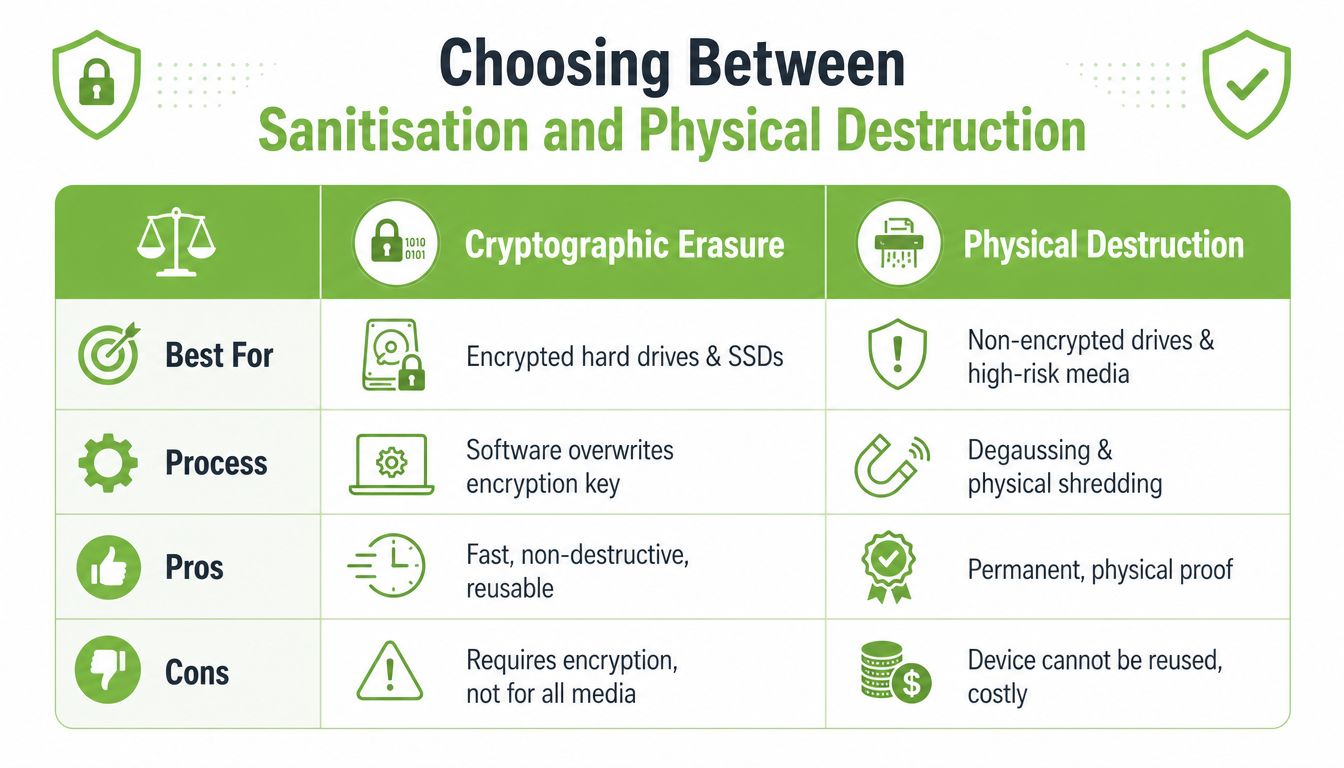
The right disposal method depends on the device's condition, the sensitivity of the information, the encryption status, and whether the asset needs to be reused. Shredding every drive may appear safest, but it destroys recoverable value and isn't always necessary for a properly managed reusable device.
Cryptographic erasure removes or destroys the encryption key that makes the stored information readable. It can suit a fully encrypted laptop or SSD that is still functional and intended for reuse, provided the organisation can verify the encryption and the erasure process. Software-based sanitisation can also preserve the device for redeployment when the media supports reliable secure deletion.
Magnetic hard drives and solid-state drives behave differently, so a single wiping routine shouldn't be applied blindly. PDPC guidance recognises secure wiping, sanitisation, destruction, and cryptographic erasure for full-disk-encrypted HDDs and SSDs. Singapore Standard SS 714:2025 adds that physical disposal methods such as degaussing or incineration should be used when secure deletion isn't possible, as reflected in the PDPC guide to data protection practices for ICT systems.
A practical decision guide
- Encrypted, working laptop: Verify the encryption state, perform approved cryptographic erasure or secure sanitisation, and retain the result.
- Reusable SSD: Use a method appropriate for SSD architecture rather than assuming a conventional overwrite will address every storage block.
- Failed or inaccessible drive: Choose physical destruction when the media can't be reliably sanitised or inspected.
- Highly sensitive media: Consider degaussing, shredding, or incineration where the risk and handling policy justify permanent destruction.
- Any method: Record the serial number, method, operator, date, approval, and outcome.
Singapore Government ICT and cybersecurity control guidance calls for sanitising hardware that stores data at rest and shredding or incinerating retired storage media. It also recommends recognised wiping standards, including the Peter Gutmann secure deletion, Bruce Schneier algorithm, and DoD 5220.22-M, and says the process should be witnessed. The method matters, but verifiable execution matters just as much.
For a practical discussion of the options, see secure data destruction.
A Practical Device Lifecycle Roadmap
A device shouldn't appear in your records only when it's being thrown away. A stronger approach starts at procurement and follows the equipment through ownership, use, maintenance, transfer, and retirement. The following checklist works as a useful starting point for a small office or a larger organisation.
| Lifecycle Stage | Key Action | Owner | Evidence to Keep |
|---|---|---|---|
| Procurement | Define security, encryption, support, and end-of-life expectations before purchase | Procurement and IT | Purchase record, approved specification, supplier details |
| Onboarding | Assign the device to a user and register its asset identity | IT or operations | Serial-number register, asset tag, acceptance record |
| Secure use | Apply access controls, encryption, backups, and approved software practices | IT and user | Configuration record, access review, policy acknowledgement |
| Maintenance | Track repairs, replacements, patches, and changes in ownership | IT and service desk | Repair history, change record, transfer form |
| Decommissioning | Approve retirement and classify the data and device condition | IT, procurement, and data protection officer | Retirement approval, risk assessment, asset status |
| Sanitisation or destruction | Use a suitable method and maintain custody until completion | Approved vendor or internal authorised team | Wiping log, destruction record, witness record |
| Reuse or recycling | Send the asset through an approved reuse or e-waste route | ITAD owner and vendor manager | Handover receipt, certificate, downstream outcome |
Make each handoff visible
Before a device leaves the building, confirm its asset identity and business owner. The person approving retirement shouldn't rely on memory or a loose spreadsheet entry, especially when several machines share the same model.
For a reusable laptop, the record should show the sanitisation method and verification result. For a failed SSD sent for destruction, it should show the physical treatment and witness evidence. A vendor certificate is useful, but it should connect clearly to the exact device or media processed.
A data protection officer may set the policy, IT may manage the technical workflow, procurement may approve suppliers, and finance may track residual value. IT lifecycle management gives teams a way to think about these responsibilities as one connected programme rather than separate administrative tasks.
Audit-ready habit: If someone asked about a retired laptop tomorrow, your team should be able to locate its identity, approval, custody trail, data-treatment record, and final outcome without guesswork.
How SMEs, Schools, and Corporate Teams Put This to Work
A boutique design agency may have a small fleet of high-value laptops approaching the end of a lease. Its main risks are an incomplete asset register, rushed returns, and client files left on devices. The agency can assign each laptop to a named owner, confirm whether full-disk encryption was active, approve the retirement batch, and give the leasing or disposal partner a serial-number list. A documented sanitisation result then supports both the client confidentiality policy and the asset handback.
A school faces a different pattern. Student iPads may move between classes, teachers, and cohorts, which makes ownership history especially important. Before devices are reused, the school can remove user accounts, confirm that personal information and school content are no longer recoverable, and retain a record linking each device to its treatment outcome. Devices that no longer work should follow a destruction or licensed recycling route rather than sitting indefinitely in a storeroom.
A regional refresh needs one playbook
A corporate procurement team coordinating a refresh across regional offices has a more complicated chain of custody. Devices may pass through local IT teams, couriers, repair centres, resale channels, and recyclers. If retired equipment crosses Singapore's borders as e-waste, the team must also assess the Basel procedure and permit requirements before shipment, rather than treating export as an ordinary logistics task.
Shortcuts often look harmless:
- The shared wipe password: It can make responsibility unclear and may not produce reliable device-level evidence.
- The mixed pallet: Combining working laptops, failed drives, and accessories without classification weakens the treatment decision.
- The verbal handover: A conversation cannot replace a serial-numbered custody record.
- The generic recycler: A low price doesn't prove licensing, permanent erasure, or downstream control.
Small teams don't need a large legal department to build confidence. They need a named owner, a consistent form, a vetted vendor, and a rule that no data-bearing device leaves the organisation without an approved treatment path.
Your Friendly Compliance Readiness Checklist and Next Step
A readiness review should feel like checking the doors and windows before leaving the house. You're not trying to create paperwork for its own sake. You're checking that the organisation knows what it owns, what information it holds, who can handle it, and what happens after retirement.
Start with the internal basics
- Policy: Define retention, encryption, device use, retirement, sanitisation, destruction, and recycling expectations.
- Inventory: Keep asset tags, serial numbers, assigned users, locations, and current status accurate.
- Ownership: Name the people responsible for IT, procurement, vendor management, and data protection decisions.
- Classification: Separate reusable devices, repair candidates, failed media, and high-risk storage.
- Supplier checks: Confirm the vendor's process, custody controls, licensing position, treatment methods, and evidence.
- Records: Retain approvals, transfer documents, wiping or destruction logs, witness records, certificates, and downstream outcomes.
- Training: Show staff how to report lost devices, return equipment, and avoid informal disposal.
Singapore's e-waste framework reports a 70% material recovery target for ICT equipment, a fine of up to S$10,000 for violations, and a five-year record-keeping requirement, as summarised in this overview of Singapore's regulated e-waste framework. Those figures reinforce a practical point: environmental treatment and data security belong in the same vendor review, not in two disconnected checklists.
A breach response plan should sit beside the disposal process. Teams that want a plain-language reference for the immediate response can review what to do after a breach, then adapt the actions to their own reporting, containment, investigation, and communication procedures.
The most comfortable operating model is one that joins Safe data, Declutter your e-clutter, and responsible reuse. A working laptop may be sanitised and redeployed. A repairable phone may return to service. A failed drive may be destroyed, while other components are recovered for parts. That's how compliance can support a zero e-waste lifestyle instead of making sustainability feel like an extra burden.
Ready to feel lighter and do good? myhalo supports corporate device lifecycle management, documented secure data destruction, certified resale, repair, and responsible recycling for retired technology. Visit myhalo to clear out old devices through a convenient, safe, and responsible process that protects your data and keeps useful tech in circulation.