

Your MacBook still works, but the battery barely gets you through a morning. You're charging between meetings, carrying a power bank to class, or watching the percentage drop while the charger is nowhere in sight. A MacBook new battery may restore the portability you bought the laptop for, but replacing it blindly isn't the smartest answer.
The better decision starts with battery health, then considers the Mac's model, software support, repair condition, data security, and the fate of the removed lithium-ion pack. Repair can keep a useful computer in service and support a zero e-waste lifestyle, provided the work is safe and the old battery enters the right recycling pathway.
Table of Contents
- Checking Your MacBook Battery Health
- Deciding Between Repair and Upgrading
- Choosing the Right Repair Service in Singapore
- Protecting Your Data Before the Swap
- Responsible Battery Disposal and E-Waste Rules
- Joining the Zero E-Waste Community
Checking Your MacBook Battery Health
Start with evidence, not guesswork. A short battery life can come from normal chemical ageing, demanding apps, heat, charging habits, or a genuine hardware problem. macOS gives you useful information before you request a quote.
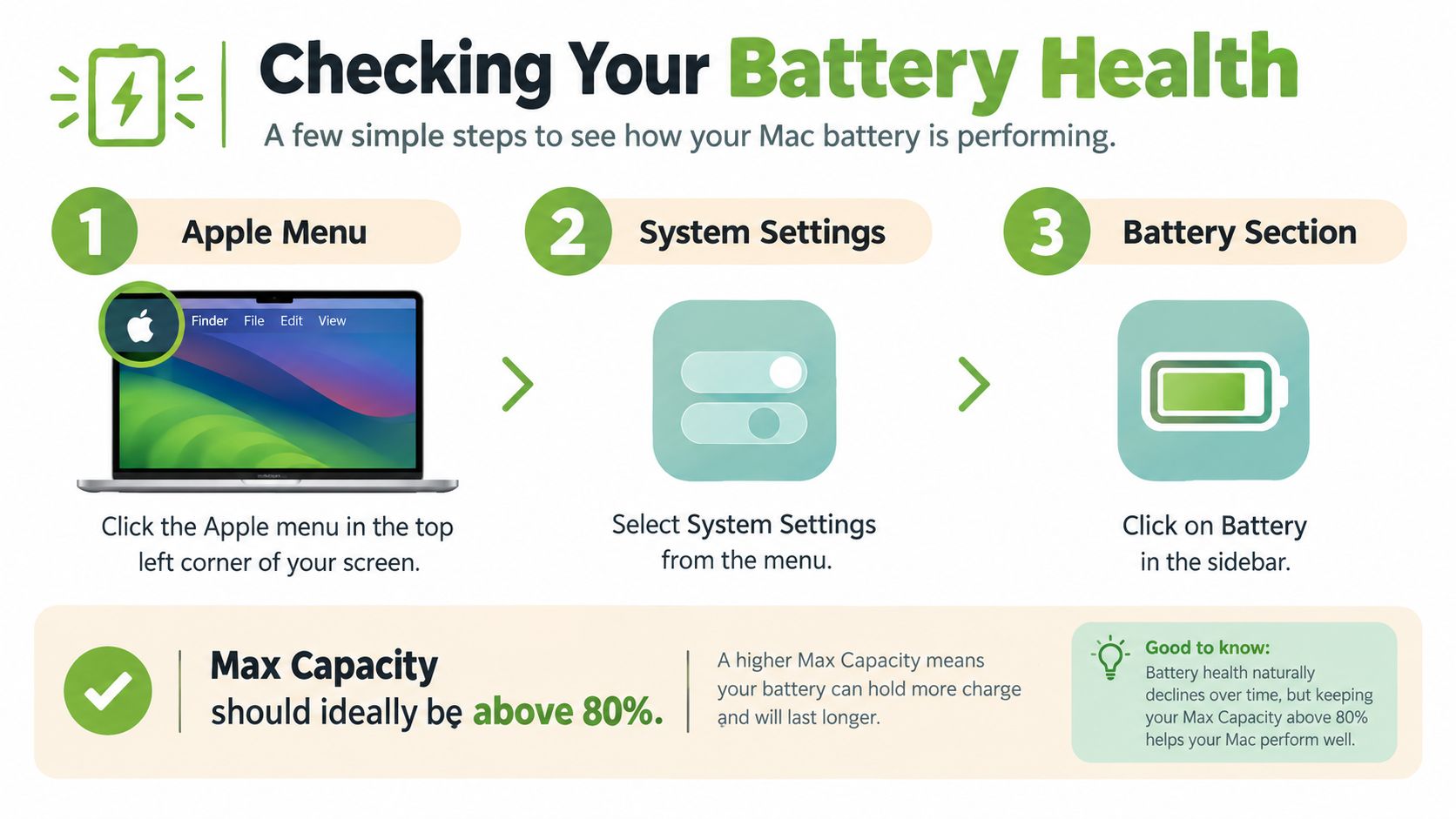
Find the information macOS already provides
Open Apple menu > System Settings > Battery. Look for the battery health status and maximum capacity. On some macOS versions, you may need to select the battery information area or open System Information to view the cycle count.
A charge cycle means using an amount of power equivalent to the battery's full capacity, not necessarily plugging in once. Apple states that built-in MacBook batteries are designed to retain up to 80% of their original capacity after 1,000 complete charge cycles, and AppleCare+ coverage applies when capacity falls below 80% of the original capacity. See Apple's Mac battery service and recycling guidance for the manufacturer's benchmark.
That percentage translates into daily life. If your MacBook originally delivered 10 hours of comparable use, 80% capacity would theoretically provide about 8 hours in similar conditions. Your actual runtime will change with workload, screen brightness, temperature, battery age, and software, so treat the figure as a decision guide rather than a promise.
Separate wear from a fault
A lower maximum capacity usually points to normal ageing. Unexpected shutdowns, swelling, unusual heat, charging failures, or a rapidly changing battery reading deserve a professional inspection instead of repeated calibration attempts.
Before booking work, record:
- Model and serial number: These identify the correct battery assembly and help a technician confirm compatibility.
- Maximum capacity: Compare the measured figure with the original specification.
- Cycle count: Use it as context alongside symptoms, not as the only trigger for replacement.
- Health message: “Service Recommended” indicates that the Mac has detected a battery concern, but it doesn't tell you whether the pack is swollen.
- Daily runtime: Note how long the Mac lasts during your normal work, study, or commuting routine.
Practical rule: Replace based on measured capacity and real symptoms, not age alone.
If the MacBook remains fast, stable, and compatible with your needs, a battery repair may be sensible even when the computer is no longer new. You can also compare the device with options discussed in this guide to buying a second-hand MacBook. For the wider disposal stage, keep a trusted provider of compliant waste and recycling services in mind, especially if the repair shop doesn't manage the removed pack.
Deciding Between Repair and Upgrading
A battery below 80% doesn't automatically mean you should replace the MacBook. Apple uses 80% maximum capacity as the threshold for no-cost battery service under AppleCare+, but repair pricing and availability depend on the exact model, warranty status, and service provider, as Apple explains in its Singapore Mac repair information.
The right question is: What else will this MacBook need during the time you expect to keep it?
Use the whole-device test
An older Intel MacBook may regain useful unplugged time after a battery replacement, but the repair won't solve every limitation. Check whether the machine also suffers from heat-related slowdowns, fan noise, keyboard or display problems, charger issues, storage pressure, or reduced macOS compatibility. A new battery can improve mobility while leaving those other constraints untouched.
An Apple silicon MacBook may offer a stronger repair case when the processor still handles your work comfortably and the rest of the hardware is healthy. For browsing, documents, video calls, and study, preserving a familiar machine can be more practical than replacing it just because the battery has aged.
Write down three values before deciding:
- Repair estimate: Request a model-specific quote, not a generic Air or Pro figure. You can use this MacBook battery replacement cost guide as a comparison point, then confirm the final amount with the service provider.
- Current second-hand value: Ask what the Mac could reasonably achieve through resale, trade-in, or reuse in its present condition.
- Remaining useful life: Consider software compatibility, performance for your workload, physical condition, and the likelihood of another repair.
A simple decision table
| Situation | Sensible next step |
|---|---|
| Battery is weak, but the Mac is stable and meets your needs | Request a battery replacement quote |
| Battery is weak and the Mac has several unrelated faults | Compare repair with trade-in or replacement |
| The device is too limited for current software or workload | Explore reuse, parts recovery, or responsible resale |
| The battery is swollen, hot, leaking, or physically damaged | Stop using it and seek specialist handling |
A transparent estimate matters more than a tempting headline price. For general repair-planning ideas, you can also browse tool repair costs, but don't treat a non-Mac example as your final quote. Ask the provider to inspect the device and explain what the replacement will and won't fix.
Choosing the Right Repair Service in Singapore
The safest repair choice balances technical competence, part quality, privacy, testing, and warranty. Official Apple service gives you a manufacturer-linked pathway, while a reputable third-party specialist may offer a more flexible local experience. Neither option should be selected on price alone.
The supplied comparison visual presents illustrative price ranges for official Apple service and certified third-party repair. Treat those figures as visual context, not a guaranteed Singapore quote. Apple's own guidance remains the safer reference for model-specific eligibility, coverage, inspection, and availability.
Ask these questions before handing over the Mac
- Which battery assembly is being installed? The provider should identify the exact model compatibility and explain part provenance.
- What inspection is included? Ask whether the technician checks swelling, thermal events, cycle count, charging behaviour, and cosmetic condition.
- How will my data be protected? A battery replacement shouldn't require casual access to your files. Ask about access controls, passcodes, backup expectations, and data handling.
- What testing happens after reassembly? The service should include charging, sleep and wake, battery-health, and thermal checks.
- What warranty applies? Get the period and exclusions in writing, along with the replacement date and service record.
- What happens to the removed battery? Request the disposal or recycling route before approving the work.
Official service may suit owners who prioritise Apple's process and coverage structure. A trusted third-party provider may suit someone who wants local convenience or a broader device-lifecycle conversation. The important distinction is not the label. It's whether the shop can explain the repair clearly and document the result.
For a local option, you can review MacBook repair services in Singapore and compare the questions above against the provider's actual process.
A proper workflow includes backup and encryption before the Mac is opened, careful removal of the integrated battery, installation of the correct pack, and post-repair charging and health diagnostics. If the technician can't describe those steps in plain language, choose someone else.
Protecting Your Data Before the Swap
Your MacBook may contain tax documents, family photos, work files, saved browser sessions, and private messages. A battery repair shouldn't put any of that at risk, so prepare the device before drop-off.
Create a usable backup
Use Time Machine with an external drive to create a current backup. Open System Settings, choose General, then Time Machine, and follow the setup prompts. Let the backup finish, then open a few important files from the backup if you can. A backup you haven't checked is only an assumption.
Next, turn on FileVault if it isn't already active. FileVault encrypts the startup disk, which means the stored data is protected if someone tries to read the drive outside normal macOS access. Keep your recovery information secure and don't share it casually.
Before service, also:
- Sign out of sensitive services: Log out of banking, work systems, password managers, and other accounts where practical.
- Record the condition: Photograph the exterior, screen, ports, and serial number.
- Clarify the passcode policy: Ask whether the technician needs your login, whether a temporary account can be used, and how credentials are deleted afterwards.
- Remove unnecessary accessories: Take off cases, hubs, memory cards, and personal stickers if you want them kept safe.
You can follow this laptop trade-in preparation guide for a wider handover checklist. For people who need extra reassurance, myhalo's Safe Data service focuses on protected handling and secure data destruction pathways, while Save Data supports recovery attempts when important files are at risk.
Responsible Battery Disposal and E-Waste Rules
A MacBook battery replacement creates a separate waste stream. The removed pack isn't ordinary rubbish, and it shouldn't go into a general-waste bin or a blue recycling bin.
Singapore generates about 60,000 tonnes of e-waste annually, and the national Extended Producer Responsibility scheme requires lithium-ion batteries to be collected and properly treated at licensed recycling facilities rather than placed in general waste. The policy connection is practical: keeping the laptop in use reduces premature disposal, while the removed battery must still enter controlled treatment.
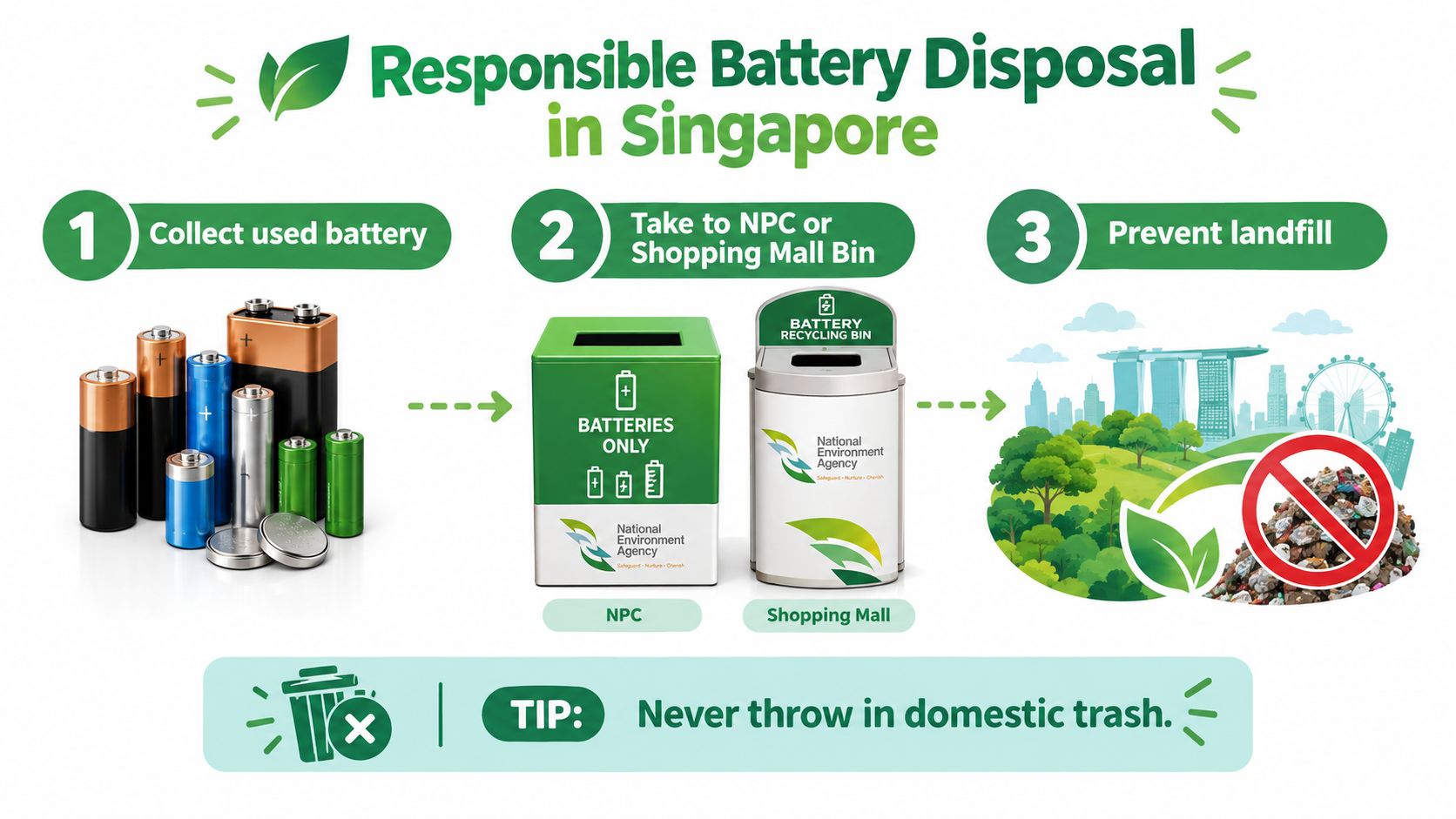
Handle the removed pack safely
The National Environment Agency advises taping the ends or wires of rechargeable batteries to reduce short-circuit and fire risks. Leaking batteries should be sealed in a leak-proof container or bag before recycling. Because a MacBook uses a built-in lithium-ion pack, confirm acceptance with the collection operator or authorised service channel rather than forcing it into an unsuitable household battery slot.
A responsible repair or refurbishment operation should:
- Label the battery: Record the MacBook model and removal date.
- Quarantine damage: Separate swollen, hot, leaking, or crushed packs from normal stock.
- Prevent further risk: Don't charge or ship visibly damaged cells.
- Keep a handover record: Note the weight, date, recycler, and receipt where available.
- Record the outcome: Identify whether the pack went to material recovery or required hazardous-incident handling.
Singapore's regulated e-waste system covers ICT equipment such as laptops and portable batteries, so a battery swap can preserve the laptop while directing the hazardous component to the correct specialist pathway. A useful service provider should answer one simple question clearly: What happens to my old battery after removal?
myhalo's Declutter your e-clutter programme fits this practical model by helping owners move unused or retired technology into repair, reuse, parts recovery, or responsible recycling pathways. The aim is convenient, safe, responsible device handling, not just getting the old item out of your home.
Joining the Zero E-Waste Community
Choosing a MacBook new battery can be a small repair with a wider effect. You keep the display, processor, storage, logic board, keyboard, and other working components in service instead of replacing the entire computer before you need to. That doesn't make every battery repair worthwhile, but it makes a careful diagnosis worth doing.
Use this quick checklist:
- Check health: Review maximum capacity, cycle count, warning messages, charging behaviour, and symptoms.
- Assess the whole Mac: Look at performance, software compatibility, thermal behaviour, physical condition, and likely future repairs.
- Protect your files: Complete a Time Machine backup, use FileVault, and agree on a safe handover process.
- Choose accountable service: Confirm the part, inspection, tests, warranty, and data practices.
- Close the loop: Request responsible handling of the removed lithium-ion battery and retain the service record.
A clear label on a repaired device can also help teams track model, service date, ownership, or recycling status. For broader ideas on sustainable engraving and labelling, consider how simple identification supports organised reuse and asset management without exposing private information.
The myhalo Promise: Sustainable device care should feel convenient, safe, and responsible. Repair what still works, protect the data inside it, and give every removed component a documented next step.
For households, a battery replacement may restore everyday independence from the charger. For offices and schools, the same thinking can support organised device lifecycle management, secure data handling, resale, parts harvesting, and compliant end-of-life planning. The best outcome isn't always a new laptop. It's the right decision for the whole device.
myhalo can assess your MacBook, check whether a battery replacement is suitable, protect your data through the handover, and route unwanted technology towards repair, reuse, or responsible recovery. Visit myhalo online or drop by the Bugis Junction or Sim Lim Square counters for a transparent next step, and let's clear out your e-clutter together.