
You've found a second hand MacBook in Singapore at a price that feels almost too good to ignore. The photos look clean, the seller replies quickly, and the listing says the battery is “still good”. Then the practical worries arrive: How many cycles has the battery completed? Is the MacBook tied to someone else's Apple account? Does the price reflect its real condition?
Those concerns are sensible, not fussy. A used MacBook can be a smart way to lower the cost of a premium laptop and keep a working device in circulation, but only when you check the parts that photos can't show. With a few calm inspections, you can replace guesswork with evidence and choose between a marketplace deal, a certified refurbished unit, or a local trade-in channel with much more confidence.
Table of Contents
- Why Buying a Second Hand MacBook Feels Stressful
- How to Evaluate Condition Like a Pro
- Verifying Serial Number and Apple Coverage
- Price Benchmarks and Where to Buy in Singapore
- Tips for Safe Transactions and Secure Data
- Join the Zero E-Waste Movement with Confidence
Why Buying a Second Hand MacBook Feels Stressful
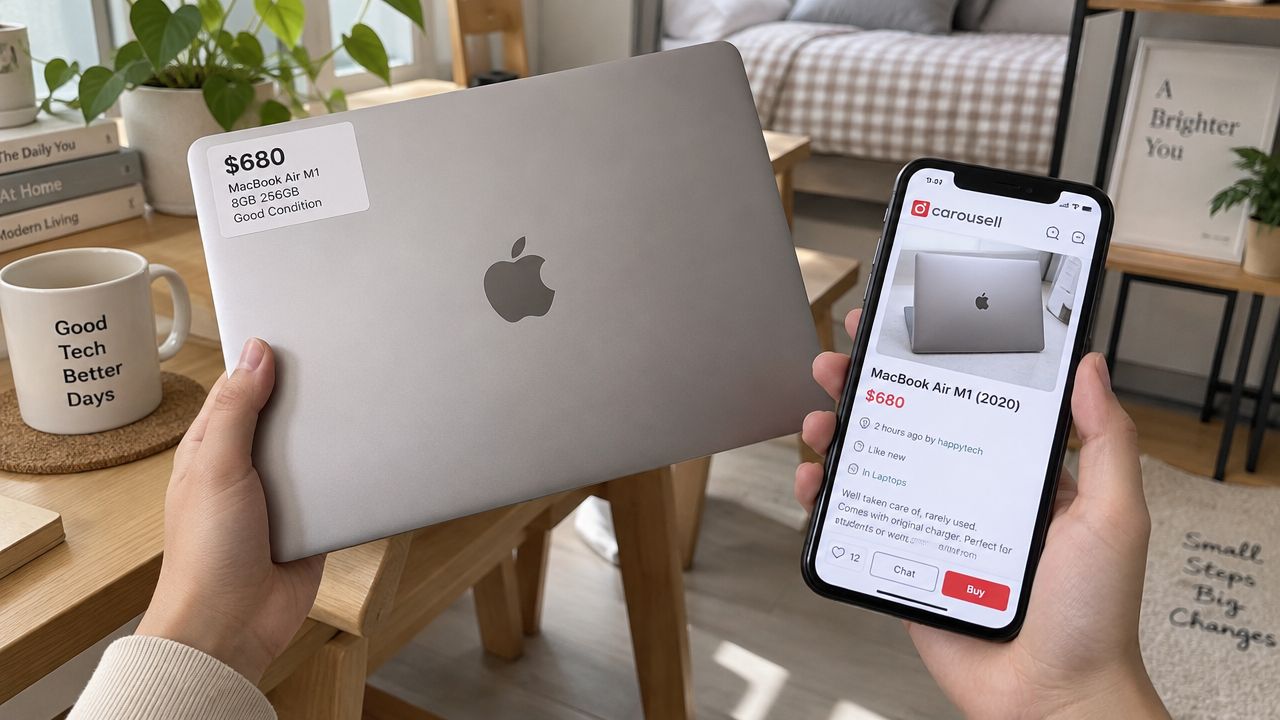
A Carousell listing can look convincing at first glance. The aluminium body appears clean, the description mentions a recent macOS installation, and the price seems ideal for school, office work, or commuting. The uncertainty starts when you remember what photos cannot show: a tired battery, unreliable USB-C port, activation lock, or display fault visible only against a bright background.
Singapore has an active resale market for Apple laptops. Carousell's Singapore MacBook marketplace presents certified used MacBooks as a dedicated category, and Carousell says its marketplace is used by 1 in 3 Singaporeans. That reach gives buyers more listings to compare, while also making careful checking more important.
The worry behind the bargain
A private listing can offer more choice and a lower price than a formal refurbished channel. The trade-off is responsibility. You may need to arrange a meeting, inspect the MacBook, verify its serial number, test the hardware, and decide whether a short or unclear warranty provides enough protection.
Certified refurbished stock reduces some of that uncertainty through testing, grading, and warranty support. Apple Singapore says its certified refurbished Macs include a one-year warranty, full functional testing, and savings of up to 15% through its official refurbished Mac store. A marketplace MacBook may still be better value, but its price should reflect the checks and risks you take on yourself.
Practical rule: Treat an attractive price as an invitation to inspect, not a reason to rush.
The local resale system also includes trade-in and buyback services, which keep older MacBooks circulating instead of sending them straight to disposal. That creates useful supply for buyers, but it does not make every listing equally safe. A refurbished unit with documented testing is a different purchase from a private sale, even when both devices look similar online.
Use price as a starting point, not a verdict. A low figure may reflect an older configuration, high battery-cycle count, missing accessories, limited warranty, or a fault the seller has not clearly described. Ask whether the condition, ownership status, battery, configuration, and warranty justify the amount before arranging payment.
How to Evaluate Condition Like a Pro
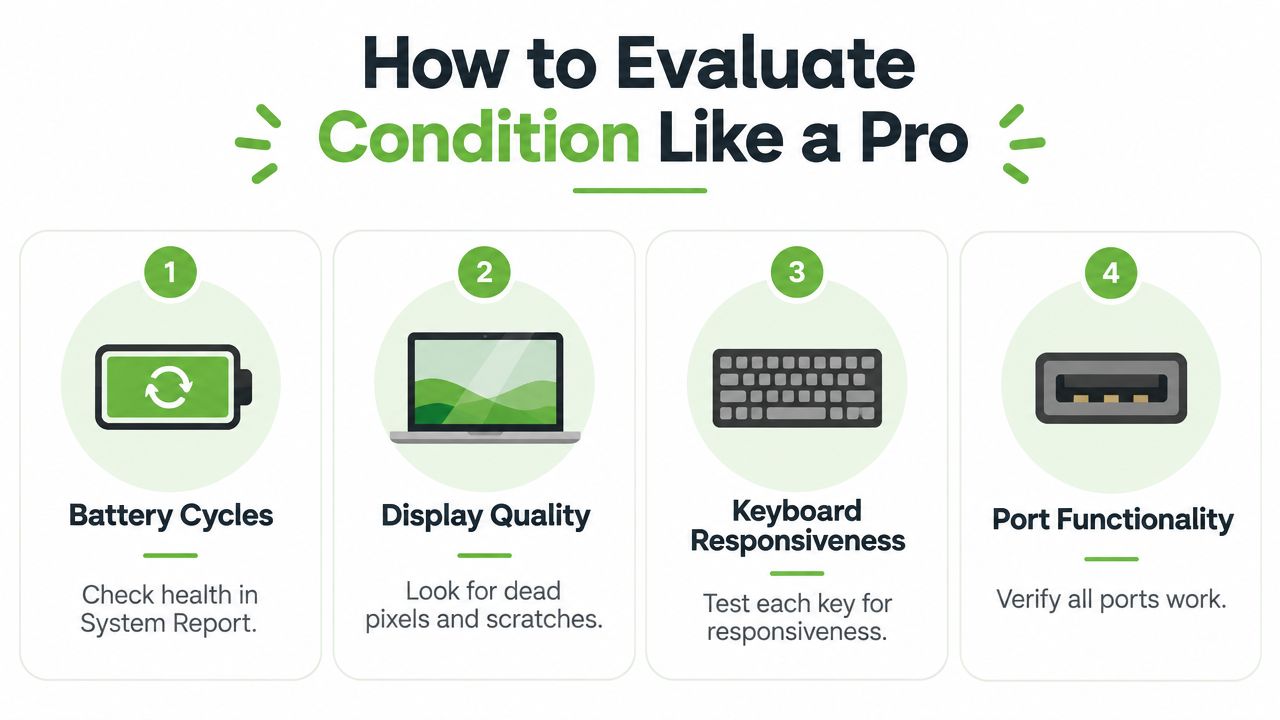
A MacBook's condition is more than its colour and outer shell. Four areas tell you much more about whether a second hand MacBook has been cared for: battery cycles, display quality, keyboard response, and port function.
Start with the battery
Apple batteries are generally rated for about 1,000 charge cycles before capacity decline becomes significant (CompAsia's Singapore guide to used MacBook Pro pricing). A cycle represents battery usage equivalent to the battery's full capacity, even if that usage happens across several partial charges.
Open macOS and choose Apple menu > About This Mac > System Report, then select Power. Check the cycle count and battery condition. Local Singapore buying guidance commonly treats units under 300 cycles as stronger-value stock, while units above 500 cycles often attract markdowns or negotiation.
A low cycle count isn't a guarantee of perfect battery life, so compare it with the stated condition. If macOS reports a service warning, ask whether the seller has priced in a replacement. A battery that needs work can reduce the device's practical value because you're paying for both the part and the inconvenience of being without the laptop.
Inspect the screen carefully
Open a plain white page, then a dark page. Look for dead pixels, bright spots, uneven backlight, scratches, and pressure marks. Slowly tilt the display and check whether the hinge holds its position without wobbling or feeling unusually loose.
A small mark on the lid is mostly cosmetic. A line across the display, flickering backlight, or pressure damage affects everyday use and can be expensive to resolve. Don't let a spotless product photo outweigh what you see with your own eyes.
Test the input and ports
Open a text editor and press every key, including modifier keys, the space bar, arrow keys, and Touch ID if the model has it. Watch for keys that repeat, fail to register, or feel different from the rest. Move a finger across the trackpad and click in different areas to check for inconsistent response.
For ports, bring a compatible charger and, if possible, a USB-C accessory such as a drive or hub. Test each port separately rather than assuming that one working port means they all work. Also inspect the charging cable and connector for fraying or looseness.
Use this refurbished laptop and MacBook inspection guide if you want a longer checklist before meeting a seller.
A useful habit: Record the serial number, cycle count, battery condition, visible defects, and included accessories before you pay. Your notes make price negotiations much clearer.
Verifying Serial Number and Apple Coverage
Before meeting a seller in Singapore, ask for the MacBook's serial number. It answers two practical questions: whether the machine matches the listing, and what Apple coverage or ownership information you can confirm before paying.
Find the serial number in Apple menu > About This Mac, on the underside of some models, or on the original packaging. Check the number on the MacBook itself, rather than trusting a box photograph. Packaging can be mixed up, replaced, or separated from the device.
Follow the ownership trail
Use Apple's coverage-check service to review the available device information. The result may show active coverage, expired coverage, or limited records, depending on the MacBook's age. Expired coverage does not automatically rule out a purchase. It means the laptop's present condition, your hands-on testing, and any seller warranty deserve more attention.
For another identity check, LineVerifier Apple support explains what information to review when verifying an Apple device. Treat this as supporting evidence, similar to checking an identity card alongside meeting the person. It cannot replace inspecting the MacBook yourself.
The main ownership risk is Activation Lock. Before the handover, ask the seller to sign out of their Apple account and disable Find My. They should then erase the MacBook and let you start setup yourself. If the reset device requests the previous owner's Apple ID, stop the transaction. The seller must remove the lock before you buy.
Confirm the MacBook can become yours
A safe handover follows this order:
- Seller signs out: Their Apple account is removed and Find My is disabled.
- MacBook is erased: The seller resets the device instead of merely deleting personal files.
- Setup screen appears: You see the normal first-use setup flow.
- No account prompt remains: The MacBook does not request the previous owner's credentials.
- Serial details align: The serial number in macOS matches the details supplied before the meeting.
Certified refurbished purchases may include checks and warranty support that a marketplace sale does not. For Singapore-specific buying context, see this Singapore refurbished MacBook guide.
Refusal to share the serial number, disable Find My, or allow testing is a clear reason to leave. A low price is not useful if the MacBook cannot legally and practically become yours.
Price Benchmarks and Where to Buy in Singapore
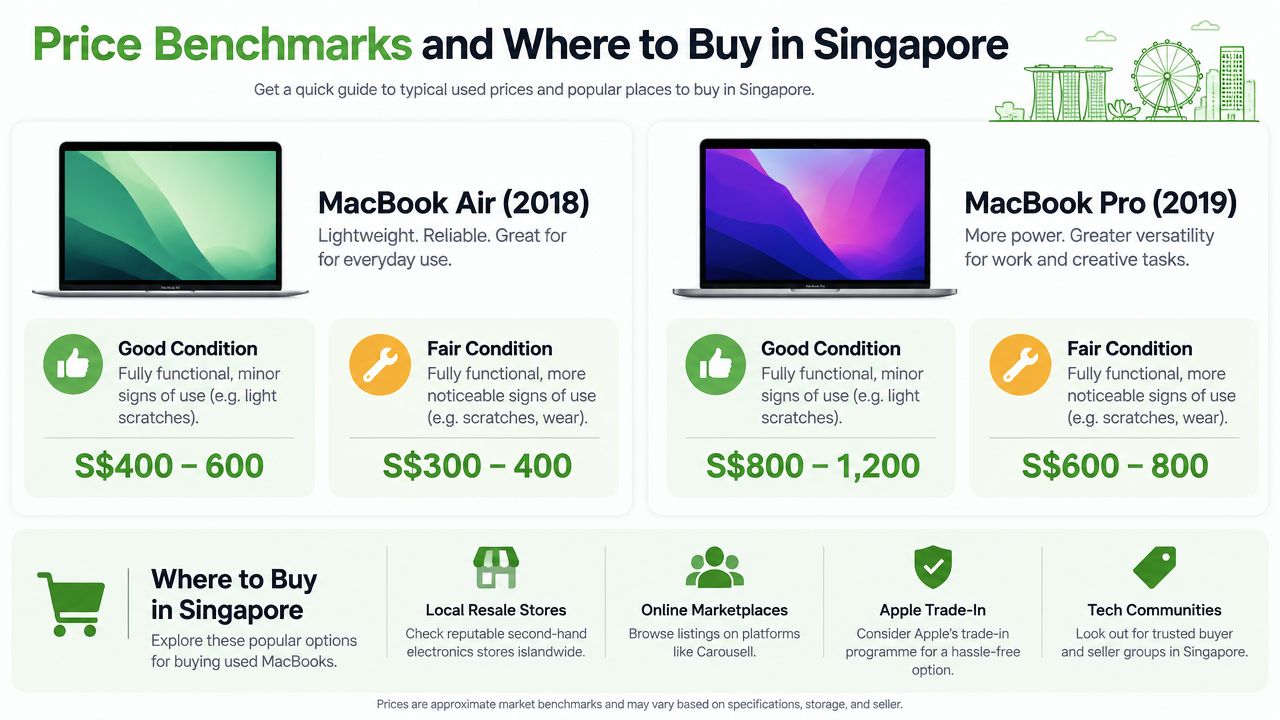
A second-hand MacBook can look cheap until you compare the details behind the listing. Processor generation, memory, storage, battery health, cosmetic condition, accessories, and warranty all affect its real value. The model name is only the label on the box. The configuration and condition determine what is inside.
Used MacBook Pro prices in Singapore commonly fall between SGD 350 and SGD 1,300, depending on the model, configuration, condition, and battery health. A local example is an M1 Pro MacBook Pro with 16GB RAM and 512GB storage listed at SGD 1,699, against an original retail price of SGD 3,236. These figures are useful reference points, not automatic valuations. Two machines called MacBook Pro can be far apart in age, performance, and remaining battery life.
Use the price as a risk signal
An unusually low listing may have a reasonable explanation. It could be an older model, limited storage, visible wear, a high battery cycle count, missing accessories, or no meaningful warranty. Ask the seller to connect the price to a specific condition. If the explanation stays vague, treat the discount as compensation for uncertainty, not as a bargain.
Apple certified refurbished devices generally cost more because they include formal support and a one-year warranty. A local refurbished reseller may charge less while providing its own grading system and warranty. A direct marketplace purchase can cost less again, but the buyer must carry out more checks personally.
| Option | Typical Price Range | Warranty | Risk Level |
|---|---|---|---|
| Apple certified refurbished | Often higher than private resale | One-year Apple warranty | Lower |
| Local refurbished reseller | Varies by model and grade | Seller warranty varies | Moderate |
| Marketplace purchase | Frequently negotiable | May be limited or absent | Higher |
| Trade-in or buyback channel | Quote depends on inspection | Usually a sales or trade-in process | Moderate |
The table supports comparison rather than guaranteeing a price or risk level. Compare the exact chip, memory, storage, battery condition, included accessories, and warranty terms.
Decide whether the discount is enough
A marketplace MacBook should be meaningfully cheaper if you are accepting weaker warranty coverage and doing the inspection yourself. If its price is close to Apple's certified refurbished price, formal testing and warranty support may make that option more sensible. A substantially lower private price can justify the extra work, provided the MacBook passes the battery, serial, Activation Lock, and hardware checks described elsewhere in this guide.
Trade-in services can help owners who want a quote without handling messages, meetings, and no-show buyers. The quoted amount depends on inspection, so compare it with the price you could obtain through a direct sale.
Before deciding, ask:
- What exactly is included? Confirm the charger, box, adapters, and receipts if they matter to you.
- What condition is documented? Look for battery information and visible grading, not only “good condition”.
- What happens after purchase? Read the warranty terms and check the exclusions.
- Why is the price lower? The seller should provide a clear, believable reason.
- Can you test it first? If testing is not allowed, the discount may not cover the added risk.
Tips for Safe Transactions and Secure Data
A safe purchase protects both your money and your personal information. Meet in a public place where you can sit down, connect a charger, inspect the MacBook, and complete the ownership reset without feeling rushed.
Use a payment method with a clear record. Don't transfer money before seeing the actual device, and don't share unnecessary identity details, banking credentials, or one-time passwords with a seller. If the seller changes the meeting arrangement repeatedly or creates artificial urgency, treat that behaviour as part of the risk assessment.
Make the handover observable
Run through the essential checks while the seller is present:
- Match the device: Compare the serial number in macOS with the number supplied before the meeting.
- Test the hardware: Check the battery, display, keyboard, trackpad, charger, and every available port.
- Remove accounts: Ask the seller to sign out of Apple services and disable Find My.
- Start the reset: Confirm that the MacBook reaches the setup screen without requesting the former owner's credentials.
- Keep the record: Save the listing, messages, payment confirmation, and any written warranty promise.
A reset protects the next owner, but sellers need a secure process before handing over a device. Singapore e-waste compliance guidance says a licensed e-waste recycler must permanently erase or destroy data on data-bearing devices before reuse, recycling, disposal, or transfer to another recycler or disposal facility. The rule applies to laptops, phones, tablets, servers, and storage drives (Singapore IT compliance requirements).
Treat erasure as a documented task
For business-owned MacBooks, deleting files or reinstalling macOS may not provide enough evidence for internal governance. Singapore compliance guidance identifies recognised sanitisation methods such as NIST 800-88, cryptographic erasure, degaussing, and physical destruction, with disposal records documenting the method used (Singapore e-waste disposal checklist).
For individuals selling an old MacBook, myhalo's Safe Data service and Declutter your e-clutter programme provide options for secure data handling and responsible device disposal. Its secure data destruction guidance also explains how a seller can arrange a more structured handover through secure data destruction support.
For sellers: Don't pass on a laptop until you're comfortable that your personal accounts, browser sessions, documents, and recovery information are no longer accessible.
Join the Zero E-Waste Movement with Confidence
Buying a second hand MacBook can be a practical choice for your budget and a thoughtful choice for the planet. Reuse keeps a working device in service for longer, while responsible refurbishment and parts recovery reduce the pressure to treat every upgrade as a reason to discard the previous machine.
Your decision doesn't end at checkout. You can extend the MacBook's useful life by caring for its battery, repairing faults instead of replacing the whole laptop, and choosing a responsible route when you eventually upgrade. You can also make the next purchase easier by keeping records of the serial number, warranty, repairs, and battery condition.
Make the full device journey count
A zero e-waste approach considers what happens before, during, and after ownership. A MacBook that no longer suits one person may still work well for another. A damaged unit may provide parts for repair, while a device with sensitive information may need documented sanitisation before anyone reuses it.
For local recycling and drop-off guidance, explore this Singapore electronics recycling resource. The right route depends on whether your MacBook can be repaired, resold, traded in, used for parts, or securely retired.
The larger lesson is encouraging: responsible technology choices don't have to feel complicated. You can buy carefully, verify ownership, protect your data, and keep useful hardware moving through the community.
This video offers another visual reminder of how a device can fit into a more responsible technology lifecycle:
Before buying, remember the essentials: check the battery cycles, inspect the physical hardware, verify the serial and Activation Lock status, compare the price with warranty protection, and complete the handover securely. Those steps turn a stressful listing into a considered decision.
Ready to feel lighter and do good? Let's clear out those old devices together through myhalo's Declutter your e-clutter programme, with Safe Data support for private information and responsible routes for reuse or recycling. Visit myhalo to explore a convenient way to trade in, repair, resell, or securely retire your MacBook in Singapore.