

In Singapore, Apple's out-of-warranty MacBook battery replacement cost is typically S$159 for many MacBook Air models and S$249 for many MacBook Pro models. AppleCare+ can bring that battery replacement charge down to S$0 if the battery holds less than 80% of its original capacity.
That's the short answer. The question is whether you should pay for a repair, lean on coverage, or use the moment to move a tired MacBook into a better next life through trade-in, refurbishment, or responsible recycling.
Table of Contents
- Why Your MacBook Battery Matters More Than You Think
- Breaking Down MacBook Battery Replacement Cost
- How to Check Your MacBook Battery Health
- Comparing Apple Authorised Service and Independent Repair Options
- Getting a Quote and Booking Your MacBook Battery Repair
- When to Repair Versus When to Trade In or Upgrade
- Your Next Steps Toward a Healthier MacBook and a Greener Planet
Why Your MacBook Battery Matters More Than You Think
Your MacBook does not need to be ancient to become annoying. It starts with a small frustration, a charger that lives in your bag, a battery bar that drops too fast, then one day your laptop dies halfway through a Zoom call in Tampines or while you are editing slides in a café.
That is why MacBook battery replacement cost is really a device lifecycle decision. If the laptop still does the job, battery replacement can extend its useful life and delay an unnecessary upgrade. If the machine is already slow, cramped, or unreliable for your needs, the better move may be trade-in, refurbishment, or responsible upcycling instead of sinking more money into it.
A weak battery should not send you straight to a new laptop. It should make you compare the repair bill with the remaining value of the device, then decide whether keeping it running still makes sense.
Practical rule: if the MacBook still fits your work, study, or creative needs, check battery health before you start shopping for a replacement.
That is the sustainable choice too. A battery swap can keep a good machine in use longer, while a device that is no longer worth fixing may be better suited to trade-in, refurbishment, or parts recovery. For Singapore users, that is the smart lane. You control costs, protect your data, and avoid throwing away a workable machine too early.
Breaking Down MacBook Battery Replacement Cost
MacBook battery replacement cost usually comes down to two things, the model family and the repair channel you choose. In Apple's out-of-warranty pricing, many MacBook Air models sit at S$159, while many MacBook Pro models sit at S$249. That Pro tier costs noticeably more because the job usually involves a larger battery pack, more parts handling, and more labour inside a tighter chassis.
That gap matters if you are deciding whether to repair, trade in, or retire the machine. A battery swap makes more sense on a MacBook that still has years of useful life left. If the laptop is already underpowered for your daily work, the repair bill starts competing with the value you could get from trade-in, refurbishment, or responsible upcycling.
What you usually pay outside Apple
Independent repair guides show the market has room to move. Many third-party shops price below Apple, and DIY parts can cost less again, but the trade-off is consistency. You are paying less cash up front, yet you also take on more variation in parts quality, labour standards, and warranty support. MacSales repair pricing context Caldex Systems battery cost guide
A clean way to judge the options is this:
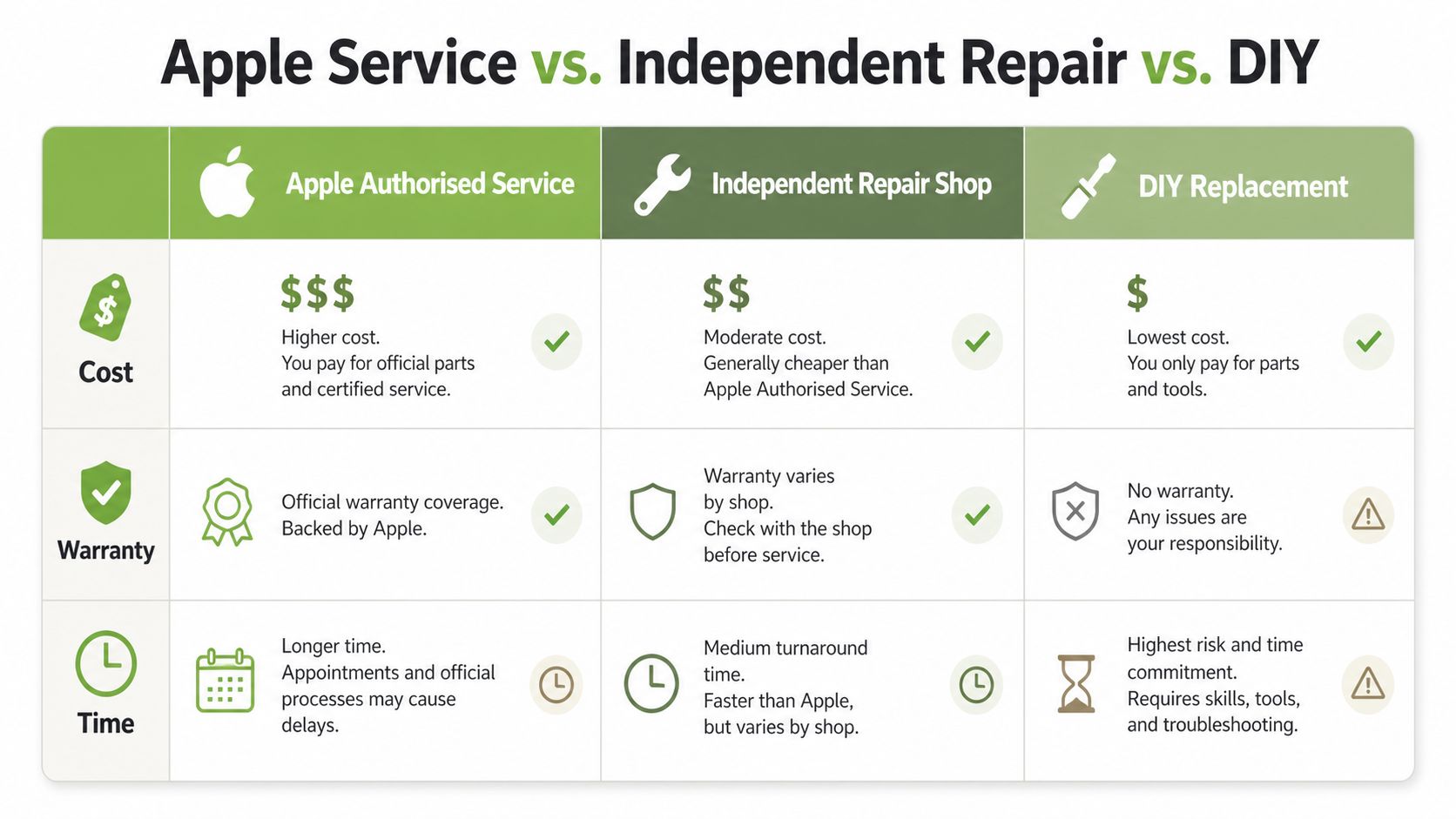
- Apple Authorised Service: highest certainty, highest price.
- Independent Repair Shop: lower cost, but parts and warranty can vary.
- DIY Battery Kit: lowest parts cost, highest risk if you are not confident opening a MacBook.
Cost comparison at a glance
| Service Type | MacBook Air Cost | MacBook Pro Cost | Warranty Coverage |
|---|---|---|---|
| Apple Authorised Service | S$159 | S$249 | May be S$0 with AppleCare+ if battery health is below 80% |
| Independent Repair Shop | Usually lower than Apple | Usually lower than Apple | Varies by shop |
| DIY Battery Kit | Parts only, often cheaper than service | Parts only, often cheaper than service | Usually no service warranty |
The price gap between Air and Pro is not random. Pro models generally use larger batteries and more involved service procedures, so the bill rises along with the complexity of the repair. If you want a broader sense of how repair bills scale beyond batteries, this MacBook Pro repair cost guide helps put the battery quote in context.
If you are comparing options, keep the full outcome in view. The lowest sticker price is not always the cheapest result if the battery quality is weak, the repair is rushed, or the machine is damaged during service.
How to Check Your MacBook Battery Health
Do not pay for a battery replacement until you know the battery is worn out. macOS already gives you the signs, and they are worth checking before you book any repair.
Start with the built-in battery report
Open System Settings, then go to Battery and look at the condition message. If you want more detail, open System Information and check the battery's cycle count, maximum capacity, and condition field.
Read those numbers like this:
- Cycle count tells you how many full charge-and-drain cycles the battery has gone through.
- Maximum capacity shows how much charge the battery can still hold compared with when it was new.
- Condition gives Apple's own view of whether the battery is normal or due for service.
If your MacBook is shutting down suddenly, draining fast, or running hotter than usual, take it seriously. Swelling is a harder warning sign, and it should not be ignored.
Use the 80% mark as your coverage checkpoint
If your battery report shows below 80%, that is the point to check whether you qualify for free replacement under AppleCare+. It turns a vague “my battery feels tired” complaint into a clear decision point.
If the battery is still healthy and the real problem is the charger, cable, software, or heat, skip the replacement and fix the actual fault first.
If you want a quick way to recognise when battery wear has crossed the line, the laptop battery warning signs guide is a useful companion read. It pairs well with a quick health check and keeps you from paying for a repair you do not need.
A proper battery check also helps you decide what to do next with the machine itself. If the MacBook is still otherwise solid, a battery swap can extend its usable life and make it better for trade-in, refurbishment, or even a second life through upcycling. If the battery report is poor and the machine is already showing wider wear, the smarter move may be to repair only if the rest of the device still has value. That is also where a Sheffield based Apple repair shop can be a useful reference for how repair-focused businesses think about component-level fixes.
Comparing Apple Authorised Service and Independent Repair Options
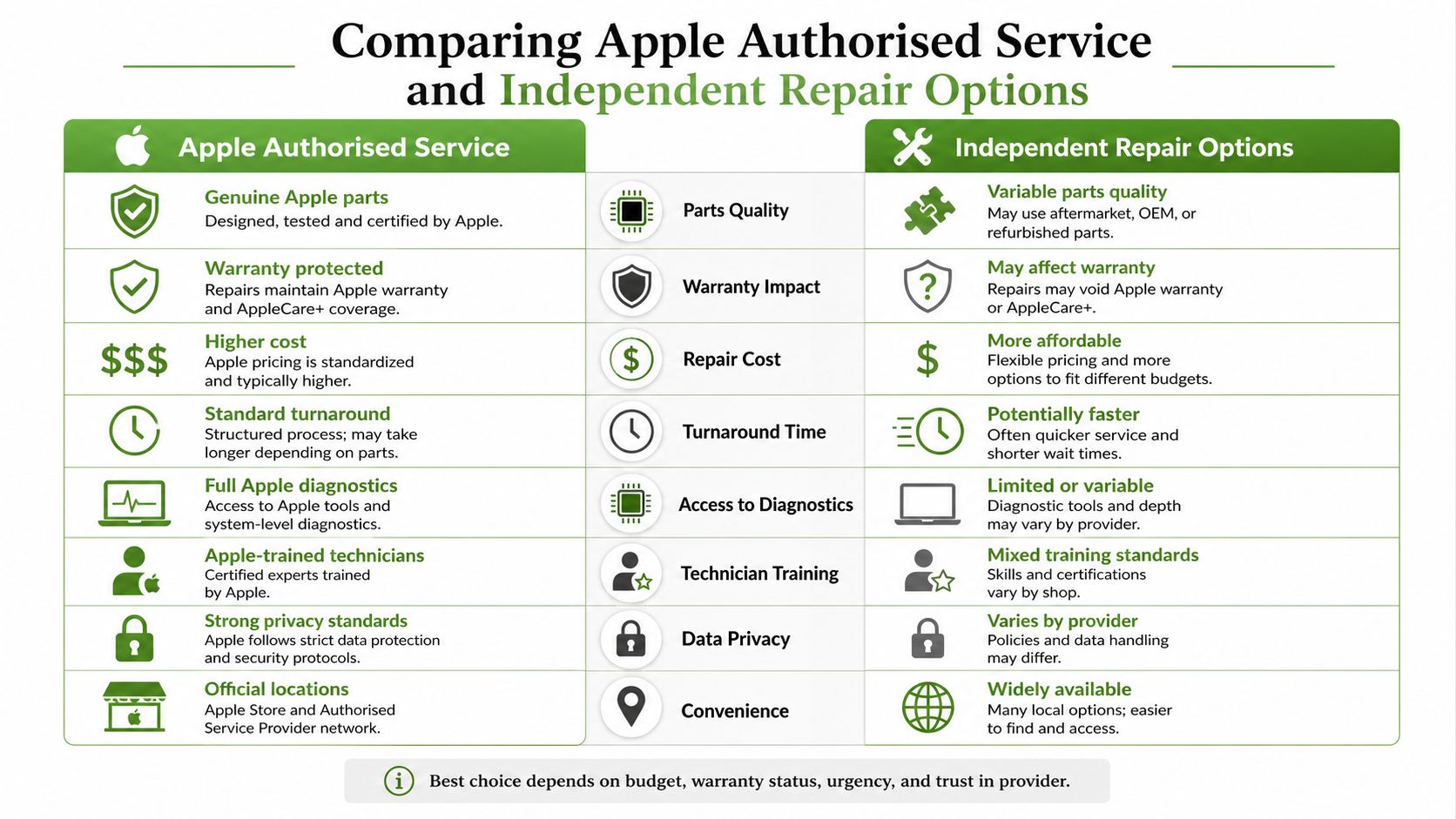
Apple Authorised Service gives you the cleanest path if your machine is still under coverage or you want the most straightforward route. Independent repair shops usually win on price, and DIY wins only if you know what you're doing and accept the risk.
The trade-offs are not subtle
Apple's advantage is predictability. You know where the part comes from, you know the service path, and you reduce the chance of awkward compatibility issues.
Independent repair is often the better value when the machine is out of warranty and the battery is the only problem. That's where practical guides from repair specialists matter, including a useful Sheffield based Apple repair shop resource from Steel City IT, which shows how local repair businesses position themselves around direct, component-level fixes.
DIY is the riskiest choice. A MacBook battery isn't like swapping a remote control cell, and if you damage the trackpad cable, the logic board, or the battery housing, the “cheap fix” can get expensive fast.
Choose based on risk, not pride
- Apple Authorised Service: pick this if you want coverage clarity and official handling.
- Independent Repair Shop: pick this if the battery is the main issue and you want a lower bill.
- DIY Replacement: pick this only if you already have the tools, patience, and repair experience.
Good repair shops don't just replace parts, they protect the data path too.
That matters in Singapore, where a laptop often carries work documents, family photos, and account sessions that you don't want exposed during a careless handover. A repairer should be as careful with your files as they are with your battery.
Getting a Quote and Booking Your MacBook Battery Repair
A swollen battery, random shutdowns, or a MacBook that only works while plugged in calls for a proper quote, not guesswork. Start by describing the symptoms clearly, then decide whether repair makes sense or whether the machine is already better suited for trade-in, refurbishment, or parts recovery. That keeps you from spending on a laptop that is already near the end of its useful life.
Make the quote process fast and specific
A useful repair request includes your MacBook model, battery symptoms, and whether the machine still charges at all. If you can say whether the problem is fast drain, sudden shutdowns, or swelling, any repair provider can give you a more realistic answer.
myhalo also offers an instant-quote flow for device repair and trade-in assessment, plus in-store drop-off and collection at Bugis Junction (#03-25/26) and Sim Lim Square (#03-40). Its process is built around fair, real-time pricing and secure handling, which suits a laptop that still has value as a work tool, a resale item, or a donor for parts.
Book with data safety in mind
Battery repair is the point where you should think about privacy, not just hardware. A trustworthy provider treats the machine as more than a battery job, because it may still hold sensitive documents, login sessions, and personal media.
Bring a charged backup plan, decide how you want to handle your password, and back up your files if your Mac still powers on.
If you are weighing repair against resale in Singapore, the trade-in guide for Singapore gives a practical lifecycle angle. It helps you judge whether repair is the right use of money or whether your machine is already a better candidate for trade-in, refurbishment, or upcycling.

The cleanest approach is simple. Get a quote, compare it with the machine's remaining value, read Bulls Eye Repair hardwood floor advice for a useful repair-versus-replacement mindset, then choose the option that protects both your money and your files.
When to Repair Versus When to Trade In or Upgrade
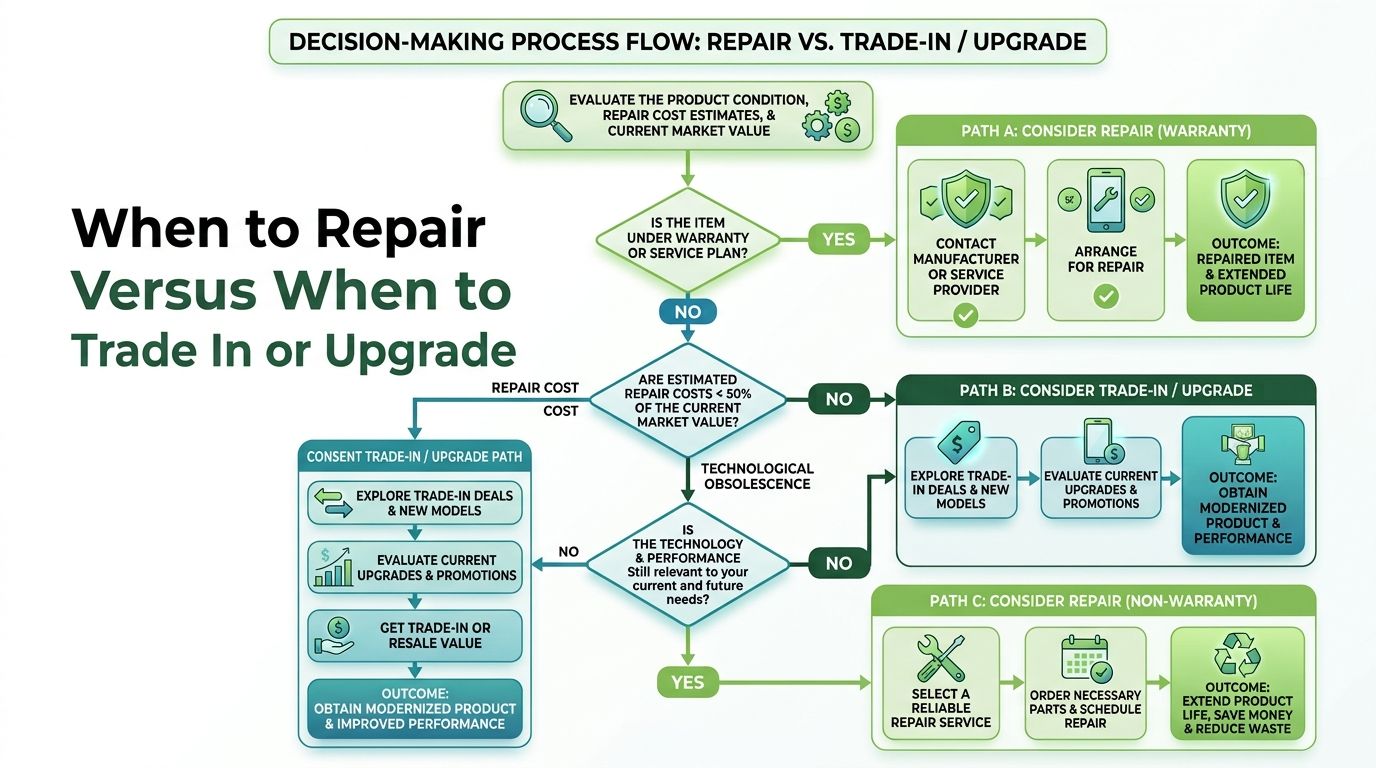
A battery replacement only makes sense if the rest of the MacBook still earns its keep. If the screen is fine, the keyboard is fine, and the machine still runs your workload, repair is usually the cleaner choice. If the laptop is old, slow, and already headed toward replacement, a battery swap can become money spent in the wrong direction.
Think in terms of device value, not just repair price
Many people make a poor decision here. They look at the repair bill in isolation and forget to compare it with what the machine is still worth or what a certified refurbished replacement might cost.
My view is blunt. If your MacBook still has useful life, repair it. If it's already sliding toward the drawer of forgotten tech, trade it in, resell it, or channel it into parts recovery so someone else can keep another machine running. myhalo's Declutter your e-clutter approach and certified ReLoved devices fit that logic well, because they keep usable hardware in circulation instead of pushing it straight to waste.
For a wider lifecycle comparison, this hardwood floor resurfacing versus refinishing guide is a surprisingly good analogy. It shows the same practical principle, repair the surface problem when the base is still sound, but stop if the underlying asset has already reached the wrong stage.
A sensible upgrade rule
- Repair if the MacBook still matches your daily needs.
- Trade in if the device still has resale value but no longer fits your workflow.
- Upgrade responsibly if the battery issue is only one part of a bigger decline.
If you're exploring the resale path, the Singapore trade-in article is worth pairing with your battery check. It helps you make one decision instead of three separate guesswork decisions.
Your Next Steps Toward a Healthier MacBook and a Greener Planet
Don't guess. Check the battery health first, compare the repair cost against the device's real value, and then choose the path that makes sense for your wallet and your workflow. A healthy-looking laptop that still fits your life deserves a repair. A machine that's barely holding on deserves a better exit plan.
Do these four things next
- Check battery health: open macOS battery settings and confirm the condition.
- Compare service paths: weigh Apple authorised service against independent repair.
- Request a quote: ask for a clear repair estimate before you hand over the device.
- Review the end-of-life option: if the MacBook is not worth fixing, look at trade-in, refurbishment, or recycling.
If you're unsure what to do with the old battery or the machine itself, the battery recycling guide for Singapore is a practical next stop. It's a good reminder that the right decision isn't always “repair at any cost”, sometimes the responsible move is to pass the device into a proper reuse or recycling stream.
My rule of thumb: keep the MacBook in use if the repair is sensible, and move it on responsibly if it isn't.
That's how you save money without creating more e-waste. It's also how you keep a useful laptop out of the drawer, out of the landfill, and in the hands of someone who can still use it well.
Ready to feel lighter and do good? Let's clear out those old devices together. Visit myhalo to explore repair, trade-in, and certified ReLoved options that make it easy to extend your MacBook's life, protect your data, and choose a more responsible next step.