
You're getting ready for a morning class or work call when your laptop lid gives a worrying creak. It opens, but one corner sits higher than the other, and you're wondering whether closing it again will make things worse. Laptop hinge repair starts with identifying what's failed, not assuming the whole machine needs replacing.
Table of Contents
- Why a Stiff Laptop Lid Is Worth Fixing
- Hinge Symptoms and What Failed
- Singapore Hinge Repair Prices by Severity
- What a Lasting Hinge Repair Involves
- Protect Your Data and Warranty Before Handover
- Repair, Let Go or Book a Diagnosis
Why a Stiff Laptop Lid Is Worth Fixing
Say your laptop still runs your work apps comfortably, holds your family photos and gets you through assignments. The problem is opening it without hearing that groan. A structural fault can make a useful device feel ready for retirement, even when its electronic components still work.
That's a familiar concern in Singapore, where 80.73% of resident households had access to a laptop or notebook in 2024, according to Singapore's household infocomm access dataset. Keeping a portable computer usable matters for everyday routines, not just the occasional trip out.
A small joint supports a much larger device
The hinge is the metal joint connecting the screen assembly to the laptop's base. It lets the lid rotate while holding the screen at your chosen angle. Its attachment points also have to carry the force you apply whenever you open, close or accidentally twist the lid.
A stiff or detached hinge isn't necessarily just a noisy inconvenience. Continued forcing can affect the screen cable, LCD panel, webcam wiring or surrounding casing, while the processor, storage and keyboard remain perfectly serviceable.
Practical rule: If opening the lid makes the casing lift, separate or bend, don't push through the resistance.
This illustration puts the everyday inconvenience into context.

Repairing a contained structural fault can preserve a machine you already know and rely on. Alongside sensible habits that extend your laptop's lifespan, an early diagnosis helps you decide whether it's safe to keep working or time to leave the lid alone.
Hinge Symptoms and What Failed
| What you notice | Usual failure | Keep opening? | Repair path |
|---|---|---|---|
| Creak or rising stiffness | Dried lubricant, grit or a bent hinge raising turning resistance | Only if the lid still moves freely; stop one-corner lifts | Clean and ease the hinge, or replace it if resistance stays high |
| Wobbly lid, plastic looks intact | Loose screws or inserts starting to pull | Limited use; support the lid at the centre | Tighten only if mounts still hold; otherwise rebuild the mounts |
| Crooked lid or bezel gap | Uneven hinges or a cracked housing | Stop if the panel flexes | Check both hinges, the bezel and the mounts |
| Cracks around screw posts | Torn plastic mounts transferring hinge load | No; keep the lid still | Rebuild the posts, or replace the housing if plastic is crumbled |
| Flicker, lines or a dropping webcam | Display or camera cable pinched by hinge movement | No; leave the lid at one angle or closed | Test and reseat the cable as part of the hinge repair |
| Hinge detached or lid flops | Broken metal hinge or split chassis | Do not use | Replace the hinge and, if needed, the lid, bezel or top case |
These are triage clues, not a confirmed diagnosis. In particular, don't force an already-open laptop shut just because closing it seems tidier. Leave it supported at its current angle if moving it causes separation, cracking or screen distortion.
Creaking and wobbling mean different things
A creak accompanied by rising stiffness suggests that the hinge is becoming harder to turn. Dried lubricant, contamination or a bent mechanism can increase torque, which means turning force. You then have to pull harder on the lid, and the hinge passes that extra force into its attachment points.
Think of a heavy door supported by tiny screws in a weak frame. If the door joint becomes difficult to turn, pulling harder can tear the screws out of the frame instead of moving the joint smoothly. A laptop can fail in a similar way.
A wobble is different. If the shell looks intact and the lid shifts at its attachment point, loose screws are a possibility. But the threaded insert, the small metal fitting that receives a screw, may also have pulled out of its surrounding plastic. Turning the screw won't restore plastic that no longer grips it.
Gaps and cracks point towards structural damage
The bezel is the narrow frame around the screen, while the chassis is the laptop's supporting body. A growing bezel gap, uneven lid or raised keyboard corner suggests that something underneath is moving out of position.
Hairline cracks around screw posts deserve attention even when the screen still works. A screw post is the raised mounting point inside the casing. Once it splits, the remaining attachments have to carry more of the hinge's load.
Citri Mobile's hinge repair guidance distinguishes the metal hinge from damaged mounts and cracked casing, and explains why replacement hardware attached to broken plastic can fail again. Those are separate repair conditions, not interchangeable names for the same job.
Keep these distinctions in mind when describing the fault:
- Metal hinge failure: The joint itself is worn, bent, seized or broken.
- Mount failure: The joint may still work, but its screws or inserts no longer have secure support.
- Housing failure: The lid or base has cracked beyond the immediate attachment point.
Screen symptoms need a cautious verdict
Flicker, lines or a webcam that disconnects when the lid moves can indicate cable strain near the hinge. They don't prove the panel itself is faulty. A damaged cable, loose connector and damaged screen need different remedies.
Don't repeatedly move the lid to reproduce the fault. Describe when it happens and take a photo or short recording only if you can do so without further movement. Our guide to laptop screen repair in Singapore helps distinguish display-related concerns before you commit to replacing a panel.
A useful diagnosis separates the hinge, mount, lid, bezel and cable rather than pricing them as a single mystery fault, a distinction reflected in The Repair Hospital's laptop repair cost guide.
A screw-only fix is worthwhile only when the structure holding the screw is still sound.
The mechanical goal is to restore a secure path for force through the hinge and casing, rather than merely hide movement. That reuse-first approach also fits the broader case for preserving working equipment discussed by Eco-Business.
Singapore Hinge Repair Prices by Severity
| Repair band | Typical price | Typical time | What the job covers |
|---|---|---|---|
| Loose-screw tightening | S$30–S$60 | 15–20 minutes | Screws and inserts that still hold, plus labour; listed with a 90-day warranty |
| Single hinge-mount repair | S$80–S$100 | 30–45 minutes | One broken mount rebuilt or reinforced, parts and labour, 90-day warranty |
| Both hinge mounts | S$100–S$120 | 45–60 minutes | Both sides rebuilt, parts and labour, 90-day warranty |
| Severe lid replacement | S$180–S$250 | 60–90 minutes | Lid or housing section replaced, parts and labour, 90-day warranty |
The prices, estimated repair times and stated warranty above are published benchmarks from BreakFixNow's laptop hinge repair listing, not myhalo quotations or guaranteed completion times.
The word hinge alone can't produce an honest quote. Tightening hardware that still has solid support is a different job from rebuilding a mounting point or fitting a replacement lid. The listing includes parts and labour, but you still need to confirm what a quotation covers for your particular laptop.
What moves a repair into a higher band
A laptop can look only slightly crooked from outside while having extensive damage underneath. Once the technician opens it, they may find that the opposite mount has also cracked or that a cable has been trapped against moving metal.
Common reasons for a more involved quotation include:
- Damage on both sides: Both attachment areas need attention, even if only one corner visibly separates.
- Replacement hardware: A bent or broken metal hinge needs a compatible part, not just an adjustment.
- Housing damage: A cracked bezel, lid or top case, the upper base section around the keyboard, adds separate work.
- Display-related damage: A cable or panel fault needs its own diagnosis and repair allowance.
For another local reference point, Affordable Laptop Services' 2024 repair guide listed hinge replacement at S$80. That's a published example, not evidence that every hinge fault should cost the same.
Compare the scope rather than just the total
Ask what failed, which parts will be retained, and which parts will be replaced. A quotation for mount reinforcement isn't directly comparable with one for a complete replacement housing.
Also separate hands-on repair time from the time you'll be without the laptop. Assessment, parts ordering, structural repair materials setting and final testing can affect collection arrangements. If you have a submission deadline, say so before agreeing to leave the device.
Request a written scope covering parts, labour, additional approval for newly discovered faults and workmanship coverage. A lower total isn't better value if the repair leaves a stiff hinge pulling against the same weakened mount.
What a Lasting Hinge Repair Involves
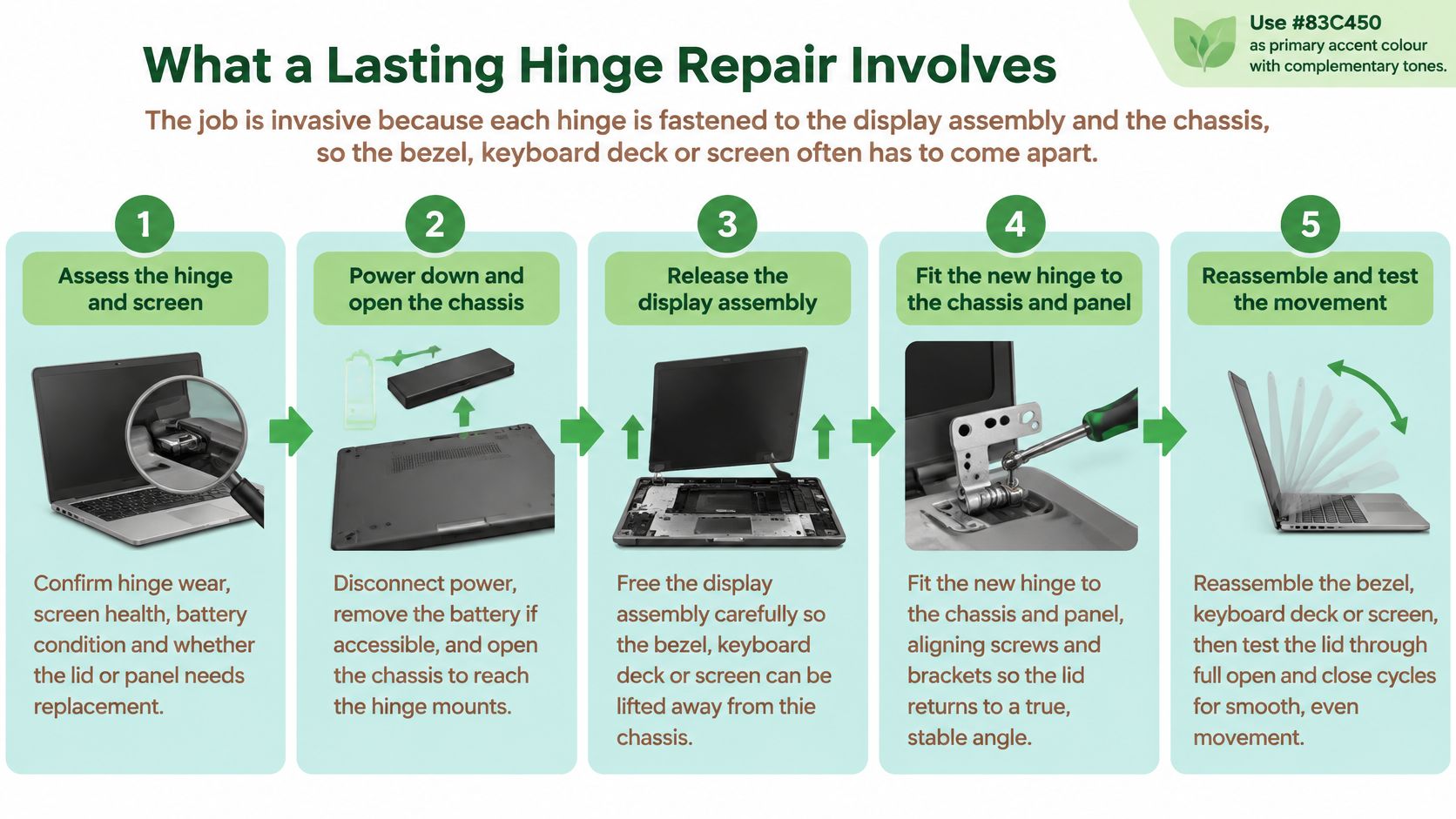
Hinge work reaches into both the display assembly and the base, so a lasting repair starts with access. Depending on the model, a technician may need to remove the bezel, keyboard deck or screen to reach the attachment points safely. The hinge is a small bridge between two shells. If only the visible joint is tightened while the mounts stay cracked, the same force returns.
The illustration outlines the main workshop stages.
The workshop sequence
Record the condition and exact model. Photographs establish the starting damage, including any gap at the hinge corner. The full model identifier helps match the hinge and housing, since similar-looking laptops can use different parts.
Shut down and isolate power. The technician disconnects the charger and internal battery before working around cables and metal brackets. The display is supported rather than forced past the damaged hinge's safe range.
Expose the attachments carefully. Removing the relevant base cover or bezel provides access to the hinge screws. The display cable needs to be freed without pulling its connector or sharply creasing it.
Identify the failed component. The metal joint, threaded inserts and plastic posts are checked separately. That tells the technician whether the fault needs adjustment, reinforcement or replacement.
Restore a secure structure. Sound mounts can be tightened. Damaged areas may need a replacement hinge, posts rebuilt with suitable epoxy or specialised plastic welding, or a new lid, bezel or top case when the shell cannot provide reliable support.
Check cable routing and functions. The display cable must stay clear of the hinge's moving path. Testing should cover the panel, webcam and Wi-Fi, with antenna wires checked for trapping or damage.
Reassemble and verify stability. Within the model's designed opening range, the lid should move smoothly and stay supported at different working angles. The casing should not lift or separate as it moves. If the base flexes when the lid opens, the repair has not finished its job.
BreakFixNow's guide to hinge damage and repair describes professional assessment, mount rebuilding and casing replacement as possible remedies. It also notes that parts for older or uncommon models can be difficult to obtain, so a technically repairable fault may still face a sourcing problem.
Why this usually isn't a first DIY project
A slipped tool can damage a connector, and poorly placed adhesive can block a cable or bond parts that need to remain removable. If the housing will not align, forcing the covers together is not a finishing step. It is a signal to stop and reassess.
For a visual reference to the work involved, this video accompanies the repair process.
After repair, open and close the lid from its centre with light, even force. Lifting one corner loads the hinges unevenly, which can pull against the mounts you have just paid to restore.
Protect Your Data and Warranty Before Handover
A hinge repair is a physical repair, but your files still deserve a little preparation. If the laptop is safe to power on without moving the damaged lid, back up documents, photos and school or work files to cloud storage or an external drive. Open a few copied files to confirm the backup is usable.
Prepare access without giving away your privacy
Sign out of sensitive accounts and remove saved access where practical. Don't automatically remove every passcode or device-finding lock: first establish what testing access is necessary. A temporary local account may allow display and webcam checks without exposing your usual account.
Before handover, prepare the following:
- Device details: Record the exact model and serial number, then check the manufacturer's warranty terms before third-party disassembly. Opening a laptop or carrying out a repair can affect cover, but it isn't a universal automatic exclusion.
- Condition evidence: Photograph the hinge corner, lid gap and cracks without prising anything apart. Note whether the screen flickers, shows lines or loses the webcam connection.
- Work approval: Request a written quotation before repair starts and clarify whether any proposed step affects stored data.
- Data handling: Discuss secure wiping if you're retiring the device. A routine hinge repair doesn't itself require erasing your files.
Our laptop repair and data recovery guide can help you separate restoring the machine from retrieving files when it won't start.
Safety first: If the battery is swollen, the laptop is unusually hot or the casing has split near the battery, stop using it and don't charge it.
Don't press the casing flat or open it at home to investigate. Contact the repair team for safe handover advice. A stripped screw or torn cable can turn an attempted tightening into a more involved repair, so professional assessment is the safer starting point for most owners.
Repair, Let Go or Book a Diagnosis
The practical choice depends on the whole device, not how dramatic the broken corner looks. Three outcomes stay open: keep using the laptop, repair it, or let it go. The table below turns that into signals you can weigh against your own deadlines.
| Factor | Lean toward repair | Lean toward letting go |
|---|---|---|
| Repair cost | Well under the price of a replacement | Near the value of a comparable used machine |
| Lid and panel | Lid intact, screen and cable sound | Lid shattered or panel damaged |
| Parts | Parts available for the model | Parts cannot be found for an uncommon model |
| Battery | Battery healthy | Battery swollen |
| Remaining use | Several more years of use still planned | Software support ending or machine only useful for parts |
Treat these as decision signals rather than automatic verdicts. A swollen battery means stop using the laptop and obtain a safety assessment. It doesn't, by itself, establish that every other component should be discarded.
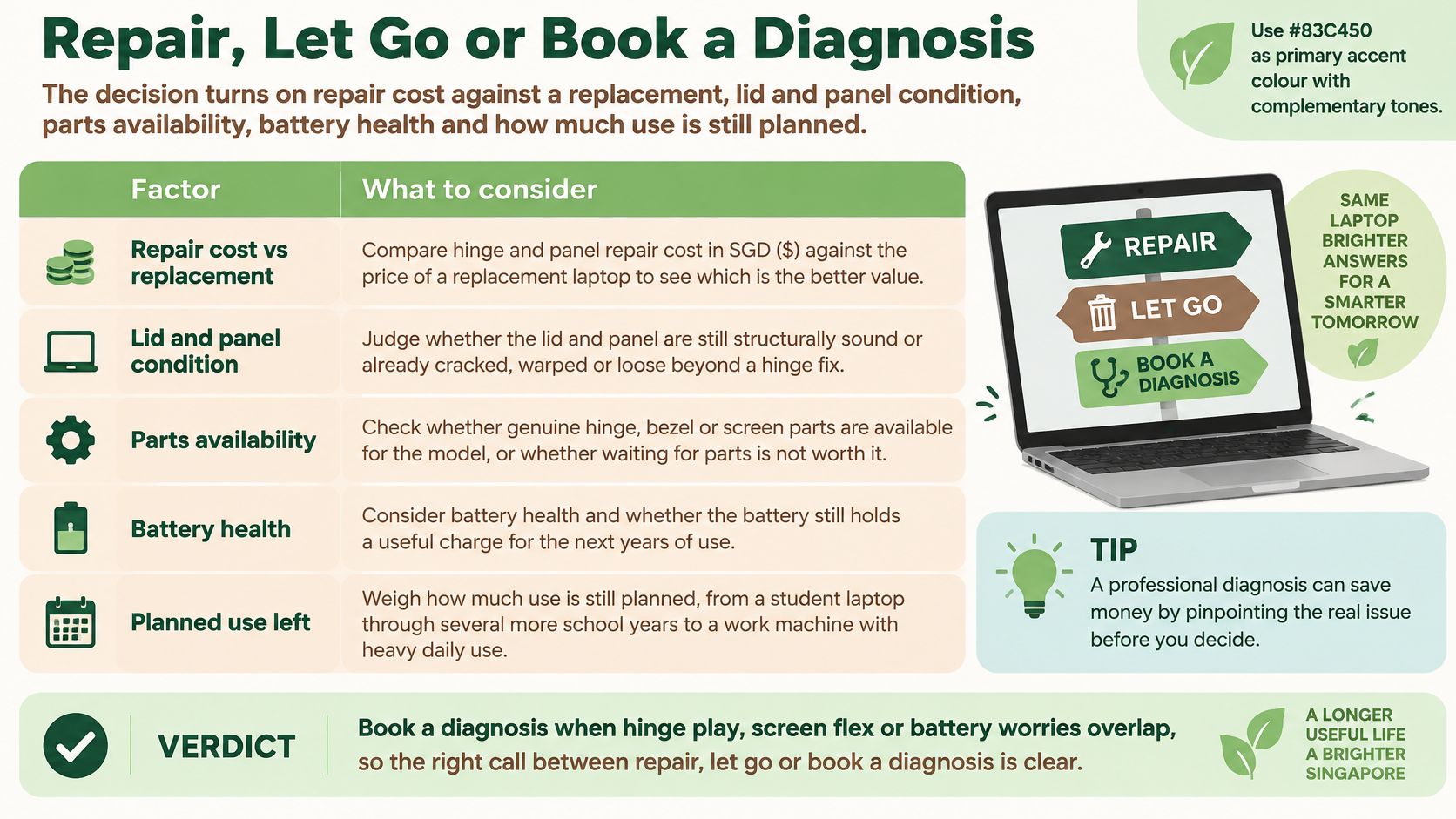
Compare the cost of getting back to work
Start with the complete repair quotation, including any associated housing, cable or battery work. Compare that with a replacement that meets your needs, rather than the cheapest advertised laptop.
Replacement also involves moving files, reinstalling software and checking licences. For a work machine, add the inconvenience of setting everything up again. For a student, ask whether the replacement comfortably supports the applications required for the course.
Say your current laptop handles your everyday workload and the fault is confined to a repairable mount. Keeping it may avoid unnecessary spending and disruption. If the shell is badly broken, the battery needs attention and software support is ending, a hinge repair alone won't solve the broader problem.
Repair isn't automatically greener, and new isn't automatically cheaper. A durable repair on a useful machine is different from repeated work on a device that can no longer serve its owner.
Consider the remaining useful life
Ask what you need the laptop to do next. A machine used for documents and video calls has different requirements from one used for demanding design work or gaming.
Useful decision points include:
- Performance: Does it already run your necessary applications without major frustration?
- Software support: Can it continue receiving the operating system and security support you need?
- Portability: Will it still be practical to carry and use after the proposed structural repair?
- Battery condition: Does the full repair plan address any battery concern, rather than treating the hinge in isolation?
- Reliability needs: Can you tolerate parts delays, or do you need a dependable replacement immediately?
For office fleets, make this assessment by model and condition rather than retiring every laptop of the same age. Some may suit continued deployment, while others are better candidates for reuse elsewhere or component recovery.
A damaged hinge doesn't erase reuse value
Singapore's reuse opportunity is broader than any single repair. A Ministry of Sustainability and the Environment address on International E-Waste Day reports that annual e-waste collection rose from about 6,000 tonnes in 2021 to around 12,000 tonnes in 2025, and cites an industry estimate that about 80% of laptops received in Singapore were still working, with roughly 5–10% needing replacement parts and 5–10% too old to reuse. These figures describe received laptops, not the success rate of hinge repairs.
For historical context, Build.gov.sg's CleanSlate e-waste overview cites an earlier NEA study estimating approximately 60,000 tonnes of e-waste annually in 2016–2017, with only about 6% recycled. The practical takeaway is to assess working components before treating visible damage as a reason for disposal.
If you no longer need the laptop, Singapore laptop trade-in options offer another route to consider. A stable, testable machine may suit resale or buyback; an uneconomical repair may still leave a usable screen, memory, storage or hardware for another device.
myhalo's upcycle pathway follows the same logic at component level. Parts harvested from upcycled devices are used to rescue other machines, so a sound screen or keyboard can serve again even when a hinge is past saving.
Make the next step fit the device
At myhalo, our laptop repairs include screen replacement, battery replacement and motherboard repair, alongside Data Recovery, Repair & Rescue and e-Xtender Subscription. Data Recovery targets files trapped on a failing drive. Secure data destruction, with certificates on request, suits a laptop you're retiring rather than repairing. Where the machine still holds resale value, a buyback offer turns it into cash instead of cupboard clutter.
Our aim is a zero e-waste world, built with a community that can choose repair, reuse and responsible recovery without unnecessary stress. Start with the model, hinge photographs and any display symptoms, so the diagnosis separates a loose screw from a broken mount before a price is final.
myhalo can help assess your hinge problem and identify whether repair, data recovery or responsible recovery is the right next step. Visit myhalo and send your laptop model, clear hinge photos and a description of what happens when the lid moves. If your files need rescuing or you're ready to let the machine go, tell us whether you need data recovery or secure data destruction too.