

A cracked iPad screen can turn a simple drop into a difficult choice. The display may still work, but a new screen could cost more than the tablet is worth.
Before deciding, check whether the frame, battery or AppleCare+ coverage changes the value of a repair. If keeping the iPad no longer makes sense, myhalo's buyback service and secure data destruction, with certificates available on request, can help with a responsible handover.
Table of Contents
- What a New iPad Screen Costs in Singapore
- Check the Damage Before You Book
- Choose DIY Apple or Independent Repair
- When a New Screen Is Not Worth It
- Prepare Your iPad and Your Data
- How Long the Repair Takes and What Sets the Clock
- Book a Repair That Keeps the iPad in Use
What a New iPad Screen Costs in Singapore
Singapore iPad screen replacement fees
| Situation | Fee in SGD | What you are paying for | Watch-out |
|---|---|---|---|
| AppleCare+ screen-only, models after 1 May 2024 | S$42 including GST | Screen-only accidental damage on newer iPads | A bent case, liquid or extra damage can leave this rate |
| AppleCare+ other eligible iPad models | S$68 including GST | Accidental-damage service fee | Confirm the model is on the older fee |
| AppleCare+ other accidental damage, newer models | S$148 including GST | Damage beyond a screen-only incident | A visible crack alone does not guarantee the lower screen-only rate |
| No AppleCare+, Apple or Authorised Service Provider | Set after inspection | Out-of-warranty repair by model and damage | There is no single published screen price |
| Independent glass replacement, 2025 Singapore quotes | S$40 to S$240 | Screen-glass replacement | Model and part grade move the quote |
| Independent original-grade display, 2025 Singapore quotes | S$55 to S$395 | Original-grade display assembly | This is not an Apple warranty repair |
| Apple diagnostic when service is declined | S$129 | Inspection in specified refusal cases | Not charged on every ordinary visit |
The AppleCare+ fees and inspection-based pricing above follow Apple's Singapore iPad repair guidance, including S$42 for eligible newer screen-only incidents, S$68 for other eligible models and S$148 for other accidental damage on newer models. The dated independent ranges come from Citri Mobile's 2025 Singapore price listing, while the S$129 diagnostic fee applies only in specified cases under Apple's Singapore retail repair terms.
Match your iPad to the right row
The newer-model screen-only category includes iPad Air (M2 and later), iPad Pro (M4 and later), iPad (A16), and iPad mini (A17 Pro). Your model and the inspection outcome matter more than how dramatic the crack looks.
For another eligible iPad, check the applicable accidental-damage category rather than assuming the newer screen-only rate applies. If there's damage beyond the screen, the assessment changes again. A tidy hairline crack with a damaged enclosure isn't necessarily cheaper to resolve than shattered glass on an otherwise sound device.
Without AppleCare+, don't treat an online estimate as Apple's final bill. Apple inspects the device, and Authorised Service Providers may set their own service fees. Also, being within the ordinary limited warranty doesn't automatically make a dropped-screen repair free: manufacturing faults and accidental damage are different claims.
Compare equivalent work, not just prices
Independent glass replacement and display assembly replacement aren't interchangeable. Glass is the outer surface; the display assembly includes the components that produce the picture and, depending on the model, detect touch.
“Original-grade” is a shop's description, not proof that Apple supplied or authorised the part. Ask what that term means for the actual screen being fitted.
Before approving: Get a written quote naming the model, repair scope, part grade, turnaround, total payable amount and whose warranty applies.
For the same cracked iPad, put the covered service fee, inspected Apple quote and independent quote beside each other. Leave an unavailable price blank until it's confirmed, rather than filling it with a hopeful estimate. That gives you a useful comparison without pretending every route offers identical work or protection.
Check the Damage Before You Book
A home check helps you describe the problem, not certify that the iPad is safe to open. Leave it assembled, avoid loose glass, and stop immediately if you notice swelling, unusual heat or a screen lifting from beneath.
Use this visual checklist before booking.
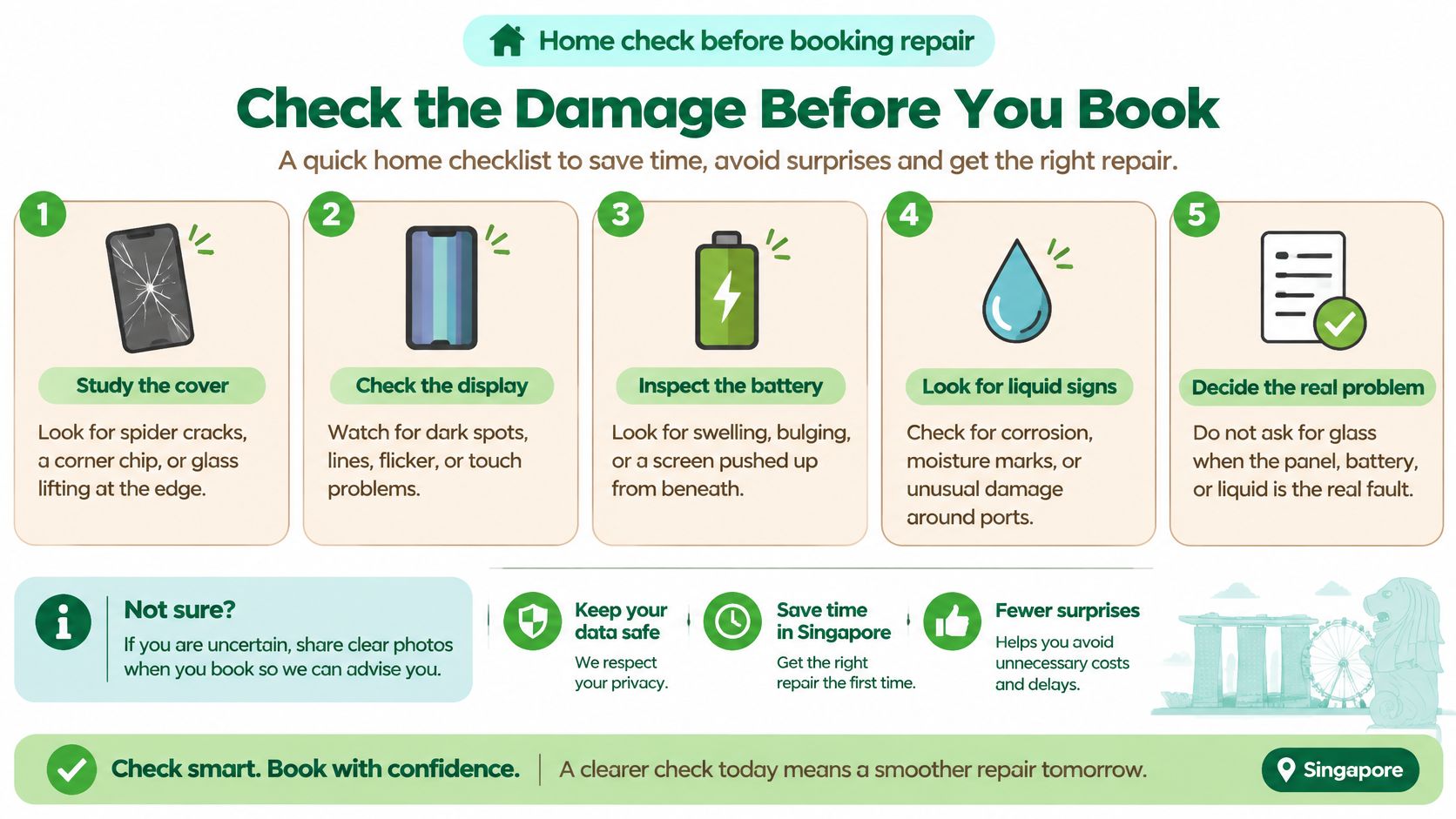
Check what still works
Study the cover. Look for spider cracks, a chipped corner and glass lifting at the edge, without running your fingers over broken areas. Tell the repair team whether the damage appears limited to the surface or includes separation from the body.
Check touch and the picture, if safe. On intact areas, drag an app icon across the screen and note where it stops responding. Dead zones suggest a touch-layer problem, while coloured lines, blotches, flickering or a dark picture need a display assessment rather than a glass-only booking.
Look along the frame. Rest the device without forcing it flat and inspect the edges for bends or dents. If the picture changes during ordinary handling, report that behaviour, but don't press the frame to reproduce it.
A touch fault doesn't always identify the failed component by itself. The digitiser, the layer that detects your finger, is part of the touch system, and a technician still needs to rule out connection or other faults. Our guide to common iPad problems and how to approach them can help you describe symptoms more clearly.
Recognise the stop signs
Look for liquid clues. Check externally around the charging port and speakers for corrosion, moisture marks or sticky residue. Don't insert a tool or open the iPad to search for a liquid indicator; book a liquid-damage assessment if exposure is possible.
Check for swelling before further use. A screen pushed upwards or a widening gap can indicate a battery problem, although lifting alone isn't a diagnosis. Stop using and charging the device, don't heat or press it, and arrange professional assessment.
Record the evidence. Photograph the symptoms and keep them with the model and serial number in a private repair note. Record whether Face ID or Touch ID, True Tone and Apple Pencil input still work, where available, so there's a baseline for later testing.
Under Apple's Singapore AppleCare+ information, models launched after 1 May 2024 qualify for the S$42 screen-only fee only when the screen is the sole damaged component; other accidental damage on those models carries a S$148 fee.
Your counter description can be simple: “The glass is cracked, touch fails near the edge, there may have been liquid exposure, and I need the battery checked before any screen work.”
Choose DIY Apple or Independent Repair
DIY, Apple and independent iPad screen routes
| Route | Parts and tools | Warranty you actually get | Best when |
|---|---|---|---|
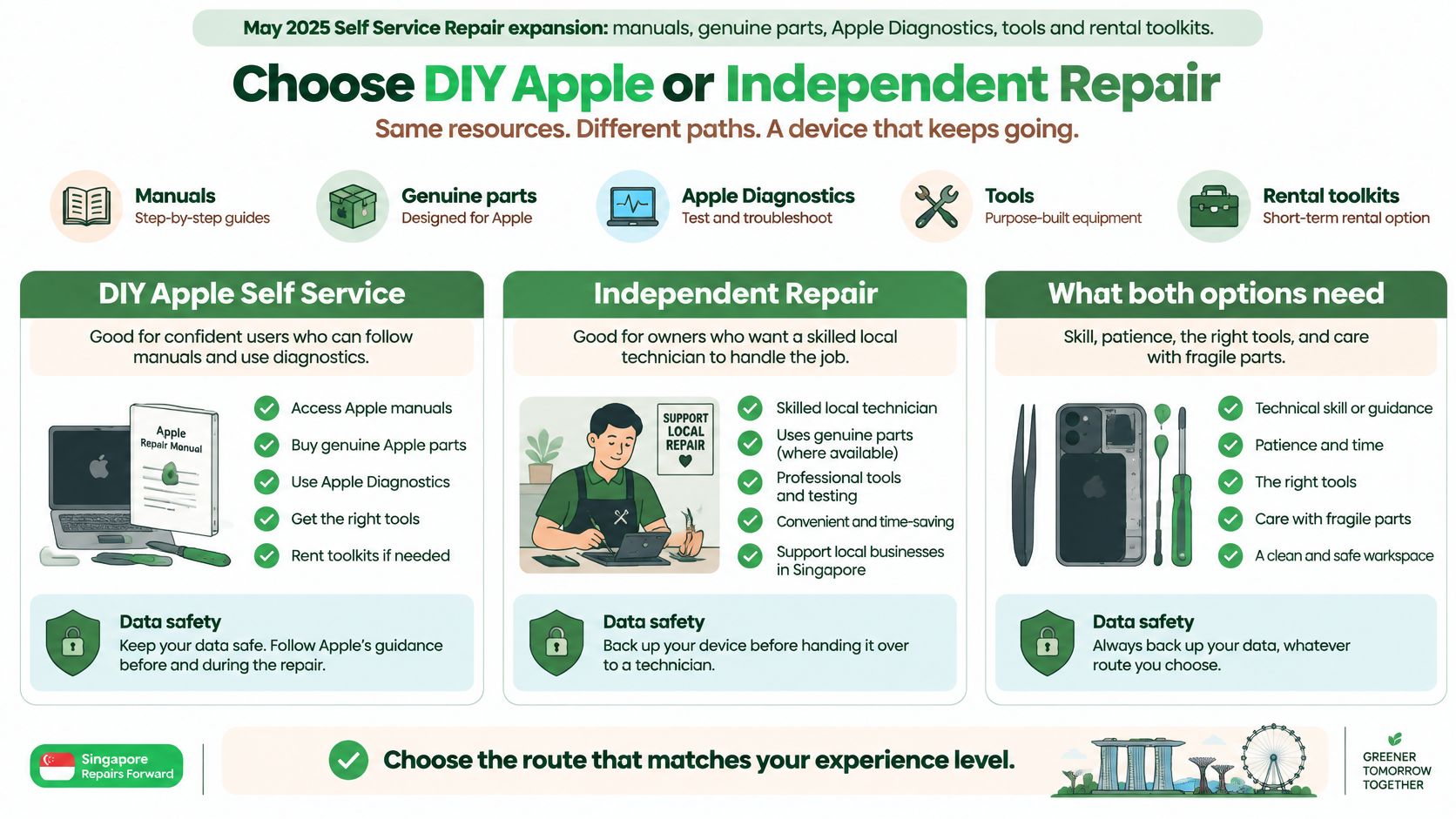
| DIY with Self Service Repair | Manuals, genuine parts, diagnostics and rental toolkits through the announced expansion | You carry mistakes; damage you cause can affect later Apple cover | You already repair devices and accept calibration risk |
| Apple or an Authorised Service Provider | Genuine parts through Apple's process | Apple service guarantee, subject to its terms | Coverage is active and you want Apple to handle the service |
| Independent repair shop | Shop-specified glass or display assembly, with tools on site | The shop's stated warranty, not Apple's | The written quote beats replacement and the frame and battery are healthy |
Apple announced its iPad Self Service Repair expansion in May 2025, covering manuals, genuine parts, Apple Diagnostics, tools and rental toolkits, according to its repair-programme announcement. That announcement isn't a reason to assume every model, part or rental option is available to a Singapore address, so check eligibility before buying anything.
This visual helps distinguish access to repair resources from the skill needed to use them.
Choose who carries the repair risk
DIY makes sense only with genuine repair experience. Separating perimeter adhesive without damaging a display cable takes controlled tools and technique. You also need to account for replacement adhesive, diagnostics, calibration where required and the possibility of damaging a usable component.
Apple-authorised service fits active coverage and eligible damage. You're paying for an accountable service route, not buying a panel. Confirm whether the proposed service involves your existing device or a replacement, because that affects your handover and data preparations.
Independent repair can suit an out-of-cover iPad. The useful comparison is a documented, model-specific repair against another suitable tablet, not the cheapest advertised screen price. A good quotation should make it clear what stays original and what changes.
Repairs by non-authorised providers aren't covered by Apple's warranty or AppleCare, and damage caused by that work is excluded unless consumer law requires otherwise. A shop must describe its own warranty as its own, even when it can obtain genuine parts.
Ask questions that reveal the real scope
- Parts: Is this replacement glass, a complete assembly or another repair, and how is the part described?
- Calibration: Which finishing or diagnostic procedures are included?
- Timing: Is the exact part available, and when will the tested device be ready?
- Data: What access is necessary, who can access it, and can you access it yourself for testing?
Use repair videos to understand the work involved, not as a substitute for the correct model-specific manual.
Choose DIY for proven ability, Apple for suitable coverage, and independent repair for a clear quote backed by a clear test list.
When a New Screen Is Not Worth It
Don't approve a screen just because it can be replaced. Approve it when the finished iPad will meet your needs at a sensible total cost.
Keep-or-skip worksheet for a cracked iPad
| Check | Keep the repair if | Stop and skip the screen if |
|---|---|---|
| Battery | Lasts a normal day | Swollen or pushing up the glass |
| Frame | Flat, and the case still closes | Bent or dented edges need assessment first |
| Liquid | No sign of liquid inside | Liquid has been inside and remains unassessed |
| Quote against replacement | Quote sits clearly under another suitable tablet | Quote is near replacement value |
| Age and storage | For example, a two- or three-year-old device still has the storage you use | Limited usefulness and low value make the full repair hard to justify |
| Biometrics | Face ID or Touch ID works, with True Tone checked separately | Required functions have unresolved faults outside the screen quote |
Price the whole outcome
Create a separate worksheet for each actual model you're considering repairing. Record its storage capacity, coverage status, current trade-in or resale offer, battery condition and the price of a replacement that would do the same job.
A hypothetical two- or three-year-old iPad Pro with suitable storage, reliable battery life and damaged glass alone may be worth keeping. But age isn't the deciding test. An older iPad used for reading and video calls can still be useful, while a newer one with several expensive faults may be a poor repair candidate.
Compare the total approved work, including any necessary frame or battery work, with replacement. If you're weighing another used device, our refurbished iPad Singapore guide can help you assess that option without assuming you need a brand-new tablet.
Stop spending when the diagnosis changes
A bent frame, extensive adhesive separation, liquid exposure or suspected swelling calls for assessment before a screen order. These findings don't all mean permanent retirement, but they do mean a screen-only quote is no longer enough.
Apple may refuse service where non-Apple parts, altered or missing serial numbers, liquid damage, misuse or unauthorised repairs prevent service under its terms. Its Singapore repair conditions also allow a S$129 diagnostic fee in specified declined-service cases, possible full replacement-value charges for ineligible products, and an authorised-service guarantee of 90 days or the remaining warranty or AppleCare term, whichever is longer.
Spending rule: If the inspection adds unresolved faults, pause the screen repair and request a revised total before approving anything.
Check software usefulness too. If essential apps no longer work adequately and the quote approaches replacement cost, moving a verified backup to another device may serve you better.
The lower-waste choice isn't always “repair at any price”. It's keeping a useful device working when its battery, frame and remaining functions justify the work, then choosing responsible reuse or recovery when they don't.
Prepare Your iPad and Your Data
A careful handover protects more than the screen. It gives you a record of the device's condition and makes clear what the technician may do with your information.
Keep this preparation checklist beside your repair notes.
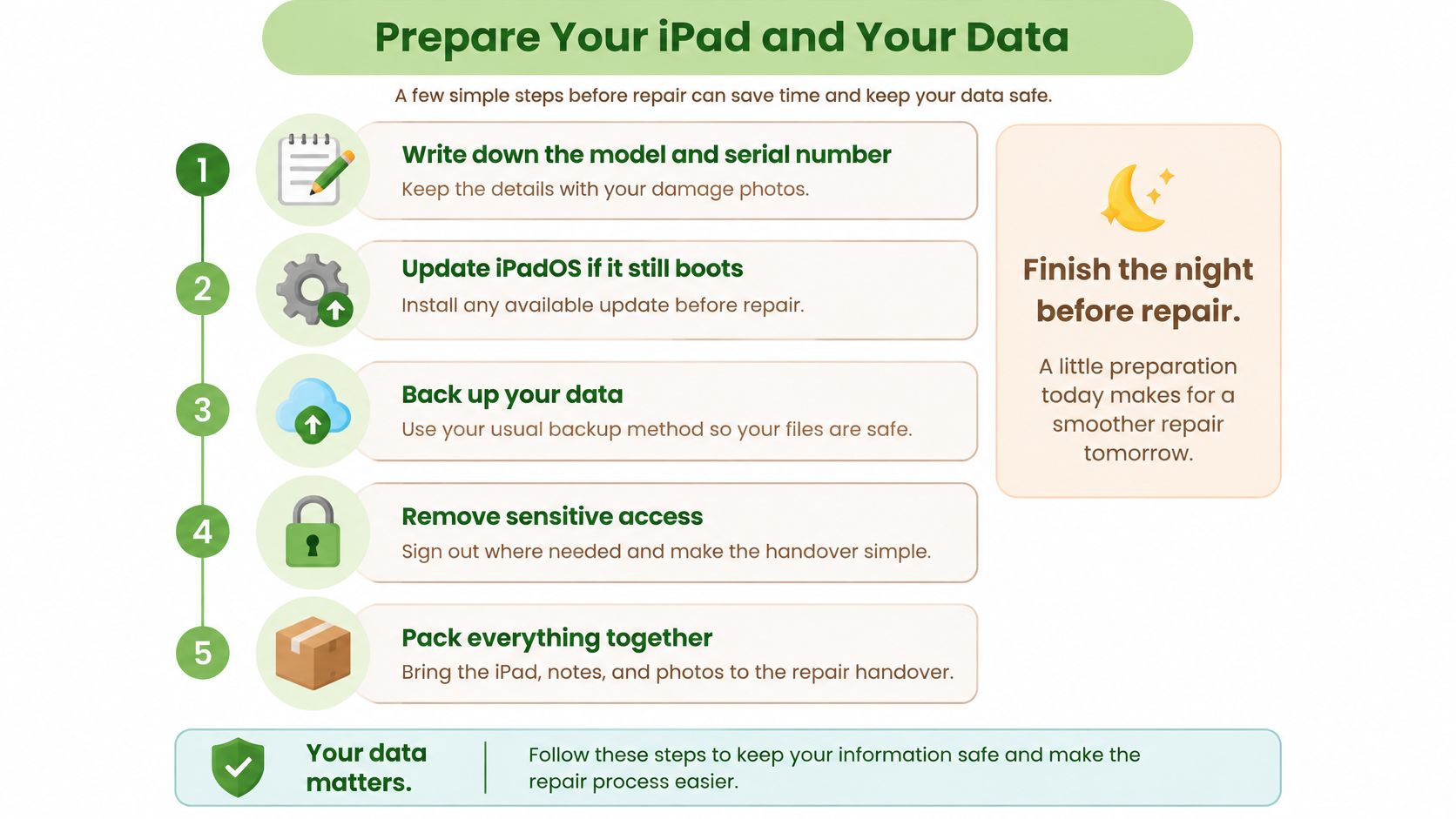
Finish the essentials before handover
Record the model and serial number with your damage photos, so you can match the quotation and receipt to the correct iPad. Keep this record privately rather than posting identifying details publicly.
Back up before changing anything, then update iPadOS if the device is stable and the service instructions call for it, because preserving accessible files comes before troubleshooting. Use iCloud or a computer and confirm the backup completed; a backup that merely started isn't enough.
Write down your data consent, so there's no ambiguity about whether you authorise testing only, backup assistance or erasure. Erasure and backup are separate decisions, and neither should be assumed from a screen-repair request.
Manage Find My and account access yourself when the service route requires it, rather than casually sharing your Apple Account password. Agree how the technician will perform any testing that requires an accessible device.
If you need help understanding backup methods, our guide to backing up an iPhone explains the familiar iCloud and computer options, though you should follow the prompts shown on your iPad.
Make testing and return arrangements clear
Remove your case, keyboard folio and Apple Pencil unless requested, so personal accessories don't get separated during handling. Bring the iPad, your notes and any accessory specifically needed to demonstrate a fault.
Leave a usable charge only if the battery and charging system appear safe, so the team can check normal functions. Don't charge a device with suspected swelling or liquid damage to prepare it for collection.
Plan Express Replacement logistics before accepting delivery, because this AppleCare+ route sends the replacement before you return the original. Apple's Express Replacement guidance requires the original back within 10 working days after Apple sends the replacement and permits a temporary card authorisation for the replacement's retail price until the original is received and inspected.
Request a collection test list, so you can check full-screen touch, even brightness, cameras, speakers, Wi-Fi, charging and sleep/wake behaviour before leaving. Include supported biometric and Pencil functions if they matter to your daily use.
Ready means a completed backup, a clear consent note and an agreed test list. If you can't access or back up the damaged iPad, say so before approving work; recovering important files may need a different plan from restoring the display.
How Long the Repair Takes and What Sets the Clock
A useful turnaround promise includes diagnosis, parts and final testing. Bench time alone doesn't tell you when you'll have a usable iPad back.
Confirm what the completion date includes
Intake and diagnosis establish the model, serial number, visible damage and any frame, battery or liquid concerns. The repair scope should be settled before a screen is ordered.
Part availability determines whether work can proceed or must wait for the exact assembly. Have stock status written into the quote rather than accepting a general statement that the shop repairs iPads.
Calibration and testing belong inside the completion estimate. Apple's technical guidance explains that genuine-part work needs appropriate knowledge and tools, and certain display repairs may require Repair Assistant to finish calibration.
Replacement logistics follow a different schedule from a bench repair. With Express Replacement, allow time to restore your backup and arrange the original device's return; receiving a replacement doesn't mean your damaged iPad remains usable.
Collection and warranty paperwork complete the job. Check that the receipt identifies the work performed and the applicable service guarantee or independent shop warranty, including exclusions.
Ask for a collection date that includes the correct part, required calibration and completed functional tests, not just installation.
Compare that written date with your actual needs. If the iPad holds school materials or work notes, arrange temporary access to those files before handover. Don't choose a rushed repair solely because the quoted installation time sounds short.
Book a Repair That Keeps the iPad in Use
You don't have to arrive knowing whether you need glass, a display assembly or a battery assessment. Tell us what happens: the crack location, dead touch areas, lines across the picture, charging trouble or glass lifting from the body.
At myhalo, customers who aren't sure what's wrong can describe the symptoms, and our repair team will help find the right solution. We offer iPad and Microsoft Surface screen and battery replacement, alongside repair, buy and sell services for smart devices in Singapore. The sensible starting point is understanding the fault before committing to a part.
Bring the information that helps the decision
- Your symptom notes: Explain what changed after the drop or exposure, including any functions that stopped working.
- Your device details: Bring the model, coverage information and private damage photos.
- Your data instructions: State whether a completed backup exists and what access or erasure you authorise.
- Your spending decision: Bring the replacement option you're comparing, so the repair isn't considered in isolation.
If you're deciding where to start, our guide to where to repair your iPad in Singapore helps you approach the choice with clearer expectations.
Keep the useful device, not the worry
Repair first is a sensible aim when the rest of the iPad is sound. It isn't a promise to replace the screen regardless of cost or condition.
If repair doesn't make sense, ask about responsible passing-on options instead of leaving the tablet in a drawer or putting it in a bin. Discuss data handling before leaving the device, particularly if it won't turn on.
Our vision is a zero e-waste world, built through a community that finds sustainable choices convenient, safe and responsible. The myhalo promise is to make that participation feel supported: protect privacy through Safe data, rescue important files through Save data where possible, and make letting go simpler through Declutter your e-clutter. Precious memories deserve attention even when the hardware is no longer worth repairing.
myhalo offers iPad screen and battery replacement to help keep a useful tablet in service. Whether you need Safe data before letting it go or Save data support when a damaged iPad won't open, visit myhalo and tell our caring team what's happening today.