
You have a drawer of old phones because one still holds family photos, and another might still have bank logins. That worry is fair. Handing a device over should not mean handing over your private life. Safe data is a proper wipe so old files are gone before the phone leaves your hands. Declutter your e-clutter is how those idle phones leave the drawer without a fuss, through repair, resale, or responsible recycling.
A cracked screen is often what starts that pile. The phone still switches on, the photos are still there, and you set it aside for later. Mobile display protection is the small habit that keeps the glass usable, so the phone stays in your pocket instead of joining that pile.
Table of Contents
- Why Your Phone Screen Needs a Shield
- Your Options at a Glance
- What Each Option Actually Protects Against
- Matching Protection to Your Phone and Lifestyle
- How to Install a Screen Protector Step by Step
- Caring for Your Protection and Knowing When to Replace It
- Deciding Whether to Repair, Replace or Protect Your Phone
Why Your Phone Screen Needs a Shield
Say you're on the MRT platform at Raffles Place. The doors open, your phone slips, and a fine crack runs across the glass before you've picked it up. Three worries land at once. What will the repair cost. Are the photos still safe. Is this phone finished.
You can shield the screen before that slip. Mobile display protection is a thin layer, or a shell, that takes the first scratch or knock so the glass underneath does not have to.
Tempered glass is a hard sheet that feels close to the original screen. Flexible film is a softer sheet that bends with the glass. A protective case wraps the back, sides, and corners. Warranty cover is a paid plan that helps with the bill when prevention fails.
Looks are the smallest part of this. A healthy screen keeps the phone useful, easier to pass on, and out of the drawer where unused devices sit. The same calm habit helps if you also carry a work laptop. A plain guide on how to strengthen your business laptop security from Finchum Fixes IT sits well beside this, because a cracked personal phone and an unsecured work machine create the same kind of stress.
By the end you'll know which option fits your phone, how to fit it neatly, how to look after it, and when to repair, trade in, or keep going.
Your Options at a Glance
Singapore's mobile-phone-accessories market was valued at USD 297.8 million in 2023, according to Next Move Strategy Consulting, and screen protectors are called out as their own segment inside that spend. The prices below are shop-floor ranges, not a fixed menu, so check the listing on the day you buy.
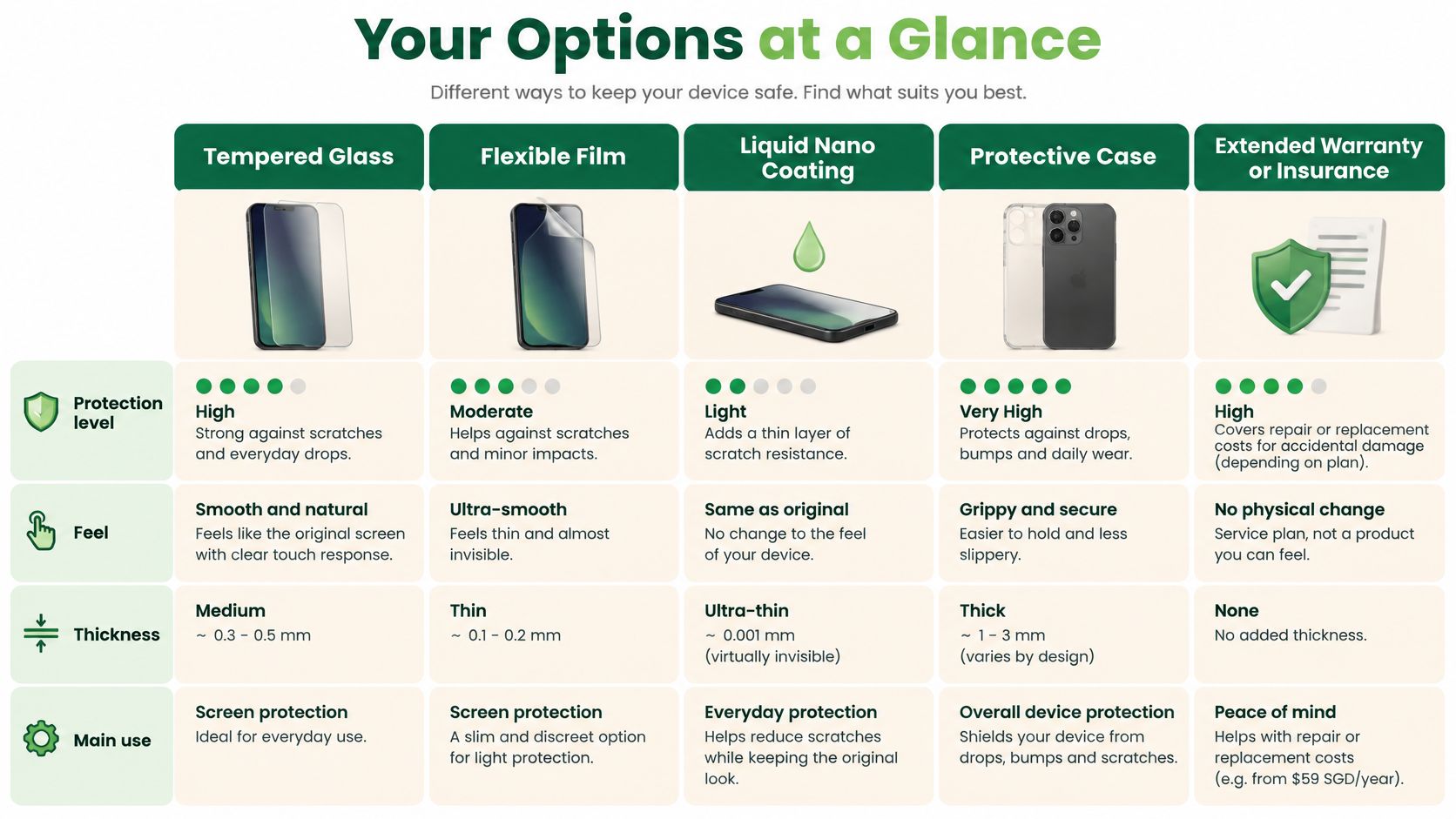
| Option | What It Covers | Typical Singapore Cost | Main Strength | Main Trade-off |
|---|---|---|---|---|
| Tempered glass | Front display, some with edges | About S$12 to S$50 | Hard, smooth, glass-like touch | Cracks under hard drops; edge fit varies |
| Flexible film (TPU or PET) | Full front, some with back | About S$5 to S$25 | Thin, forgiving, easy to fit | Scratches sooner; little impact absorption |
| Liquid nano coating | Thin invisible layer on glass | About S$15 to S$40 | No edges, no bubbles | Limited scratch and impact protection |
| Protective case | Back, sides and corners | About S$15 to S$80 | Absorbs drops; raised lip guards the screen | Bulkier; may block edge sensors or wireless charging |
| Extended warranty or insurance | Repair or replacement costs | Plan premium plus a claim excess | Covers costly screen replacement | Exclusions, claim fees and waiting periods apply |
A protector guards the glass against scratches and cracks. A case guards the edges and back against drops. A warranty or insurance plan pays toward the repair when prevention fails. I would start with two layers, glass or film plus a case, because each covers the gap the other leaves open. The rest of this guide shows how each layer works, and which one belongs on your phone.
What Each Option Actually Protects Against
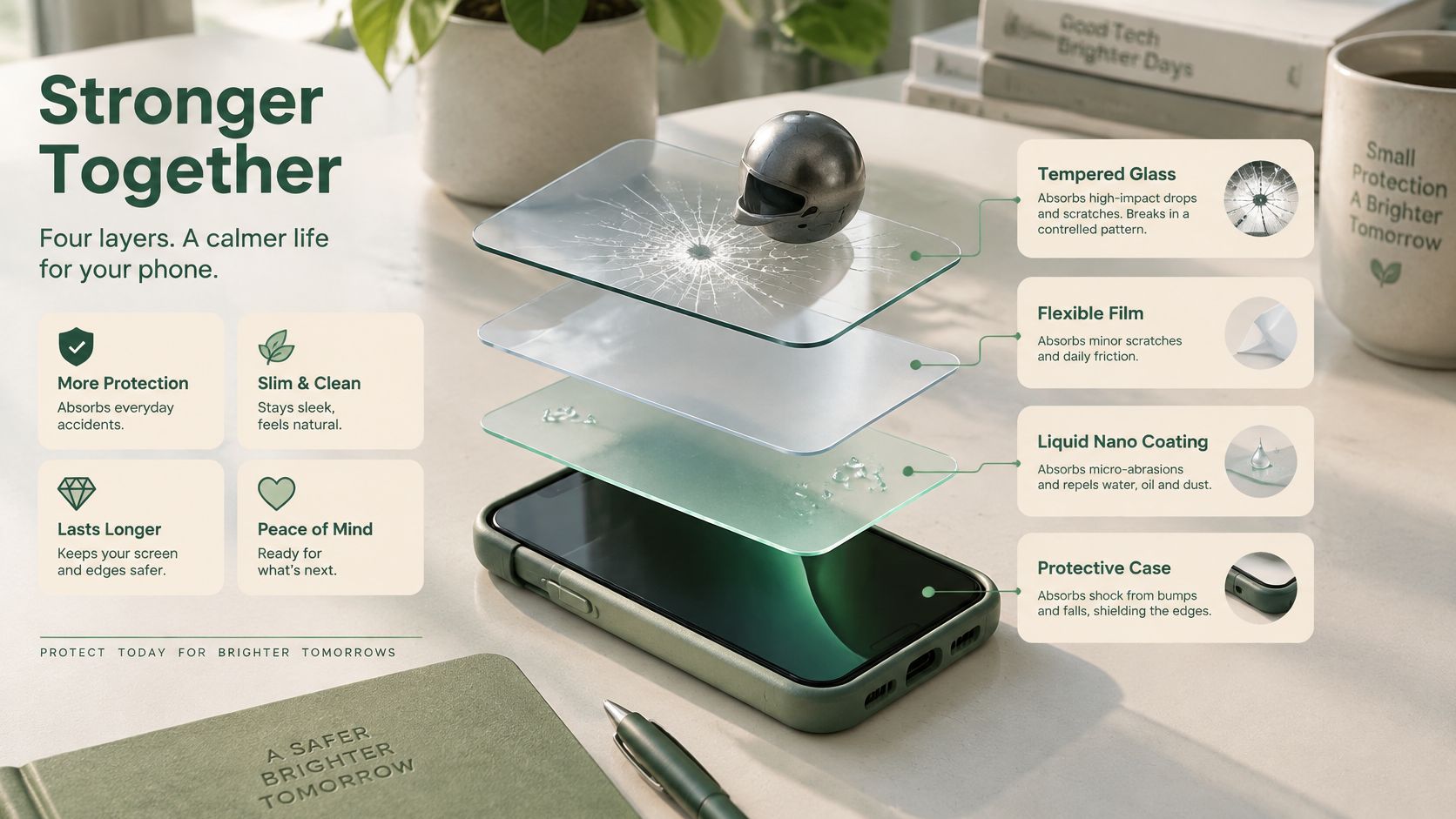
Think of the stack as four jobs, not four brands.
How each layer takes a hit
Tempered glass behaves like a helmet. It is hard, usually about 0.2 to 0.33 mm thick, and it is made to crack in a web so the force spreads instead of punching one hole through the display. That extra height sits slightly proud of the phone's rim, which is why a case lip still matters.
Flexible film, often TPU or PET, is closer to sunscreen for daily wear. It soaks up pocket grit and light knocks. Some TPU films soften faint scuffs when you warm them with a thumb. A hard drop still reaches the panel.
Liquid nano coating is a clear raincoat. You wipe on a slick film that resists fine marks and fingerprints. It has no edge to peel. It also has almost no thickness, so it will not stop a crack.
A case is the bumper. Corner rubber and a raised lip take the energy, and they keep the glass off the floor when the phone lands face down. Without that lip, even good glass meets the pavement first.
The scratch-versus-crack split is worth a closer look in this note on what screen protectors stop, and what they don't.
Reading a drop claim
A box that says the phone survived a set height is a lab result on one surface, one model, and one way of falling. Before you trust it, ask four things.
- Surface: Was it marble, concrete, tile, or carpet.
- Height and angle: Did the corner hit first, or the flat face.
- Sample count: One lucky phone is not a pattern.
- After the drop: Did touch and the picture still work, or did the glass only look intact.
A short demo makes the helmet idea easier to see than a spec sheet does.
A protector is a sacrificial layer that takes the damage so the display does not have to.
Matching Protection to Your Phone and Lifestyle
Foldable phones come first, because the wrong layer can do harm. Samsung's support page for Singapore states that the factory-applied protective film is part of the foldable display's protective structure, can be replaced when only the film is damaged, and should not be removed by users. Peel it yourself and you can crease the panel or hide a real fault under a third-party sheet. A case, plus gentle open-and-close habits, is the safer add-on.
The same fit logic shows up on tablets. If you carry an iPad mini in a bag with keys, Grainmark Leather's iPad mini folio guide is a useful read on how a cover should sit, close, and stay out of the way of the screen.
| Your Situation | Best Setup | Why It Works | Watch Out For |
|---|---|---|---|
| Foldable phone | Keep the factory film; add a case only | Factory film is part of the display structure | Third-party film can lift, crease or block the hinge area |
| Curved-edge flagship | Edge-friendly tempered glass or film with edge coverage | Full edge coverage stops dust and cracks starting at the sides | Thick edges can dull touch near the sides |
| Daily commuter who drops the phone | Tempered glass plus a raised-bezel case | Two layers handle both scratches and impacts | Bulky cases may not fit small pockets |
| Phone with an under-display fingerprint sensor | Thin tempered glass or thin film rated for the sensor | Thin layers keep unlocking fast and reliable | Thick layers can slow or block unlocking |
| Wireless charging user | Thin case or film, no metal plates | Metal inserts weaken the charging signal | Check that the case is marked wireless-friendly |
| Older phone you plan to resell | Tempered glass only, applied cleanly | Light protection keeps the original screen in good grade | Heavy adhesives can leave residue at resale |
Why the rows differ
A curved flagship, such as many Samsung Galaxy S models, needs coverage that follows the bend. A gap at the side lets dust in, and a crack likes to start there. Thick glue at that curve can also dull side swipes.
If your phone leaves your hand on buses and walkways, pair hard glass with a case that has a raised bezel. The glass handles grit. The lip handles the landing. Big phones make that slip more likely, which is why fit matters even more on large-screen phones.
An under-display fingerprint reader needs a thin sheet that the maker has rated for that sensor. Thick glass slows fingerprint recognition or blocks it. Wireless charging hates metal plates and thick wallets glued inside a case. If the pack doesn't say wireless-friendly, assume it isn't.
On an older phone you hope to sell, a clean tempered sheet is enough. Heavy glue that leaves a sticky frame will drop the grade even if the panel is fine.
Before you pay, confirm five things: the exact model, flat or curved edges, camera and sensor cut-outs, whether your case still charges wirelessly with the sheet on, and whether the protector covers the full curve or only the flat middle.
How to Install a Screen Protector Step by Step
A neat fit is mostly patience. Dust, not the brand, is what ruins most jobs. Work on a desk, not on the bed, and wash your hands first.
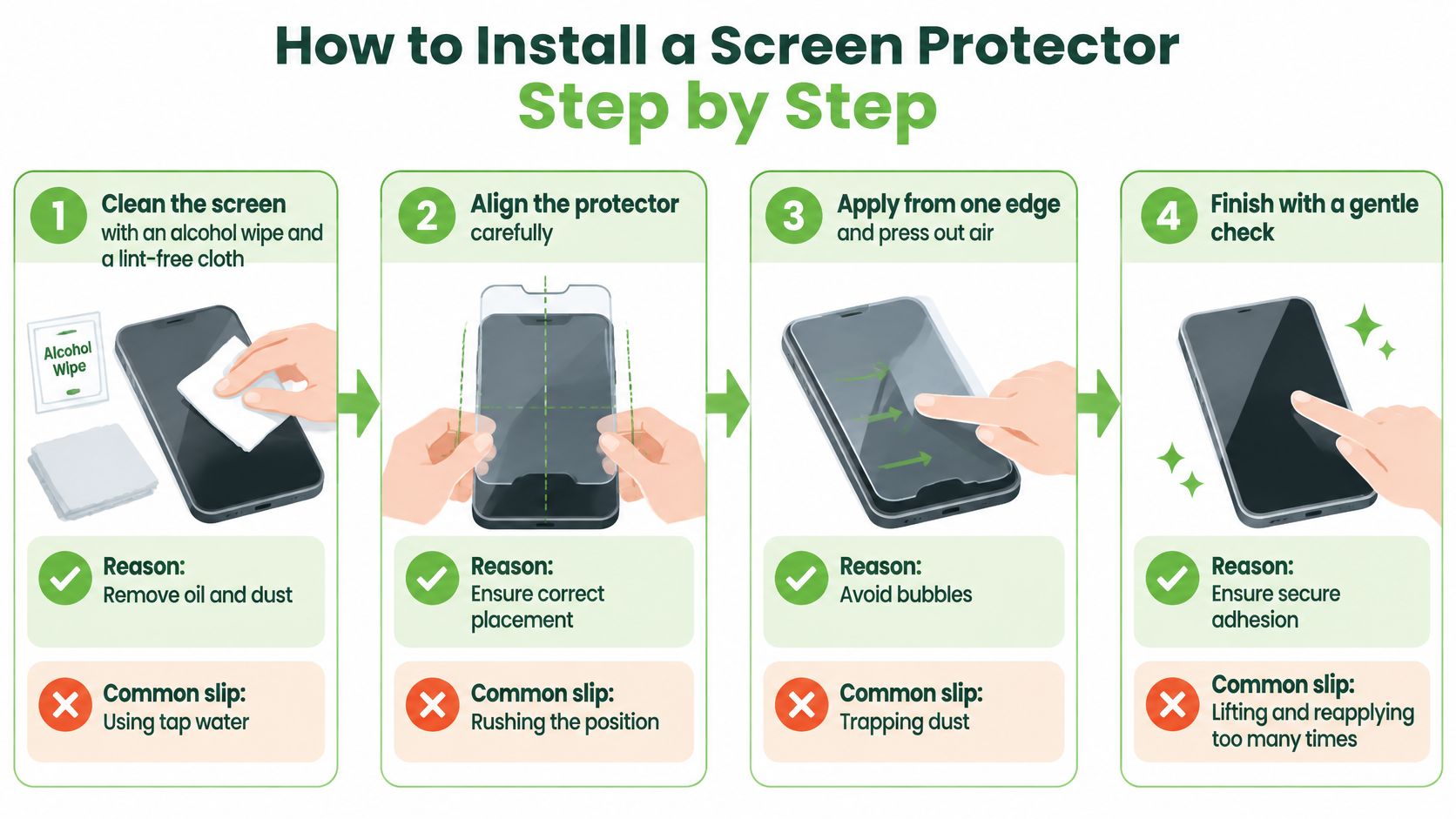
- Wipe the screen with the alcohol cloth in the kit, then a dry lint-free cloth. Oil and dust stop the glue bonding. Tap water leaves mineral spots, so don't use it.
- Lift leftover specks with the sticky side of a small piece of tape. Blowing on the glass puts moisture back on it.
- Hold the protector over the phone and match the camera, speaker, and sensor holes before you peel anything. A wrong cut-out can't be fixed after it sticks.
- Peel the backing from one end only. Line the top edge with the phone's top edge, then lower the sheet. Rushing traps a bubble in the middle.
- Smooth from the centre outward with the card or squeegee in the pack, pushing air to the sides. Pressing only the middle leaves a halo at the rim.
- Peel the top handling film slowly, then press the edges again. Yanking that film can lift a corner you just set.
- Check the edges, every cut-out, and touch in several spots, including the corners and the fingerprint area. A misaligned hole over the earpiece is a return, not a small flaw.
- Leave the phone alone for about 24 hours. Skip water, steam, and a hot car dashboard while the adhesive cures. Heat and moisture are what make a fresh edge peel by evening.
What a good fit looks like
You want no dust under the layer, even borders, touch that answers in every zone, and cut-outs that line up with the holes. A faint line that vanishes after a day of normal use is trapped air finishing its exit. A speck with a rainbow ring around it is dust, and it will not leave on its own.
Practical rule: If a bubble won't move, lift that corner gently, dab the speck with tape, and lay the sheet down again. Forcing it cracks tempered glass or stretches film.
Don't re-peel more than once or twice. Each lift weakens the glue, and a tired edge is what lifts in your pocket a week later.
Caring for Your Protection and Knowing When to Replace It
Treat the layer as a consumable, the way you treat wiper blades. It is meant to wear out so the panel does not.
- Weekly clean: Use a soft microfibre cloth and a drop of mild screen cleaner. Harsh solvents strip the oleophobic coat, the slick layer that shrugs off fingerprints.
- Pocket mates: Don't store the phone with keys or coins. They cut film and chip glass edges.
- Heat: Keep it off a sunny dashboard. Heat softens adhesive, and a loose edge collects dust.
- Monthly look: Check the rim for lifting, chips, or a grey dust line. Catch it before the line creeps inward.
- Case off: Ease the case from the corners. Pulling at the screen edge peels the protector with it.
When to swap it
Replace tempered glass after a deep crack, a chipped corner, or a hard knock that left a mark. Glass can look whole and still carry hidden breaks, so the next drop lands less predictably. Replace film when it yellows, lifts, bubbles, or the touch feels dull. On a phone that lives in a bag, plan on a fresh film about once a year.
A cracked protector over a picture that still looks clean is a win. The cheap layer did the job. If the image under it is broken, spidered, or black in patches, you're into a repair, and a new sheet won't hide that. A clear walk-through of iPhone screen repair in Singapore helps you tell a surface crack from a panel that needs parts.
Budget a replacement the way you budget a top-up. A spare sheet in a drawer costs less than a shocked face at the repair counter.
Deciding Whether to Repair, Replace or Protect Your Phone
Three paths cover almost every phone on a Singapore desk.
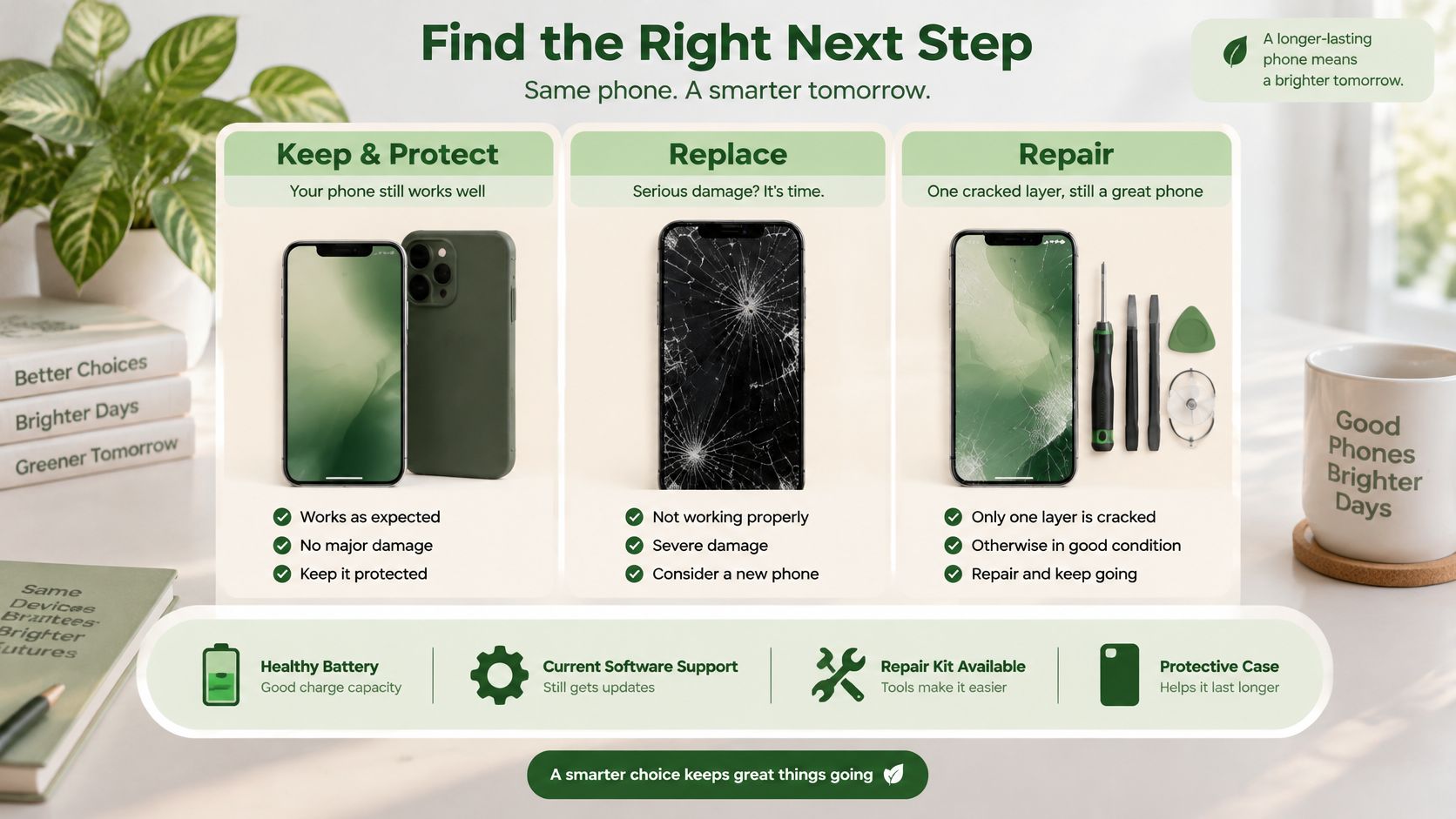
Keep and protect when the phone still does your day, the battery holds a charge through the afternoon, and the maker still sends software updates. A fresh protector and a case with a lip are cheaper than a new handset, and they keep the grade honest if you sell later.
Repair when one layer is cracked and the rest still behaves. Cameras focus, the battery is fine, and only the glass or the display assembly is hurt. A phone with a replaceable screen can go back into a pocket, a resale listing, or a trade-in. It does not have to become rubbish.
Trade in or resell when the battery is weak and software updates have stopped. That phone still has value to a next owner, or as parts. Leaving it in a drawer helps nobody.
NEA research, summarised by Singapore Management University, found that only 6% of Singapore's e-waste is recycled, while 35% is removed by delivery personnel, 26% is discarded with general waste, 24% is traded in, and 9% is donated. A repairable phone should not ride out with the general waste.
If the device can't be reused, use an official channel. By June 2024, more than 800 collection points were in place and more than 20,000 tonnes of e-waste had been collected under the Producer Responsibility Scheme run by ALBA E-waste Smart Recycling, as noted by the National Environment Agency.
A simple order of decisions
- Look at the damage. Is the picture intact under a cracked sheet, or is the panel itself dark, lined, or unresponsive.
- Compare a screen repair quote with the cost of a replacement phone you would buy.
- If you repair or you buy again, fit protection the same day, before the first commute.
Putting a new sheet on glass that is already broken is a different job, and this guide on a screen protector over a cracked screen spells out when that helps and when it hides a worsening crack.
🌿 The myhalo Promise: Joining a lower-waste habit should feel light, not like homework. Declutter your e-clutter clears unused phones from the drawer. Safe data wipes them so your privacy stays yours. Save data tries to bring photos and files back from a device that will not switch on cleanly.
Your precious files and memories matter. If a drop has left you unsure whether to wipe, repair, or recover, reach out and we'll walk through it with you, one calm step at a time.
If a screen crack has you stuck between a repair and a phone sitting in a drawer, myhalo can help you protect what still works, recover files, or pass the device on without the data worry. Mobile display protection keeps the next phone in use longer, and a kind handoff keeps the old one out of the bin. Visit myhalo when you're ready, and we'll sort the next step with you.