
You're in Singapore, it's the morning of an important client pitch, and your MacBook Pro won't boot. The screen is grey, the folder-and-question-mark icon is staring back at you, and suddenly the Keynote file you edited last night feels very far away. You're trying to remember whether Time Machine was running, while worrying about unsaved work, family photos, and files that may have existed only on that Mac.
A calm response matters because modern Macs add a security gate that generic recovery advice often skips. On T2 and Apple Silicon Macs, recovery commonly depends on the macOS password or FileVault key, and that credential can affect whether the job remains a straightforward logical recovery or becomes board-level work. Stop using the Mac, power it down if you hear clicking, and find every credential or backup that could help.
Table of Contents
- That Sinking Feeling When Your Mac Won't Cooperate
- First Things First, Stop, Breathe, and Triage the Symptoms
- DIY Software Versus a Professional Recovery Lab
- What Actually Happens Inside a Singapore Mac Recovery Lab
- Realistic Timelines and Costs for Mac Recovery
- Why Recovery Comes Before Repair, Resale, or Disposal
- How myhalo Cares for Your Mac and Your Memories
That Sinking Feeling When Your Mac Won't Cooperate
A folder with a question mark usually means the Mac can't find a usable startup system. It doesn't automatically mean your files have disappeared. The same distinction applies when a MacBook shows no power after a fall or spill. The computer may be unable to start while the storage and your data remain partly intact.
Start with triage, not experimentation. Repeated boots, forced repairs, reinstallations, and random disk utilities can write to the same storage you're trying to preserve. On a failing drive, each new write can reduce what a technician can reconstruct.

Three actions that protect your options
- Stop using the drive. Don't keep restarting the Mac to see whether the next attempt works. Don't install macOS, run First Aid repeatedly, or save files to the affected volume.
- Power down after mechanical symptoms. Clicking or beeping from an older hard drive points to a physical problem. Shut it down and disconnect power rather than allowing the heads to keep trying to read damaged areas.
- Locate the credentials. Write down the macOS user password and look for the FileVault recovery key. If the Apple ID account uses two-factor authentication, keep the trusted device available in case account access is needed during verification.
For newer Macs, encryption isn't an optional detail. Apple Silicon and T2-based Macs use built-in encryption, and Singapore recovery providers explain that technicians generally need the macOS password or FileVault key to decrypt data after repairing the hardware. Singapore Mac recovery guidance describes typical Apple macOS recovery times of 3 to 7 business days, while more complex jobs can take longer.
Practical rule: The password isn't just an administrative detail. On a T2 or Apple Silicon Mac, it can be the gateway to the files.
If your Mac still responds, don't rush into repair mode. Record what happened, including a spill, fall, update, unusual sound, or deleted folder. That short history helps a technician choose the correct recovery path and prevents a healthy storage device from being treated like a failed one.
First Things First, Stop, Breathe, and Triage the Symptoms
The right first action depends on what the Mac is doing. A clicking hard disk and an accidentally deleted document aren't the same recovery problem, so they shouldn't receive the same treatment.
Mac data loss symptom-to-action triage
| Symptom | Immediate Action | What to Avoid |
|---|---|---|
| Clicking or beeping hard drive | Power down immediately and disconnect it. | Don't reboot repeatedly, initialise the disk, or run repair utilities. |
| No-power MacBook after a fall or spill | Stop charging it and arrange a diagnostic assessment. | Don't press the power button over and over or open it without the right tools. |
| Liquid damage | Disconnect power, keep the device off, and bring it for evaluation. | Don't dry it with rice, apply heat, or reconnect it to test whether it works. |
| Accidental file deletion | Check the Trash and Time Machine, then stop saving to the affected volume. | Don't install recovery software onto the same disk or continue normal use. |
| FileVault or T2 lockout | Bring the Mac with the macOS password or FileVault key available. | Don't erase the Mac or assume a raw chip read will bypass encryption. |
A clicking drive deserves particular caution. Reinstalling macOS on it can overwrite sectors that still contain recoverable file fragments. If you're unsure what “deleted” means at storage level, this plain-language explanation of where deleted files go is useful. Singapore's Personal Data Protection Commission also explains that deleting a file commonly removes its reference while underlying data can remain recoverable until overwritten, as described in its personal-data disposal guidance.
A one-minute self-check
Before contacting a lab, note four things:
- Backup status: Is there a current external backup, Time Machine disk, iCloud copy, or company backup?
- Credential status: Do you have the macOS password or FileVault recovery key?
- Mac generation: Is it an older Mac with removable storage, an Intel Mac with T2, or an Apple Silicon model?
- Management status: Is the Mac enrolled in a corporate MDM profile?
That information helps a technician plan the evaluation and can avoid unnecessary diagnostic work. For a more detailed walkthrough of symptoms and first responses, see this Mac hard drive failure recovery guide.
DIY Software Versus a Professional Recovery Lab
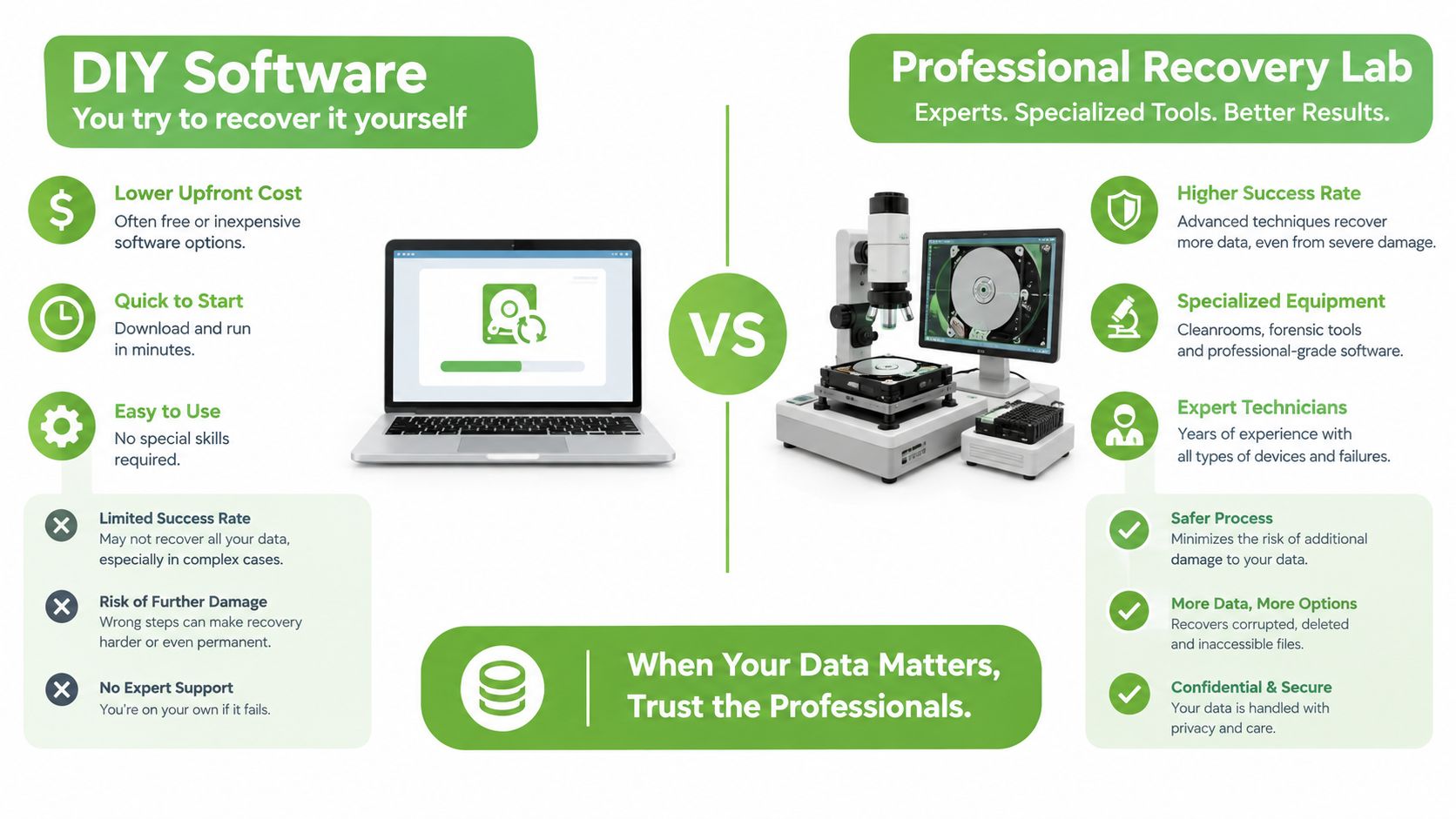
Recovery software has a legitimate place. If you accidentally deleted a file from a healthy, accessible drive and haven't continued writing to it, a careful scan may find the missing data. The risk rises sharply when the Mac has unstable hardware, a failing SSD, a corrupted APFS volume, or an encryption lock.
The important distinction is between file discovery and storage stabilisation. Disk Drill and Stellar can scan a volume they can read, but they can't make a clicking disk mechanically safe. They also can't turn an encrypted T2 or Apple Silicon volume into readable files without the credentials that open it.
Where home software fits
Use software only when the Mac remains stable and the issue looks logical:
- Accidental deletion: Check the Trash and backups first. If recovery software is necessary, install it on another drive and save recovered files somewhere else.
- A healthy external drive: A stable USB hard disk, memory card, or removable SSD may be suitable for a cautious scan.
- A visible but corrupted volume: Stop if the drive disconnects, freezes, clicks, or becomes unusually slow.
Never scan a physically unstable disk for hours from a USB dock. Every read attempt can stress a failing device, and writing recovered files back to the source can overwrite the very blocks you need.
What a lab adds
Singapore providers publish a 90% recovery claim for PC and laptop recovery cases, including Mac hard drive and MacBook Air SSD recovery, as stated in their local PC and laptop recovery service information. Treat that as an operational benchmark for the provider's stated scope, not a promise for every Mac or every failure.
A professional lab can separate logical, encrypted, and board-level work. It can create a controlled image, inspect an unstable device, clean liquid contamination, and diagnose board faults before attempting extraction. That process is different from connecting the Mac to a dock and hoping an application can read it.
The encryption boundary is firm. An encrypted volume without its password remains opaque to consumer tools and specialist equipment alike. A lab may be able to repair the original board enough to access the storage, but no responsible technician should promise a bypass.
For practical guidance on choosing between online tools and a physical service, use this data recovery online guide.
Software is appropriate for accidental deletion on a healthy drive. Hardware symptoms or encryption issues belong with a recovery lab.
What Actually Happens Inside a Singapore Mac Recovery Lab
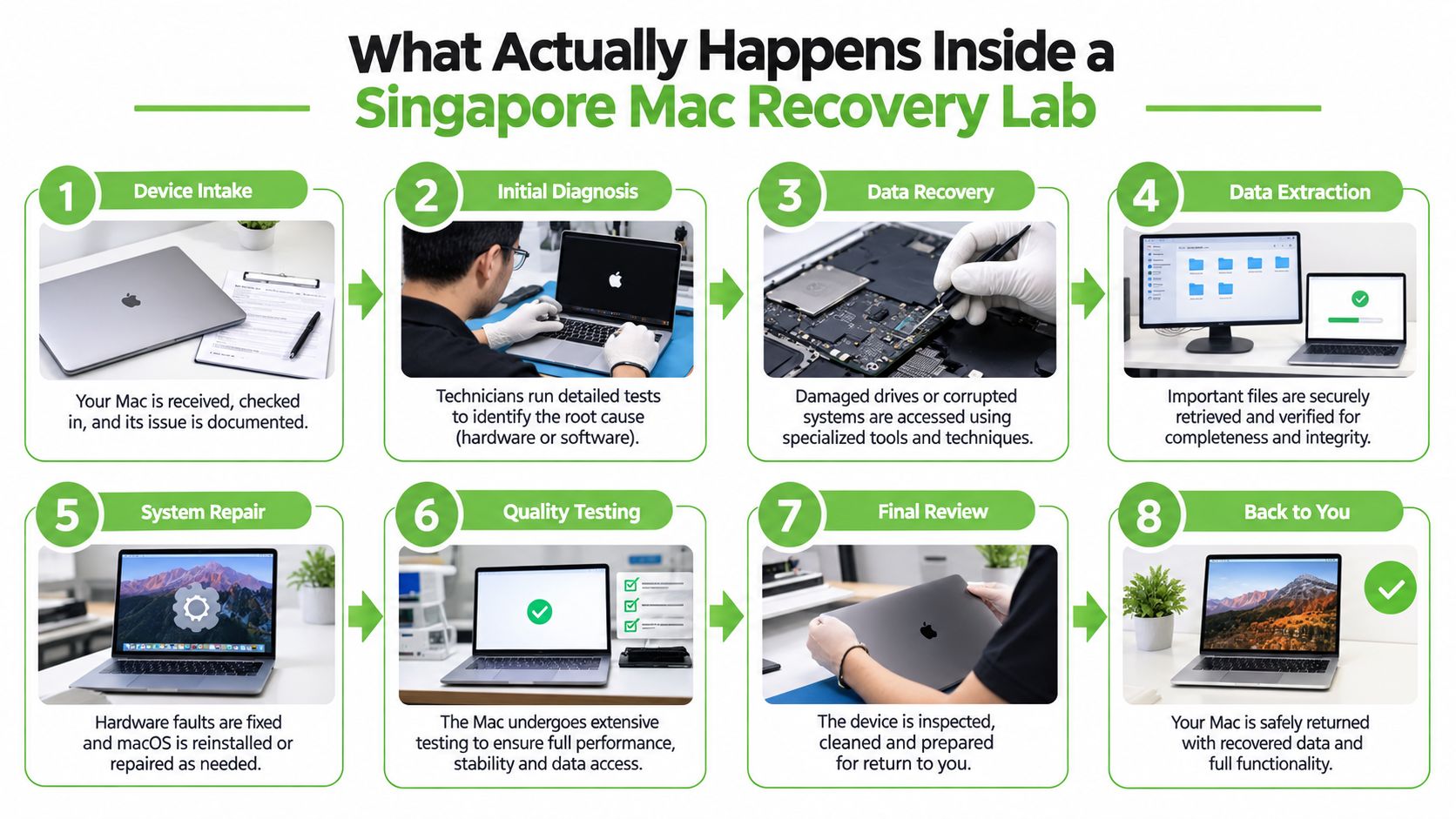
A professional Mac job should follow a controlled sequence. The purpose isn't to make the process mysterious. It's to preserve the original state, identify the failure, obtain approval before billable work, and verify the recovered files before return.
Intake and diagnosis
At intake, the technician records the model, serial number, accessories, reported symptoms, and any visible damage. That model information matters because an older Mac with removable storage presents a different technical problem from a T2 or Apple Silicon Mac with storage integrated into the board.
The lab then performs an evaluation. Depending on the case, the technician may attempt a controlled boot, inspect the underside, assess liquid contamination, check storage health, and identify the security architecture. The owner should provide the macOS password or FileVault recovery key at this point, not after several unsuccessful attempts.
Approval before recovery
After diagnosis, the customer receives a written explanation of the failure, the proposed recovery path, expected timing, and price. A clear approval stage protects both sides. It also lets the owner decide whether the files justify board-level work or whether an existing backup makes recovery unnecessary.
A T2 or Apple Silicon Mac may need the original board to function sufficiently for decryption. If the credential is missing, the lab's options become narrower, more technical, and less predictable. Raw NAND data is not the same as usable documents.
Recovery, verification, and return
Logical cases may involve imaging the storage and rebuilding the APFS file structure. Physical cases can involve component-level board work, specialist readers, or controlled extraction from removable media. Modern Mac storage isn't handled like a generic Windows hard disk, especially when the encryption layer depends on the original hardware.
The final stage is quality control. A technician should authenticate the recovered file set, provide a file listing or sample files for review, and return the files through an agreed secure method. The original Mac can then be repaired, refurbished, returned, or sent through a responsible disposal route.
A clean-room setup is mainly associated with fragile hard-drive platters. Many modern Mac recovery cases instead involve soldered NAND and board-level diagnosis, so the critical capability is encryption-aware component work rather than opening a sealed drive.
Realistic Timelines and Costs for Mac Recovery
A Mac that shows the same “won't boot” symptom can require very different work. Singapore pricing depends on the failed component, whether the storage can still be read, and whether the macOS password or FileVault recovery key is available. A provider's published MacBook recovery bands list S$250 to S$900 for removable or logical cases, S$400 to S$1,800 for T2 or encrypted cases when the password is known, and S$400 to S$1,800 for Apple Silicon board-level work.
Published turnaround estimates range from 3 to 15 business days, depending on failure complexity and priority. For a fuller breakdown of pricing and success rates, see our data recovery Singapore cost and success rate guide.
Mac Recovery Cost and Timeline Bands in Singapore
| Scenario | Price Band (SGD) | Typical Turnaround | Notes |
|---|---|---|---|
| Removable or logical recovery | S$250 to S$900 | 1 day to a couple of weeks | Suitable for accidental deletion, accessible media, or logical corruption, subject to diagnosis. |
| T2 or encrypted recovery with password | S$400 to S$1,800 | About 3 to 7 business days | The credential allows repaired hardware to decrypt the storage. |
| Apple Silicon board-level work | S$400 to S$1,800 | About 3 to 15 business days | Timing depends on board condition, symptoms, and the recovery route. |
These are indicative provider-published figures, not guaranteed quotes. Request a diagnosis or evaluation before approving work, especially after liquid damage or a board fault. Some Singapore specialists report that non-mechanical corruption may be assessed and recovered in about 4 to 16 hours. Mechanical failures may require a 1 to 3 day quotation window, followed by an additional 1 to 3 day recovery window.
Ask whether the service uses a no-data-no-fee arrangement, what qualifies as successful recovery, and whether file-transfer media is included. Urgent work can change the price. The technical question comes first: can the storage be stabilised and decrypted without worsening its condition?
Why Recovery Comes Before Repair, Resale, or Disposal
A broken Mac creates three separate decisions: retrieve the files, restore the device, and decide where the hardware goes next. Data recovery belongs first because repair or disposal can alter the storage before anyone checks whether the information is still accessible.
The PDPC distinguishes sanitisation from destruction. Sanitisation applies to re-writable electronic media and aims to remove data while preserving the medium. Destruction applies to physical media and must render the information irretrievable, whether the medium is wiped, shredded, or otherwise disposed of. The PDPC personal data preservation guide provides useful background for households thinking through that boundary.
The safer order of decisions
- Assess the data. Identify work files, personal photos, customer information, credentials, and any material that exists nowhere else.
- Attempt recovery before wiping. Keep the original device unchanged until a technician has assessed it.
- Repair or replace after extraction. Once the files are safe, decide whether the Mac is worth repairing.
- Sanitise or destroy responsibly. Use a method appropriate to the storage medium and retain documentation where business data is involved.
Singapore generates an estimated 60,000 tonnes of e-waste each year, while collection for recycling rose from 3,500 tonnes in February 2022 to more than 22,300 tonnes by September 2024, according to The Straits Times' report on Singapore's e-waste collection. Recycling and reuse are valuable, but they shouldn't begin with an unverified wipe or a device placed straight into a disposal stream.
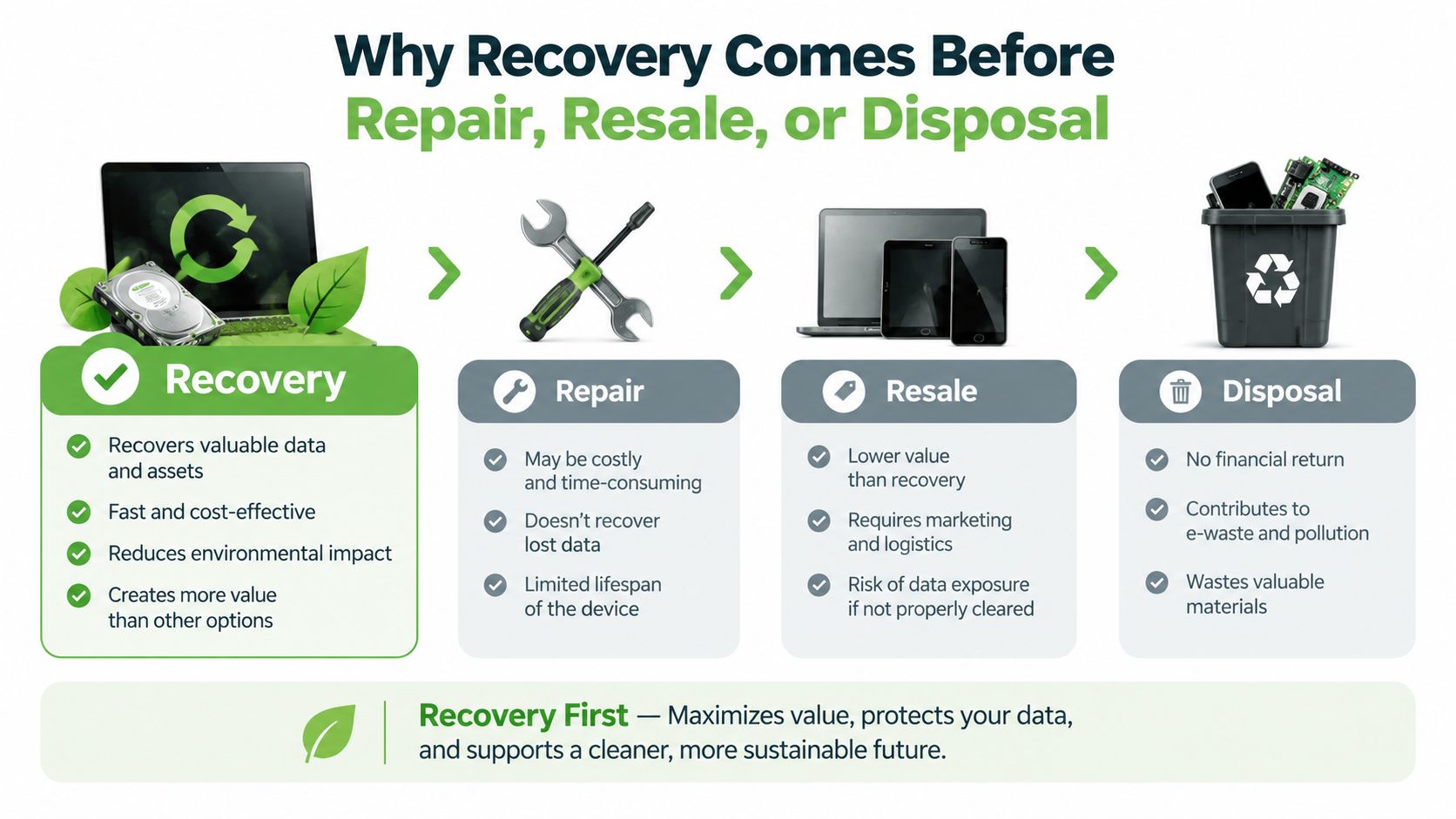
Decision point: If the files matter, preserve first. Repair, resale, recycling, and destruction come after you know what has been recovered and what still needs protection.
That approach supports a zero e-waste world without treating privacy as an afterthought. Successful recovery can allow a device to be repaired or reused, while secure sanitisation or destruction can close the data risk when the Mac has reached end of life. For a practical guide to backup planning before failure happens, see myhalo's data recovery and backup guidance.
How myhalo Cares for Your Mac and Your Memories
For Singapore Mac owners, a sensible service should make the next step clear without hiding the technical limits. The Save data programme starts with a free 15-minute remote triage, where the team records the symptoms, Mac model, recent events, backup status, and encryption credentials available.
From there, the device can move by courier pickup or walk-in assessment at the Tai Seng workshop. A bench evaluation supports a transparent quotation and places the job into one of three practical routes:
- Logical recovery: Accidental deletion, file-system corruption, or software problems where the storage remains readable.
- Encrypted recovery: T2 or Apple Silicon cases where the original hardware must be stabilised and the macOS password or FileVault recovery key is available.
- Board-level recovery: Power faults, liquid damage, or storage-access problems that require component-level diagnosis on the original board.
Credentials and privacy
The credential request is central, not ceremonial. For T2 and Apple Silicon Macs, recovery generally can't proceed without the macOS password or FileVault recovery key. If you don't have either, say so at triage. A responsible technician should explain the limitation rather than imply that specialist tools can defeat Apple's security design.
Sensitive devices should move through a documented handling process, with access restricted to the recovery task and files returned through an agreed secure channel. If you're supporting an older relative or helping someone who is distressed by the loss of personal memories, Velma's guidance on helping someone with memory loss offers a useful reminder to keep conversations calm, respectful, and focused on one decision at a time.
myhalo's published service information describes a no-recovery-no-fee structure for T2 and Apple Silicon cases, with logical and encrypted work commonly taking 1 to 3 days and board-level cases taking 2 to 3 weeks. The service connects recovery with repair, refurbishment, reuse, and secure data handling, so the next destination for the Mac can be chosen after the files are addressed.
Your precious files and memories matter to us. Whether you need to protect your privacy with Safe data or rescue lost files with Save data, myhalo can arrange practical next steps for your Mac recovery case. Visit myhalo to begin a remote triage and choose a convenient Singapore drop-off or collection option.