

The screen cracks just before an important presentation. Or it starts flickering during an evening class, turns black when you adjust the lid, or shows a bright line across the middle of your work. In Singapore, that kind of failure can make a perfectly usable laptop feel disposable overnight.
Before you buy a replacement device, get the display diagnosed. A damaged panel is often a component problem, not proof that the processor, storage and other parts have reached the end of their useful life. Singapore's e-waste context makes that decision even more important. The country generated about 60,000 tonnes of e-waste a year in the 2018 NEA study, equivalent to roughly 73 discarded mobile phones per person, while only 6% was recycled. (The Straits Times reports on Singapore's e-waste collection)
A successful laptop screen repair can keep a working computer in use, protect your budget and avoid unnecessary disposal. This guide gives you a practical route through laptop screen repair in Singapore, from identifying the fault and protecting your data to comparing panel costs, turnaround times and the repair-versus-replace decision.
Table of Contents
- Introduction to Laptop Screen Repair in Singapore
- How to Tell What Is Wrong With Your Display
- Preparing Your Laptop and Booking a Repair Service
- What Repair Costs and Timelines Look Like in Singapore
- Deciding Whether to Repair Replace or Upcycle
- After Your Repair and Next Steps for a Zero E-Waste Lifestyle
Introduction to Laptop Screen Repair in Singapore
A cracked screen does not always mean a dead laptop. If the machine still boots, the keyboard responds, and an external monitor shows your files, the problem is usually confined to the panel, cable, or hinge area. That matters, because one broken part should not force you to replace the rest of a working device.
Singapore's reuse habits back that up. Eco-Business explains why reuse matters in Southeast Asia noted that many laptops collected for reuse are still in good working condition, with a smaller share needing parts replaced before they can go back into service. A damaged display is often a repair job, not a reason to write off the whole laptop.
My practical view: if the laptop still does your work, study, or gaming job properly, diagnose the display before you shop for a replacement.
What this guide helps you decide
You'll learn how to:
- Describe the symptoms: Note whether the screen has cracks, lines, flicker, dark patches, or intermittent blackouts.
- Separate likely faults: Use simple internal and external display checks before you approve a screen replacement.
- Prepare safely: Back up your files, confirm the exact model, and bring the right accessories.
- Benchmark quotes: Compare panel-based costs instead of accepting one generic price.
- Choose the right outcome: Repair the laptop, buy a refurbished device, trade it in, or upcycle it responsibly.
myhalo's Declutter your e-clutter approach fits this decision well. Repair comes first where it makes sense, while Safe data support helps people hand over devices without unnecessary worry. The goal is straightforward, safe, responsible device care.
How to Tell What Is Wrong With Your Display
Don't approve a screen replacement based only on the phrase “my display is faulty”. Flicker, a black screen and coloured lines can come from different parts of the display chain. A few careful observations can help a technician quote accurately and stop you paying for the wrong component.
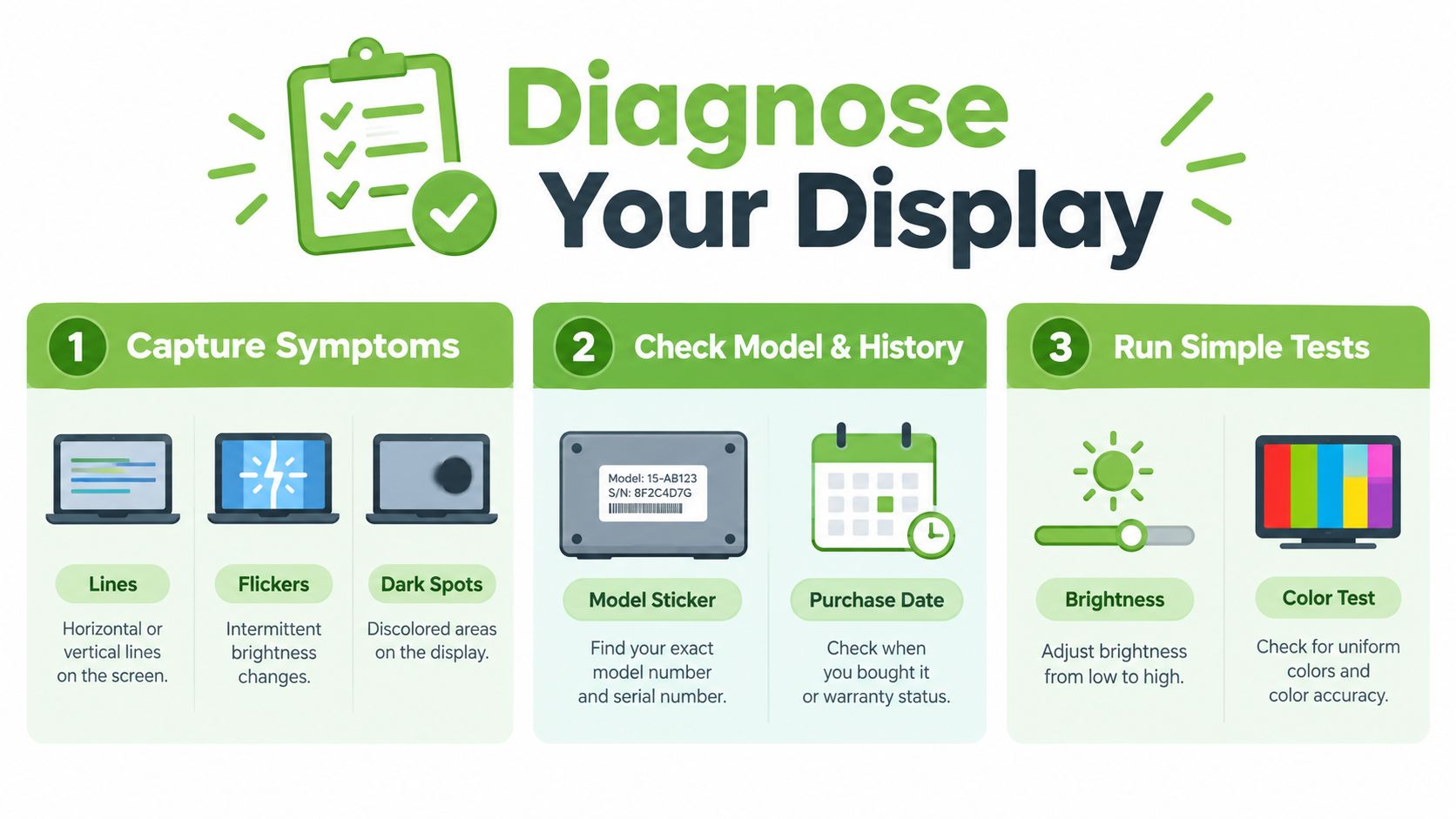
Start with symptom capture
Write down exactly what happens and when it happens:
- Look for fixed damage. Cracks, pressure marks, black blotches, dead pixels and permanent horizontal or vertical lines usually point towards panel damage. Closing the lid on earbuds or another small object can create pressure marks even when the outside casing looks fine.
- Move the lid gently. If the image changes when you adjust the viewing angle, the display cable or hinge area deserves inspection. Don't force the lid or repeatedly flex it to reproduce the fault.
- Check brightness behaviour. A very dim image may indicate a backlight problem rather than a completely failed LCD panel. Shine no tools or liquids onto the screen, note whether a faint image remains.
Confirm the model and history
Find the exact model name and identifier from the underside label, the operating system settings or the original purchase record. Two laptops from the same product family can use different resolutions, connectors, refresh rates or touch layers.
Also record what happened before the problem appeared. A drop, pressure in a packed bag, liquid exposure, hinge stiffness, a recent driver change or no obvious event at all gives the technician useful context. You can also follow this LCD screen repair troubleshooting guide for a more detailed way to describe the fault.
Run the external display test
Connect the laptop to a television or monitor using a suitable HDMI, USB-C or other available output. If the external image is clear while the laptop panel remains faulty, the internal panel, backlight or cable becomes more likely. If both displays show the same flicker or distortion, the graphics hardware, memory or motherboard may need investigation instead.
That test doesn't prove the exact failed part, but it gives the repairer a valuable starting point. Stop testing and arrange professional help if you notice burning smells, liquid exposure or repeated shutdowns.
Preparing Your Laptop and Booking a Repair Service
A smooth repair starts before you hand over the laptop. Back up your files first, even when a screen replacement shouldn't affect storage. Use an external drive or a trusted cloud service for work documents, photos and authentication details, then shut the laptop down fully.
Singapore's official recycling guidance also recommends backing up data and factory resetting personal devices where possible before recycling. The same guidance says recyclers must permanently erase or destroy data on data-containing devices before preparing them for reuse or recycling. (Recycle.gov.sg guidance for electronic waste) For a repair handover, ask how the service provider protects your information and whether a data-handling record is available.
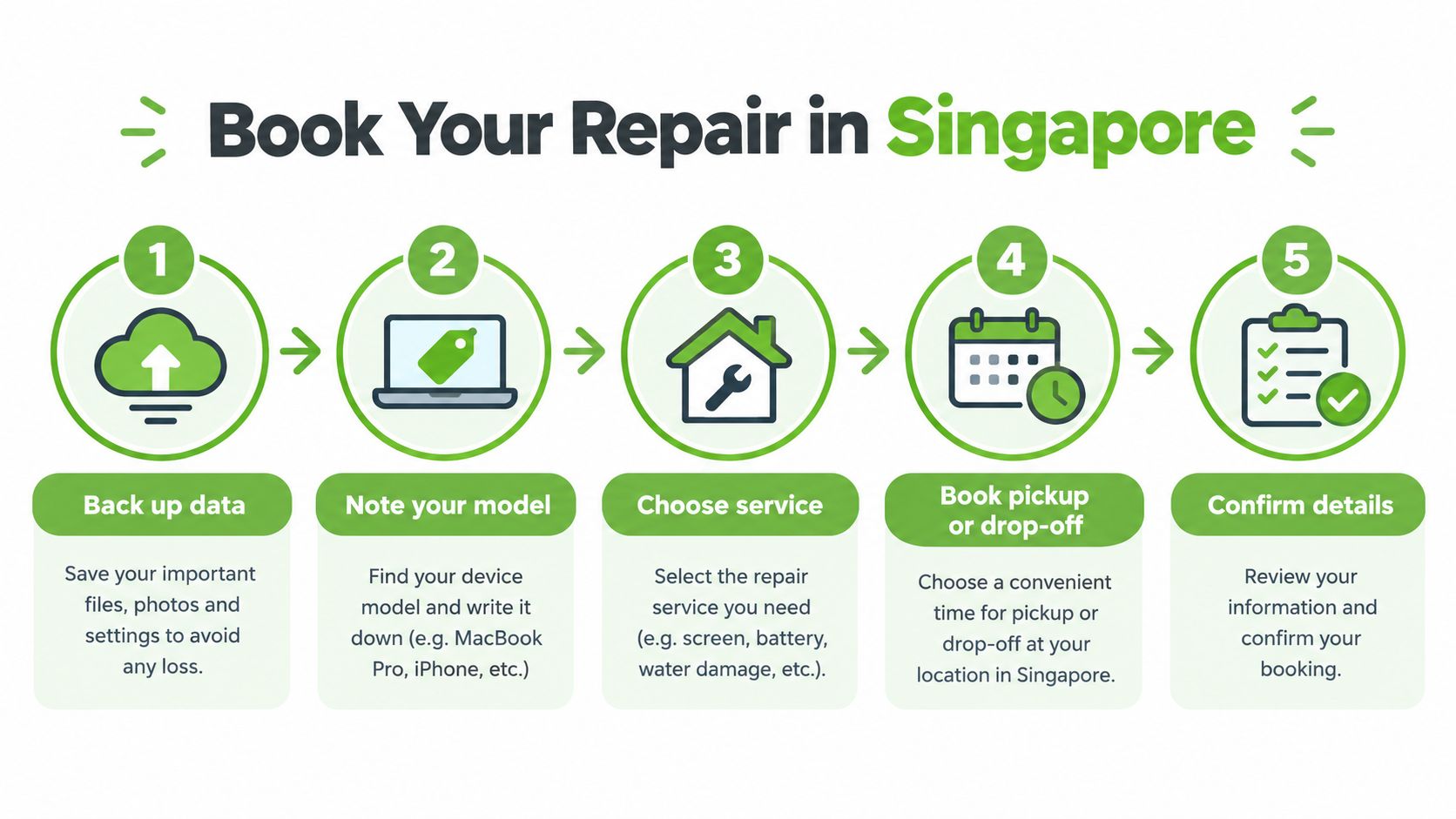
Prepare the details that affect your quote
Send or bring:
- Exact model information: Include the full model code, not only “Dell Inspiron” or “ASUS ZenBook”.
- A symptom description: Mention cracks, flicker, lines, backlight dimming, touch failure and whether an external monitor works.
- Damage history: Explain drops, pressure, hinge resistance or liquid contact.
- Useful accessories: Bring the charger when power behaviour is part of the problem. Don't include unrelated accessories.
- Your access needs: Tell the technician whether you need the laptop back urgently for work, school or travel.
For central drop-off, myhalo has counters at Bugis Junction, #03-25/26, and Sim Lim Square, #03-40. Online quotes, collection and mail-in arrangements can be more convenient when carrying a damaged laptop across Singapore isn't practical. An AI-backed pricing process can provide a starting quote, but the final price still depends on the confirmed model and panel specification.
If you're mailing the laptop, use a rigid box, cushioning and careful cable placement. Anti-static bubble wrap is a useful packaging resource for protecting electronics during transport, especially when the device may move through several handling points. (Anti Static Bubble Wrap from Storage & Removal Boxes Ltd)
This laptop preparation guide for trade-in also covers the broader handover routine, including organising your files and removing personal accounts when the device is leaving your care.
A repair service should confirm the panel type, expected timeline, warranty terms and any extra hinge or casing work before installation. You should know what happens if the inspection finds a cable or motherboard fault instead of a failed screen.
What Repair Costs and Timelines Look Like in Singapore
A cracked or flickering laptop screen is usually a parts-and-labour job, and the bill depends on the panel, not just the laptop brand. A basic 1080p office screen, a gaming panel with a high refresh rate, a creator display with wide colour coverage, and an OLED touchscreen all sit in different price bands.
Singapore pricing references place mainstream 14 to 15.6 inch 1080p TN or IPS replacements at about S$180 to S$280. High-refresh gaming, 2K or 3K, wide-gamut creator, and OLED panels rise to roughly S$320 to S$650. Other local guides place non-touch LCD replacements around S$130 to S$280 and touchscreen replacements around S$220 to S$360. Compare panel-dependent costs in this laptop screen repair price guide instead of relying on one generic quote. (Singapore laptop screen replacement pricing by panel type)
| Panel Type | Typical Cost SGD | Typical Timeline |
|---|---|---|
| Mainstream 14 to 15.6 inch 1080p TN or IPS | S$180 to S$280 | About 1 to 2 hours when the correct panel is stocked |
| High-refresh gaming, 2K or 3K, wide-gamut creator, or OLED | S$320 to S$650 | About 1 to 2 hours when stocked, longer if sourcing is required |
| Non-touch LCD, broader local guide range | S$130 to S$280 | Depends on stock and model |
| Touchscreen replacement | S$220 to S$360 | Depends on the touch assembly and availability |
One local repair service page shows a S$89 starting price, which is useful as a reference but not a universal rate for every laptop. (Singapore laptop repair service pricing) A low quote can apply to a basic panel, while a premium display needs a matched part and usually costs more.
Why the panel specification changes the bill
Compatibility starts with the panel spec. Resolution, refresh rate, colour gamut, OLED construction, and touch layers all affect sourcing and the risk of fitting the wrong part.
Ask for these details in writing:
- Panel size and resolution
- TN, IPS, OLED or another panel class
- Refresh rate
- Touch capability
- Colour and surface specification
- Whether hinge, bezel or cable work is included
- Warranty coverage after installation
A stocked standard replacement generally takes about 1 to 2 hours, while cases involving parts sourcing or hinge damage can take 3 to 7 working days. (Singapore screen replacement workflow and turnaround) That is a practical planning band, not a promise for every model. Ask the technician to confirm stock before you head over, and back up your files first if the laptop still powers on.
Deciding Whether to Repair Replace or Upcycle
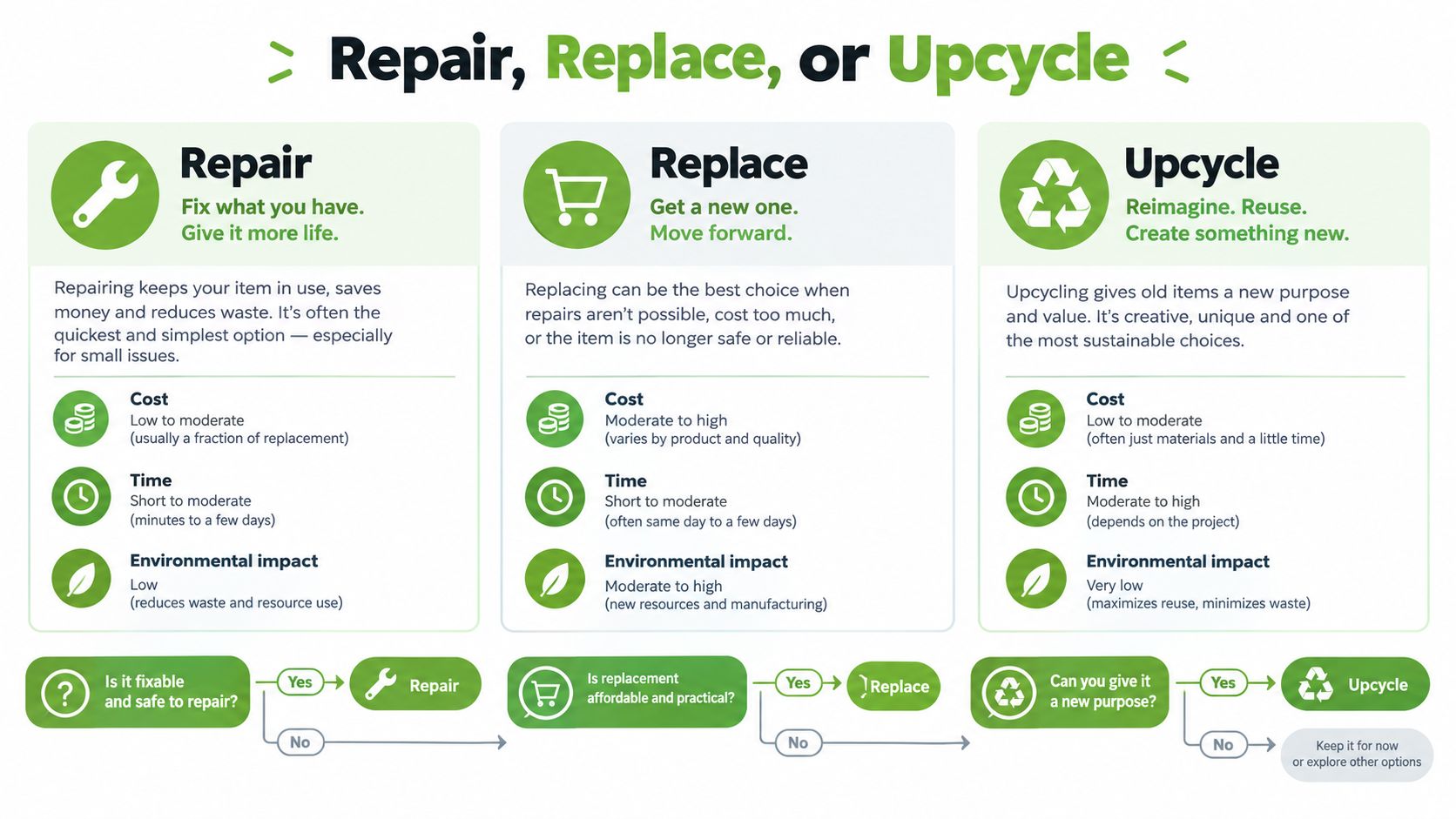
A cracked screen does not automatically make a laptop disposable. Start with the device's remaining value, not the replacement panel alone. Review its speed, battery condition, storage, software support and role in your work or studies, then compare that picture with the confirmed repair quote.
Use this decision path:
- Does it still meet your needs? If the processor, memory, storage and battery are suitable, repair is usually the quickest way to keep a familiar machine.
- Is the screen the only major fault? Add the cost of any damaged cable, hinge or motherboard before deciding.
- Does the panel justify the spend? A basic office laptop and a premium OLED gaming or creator machine deserve different calculations. If the panel quote is high, a tested replacement may offer better value.
- Would a refurbished laptop solve more problems? Consider a certified ReLoved device if you need a different specification, stronger battery performance or a reliable spare.
- Can the old laptop support another user or device? Request a buyback or upcycling assessment. Eligible items may receive vouchers, while usable components can stay in circulation.
Singapore reuse findings show why you should assess the whole laptop before recycling it. Many devices entering the reuse market were still in good working condition, while some needed replacement parts before they could be reused. (Eco-Business reuse market report) A screen repair can preserve more value than disposal when the keyboard, board, storage and battery remain sound.
A sensible rule: Repair a laptop that still fits your needs. Replace it when the repair changes the economics or leaves wider performance problems unresolved. Upcycle it when repair and resale no longer make practical sense.
Do not leave the old device in a drawer. Unused laptops can still contain recoverable parts and personal data. Arrange a repair assessment, trade-in quote or upcycling evaluation while you can accurately describe the device's condition. Before handing it over, back up your files, sign out of accounts and ask how the service will protect or erase your data.
After Your Repair and Next Steps for a Zero E-Waste Lifestyle
A repaired laptop should leave the workshop ready for daily use, not merely looking better. Before you go, ask the technician to confirm a stable image, normal brightness, even colours and correct touch response, if applicable. Open and close the lid gently, then check the hinge alignment, bezel fit and cable behaviour.
Your post-repair checklist
- Test the display: Look for flicker, lines, dark patches or sudden brightness changes against both light and dark backgrounds.
- Check the hinges: The lid should move evenly without unusual tightness, looseness or grinding.
- Confirm the warranty: Keep the invoice and ask which panel, labour and related faults the warranty covers.
- Review data handling: If the service involved access to your device, request secure data documentation or a certificate where the arrangement provides one.
- Protect the new panel: Use a padded sleeve, remove objects from the keyboard before closing the lid and never force the hinge.
Back up important files after collecting the laptop, then check that your documents, photos and working folders open normally. Keep a second copy away from the device. This simple check protects your data if a later hardware fault affects the storage drive.
Singapore's regulated e-waste system supports repair and reuse before recycling. NEA recommends “Repair” where feasible and “Reuse/donate” for working items. Its Extended Producer Responsibility framework also assigns collection and proper treatment responsibilities to producers of covered electrical and electronic equipment. Read NEA's e-waste management guidance before choosing a disposal route.
If you upgrade later, do not leave the repaired laptop unused in a drawer. First compare its condition and remaining life with a trade-in or buyback offer. If it still works, certified reuse keeps more value in circulation. If repair and resale no longer make sense, use this guide to recycle electronics in Singapore.
Official options include designated ICT equipment bins for items smaller than 500 mm by 250 mm, plus collection points operated by ALBA, SGRecycle-Virogreen, Shell-Metalo and KGS. Recycle.gov.sg laptop recycling guidance explains the available route. Singapore collected more than 34,000 tonnes of e-waste since 2021 by 2025, including close to 10,000 tonnes in 2025 alone, a 60% increase compared with the same period in 2024, according to The Straits Times coverage of national e-waste collection.

The myhalo Promise: A zero e-waste routine should be convenient, safe and responsible. myhalo's Safe data service supports privacy, while Declutter your e-clutter helps direct unused devices towards repair, reuse, secure processing or recycling.
Your files and memories deserve careful handling. Visit myhalo for laptop repair, secure data support, trade-in and responsible device reuse in Singapore.