

A standard 1080p IPS laptop screen repair price in Singapore usually sits around S$180 to S$280, while 2K or 3K, OLED, and touch display assemblies often rise to about S$320 to S$650 depending on the model and how complex the screen assembly is. If you're staring at a cracked, blacked-out, or flickering display right now, that range gives you a solid starting point before you call any shop or panic-buy a new laptop.
Maybe your screen cracked on the MRT, or your laptop slipped off the sofa during a late-night work call. Maybe the display still turns on, but there are coloured lines, dark patches, or a spiderweb crack spreading from one corner. Many in Singapore worry about the same three things straight away. How much will this cost, how long will I be without my laptop, and what happens to my files?
That stress is real. A laptop screen problem feels visible and urgent in a way other faults don't. You can ignore a slightly weak battery for a while. You can't really ignore a screen you need to stare at all day.
Repair pricing gets confusing because many people expect one flat fee. In reality, the laptop screen repair price depends far more on the screen class than the logo on the lid. A simple non-touch office laptop can be quite reasonable to fix. A premium OLED or bonded touchscreen can change the maths completely.
If your glass is damaged but the display still works, it also helps to understand the risk of waiting. This guide on using a screen protector on a cracked screen is a useful companion if you're trying to buy a little time without making things worse.
Table of Contents
- Introduction Cracked Screen Stress and What Repair Really Costs
- Understanding Laptop Screen Types and Why They Change Price
- What Drives Your Laptop Screen Repair Price in Singapore
- Typical Price Ranges by Laptop Class and Brand Tier
- How to Get an Instant AI Backed Quote From myhalo
- Smart Ways to Reduce Cost and Decide Repair vs Upcycle
- Turnaround Warranty and Your Next Step With myhalo
Introduction Cracked Screen Stress and What Repair Really Costs
You open your laptop for work, class, or a client call, and the screen is the problem. Maybe there is a corner crack, coloured lines, or a black patch spreading across the display. The laptop still powers on, your files are likely still safe, but the quote you get can swing from manageable to painful.
That price gap catches people off guard because a cracked laptop screen is not one simple repair. It is closer to choosing the right replacement window for a flat. Two windows can be the same size, but the cost changes if one is basic clear glass and the other is tinted, laminated, and built into a more complex frame. Laptop screens work in a similar way.
The most useful first question is not "How cheap can I fix this?" A better question is, "What panel class am I paying for?"
The starting range in Singapore
In practical terms, a common 1080p IPS screen replacement often lands around S$180 to S$280. Once you move into premium territory such as OLED panels, high-refresh gaming displays, or touch assemblies, the bill can climb into the S$320 to S$650 range, depending on how the screen is built and how much of the assembly needs replacing.
That is why a S$180 IPS fix can be a very sensible repair on a workhorse laptop, while a S$500-plus OLED or touch assembly can change the decision completely. At that point, you are no longer comparing one repair quote against another. You are deciding whether the panel class still justifies repair, or whether an upcycle path with a voucher makes more financial sense.
A cracked screen is not a flat-fee problem. It is a panel-class decision.
That single idea removes a lot of the confusion.
Why quotes vary so much
A basic non-touch office laptop usually has a simpler part and a simpler replacement process. Premium models often pack more into the lid. Touch layers, bonded glass, higher resolutions, stronger colour coverage, and thinner display assemblies all push the part cost up. Labour can rise too, because the repair needs more care and the risk of damaging adjacent parts is higher.
If your display still works and only the glass area looks damaged, it helps to understand the trade-off before rushing into a repair. This guide on using a screen protector on a cracked laptop screen explains when waiting buys you time and when it can lead to a worse outcome.
What to ask a repair advisor before approving a quote
A good quote should answer a few practical questions clearly:
- What screen class is being replaced? Basic LCD or IPS, high-refresh panel, OLED, or touchscreen assembly.
- Is it a panel-only swap or a larger assembly replacement? This affects both part cost and labour.
- At this price, does repair still make sense for the laptop's age and value? Sometimes it does. Sometimes an upcycle or voucher route protects your budget better.
- How long will the laptop be away, and are my files affected? A screen repair usually does not touch your stored data, but it is still worth confirming.
That is the calmer way to look at laptop screen repair price in Singapore. Start with the panel class, then decide whether the repair is a sensible fix or a sign to move on wisely.
Understanding Laptop Screen Types and Why They Change Price
When people hear "screen replacement", they often picture one part coming out and one part going in. Sometimes that's true. Sometimes it isn't.
Start with the panel, not the brand
Think of laptop screens like different grades of windows in a flat. They may look similar from a distance, but the material, finish, insulation, and installation method change the price.
A useful first read is this plain-language guide to LCD screen repair, especially if you're not sure whether your issue is just the panel or something deeper in the display assembly.
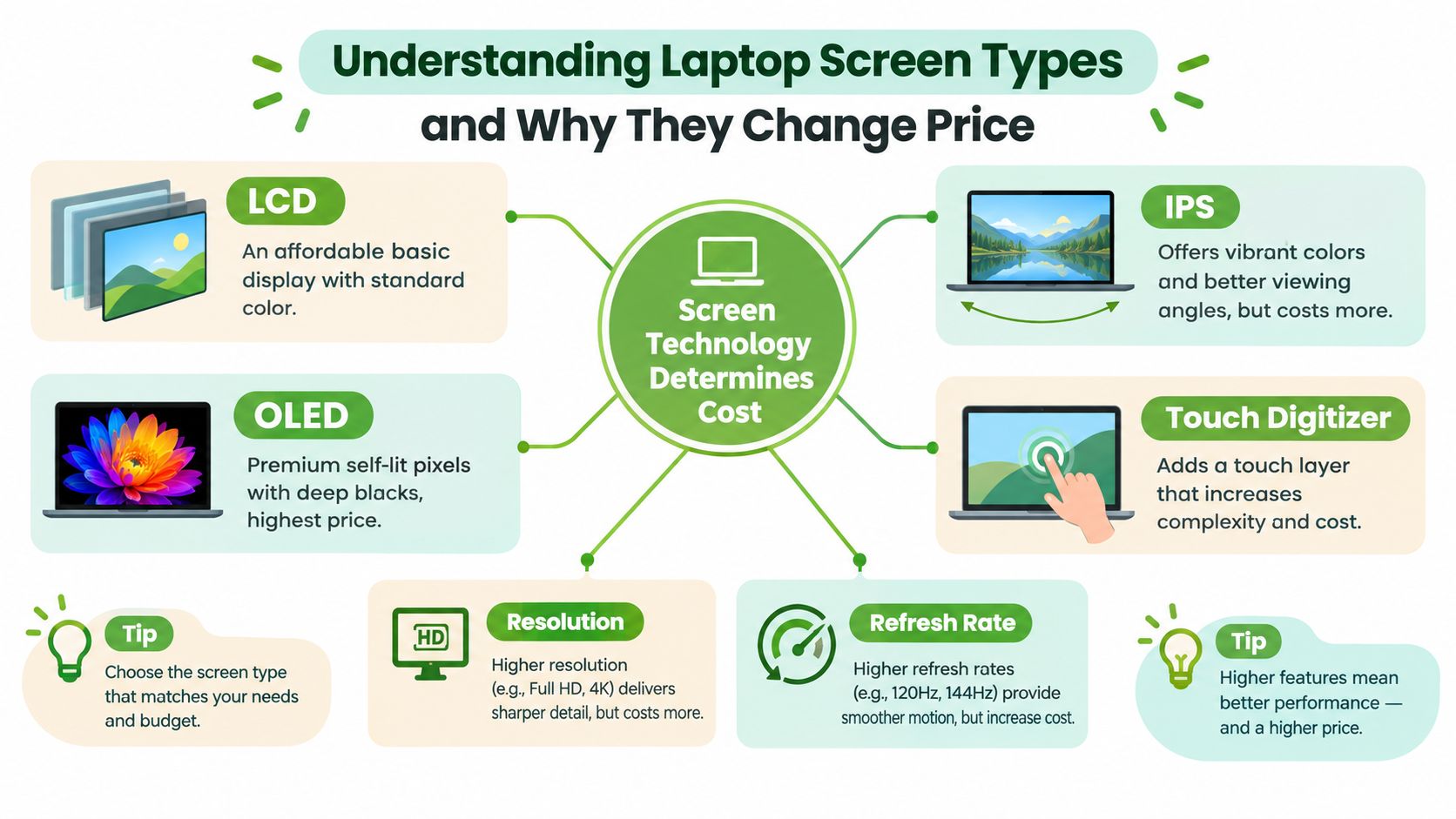
Here are the screen types you run into:
- LCD: The broad family casually referred to when saying "normal laptop screen". It's usually the more affordable category.
- IPS: A common LCD subtype known for better viewing angles and nicer colour. Many mainstream laptops use it.
- OLED: A premium display type with deeper blacks and stronger contrast. It usually costs more to replace.
- Touchscreen with digitiser: This adds a touch-sensitive layer. That extra layer often changes the repair from "panel swap" to "assembly replacement".
Why touch changes everything
A non-touch screen is often closer to swapping a framed photo. You remove the damaged panel, fit a matching one, test it, and close the machine back up.
A bonded touchscreen is more like replacing a laminated sandwich of parts. The visible display, touch layer, and outer structure may be integrated. If one part breaks, the whole front assembly may need replacement. That pushes parts cost and labour up.
Practical rule: If your laptop folds into tablet mode or supports touch, don't assume it uses the same repair method as a standard clamshell laptop.
Resolution and refresh rate matter too
Two 15.6-inch laptops can still be priced very differently because of what the panel is built to do.
A higher-resolution screen packs in more detail. A high-refresh screen is designed to update the image more smoothly, which many gaming laptops use. Creator laptops may add wider colour coverage for editing work. Those features sound nice because they are nice. But they also raise replacement cost because the exact matching panel is more specialised.
A simple self-check before you ask for a quote
If you want a better estimate before contacting a repair counter, check these details:
- Is it touch or non-touch?
- Is it a standard office laptop, gaming laptop, creator laptop, or MacBook?
- Do you know if the screen is Full HD, 2K, 3K, 4K, or OLED?
- Does the laptop convert into tablet mode?
- Is the damage only visual, or is the display also flickering, blacking out, or not responding?
That small checklist often clears up why one person hears one price and another hears something very different.
What Drives Your Laptop Screen Repair Price in Singapore
A screen quote makes more sense once you stop treating it like a single repair fee. In practice, it works more like a decision matrix. The question is which panel class your laptop belongs to, and whether that class still makes repair good value.
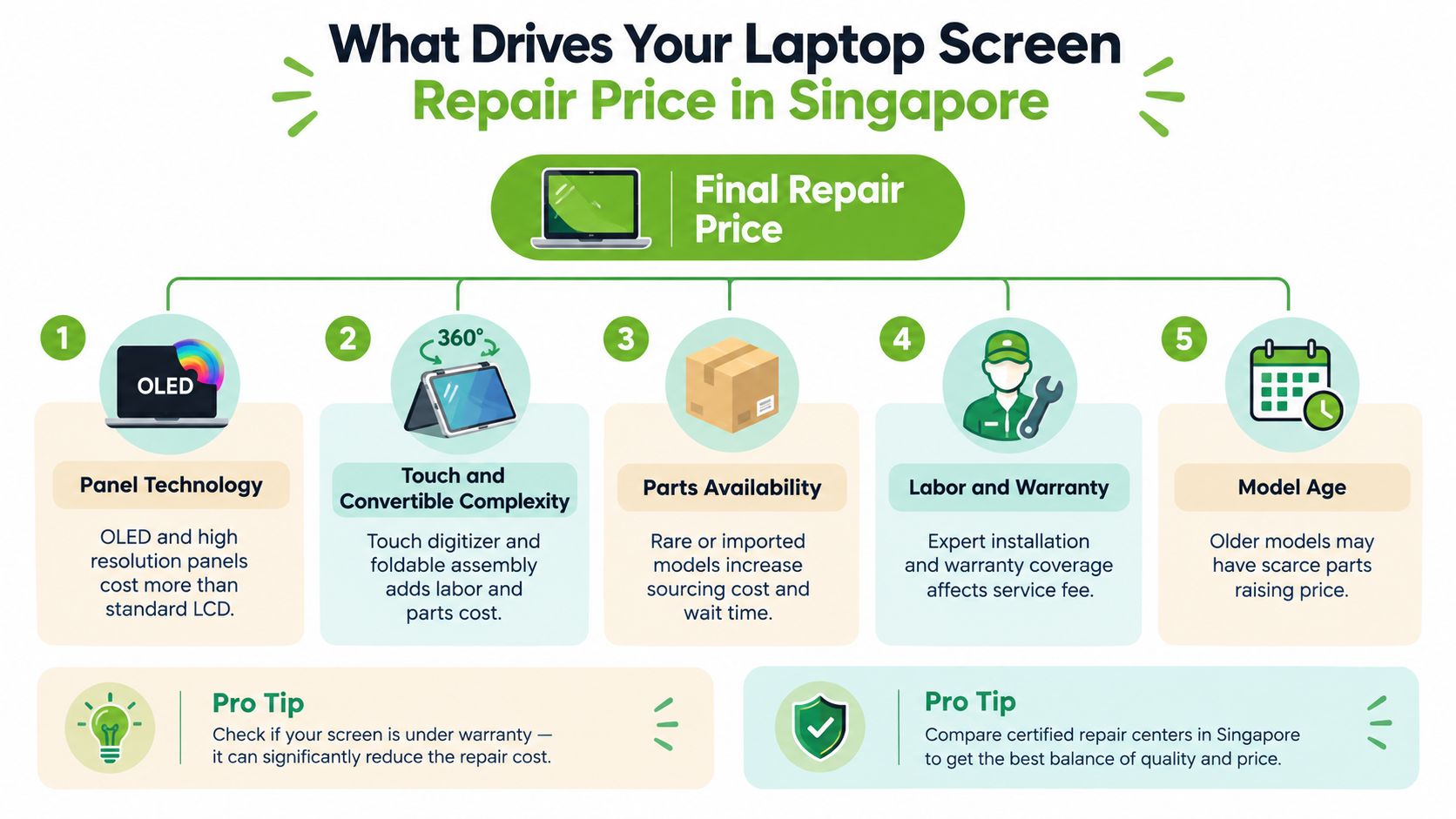
A standard office laptop with an IPS panel may still be a sensible fix around the lower to mid range. A premium OLED, high-resolution touch model, or full display assembly can climb into territory where upcycling starts to make more sense than repair. That is why two cracked laptops of the same size can lead to very different advice.
Panel technology and resolution
Panel type usually sets the starting lane for pricing. One Singapore repair guide places standard IPS LCD screens at about S$150 to S$250, Full HD IPS at S$200 to S$350, 4K UHD at S$400 to S$600, and OLED at S$450 to S$700, depending on model and panel technology, as shown in this Singapore laptop screen repair cost breakdown.
A useful way to read that range is by class, not by inches. An IPS panel is the practical family sedan of laptop screens. It is common, easier to source, and often worth replacing if the laptop itself still suits your needs. OLED is closer to a premium built-in component. It looks better, but the replacement part is also much costlier, so the repair decision changes faster.
Assembly type and touch layers
The second big driver is how much has to be replaced as one unit.
Some laptops allow a panel-only swap. Others need a larger front assembly, especially on premium ultrabooks and touch models. A Singapore pricing guide lists non-touch LCD replacements around S$130 to S$280 or S$150 to S$300, while touchscreen and premium assemblies can rise to S$286 to S$390+ or even S$420 to S$780, according to this Singapore laptop repair cost guide.
That jump often surprises owners because the crack looks small. The repair bill follows the construction, not the crack size.
Model availability and matching parts
Parts supply matters more than many people expect. A common Lenovo, HP, or Acer office laptop often has easier-to-find compatible panels. A rarer gaming machine, creator model, or slim premium notebook may need a very specific panel code, connector position, bracket layout, or complete top-half assembly.
Older laptops can go either way. If the model used a very common screen, repair may stay affordable. If the part is discontinued or only available in limited stock, the quote can rise even for a basic-looking panel.
Labour time and handling risk
Labour is not just "open laptop, change screen, done." Some jobs are straightforward. Others involve careful disassembly around thin bezels, adhesive, fragile cables, or tightly packed hinges.
Bench time can still be fairly quick for many standard models, but complexity affects what the technician must check after fitting. That includes brightness control, flicker, dead pixels, webcam alignment, touch response where applicable, and proper lid closure. A slower, more delicate job usually costs more because the risk of damaging surrounding parts is higher.
Here's a short visual explainer on how technicians approach these jobs and why some take longer than others.
What is actually included in the quote
A fair quote covers more than the replacement part. It should also reflect fitting, testing, and warranty support after collection. This matters when you compare a simple S$180 IPS repair against a S$500-plus OLED or touch assembly. The cheaper quote is not automatically better if the panel spec is mismatched or post-repair checks are unclear.
A good repairer should explain the quote in plain language:
- Panel specification: The exact screen class and matching part being installed
- Repair scope: Whether the job is a panel swap or a full display assembly replacement
- Function testing: Checks for image quality, brightness control, and touch if the model supports it
- Warranty terms: What support is included after the repair
That clarity helps you make the right call. If your laptop sits in the practical IPS bracket, repair often makes sense. If it sits in the premium OLED or bonded-touch bracket, the smarter move may be to compare the quote against upcycle value and any trade-in voucher path before spending heavily.
Typical Price Ranges by Laptop Class and Brand Tier
Your cousin pays S$180 to fix a cracked office laptop screen. You get quoted more than S$500 for a slim premium model. Both prices can be reasonable, because laptop screen repair price is really a panel-class decision, not a single market rate.
A clearer way to read any quote is to sort your laptop into the right bucket first. Entry-level non-touch screens usually sit in the lower bands. IPS office panels often land in the middle. OLED, high-refresh gaming, bonded touch, and MacBook display assemblies climb fast because the part itself is costlier and the repair scope is often larger.
The mainstream band most owners fall into
For standard non-touch Windows laptops, local repair guides commonly place screen replacement in the lower to mid range. One Singapore pricing overview describes cracked mainstream laptop screens at about S$150 to S$300, while higher-end displays can go past S$500, according to this Singapore laptop repair pricing overview.
That lines up with what many owners see at the counter. A basic classroom or office laptop often gets a straightforward panel swap. A premium ultrabook with a brighter IPS panel, thinner lid, or tighter fit usually costs more even before you reach OLED or touch territory.
Where the quote starts changing category
The bigger jump happens when the screen stops being a simple panel replacement and becomes a premium part class. Existing Singapore repair pricing by device tier shows mainstream laptops commonly around S$150 to S$280, gaming screens around S$300 to S$550, creator and high-gamut panels around S$380 to S$650, and MacBook display assemblies often much higher at roughly S$199 to S$719 or even S$600 to S$950+ for newer Pro models, based on this Singapore laptop repair cost article by device tier.
Here is the practical takeaway. If your machine uses a normal Full HD IPS panel and the quote is around S$180, repair often makes good sense. If the quote is pushing into S$500 and above because the laptop uses OLED, bonded touch, or a full display assembly, compare that spend against the laptop's remaining value and whether an upcycle or voucher path would leave you better off.
A screen quote makes more sense when you compare it to your laptop's panel class, not to what someone else paid for a different machine.
Laptop Screen Repair Price by Panel and Device Class in Singapore
| Laptop Class and Panel Type | Typical Price Range SGD | Key Cost Driver |
|---|---|---|
| Basic non-touch LCD | S$130 to S$280 | Simpler panel and assembly design |
| Mainstream Full HD IPS | S$180 to S$350 | Better panel quality and common office-laptop format |
| Touch-enabled laptop screen | S$258 to S$390 | Added touch layer and more involved fitting |
| Bonded touch or convertible design | S$420 to S$780 | Full assembly replacement and added complexity |
| Gaming laptop panel | S$300 to S$550 | Higher refresh panels and model-specific parts |
| Creator or high-gamut panel | S$380 to S$650 | Premium colour-focused displays |
| 4K UHD panel | S$400 to S$600 | Higher-resolution replacement cost |
| OLED laptop panel | S$450 to S$700 | Premium panel technology |
| MacBook display assembly | S$199 to S$950+ | Integrated assembly and premium parts |
How to read the table without getting stuck
Use the table like a map. First, find your panel class. Then ask whether the quote matches the kind of laptop you own.
If your price sits near the expected band, the quote is probably in the right zone. If it sits far above the band, ask what changed. Common reasons include touch glass, a bonded assembly, uncommon part supply, or a premium display type that looks similar from outside but costs very differently inside.
The logic is similar to comparing service plans online. Buyers do not ask only for one flat SMS number. They compare plan type, features, and use case, which is why a page like affordable Shopify SMS rates is easier to judge than a vague custom quote. Screen repair pricing works the same way. The more specific the class, the less stressful the decision.
If you want a reality check before approving a high quote, this guide to used laptop prices in Singapore by model and condition helps you see whether the repair cost still fits the machine's current value.
How to Get an Instant AI Backed Quote From myhalo
When your screen is damaged, the fastest way to calm the situation is to get a quote that reflects the actual model and display class, not a generic promise. That usually means sharing the right details upfront so the estimate starts close to reality.

What details to prepare first
Before you request any screen quote, gather these basics:
- Exact laptop model: The sticker under the device or the system model number matters.
- Screen symptoms: Crack, black screen, flickering, coloured lines, dead pixels, or touch failure.
- Display class clues: Touch or non-touch, gaming or office model, and any known resolution.
- Urgency: Whether you need same-day assessment or can wait for parts if needed.
Those details reduce back-and-forth and make it easier to spot whether you're looking at a simple panel replacement or a more expensive bonded assembly.
How the quote flow works
One option is to use the myhalo repair quote engine, which provides model-based repair estimates and lets you start online before visiting a physical counter. The practical benefit isn't magic. It's that the quote process begins with device-specific information rather than a one-size-fits-all number.
If the issue is straightforward, you can usually move from quote to booking with less friction. If the case looks unusual, an in-store technician can verify the panel type and condition before final confirmation.
What a transparent quote should include
A proper quote shouldn't just show one big number. It should help you understand what you're saying yes to.
Look for these pieces:
- The likely panel or assembly type
- Whether touch support changes the job scope
- Estimated turnaround
- Warranty terms
- Any need for further verification after physical inspection
A good quote reduces surprises. If a repairer can't explain the difference between a panel swap and a full assembly replacement, pause before approving the job.
Why data handling matters during screen repair
A screen repair may seem purely cosmetic, but your laptop still contains personal files, saved logins, family photos, work documents, and school materials. That's why many people don't just want a cheap quote. They want a process that handles devices carefully and keeps privacy in view.
For that reason, it's worth choosing a provider that states how devices are processed, what gets checked during repair, and how customer data is handled if a deeper diagnostic is needed. If the machine has signs of wider damage, a repair pathway that also supports diagnostics and data recovery can be useful before you make a final decision.
Smart Ways to Reduce Cost and Decide Repair vs Upcycle
A student cracks a 14-inch IPS screen on a dependable workhorse laptop and gets a quote around S$180. A designer damages a slim OLED touch model and sees a quote above S$500 because the whole display assembly may need replacement. Both are "screen repairs," but they are not the same purchase decision.
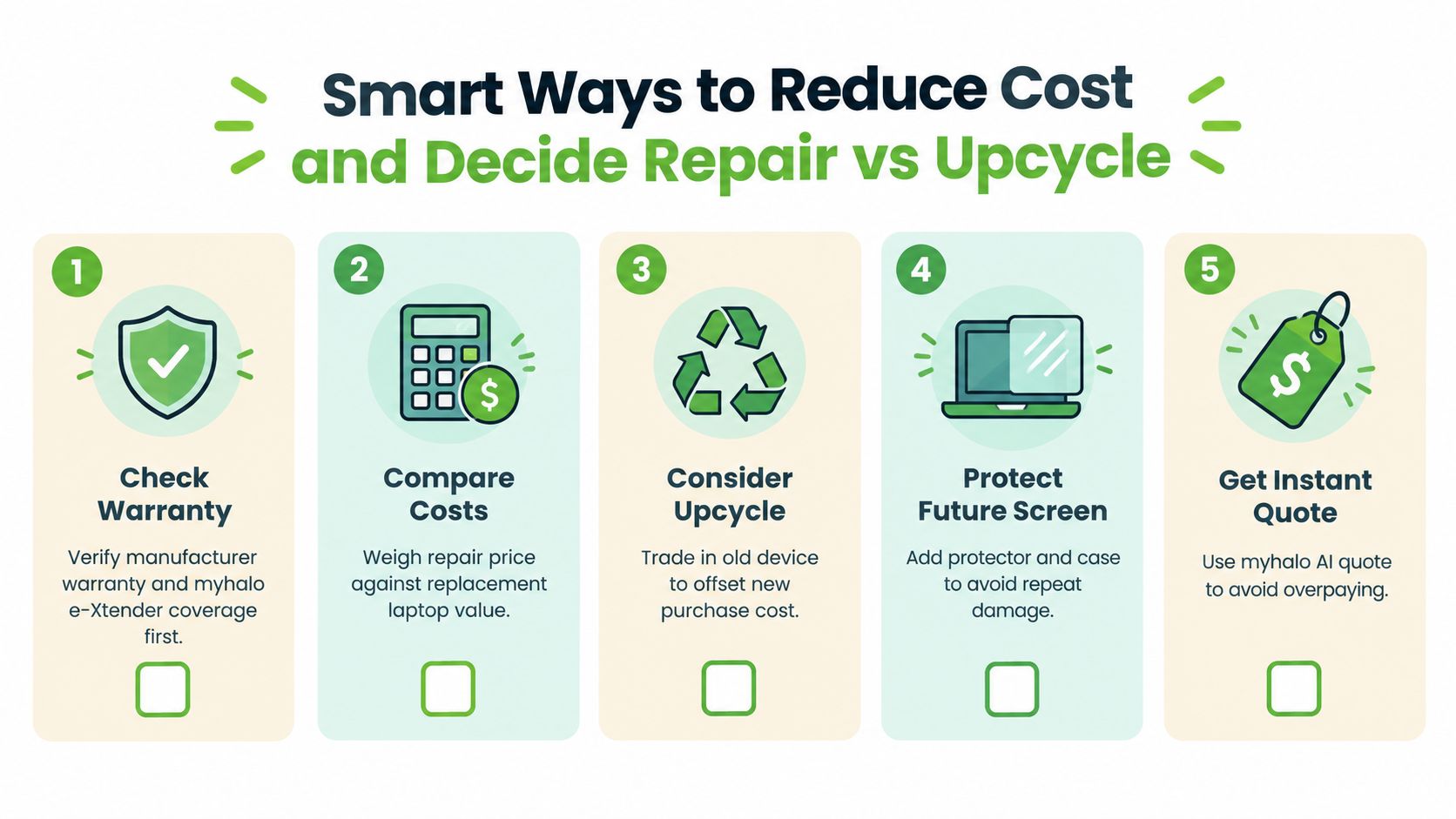
Price works better as a panel-class decision matrix than a flat fee. The question is simple. Are you paying for one more useful chapter with this laptop, or are you putting premium screen money into a machine that is ready for a different exit path?
When a S$400+ repair still makes sense for your laptop class
A higher repair bill can still be sensible when the laptop itself still fits your daily life. That usually means performance is still fine, the battery is acceptable, the keyboard and ports suit your work, and you do not want the downtime of setting up another machine.
A good way to judge it is to look at the screen type like the tyres on a car. Replacing standard tyres on a practical sedan feels very different from replacing specialised tyres on a performance model. The second job costs more, but it can still be the right call if the rest of the vehicle is in good shape and worth keeping.
Here is the plain-English version:
- A standard non-touch IPS repair often makes sense if the laptop is otherwise healthy and still has a clear role at work, school, or home.
- A premium OLED or bonded touch assembly repair makes sense when the laptop is newer, higher-spec, or expensive to replace like-for-like.
- A high quote on an ageing entry-level machine needs closer scrutiny, because the panel class may now be worth more than the remaining usefulness of the laptop.
A practical way to cut cost before you approve anything
You do not always control the panel price, but you can avoid paying for the wrong outcome.
Use this quick filter:
- Check remaining coverage. Manufacturer support, retailer plans, or card-linked protection can change your out-of-pocket cost.
- Match the repair to the laptop's role. A home study laptop and a colour-critical design laptop do not need the same screen standard.
- Ask if the job is a panel swap or full assembly replacement. That difference often explains why one quote looks manageable and another jumps sharply.
- Consider the rest of the machine. Weak battery, hinge wear, heat issues, or sluggish performance can make a pricey screen less attractive.
- Protect your files first if the damage came from a hard drop or liquid. Screen damage sometimes arrives with hidden board or storage issues.
One small habit helps a lot. Ask yourself, "If this screen were perfect tomorrow, would I still want to use this laptop for the next year?" If the answer is yes, repair often feels much easier to justify.
When upcycling is the calmer, smarter choice
Upcycling is not a fallback for "bad" laptops. It is a sensible route when the repair cost belongs to a premium panel class, but the laptop itself no longer deserves premium spending.
That is where myhalo's upcycle and voucher pathway can be useful. If an OLED or touch assembly quote pushes beyond what feels comfortable for an older or lower-value machine, upcycling can return some value, keep usable parts in circulation, and spare you from sinking more money into a device that no longer fits your needs.
In practical terms, this route often suits laptops with one or more of these signs:
- the screen quote is high because the display assembly is specialised
- the machine already has other age-related problems
- replacement with a suitable ReLoved device feels more sensible than a major repair
- you would rather convert the old laptop into voucher value than pay for an expensive panel class
A clearer threshold for repair versus upcycle
Once a quote enters the S$300 to S$400 range, the decision usually deserves a closer look. Not because every repair above that level is poor value. Because that band often marks the point where panel class starts competing with the laptop's remaining lifespan.
Below that level, many standard IPS repairs can still feel like straightforward maintenance. Above that level, especially for OLED or touch assemblies, you are often making a bigger ownership decision.
That is the decision matrix to use. A roughly S$180 IPS fix can be an easy yes for a solid daily laptop. A S$500+ OLED or touch assembly can still be worth it for a newer premium machine. If it is not, upcycling with a voucher pathway may be the lower-stress choice.
Turnaround Warranty and Your Next Step With myhalo
Your laptop screen cracks on Tuesday night. By Wednesday morning, the question is no longer just price. It is how long you can be without the machine, what protection you get after the repair, and whether this panel class still makes sense to fix.
What timing usually looks like
For a standard non-touch screen that is already in stock, repair can be fairly quick. For a premium panel, timing often stretches because the job is no longer just a swap. The part may need to be ordered, and some models use a full display assembly rather than a simple panel replacement.
A helpful way to read turnaround is to match it to panel class, just like you matched price to panel class earlier.
- Standard LCD or IPS panel: often the fastest if the part is available
- Touch or bonded display: usually slower because more parts are attached together
- OLED or less common premium panel: may take longer to source before fitting starts
So if you are comparing a roughly S$180 IPS repair with a S$500+ touch or OLED assembly, do not compare price alone. Compare downtime as well.
What warranty should cover
A clear warranty should answer two plain questions. If the replacement screen itself develops a fault, what will the shop do? If the issue comes from installation, what is covered and for how long?
It should also say what is not covered, especially new accidental damage after collection.
That matters because a screen warranty is not the same as insurance. It usually covers part defects and workmanship. It usually does not cover a fresh drop in your bag on the MRT the next day. Once that is explained clearly, you can judge the repair on real terms instead of guessing.
The myhalo next step
myhalo keeps the choice practical. Repair if the panel class still fits the laptop's value and your daily use. Upcycle if the quote, downtime, or overall condition points the other way.
That approach follows a simple idea. Convenient, safe, responsible.
It also connects with Declutter your e-clutter, Safe data, and Save data. One helps you clear space. One helps protect privacy. One helps recover files that still matter.
If your laptop screen is cracked and you're stuck between repairing, replacing, or letting go responsibly, myhalo offers repair quotes, data-safe device handling, upcycle options, and support for recovering value from ageing tech. You can start online, visit the Bugis Junction or Sim Lim Square counters, and choose the path that feels right for your budget, your files, and our shared zero e-waste future.