

You're on the MRT, your phone slips while you tap out, and by the time you pick it up the glass has already spidered across the display. Or it happens at a hawker centre table, on a wet pavement after rain, or when luggage shifts in the car boot and crushes the corner of the phone. In Singapore, cracked iPhone screens aren't rare accidents. They're routine.
The mistake is treating the crack as a simple nuisance. It isn't. The way you repair an iPhone screen affects what the device is worth later, whether future service stays straightforward, whether trade-in gets messy, and whether you hand over your phone in a way that protects your data.
That matters even more locally because Singaporeans are replacing their phones every 2.7 years, and reporting here also cites about 2.9 million mobile phones being stowed away, which tells you how many devices are sitting idle when a repair could keep them useful for longer. That's one reason screen repair isn't just about convenience. It's also a practical reuse decision in a market already full of recoverable devices, as noted in The Straits Times coverage on keeping phones in use longer.
Table of Contents
- That Cracked iPhone Screen Moment Every Singapore Owner Knows
- DIY Versus Professional iPhone Screen Repair in Singapore
- How Much iPhone Screen Repair Really Costs in 2026
- What Happens During a Professional iPhone Screen Repair
- Warranty, Telco Plans, and Data Security Trade-offs
- Getting an Instant Quote and Booking Your Repair with myhalo
That Cracked iPhone Screen Moment Every Singapore Owner Knows
You tap out at the MRT gantry, the phone slips, and the sound tells you the result before you even pick it up. Screen cracked. Display still on. Touch still responds, but one side starts missing taps, and the fracture runs straight across the part of the phone you use all day.
That is the moment many Singapore iPhone owners make an expensive mistake. They treat the damage as a quick glass problem and hunt for the lowest repair price.
A cracked iPhone screen is a value problem first. The repair channel you choose affects what the phone is worth later, whether a buyer trusts it, whether a trade-in gets rejected or marked down, and whether future servicing becomes straightforward or troublesome. On newer iPhones, that difference can matter more than the repair bill itself.
Buyers in Singapore ask the same practical questions every time. Was the display replaced with a proper panel? Does True Tone still work? Was Face ID or the front sensor setup disturbed? Is there a clean repair record? If your answers are messy, your resale price usually follows.
Telco protection adds another layer. A repair done under one programme does not automatically leave you with the same warranty position, service options, or flexibility later. Some repair routes are easy to document and easy to claim on. Others leave you arguing over what is covered, what is excluded, and whether later faults are tied to the earlier repair.
Use a simple rule. If the repair makes the phone harder to resell, harder to trade in, or harder to service, it was not cheap. You just postponed the cost.
Singapore makes cracked screens worse faster. Rain gets into damaged edges. Daily commuting means one-handed taps, crowded transfers, and more drops onto hard tile. Then there is the usual pressure from bags, office desks, and food-centre tables. A small corner crack today can turn into touch issues, display flicker, or moisture-related problems after a few ordinary days outside.
Start with the right question. Not “where is the cheapest repair screen iPhone option?” Ask, “which repair path protects this phone's value, service history, and my data?” That question usually leads to the better decision.
DIY Versus Professional iPhone Screen Repair in Singapore
You have three real choices after a cracked screen. Repair it yourself, send it through Apple's authorised path, or use an independent workshop. Owners comparing DIY, Apple, and independent repair already know those channels exist. The part that gets expensive is choosing the wrong one for the phone you own.
Treat this as a device-value decision, not a one-time fix. The repair route changes what happens to your warranty position, future trade-in, resale questions from buyers, and how confidently you can hand over a phone that still holds your banking apps, Singpass, and work data.
DIY only makes sense for low-value iPhones
DIY is for phones you can afford to get wrong.
A kit from Carousell or Lazada plus a YouTube guide can be enough for an older iPhone that is already out of warranty and no longer worth much on the resale market. It is a poor decision for a newer daily driver. Modern iPhones are not friendly to casual repairs. You are dealing with adhesive seals, delicate flex cables, sensor alignment, and display calibration that affects brightness, colour, and features tied to the original screen assembly.
If the phone comes back with weak touch response, poor colour, or Face ID problems, that is not a surprise. It is the cost of taking on the job yourself.
Apple's authorised route protects service history
Apple is the cleanest option for newer iPhones, Pro models, and devices still under AppleCare+ or other coverage that depends on authorised work. It preserves the most straightforward repair history, which matters later if you sell the phone, trade it in, or need follow-up service.
The downside is cost. Without coverage, authorised screen repair can feel hard to justify on an older model. With coverage, the calculation changes fast. If your device is already inside Apple's support chain, keep it there.
That recommendation is even stronger if you plan to resell within the next year. Buyers in Singapore ask about parts history now. They are not just buying a working screen. They are buying confidence that the phone will not trigger display warnings, lose features, or become harder to service later.
Independent repair is often the smartest cash decision
For many out-of-warranty iPhones, a good independent workshop gives the best balance of price, speed, and retained value.
That does not mean every third-party repair is equal. Part grade decides a lot. Some shops use low-cost panels that look acceptable for a week and disappoint after that. Others offer better assemblies with stronger brightness, touch performance, and finish. If you want to compare those differences before you book anything, read this guide to phone repair parts and what you're actually paying for.
Choose independent repair when the phone is still worth keeping, but not worth paying top authorised pricing. Choose it only if the shop is clear about part grade, post-repair testing, and what happens if the new screen develops faults.
| Channel | Best For | Parts Quality | Turnaround | Effect on device value |
|---|---|---|---|---|
| DIY | Older iPhones with low resale value | Inconsistent | Depends on your skill and parts delivery | Highest risk to resale, future service, and water resistance |
| Apple | Covered devices, newer iPhones, Pro models | Authorised repair path | Appointment-based | Best for preserving clean service history and support options |
| Independent workshop | Out-of-warranty iPhones where cost still matters | Varies by shop and part grade | Usually faster and more flexible | Good value if the shop uses decent parts and documents the repair |
My advice is simple. If you own a newer Pro iPhone, or any model you may trade in soon, pay for the repair path that keeps the phone easy to explain later. If you own an older out-of-warranty model, use a reputable independent shop and skip DIY unless you are prepared to lose value, features, or both.
How Much iPhone Screen Repair Really Costs in 2026
A cracked screen is not just a repair bill. It is a value decision. The price you pay today affects what the phone is worth later, whether a buyer trusts its repair history, and whether a telco or trade-in partner treats it as clean stock or discounted stock.
The price bands that actually matter
In Singapore, iPhone screen repair usually falls into three practical bands.
Older models such as the SE and 8 series sit at the bottom end. Mid-generation phones such as the XR through 13 form the middle band. Newer phones, especially larger and Pro models, sit at the top because the display assembly itself costs more and buyers care more about service history on expensive devices.
Independent pricing references in Singapore show that spread clearly. Older iPhones often land around S$80 to S$180, XR to 13 commonly sit around S$150 to S$300, and newer 14 to 17 models often reach S$250 to S$450, according to this Singapore phone screen repair pricing guide.
Another local cost guide shows how wide the independent market can get once part grade changes. Older models can start very low, while newer Pro and Pro Max repairs can rise sharply if you choose original-grade aftermarket parts or genuine Apple displays, based on this Singapore iPhone screen replacement cost guide.
| iPhone Model | DIY Kit (S$) | Independent (myhalo) (S$) | Apple Out-of-Warranty (S$) |
|---|---|---|---|
| Older iPhones such as SE and 8-series | Varies by kit quality and tool bundle | S$80 to S$180 | Higher than many independent quotes |
| Mid-range iPhones such as XR to 13 | Varies by panel type and supplier | S$150 to S$300 | Often competitive only if you prioritise official service history |
| Newer iPhones such as 14 to 17 | Higher due to newer display tech | S$250 to S$450 | Usually highest, but better for preserving clean resale and support records |
If you want a model-by-model benchmark before you commit, this breakdown of phone screen repair pricing in Singapore is useful because it compares cost by model and screen type instead of lumping every iPhone into one average.
Why one iPhone screen costs far more than another
Three factors drive the bill.
- Display type: OLED panels cost more than LCD.
- Part grade: Genuine or genuine-grade assemblies cost more than lower-tier aftermarket parts.
- Model tier: Newer, larger, and Pro iPhones use more expensive assemblies and carry more resale risk if the repair quality is poor.
That last point matters more than many owners expect.
A cheap screen on an old backup phone can make sense. A cheap screen on a recent Pro model often becomes expensive later, because lower brightness, weak touch response, missing True Tone, or an unclear repair record can drag down resale, trade-in offers, and buyer confidence.
What smart owners should budget for
Budget by phone value, not just by repair price.
If your iPhone is older and already well past its peak resale years, independent repair usually gives the best return. If your iPhone is a newer main device, especially a Pro model you may sell or trade in within the next year or two, the safer repair path often protects more value even if the upfront bill is higher.
That is the cost in 2026. Not just what leaves your wallet today, but what the repair choice does to the phone's future price, support options, and credibility when someone else inspects it.
What Happens During a Professional iPhone Screen Repair
A professional iPhone screen repair decides more than whether your display lights up again. It affects whether the phone keeps its value, whether later trade-in checks go smoothly, and whether you end up with a clean repair record or a device that raises questions.
Good shops treat the job like a device-preservation process.
A proper repair starts with diagnosis, not disassembly
A cracked front does not always mean the screen is the only problem. Hard drops can bend the frame, loosen internal connectors, damage the top sensor area, or cause battery pressure that shows up as display issues.
That is why the first few minutes matter.
A competent technician should check what failed. Cracked glass. Dead OLED. Intermittent touch. Ghost input. Black spots. Green lines. They should also check whether the housing is straight enough for a proper seal after reassembly. If the frame is warped and nobody tells you, the new screen may sit badly, lift at the edges, or fail again after a minor knock.
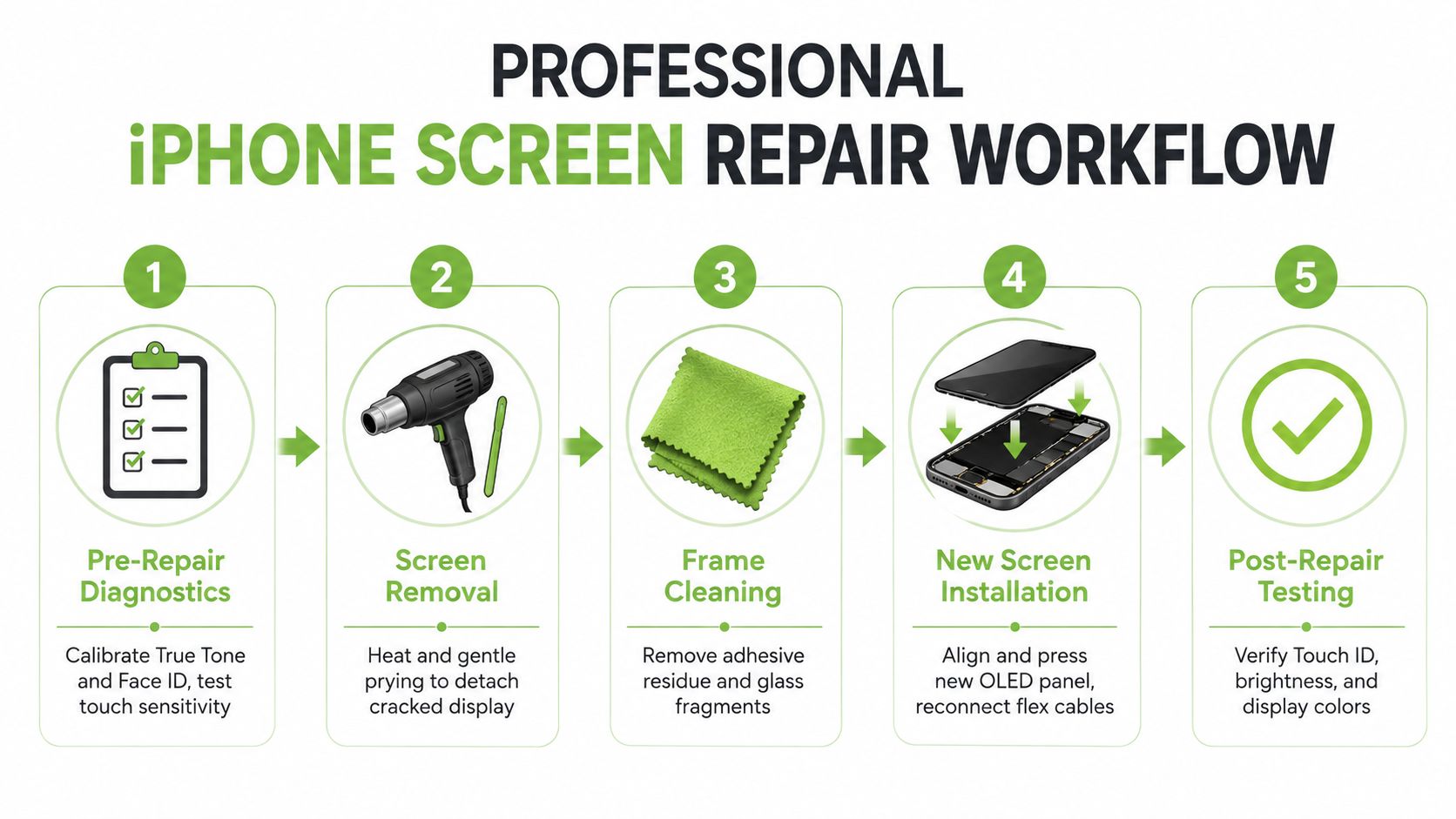
What the bench process should include
A sound repair usually follows this sequence:
Intake inspection
The technician checks the display, touch response, frame condition, front camera area, and signs of deeper impact damage.Controlled opening
The phone is opened carefully so the flex cables, sensor assembly, and housing are not damaged during removal.Part matching
The replacement screen is matched to the exact model and repair standard agreed before work starts. The wrong part grade can hurt brightness, colour accuracy, and buyer confidence later.Cleaning and resealing prep
Old adhesive, broken glass dust, and residue are removed so the new screen sits flush and seals properly.Installation and reconnection
The new display is fitted, connectors are secured, and the assembly is aligned to avoid pressure points or gaps.Function testing before handover
The technician checks touch across the full panel, brightness consistency, front sensor behaviour, camera alignment, and any display features that should still work after replacement.
For a clearer step-by-step explanation, this guide to Apple iPhone screen repair and the steps involved breaks down what a proper service visit should look like.
What separates a value-safe repair from a cheap one
The screen turning on is the minimum standard. A value-safe repair goes further.
You want the display to sit flush, respond evenly across the whole panel, and look correct at low and high brightness. You also want the repair documented properly. That invoice matters when a buyer, trade-in counter, or later service centre asks what was changed.
Poor repairs usually leave clues. Slight lifting at one corner. Weak touch near the keyboard rows. Washed-out colours. Missing display calibration features. Dust under the glass. These are not cosmetic annoyances. They are resale deductions.
What to test before you leave
Do not collect the phone and check it later on the MRT.
Test it at the counter:
- Touch across the full screen: Open the keyboard and type along the edges and corners.
- Brightness and colour: Look for flicker, dim patches, yellow tint, or uneven blacks.
- Front camera and top sensor area: Make sure the selfie view is clear and the top section behaves normally.
- Screen fit: Check that the panel sits evenly with no visible lifting.
- Repair record: Keep the invoice and confirm what part standard was installed.
A professional repair should leave you with a phone that works properly and still makes sense to sell, trade in, or keep for another year without hidden downside.
Warranty, Telco Plans, and Data Security Trade-offs
A cracked screen is not just a repair bill. It is a device-value decision that affects what your iPhone is worth, who will service it later, and how cleanly you can sell or trade it in.
Warranty affects resale more than people expect
If you plan to keep the iPhone inside Apple's service channel, use an authorised repair. That keeps the parts history straightforward and avoids awkward questions later if you need follow-up support, a battery replacement, or a trade-in assessment.
Independent repair still makes sense for many out-of-warranty phones. The right way to judge it is simple. Compare the savings today against the value risk later. If the phone is newer, higher-value, or likely to be traded in within the next year, a poorly documented repair can cost you more than you saved.
Telco repair plans are no longer a simple safety net
Singapore buyers often assume a telco add-on gives them a clear and stable repair path. That assumption is outdated. Telcos keep changing how repair support is bundled, claimed, and approved. As noted earlier, even Singtel's old screen-repair arrangement was reworked, which is a good reminder to read the current plan terms instead of relying on what a sales rep said at sign-up.
What matters is not just whether a screen can be replaced. Check who performs the repair, what documentation you receive, whether the claim affects your plan benefits, and whether the repair route leaves a clean ownership record.
| Repair Channel | Warranty Impact | Typical Price (S$) | Turnaround | Trade-in Value Effect |
|---|---|---|---|---|
| Apple authorised | Keeps the official service path clearer | AppleCare+ excess or Apple out-of-warranty pricing applies | Appointment-based | Usually easier to defend at resale or trade-in |
| Telco-linked repair path | Depends on your plan terms, claim rules, and exclusions | Varies by plan and device | Depends on approval and claim handling | Acceptable if the paperwork is clear |
| Independent repair | Lower upfront cost, but future official support may get less straightforward | Varies by model and part grade | Usually more flexible | Works best when part quality and invoice details are clear |
Data security deserves the same attention as price
For a basic screen replacement, a technician usually does not need full access to your phone. If a shop wants your passcode without a clear reason, stop and ask exactly what they need to test.
Do the prep before handover, not while standing at the counter.
- Back up first: Follow this guide to backing up your iPhone properly before repair.
- Remove unnecessary access: Log out of banking apps, password managers, and work tools that expose sensitive data.
- Follow only the intake steps required: Disable features only when the repair provider explains why.
- Review your privacy basics: Carti's data security best practices are a practical checklist before handing any device to a third party.
A screen repair should restore the phone, not create a warranty dispute, a resale discount, or a privacy problem. Choose the repair channel with the full ownership cost in mind.
Getting an Instant Quote and Booking Your Repair with myhalo
You drop your iPhone at Raffles Place, pick it up, and notice the crack has spread across the face. The phone still works, so it is tempting to wait. That usually costs more later. A damaged screen lowers resale appeal fast, can complicate trade-in checks, and leaves the device more exposed while you carry your data around every day.
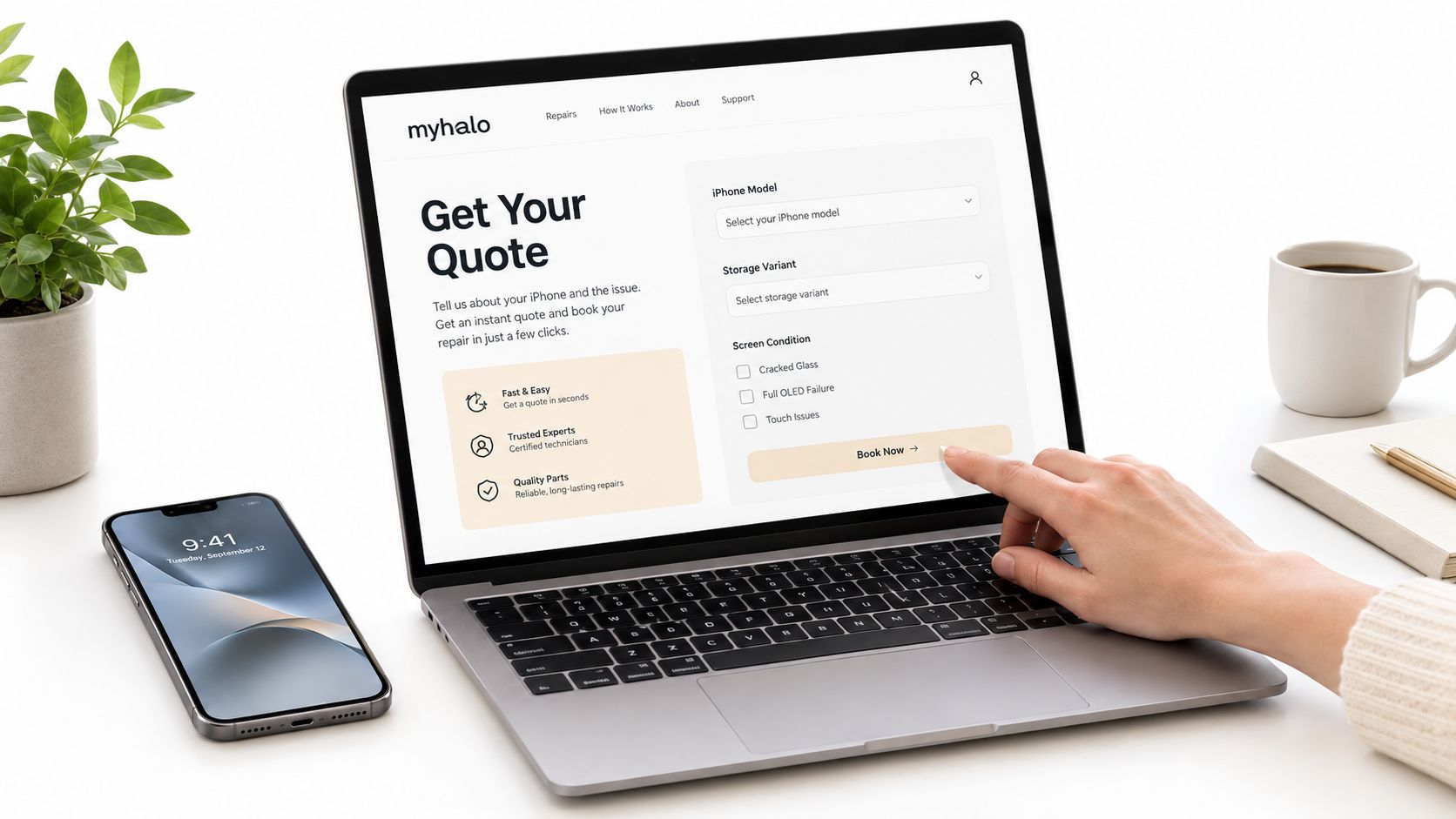
How to get the quote right
An instant quote is only useful if the fault description is accurate. “Cracked screen” is too broad and often leads to the wrong expectation on price, parts, or turnaround.
Give three details upfront:
- Your exact iPhone model: Check Settings or the model number. Do not guess.
- What the screen is doing: Cracked but usable, black display, green lines, flicker, ghost touch, or dead touch.
- What you plan to do with the phone after repair: Keep it for another year, pass it to family, sell it, or trade it in.
That third point matters more than buyers realise. If your goal is resale or trade-in value, the repair path should protect documentation, part quality, and future inspection results. If the phone is only meant to last a few more months, your decision may be different.
Booking with clear expectations
A good booking flow should let you choose the handling method that fits your day and your device plan. Drop-off works if you want the phone assessed in person. Collection makes more sense if you do not want to spend time travelling across town for a repair.
myhalo operates as a Singapore device lifecycle platform with repair, resale, buyback, upcycling, and secure data handling services. That matters because the screen fix does not sit in isolation. The channel you book through can affect your paperwork, future buyback options, and how cleanly the device moves into its next stage of use.
If you want to see the process before booking, watch this walkthrough:
What to check before you confirm
Save yourself the usual mistakes. Confirm these three points before handover:
Your data access
Back up the phone and only provide the access needed for testing.Your repair record
Keep the quote, invoice, and repair notes. These help if you later sell, trade in, or need to clarify what was replaced.Your value plan
Decide what this repair is meant to protect. Daily usability, resale price, trade-in eligibility, or a short holding period before replacement.
A screen repair is a device-value decision. Treat it that way.
If your iPhone screen is cracked, dead, or half-responsive, get the repair assessed before the phone loses more value or becomes harder to place through resale or trade-in. myhalo helps Singapore users handle screen repair, secure device processing, trade-in decisions, and longer-term reuse in one place.