
You know that old hard drive sitting in a drawer, cupboard, or taped under a desk? It may look harmless, but it can still carry tax files, client records, login tokens, work documents, and personal photos. That quiet worry is often why people keep retired devices long after the laptop itself has disappeared from daily life.
A quick format or ordinary delete doesn't give the same reassurance as physical destruction. Hard disk drive shredding turns an unresolved data risk into a controlled, documented end to the device's life. For a wider look at protecting information before letting old technology go, explore this guide to secure data destruction.
Table of Contents
- That Old Drive in Your Drawer and the Worry It Carries
- What Hard Disk Drive Shredding Actually Means
- Shredding vs Degaussing vs Software Erasure
- Why Organisations Treat Shredding as a Compliance Safeguard
- Inside a Singapore Secure Destruction Workflow
- How Corporate ITAD Services Handle Shredding End to End
- Common Assumptions That Put Data at Risk
- Letting Go of Old Hardware the Safe and Easy Way
That Old Drive in Your Drawer and the Worry It Carries
The moment usually arrives during a tidy-up. You find a loose drive from an old office computer, a retired desktop, or a laptop that failed years ago. You can't remember whether it held payroll documents, customer details, scanned identity records, or browser sessions that were still signed in when the machine stopped working.
You might have formatted it. Perhaps you deleted the visible folders or used the computer's reset option. Yet the drive remains in your possession because you aren't fully convinced the information has gone. That hesitation makes sense. Deleting files changes what the operating system can see, but it doesn't automatically create the same certainty as destroying the storage medium.
Peace-of-mind test: If you wouldn't hand the drive to a stranger with its contents visible, don't place it in an ordinary scrap stream without a controlled data-disposal plan.
Hard disk drive shredding answers a personal question, not just a technical one: “Can I finally let this go?” Instead of relying on hope, you choose a process that physically breaks the device and records what happened to it. The goal isn't to make the drive look unusable from the outside. The goal is to make the data difficult or impossible to recover, in line with Singapore's official disposal guidance.
That distinction matters for homes as well as organisations. A family photo archive deserves care, and so do invoices, employment records, client files, and saved credentials. Secure destruction lets you close the chapter without keeping old hardware in a drawer “just in case”.
For individuals, the next step may be a secure collection route. For companies, it may involve asset registers, witnessed destruction, and formal certificates. Either way, the emotional outcome is similar. You replace lingering doubt with a clear, responsible action that protects privacy and keeps useful materials moving towards recycling.
What Hard Disk Drive Shredding Actually Means
A hard disk drive contains spinning magnetic platters, read heads, a motor, electronics, and a protective casing. The platters are the important part for data security because they hold information in magnetic patterns. Hard disk drive shredding physically destroys the assembly instead of asking software to hide or overwrite its contents.
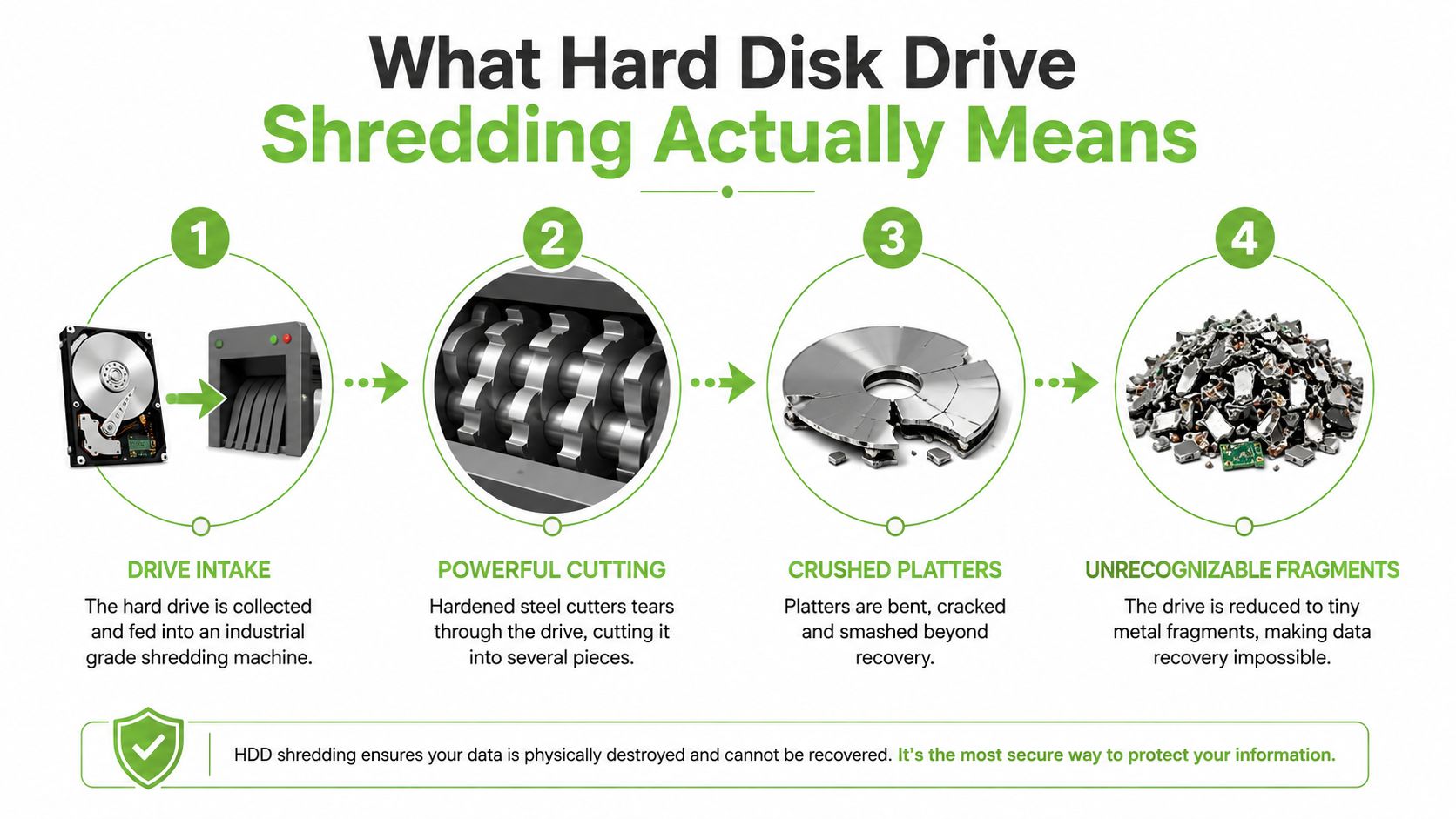
In a controlled industrial process, the drive enters a machine with hardened cutters. Those cutters tear through the casing and damage the internal components, including the platters. The result is a collection of metal and electronic fragments rather than a working disk that a reader head could spin and inspect.
The physical process in simple steps
- Intake and identification: The processor receives the drive and records the relevant asset details.
- Mechanical entry: Hardened cutters pull the device into the destruction chamber.
- Platter damage: The casing bends or breaks, while the magnetic platters are cut and distorted.
- Fragment handling: The remaining pieces are sorted and sent through appropriate recycling or downstream treatment.
The exact output depends on the equipment and service specification. Smaller fragments generally make reconstruction more difficult because the platter surface is no longer available as a continuous disk. The key assurance comes from the physical loss of the medium, not from a message on a computer screen.
HDDs and SSDs aren't handled identically
A solid-state drive, or SSD, stores information on flash-memory chips, not spinning magnetic platters. That means a magnetic process designed for HDDs won't address the same physical storage mechanism in an SSD. Singapore reporting describes HDDs being degaussed and then crushed, while SSDs are shredded because they don't store data magnetically, as covered in this local explanation of secure shredding services in Singapore.
The practical lesson is simple. Identify the media type before choosing the method. If the aim is irreversible destruction rather than reuse, physical processing should match the components that store the data.
Shredding vs Degaussing vs Software Erasure
The right choice begins at the moment you let the old drive go: will it serve another purpose, or should nobody ever use it again? Software erasure suits a drive planned for reuse, provided the method matches the medium and the risk. Degaussing disrupts magnetic information, but the drive may not remain usable. Shredding takes the final route, breaking the device and its data-bearing parts when physical inaccessibility is the goal.
Singapore's Personal Data Protection Commission explains that erasure software can be sufficient when a hard disk is intended for reuse. If the objective is to make the medium inaccessible, physical destruction must make personal data unrecoverable. For a closer look at the magnetic option, see this practical guide to hard disk degaussing.
| Method | How It Works | Proof Produced | Drive Reusable? | Best Fit |
|---|---|---|---|---|
| Shredding | Cuts and breaks the drive and its data-bearing components | Physical evidence, service records, and potentially a destruction certificate | No | End-of-life drives where irreversible destruction is required |
| Degaussing | Uses a powerful magnetic field to disrupt data on magnetic media | Process records, but no visible platter fragments | Usually not | Magnetic HDDs requiring a strong sanitisation step before further physical treatment |
| Software erasure | Overwrites or erases accessible storage areas | Software logs or an erasure report | Yes, when the process is appropriate and successful | Drives that will be reused rather than destroyed |
Match the method to the outcome
Choose reuse when the hardware has a legitimate next purpose. A documented erasure process can preserve the drive as an asset, while software logs provide a record of what was done. The organisation still needs to confirm that the process suits the storage medium and its risk level.
Choose physical destruction when reuse is not part of the plan. Shredding removes the possibility of reconnecting the drive later and gives the decision a visible endpoint. A factory reset may change what appears on screen, while shredding changes the physical state of the storage components.
Use layered handling when the risk calls for it. Singapore reporting describes a local recycler's workflow in which HDDs are degaussed in less than 10 seconds and then crushed within about half a minute. The physical step adds a visible barrier after magnetic sanitisation. It also shows why recycling streams need clear sorting: shredded SSD fragments contain flash-memory chips and circuit-board parts, while HDD destruction produces damaged platter and casing fragments. Channel NewsAsia describes this local sequence.
Why Organisations Treat Shredding as a Compliance Safeguard
A retired drive may sit in a storeroom, yet the personal data inside it still carries responsibility. Organisations choose hard disk drive shredding when they need a clear answer to one question: what happened to the data after the device left active use?
Singapore's PDPC guidance recognises physical destruction as a way to dispose of personal data stored on physical media. The outcome matters most. The chosen method must make the information unrecoverable, whether some or all of the data is removed. IMDA guidance also lists shredding, incineration, overwriting, degaussing, crushing, and drilling as disposal options for media that may contain personal data. The aim is to make recovery difficult or impossible. A Singapore-focused explanation is available in this overview of hard disk shredding in Singapore.
Organisations can review broader IT compliance requirements in Singapore when setting their own retirement procedures. The practical decision is similar to closing a locked file room: the organisation needs both a secure action and a record showing that it happened.
The evidence matters
A company handling customer files, financial records, employee information, or healthcare information needs more than an informal claim that “the drive was wiped”. Its process should identify the asset, control its movement, record the destruction method, and retain evidence for an internal review or external query.
| Framework or Standard | Relevant Clause | What It Expects |
|---|---|---|
| Singapore PDPC guidance | Disposal of personal data on physical media | Use a method that makes personal data unrecoverable, with physical destruction available when reuse isn't required |
| Singapore e-waste rules | Licensed recycler handling of data-bearing devices | Permanently erase or destroy stored data before reuse, recycling, disposal, or transfer to a non-licensed disposal facility |
| IMDA disposal guidance | Secure disposal of physical media | Consider destruction methods such as shredding, degaussing, overwriting, crushing, and drilling |
| Internal security policy | Asset retirement and evidence retention | Maintain a traceable record showing which media was handled and how |
| Contractual controls | Customer, supplier, or sector requirements | Follow agreed handling, custody, and evidence requirements |
Singapore's rule for licensed e-waste recyclers is direct. Data on a data-bearing device must be permanently erased or destroyed before the device is reused, recycled, disposed of, or transferred outside the licensed facility's control. The Singapore legislation on licensed e-waste recyclers provides the statutory reference.
Shredding offers physical finality. An erasure log records that software completed a defined process. A shredded drive cannot be reconnected, reused, or passed along intact. That visible endpoint helps security teams, procurement staff, auditors, and senior leaders understand the retirement decision without relying on assumptions. For the person approving disposal, it turns “let go safely” from a hope into a documented outcome.
Inside a Singapore Secure Destruction Workflow
A secure destruction service begins before the drive reaches the shredder. A licensed Singapore e-waste recycler can collect devices in controlled containers, record the assets, and maintain custody as the equipment moves from the client's site to the destruction facility.
The first practical task is reconciliation. Staff compare the physical drives with the asset register, capture serial numbers where available, and note exceptions such as missing labels or damaged casings. That record creates a starting point for accountability. If a client hands over a batch, the service provider should be able to show what arrived, what method was applied, and what happened after processing.
From collection to destruction
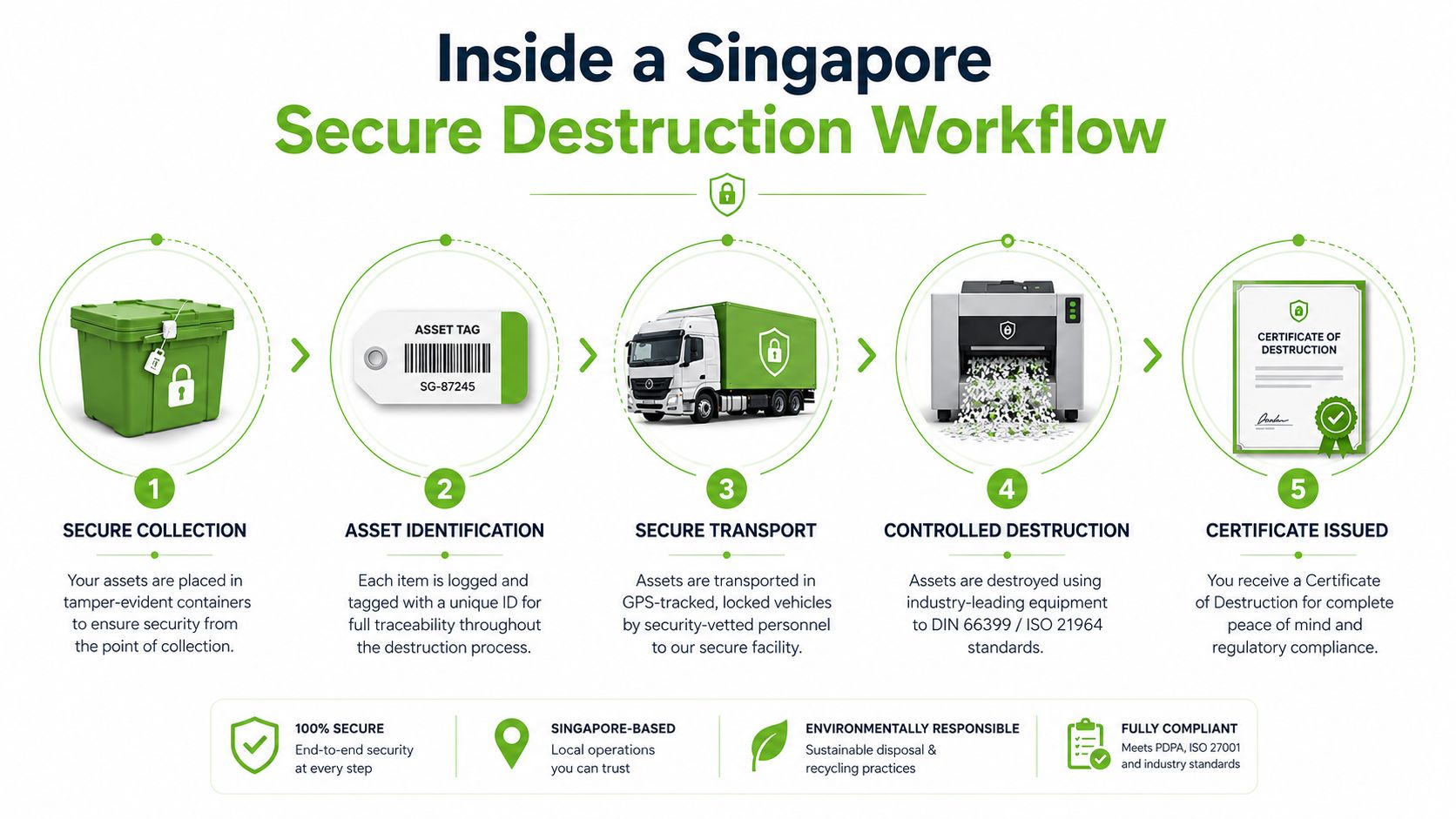
The workflow may include the following stages:
- Secure collection: Devices travel in controlled containers rather than entering an informal scrap stream.
- Intake inspection: Operators verify the media type and match the items against the handover record.
- Optional degaussing: Magnetic HDDs may receive a degaussing step as part of a broader sanitisation sequence.
- Mechanical destruction: Cutters, crushers, or other approved equipment damage the casing and data-bearing parts.
- Material sorting: Ferrous and non-ferrous materials move into appropriate downstream recycling channels.
The local sequence reported in Singapore is tangible. HDDs can pass through a degaussing machine in less than 10 seconds, followed by crushing within about half a minute. Degaussing disrupts the magnetic parts of an HDD, while the follow-up crushing makes the remaining drive physically difficult to recover. SSDs require a different approach because they store information on flash chips rather than magnetic platters.
The paperwork closes the chain
A careful workflow records handoffs, operator details, equipment or method information, and the final material route. Depending on the provider, evidence may include photographs, weight records, serial-number lists, and an operator sign-off.
The client then receives a certificate of destruction or equivalent record. It should identify the relevant assets, destruction date, method, and responsible processor. The certificate doesn't replace good custody controls, but it gives the organisation a durable record that links the original drive to its final treatment.
How Corporate ITAD Services Handle Shredding End to End
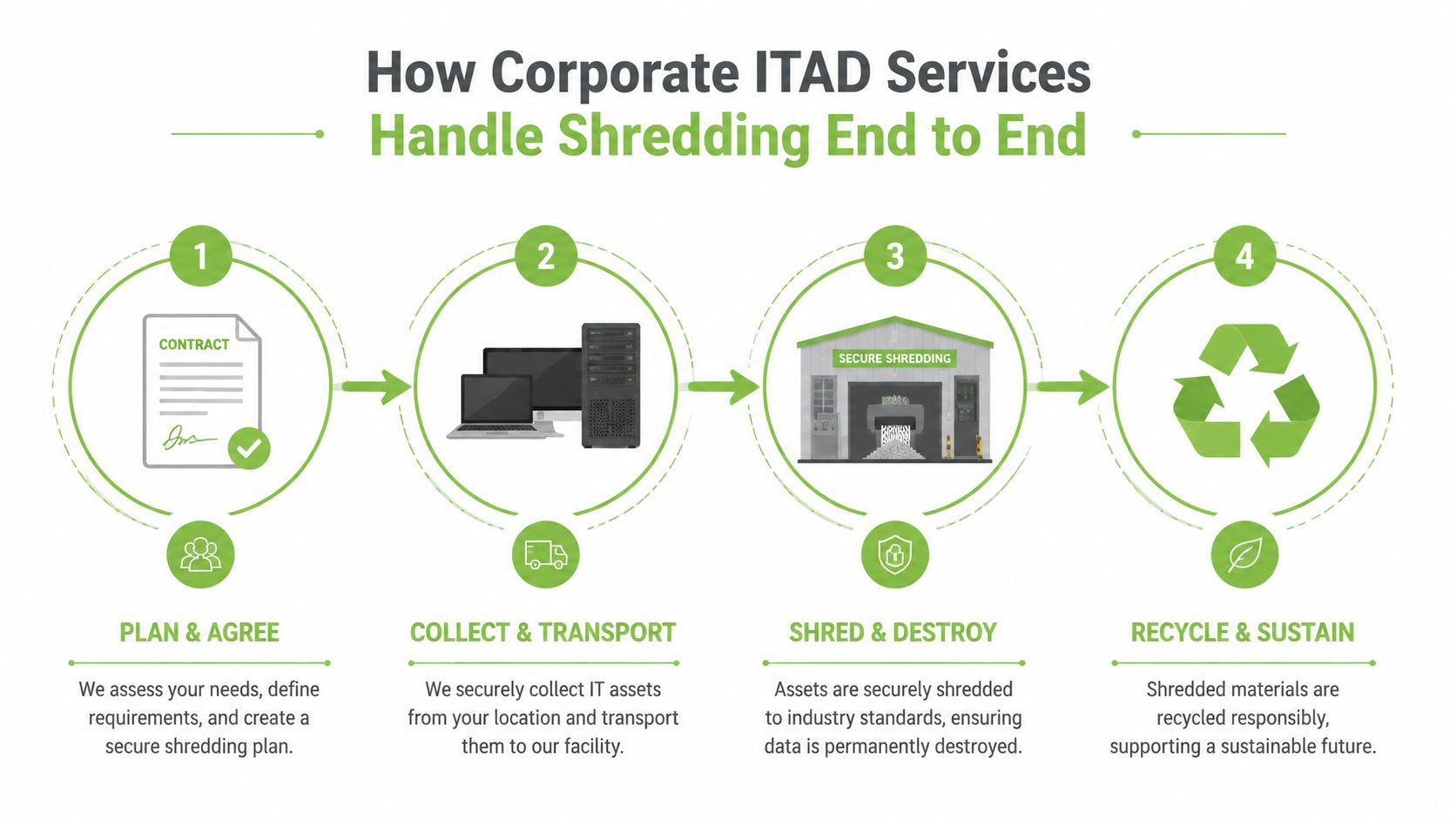
Corporate IT asset disposition, or ITAD, coordinates the retirement of laptops, desktops, servers, and their storage media. A well-run engagement starts with scope, not with a truck arriving at the loading bay. The provider and client agree on locations, asset records, security requirements, media types, and the intended outcome for each device.
Some equipment may be suitable for reuse after secure erasure. Other drives may contain sensitive information or be too old, damaged, or unsuitable for redeployment. Those assets can be assigned to physical destruction. The decision should be made before collection so the chain of custody reflects the client's risk assessment.
A practical corporate sequence
- Define the project: Confirm sites, equipment categories, custody requirements, and whether shredding, degaussing, or erasure applies.
- Prepare the inventory: Match serial numbers and asset tags to the company's register before the devices leave the premises.
- Choose the destruction setting: High-sensitivity batches may call for witnessed or on-site destruction, while routine retirements may move to a licensed facility under controlled custody.
- Document the result: Retain a certificate or destruction report that connects each asset with the applied method and final disposition.
What a useful certificate should show
A certificate of destruction should be specific enough for another person to understand the event without chasing missing details. Useful fields include:
- Asset identity: Serial numbers, asset tags, or another reliable identifier.
- Method: Shredding, degaussing, software erasure, or a documented combination.
- Timing: The destruction date and, where used by the provider, a timestamp.
- Responsibility: The operator, processing facility, and relevant sign-off.
- Downstream record: Material weights or recycling information where the service includes resource recovery.
This documentation serves two teams at once. Security staff can demonstrate that retired storage media was handled deliberately. Sustainability staff can track e-waste diverted from disposal, materials recovered, and the movement of metals into downstream recycling. The same ITAD engagement can therefore support data governance and a zero e-waste strategy without treating environmental responsibility as an afterthought.
Common Assumptions That Put Data at Risk
Old habits often make disposal feel easier than it really is. A quick reset feels complete because the screen looks clean, but a clean screen isn't the same thing as a destroyed storage medium. The safer replacement is to decide whether the drive will be reused, erased under a suitable process, or physically destroyed.
Assumption one, a format is enough
Risk: A format can remove the ordinary file index without delivering the irreversible outcome you need.
Better action: Select a documented erasure route for reuse, or use physical destruction when the drive is leaving service permanently. Singapore's PDPC guidance makes this outcome-based distinction clear.
Assumption two, donating the laptop transfers the responsibility
Risk: Giving away an old laptop without confirming what happened to its internal drive can leave personal or business information attached to the device.
Better action: Record the storage media, remove or sanitise it through a controlled process, and keep evidence of the result. Treat the drive separately if the laptop itself is being reused.
Assumption three, any collector is an e-waste solution
Risk: An informal handoff may not provide the custody records or data destruction controls required for sensitive media.
Better action: Use an authorised e-waste channel. Singapore's official recycling guidance says HDDs don't belong in blue recycling bins and should go to e-waste collection points that accept ICT equipment. The official hard disk drive recycling guidance explains that route.
Assumption four, a certificate is unnecessary
Risk: Without written evidence, the organisation may struggle to show what happened if an auditor, customer, or regulator asks later.
Better action: Request serial-numbered intake and a signed destruction record. For broader physical safeguards around sensitive facilities and equipment, Overton Security's resource on safeguarding critical infrastructure offers useful context.
Shortcuts don't remove responsibility. They only make the risk harder to see, measure, and resolve.
Letting Go of Old Hardware the Safe and Easy Way
Retiring an old drive often gets blocked by three feelings. You worry about a leak, doubt whether the chosen method is strong enough, and feel unsure about what happens after the device leaves your hands.
A controlled service answers each concern with a practical measure:
- Worry becomes traceability: Serial-logged intake and documented handoffs show where the asset went.
- Doubt becomes method matching: HDDs, SSDs, reuse decisions, and end-of-life destruction receive different treatment.
- Uncertainty becomes closure: A certificate of destruction gives you a record for your files and audit trail.
Singapore's licensed-recycler requirements support this disciplined approach. Data on a data-bearing device must be permanently erased or destroyed before reuse, recycling, disposal, or transfer to a non-licensed disposal facility. Physical destruction therefore fits within a wider secure and responsible e-waste workflow, not a standalone act of breaking hardware.
myhalo offers secure data destruction for data-bearing media, including physical destruction for faulty hard disks, with a Certificate of Data Destruction available for storage media handled through its service. Its wider lifecycle approach connects privacy protection with repair, reuse, upcycling, and responsible recycling. That combination helps households and organisations clear unused technology without treating security and sustainability as competing priorities.
The best time to deal with the drive is when you find it, while its history and ownership are still clear. A scheduled collection, recorded intake, suitable destruction method, and final certificate can turn a drawer full of uncertainty into a small, responsible step towards a zero e-waste lifestyle.
Ready to feel lighter and do good? Let's clear out those old devices together! Check out myhalo's Declutter your e-clutter programme today and see how convenient it is to make a positive splash for our environment. Visit myhalo to arrange a secure handover for retired hard drives and move them towards safe destruction and responsible recycling.