
Your Samsung phone picked the worst moment to act up. The screen's cracked, the battery is fading by lunchtime, or the phone just froze after a fall into the sink, and now you're staring at it wondering the same three things most Singaporeans ask first, how much will this cost, can my data still be safe, and is it smarter to repair or move on.
The honest answer is that samsung phone repair is often the smarter first move, especially when the fault is localised and the device still has life left in it. Singapore also has a strong reason to keep phones in use, because the National Environment Agency reported 11.8 million tonnes of waste in 2023, with an overall recycling rate of 12% and domestic recycling rates of <10% for several waste streams, which makes repair and reuse more sensible than reflex replacement (NEA waste and recycling overview). If you're trying to protect your photos, messages, and resale value at the same time, the right repair path matters just as much as the repair itself.
Table of Contents
- Your Samsung Phone Broke Now What
- Common Samsung Phone Problems and What Causes Them
- Safe DIY Troubleshooting Before You Seek Professional Help
- Authorised vs Independent Repair Which Path Is Right for You
- Protecting Your Data and Maximising Resale Value After Repair
- How to Choose the Right Samsung Repair Provider in Singapore
- Why myhalo Makes Samsung Phone Repair Simple and Sustainable
Your Samsung Phone Broke Now What
A Singapore office worker drops a Galaxy on the train platform, sees the display spiderweb, and immediately assumes the day is ruined. That reaction makes sense, because a broken phone feels like a data problem, a money problem, and a convenience problem all at once. The temptation is to buy a new one quickly, but that's usually the expensive route when the damage is limited to a screen, battery, or connector issue.
The smarter move is to pause and sort the problem into three buckets, can it power on, is the issue software-related, and is the damage physical. Samsung's service history shows this is not a niche concern. Samsung disclosed in U.S. court testimony that more than 4 million phones per year were returned for service, described as 4 million to 5 million a year in the 2010 to 2012 period, plus about 1 million additional returns for broken screens (CNET on Samsung service volume). That scale is exactly why a repair-first mindset is practical, not sentimental.
Practical rule: if the phone still turns on, don't assume the worst. Rule out software issues before paying for hardware work.
For Singapore users, the repair-first approach also fits the way a lot of people use their phones. A working Galaxy can still serve as a backup device, a trade-in candidate, or a passed-down phone for family use. That's where a repair and rescue mindset helps, because it keeps the device in circulation instead of becoming drawer clutter.
If you're trying to decide what to do next, start with a repair triage mindset, then think about whether the phone is worth restoring, trading in, or responsibly retiring. Myhalo's Safe data and Declutter your e-clutter approach fits that kind of decision-making, because the aim isn't just to fix a screen, it's to help you keep control of the device's next life. For a simple first read on what to do when a phone breaks, see what you can do after your phone breaks.
Common Samsung Phone Problems and What Causes Them
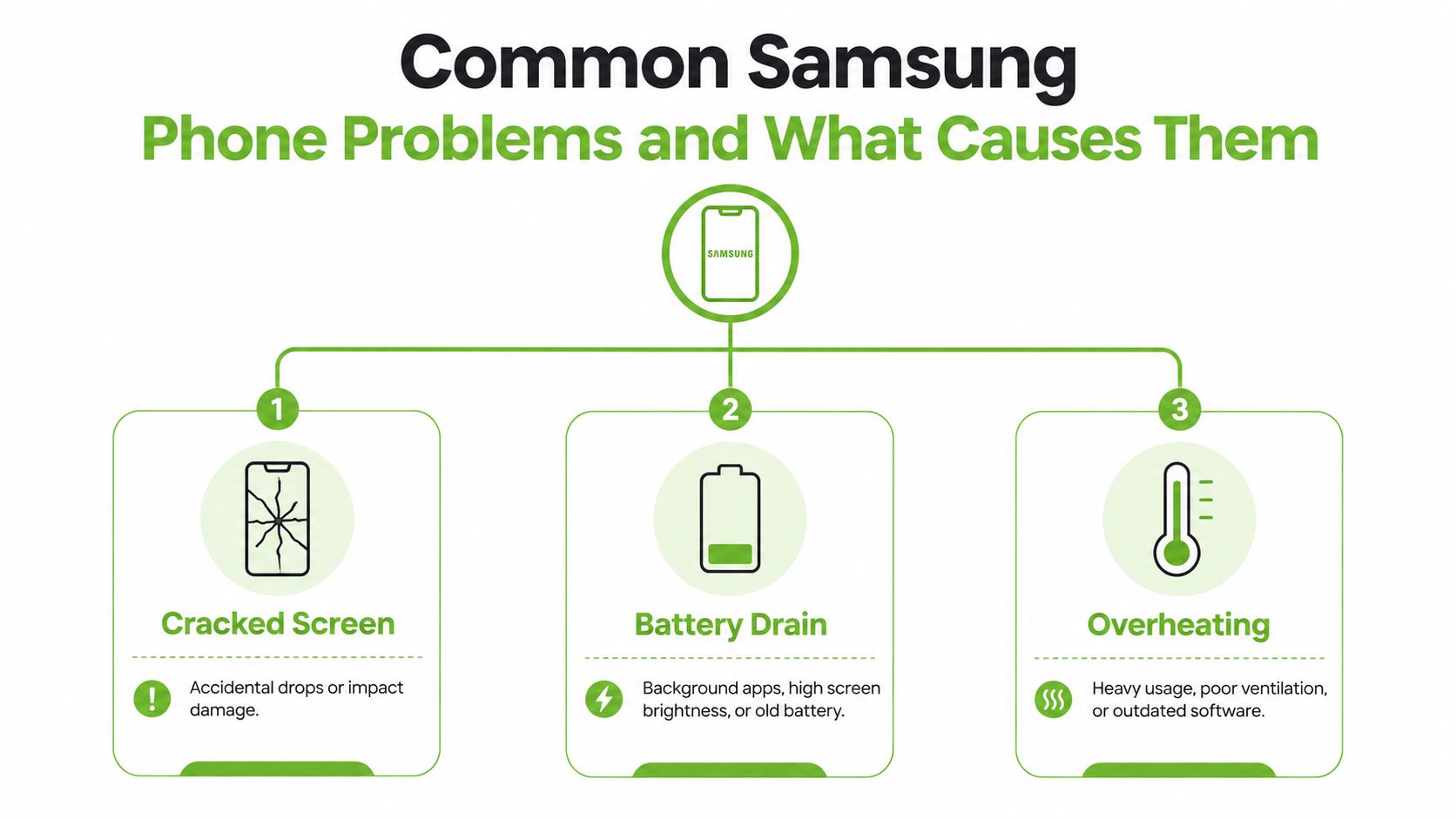
Cracked screens and display damage
A cracked Samsung screen usually starts with a simple drop, knock, or pressure point, but the damage often goes beyond the glass. Once the display assembly is stressed, the problem can spread to the panel, frame, or internal connectors, especially on phones that are harder to open cleanly because of strong adhesives and tightly integrated parts (SlashGear on Samsung repair difficulty).
That is why a screen repair is not always a quick cosmetic job. A proper technician should check whether the damage is limited to the front display or whether the phone needs a fuller inspection before any parts are changed. In Singapore, that matters if you are deciding whether to repair the phone for continued use, fix it for resale, or stop spending on a device that is already close to retirement.
Battery drain, charging faults, and overheating
Battery complaints usually come from three places, an ageing battery, a charging path problem, or software draining power in the background. A phone that heats up, drains fast, or acts strangely while charging does not automatically need a battery swap. It may only need a port check, a charging accessory check, or software cleanup first.
Water exposure is a different case. Samsung's support guidance says waterlogged phones should be powered off, dried carefully, and taken to an Authorized Service Center as soon as possible, because moisture and salinity can corrode the mainboard (Samsung physical damage guidance). If a phone has both a crack and liquid exposure, the smarter call is to treat it as mixed damage, not just a broken screen. That kind of device can still be repairable, but it also deserves a resale check, because the cost of fixing board damage can outweigh the value you recover later.
Software glitches that look like hardware failure
Frozen apps, random reboots, and slow performance can look like hardware trouble, but they often start with a bad update, a new app, a corrupted cache, or a rough drop that only upset the software. Start with the cause, not the parts. If the problem began after an install, update, fall, or spill, a technician should test the software side before recommending replacement parts.
A careful diagnosis saves money because it stops people from replacing parts that weren't broken.
For a practical look at how replacement parts fit into phone repair decisions, myhalo's phone repair parts and what they do guide is worth a read. The point is simple, the cleaner the diagnosis, the less likely you are to pay for unnecessary teardown, and the easier it is to decide whether repair, trade-in, or retirement makes the most sense for the phone.
Safe DIY Troubleshooting Before You Seek Professional Help
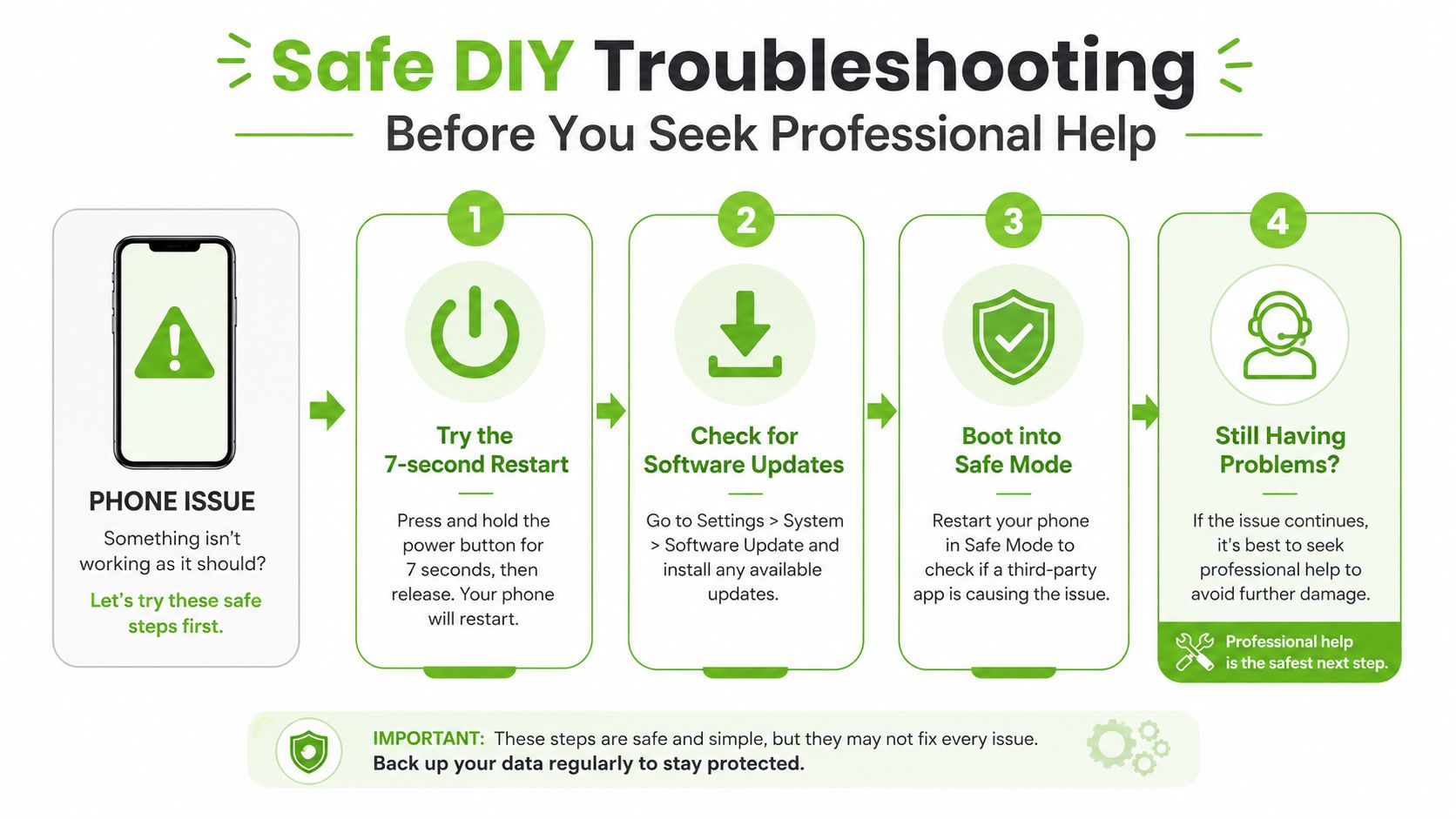
A Samsung phone that still powers on gives you room to try the safest fixes first. Start with a forced restart, then move to Safe Mode and basic software checks. Samsung SG's own troubleshooting flow supports that order, and the Factory data reset stays at the end because it clears your data and settings (Samsung SG troubleshooting tips).
Use the lightest fix first
A forced restart is the first move when the phone freezes, lags, or acts stuck. If that does not help, check for a software update, then use Battery and device care > Optimize now, and try Reset all settings before you even think about wiping the phone. Samsung includes these steps in its own guidance, so treat them as the normal path before you pay for a repair.
Safe Mode tells you whether an app is the problem
Safe Mode is the quickest way to separate an app issue from a hardware problem. If the phone behaves properly in Safe Mode, the cause is usually a third-party app, a messy setting, or a corrupted cache. That is a good sign, because it means you may avoid unnecessary parts replacement and keep the phone in better shape for repair or resale.
If the phone still misbehaves in Safe Mode, stop blaming apps. That points you toward a deeper software fault or a hardware issue, and that is the point to compare repair cost against the phone's resale value. If the repair cost is sensible, fix it. If the cost is too close to the value you would get from a trade-in, protect your data, back up what you need, and choose the cleaner exit.
Stop here if the phone is water-damaged. DIY software fixes are fine for glitches, but a wet phone needs a proper inspection fast.
When software checks do not solve the problem, get a proper diagnosis instead of guessing. If you want a clearer view of the parts side of repair decisions, see what repair parts are commonly involved. That kind of check helps you decide whether to repair, trade in, or retire the device, and it also tells you whether a factory reset makes sense after your backup is complete.
Authorised vs Independent Repair Which Path Is Right for You
The choice is not “Samsung or not Samsung”. It is whether your phone needs warranty-safe handling, fast turnaround, lower cost, or a more detailed component-level fix. Samsung's official network is broad, and it also offers self-repair support with genuine parts, tools, and manuals for models sold since July 2021 (Samsung global service network and self-repair). That reach helps, but it does not make official repair the automatic answer for every broken phone.
| Factor | Authorised Samsung Service | Independent Repair Shop |
|---|---|---|
| Warranty status | Better aligned with warranty and official repair processes | Often more suitable for out-of-warranty devices |
| Parts | Official parts and Samsung-approved workflows | Parts quality depends on the shop, ask directly |
| Speed | Samsung says authorised centres can provide same-day repair in most cases in the U.S. market (Samsung cracked screen repair) | Can be faster for straightforward jobs if stock is available |
| Convenience | Multiple modes exist, including in-person, mail-in, and mobile vans | Usually easier for walk-in diagnostics |
| Best fit | Newer phones, warranty-sensitive cases, complex claims | Older phones, urgent jobs, cost-sensitive repairs |
Choose official service when the case is delicate
Go official if the phone is under warranty, has mixed damage, or needs a claim that must stay inside Samsung's service channels. Samsung's repair flow includes request and status tools, and it uses identifiers such as the IMEI or serial number to manage the service process (Samsung service request page). That suits owners who want formal paperwork, a clear service trail, and fewer arguments later about what was done.
For phones that still have resale value, official repair also gives you a cleaner story at trade-in time. A documented repair is easier to explain to a buyer or trade-in desk than a vague fix from an unknown source, especially if you plan to sell the device soon after.
Choose independent repair when the numbers make more sense
If the phone is out of warranty and the fault is straightforward, an independent shop is often the better call. You usually get more room on price, faster turnarounds for simple jobs, and a clearer answer on whether the phone is worth saving at all.
That decision gets even sharper if the repair bill starts creeping close to the phone's trade-in value. At that point, stop forcing a full restore. Back up your data, wipe what you can, and choose between repair, trade-in, or parts harvesting based on the actual value left in the device. If you need a practical reminder of why pre-sale backup matters, see backing up your data before selling your phone.
A good local repair adviser should be blunt here. If the cost of repair is too close to the value of the phone, ask about trade-in or parts harvesting instead of paying for a fix that does not make financial sense. Repair should protect value, not sink more money into a phone that is already on the edge.
For phones that still have useful life after repair, keep the resale path in mind from the start. That means choosing the option that preserves data security, keeps the device presentable, and leaves you with a clean handover if you decide to sell later. The idea behind digital stamp cards for fitness studios is simple, structured handover matters, and the same logic applies when you pass on a repaired phone.
Protecting Your Data and Maximising Resale Value After Repair
Repair and resale are linked, whether people treat them that way or not. If you repair a Samsung phone, you may still want to trade it in, sell it, or keep it as a backup. The first step is always to back up your data before any service visit, because some repairs are software-light and others involve a reset or part swap that can wipe the device.
Samsung support and consumer repair guidance both stress the same basic discipline, back up first, remove SIM and microSD cards where relevant, and understand whether the repair will trigger a wipe. That matters because a repaired phone can still carry sensitive information unless you verify what was erased and how. For a practical checklist on backing up before sale, see backing up your data before selling your phone.
Trade-in value depends on the repair outcome
A phone that powers on after repair is easier to assess for trade-in or certified resale than one that still has intermittent faults. A device that is no longer economical to restore may still have value in parts harvesting, which is a better outcome than leaving it in a drawer. That's where repair, resale, and end-of-life handling blend into one decision.
If you need a model for secure digital handover after repair, the idea behind digital stamp cards for fitness studios is a useful analogy, because clean digital records make handoffs simpler and more trustworthy. In device terms, you want the same clarity, a clear record that the phone was backed up, checked, and wiped properly before it changed hands.
Keep the repair record, the backup proof, and the wipe confirmation together. That paperwork protects you later if the phone is sold, traded in, or passed to someone else.
My view is simple. If the phone is repairable and the data can be handled cleanly, repair first. If the repair only gets the phone halfway back, then you need to decide whether certified resale, trade-in, or responsible recycling gives you the better outcome.
How to Choose the Right Samsung Repair Provider in Singapore
Your Samsung screen cracks on the way to work, or the battery starts dying before lunch. At that point, the wrong repair choice can waste money twice, first on a poor fix, then again when you realise the phone still has low resale value. Start by asking what the repair does to the phone's next step, because the right provider should help you decide whether to keep using it, trade it in, or retire it properly.
Samsung's service locator already shows that repair options come in different categories, including official repair partners and independent service providers, with Samsung's broader network described as having more than 700 uBreakiFix locations nationwide and more than 1,100 independent service providers (Consumer Reports on Samsung service network). That spread matters. Some providers are set up for quick, standard repairs, while others are better for phones that may still be worth selling, trading in, or salvaging for parts.
What to ask before handing over the phone
- Ask for the diagnosis logic. A technician should tell you whether the problem points to software, battery, charging port, display, or board damage, and why.
- Check the parts source. Genuine or high-quality parts matter, especially for screens and batteries, because cheap parts can hurt both performance and resale value.
- Confirm the repair warranty. The shop should state what is covered, what is not, and how long the coverage lasts.
- Ask about data handling. Repairs and data protection belong in the same conversation, especially if your phone still has personal photos, work files, or app logins.
- Get a written estimate. A written quote gives you something to compare against if the repair changes after inspection.
Watch for these red flags
A provider that jumps straight to “replace everything” without explaining the fault is avoiding proper diagnosis. So is a shop that refuses to say whether the phone will be opened, cleaned, or only partly repaired. If you are comparing handover and return processes for devices, Shopify shipping to Singapore tips is a useful reminder that every step matters, from intake to the final return.
If you want a local reference point for comparing repair options, use this Singapore repair guide as a practical checklist. The provider worth choosing is the one that gives you straight answers, a sensible repair plan, and a clear path to reuse, trade-in, or responsible disposal.
Why myhalo Makes Samsung Phone Repair Simple and Sustainable
myhalo is built for the exact kind of decision people struggle with after a Samsung phone breaks. Sometimes the right answer is repair. Sometimes it's trade-in, resale, or certified disposal. The useful part is having one place that can help you decide without pushing you into the wrong outcome.
For Singapore users, the value is in the workflow. myhalo combines Repair and Rescue diagnostics, component-level fixes, certified resale, trade-in, buyback, data recovery, and secure disposal under one roof, with in-store drop-off at Bugis Junction (#03-25/26) and Sim Lim Square (#03-40). It also uses an AI-backed pricing algorithm for fair, transparent quotes and supports secure data handling with documented processes, which is exactly what you want when a phone may still have resale value or sensitive files. If you want a deeper look at service design and support, generative AI powered customer support shows how structured service can make these handovers easier.
The repair-to-resale decision tree is where myhalo makes the most sense. A cracked Samsung that can be restored can go through repair and keep working. A device that is not worth repairing can move into buyback, parts recovery, or certified resale instead of becoming useless clutter. That's a much cleaner outcome than buying new by default.
If you're comparing options, think in this order, repairability first, data safety second, resale potential third. That sequence protects your wallet, your privacy, and the environment at the same time.
Your precious files and memories matter to us. Whether you need to protect your privacy with Safe data or rescue lost files with Save data, our caring team is right here to help. Reach out to us today!