

A laptop screen can fail in the middle of a workday, right before a class, or after one unlucky knock on a café table. The first reaction is usually panic, then a quick search for replacement parts, then the nagging question of whether the whole device is still worth saving. In Singapore, that question sits inside a repair-first environment, where reuse, refurbishment, and proper treatment of electronics are part of the bigger e-waste picture, not an afterthought (NEA e-waste framework context).
For many people, the screen is the part that makes the laptop feel “broken”, even when the rest of the machine still powers on. That's why smart laptop screen repairs start with diagnosis, not tools. A calm check can tell you whether you're dealing with a cracked panel, a cable fault, a backlight issue, or something that doesn't need a screen swap at all.
Table of Contents
- When the Screen Goes Dark and What Happens Next
- Triage First Diagnose Before You Repair
- Matching the Replacement Panel the Compatibility Gate
- DIY Versus Professional Repair How to Decide
- What Repair Costs and Turnaround Look Like in Singapore
- Choosing a Trustworthy Repair Service What to Ask
- Beyond Repair Data Security Trade-In and Upcycle
- A Quick Decision Checklist and a Friendly Next Step
When the Screen Goes Dark and What Happens Next
You open the lid and the laptop does not give you a clean answer. The display flickers, a line runs across the panel, the screen stays black, or the keyboard lights up while the picture never appears. If the lid also feels uneven or rests at a strange angle, hinge stress may be part of the problem, not just the screen itself.
A sensible repair starts with three questions before anyone touches a screwdriver. Is this really a screen fault. Does it need a panel swap, a cable fix, or a different repair path. What should the laptop look and feel like after the job is finished.
This diagnostic order is key because laptop screen repairs are easier to trust when the diagnosis comes first. That approach also fits Singapore's official e-waste management framework, which supports repair and reuse for devices that can still do useful work instead of being treated as waste.
You do not need to be a technician to make a good call. A short checklist, a basic sense of how screens fail, and a few clear questions at the counter are enough to keep the repair conversation grounded. If you want a fuller breakdown of hardware fault checks, this guide on computer hardware troubleshooting gives a useful starting point.
Practical rule: if the laptop still boots, do not assume the screen glass is the only part that failed.
Triage First Diagnose Before You Repair
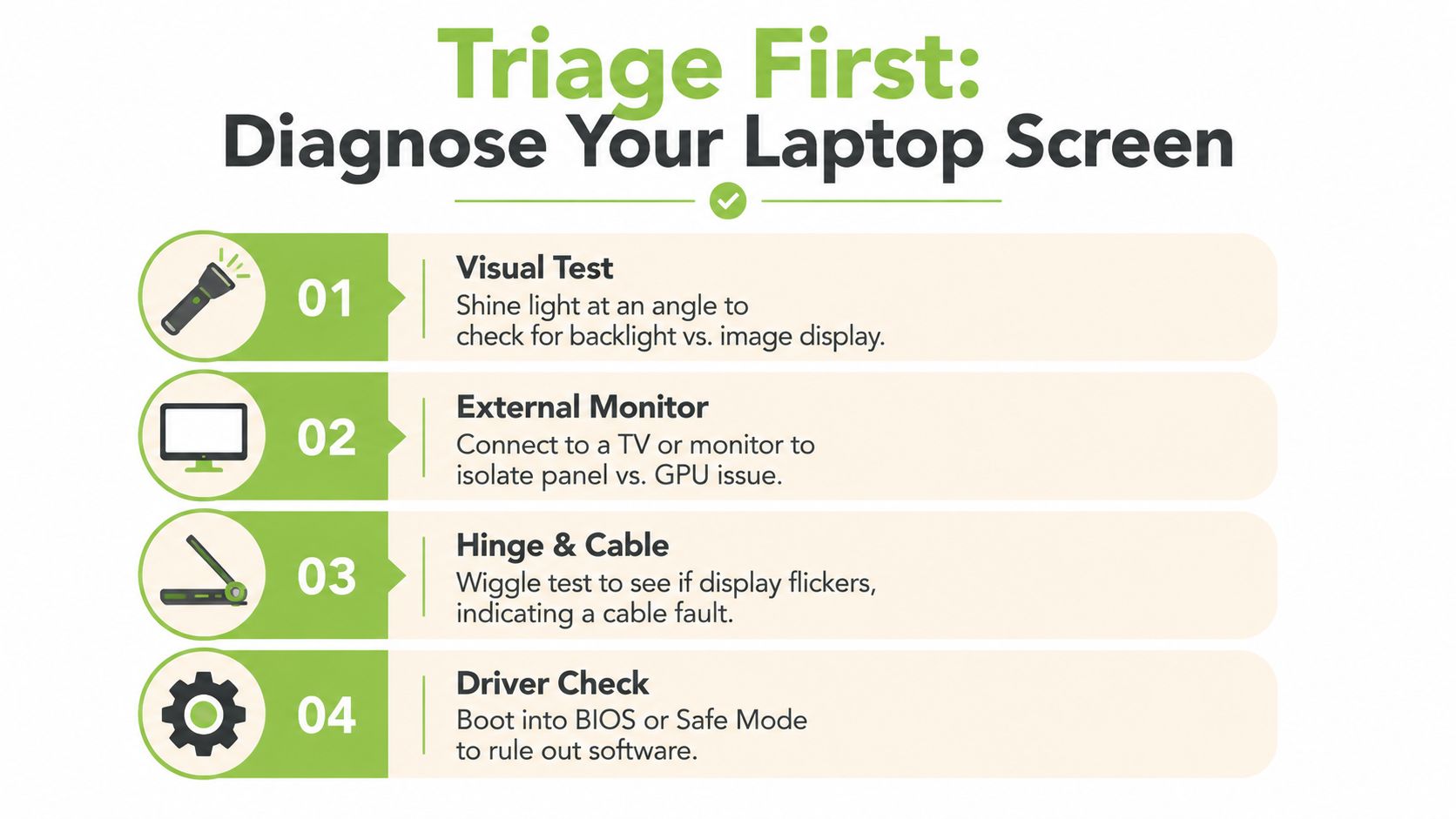
A cracked-looking screen and a dead screen are not always the same problem. The fastest way to avoid a wrong quote is to run four simple checks before you book anything, because bad diagnosis can turn a small cable issue into a full panel replacement.
- External monitor test. Plug the laptop into a TV or monitor. If the external display works normally, the main laptop board may be fine and the problem may sit with the panel, cable, or lid assembly.
- Flashlight test. Shine a light at the dark screen from an angle. If you can faintly see a desktop or login page, the backlight may be dead rather than the image layer itself.
- Lid-movement flicker test. Open and close the lid gently. If the picture cuts in and out, a fraying display cable or a hinge-related strain point becomes more likely.
- BIOS or Safe Mode check. Boot into BIOS or Safe Mode to see whether the issue follows the operating system. If the display behaves differently there, software or driver trouble may be involved.
In plain terms, these checks help you separate glass damage, LCD failure, backlight trouble, cable faults, and software glitches. That matters because a laptop can look badly broken while still needing a smaller fix, which keeps cost and waste down in a repair-oriented city like Singapore. For a fuller hardware checklist, see this Singapore troubleshooting guide.
If the external monitor works, the laptop itself may still be healthy.
A quick triage ritual also helps you speak the same language as the technician. Instead of saying “my screen is gone”, you can say, “it flashes when I move the lid” or “I can see an image with a flashlight”. That single sentence often saves time at the counter.
Matching the Replacement Panel the Compatibility Gate
Once you know the panel really needs replacing, the next step is compatibility. Many people get tripped up at this stage, because two screens can look almost identical and still fail to fit, connect, or operate properly.
The replacement has to match the original in size, resolution, connector type, connector location, touch or non-touch design, mounting style, and often the exact panel model number (panel compatibility requirements). If any one of those is off, the install can become electrically or mechanically incompatible even if the replacement “looks right”.
Trying to fit the wrong plug into a socket demonstrates the problem. The shape may seem close, but the fit is still wrong, and forcing it usually makes the situation worse. That is why reputable repair shops quote by part number, not by appearance.
| Panel Compatibility Checklist | Why it matters | What goes wrong if ignored |
|---|---|---|
| Size | The panel must match the lid opening | It may not fit the bezel or mounting frame |
| Resolution | The display timing and sharpness need to match | Image quality can be wrong, or the screen may not initialise correctly |
| Connector type | The cable has to mate with the panel | The laptop may not power the screen at all |
| Connector location | Left, right, or centre placement affects routing | The cable may not reach or may bend unnaturally |
| Touch or non-touch design | Touch models use different layers and hardware | Touch features can fail, or the panel may not work as expected |
| Mounting style | Tabs, brackets, and screw points must line up | The panel can sit loose or not install cleanly |
| Exact model number | Small internal differences matter | A visually similar panel can still be the wrong part |
A helpful way to ask a shop is simple. “Can you match this by panel number, not just by laptop model.” That question cuts through a lot of confusion.
For a practical repair-or-replace comparison, see this laptop screen decision guide.
DIY Versus Professional Repair How to Decide
DIY laptop screen repairs can be satisfying if you like careful hands-on work. They also come with real risks, especially on thin modern laptops where the bezel, display cable, and adhesive strips can be damaged during a first teardown. A rushed job can turn a screen issue into a hinge or cable problem.
Professional repair makes more sense when the panel is awkward to source, the laptop is urgently needed, or the device is still under a warranty arrangement that you do not want to jeopardise. It also helps when you want the panel installed and tested by someone who handles these machines every day.
A useful rule is to test before the laptop goes back together. HP's DIY screen repair guidance recommends reconnecting power, booting the device with the bezel still off, and checking for dead pixels, colour shifts, backlight defects, and touch errors. That habit catches seating problems and panel defects before you close everything up again.
Good DIY means test first, reassemble later.
If you're handy with a spudger, have a clean workspace, and don't mind buying the right part in advance, DIY can make sense. If you need the laptop back quickly, or you'd rather not gamble with a fragile cable under the bezel, a shop is the calmer path. There's no prize for doing it the hard way.
The right choice is the one that matches your skill, time, and tolerance for risk. That's the part many first-timers skip, then regret later.
What Repair Costs and Turnaround Look Like in Singapore
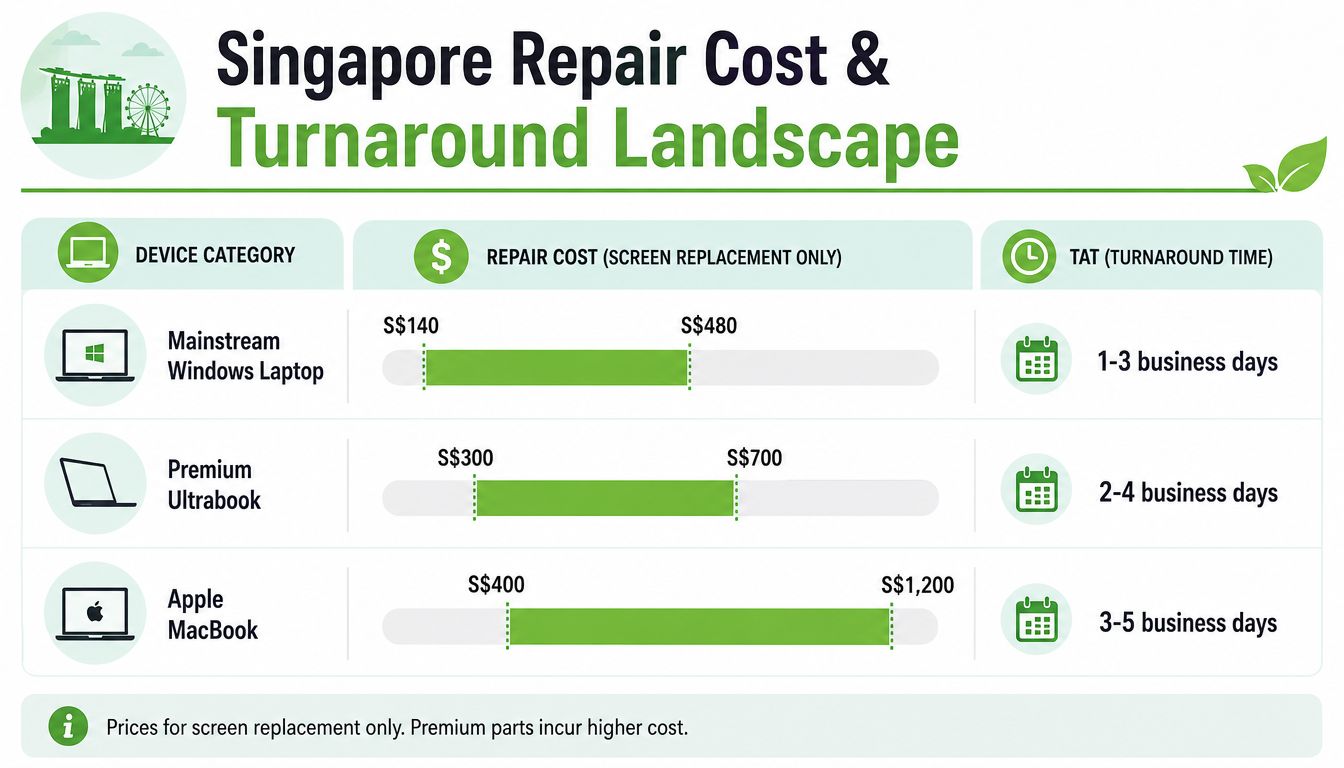
For most Singapore owners, the repair decision starts with the cost of keeping the laptop alive versus replacing the whole machine. Industry pricing guides commonly place professional laptop screen replacement in the broad range of about S$140 to S$480 for mainstream Windows laptops, with touchscreen and premium panels costing more, and high-refresh gaming or OLED screens reaching roughly S$260 to S$650 equivalent in similar regional guides (laptop repair pricing guide).
That range makes screen repair one of the clearest lifecycle choices in the market. If the laptop is otherwise solid, a repaired panel can preserve the machine's remaining value instead of pushing it into early retirement. That matters in Singapore, where many users keep devices longer and care about resale or trade-in value.
Turnaround depends on more than just the labour itself. Panel availability is usually the biggest factor, because the right part may need to be ordered. A glued bezel or a stressed hinge assembly can also slow the job, since the technician has to work more carefully to avoid cracking the frame or damaging the cable route.
A rough planning rule is simple, in-stock mainstream repairs can move faster than premium panel jobs, while specialty displays often wait on parts. If you need the laptop for work or study, ask the shop whether they can confirm part availability before you hand it over.
Use the comparison below as a mental map, not a promise:
- Mainstream Windows laptops: usually the most straightforward repair path.
- Premium ultrabooks: often cost more because the panels are thinner, brighter, or harder to source.
- Gaming and OLED models: can be pricier because the screen spec itself is the expensive part.
For Mac owners comparing repair versus upgrade, this MacBook repair guide is useful background.
Choosing a Trustworthy Repair Service What to Ask
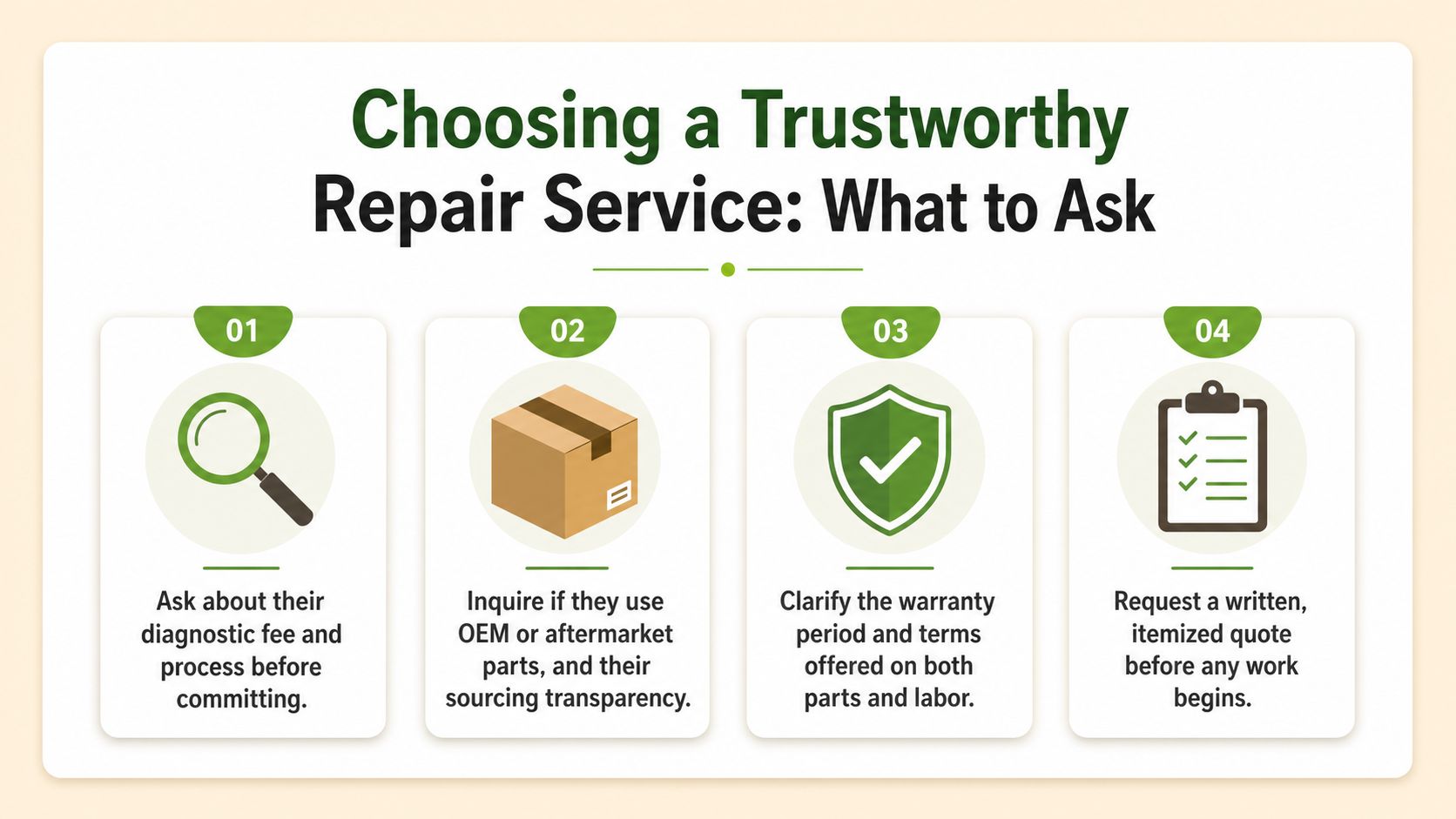
A trustworthy repair counter should be able to explain its process before you hand over the laptop. If the answers feel vague, rushed, or defensive, slow down and ask again. Good screen repair starts with clear diagnosis, not guesswork.
A first-timer usually needs a shop that can separate a broken panel from a loose cable, hinge strain, or a board-level fault. That distinction matters because the wrong diagnosis can send you into a replacement you did not need. The best counters usually explain what they will test, what they suspect, and what would change the quote.
Ask these four questions first:
- What diagnostic checks will you run? You want the shop to confirm whether the fault is the panel, cable, hinge, or something else before quoting.
- Where do the parts come from? Ask whether they use OEM or aftermarket panels, and how they source them.
- What warranty covers the parts and labour? Get clarity on both, not just one or the other.
- Will I receive an itemised quote before work begins? A written breakdown prevents surprises later.
That last point matters if the technician opens the laptop and finds a second problem. A clear quote should say what will be replaced, what the part is, and what happens if the replacement panel turns out to be faulty. If the shop cannot explain that in plain language, the repair process may be less controlled than it should be.
Data care matters too. Before drop-off, back up your files if the laptop still boots, note the device's visible condition, and keep any login or password issues written down. For a Singapore-based service that handles device lifecycle work, including diagnostics and data security, myhalo is one option. For readers who want a broader view of what to ask before handing over a machine, this guide on deciding between repair and replacement is a useful companion.
Practical rule: a written quote beats a verbal promise every time.
Beyond Repair Data Security Trade-In and Upcycle
A cracked or blacked-out screen does not always mean the laptop is finished. In Singapore, the next step can still be a secure handover, a resale check, or a parts-recovery route that keeps useful hardware in use a little longer. That fits the country's e-waste direction, where consumer collection under Singapore's Extended Producer Responsibility scheme for electronics applies to regulated products such as laptops and computers.
Before deciding the next step, assess the device's remaining value. A working screen can lift a trade-in offer because the laptop is easier to test and resell. A dead screen may still leave a usable battery, keyboard, storage drive, or motherboard that can help another repair.
Before any disposal or handover, back up your files and do a secure erase if you can still reach the data. That protects photos, work documents, and saved logins, and it also makes the laptop easier to sell or process. For a privacy-first checklist, see this guide to secure data destruction for devices.
The most practical options usually fall into three buckets:
- Trade-in or resale for laptops that still have enough value left.
- Upcycle or part harvest for machines where the screen is gone but other components can still help.
- Certified e-waste disposal when repair no longer makes sense.
That order matches Singapore's repair-first mindset. The goal is not to keep every laptop alive forever. The goal is to choose the next step that protects your data, avoids unnecessary waste, and gives usable parts another life where possible.
A Quick Decision Checklist and a Friendly Next Step
If your screen just failed, keep the decision simple.
- Run the triage checks first.
- Decide whether DIY suits your skill and time.
- Match the panel by part number, not by looks.
- Ask for a written quote with parts and labour separated.
- Back up data before the device leaves your hands.
- Think about repair, trade-in, or upcycle before disposal.
That order keeps the process calm and avoids expensive guesswork. It also fits Singapore's repair-first reality, where a careful fix often makes more sense than an automatic replacement.
If you want hands-on help, a device assessment, or a next-step plan for a screen fault that may not be just the screen, the team at myhalo can help with repair, rescue, resale, and secure data handling in one place. Bring the laptop in, ask for a diagnosis-first check, and let the device get the right path instead of the quickest guess.
Ready to feel lighter and do good? Let's clear out those old devices together, whether that means a repair, a trade-in, or a safer next step for a laptop with screen trouble. Visit myhalo to explore a convenient, responsible path for your device today.