
Data recovery is the process of retrieving inaccessible, deleted, corrupted, or damaged data from storage devices to restore access after failure or loss. In Singapore, more than US$1 billion was lost by local firms over a 12-month period, while 66% of surveyed businesses experienced data loss or downtime during that same period. Singapore's PDPC data-breach guidance shows why losing access to information isn't just a technical nuisance.
You may be staring at a phone that won't turn on, a laptop showing an empty folder, or an external drive making an unfamiliar clicking sound. Perhaps a family photo folder disappeared after an accidental format, or an important work document became unreadable just before a meeting. That sinking feeling is understandable. Digital files often carry memories, income, customer information, and years of effort.
Data recovery doesn't always mean “undeleting” a file. It can involve restoring access after accidental deletion, file-system corruption, a failed component, ransomware, liquid damage, or another disruption. The right response might be professional recovery, restoring a clean backup, or securely destroying the device when its remaining data must no longer be retained.
Table of Contents
- Introduction to What Data Recovery Really Means
- How Data Storage and Deletion Actually Work
- Common Causes of Data Loss You Should Know
- Three Levels of Data Recovery Explained
- Success Rates Costs and Timelines in Singapore
- When to Try DIY Tools and When to Call Professionals
- Protecting Your Data and Next Steps With myhalo
Introduction to What Data Recovery Really Means
A laptop can crash before a presentation, a phone can stop responding after water damage, or an external drive can refuse to open a folder. The device may look empty or unusable, yet some information could still remain. What is data recovery? It is the process of trying to retrieve usable information when normal access has failed.
The problem can occur at different layers. The operating system may lose the record that points to a file. The storage hardware may no longer read its contents. Encryption may keep the information inaccessible without the correct credentials. These situations need different responses, so recovery is not one universal button or software scan.
For a Singapore business, the first decision is practical: recover the original data, restore a backup, repair the device, or destroy the storage securely. A clean, recent backup may make restoration safer and faster than working on the failed drive. If no usable backup exists, recovery may be appropriate. If the data must not remain on the device, secure destruction is the correct outcome rather than continued retrieval. Singapore's data-loss and downtime context also shows why organisations need a response plan before an incident occurs.
Recovery is different from backup and repair
A backup is a copy made before a problem happens. Restoring it replaces missing or damaged files with a known copy, provided the backup is current, complete, and readable. Data recovery works from the affected storage or another damaged source when a backup is missing, outdated, incomplete, or unusable.
Repair has a different target. Replacing an iPhone screen can restore the display, but it will not automatically bring back deleted photos. Replacing a laptop battery can restore power, while leaving a corrupted file system unchanged. A repaired device may still need recovery, and recovered files may still need to be moved to healthy storage.
The practical idea: recovery tries to save information. Repair tries to make the device function. Backup restoration uses a separate copy. Secure destruction removes the storage when retaining its data is no longer wanted.
Use a simple decision check before trying anything:
- Backup available and verified: restore the backup first.
- No usable backup, device still stable: consider a careful DIY scan.
- Clicking, overheating, severe damage, or important files: stop using it and seek a recovery lab.
- Data must not be retained: choose secure destruction instead.
This distinction helps prevent a common mistake, repairing or repeatedly scanning a device when the safer choice is backup restoration or professional recovery.
How Data Storage and Deletion Actually Work
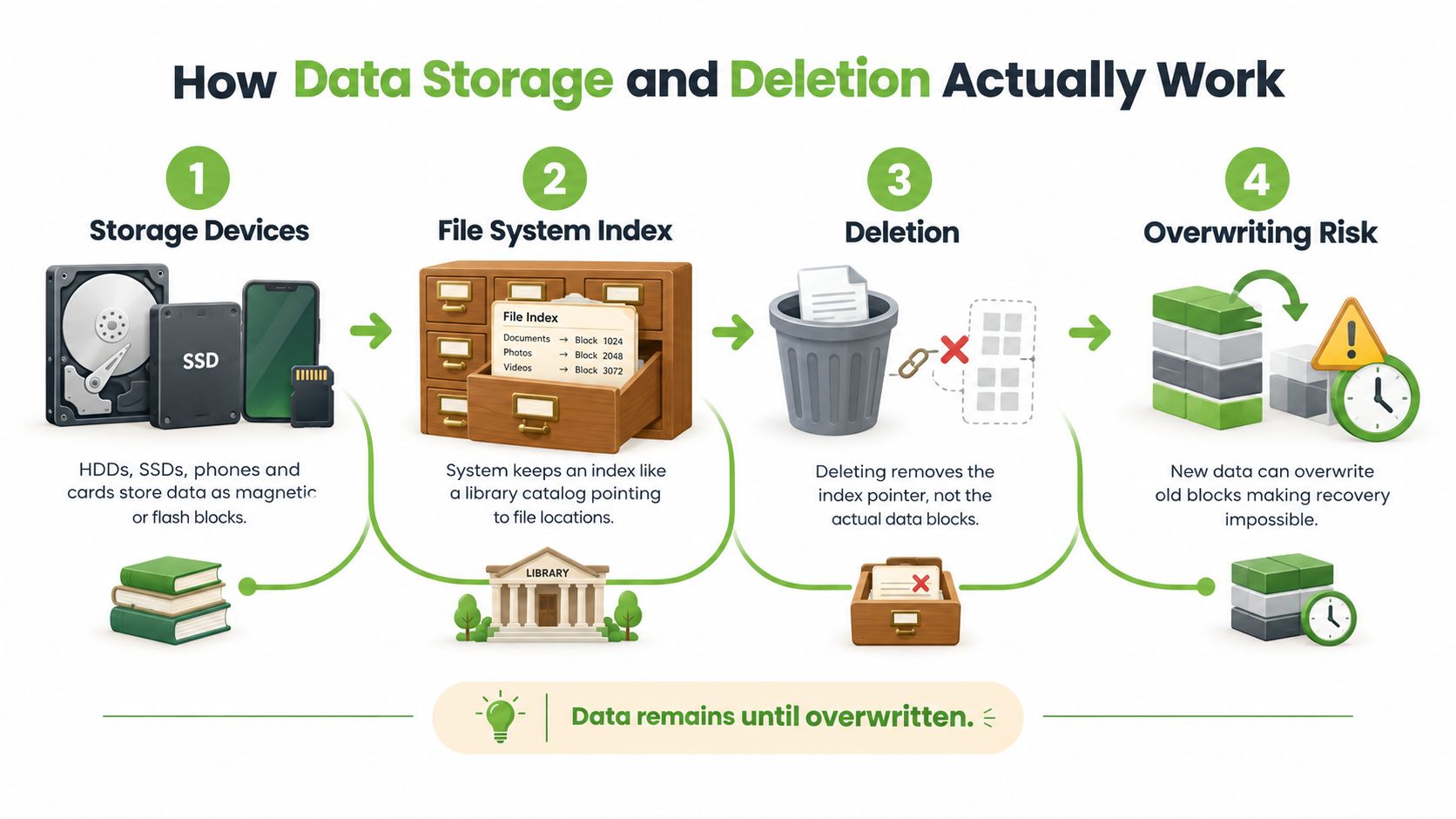
Your laptop, phone, camera card, USB drive, or external hard disk stores information in very small areas called blocks. Hard disk drives, or HDDs, use magnetic storage on spinning platters. SSDs, phones, and memory cards use flash memory, where electronic charges represent data.
A file system organises those blocks. It records the file name, size, location, and other details needed by the operating system. The actual file content is separate from this index, much like books are separate from a library catalogue.
What deletion changes
When you delete a file, the system often removes or changes the catalogue entry that points to its storage blocks. The underlying content may remain temporarily, but the space is marked as available for new information.
Formatting can create a similar problem. It may rebuild the organisational structure without immediately replacing every stored block. A recovery tool can sometimes scan the device, find recognisable file patterns, and reconstruct files. The result depends on the file system, device type, encryption, and whether new data has already occupied the old space.
Data remains until overwritten, but “remaining” doesn't mean “guaranteed to be recoverable”.
Why SSDs and phones behave differently
SSDs use a process commonly called TRIM to help manage unused blocks. When the system marks data as no longer needed, the SSD may prepare those blocks for future use. This can reduce the time available for recovery compared with some traditional hard disk situations.
Modern phones also add encryption and tightly integrated hardware. If a phone has severe board damage, recovering the memory chip alone may not provide readable files because the device may need its original security components or passcode.
The key distinction is logical accessibility versus physical accessibility. A logically inaccessible drive may still be detected and readable at hardware level, but its files or file-system structure are damaged. A physically inaccessible drive may have failing heads, a damaged controller, corrupted firmware, broken memory connections, or other hardware faults. Those cases require different handling and can become worse if you repeatedly power the device on.
Common Causes of Data Loss You Should Know
Data loss usually begins with a simple event, but the underlying problem can be more complex than it appears. A folder that looks empty may have a damaged file system. A drive that isn't detected may have a firmware or controller fault. A phone that stopped working after a drop may still contain sensitive personal information.
The Cyber Security Agency of Singapore lists weak or stolen passwords, unpatched vulnerabilities, phishing, and insider threats among common data-breach causes. Insider threats can include a careless employee losing a storage device or sending confidential information to the wrong recipient, as described in the CSA advisory on common data-breach causes.
Human mistakes
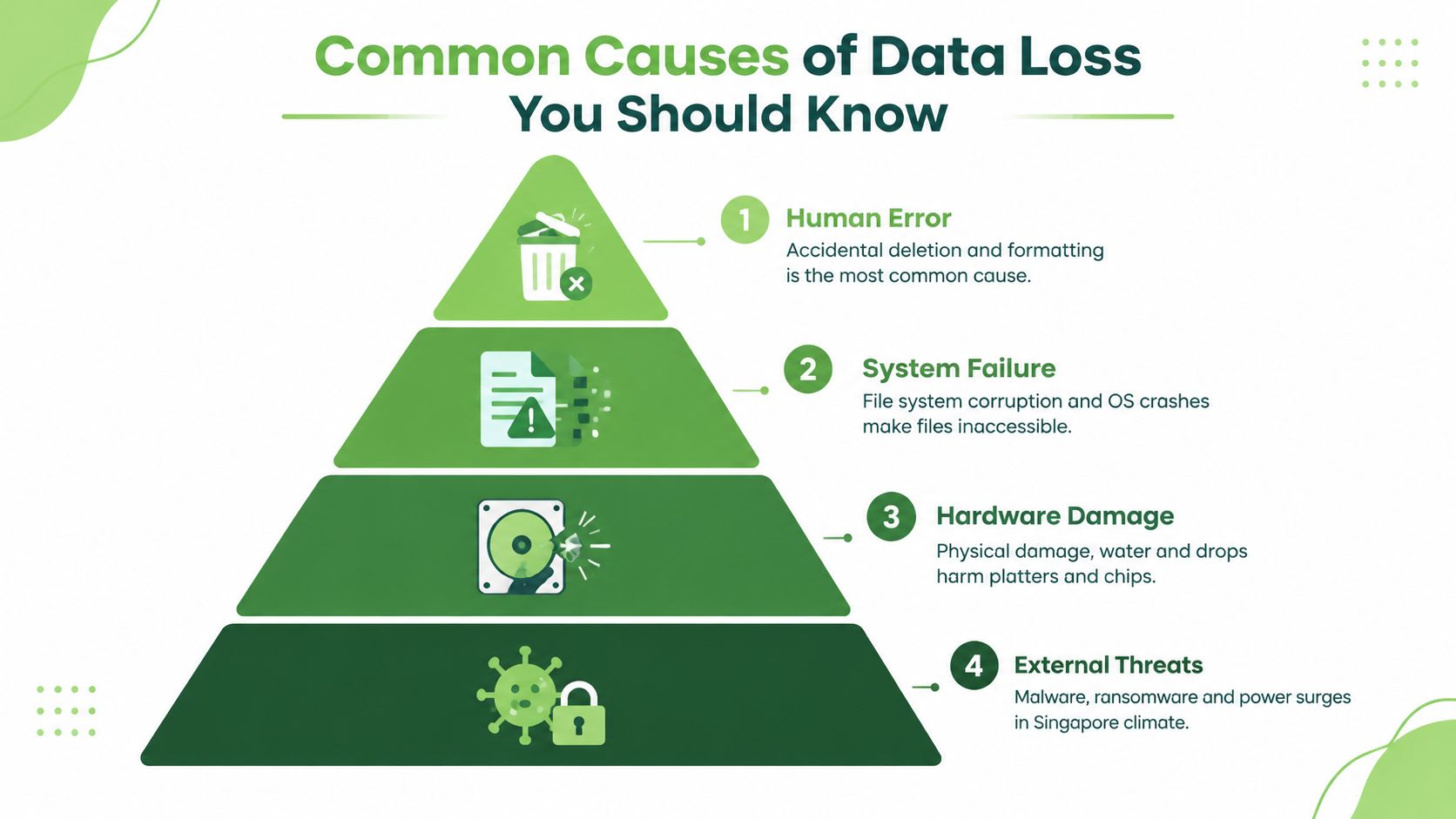
- Accidental deletion: A file or folder is removed from a laptop, external drive, or phone. Stop using the storage immediately because new activity may reuse the released blocks.
- Unplanned formatting: Someone selects the wrong drive or accepts a format prompt. Recovery may still be possible, but don't initialise or format the device again.
- Incorrect transfer: A user moves files rather than copying them, then discovers the destination failed. The original may no longer contain a complete, usable copy.
System and software failure
File-system corruption can follow an unsafe removal, operating-system crash, failed update, or interrupted write. Typical signs include an operating system asking you to format a drive, folders displaying strange names, or files opening with errors.
Malware and ransomware create a different situation. Ransomware can encrypt files, disable systems, or threaten to expose information. A recovery plan may need to preserve evidence, isolate affected systems, identify clean backups, and verify restored files rather than running a file-recovery programme.
Hardware and environmental damage
Hard drives can develop mechanical faults, while SSDs, USB drives, and phones can suffer controller, firmware, chip, or connection failures. Drops, liquid exposure, heat, and power problems can damage storage or the surrounding electronics.
A failed device can still contain recoverable confidential material. That's why a damaged laptop shouldn't automatically go into general recycling. For broader operational guidance, organisations can review resources on managed IT and data safety. You can also explore this Singapore guide to causes of data loss and recovery for device-specific examples.
Three Levels of Data Recovery Explained
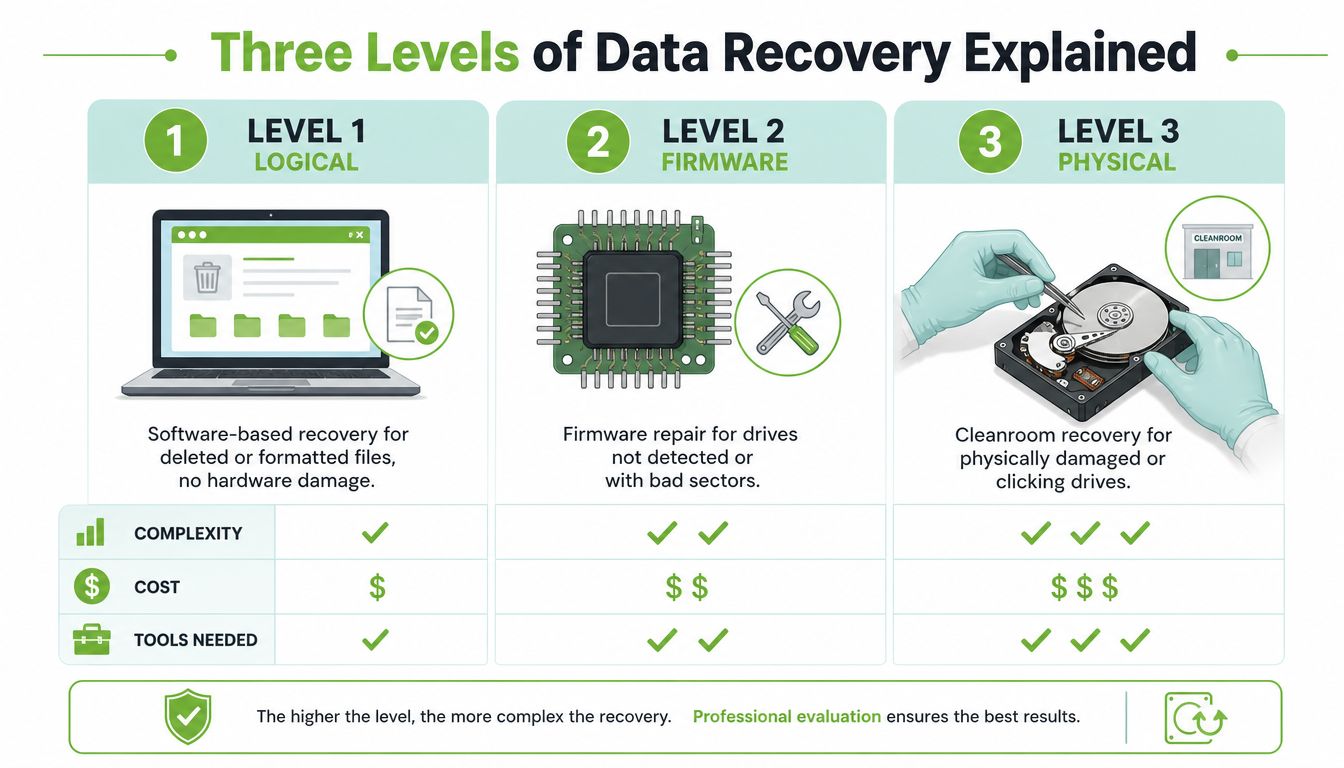
Recovery work generally falls into three practical levels. The levels aren't a promise of success or a fixed price list. They describe where the main obstacle sits and what kind of environment is needed to work safely.
Level one logical recovery
Logical recovery applies when the storage hardware can still communicate but the file organisation is damaged. Examples include recently deleted files, missing partitions, accidental formatting, and corrupted directories.
Software scans the available storage, identifies file structures, and may rebuild a usable copy. The safest process works from an image or clone rather than repeatedly scanning the original. DIY software may be reasonable when the files are replaceable, the device is stable, and the storage is still detected normally.
Level two firmware and hardware-assisted recovery
A drive that isn't detected, reports the wrong capacity, freezes, or shows bad sectors may have a firmware, controller, or other component problem. Technicians may need specialised diagnostic tools to stabilise access and create a readable image before reconstructing the file system.
The danger is that an unstable drive can deteriorate with every power cycle. A repair attempt that changes the original hardware or writes to the device can reduce the remaining recovery options.
Level three physical and chip-level forensics
Severe physical damage needs controlled lab work. NTU's cyber-hardware forensics programme) describes chip-off and device-level analysis for extracting readable data from damaged non-volatile memory devices. These techniques are relevant when firmware corruption, controller failure, or serious physical damage prevents normal access.
A lab may first perform non-destructive diagnostics, document the failure, and request authorisation before intervention. Opening delicate hardware without the right environment can introduce contamination or cause additional damage.
| Recovery Level | Typical Failure | Method and Setting |
|---|---|---|
| Level one logical | Deleted files, formatting, missing folders, file-system errors | Software analysis on a stable device, preferably using an image or clone |
| Level two firmware | Drive not detected, freezing, controller or firmware problems, bad sectors | Hardware-assisted diagnostics and imaging by a trained technician |
| Level three physical | Clicking HDD, water damage, broken storage chips, severe board failure | Controlled lab work, physical repair, or chip-level forensics |
A recovery plan should sit alongside wider disaster recovery strategies for 2026, including tested backups and clear responsibilities. For more detail on what a provider may handle, see this guide to the scope of data recovery services.
Success Rates Costs and Timelines in Singapore
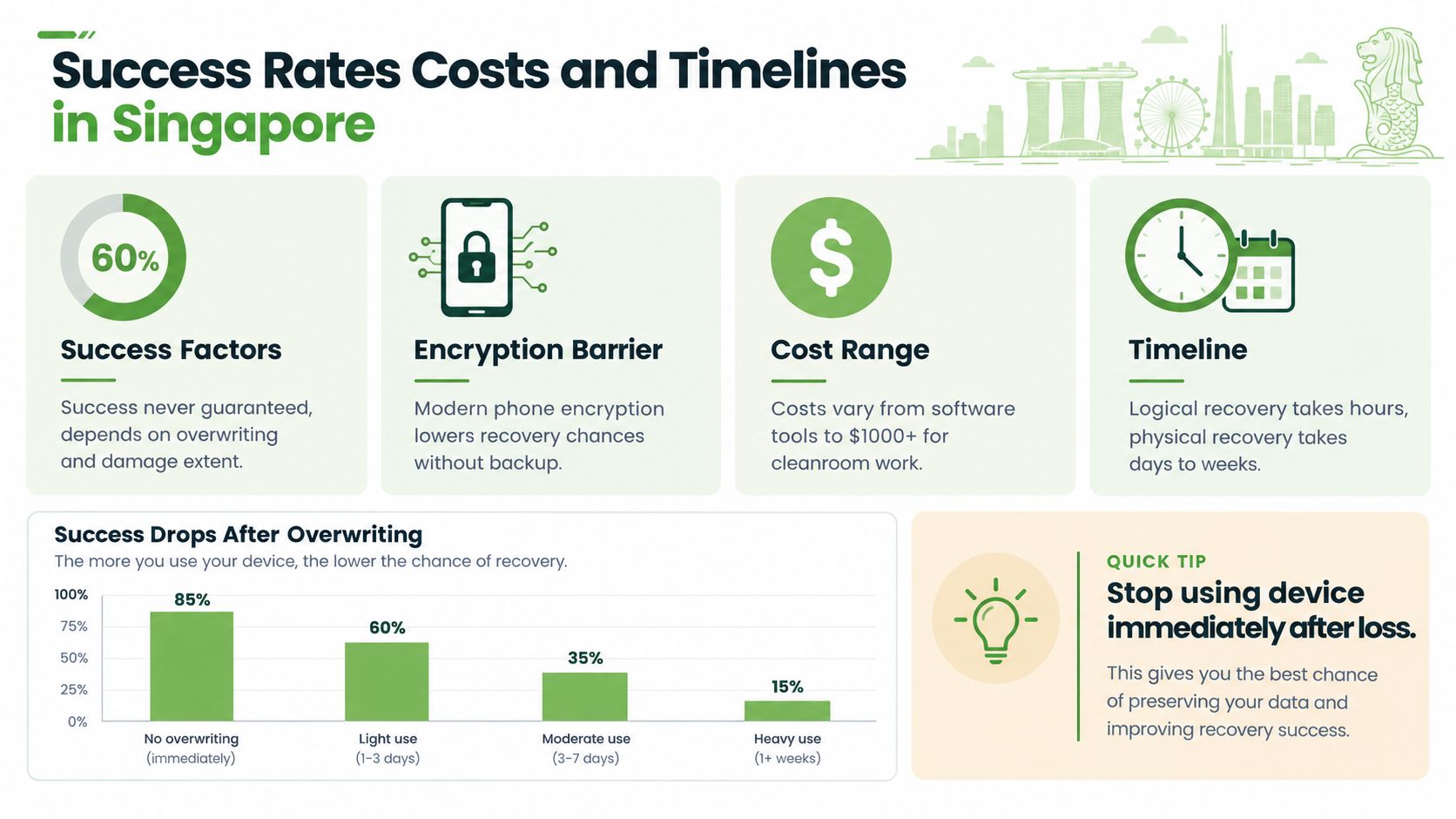
No honest provider can guarantee complete recovery before examining the device. Deleted data may have been overwritten, a damaged storage chip may be unreadable, encryption may block access, or ransomware may have affected both live systems and backups. Even when files are recovered, some may be incomplete or corrupted.
Singapore-specific ransomware figures illustrate the operational cost. Sophos-reported figures put the average recovery cost at US$2.2 million in 2024, compared with average ransom payments of US$1.584 million for affected organisations. The same report said 62% of surveyed firms sought law-enforcement help to recover data. These figures appear in Singapore ransomware recovery reporting.
Why recovery may take longer than expected
A 2025 Singapore report found that 53% of affected organisations fully recovered within a week, while 22% took one to six months. Only 46% used backups to restore data, and 50% paid ransom, with a median demand of US$365,565, according to reporting on Singapore ransomware recovery timelines.
These figures aren't a promise or prediction for an individual device. They show why recovery can involve more than scanning files. Teams may need to contain an attack, preserve evidence, identify clean systems, rebuild infrastructure, validate backups, and restore services in a safe order.
What affects cost
Logical recovery from a stable drive may require less specialist work than physical recovery from a failed HDD, SSD, phone, or memory card. Cost can rise when technicians need advanced diagnostics, component work, cleanroom handling, chip-level extraction, or urgent attention.
A backup can reduce the need for file-by-file recovery, but it must be complete and restorable. The Singapore data recovery guide covering cost and success rate provides useful context for comparing recovery options without assuming that every case follows the same path.
When to Try DIY Tools and When to Call Professionals
A missing folder can tempt you to download the first recovery app you see. Pause first. Stop saving files to the affected device, and do not install recovery software on that same drive. Repeated restarts, repair commands, format prompts, or opening a hard disk in an ordinary room can reduce the chance of a safe recovery.
A cautious DIY decision
DIY tools may suit a narrow set of cases:
- The device is stable: It starts normally, makes no unusual sounds, and stays connected.
- The problem is likely logical: You deleted a file or emptied a folder, while the storage itself still appears healthy.
- The files are replaceable: A failed attempt would be inconvenient, rather than damaging legal, financial, customer, or irreplaceable personal records.
- You have another destination: Save recovered files to separate storage, never back onto the source device.
A professional assessment is safer if a drive clicks, grinds, overheats, disappears from the system, reports the wrong capacity, or has suffered a drop or liquid exposure. Use the same caution when it contains confidential business information, personal identity data, or evidence related to a cyber incident. In these cases, each further power-on can be like handling a damaged document with wet hands: it may make the original condition harder to preserve.
Stop and preserve the device when the storage makes new noises, becomes unusually hot, or repeatedly disconnects.
Recovery, backup restore, or secure destruction
Before choosing a service, answer three questions:
- Is there a clean, recent, tested backup? If so, restoring it may be faster and safer than scanning a failing device. A backup is the spare key. Recovery is the locksmith working on the original lock.
- Is the original data still needed for evidence or compliance? A breach may require controlled handling, preservation, and notification decisions. The PDPC breach-handling guidance explains the reporting timeline for a notifiable breach once the relevant threshold is met.
- Is the device reaching end of life? If the files are no longer needed, secure destruction may be the responsible choice. Ordinary deletion does not provide the same protection for sensitive information.
For an organisation dealing with a suspected breach, preserve relevant devices and records before attempting repair or disposal. This helps separate a recovery decision from an incident-handling decision.
myhalo offers diagnostics and data-recovery support for laptops, PCs, iPhones, Android devices, hard drives, and SSDs. Treat this as an assessment option, not a guarantee. A technician can compare recovery, backup restoration, and secure data destruction, then explain which route best fits the files, device condition, privacy needs, and downtime risk.
Protecting Your Data and Next Steps With myhalo
Recovery is the emergency door, not the everyday storage plan. Keep multiple copies of important files across different storage types, maintain a separate copy away from the main device, and test whether you can restore a file. A backup that has never been tested is only an assumption.
Singapore's privacy rules also make the end of a device's life part of the data-protection conversation. Organisations must stop retaining personal data when there is no longer a valid business or legal purpose, and the PDPC retention limitation guidance explains that disposal of physical media isn't complete until the information is properly destroyed. SS 714:2025 states that organisations must take appropriate measures to ensure disposed personal data cannot be recovered, as set out in the Singapore Standard on personal-data disposal.
That creates three responsible routes: Save Data when precious files need rescuing, Safe Data when privacy and secure destruction matter, and Declutter your e-clutter when old devices can be repaired, reused, upcycled, or responsibly processed. The myhalo approach connects convenience, safety, and responsibility with the wider goal of a zero e-waste world. In Singapore, you can seek support online or visit the counters at Bugis Junction or Sim Lim Square.
For practical prevention habits, read this guide to data recovery and backup.
Your precious files and memories matter to us. Whether you need to protect your privacy with Safe data or rescue lost files with Save data, our caring team is right here to help. Reach out to myhalo online or visit us at Bugis Junction or Sim Lim Square, and take one simple step towards safer devices and a zero e-waste lifestyle today.