
You are on the MRT platform, bag on one shoulder, phone in the other hand, when someone brushes past and the phone tips towards the gap. Or you are at the sink, hands wet, and it skids across the counter. That little jolt is how most screens get their first mark, and a good protector is the cheap layer that takes the knock so the glass underneath can stay smooth, bright and worth keeping.
The best screen protector is not the one with the boldest hardness claim on the box. It is the one that stays on, matches your phone, and keeps the display usable, repairable and easy to resell for longer. A cracked sheet is a small swap. A cracked panel is a repair, a weaker trade-in, or a phone that ends up in a drawer. Choosing well is a simple, friendly way to stretch the life of a device you already own.
Table of Contents
- Which Screen Protector Type Fits Your Phone
- What Protectors Absorb and What They Cannot Stop
- When Privacy and Matte Filters Earn Their Place
- Selection Criteria That Decide the Best Protector
- How to Fit a Protector Without Bubbles or Dust
- When to Replace a Protector and When to Check the Screen
- Making Your Protector Last and Saving Money
- Confirm Your Protector Choice and Dispose of the Old One
Which Screen Protector Type Fits Your Phone
For most flat-screen phones used in Singapore, tempered glass with full adhesive coverage is the strongest all-round default. Film, hydrogel and privacy filters earn their place when the screen curves, when glare is the main problem, or when strangers can read over your shoulder.
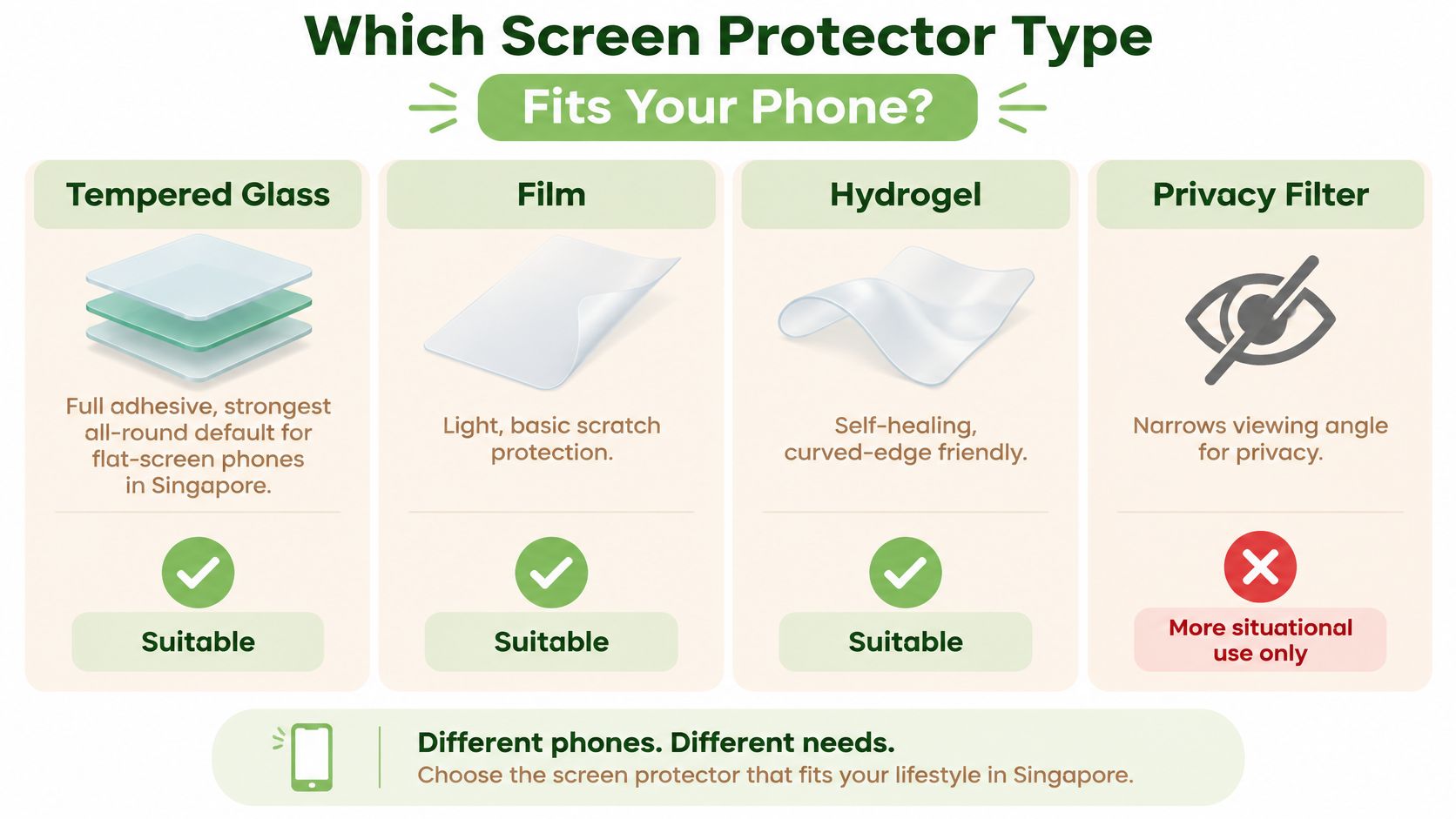
| Type | Best for | Main strength | Main trade-off |
|---|---|---|---|
| Tempered glass | Everyday drops, scratches, flat screens | Hardest surface with glass-like touch | Can chip or crack on heavy impact; poor fit on curved edges |
| TPU or PET film | Curved displays and tight budgets | Conforms well to curved edges | Absorbs less impact and wears sooner |
| Hydrogel film | Curved screens and light scuffs | Flexible and self-healing on light marks | Softer, less scratch-resistant than glass |
| Matte anti-glare film | Gaming, outdoor use and glare | Cuts reflections and fingerprint shine | Slightly softer view and grainy feel |
| Privacy filter | Shoulder surfing on MRT, in offices and cafés | Hides the screen from side angles | Dims the display and narrows the viewing area |
Start from your biggest risk, then check the edge of the phone. Drops and keys point to glass. A waterfall edge points to TPU, PET or hydrogel, which bend where rigid glass lifts. Glare points to matte. Crowded seating points to privacy.
The Belkin Singapore buying guide treats tempered glass as the strongest general-purpose choice for flat screens because it pairs surface hardness with a glass-like touch. A 9H label uses the pencil-hardness scale, so it resists scratches from keys and coins. It is not a drop rating. Oleophobic means a thin coating that sheds finger oils, so prints wipe away and the picture stays clear. Look for full adhesive, exact cut-outs and rounded 2.5D edges. Glass can still chip, and a raised-edge case is what covers corners the sheet never reaches. Flexible film conforms to curves, absorbs less impact and shows wear sooner.
If your phone folds, leave the factory film in place rather than adding a third-party layer. The right type is the one you will keep on.
What Protectors Absorb and What They Cannot Stop
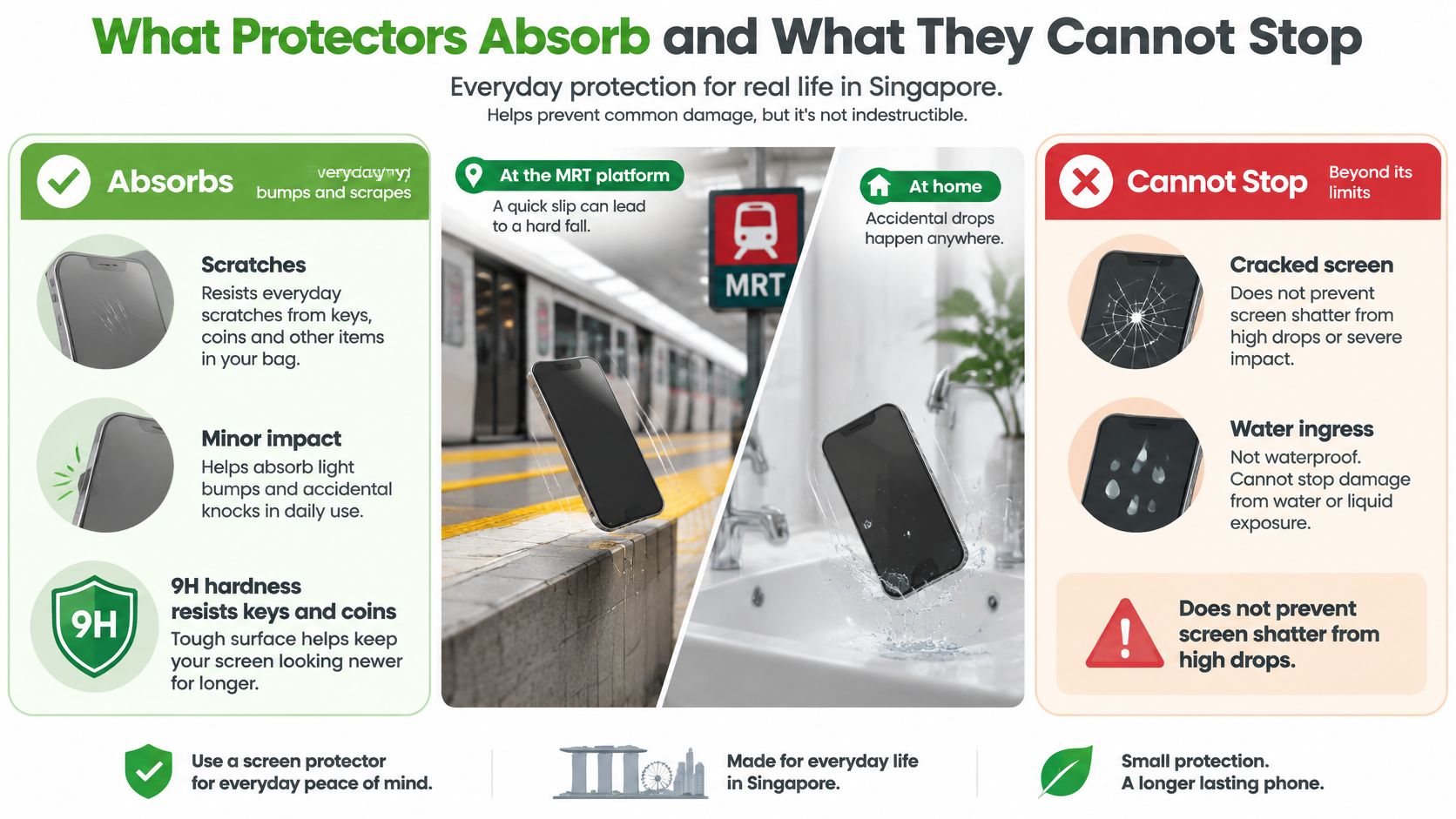
The phone leaves your hand on the platform edge, or it skates off a wet sink. Those are ordinary moments, not dramatic accidents, and they are exactly where a protector earns its keep.
A protector does two jobs. It takes scratches and some of the hit in its own layer, and it breaks first so the original glass has a better chance of staying whole. Tempered glass is built to crack in a spider pattern under a concentrated blow. That sacrifice is useful only if you swap the sheet before the next drop lands on bare glass.
It cannot stop everything.
Bending the phone can split the panel even when the outer sheet looks fine. A hard corner hit can travel past the protector into the display. Exposed sides stay open unless a case rises above the glass. Water down a port is a different problem again. A sheet on the front does nothing for that.
A 2015 survey of smartphone users in Singapore, Malaysia, Taiwan and Hong Kong found that 70% of respondents said their phones usually slipped out of their hands. The same survey reported that 34% had damaged a phone in or near a toilet, 31% while walking on the street, and 29% while using public transport. Movement, not misuse, is the pattern. The survey also found that 71% would rather keep using a cracked screen than pay for repairs, while Singapore respondents spent an average of US$19 on a case. Prevention matters most for people who will live with the damage rather than book a fix. Our guide on scratches versus cracks walks through that difference in more detail.
Practical rule: If the knock would have landed on the sheet, ask whether the thickness and material match your day. Keys in the same pocket call for a hard face. Repeated slips call for glass plus a case with a lip.
You don't need a perfect shield. You need a layer that fails in a cheap, replaceable way, so the phone underneath stays pleasant to use.
When Privacy and Matte Filters Earn Their Place
A privacy filter is often sold as the safer upgrade for city life. That only holds if strangers regularly sit beside you while you read mail or a banking app. If they don't, you pay for a darker, narrower screen every day and gain very little.
A privacy filter uses tiny louvres that keep the picture readable from straight on and dark from the side. The trade-offs are real. The panel looks dimmer, so you may push brightness up and use more battery. Sharing a photo with the person next to you gets harder because the viewing area shrinks. Colour looks a little less vivid, which bothers anyone who edits pictures or watches film on the train.
Matte anti-glare film is a different tool. It scatters reflections, which helps gamers and anyone working in sun or under office lights. The image is softer, and the surface can feel slightly grainy under a fingertip. Touch stays usable, but fine detail is less crisp than on clear glass.
- Student on a crowded MRT, checking mail: a privacy filter fits, because the risk is the person in the next seat.
- Open-plan office, spreadsheets on the desk: privacy again, if colleagues walk behind you all day.
- Parent passing holiday photos around the table: skip privacy. A clear protector lets everyone see the screen without squinting.
- Gamer or someone shooting outdoors: matte anti-glare, unless side privacy matters more than a sharp picture.
Hold the phone at an angle in a bright room before you commit. Check touch, the fingerprint reader and face unlock on your exact model, then decide with that test rather than the box photo.
Clear glass or clear film remains the better daily choice for photographers, people who share screens, and anyone who already struggles with brightness.
Selection Criteria That Decide the Best Protector
Carry a short checklist into the shop or the online cart. A protector only counts as the best screen protector for you if it passes the rows that decide whether it stays stuck and keeps the original screen feeling normal.
9H belongs on that list as scratch resistance, not as proof the phone can survive a drop. Read it next to how the sheet is built and how far it reaches toward the sides.
| Criterion | What good looks like | Why it matters |
|---|---|---|
| Model fit | Exact cut-outs for camera, speaker, sensor and fingerprint reader | Misalignment causes edge lift and blocked sensors |
| Hardness rating | 9H pencil-hardness rating stated clearly | Shows scratch resistance, not proof against drops |
| Edge coverage | Rounded 2.5D edges or full-cover design | Protects the sides where cracks often start |
| Oleophobic coating | Fingerprint-resistant coating listed | Keeps fingerprints light and the screen clear |
| Touch sensitivity | Reviews report no lag or dead spots | A thin layer should not slow your touch |
| Installation kit and replacement | Alignment frame, dust sheets and a clear replacement policy | Easier fitting and cheaper swaps when the protector cracks |
How to score a shortlist
Give each candidate a simple yes or no on the six rows. Drop any that fail model fit or edge coverage. Those two decide whether the protector works at all. A beautiful sheet that blocks the earpiece or lifts beside your case will come off within a week, and then you are back to bare glass.
Check the case type in the same pass. A thick bumper can push a full-cover edge up. A slim case usually sits happily with 2.5D glass. If reviews mention lag or a dead strip near the fingerprint reader, treat that as a fail even when the hardness number looks strong.
A sheet that keeps the screen original-feeling for months is the better buy, because it delays a screen repair and keeps the phone easier to trade in later. You are buying time on a device you already like, not a lab score.
How to Fit a Protector Without Bubbles or Dust
A clean, well-lit surface makes fitting easier. Dust and skin oil can stop adhesive from settling evenly, so prepare the screen before you peel the protector's backing.
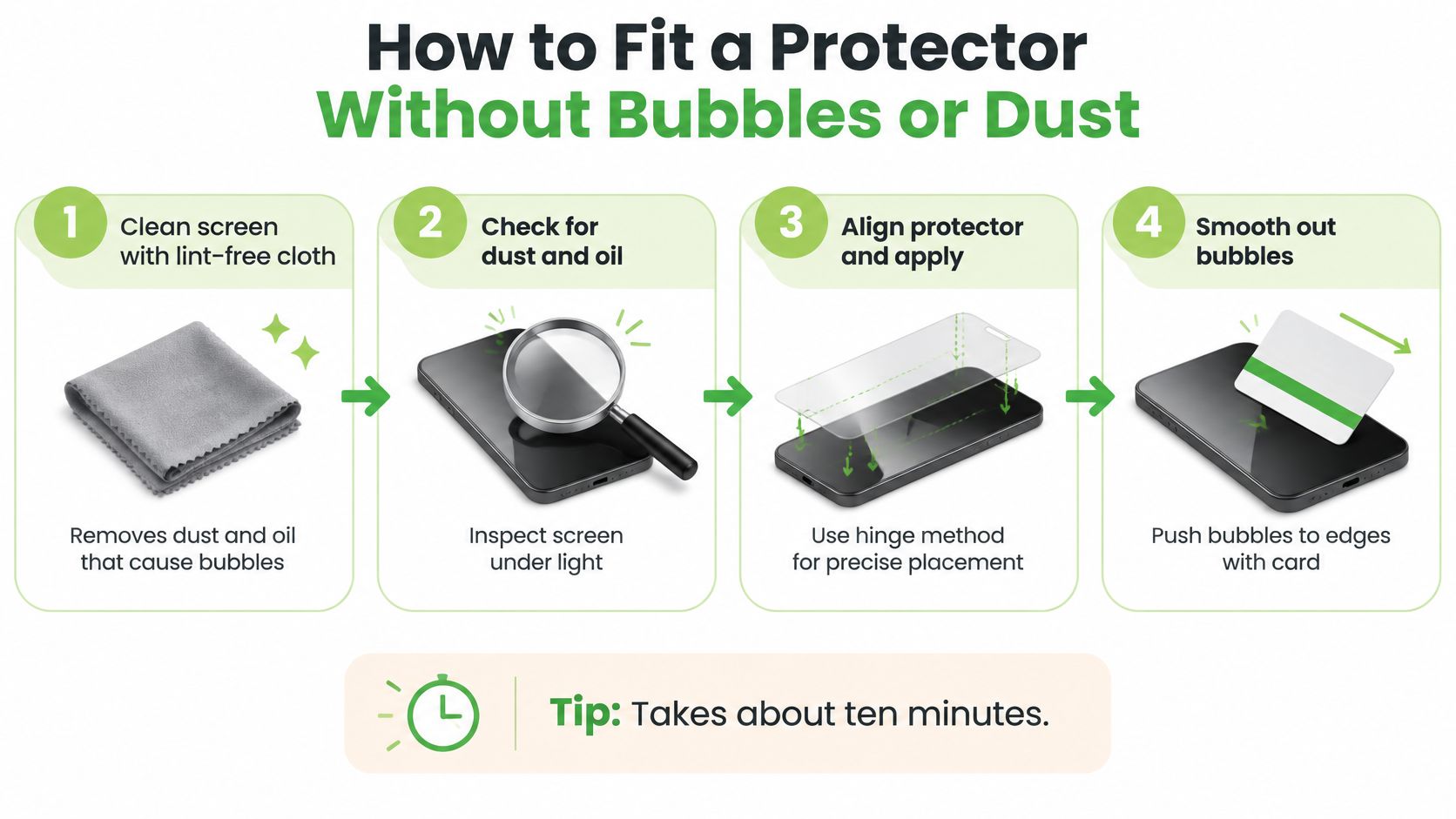
- Clean the screen with a lint-free cloth. Check for dust and oil in good light, since either can leave a speck or bubble under the adhesive.
- Remove the old protector and wipe away residue with a soft cloth. Avoid scraping the glass.
- Align the cut-outs with the speaker, camera and sensors. An alignment frame, or a hinge made with a dust sticker, helps keep the protector from shifting.
- Lower the protector from one edge, pressing gently as you go. This pushes air towards the opposite edge instead of trapping it beneath the sheet.
- Smooth out small bubbles with a card or cloth, working from the centre towards the edges. Give tiny bubbles a little time to settle before pressing harder.
- Let the adhesive settle before putting the phone in a tight-fitting case or a pocket with keys.
Foldable phones need extra care. Guidance on protecting mobile displays says to leave the factory film in place, rather than removing it or covering it with an unsuitable third-party sheet. On a standard OLED or LCD phone, line up the openings, keep the screen clean, and lower the protector from one side.
For a visual guide, this short clip shows how to use a hinge to place the sheet straight.
If a bubble or lifted edge remains after a careful second attempt, pressing harder may not help. Check whether the problem is trapped dust, poor alignment or the screen beneath the protector.
When to Replace a Protector and When to Check the Screen
Most protector problems are fixed by swapping the sheet. A few symptoms mean the panel underneath is already hurt, and another layer will only hide that.
| Symptom | Likely cause | What to do |
|---|---|---|
| Cracked or chipped edge | Impact reached the glass through the protector | Replace the protector now and check the screen |
| Bubbles or edge lift within days | Dust or oil under the film | Lift gently, clean and reapply within a day or two, or replace |
| Dead touch zone near the edge | Adhesive or panel fault | Remove the protector and test the bare screen |
| Persistent fingerprints | Oleophobic coating worn | Clean with a microfibre cloth; replace if still greasy |
| Lines, dead zones or discolouration under a clean protector | Panel damage | Visit a repair specialist rather than adding another layer |
Read the symptom before you buy another sheet
A chipped edge is common. The protector did its job and broke. Fit a new one the same day, then run a finger over the glass in good light. If the glass is smooth and the picture is even, you are done.
Bubbles that show up within a day or two are almost always dust or oil. You can lift a fresh sheet gently, clean, and set it again. Once the adhesive has picked up grit for a week, replacement is cleaner than fighting it.
A dead strip of touch near the rim needs a bare-screen test. Peel the protector, restart the phone and try the same spot. If touch returns, the adhesive or a lifted edge was the cause. If the dead zone stays, the panel needs a look, not a thicker film. Putting a sheet on glass that is already broken is a separate decision, and our note on a protector over a cracked screen sets out when that helps and when it doesn't.
Greasy prints after a proper microfibre wipe mean the coating has worn through. That is a comfort problem, and a fresh sheet fixes it.
Any crack that leaves a sharp edge should be replaced promptly. The chip can cut you, and the next knock has a path straight to the original glass.
Coloured lines or blotches under a clean, well-fitted protector are panel damage. Stop stacking layers and book a repair so the phone can stay in use.
Making Your Protector Last and Saving Money
The cheapest protector is the one you don't replace every few weeks. Price on the shelf is only the start. Total cost is the sheet plus every replacement, spread over the months you keep the phone.
Shops and models differ, and there is no single price list that stays fair, so compare the tags in front of you before you buy. A bargain film that bubbles in a fortnight can cost more across a year than a glass sheet that lasts through ordinary knocks.
People often keep using a cracked display rather than pay for a repair, and a case is a small spend next to a new panel. A protector that stops the first crack can save more than the sheet itself, because the phone stays pleasant to hold and easier to sell or pass on.
The Ministry of Sustainability and the Environment encourages people to repair phones where possible, or to sell or donate devices that only have cosmetic marks, so the materials stay in use. A mark on a replaceable sheet is cosmetic. A shattered panel pushes the phone toward the drawer.
- Note the price and a realistic life in weeks. Use the last sheet you wore out, not the claim on the packet.
- Count a year of replacements. Four sheets a year is a different sum from one.
- Set that total beside a screen-repair quote before you decide the thin option is a saving.
A well-chosen protector keeps the phone usable for longer. That is the greenest outcome and the cheapest one too. You are not chasing a perfect accessory. You are avoiding a repair you didn't need.
Confirm Your Protector Choice and Dispose of the Old One
When a protector cracks or its coating turns greasy, replace the sheet rather than the phone if the display underneath is still sound. Check current NEA guidance before disposing of the old protector and its packaging. For a phone you no longer need, use a collection point or a suitable recycling channel instead of leaving it in a drawer.
The Ministry of Sustainability and the Environment's guidance on e-waste collection says data-bearing devices sent to licensed recyclers must undergo data sanitisation and physical dismantling before secure recycling. Before handing over a phone, remove your accounts and personal data, or arrange secure data destruction.
myhalo's Rescue service aims to keep devices valuable and functional, helping prevent them from becoming e-waste. Its popular repairs include screen and battery replacement, along with charging and keyboard problems across phones, tablets and laptops. If the phone still works, keeping it in use can be a better outcome than replacing it. For a device you are ready to part with, myhalo offers secure data management and destruction, with certificates on request, as well as trade-in and buyback services. The myhalo sustainable screen protector campaign connects everyday protection with keeping phones useful for longer.
You can visit myhalo in store or online to arrange secure data destruction or get a trade-in quote. A sound screen, a fresh protector and a suitable repair can help keep a phone in use; when it is time to move on, secure handling and reuse give it a more responsible next step.