
Your laptop screen flickers on a Monday morning, payroll is due, and a client delivery is waiting. If you're a young firm, that small failure can feel huge. If you're larger, you might have a spare machine and an IT process ready. That's the business life cycle in everyday form. The same device problem carries very different weight depending on your stage, your cash, and how much backup you have.
Many Singapore owners meet this lesson the hard way. They buy devices in a hurry at launch, add more in growth without a standard, then face a storeroom of old laptops at maturity. A calmer approach is possible. When you understand your stage, you can plan repairs, replacements, and retirement early, protect your data, and keep useful tech working for longer.
Table of Contents
- What Is the Business Life Cycle
- The Five Stages of Business Growth
- IT Asset Planning at Each Lifecycle Stage
- Real-World Examples from Singapore Businesses
- End-of-Life Decisions Beyond Disposal
- Why Device Lifecycle Management Improves Survival
- A Practical Checklist for Every Stage
What Is the Business Life Cycle
Think of a small design studio in Bugis. In year one, the founder works on a personal laptop, borrows a printer, and focuses on winning the first clients. A few years later she hires a team, buys matching machines, and needs reliable systems for files and billing. Later still, the studio is steady, margins matter more than speed, and old devices start to pile up. Nothing dramatic has changed in one day. The business has moved through stages.
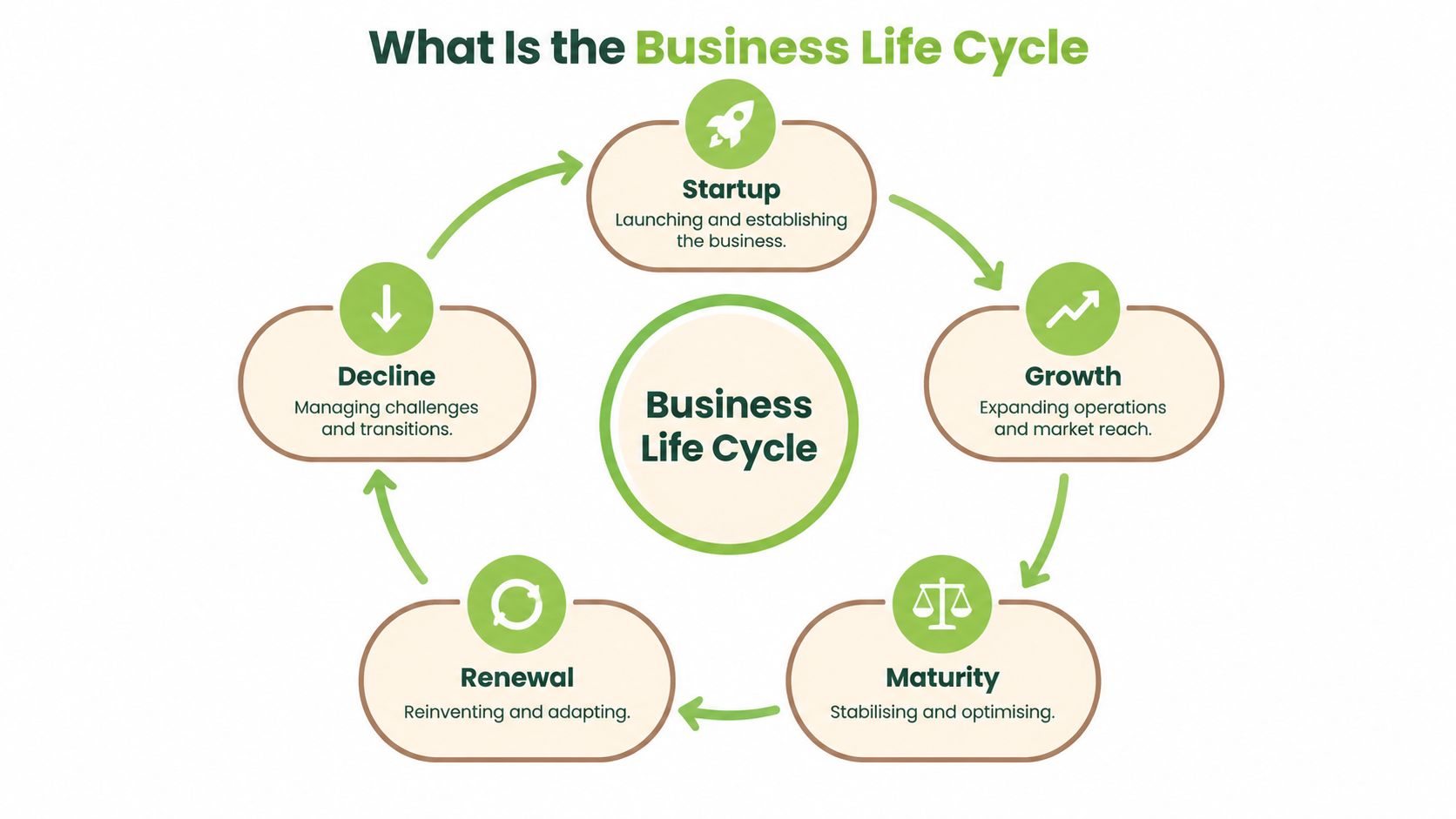
That's what the business life cycle describes. It's a practical map of how a company evolves, usually through startup, growth, maturity, renewal, and decline. Each stage brings a different main job. Early on, you prove there's demand. In growth, you build capacity. In maturity, you organise and optimise. In renewal, you adapt to stay relevant. In decline, you restructure, shrink, or close with care.
A simple visual helps you see that this isn't a straight line, and a firm can loop back through renewal instead of sliding down.
Why This Map Helps With Device Decisions
A device choice rarely fails because the device itself is bad. It fails because it doesn't fit the stage. A startup that spends heavily on brand new kit for everyone may strain working capital. A growing firm that lets every hire choose a different model may create support headaches. A mature firm that ignores ageing laptops may face sudden downtime and rushed purchases.
Practical rule: Ask what job this device must do for the next stage, not just what you need this week.
Singapore's history shows why long term planning matters. Between 1998 and 2017, approximately 460,000 firms were formed, yet only 984 were identified as success cases that listed or were acquired, equal to roughly 0.21%, as reported in Singapore Business Review's coverage of startup sustainability. That's about 1 successful exit for every 467 new firms. Starting is common. Reaching a large exit is rare.
Don't let that number discourage you. It reframes success. For most firms, the prize is a healthy, lasting business, not a listing. That means managing assets, costs, and capability at every stage, preserving value in equipment you already own, and recirculating it where you can.
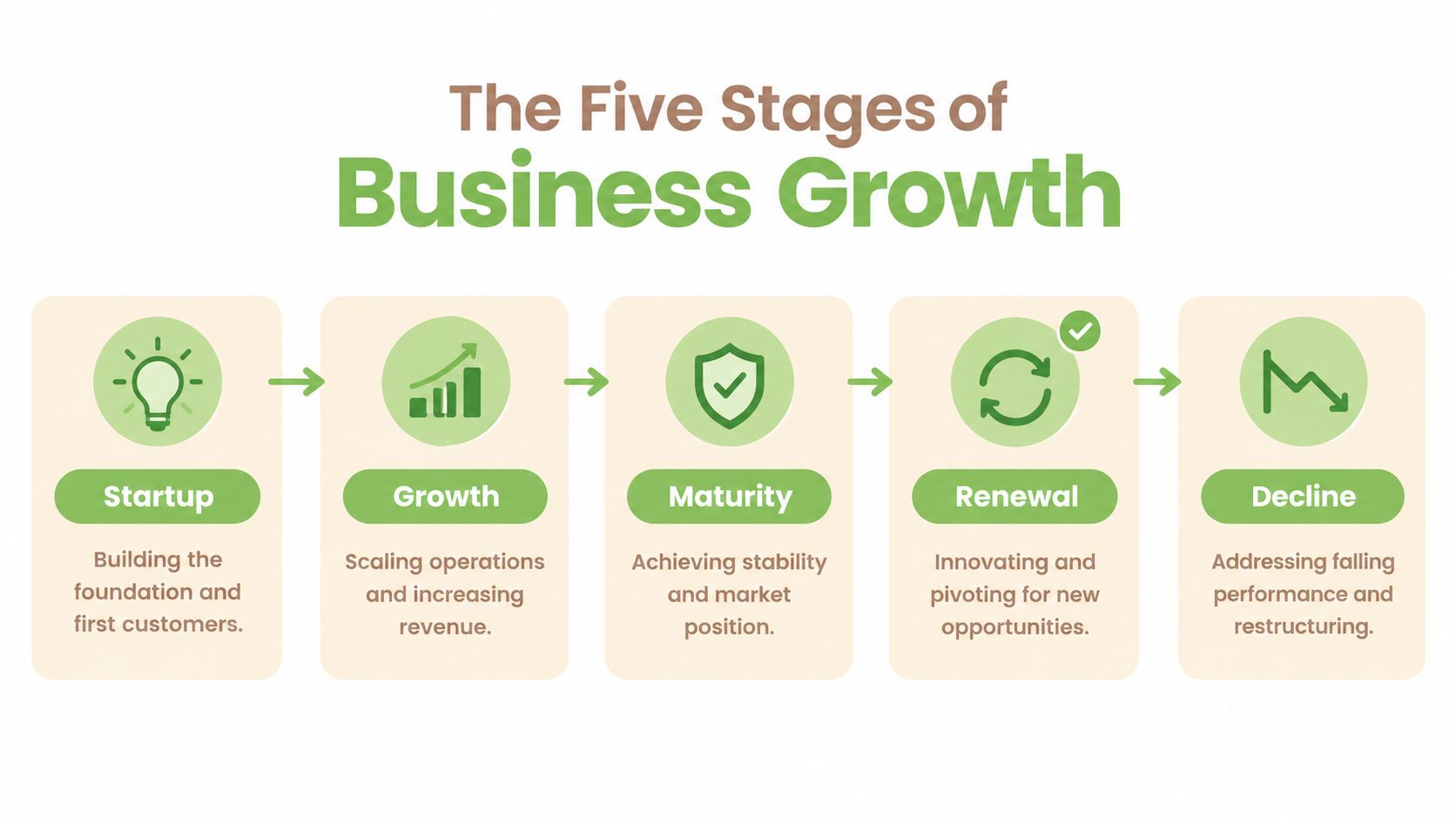
The Five Stages of Business Growth
The five stages are easier to spot when you look at your daily pressure, not your age. A two year old firm can be mature in a small niche. A ten year old firm can be back in startup mode after a pivot. Use the stage that best matches your current reality.
This timeline puts the stages in order, so you can place yourself before reading the detail below.
Startup and Growth
- Startup: You're launching and finding first customers. Cash is tight, roles overlap, and one broken laptop can stall work. Your priority is continuity on a small budget.
- Growth: Orders and headcount rise. You need repeatable processes, faster onboarding, and devices your team can set up the same way every time.
Survival through these early years is not guaranteed. About 53% of Singapore startups remain operating after five years, compared with 49% in the United States and 42% in the United Kingdom, in a National University of Singapore study cited in The Evolution and State of Singapore's Start-up Ecosystem. Nearly one in two doesn't reach that milestone. That's why early habits, including how you buy and repair tech, deserve attention before growth makes them harder to fix.
Maturity, Renewal, and Decline
Maturity feels calmer. Revenue is steadier, customers return, and you focus on margins, service consistency, and removing waste. Renewal is your chance to refresh an offer, enter a new segment, or rebuild systems before pressure forces you. Decline is different. Sales fall, costs feel heavier, and you may need to restructure, sell assets responsibly, or wind down part of the business.
A short explainer can help if you learn better by watching the stages described in sequence.
Readers often ask whether decline is inevitable. It isn't. Renewal sits in the cycle for a reason. Firms that notice slowing demand early, control costs, and redirect working assets to new uses give themselves options. Firms that hold idle devices, lose track of data on them, or replace everything at once have fewer options and higher costs.
Survival also isn't the same as scale. A firm can stay alive and still stay very small. That's not failure if it serves customers well and supports its owners, but it does change what good device planning looks like. Smaller teams need fewer spares, simpler standards, and repair choices that protect cash.
IT Asset Planning at Each Lifecycle Stage
Device planning sounds technical, but it's really three friendly questions. What do we need, how long should it last, and what happens when it no longer fits? If you answer those at each stage, you'll avoid most surprise costs.
This is how teams often work through those questions together when growth makes informal habits stop working.

Startup and Growth Decisions
At startup stage, favour flexibility. Lease versus buy is a cash flow question first. Leasing or a device as a service model can spread cost and simplify replacement, while buying refurbished can lower upfront spend. You can explore that route in this guide to device as a service and sustainable laptop leasing in Singapore. Keep a simple register from day one, even a spreadsheet with serial numbers, user, purchase date, and warranty.
In growth, standardise. Pick a small set of approved laptop and phone models, common chargers, and a clear setup checklist. New hires get working faster, spare parts are easier to hold, and support stops being guesswork. For budget structure, these practical IT hardware budgeting tips from Nutmeg Technologies are a helpful companion when you're forecasting refresh cycles instead of buying in panic.
Digital tools make this standardisation stick. 95.1% of Singapore SMEs adopted at least one digital technology area in 2024, up from 94.5% in 2023, and average adoption intensity rose from 2.0 to 2.3 areas, according to IMDA's Singapore Digital Economy Report 2024. What matters isn't owning software. It's whether your tools for inventory, customer records, and workflow improve turnaround time and reduce errors as volume grows.
Maturity and Renewal Decisions
At maturity, shift from buying more to getting more from what you have. Track repair cost against replacement cost, age, and downtime. Repair a reliable machine with a worn battery. Replace a machine that fails repeatedly, can't run current security updates, or costs more in lost hours than it saves.
A spare pool of standard, wiped, and ready laptops is often cheaper than one day of team downtime.
In renewal, audit before you refresh. Some devices can move to lighter duties, such as training, reception, or warehouse tasks. Others can be traded in to fund new kit. One option in Singapore is myhalo, which provides repair, certified resale, buyback, and corporate lifecycle services for devices moving between users or out of service. Whichever provider you use, ask for clear grading, data handling records, and pricing you can check.
Real-World Examples from Singapore Businesses
Examples make the cycle easier to use, because most device decisions are ordinary rather than dramatic. See if you recognise your own team in these situations.
A new logistics startup needs laptops for three coordinators but can't predict headcount in six months. It chooses certified refurbished machines for desk based work and keeps one shared spare. The saving preserves cash for vehicle deposits. The spare means a cracked screen doesn't stop dispatch. The founder records each serial number and sets a simple rule. Repair first for battery, keyboard, and storage faults, then review replacement only if the same machine fails again.
When Growth Creates a Standardisation Problem
A growing tuition centre faces a different issue. Teachers bring personal laptops, lesson files sit in different places, and a borrowed tablet holds student information. The centre moves to two standard models, central file access, and a handover form when a teacher leaves. Old personal devices no longer hold centre data. Retired centre tablets are wiped, checked, and either redeployed for reception use or sold on.
That tidy up reflects a wider Singapore gap. An NEA study found only 6% of consumer e-waste was recycled, while 24% was traded in or resold, 9% donated, 35% removed by delivery personnel, and 26% thrown away, as summarised in the Ministry's e-waste management paper. The lesson for businesses is to decide a pathway before a device leaves your control. Once it's thrown into a general bin, you've lost resale value, usable parts, and confidence about its data.
A Mature Firm Recovering Value
A mature professional services firm refreshes laptops in phases rather than all at once. High performing staff get new machines first. Sound older machines are securely erased and offered for internal roles with lighter needs. Units beyond economical repair are assessed for parts, such as screens and memory, before material recycling. Finance likes the phased spend. IT likes fewer emergency tickets. The office manager likes that cupboards are not filling with forgotten kit.
Notice the pattern across all three examples. Each firm matched the decision to its stage, kept records, and treated retirement as part of buying. None needed a large IT department to start. They needed a register, a repair threshold, and a trusted route for erasure, resale, or recycling.
End-of-Life Decisions Beyond Disposal
It's tempting to call every old device waste and recycle it. That shortcut can destroy value you still need. A five year old laptop with a good screen and a tired battery may suit a trainee. A phone with a failed board may still yield parts. Recycling is important, but it should usually come after you've checked for safe reuse.
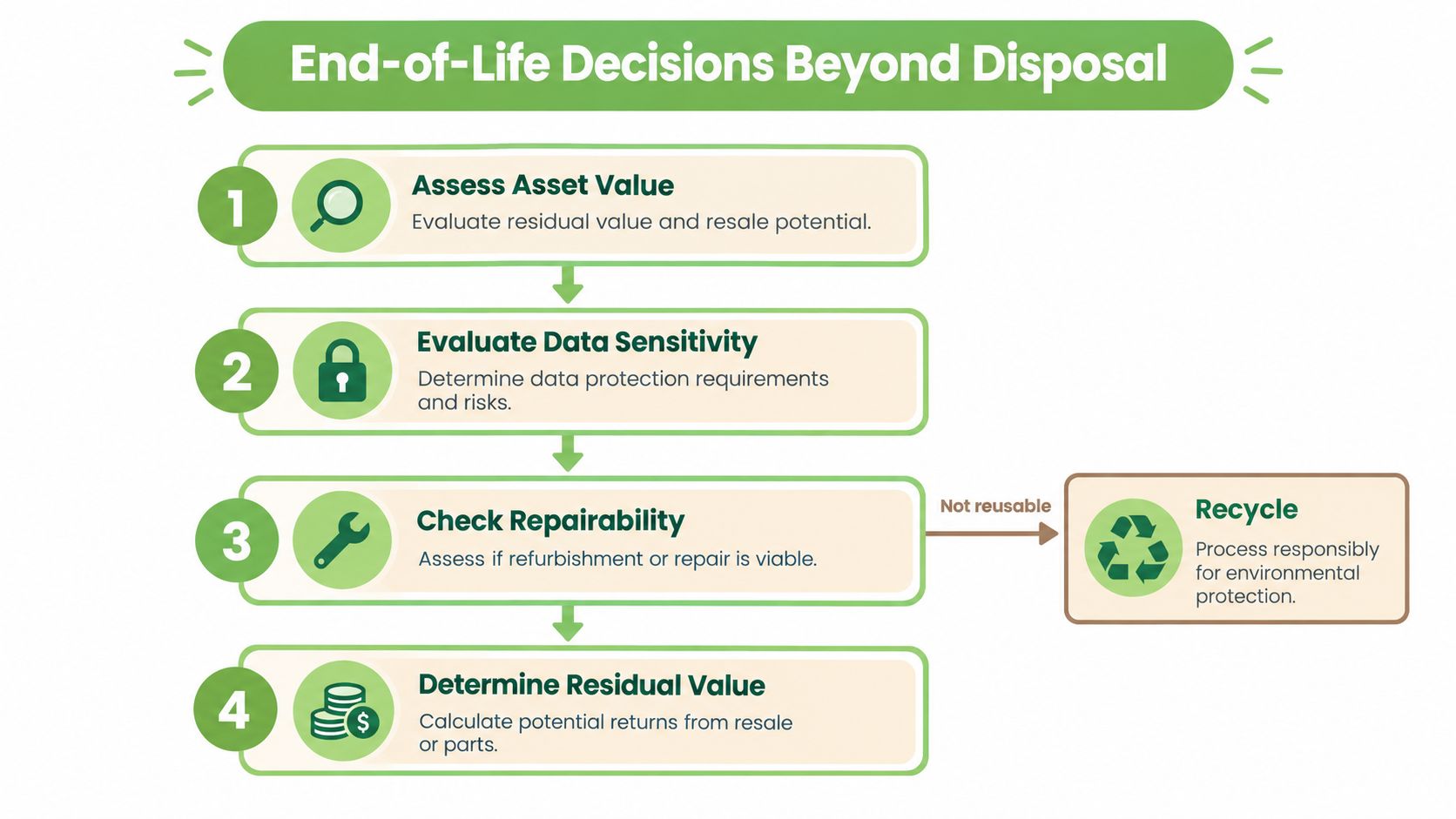
This flow helps you slow down for four questions before you choose a route.
Four Questions Before You Retire a Device
- What's it still worth: Consider working resale value, internal reuse value, and parts value, not just scrap.
- What data is on it: Customer records, staff files, photos, and logins all change the care required.
- Can it be repaired sensibly: Compare repair cost, expected extra life, and reliability for its next user.
- What proof will you keep: Save serial numbers, erasure certificates, handover dates, and final pathway records.
Data care is not optional at this point. Singapore's Personal Data Protection Act requires reasonable security arrangements to prevent unauthorised access, use, disclosure, or disposal of personal data, and the Commission describes secure electronic disposal as sanitisation, so data can no longer identify or relate to an individual, as explained in the PDPC guidance on disposing of personal data. Deleting visible files isn't enough if data can still be recovered.
That's why keeping old devices in a drawer is not a safe middle ground either. Storage without a register creates its own risk. Devices get borrowed, lost, or forgotten, and nobody knows what's on them. A clear process protects people and frees space. This overview of IT asset disposition services explains the documented route for collection, erasure, and compliant handling.
Choosing the Right Pathway
- Redeploy: Best when the device is reliable, sanitised, and suited to a lighter internal role.
- Repair and resell: Best when residual function supports a fair second life with testing and grading.
- Harvest parts: Best when the whole unit isn't viable but screens, drives, or other components can rescue other devices.
- Recycle through licensed channels: Best when repair and parts recovery no longer make sense.
Remember this order: Triage first, reuse where safe, harvest what helps, recycle what remains.
Ask any provider how they show chain of custody and what certificate you'll receive. Good evidence supports audits, procurement checks, and sustainability reporting. It also gives staff confidence to let go of old tech instead of hoarding it through worry.
Why Device Lifecycle Management Improves Survival
Lifecycle management is often treated as a tidy up for later. For small firms, it's better understood as a survival capability. It protects cash, reduces downtime, and keeps your team working when a device fails at the worst moment.
Digital capability has a measurable link to performance. Enterprise Singapore cites an MTI study indicating digital tool adoption is associated with average increases of 25% in firm value-added and 16% in productivity, as noted in Enviro-Hub's 2023 initiation report hosted by KGI.pdf). Those tools only help if the laptops and phones running them are reliable, updated, and available to staff. A broken device quickly turns a good system into a queue of frustrated people.
Cash, Continuity, and Confidence
Repair first thinking preserves cash for rent, stock, and hiring. Sensible refurbished purchases lower the cost of a spare pool. Trade in at the right time returns value before a device sits idle and depreciates. These are not grand strategies. They're small, repeated decisions that stop working capital leaking into rushed replacements.
Continuity matters just as much. If you know each device's age, condition, and user, you can plan replacements during quiet periods. You can also follow simple habits that stretch useful life, covered in this guide on how to extend laptop lifespan. Cleaning, battery care, storage management, and timely small repairs often delay a larger purchase without hurting performance.
There's a wider benefit too. Singapore generates approximately 60,000 tonnes of electronic waste each year, but only about 20% is recycled, according to the report linked above. Keeping a device in use longer reduces what enters that stream. It also supports a zero e-waste habit that customers and staff can see in daily practice, not just in a policy document.
The firms that handle this well don't wait for maturity to start. They build the register at startup, standardise in growth, and review value recovery at every refresh. That rhythm makes each later stage calmer, because fewer decisions are made in a rush.
A Practical Checklist for Every Stage
You don't need a complex programme to begin. Start with a register, assign one owner for device decisions, and review it whenever you hire, refresh, or retire kit. The table below keeps actions matched to your stage.
Device Lifecycle Actions by Business Stage
| Stage | Key Actions | Metrics to Track |
|---|---|---|
| Startup | Buy or lease for cash flow, keep a spare, record serial numbers | Downtime, repair spend, cash tied in devices |
| Growth | Standardise models, set setup and handover checklists | Onboarding time, support tickets, quote turnaround |
| Maturity | Phase refreshes, compare repair with replacement, redeploy sound units | Cost per user, recovery value per device, failure rate |
| Renewal | Audit idle assets, trade in surplus, redirect devices to new work | Idle device count, resale yield, parts recovery yield |
| Decline | Securely erase, sell or recycle with records, close accounts | Erasure completion, time to disposition, audit evidence |
Two Final Checks Before Disposal
Check the media type before you choose a method. Singapore's official guidance says specialised software can overwrite USB drives, hard disks, or SSDs, while write once or read only optical media should be crushed, drilled, shredded, or otherwise physically destroyed, as set out in the PDPC secure disposal guidance. If media can't be reliably sanitised, separate it from the device and destroy it, even if the rest of the hardware can be reused.
Then check your wider duties. This summary of IT compliance requirements helps you connect device retirement with data protection, records, and vendor evidence. Keep certificates with the asset register, not in a colleague's inbox. When your business changes stage, revisit the checklist and update your repair threshold, spare pool, and approved models.
Ready to feel lighter and do good at every stage of your business life? Whether you need repair, trade in, certified ReLoved devices, or secure data erasure for retiring kit, visit myhalo to explore convenient, safe, and responsible options for your team. Let's declutter your e-clutter together and keep good tech working for longer.