
You place your phone on a charging pad before bed, confident it'll be ready in the morning. Then you wake up to a cool, half-charged device because it shifted a little, the case trapped heat, or the phone and charger just weren't a good match. Wireless charging feels effortless, but phones with wireless charging still need the right accessories, sensible charging habits, and careful checks when they're repaired or passed to a new owner.
That matters in Singapore, where smartphone ownership is almost universal among adults. The Infocomm Media Development Authority's Singapore Digital Society Report reported that 97% of Singapore residents owned a smartphone in 2022, while government data recorded ownership among residents aged 18 and above at 96.47% in 2024. Those figures don't measure wireless-charging adoption, but they show why compatibility, battery condition, resale value, and responsible reuse affect a very large device community.
Table of Contents
- The Magic and Reality of Wireless Charging
- How Wireless Charging Works
- Understanding Qi and Magnetic Alignment Standards
- Battery Health and Charging Efficiency Trade-offs
- How myhalo Evaluates Wireless Charging for Trade-in
- Extending Device Life and Recycling Responsibly
The Magic and Reality of Wireless Charging
After a long day, dropping your phone onto a pad feels wonderfully simple. There's no cable to find in the dark, no connector to insert, and less strain on the charging port. On a desk, bedside table, or compatible car mount, that small action can make charging feel like part of the furniture rather than another task.
The convenience is real, but wireless charging isn't a universal experience. One phone may settle neatly on a pad and charge steadily, while another may need careful centring. A thick case can interfere, a magnetic accessory can change how the phone sits, and an older battery can become warmer during charging than it once did.
The useful question isn't only “Does my phone support wireless charging?” It's “Will my phone, case, charger, and daily setup work well together?”
Wireless charging transfers energy across a short gap instead of through metal contacts. That means there's no physical plug connection, but it also means the transmitter in the pad and the receiver inside your phone must cooperate. Small changes in distance and alignment can affect how much energy reaches the battery.
Singapore's large installed base makes this more than a niche feature. The IMDA report describes smartphone ownership among residents aged 18 to 59 as almost universal, with ownership among seniors aged 60 and above reaching 89%, up from 74% in 2017. For retailers, repairers, and resale services, wireless charging should therefore be recorded as part of a phone's condition and compatibility profile.
A good habit is to treat wireless charging as a useful option, not a replacement for every other charging method. Cable charging may suit a fast top-up, while a carefully aligned wireless pad can be ideal for convenient overnight or desk charging. Once you understand what happens beneath the phone's back glass, choosing between the two becomes much easier.
How Wireless Charging Works
Wireless charging works through resonant inductive coupling. The term sounds dense, but the idea is simple. A charging pad creates a changing magnetic field, and a matching coil inside the phone picks up that energy and turns it into electrical power for the battery.
You can picture it like two parts of the same system working across a tiny air gap. One part sends energy. The other receives it. Because there is no metal-to-metal contact, position matters more than many phone owners expect.
Why placement affects charging
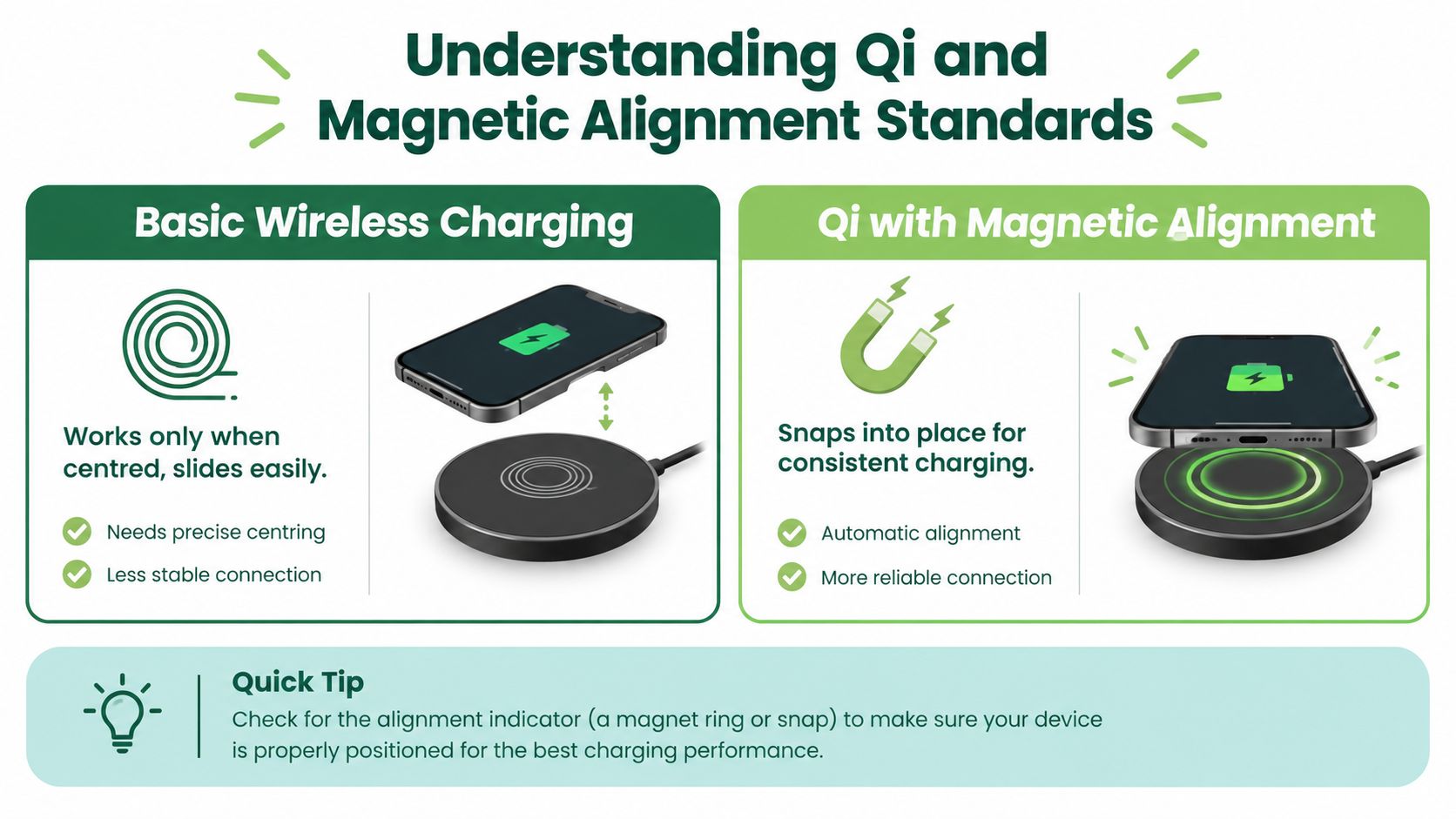
The pad contains a transmitter coil. Your phone contains a receiver coil. If those coils sit close together and line up well, energy transfer is more efficient. If the phone is off-centre, tilted by a thick case, or shifted during the night, the connection weakens and charging may slow down, stop, or create more heat.
That trade-off matters in daily use. A wireless charger can feel convenient on a desk or bedside table, but convenience drops if you need to keep repositioning the phone. Over time, accessory fit also shapes the ownership experience. A phone that charges reliably with common pads, stands, and cases is easier to live with, and in Singapore's resale market that kind of compatibility can make a device more attractive to the next owner.
Cases are a common source of confusion. A thick back panel, a metal plate, or the wrong magnetic insert can increase the distance between the coils or interfere with charging. The Wireless Power Consortium's Qi overview is a useful reference for how the standard is designed to work across compatible devices and accessories.
A simple troubleshooting sequence
- Remove the case temporarily. If charging becomes more stable, the case is affecting alignment, distance, or heat release.
- Centre the phone on the pad. Wait for the charging symbol, then confirm it stays active.
- Try a certified accessory. Certified products reduce guesswork around compatibility and safety.
- Check the cable and power adapter connected to the pad. The pad still depends on the power source feeding it.
- Compare with wired charging. If both methods behave oddly, the battery or charging hardware may need inspection.
If you use Samsung devices, this Samsung 25 W charger guide helps explain why charger output, phone limits, and heat control all affect charging results.
A charger can be powerful without making a poorly aligned phone charge quickly. Position comes first.
Understanding Qi and Magnetic Alignment Standards
Basic Qi wireless charging and magnetic alignment aren't the same thing. Qi describes a wireless charging standard. Magnetic alignment describes how the phone and charger stay positioned relative to each other.
A Qi-compatible phone can charge when it's placed on a suitable pad, but it may slide if the surface is angled or the device is nudged. A phone with built-in magnets can attach to a compatible charger, stand, or power bank and keep its receiver coil centred. A phone may support Qi charging without having built-in magnets.
That distinction is especially important in a mixed Singapore household. An iPhone with built-in MagSafe magnets may attach securely to a magnetic stand, while a Samsung Galaxy phone may charge on the same pad without attaching. Recent local reporting has noted that Samsung Galaxy devices were expected to adopt Qi2 in 2025, while the Galaxy S25 Edge requires a magnetic case for magnetic alignment, unlike Apple models with built-in MagSafe magnets. Read the HardwareZone report on Qi2 25W and phone support for the current compatibility discussion.
Compare the features separately
| Feature | What it tells you |
|---|---|
| Qi support | The phone can receive power wirelessly from a compatible Qi pad. |
| Qi2 certification | The phone or accessory follows the newer Qi2 standard, but check the exact device capabilities. |
| Built-in magnets | The phone can attach to compatible magnetic accessories without relying on a special case. |
| Magnetic case support | A non-magnetic phone may gain alignment support through a suitable case. |
| Charger power | The accessory's maximum output doesn't guarantee that your phone will accept that level. |
Existing Qi2 devices may remain limited to 15W, while the emerging Qi2 25W standard adds another layer to the buying decision, as described in the HardwareZone coverage. Don't assume that a charger labelled “magnetic” delivers the same experience to every phone.
A car mount needs secure attachment. A flat bedside pad mainly needs reliable placement. A multi-device charger should be tested with each phone and case combination, not just one device from the household.
Before buying, check the manufacturer's specifications for the exact phone model, then verify whether the accessory needs built-in magnets, a magnetic case, or only a flat charging surface.
Battery Health and Charging Efficiency Trade-offs
Set a phone on a bedside pad before sleep, and the experience feels almost effortless. By morning, though, the trade-offs show up in three places: charging speed, heat, and how gently the battery was treated along the way.
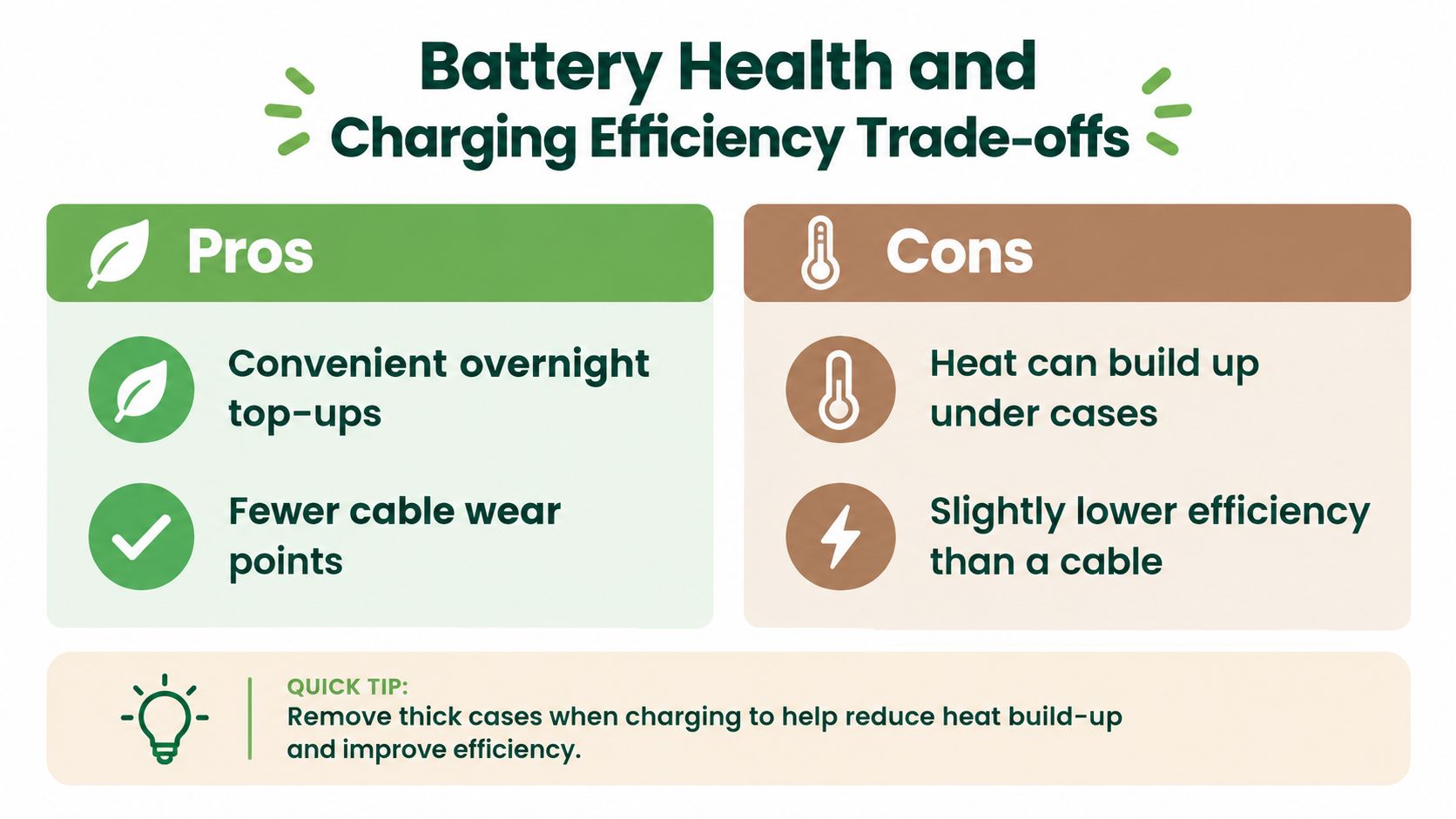
Wireless charging wastes more energy than a cable, so some of that lost energy turns into warmth. A little warmth is normal. Extra heat from poor alignment, a thick case, a warm room, or heavy use during charging can push the phone to slow down and manage temperature more aggressively. That matters because lithium-ion batteries age through daily use, and heat adds stress over time. For a practical explanation of how that process works, see this lithium-ion battery guide.
Speed isn't the whole story
The Straits Times wireless charger coverage notes that a 25W wireless charger can take up to about 90 minutes to fully charge a phone, while wired charging at up to 125W can do the job in roughly 20 minutes. Those figures come from different setups, so treat them as examples rather than a promise for every phone. The broader point is easy to see. Wireless charging fits slow, routine top-ups well, while a cable remains the practical choice when time is tight.
A helpful way to picture it is a funnel. Wired charging usually pours energy in more directly. Wireless charging depends on coils lining up well, and small mismatches can waste more of the transfer.
Try these habits:
- Remove a thick case during longer charging sessions. Less material between the charger and phone can reduce trapped heat.
- Keep the phone centred. Better alignment helps the coils transfer power more cleanly.
- Avoid demanding tasks while charging. Gaming, navigation, and intensive video work add heat from another direction.
- Use certified accessories. Clear compatibility details and suitable power ratings lower the risk of unreliable charging.
- Choose wired charging when speed matters. A cable is usually the better option for a quick boost before heading out.
These habits also affect resale value in Singapore. Buyers and trade-in evaluators care less about a wireless charging logo on the spec sheet than about whether the phone charges steadily, stays at a reasonable temperature, and still has a healthy battery. Chasing the highest advertised wattage is not always the smarter habit. A cooler, more consistent routine often leaves an older phone easier to use, easier to assess, and easier to pass on responsibly.
How myhalo Evaluates Wireless Charging for Trade-in
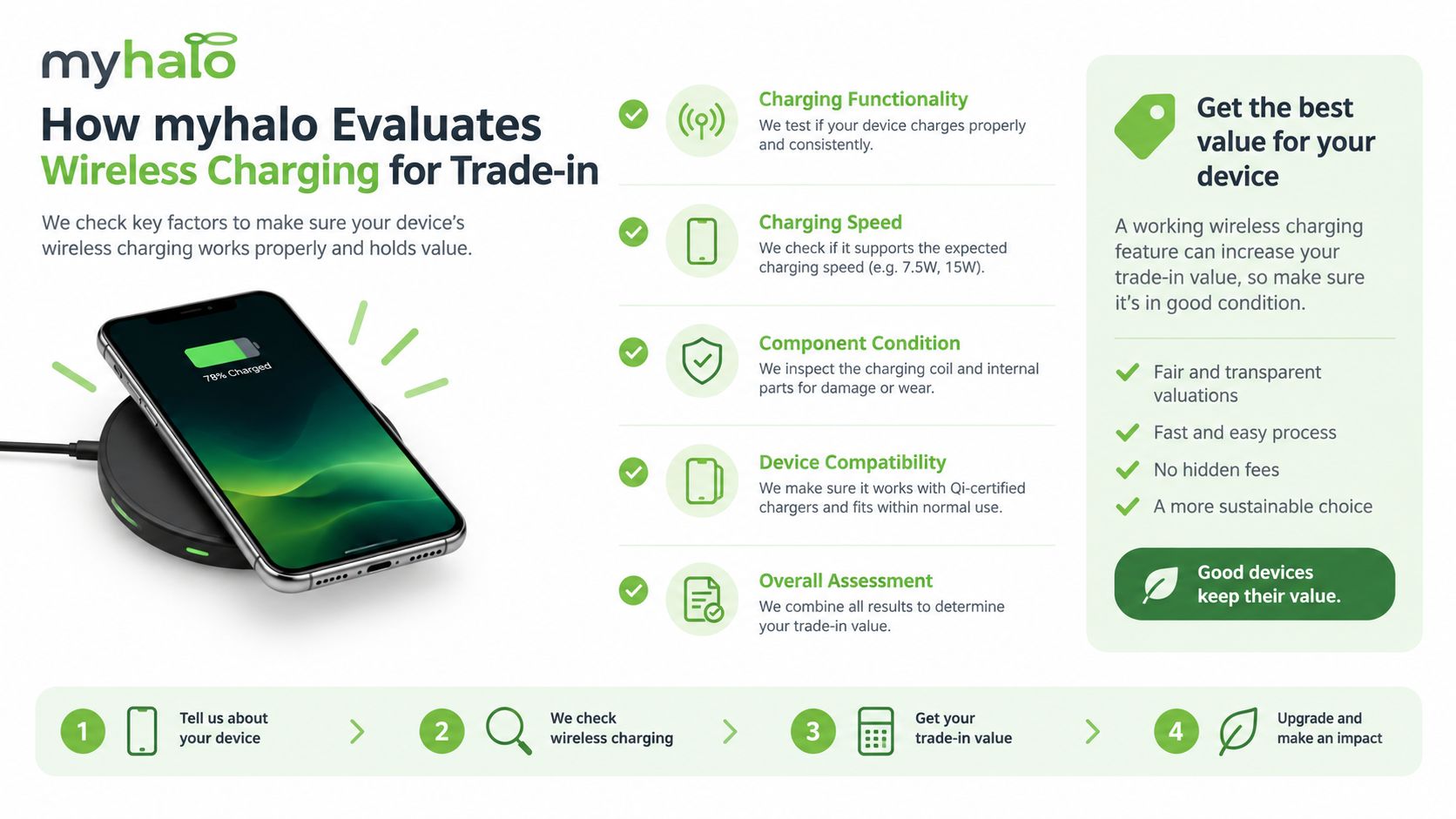
A phone's wireless charging feature can influence how useful it remains in its next home, but it's only one part of a fair assessment. A technician should check the actual charging behaviour, not just accept a model name as proof that everything works.
A practical evaluation starts with a certified charging pad. The phone is placed in the centre, allowed to establish a connection, and observed for stable charging. The test should then be repeated with the customer's case attached, because a device can work perfectly bare but charge intermittently inside a thick or magnetic case.
What the inspection records
- Charging response: Does the phone detect the pad, begin charging, and hold the connection?
- Coil and rear housing: Are there cracks, warping, repair marks, or damage around the area where the coil sits?
- Temperature behaviour: Does the phone become abnormally warm during a normal test?
- Battery condition: Can the battery support everyday use without making wireless charging impractical?
- Network compatibility: Does the phone still support the networks and services needed by its next owner?
- Data security: Has the device been backed up, signed out, erased, and prepared for transfer?
The network check matters because physical charging support doesn't guarantee that an older phone remains suitable for Singapore's mobile environment. IMDA's 3G transition announcement states that Singapore's 3G networks and services ceased on 31 July 2024. From 1 November 2023, new registrations and renewals for 3G-only and non-VoLTE-capable smartphones stopped, with deregistration beginning on 1 February 2024. A phone might still charge wirelessly but need replacement if it lacks suitable 4G, 5G, or VoLTE support.
For an additional reference on confirming a device's identity and condition, you can review Ruit's phone verification process. A transparent trade-in assessment brings these physical, technical, and privacy checks together.
You can find more practical considerations in this guide to phone trade-in in Singapore. A working coil may support continued use, but cosmetic grade, battery health, network compatibility, and secure data erasure still shape the final decision.
Extending Device Life and Recycling Responsibly
A faulty wireless charging coil doesn't automatically mean a phone belongs in the bin. If the display, processor, battery compartment, and other components remain serviceable, a repair assessment may reveal a sensible way to extend the device's useful life. Repair, resale, and parts harvesting can all delay the need for a new phone.
Singapore's regulated e-waste system, introduced by the National Environment Agency in July 2021, operates under an Extended Producer Responsibility approach. Producers are responsible for collection and treatment of regulated products at end of life, and collected e-waste must go to licensed recyclers. Mobile phones are included, and NEA notes that battery recycling services cover mobile-phone and laptop batteries.
That gives you a clear route:
- Repair first when practical. Ask whether the coil, rear housing, battery, or charging board can be restored.
- Reuse or resell a working device. A well-tested phone can serve another owner instead of becoming redundant e-clutter.
- Protect your data. Back up important files, sign out of accounts, and use a secure erasure service when appropriate.
- Recycle irreparable devices properly. Use an authorised collection or recycling pathway rather than general waste.
For battery-specific disposal guidance, see this resource on battery recycling in Singapore. Responsible recycling protects privacy, supports material recovery, and keeps damaged batteries out of unsuitable waste streams.
myhalo offers repair diagnostics, certified resale, trade-in, buyback, data recovery, secure data destruction, and responsible e-waste pathways for devices in Singapore. If you're ready to check a phone with wireless charging, clear out unused tech, or prepare an old device for its next life, visit myhalo and take the convenient, safe, responsible route toward a lighter e-clutter load.