
Third-party phone screen repairs in Singapore typically range from SGD 150 to SGD 400, and the final price can swing a lot depending on your phone model and the kind of screen inside it. If you're holding a cracked phone right now, the smart move isn't guessing. It's figuring out whether repair, replacement, or a ReLoved device gives you the better outcome.
You know the moment. The phone slips out of your hand at the MRT platform, on the office floor, or while getting out of a Grab. You pick it up, see the spiderweb crack, and your brain immediately jumps to the same questions. How much is this going to cost, how fast can someone fix it, and do I risk my data by handing it over?
That panic is normal. A damaged screen is annoying, expensive-looking, and weirdly disruptive because your whole day sits inside that device. The good news is that the phone screen repair Singapore price market is more predictable than many assume once you know what drives the bill. And if repair no longer makes sense, you've still got better options than leaving the phone in a drawer.
Table of Contents
- That Heart-Stopping Moment Your Phone Hits the Floor
- Typical Phone Screen Repair Prices in Singapore
- What Factors Influence Your Final Repair Bill
- Comparing Your Repair Options Authorized vs Third-Party vs DIY
- How to Get an Accurate Instant Repair Quote
- Is It Worth Repairing Next Steps for a Smart Decision
- Your Repair Journey What to Expect and How to Prepare
That Heart-Stopping Moment Your Phone Hits the Floor
A cracked screen does two things at once. It damages the phone, and it wrecks your mood.
One minute you're replying to messages. Next minute you're tilting the screen under the light, hoping it's “just the protector”. Then you notice the touch is slightly off, or a black patch starts spreading from the corner, and suddenly this isn't cosmetic anymore.
I've seen people make three bad decisions after that moment. They rush to the first shop they see. They keep using the phone until the damage gets worse. Or they give up and buy a new device too quickly. All three usually cost more than they need to.
If your phone still works, pause. Check whether the crack affects touch, display brightness, or face recognition. If it does, treat it as a proper screen repair problem, not a “later” problem. Delaying often turns a manageable job into a messier one.
For a calmer first step, this guide on what to do after you've broken your phone is worth reading before you start calling around.
The first decision isn't where to repair
It's whether the phone deserves repair at all.
That sounds blunt, but it saves money. A newer device with a single-screen issue is often worth fixing. An older phone with a damaged screen plus battery issues plus frame damage may not be. You want a decision that covers cost, convenience, data security, and waste, not just the first quote someone throws at you.
A broken screen shouldn't push you into a rushed upgrade if a clean repair gets the job done.
Don't ignore the data question
A common focus is on glass and display quality. Fair enough. But your phone also holds banking access, photos, work chats, and saved passwords. If you're sending it for repair, you need to think about privacy and backups before the technician starts.
That's why the right decision framework is bigger than a price list. A smart repair choice protects your wallet, your data, and the usable life of the device.
Typical Phone Screen Repair Prices in Singapore
Start with a realistic budget range. In Singapore, third-party screen repairs for popular phones often fall between SGD 150 and SGD 400. Samsung repairs can sit lower for A Series models and climb fast for premium devices. Foldables are in a different league altogether. This Singapore repair pricing guide for Samsung Galaxy screens shows why Galaxy Z repairs can get expensive quickly.
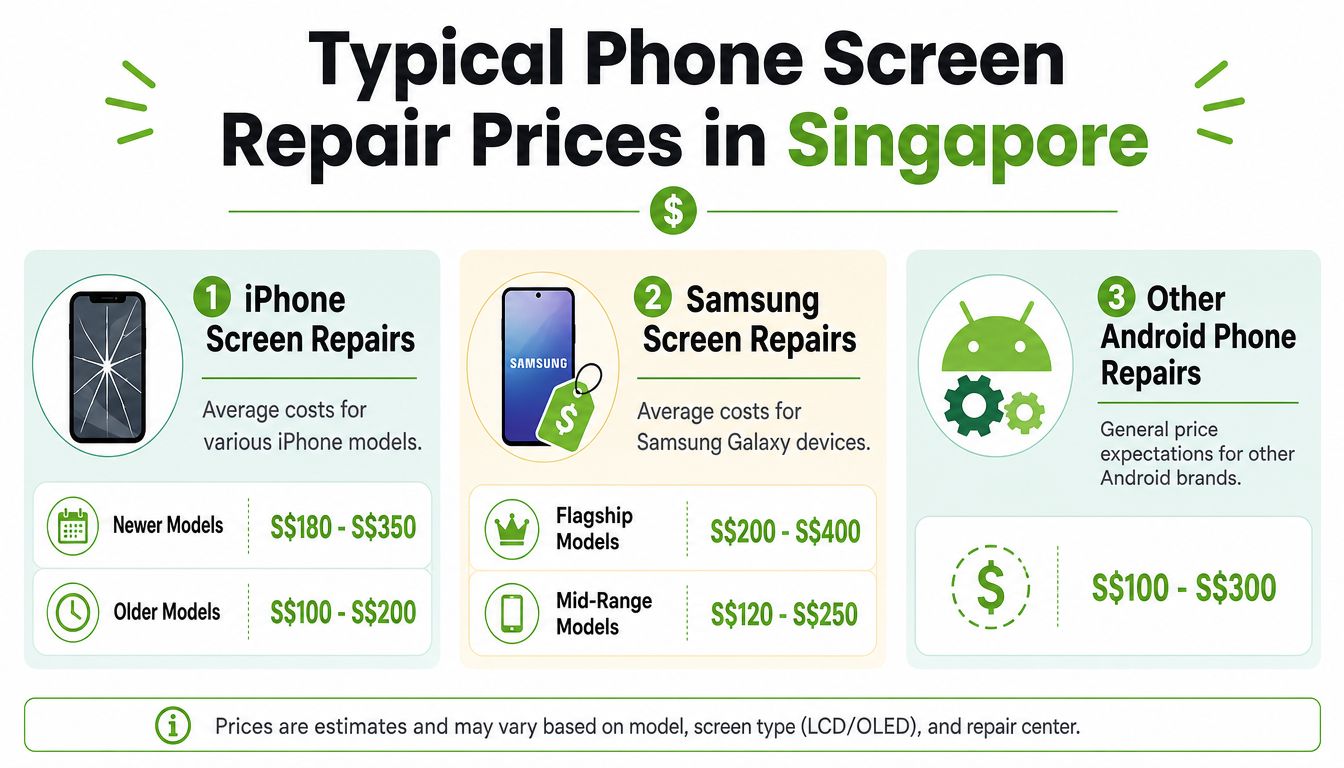
The common price range for repairs
A simple way to judge any quote is to place your phone into the right tier first.
- Older or simpler models: Usually closer to the lower end.
- Recent mainstream models: Often priced in the middle band.
- Flagship and foldable phones: Usually the most expensive because the screen assembly is more complex.
For Samsung, the pattern is fairly consistent:
| Device category | Typical third-party screen repair price |
|---|---|
| Galaxy A Series | $120 to $300 |
| Galaxy S Series | $150 to $350 |
| Galaxy Note Series | $180 to $280 |
| Galaxy Z Series Fold and Flip | $450 to $900 |
That difference matters. A Galaxy A device, a Galaxy S Ultra, and a Galaxy Z Fold should not be judged by the same “screen repair price” idea.
Use price to make a decision, not just to compare shops
Price only helps if you pair it with the bigger question. Should you repair, replace, or switch to a ReLoved phone instead?
Here's the practical framework:
- Repair if the phone is still solid apart from the screen and the quote is sensible for its age.
- Replace if the repair cost is too close to the value of the device, or if there are other major issues on top of the screen.
- ReLoved if you want a lower-cost upgrade with less waste than buying brand new.
That approach saves you from two common mistakes. Overpaying to fix a tired phone, or replacing a perfectly good one just because the first quote looked scary.
Cheap quotes can be misleading
A very low headline price does not always mean a better deal. Some shops quote for glass-only repair, while others quote for a full display assembly. If the panel underneath has touch problems, black patches, dead pixels, or brightness issues, the cheaper price may not apply.
If you want a quick breakdown of the difference, this LCD screen repair guide explaining glass damage vs full display repair is useful.
Practical rule: If a quote is far below the usual range, ask one direct question. “Is this for the outer glass only, or the full screen assembly?”
That one question protects your budget, your time, and your expectations. It also makes it easier to compare repair shops fairly, including services like myhalo that focus on clear quoting and a safer, less wasteful repair path.
What Factors Influence Your Final Repair Bill
A phone screen repair Singapore price isn't random. The bill usually follows the hardware.
Screen tech changes everything
The biggest cost driver is the display technology. LCD panels are cheaper to replace than OLED panels, and high-end models like iPhone Pro devices or Samsung Galaxy S phones can push repair costs towards or above SGD 400 when an OEM-grade OLED part is involved, based on this Singapore phone repair pricing breakdown.
That's the key reason two phones with “a cracked screen” can end up with very different quotes.
If your phone uses LCD, the replacement part is generally less expensive. If it uses OLED or a similar premium panel, the part itself costs more before labour even enters the conversation. Colour accuracy, brightness, thinness, and panel complexity all add cost.
Other details that move the quote
Screen tech is the main factor, but it isn't the only one. Final pricing usually changes based on a few practical details:
- Brand and model family: Flagship phones often use pricier parts and tighter assembly designs.
- Damage scope: A visible crack is one thing. Dead pixels, black spots, touch failure, or frame issues usually point to a more involved repair.
- Part grade: Some shops quote for OEM-grade parts, while others quote for aftermarket replacements.
- Condition around the screen: If the frame is bent or the back glass is also damaged, the repair gets less straightforward.
Here's the simple way to understand it:
| Factor | Usually lowers price | Usually raises price |
|---|---|---|
| Screen type | LCD | OLED |
| Device class | Older or budget model | Recent flagship or foldable |
| Damage | Glass issue only | Display and touch issue |
| Parts | Basic compatible part | OEM-grade replacement |
What you should ask before saying yes
Don't ask only “how much”. Ask these instead:
- What part are you replacing exactly
- Is the quote for LCD, OLED, or OEM-grade
- Does the price include labour
- Is there any warranty on the repair
- Will the phone be tested after the replacement
That small checklist saves you from the usual confusion and gives you a cleaner comparison between shops.
Comparing Your Repair Options Authorized vs Third-Party vs DIY
A cracked screen gives you three real choices. Go to an authorized service centre, use a trusted third-party repair provider, or try fixing it yourself.
Here's the decision framework I'd use in Singapore. Judge each option on cost, convenience, data security, and how much life it gives your phone. That last part matters. A good repair keeps a usable device out of the drawer or the bin, which is better for your wallet and better for waste.
Phone Repair Options at a Glance
| Factor | Authorized Centre (e.g., Apple) | Trusted Third-Party (e.g., myhalo) | DIY (Do-It-Yourself) |
|---|---|---|---|
| Cost | Highest | Usually lower | Lowest upfront |
| Parts | Official parts | Varies by provider and quote | Depends on what you buy |
| Turnaround | Can be slower depending on booking | Often same-day | Depends on your skill and parts delivery |
| Warranty | Clear official policy | Usually shop warranty | No service warranty |
| Risk | Low repair risk | Moderate if you choose poorly, lower with a reputable provider | Highest |
| Data handling | Structured process | Ask directly about privacy and testing | You control access, but risk damaging device |
| Convenience | Strong if you want brand-authorized service | Strong if you want speed and value | Weak unless you already know what you're doing |
My take on the right choice
Authorized service is the safe, predictable route. Pick it if you want official parts, official processes, and the least guesswork. The trade-off is price, and sometimes slower booking or collection.
Trusted third-party repair is the smart choice for plenty of people. You save money, get the phone back faster, and still avoid the chaos of doing it yourself. The catch is simple. You need a shop that explains part quality, warranty, testing, and data handling clearly. If you're weighing providers, this guide on choosing the right iPhone repair for your needs gives you a solid filter.
DIY sounds cheap until it goes wrong.
Modern phones are tightly packed, glued down, and easy to damage during opening. One slip can tear a flex cable, weaken water resistance, crack the new panel during installation, or turn a screen repair into a much bigger bill. Unless you already repair phones confidently and have the right tools, skip DIY.
Here's the simplest way to decide:
- Choose authorized if official support matters more than price.
- Choose trusted third-party if you want the best balance of cost, speed, and practical value.
- Skip DIY unless you know exactly what you're doing.
There's one more angle people miss. A repair is not only a repair decision. It's also a replace vs keep vs ReLoved decision. If your current phone still suits your needs after a screen replacement, repairing it is usually the strongest value move. If the repair cost is too close to the phone's remaining value, reconsider and compare it against a replacement or a ReLoved device instead.
If a shop cannot tell you what screen grade it uses, what warranty you get, and how your data is protected during testing, don't hand over your phone.
How to Get an Accurate Instant Repair Quote
The fastest way to overspend is to rely on vague “starting from” prices.
A proper quote should reflect your exact device model, the screen type involved, and the condition of the phone. If someone gives you a number without asking those details, they're guessing or baiting.
What to prepare before checking price
Before you request a quote, have these ready:
- Your exact phone model: Not just “iPhone” or “Samsung”.
- What the screen is doing: Cracked only, black spots, flickering, touch issues, green line, or full display failure.
- Any extra damage: Bent frame, back glass damage, or water exposure.
- Whether you need speed: Same-day matters if the phone is your work device.
- Your comfort level with non-official parts: This changes the quote conversation.
That's all basic stuff, but it makes the estimate far more useful.
Why instant quotes beat vague estimates
Transparent pricing is better than phone-tag with repair counters. You want to compare a real quote against the value of the device, not against a random range you saw online.
One option in Singapore is myhalo, which uses an AI-backed pricing approach for device quotes across repair and lifecycle services. That matters because a good quote should feel specific, not scripted.
Here's the kind of experience more repair services should be aiming for:
A clear quote does two jobs. It tells you whether repair is financially sensible, and it tells you whether the repair process feels trustworthy. If the pricing is fuzzy at the start, the rest of the experience usually won't improve.
Is It Worth Repairing Next Steps for a Smart Decision
The answer isn't just yes or no. It's repair, replace, or ReLoved.
Start with the money side. A common rule is the 50% to 60% guideline. If the repair cost is more than 50 to 60% of the phone's replacement value, you should pause and consider whether replacing it makes more sense. One example used in Singapore is a $600 repair on a phone worth $1200, which sits right on that questionable threshold, as explained in this repair vs replacement guide.
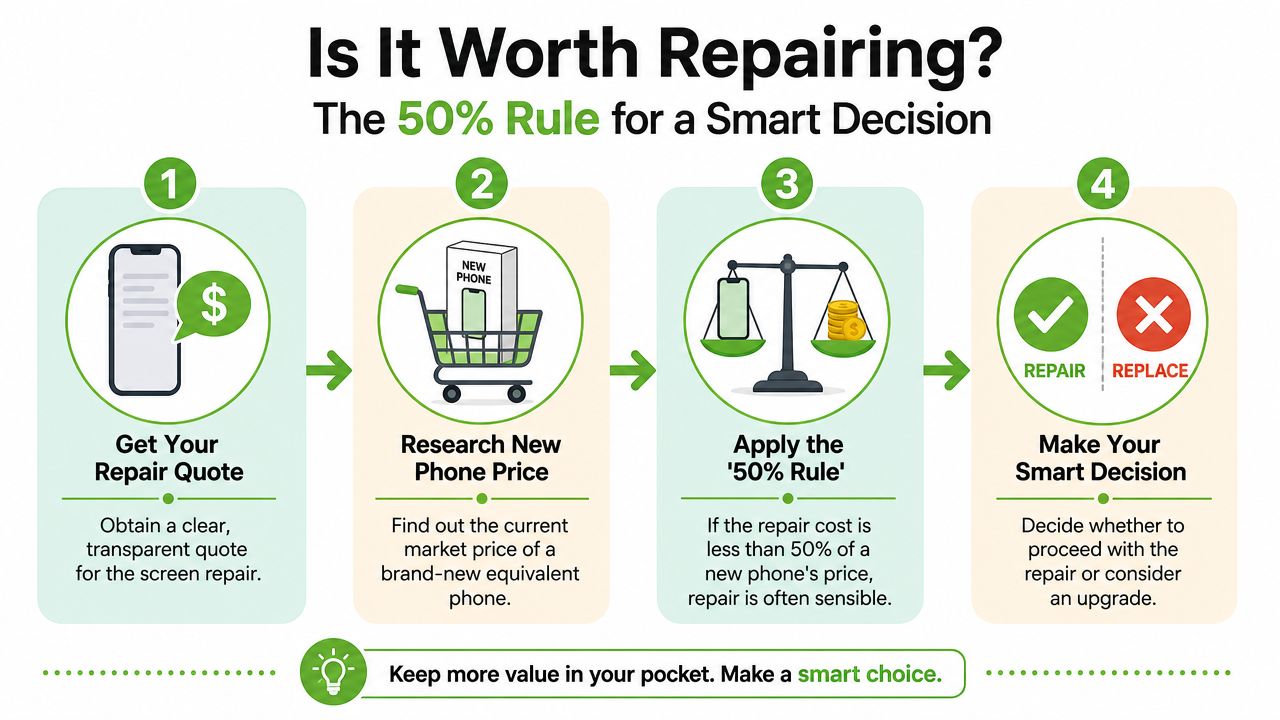
Use the 50 percent rule properly
Don't misuse the rule. It isn't saying “repair is bad above a fixed amount”. It's saying the repair cost only makes sense relative to what the phone is worth right now.
Ask yourself:
- What is my current repair quote
- What would it cost me to replace this phone with an equivalent one
- Does this phone still meet my needs after repair
- Is there any hidden issue beyond the screen
If the repair sits comfortably below that threshold and the phone still serves you well, repair is usually the sharper move.
Here's a quick visual way to understand this:
Worth remembering: A cheap repair on a phone you still like is often better than an expensive upgrade you didn't plan for.
Repair vs Replace vs ReLoved
People usually get stuck here, so here's my view.
- Choose repair when the quote is reasonable, the phone still performs well, and the damage is isolated to the screen.
- Choose replacement when the screen is only one of several issues and the device is already falling behind your daily needs.
- Choose ReLoved when buying brand-new feels unnecessary, but you still want a dependable upgrade.
That third option matters. A certified ReLoved phone can be the sweet spot between overspending on a new flagship and sinking money into an ageing device that's close to retirement anyway.
There's also the waste angle, and I think people should care about it more. A repairable phone shouldn't become drawer clutter just because the decision feels inconvenient. A zero e-waste approach means keeping devices in use longer, harvesting parts when full repair doesn't make sense, and making data-safe offloading normal instead of stressful.
🌿 The myhalo Promise: We believe that joining the zero e-waste movement should feel good and be completely effortless. Through our Safe data guarantee, your privacy is perfectly protected, while our Declutter your e-clutter program makes recycling your old devices completely convenient, safe, and responsible.
If repair no longer makes sense, don't let the phone sit idle. Trade it in, sell it through a structured buyback path, or upcycle it so usable parts can help rescue another device.
Your Repair Journey What to Expect and How to Prepare
Once you've decided to repair, the process should be simple. In Singapore, most independent repair shops complete screen repairs within 45 to 60 minutes, and many offer free diagnostics plus a 30 to 90-day warranty on their work, according to this local repair service overview.
That speed is one reason third-party repair stays popular. You're not cut off from your phone for long, and you can usually sort it out on the same day.
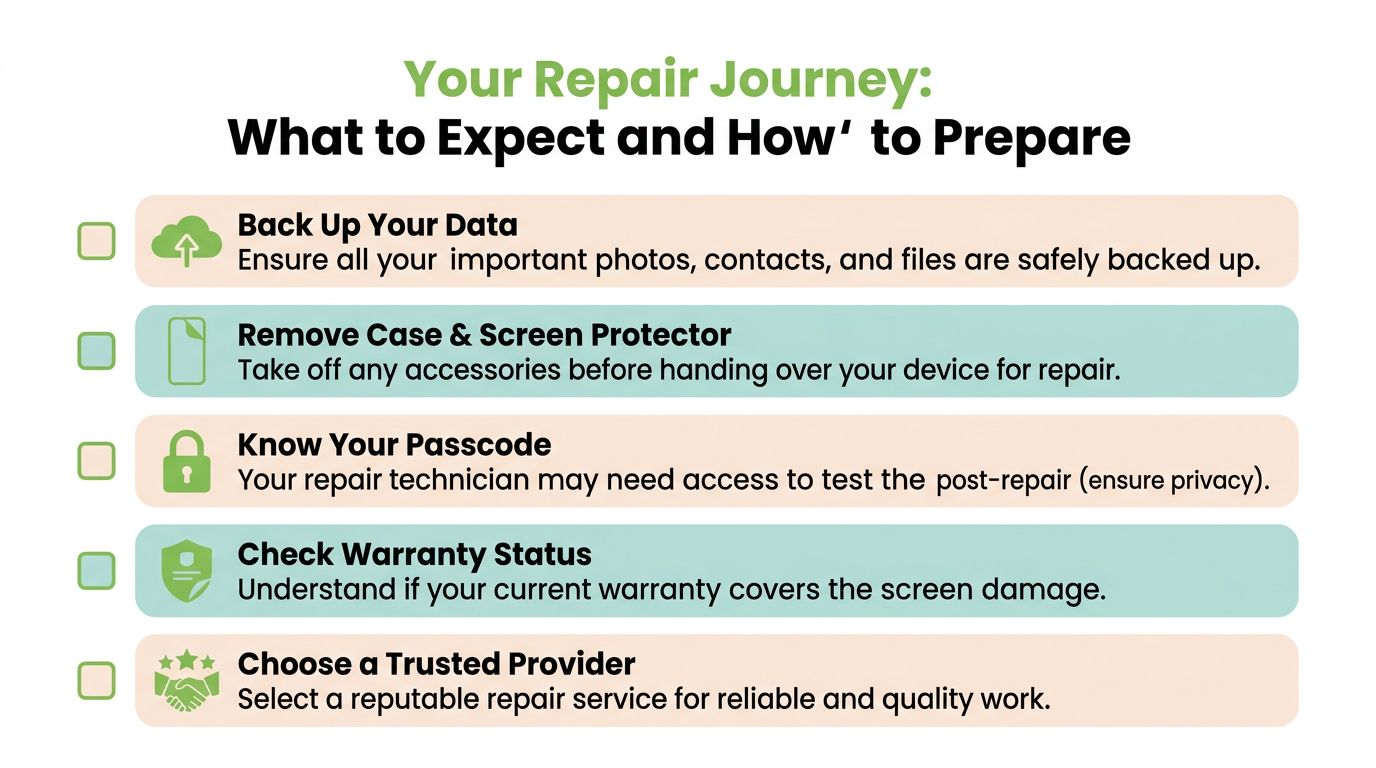
Before you hand over the phone
Do these first. They're boring, but they matter.
- Back up your data: Photos, contacts, notes, chat history, and app data should be secured before repair. If you need help, this guide on backing up your iPhone is a practical place to start.
- Remove accessories: Take off the case, magnetic wallet, and screen protector if asked.
- Know your passcode situation: Some post-repair testing may require access. Ask how the shop handles privacy before sharing anything.
- Check existing warranty status: If you still have manufacturer coverage, understand what a third-party repair may change.
What a smooth repair experience looks like
A decent repair handoff should feel organised.
You ask for a quote. The shop confirms the model and symptoms. They explain the expected part type and turnaround. They tell you whether diagnostics are needed first. They confirm any repair warranty. Then they test the phone after the job is done.
That's also where Safe data and Save data matter. If your privacy is your main concern, secure handling should be paramount. If the screen issue comes with data access problems, recovery support becomes just as important as the screen itself.
A phone repair isn't only about making the glass look nice again. It's about getting your digital life back into a safe, usable state with as little hassle as possible.
Your precious files and memories matter to us. Whether you need to protect your privacy with Safe data or rescue lost files with Save data, our caring team is right here to help. Reach out to myhalo today!