
A pre-owned Samsung Galaxy S23 Ultra 5G can look spotless in a listing photo and still raise practical questions once you imagine using it in Singapore. Will 5G stay stable on the MRT, in a condo lift, or inside a concrete HDB flat? Is the battery already worn enough to affect a full workday? And what happens to the old phone sitting in a drawer when you worry about personal data?
Those questions deserve plain answers before money changes hands. A refurbished flagship is a bit like a used car: the badge matters less than the service history, the condition of key parts, and how it behaves on the roads you drive. For a phone in Singapore, that means checking local network behaviour, battery health, physical wear, and a responsible end-of-life route for the device you already own.
myhalo focuses on extending the life of digital devices through repair, resale, buyback, and upcycling in Singapore. That matters here because buying refurbished is only one part of the decision. If your current phone still has value, you can sell it to myhalo and get an instant quote. If it needs repair first, myhalo offers Samsung screen replacement and Samsung battery replacement. If it is being retired, secure data management and destruction are available, with certificates on request.
The myhalo Promise: Moving toward a zero e-waste routine should be clear and practical. You can repair a Samsung phone screen or battery, sell an existing phone for an instant quote, or pass on retired devices through services that support reuse and responsible handling.
Table of Contents
- Galaxy S23 Ultra 5G Specs and Why It Still Holds Up
- Singapore Launch Prices and Storage Tiers
- What Certified Refurbished Covers Before You Pay
- Physical Condition Checks Before You Pay
- Singapore 5G, eSIM and Indoor Coverage
- Wipe, Sell or Recycle at End of Life
- Decide Whether a Refurbished S23 Ultra Fits You
Galaxy S23 Ultra 5G Specs and Why It Still Holds Up
If you've inherited a Samsung Galaxy S23 Ultra 5G or spotted a tidy secondhand listing, you're looking at a flagship built with enough headroom to serve comfortably for years. Say you're a commuter in Tampines who shoots family photos on weekends, edits work documents on the train, and expects your handset to last from breakfast to bedtime. Before comparing prices or worrying about scratches, start by confirming the exact hardware inside the phone.
Here's a quick visual summary of the core specifications you'll want to verify before going any further.
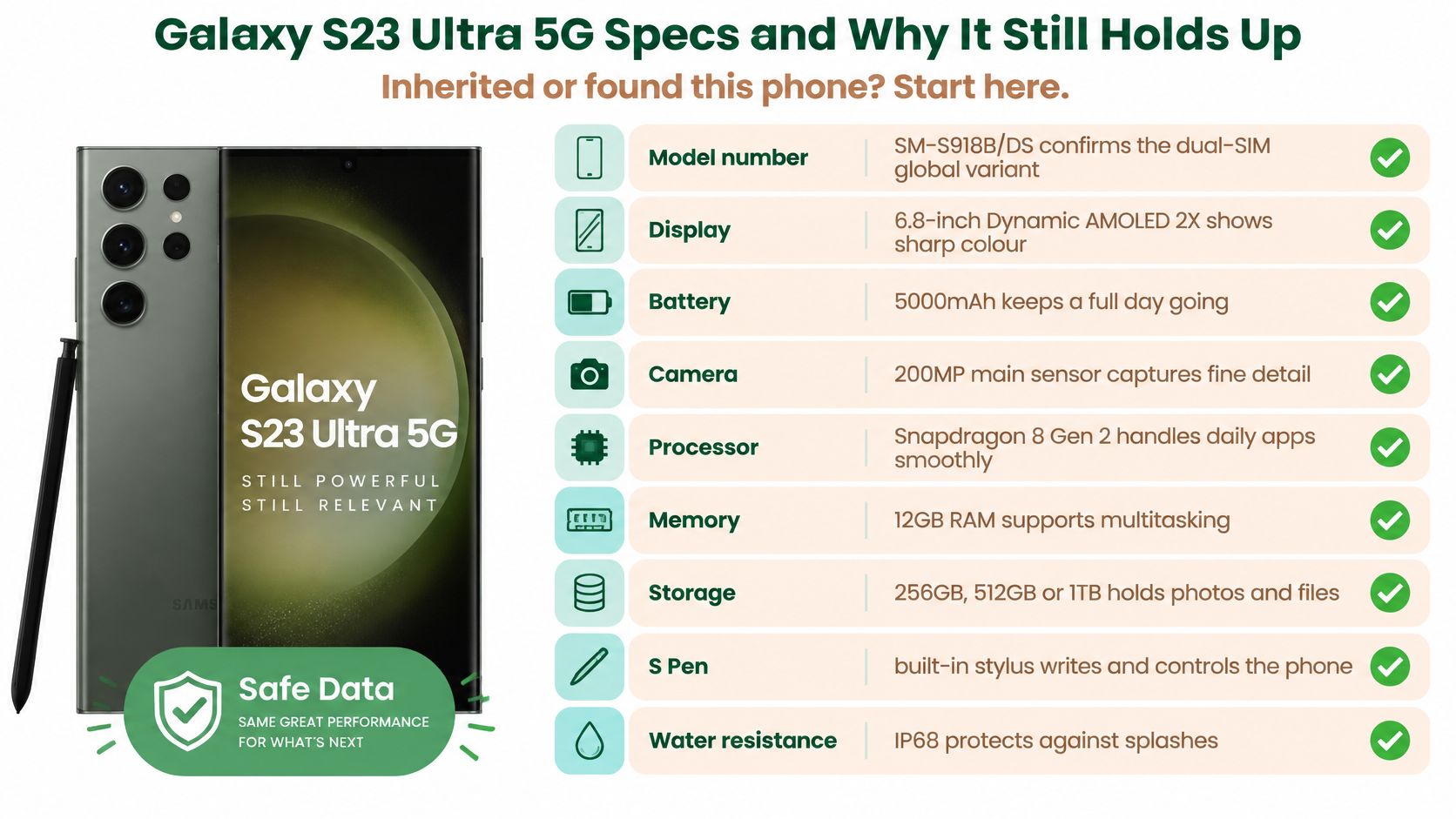
According to the Samsung Singapore support page, the local Galaxy S23 Ultra carries model number SM-S918B/DS, pairs a 6.8-inch display with a 4,855 mAh rated battery capacity, and offers a 512 GB dual-SIM configuration on one Singapore variant alongside compatible 5G carrier support. You might notice a slight difference in battery labels across regions: in 2026, Samsung's official UAE product page listed the typical battery capacity at 5,000mAh, which reflects the standard marketing average rather than the minimum rated figure shown in Singapore's support specs.
Meanwhile, in 2026, the Qualcomm device finder lists the handset with a 200-megapixel camera and the Snapdragon 8 Gen 2 Mobile Platform for Galaxy. Put all of those parts together, and you get a clear checklist of what matters to a used buyer.
| Feature | Galaxy S23 Ultra 5G | What it means for a buyer |
|---|---|---|
| Model number | SM-S918B/DS | Confirms the exact phone; check the box or Settings before comparing listings |
| Display | 6.8-inch | Large screen; check its condition first, since screens are costly to replace |
| Battery | 4,855 mAh rated (Singapore product page) | Battery wear shows first on a used unit |
| Processor | Qualcomm Snapdragon 8 Gen 2 for Galaxy | Still a capable flagship chip for everyday apps and games |
| Main camera | 200-megapixel | Fine detail for everyday shots and large prints |
| SIM | Dual-SIM configuration on one Singapore variant | Check which SIM setup your listing has |
| Connectivity | 5G with eSIM support | eSIM support varies by country and carrier, so check before buying |
| Water and dust resistance | IP68 rating | Good protection, but seals weaken with age and drops |
Why the Chip, Camera, and Seals Still Matter
Think of the Snapdragon 8 Gen 2 for Galaxy like a well-built touring engine that keeps pulling smoothly long after the showroom shine fades. Even as modern apps grow heavier, it handles split-screen messaging, map navigation, and graphic-heavy games without the stutter you often feel on cheaper new handsets.
The 200-megapixel main sensor follows a similar rule: a strong lens and sensor do far more work than a shiny new model badge. For everyday hawker-centre snapshots, cropped zoom shots at school concerts, or large printed family portraits, the detail holds up remarkably well.
On water resistance, an IP68 rating means the factory assembly was sealed against dust and brief submersion in fresh water. Over time, though, adhesive gaskets loosen after knocks, heat cycles, or prior repairs, so treat a pre-owned handset as splash-resistant rather than pool-proof. Notice too that storage and memory vary across models, which shapes both performance headroom and resale value.
How to Confirm the Exact Model Before Comparing Listings
Listings often lump regional imports and local sets under one generic title. Before you compare offers, verify the exact model in three simple places:
- Original retail box: Check the white barcode sticker on the back or side panel for SM-S918B/DS and the printed IMEI digits.
- Phone Settings menu: Open Settings, scroll to About phone, and read both the Model name and Model number directly from the software.
- SIM tray and back etching: On clean local units, the fine print near the lower back glass or inside the SIM slot area helps confirm you're holding a genuine dual-SIM global unit rather than a carrier-locked overseas set.
Taking two minutes to confirm those details keeps you from comparing apples with oranges, and it ensures genuine Samsung parts and battery replacements remain straightforward if you ever service the handset down the road.
Singapore Launch Prices and Storage Tiers
Understanding what a flagship originally cost helps you judge whether a used or refurbished asking price makes sense. When the Samsung Galaxy S23 Ultra 5G was announced on 2 February 2023 and officially launched in Singapore on 17 February 2023, the Samsung Singapore Newsroom launch announcement set three distinct retail tiers. Buyers who ordered during the 17 February to 16 March 2023 launch-promotion period through Samsung stores, authorised retailers, and selected electronics outlets also qualified for early promotional benefits, which explains why some original local receipts list bundled perks or storage upgrades.
| Storage | RAM | Launch price (S$) | Extra over 256GB (S$) |
|---|---|---|---|
| 256GB | 8GB | 1,828 | Base price |
| 512GB | 12GB | 2,098 | 270 |
| 1TB | 12GB | 2,458 | 630 |
Look closely at the jump between the base tier and the middle tier. Paying S$270 extra at launch didn't just double storage from 256GB to 512GB, it also lifted system memory from 8GB to 12GB of RAM. Moving from the base model to the 1TB variant added S$630 to the ticket price while keeping that same 12GB memory ceiling.
Picking the Right Storage Tier for Daily Life
Because the phone launched at a high retail benchmark, clean pre-owned units keep meaningful value long after the first owner moves on, especially if you're weighing it against a newer Samsung S24 Ultra price in Singapore. That makes choosing the right tier a practical budget call rather than a bragging-rights contest.
As a plain rule of thumb, the 256GB model with 8GB of RAM fits most everyday users who stream music, store photos in the cloud, and juggle standard social and banking apps. Step up to 512GB or 1TB if you record frequent high-resolution videos, keep large offline game libraries installed, or expect to hold the phone for several more years with plenty of breathing room in 12GB of RAM.
Before sealing a deal, double-check that the tier printed on the box matches what's inside the phone. Open Settings, tap Device care, and select Storage to verify the total capacity shown on screen, since mismatched boxes are a common mix-up in secondhand sales.
What Certified Refurbished Covers Before You Pay
"Certified refurbished" sounds reassuring, yet different sellers use the phrase very differently. One shop might run full multi-point quality assurance testing with component checks and fresh seals, while another might wipe the screen with a cloth and call it a day. Asking for clear answers in writing protects your wallet and tells you immediately how much a seller stands behind their work.
Put these six questions to any refurbisher before transferring a single dollar:
- Warranty coverage and repair channel: Ask how long the warranty runs and whether it covers the battery, screen, and internal board faults. Confirm who handles hardware repairs if something goes wrong, so you aren't left chasing an overseas warehouse.
- Cosmetic grading standards: A "like new" tag means little without definitions. Request the exact grade assigned to the handset and a written breakdown of what micro-scratches, frame marks, or screen wear that grade allows.
- Battery testing and health reading: Lithium-ion cells naturally lose punch over years of charging. Ask whether the battery was tested or swapped for a fresh unit, and request the health reading on paper before buying.
- Verified data wipe and account removal: You want certainty that the previous owner's files, Samsung account, and Google lock are completely gone. Ask for a documented erasure record so you know the phone won't ask for someone else's password after a future software update.
- Box contents and dated invoice: Find out whether a compatible USB-C cable, charging adapter, or original S Pen is included, and make sure a dated invoice with the phone's IMEI comes with your purchase.
- Return window and shipping costs: Confirm how many days you have to return the handset if it fails your network or physical checks at home, and clarify who covers return postage or drop-off fees.
A refurbished phone backed by a clean inspection report and a clear local warranty beats a cheaper bargain with a mystery history every single time. If a seller dodges these six questions or insists everything is "tested okay" without written proof, treat that hesitation as your cue to walk away.
Physical Condition Checks Before You Pay
Even with a solid warranty in hand, running your own ten-minute inspection before paying gives you peace of mind. You don't need specialist gear, just a bright room, a charging cable, your own SIM card, and a calm step-by-step routine.
Start by reviewing the key hardware zones shown in this quick inspection checklist.
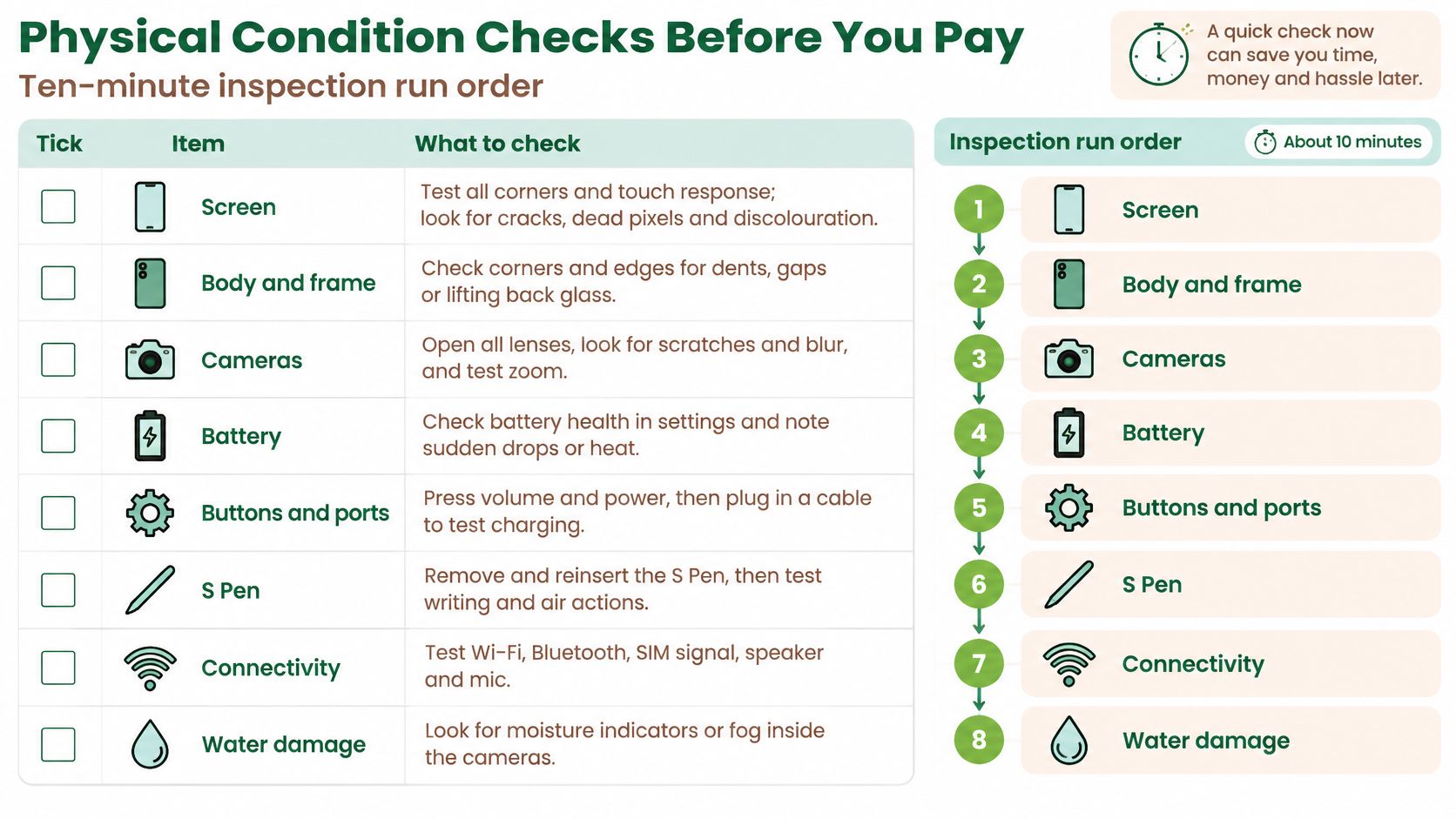
Use the pass signs and red flags below to score every major part of the handset while you hold it.
| Check | How to test it | Pass sign | Red flag |
|---|---|---|---|
| Screen | Test every corner, touch response and brightness under a bright light | Even colour, responsive touch | Lines, dead zones, ghost touches |
| Battery | Read the battery health or seller report | Healthy reading, steady drain | Fast drain, sudden shutdowns |
| Frame and back glass | Inspect edges, corners and buttons | Clean, tight fit | Cracks, bends, loose buttons |
| Cameras | Test each lens, zoom and autofocus | Sharp, clear images | Blur, grit, fogging, failed lens |
| IMEI and carrier status | Dial *#06#, match the box and listing, and insert a local SIM | Numbers match, not carrier-locked | Mismatch, carrier lock |
| Ports and audio | Charge, test both speakers and the microphone | Charges, clear sound | Loose port, crackle, dead speaker |
| Biometrics | Enrol and unlock with face and fingerprint | Quick, reliable unlock | Fails intermittently |
Your Six-Step Ten-Minute Run Order
Following a fixed order keeps you from forgetting small faults when a seller is chatting beside you.
- Power on and sign in cleanly: Restart the handset and confirm it boots straight to the welcome screen or a blank home screen with no leftover Samsung or Google accounts attached. A lock prompt tied to a stranger's email is an instant deal-breaker.
- Inspect the screen and S Pen: Turn brightness all the way up on a plain white page, check for pink or green vertical lines, and drag an icon across every edge to spot dead touch zones. Pull out the built-in S Pen and scribble across the curved edges; aftermarket copy screens often drop stylus responsiveness, and genuine Samsung phone screen repair isn't cheap because curved AMOLED panels bundle the stylus digitiser underneath.
- Verify the IMEI and SIM status: Dial
*#06#on the keypad, match the digits against the invoice and box label, and slot in your own SIM card to confirm the phone connects without asking for a carrier PIN. - Check battery health and temperature: Open Settings, then Battery, or launch the Samsung Members app under Diagnostics to read the battery status. Watch whether the percentage drops steeply during your test or if the back glass feels oddly warm or lifted at the seams, which signals a swollen cell.
- Test every camera lens: Cycle through ultra-wide, main, and telephoto zoom levels, focusing on both nearby text and a distant sign. Dust specks, cloudy moisture inside the glass, or a camera that refuses to focus usually point to prior impact or moisture entry.
- Check calls, ports, and biometrics: Plug in a USB-C cable to ensure a snug click and steady charging, play a short voice memo through both speakers, make a brief test call, and enrol one thumbprint to verify the under-display ultrasonic reader works reliably.
If you'd like to watch how a thorough secondhand Samsung inspection looks in practice, this walkthrough demonstrates the key checks on camera.
Walk away immediately if you spot a mismatched IMEI, a lifting back panel, vertical coloured lines on the display, or an active account lock that the seller promises to "remove later".
A tidy refurbished unit with honest diagnostics and clear warranty terms will always give you better long-term value than a slightly cheaper listing hiding silent wear.
Singapore 5G, eSIM and Indoor Coverage
A phone can look perfect on a listing page and still annoy you after payment. It may connect to 5G on the street, then struggle when you enter an MRT station, a lift, or a basement carpark. That is why a refurbished Galaxy S23 Ultra should be judged by how it behaves in Singapore conditions, not only by its screen size, camera gear, or "5G-ready" label.
The Samsung eSIM and supported network carriers guide confirms the Galaxy S23 Ultra is eSIM-capable and lists M1, Singtel, and StarHub as supported Singapore carriers. It also cautions that eSIM availability varies by country and carrier. That detail matters if you are comparing a local set with an overseas import: the hardware may look identical, but regional firmware and carrier support can affect setup.
eSIM works like a digital SIM card. Instead of inserting a plastic card, you download a carrier profile onto the phone. That is convenient for travellers and buyers who want flexibility, but it also means the handset must support the right carrier setup in Singapore. If you are visiting or staying mobile between networks, a digital plan can help you get online in Singapore without roaming. Before paying for a refurbished set, check that the eSIM menu is present, that activation works with your chosen carrier, and that calls still work over mobile data.
Why Outdoor Coverage Numbers Don't Tell the Whole Story
Street-level coverage gives only part of the picture. Indoor signal behaves differently because concrete walls, lifts, basements, and underground transport spaces weaken or reflect radio waves. Think of coverage like sunlight in a room: an open field is bright, while a corridor behind thick walls can stay dim even on the same sunny day.
The same idea applies to 5G. A phone may show strong signal outside a building, then drop to a weaker connection inside. For a refurbished Galaxy S23 Ultra, that difference can reveal whether the device is behaving properly with local networks. It also helps separate a phone problem from a location problem. If your existing phone also struggles in the same lift, the building may be the issue. If only the S23 Ultra struggles, the handset, settings, or firmware deserve a closer look.
Buyer check: A lower price tag on an overseas import can hide eSIM setup problems or weaker indoor handoff behaviour. Test the phone in the places you actually use before you accept the return window closing.
Your Ten-Minute Singapore Network Test Matrix
Use this short test during inspection or just after delivery. Turn Wi-Fi off, keep VoLTE enabled in mobile network settings, and note whether data and calls stay stable. VoLTE, or Voice over LTE, lets calls run over mobile data networks, so it is a useful sign that the phone and carrier are working together properly.
| Location or check | What to test | Pass sign |
|---|---|---|
| Carrier eSIM | Activate on M1, Singtel or StarHub | Plan activates and VoLTE calls work |
| Home | Speed test on 5G with Wi-Fi off | Steady 5G with usable speed |
| MRT station platform | Speed test and a short call | Connects without dropping |
| Inside a lift | Call and data use during a ride | Stays connected throughout |
| Basement carpark | Speed test and a short call | Connects or recovers quickly |
| Concrete building interior | Speed test in a room away from windows | Usable speed with no repeated drops |
Read the results as a pattern. One weak spot may point to the location, especially in a lift or basement. Repeated failures across several rows suggest the handset needs closer checking. The strongest result is a phone that activates your carrier eSIM smoothly, keeps data usable indoors, and holds calls crisp without sudden audio drops.
A responsible refurbished purchase also looks beyond connectivity. If the phone later reaches the end of its useful life, sell it or route it through a proper recovery channel instead of leaving it in a drawer. myhalo offers instant trade-in quotes for Samsung devices, and customers can sell their existing phone to myhalo and get an instant quote. That gives the handset a practical end-of-life route while you decide what to do next.
Wipe, Sell or Recycle at End of Life
Every smartphone eventually reaches a crossroads, whether you're retiring an older handset to fund an S23 Ultra or planning ahead for the day your current phone moves on. Treating an upgrade as an automatic trip to the bin wastes usable components and puts personal data at risk.
Singapore takes electronic waste seriously. Under the National Environment Agency's Extended Producer Responsibility system-system-for-e-waste-management-system), regulated e-waste covers mobile phones and tablets, while the Resource Sustainability Act sets a 20% collection target by weight for ICT equipment. As outlined in the NEA e-waste management media factsheet, Singapore rolled out this regulated system in July 2021 so unwanted electronics enter approved recovery channels instead of general rubbish.
Keeping devices alive longer makes a measurable climate difference, too. In 2024, our upcycling, rescuing, and reloving efforts avoided 2020 MTCO2e of carbon emissions, made up of 960 MTCO2e from smartphones, 890 from laptops, 90 from tablets, and 80 from desktops.
Follow this clear five-stage order whenever you decide what happens next to a Galaxy S23 Ultra.
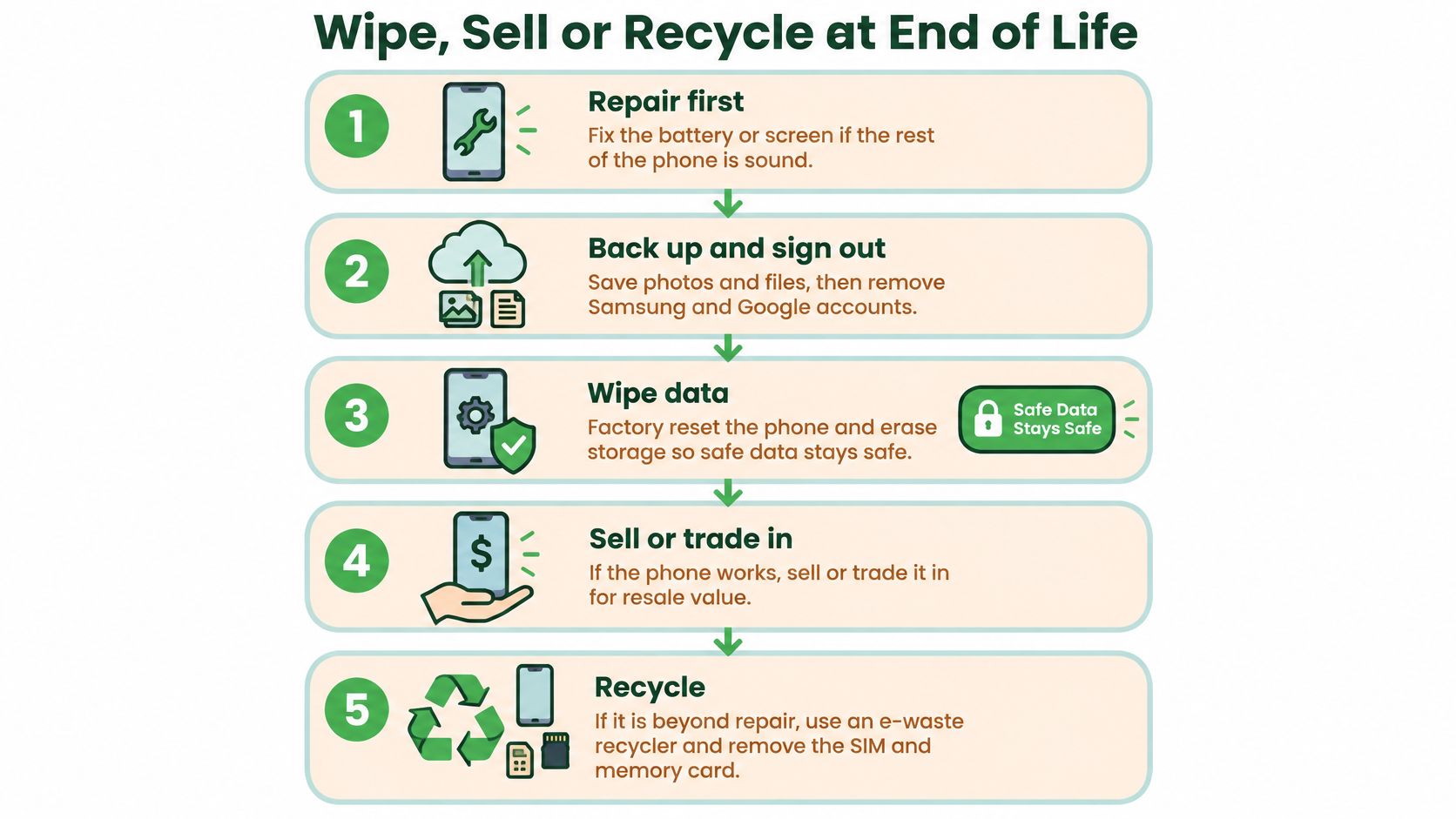
Repair, Reuse, Harvest, or Recycle
- Repair first when the core is sound: If the motherboard, cameras, and frame are intact, swapping a worn battery or cracked screen restores years of flagship usability.
- Pass it on through certified reuse: When the handset still works reliably and passes security checks, reselling or trading it in extends its life for a second owner. Presenting a spotless, well-kept handset also protects your payout, a practical detail highlighted in Idaho Pawn & Gold device advice on why clean brand-name electronics command stronger offers.
- Sanitise your data before handover: Never hand over a working or broken phone without verified erasure, especially if it holds Singpass, banking apps, or work emails. If a damaged handset won't power on and still holds precious family photos, our Save data service can help rescue your files before anything is wiped.
- Harvest working parts when repair isn't economical: Severe liquid damage, a bent chassis, or stacked board failures usually mean repair costs outweigh the phone's value. Even then, healthy components like camera modules or buttons can rescue other devices.
- Use licensed e-waste recycling last: Only once repair, reuse, and parts harvesting are exhausted should the handset go to an approved recycler for material recovery.
Six Calming Steps to Wipe Your Phone Properly
Letting go of an old phone feels much lighter once you know your personal life isn't tagging along inside its memory. Work through these six steps in order:
- Back up everything that matters: Sync photos, contacts, WhatsApp chats, and authenticator codes to cloud storage or a home computer, and verify the backup completed.
- Sign out of Samsung and Google accounts: Open Settings, go to Accounts and backup, and remove your Google and Samsung accounts so Activation Lock won't block the next user.
- Remove screen locks and biometrics: Turn off your PIN, pattern, fingerprint, and face recognition before resetting.
- Run a full factory reset: Go to Settings, tap General management, select Reset, and choose Factory data reset to clear local apps and storage.
- Remove physical and digital SIMs: Eject the physical SIM tray and confirm any eSIM profile has been deleted during the reset.
- Keep proof of erasure: For personal peace of mind, or for corporate sustainability and IT compliance records, retain a documented reset or certified secure data destruction record.
If you'd rather skip the guesswork, our Safe data service handles certified erasure with full privacy protection, and our Declutter your e-clutter programme makes handing over retired tech simple and worry-free.
Decide Whether a Refurbished S23 Ultra Fits You
A refurbished Samsung Galaxy S23 Ultra 5G is a smart, rewarding choice when three boxes are ticked together: the seller backs the phone with transparent written terms, the physical and local Singapore 5G tests pass cleanly, and the storage tier matches your day-to-day device use. Skip the gamble if a listing dodges warranty details, hides overseas network quirks, or fails your screen and battery checks.
Choosing a healthy pre-owned flagship isn't just friendly on your budget. According to NEA information reported by GovInsider, Singapore generates approximately 60,000 tonnes of electrical and electronic waste each year, with regulated ICT equipment covering mobile phones, tablets, computers, batteries, chargers, monitors, and related accessories. Every time you repair a tired battery, pick a certified second-life phone, or pass an idle gadget back into circulation, you keep valuable materials working instead of letting them gather dust in a drawer.
When you're ready to upgrade or clear space, you can sell your existing phone to us and get an instant quote, with instant trade-in quotes available for Apple devices, Samsung devices, and gaming laptops. Prefer a quick chat before dropping by? Message myhalo CircularXchange on WhatsApp at +65 8068 0100 and our team will guide you through your options.
Ready to feel lighter and do good? Let's clear out those old devices together! Check out our Declutter your e-clutter program today and see how convenient it is to make a positive splash for our environment.
Whether you're hunting for a thoroughly tested Samsung flagship, needing a screen or battery refresh, or clearing out unused phones with guaranteed privacy, myhalo is here to make every step convenient, safe, and responsible. Explore our Certified ReLoved devices, instant trade-in quotes, Safe data erasure, and Repair and Rescue services online or drop by our counters in Singapore to join our zero e-waste community today.