
Choosing between a 2-in-1 laptop and a traditional laptop can feel big, but we’re here to make it warm, helpful, and easy. In this friendly guide, we’ll compare Surface Pro and Surface Laptop so you can find the microsoft surface that fits your life. We’ll keep things honest and down-to-earth, highlight a caring approach to tech, and share fun ways to enjoy a smooth laptop experience with your favorite apps on surface—while keeping sustainability in mind.
Overview of Microsoft Surface Devices
Microsoft’s Surface family brings together thoughtful design and practical power. From a flexible 2-in-1 laptop like surface pro to a classic surface laptop, each surface device balances portability, performance, and everyday ease with microsoft 365 apps. You’ll also find creative choices like surface studio and surface laptop studio 2, plus compact options such as surface go. For the latest models, laptops featuring Surface are listed under https://shop.myhalo.com.sg/collections/laptops?gf_144112=Surface, making it convenient to explore a new surface that suits your needs.
Introduction to Surface Pro
Surface Pro is a versatile 2-in-1 laptop that adapts to your day. Pair a surface pro keyboard or surface pro flex keyboard and switch from tablet to full laptop experience in moments. Sketch ideas with a surface pen or surface slim pen, power up with a 39w surface power supply, and run microsoft 365 personal or 365 for business microsoft power tools with ease. From the 12-inch surface pro and surface pro 13 to surface pro 9, each version of the microsoft surface focuses on portability without losing performance.
Introduction to Surface Laptop
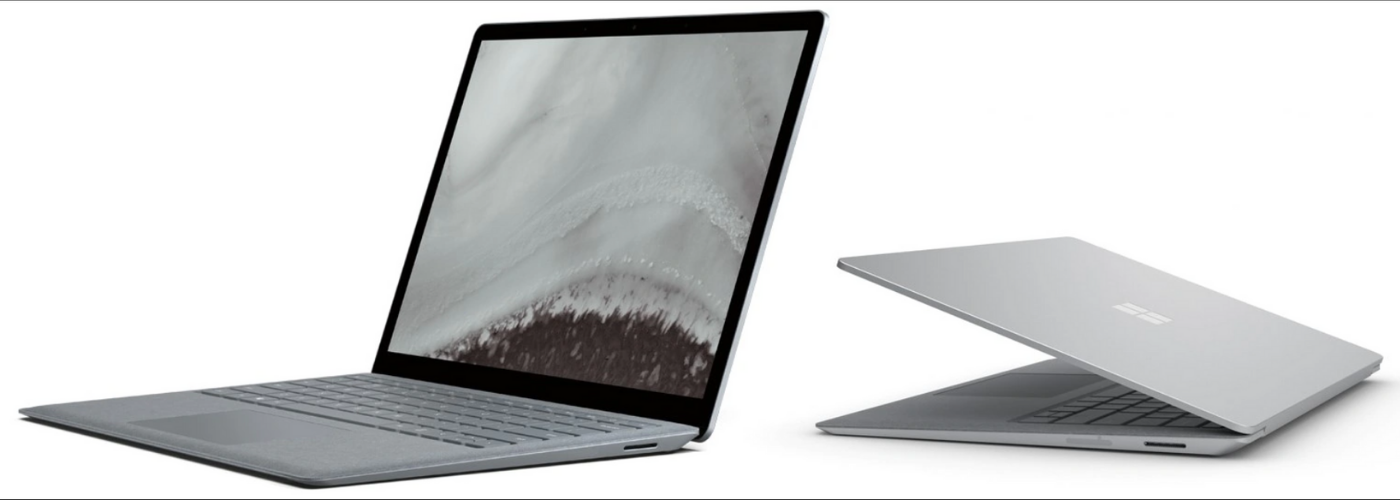
Surface Laptop offers a familiar, elegant, reliable design that feels effortless every time you open the lid. A microsoft surface laptop delivers comfortable typing, long battery life, and quiet confidence for work and play with apps on surface. Whether you’re considering the second edition of the surface or a newer edition of the surface laptop, it’s built for reliability. If you loved laptop 2 then do explore current models—there’s even a caring path for a preowned version of the microsoft that reduces e-waste while keeping things budget-friendly.
Why Buy the Sleek and Strong Microsoft Surface Laptop: Key Differences Between 2-in-1 and Traditional Laptops
Choose 2-in-1 (Surface Pro) for touch, inking, and flexibility; choose traditional (Surface Laptop) for simplicity and steady typing. A 2-in-1 like surface pro shines when you want touch, inking with a surface pen, and detachable flexibility; add a surface pro keyboard to create a full laptop experience on demand. A traditional surface laptop prioritizes a steady, ready-to-go form with fewer accessories to manage. Need creative sketching and note capture? Go 2-in-1. Prefer a simple, focused typing setup? Choose traditional. Both run microsoft 365 apps smoothly, and if you need guidance, contact microsoft or visit the microsoft store for friendly, honest support.
Design and Build Quality
Design and build matter when choosing a microsoft surface that feels right in your hands every day. Whether you prefer a 2-in-1 laptop like surface pro or a classic surface laptop, both aim to deliver a calming, reliable laptop experience. Microsoft’s Surface approach blends thoughtful materials, clean lines, and friendly details across each surface device, from surface go to surface studio and surface laptop studio 2. We’ll walk through aesthetics, portability, and durability with the same warm, honest tone you’d expect at a microsoft store.
Surface Pro Design Features
Detachable design with kickstand and pen support that pairs beautifully with a surface pro keyboard or surface pro flex keyboard. The integrated kickstand tilts smoothly for typing, drawing with a surface pen or surface slim pen, or enjoying apps on surface hands-free. Slim bezels frame bright displays on models like the surface pro 13 and surface pro 9, while the 12-inch surface pro keeps things ultra-portable. Thoughtful surface accessories and the compact 39w surface power supply round out a tidy, travel-friendly setup.
Surface Laptop Aesthetics
Minimalist, one-piece chassis with comfort-first typing. The surface laptop leans into minimalist charm: a thin, sturdy chassis, clean edges, and a timeless hinge that opens with one hand. A microsoft surface laptop favors comfort-first typing and a generous trackpad for a soothing laptop experience. Colors and materials are curated with care to match a new surface that feels personal yet professional. If you loved laptop 2 then do explore the latest edition of the surface laptop or even a preowned version of the microsoft to keep things sustainable, stylish, and budget-wise without fuss.
Durability and Portability Comparison
Surface Pro: lighter and modular; Surface Laptop: sturdier one-piece build. Surface pro is the featherweight traveler, easily slipping into a bag alongside a surface slim pen and surface accessories, ideal for note-taking, sketching, and quick setup anywhere. Add the surface pro keyboard for laptop-class productivity, then detach for tablet mode on the move. The surface laptop offers a single, solid shell that feels reassuring in commute bumps and coffee-shop sessions. Both microsoft’s surface designs are built to last; choosing comes down to whether you value modular lightness or one-piece sturdiness during daily journeys.
Performance and Specifications
Performance on a Microsoft Surface should feel effortless with Microsoft 365 apps, whether you’re crafting in Word, analyzing in Excel, or presenting with confidence. Across Surface device families, configurations scale from everyday browsing to creative builds that rival Surface Studio spirit.
| Category | Details |
|---|---|
| RAM Options | 16GB, 24GB, 32GB, 64GB |
| Processor Options | AMD Ryzen 7, AMD Ryzen 7 Pro, Intel Core Ultra 7, Intel Core Ultra 9, Intel Core i9, Intel Core 7-2, Intel Core 7-1, Snapdragon X Elite, Snapdragon X Plus |
Surface Pro Performance Metrics
Strong performance in a lighter 2-in-1 form, handling microsoft 365 personal and 365 for business microsoft power needs with ease. Modern configurations bring strong multi-core performance, fast wake, and efficient battery life for all-day apps on surface. With RAM up to 32GB or more and options like Intel Core Ultra or Snapdragon X Elite, surface pro 9 and surface pro 13 load large spreadsheets, creative sketches, and browser tabs smoothly. Pairing the 39w surface power supply keeps you topped up while the fan designs stay quiet and cool.
Surface Laptop Specifications
Better sustained performance and battery life potential thanks to ample thermal headroom, long battery life, and quiet operation that supports deep work. You’ll find RAM options from 16GB through 64GB and processors such as AMD Ryzen 7, AMD Ryzen 7 Pro, Intel Core Ultra 7, Intel Core Ultra 9, Intel Core i9, Intel Core 7-2, Intel Core 7-1, plus Snapdragon X Plus or Snapdragon X Elite in select models. This range helps a Surface Laptop glide through heavy multitasking, large presentations, and creative bursts without breaking your flow, thanks to options at the laptop factory that enhance performance.
Which Device is More Powerful?
It depends on configuration: Surface Laptop often leads in sustained loads; Surface Pro can match for lighter kits when well-specced. Power depends on configuration, not just form. A Surface Laptop often edges ahead under sustained loads thanks to a larger chassis for cooling and top-end chips like Intel Core i9 or AMD Ryzen 7 Pro with 32GB–64GB RAM. Yet a well-specced Surface Pro with Intel Core Ultra 7 or Snapdragon X Elite still delivers impressive speed for a lighter kit. For guidance tailored to your apps on Surface, contact Microsoft or visit a Microsoft Store and explore a version of the Microsoft Surface that fits today and grows with you.
| Model | Typical Strength | Example Configurations |
|---|---|---|
| Surface Laptop | Leads in sustained loads | Intel Core i9 or AMD Ryzen 7 Pro; 32GB–64GB RAM; larger chassis for cooling |
| Surface Pro | Strong for lighter kits when well-specced | Intel Core Ultra 7 or Snapdragon X Elite |
Operating System and User Experience
Both Surface Pro and surface laptop run Windows with a friendly touch that makes everyday tasks feel simple. You can open microsoft 365 apps, organize files, and enjoy apps on surface with the same familiar layout across each surface device. The difference is in how you interact: a 2-in-1 laptop invites touch and inking, while a traditional laptop leans into classic typing. Whichever microsoft surface you choose, updates are straightforward, and help is close—just contact microsoft or visit a microsoft store.
Windows Experience on Surface Pro
Best for touch and pen-first workflows. On surface pro, Windows feels light and flexible. Tap, swipe, and write with a surface pen or surface slim pen, then snap on a surface pro keyboard or surface pro flex keyboard for a full laptop experience. Features like split view and quick notes pair beautifully with microsoft 365 personal and 365 for business microsoft power workflows. The kickstand makes hands-free viewing easy, and performance on models like surface pro 9 or surface pro 13 keeps your apps on surface smooth and responsive.
Windows on Surface Laptop
Optimized for classic typing and trackpad precision. Windows on a microsoft surface laptop aims for calm focus. The roomy trackpad, comfortable keys, and steady performance make multitasking in microsoft 365 apps feel effortless. With a surface laptop, you’ll enjoy quiet confidence for long writing sessions, spreadsheets, and video calls. This traditional setup is ideal if you prefer a consistent laptop experience without attaching surface accessories. Whether you’re exploring the second edition of the surface or a newer edition of the surface laptop, updates remain seamless and reliable.
Touch vs. Traditional Input Methods
Pen/touch = creativity and annotation; keyboard/trackpad = sustained productivity. Touch and inking on a 2-in-1 laptop invite creative flow: sketch ideas with a surface pen, annotate PDFs, or mark slides quickly. Traditional input on a surface laptop centers on precise typing and trackpad control for deep work. Many people blend both by pairing a surface pro keyboard with pen input, while others keep it classic with a microsoft surface laptop. There’s no wrong choice—consider whether your day leans toward handwriting and taps, or sustained typing and cursor accuracy.
Productivity and Use Cases
Productivity thrives when your microsoft surface matches your rhythm. If you bounce between meetings, notes, and drawings, a surface pro adapts with pen, touch, and keyboard. If you settle into long documents, coding, or spreadsheets, a surface laptop offers steady comfort. Both run microsoft 365 apps beautifully, and surface accessories like the 39w surface power supply support life on the go. When you’re ready for a new surface, you can explore sustainable paths, including a preowned version of the microsoft, to keep e-waste low.
Best Use Cases for Surface Pro
Great for mobile creators, students, and note-takers. Surface pro shines for mobile creators, students, and professionals who rely on touch-first tools. Take handwritten notes in lectures, sketch storyboards with a surface slim pen, or mark contracts between meetings. The kickstand and surface pro keyboard enable fast setup in tight spaces, while models like the 12-inch surface pro, surface pro 9, or surface pro 13 balance portability and power. For on-the-spot collaboration, apps on surface and microsoft 365 personal keep files synced, with the 39w surface power supply ready for quick top-ups.
Ideal Scenarios for Surface Laptop
Best for writers, analysts, developers, and deep work. A surface laptop is perfect for writers, analysts, developers, and anyone who prefers a focused, all-in-one shell. Its stable hinge and full-size keyboard make long sessions in Word, Excel, or coding environments feel natural. If you appreciated laptop 2 then do explore the latest edition of the surface laptop or even a preowned version of the microsoft to stay eco-conscious. For presentations, video calls, and large workbooks, the microsoft surface laptop offers consistent performance without managing extra surface accessories.
Which Device Suits Your Needs?
Pick Surface Pro for adaptability; choose Surface Laptop for simplicity and stability. Choose surface pro if you want a 2-in-1 laptop that pivots from tablet to laptop experience with pen, touch, and a surface pro flex keyboard. Pick a microsoft surface laptop if you value simplicity, steady typing, and fewer moving parts. Both surface device families pair well with microsoft 365 apps and apps on surface, and you can always contact microsoft or visit a microsoft store for hands-on guidance. When you’re ready for a version of the microsoft surface, consider sustainable options for a caring upgrade path.
Accessories and Add-Ons
Thoughtful surface accessories can turn a good laptop experience into a great one. Whether you choose a surface pro or a microsoft surface laptop, adding the right tools brings comfort, creativity, and care for the planet. From a surface slim pen for joyful inking to a 39w surface power supply for gentle top-ups, each surface device becomes more personal. We’ll highlight essentials for a microsoft surface, plus simple bundles that keep your apps on surface and microsoft 365 apps flowing smoothly.
Essential Surface Accessories for Surface Pro
Must-haves: Surface Pro Keyboard and Surface Pen. A surface pro shines brightest with a few essentials. Start with a surface pro keyboard or surface pro flex keyboard for confident typing anywhere, then add a surface pen or surface slim pen to sketch, sign, and capture ideas in microsoft 365 personal or 365 for business microsoft power workflows. Keep a compact 39w surface power supply in your bag for mindful charging. A protective sleeve, screen protector, and lightweight hub round out a calm, travel-ready 2-in-1 laptop setup.
Recommended Accessories for Surface Laptop
Comfort and connectivity upgrades make the most impact. For a microsoft surface laptop, comfort leads the way. A gentle wrist-friendly mouse, USB‑C hub, and a quiet external keyboard for desk days complement the sturdy design. Consider a soft-carry sleeve to protect your surface laptop on commutes, and pair with a 39w surface power supply for tidy cable management. If you loved laptop 2 then do explore color-matched accessories to keep your edition of the surface laptop coordinated, while external storage helps organize creative projects and large microsoft 365 apps files with ease.
Enhancing Functionality with Accessories
Docks, pens, and monitors expand creativity and I/O. Accessories unlock playful potential across microsoft’s surface family. Creators can connect a surface studio‑style workflow by adding a color-accurate monitor to a surface pro 13 or surface laptop, while a dock brings extra ports for audio and displays. Students can capture notes with a surface slim pen, then present with confidence using a compact adapter. Even a surface go benefits from a quiet mouse and sleeve. Each add-on gently extends your laptop experience while keeping your new surface light, tidy, and ready for everyday kindness.
Pricing and Value for Money
Value is about more than a price tag—it’s the balance of performance, comfort, and care for our world. With a microsoft surface, you can choose a surface device that fits your budget today and grows with your needs tomorrow. From a flexible 2-in-1 laptop like surface pro to a classic surface laptop, we’ll look at costs, sustainability options, and how thoughtful specs keep microsoft 365 apps and apps on surface feeling effortlessly friendly for years to come.
Cost Comparison of Surface Devices
Factor accessory costs and consider sustainable tiers. It’s easy to explore laptops between 0 and 1500 at https://shop.myhalo.com.sg/collections/laptops?gf_144108=0%3A1500, including options listed as Brand New, As New, ReEco, or ReLoved. A Surface Pro with a Surface Pro Keyboard may price close to a Microsoft Surface Laptop, so consider accessory costs in your total. ReLoved and ReEco paths offer caring savings and lower e-waste, while As New keeps things pristine. If you need guidance, contact Microsoft or visit a Microsoft Store for transparent, down-to-earth advice.
| Option | Notes |
|---|---|
| Brand New / As New | As New keeps things pristine |
| ReEco / ReLoved | Offer caring savings and lower e-waste |
| Surface Pro + Keyboard | May price close to a Microsoft Surface Laptop; factor accessory costs |
| Guidance | Contact Microsoft or visit a Microsoft Store for advice |
Long-Term Value of Surface Pro
Versatility over time with reusable accessories. A surface pro offers lasting value through versatility. As your days change, detach for tablet notes with a Surface Pen, then reattach a Surface Pro Flex Keyboard for focused work in Microsoft 365 apps, utilizing Microsoft Learn support for AI integration. Efficient processors in models like surface pro 9 and surface pro 13 sip power gently from the 39w surface power supply, supporting long battery health. Accessory reuse across generations, plus sustainable choices like ReLoved, extend the life of your version of the Microsoft Surface with thoughtful, planet-kind savings, available at the laptop factory outlet where customers can find great deals.
Surface Laptop: Is It Worth the Investment?
Yes—if you want a steady, classic laptop with long battery and comfort. A microsoft surface laptop is a calm, steady companion—great thermals, long battery life, and a comfortable keyboard for deep work. Its single-piece design suits writers, analysts, and creators who want a straightforward laptop experience without extra setup. Choosing Brand New secures the latest features, while a preowned version of the microsoft or As New option keeps costs kind and waste low. If you admired the second edition of the surface, then this classic form remains a warm, reliable investment for everyday life.