
A storeroom in Singapore can tell you a lot about how a company handles technology. If there are a few spare keyboards, one half-working monitor, and a stack of laptops “waiting for a decision”, you're already doing IT lifecycle management, just without a proper map. The difference between a messy drawer and a managed programme is simple, one is reactive, the other gives every device a clear path from purchase to retirement, while keeping data security, cost control, and zero e-waste in view.
For many teams, the hardest part is not buying devices. It's deciding what happens next, who signs off, and how to avoid turning old equipment into a privacy or disposal headache. A solid lifecycle approach makes that path visible, so procurement, IT, finance, and sustainability can work from the same playbook.
Table of Contents
- What IT Lifecycle Management Really Means
- The Six Stages Every Device Travels
- Compliance and Data Security Across the Lifecycle
- Sustainability and the Repair-First Mindset
- KPIs and Processes for a Strong IT Lifecycle Programme
- How Real Teams Use myhalo Across the Lifecycle
- Getting Started With Your Own Lifecycle Programme
What IT Lifecycle Management Really Means
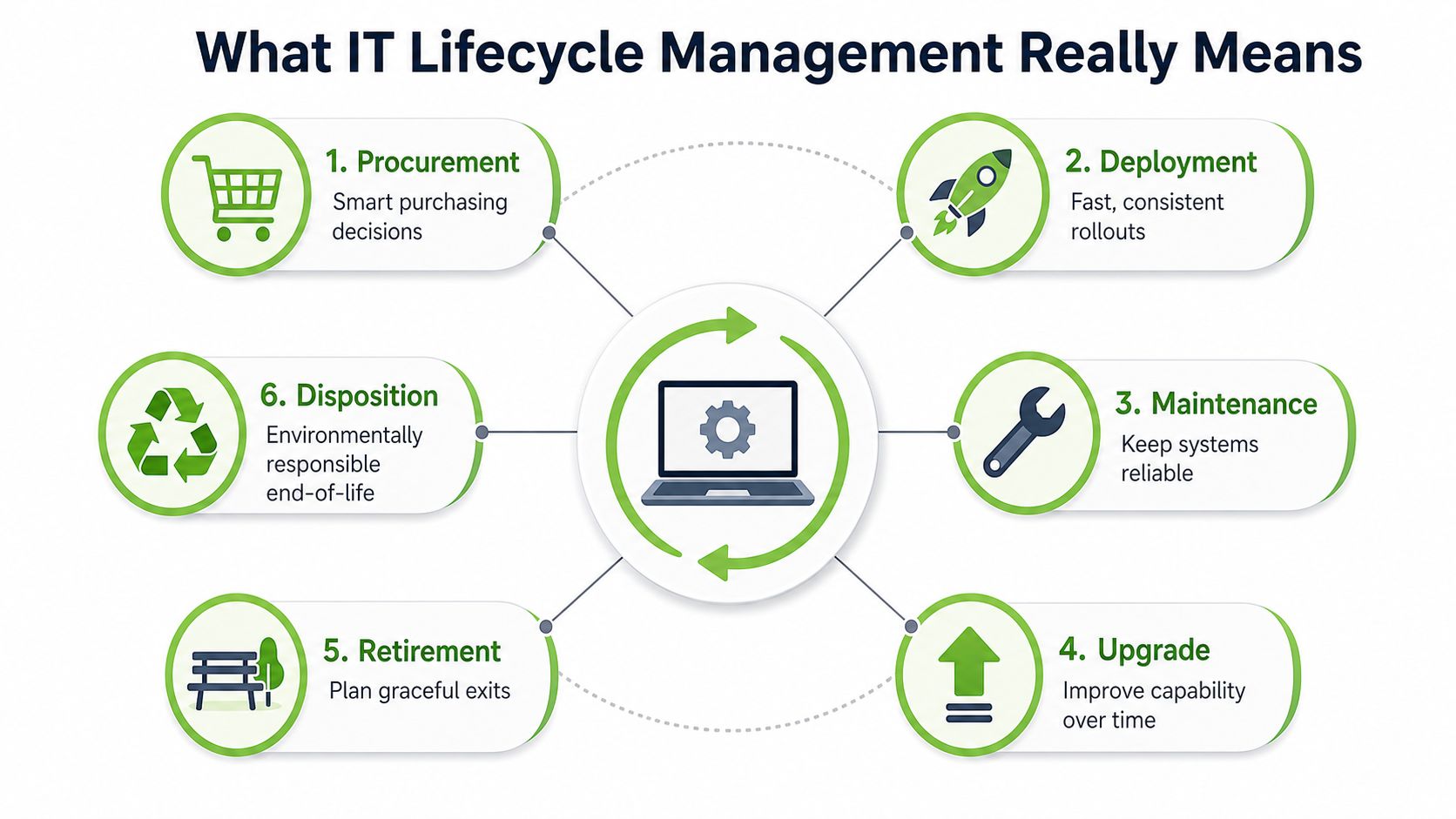
A laptop doesn't become “old” the moment it leaves the box. It goes through a working life, like a car that needs servicing, tyre checks, and eventually a proper end-of-life decision. IT lifecycle management is the practice of planning that whole journey, so the device is purchased well, used well, maintained properly, and retired safely.
In a Singapore office, the common mistake is to treat retirement as an admin task. A device gets tucked into a cupboard, someone means to wipe it later, and then the old fleet sits there like a row of unanswered emails. That's where lifecycle thinking helps, because it treats each device as an asset with a route, not clutter with a power cable.
The useful part is that lifecycle management links three things usually handled separately. Operations wants uptime. Finance wants sensible spend. Sustainability wants less waste. A proper programme gives all three a seat at the same table.
Why the idea matters in Singapore
Singapore's device environment moves quickly, so unmanaged drawers fill up fast. Replacement pressure is rising, not just because hardware ages, but because refresh timing is tightening and organisations are paying more attention to secure sanitisation as devices leave active use, with NIST 800-88 compliance up from 34% to 52% in the benchmarking report cited in the brief. That shift means the market now cares about both faster turnaround and better proof of data handling, which is exactly where lifecycle management earns its keep. Cascade benchmarking report
The policy backdrop matters too. Singapore's Extended Producer Responsibility system requires producers supplying regulated products to finance collection and recycling, and the national direction favours reuse, repair, and recovery before disposal. That makes lifecycle planning more than good housekeeping, it aligns device handling with the country's waste and circular-economy goals. NEA EPR framework and Singapore policy context
Practical rule: if a device is still useful, don't let “retired” mean “forgotten”. Decide whether it should be repaired, redeployed, resold, or securely disposed of.
For teams that want a simple starting point, keep one idea in mind. Lifecycle management is not a single service. It's the operating system for every device decision, from first purchase to final handover. A useful overview of device governance sits in myhalo's IT asset management best practices.
The Six Stages Every Device Travels
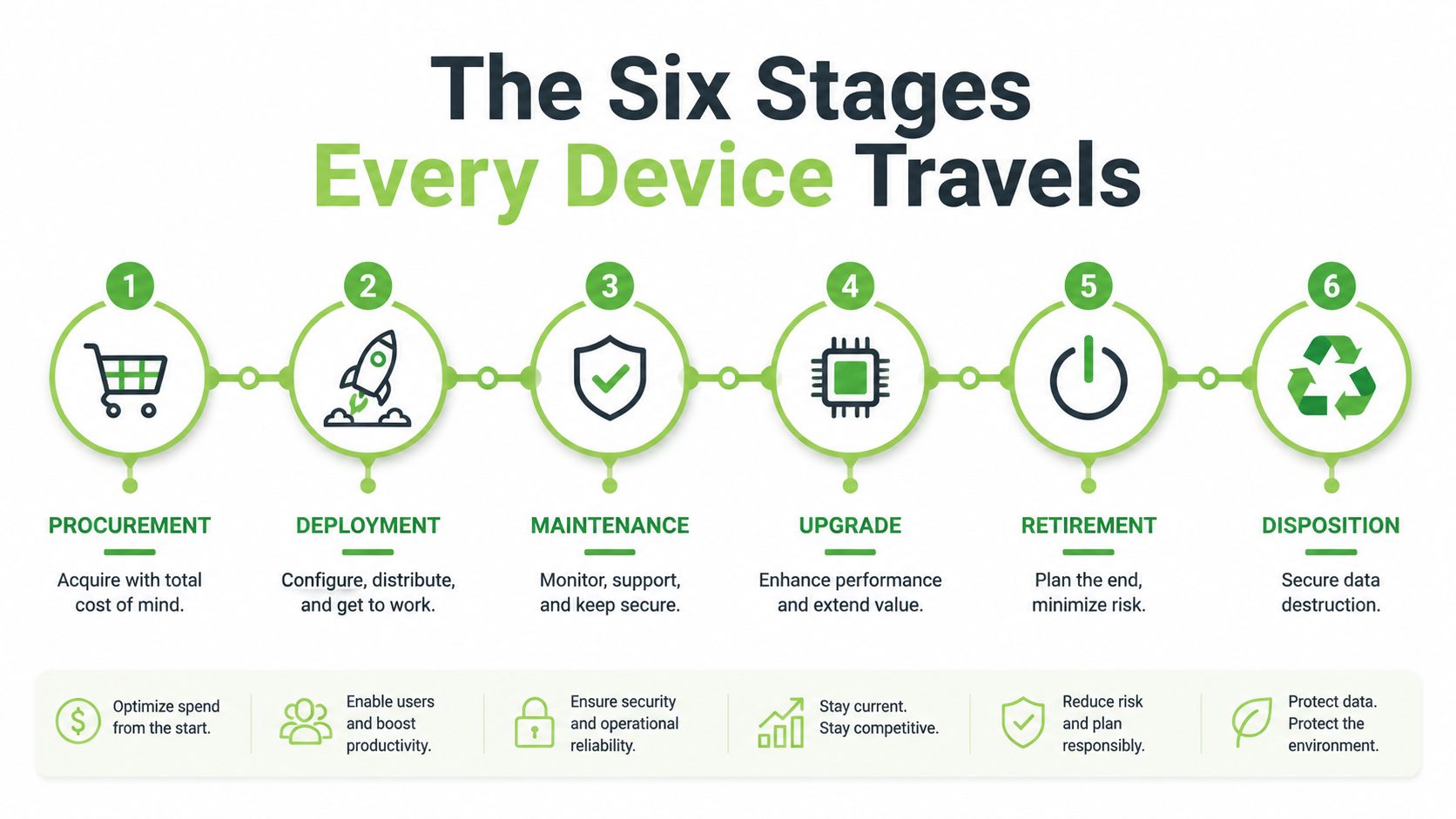
A device's life is easier to manage when you stop thinking in one-off events and start thinking in stages. That's the same way a fleet manager looks after a van, nobody buys it and forgets about tyres, service history, and resale value. Each stage has its own owner, its own risk, and its own chance to recover value.
Procurement and deployment
Procurement is where the bill starts, but it's also where the future headaches begin or get avoided. A procurement officer should ask what the device is for, how long it's likely to stay useful, and whether a certified ReLoved option could do the job without forcing a brand-new purchase.
Deployment is the handover moment. IT configures the device, assigns it, and checks that it's ready for the user. If this stage is sloppy, support tickets start early and the device's useful life shrinks before it's even settled in.
Maintenance and upgrade
Maintenance is the regular service stop. Batteries weaken, software gets patched, and parts need attention. This is the stage where repair-first thinking makes the biggest difference, because a quick fix can keep a laptop productive long after a rushed replacement would have been approved.
Upgrade is the decision point that many teams rush through. Instead of treating it as “new device or nothing”, look at trade-in, buyback, and redeployment. A machine that no longer suits one team may still be perfect for another, especially in a mixed fleet where roles aren't identical.
Retirement and disposition
Retirement starts when the device stops being the right fit, even if it still powers on. That doesn't mean disposal is next. It means the organisation needs to check whether the device can be wiped, reassigned, sold, or harvested for parts.
Disposition is the end of the road, but it should still be a controlled process. If a device leaves the organisation, you need chain-of-custody, proof of sanitisation, and a clean record of what happened next. A helpful reference for organisations building this flow is the device lifecycle tag overview.
The cleanest way to think about it is this, the device should always have a known status. In use, being repaired, waiting for upgrade, retired for recovery, or moving through secure disposition. Anything less leaves value on the table and risk in the cupboard.
A useful note for operations teams is that lifecycle work becomes easier once everyone agrees on the handoff rules. The IT team decides condition. Procurement decides replacement timing. Finance checks recovery value. Sustainability checks whether the asset can still stay in circulation. For a practical playbook on secure retirement, see secure data destruction guidance.
Compliance and Data Security Across the Lifecycle
A device can look finished and still carry risk. In Singapore, that matters all the way to the last handoff, because the PDPA expects organisations to protect personal data during collection, storage, use, and disposal, and device retirement is part of that duty. The safest way to read the final stage is simple, if data ever lived on the asset, its exit needs the same care as its arrival. PDPA protection obligation and disposal duties
What secure end-of-life really requires
A retired laptop may still hold email threads, spreadsheets, browser sessions, cached logins, and downloaded files. That is why secure wiping, documented handover, and a verifiable sanitisation or destruction record matter. If the asset is going to be reused, resold, or transferred, the organisation needs a clear record of how the data was removed and who handled the device at each step.
Singapore's Extended Producer Responsibility framework adds another layer to that process. Producers must register with the regulator and fund collection and treatment for regulated e-waste categories, so lifecycle handling sits inside a formal collection-and-treatment system rather than an informal drop-off habit. For ICT equipment, batteries, and related regulated parts, that means the end-of-life step has to fit the national structure, not sit outside it. Singapore EPR framework for regulated e-waste
Keep one rule in mind, if a person touched the device, or if personal data ever lived on it, the disposal step needs a paper trail.
Why documented sanitisation is becoming normal
The benchmarking report in the brief shows that more organisations are now meeting NIST 800-88 sanitisation standards than in the previous year. That shift points to a clear trend, documented destruction is moving from specialist practice to common expectation when devices are redeployed or retired. Cascade benchmarking report
The practical lesson is easy to apply. If you cannot show what happened to a retired device, you are relying on memory instead of evidence. That is weak for audits, weak for procurement reviews, and weak for any team that needs to prove it handled personal data properly.
The same logic appears in wider security work, including asset governance in cloud environments, where origin, usage, and handoff all need tracing. The article from compliance hurdle to growth makes the same point in a different setting, visibility turns a hard requirement into a process people can run.
For teams closing the loop on retired devices, the handoff should also connect to secure destruction guidance such as secure data destruction guidance, so wiping, collection, and final disposal stay aligned.
Sustainability and the Repair-First Mindset
A laptop with a failing battery does not always need to be retired. It may just need a battery swap, a new SSD, or a careful parts replacement before it goes back to work. Repair-first thinking treats that choice as both a finance decision and a sustainability decision, because each extra month of use keeps embodied value from being written off too early.
Why extension matters
For Singapore organisations, the sustainability case often starts with the simplest question. If a device can stay in service safely, the team avoids the environmental cost of manufacturing a replacement right away. The brief cites myhalo's reported about 2,020 MTCO2e of avoided emissions in 2024 across smartphones, laptops, tablets, and desktops, which shows how repair, certified reuse, and parts harvesting can reduce embodied-carbon impact when assets stay in circulation longer. For readers comparing the operational side with the waste side, myhalo's declutter tech for zero-waste Singapore and the Green Plan puts that idea into a local context.
That figure changes how refresh conversations happen. Instead of asking only what a new device costs, procurement can also ask what carbon is avoided by keeping the current one running for another cycle. For endpoint fleets with high embodied carbon, such as laptops, that question belongs at the start, before replacement becomes the default answer.
Repair, reuse, and parts harvesting
A repair-first model is practical, not sentimental. A cracked screen can be fixed, a battery can be swapped, and a device that no longer fits one employee's role may still suit another role, another team, or another site.
Singapore's direction points the same way. The 2023 Singapore Green Plan sets a target of a 70% increase in the national recycling rate by 2030, which supports reuse and recovery before disposal. That does not mean every device should be repaired forever, but it does mean the first question should be whether the asset can still give useful service. Green Plan and circularity context
For teams building a longer-term hardware strategy, the hardware lifecycle management guide from Nutmeg Technologies is a useful companion read. It helps connect procurement choices, refresh timing, and recovery decisions so the policy does not stop at purchase day.
A good lifecycle policy does not punish replacement. It simply makes replacement the last sensible option, not the first reflex.
KPIs and Processes for a Strong IT Lifecycle Programme
A lifecycle programme gets real when someone measures it. Without metrics, every team has a different version of “working well”, and that usually means drawers full of unloved devices, uneven support costs, and weak visibility at retirement time.
KPIs worth tracking
- Refresh cycle length: Track how long devices stay in use before replacement. This helps procurement spot whether upgrades are happening too soon or too late.
- Repair success rate: Count how often a device returns to service after repair. That tells IT whether repair is an exception or a reliable option.
- Internal redeployment rate: Measure how many retired assets find a second home inside the organisation. Finance usually likes this one because it stretches value.
- Certified resale recovery value: Note how much value comes back from trade-in or buyback. This helps procurement compare refresh options more fairly.
- Documented data-destruction rate: Check how many retired assets leave with proof of secure sanitisation or destruction. This is the one that protects the organisation when questions come later.
A lightweight process for SMEs
- Intake the asset. Record the model, condition, and owner so no device vanishes into a mystery pile.
- Assess the condition. Decide whether it needs repair, can be redeployed, should be resold, or must retire.
- Choose the route. Keep the decision simple and written down, because unclear handoffs cause delay.
- Hand off to a vendor. Use a partner that can manage quotes, recovery, collection, and documentation in one flow.
- File the certificate. Store proof of destruction, sanitisation, or resale so the paper trail isn't scattered across inboxes.
A hybrid service model helps here because not every SME has a full CMDB or a dedicated asset manager. The useful part of a mix of online quotes and physical counters is that it lowers friction for staff who just need a fast, clear answer. It also makes it easier to standardise intake for mixed-age fleets without building a big internal system first.
How Real Teams Use myhalo Across the Lifecycle
A 40-person Singapore SME doesn't need a grand transformation plan to start. It needs a workable flow when half its laptops are due for replacement after a Windows 10 transition, and someone in finance wants to know whether the old fleet has any value left. The cleanest path is usually a mix of trade-in, buyback, and certified ReLoved replacements, so the team can refresh in stages instead of dumping everything at once.
The benefit is less chaos. Staff get replacement devices with a clearer budget impact, while the older laptops don't sit idle in a cabinet waiting for a forgotten disposal task. That's also where a hybrid service setup matters, because a team can compare devices online, then hand over the old fleet at a counter when it suits the office schedule.
A school's tablet retirement looks different
A school faces a different problem. Student tablets often leave service in batches, and the key question is whether each device can be wiped, reused, or sent through ITAD with proper records. The Safe Data step matters here because parents, teachers, and administrators all need confidence that old devices won't leak personal information later.
Functional tablets don't always have to stop at retirement. Some can be redeployed into computer labs or other controlled settings, while others go through secure destruction and certificate handling. That's the kind of practical loop that keeps value in circulation and reduces unnecessary waste.
Physical touchpoints help both kinds of team. Staff can use the Bugis Junction and Sim Lim Square collection points when a face-to-face handover is easier than arranging everything by email. For organisations that need a longer service list, the corporate Repair and Rescue, buyback, resale, and ITAD options offer a single route through the same device journey.
Getting Started With Your Own Lifecycle Programme
The easiest way to begin is to stop thinking about “everything at once”. Start with five simple actions. Audit current devices, define a refresh policy, set a data-destruction standard, choose a partner, and run a pilot on one team or one office floor.
That first pass already answers most of the awkward questions. Which devices are still worth repairing. Which ones should be redeployed. Which ones should be resold. Which ones need secure retirement because the data risk is too high. Once those answers are visible, the programme feels much less like admin and much more like sensible operations.
The myhalo promise behind this approach is straightforward, decluttering your e-clutter should feel convenient, safe, and responsible. If you're sorting old phones, laptops, tablets, or mixed office stock, the Declutter your e-clutter, Safe Data, and Save Data programmes give you a practical way to move from uncertainty to action without overcomplicating the process.
Visit myhalo to explore trade-in, buyback, repair, and ITAD options, or drop by the Bugis Junction and Sim Lim Square counters if you want to handle the handover in person. If your team is ready to make device management simpler and more sustainable, start with one fleet, one policy, and one clear next step.