

You've probably got the same headache right now. The monitor flickers during a spreadsheet edit, the screen goes black after a harmless bump to the desk, or a line of dead pixels starts getting on your nerves every time you boot up. In Singapore, the smart move isn't to panic and replace it on the spot, it's to check whether the fault is repairable, whether the quote makes sense, and whether the monitor should be repaired at all.
For monitor repair Singapore, the core question isn't just "can it be fixed". It's "is it worth fixing, who should handle it, and what's the most responsible next step?" That's the part most guides skip, and it's the part that saves money, time, and unnecessary waste. If you're dealing with a home setup, a gaming rig, a workstation, or an office fleet, a calm decision now beats a rushed purchase later.
Table of Contents
- When Your Monitor Starts Acting Up
- Quick Diagnostic Checks Before Seeking Help
- Common Monitor Faults and Repairability
- Realistic Costs and Turnaround Times in Singapore
- Making the Smart Decision Repair, Replace, or Recycle
- Choosing a Reliable Repair Service Provider
- Beyond Repair Device Lifecycle and Sustainability
When Your Monitor Starts Acting Up
The pattern is usually the same. Someone powers on the PC, the tower hums, and the monitor either stays dark, flashes a weird colour, or shows a picture that looks wrong enough to ruin the day. In an office, that becomes a productivity problem fast. At home, it usually starts as annoyance, then turns into a question about whether the whole screen is on its last legs.
Some faults look dramatic but aren't always severe. A loose cable can mimic a dead monitor, a wrong input source can hide a perfectly healthy display, and a graphics issue can make the screen look guilty when it isn't. Other symptoms point to real hardware trouble, like persistent flickering, sections that stay black, bright spots that won't go away, or a screen that refuses to wake even when the power light is on.
Practical rule: if the monitor still responds to buttons, changes inputs, or briefly shows a logo, there's a stronger chance the problem is in the chain around the panel, not the panel itself.
What usually feels minor and what doesn't
A single dead pixel on a large monitor is irritating, but it's not the same thing as a failed backlight or a cracked panel. A monitor that powers on but shows no image can still be something simple, like a cable or source issue. A panel with visible physical damage, however, usually pushes the conversation toward replacement rather than clever repair.
The fastest way to stay sane is to separate symptoms from causes. Flicker, colour shift, dimness, no signal, and random shutdowns all look different, and they don't always mean the same repair path. That matters because the wrong guess can send you straight into unnecessary panel replacement or a needless buy-new decision.
The Singapore market has enough repair activity to treat these as real service issues, not one-off oddities. Singapore's official Repair of Digital and Electronic Equipment benchmark sits inside the Singapore Department of Statistics' BITE system, with the published benchmark based on 2023 data, which tells you this is a recognised service segment in the local economy, not a fringe fix-up scene (Singstat BITE benchmark).
Quick Diagnostic Checks Before Seeking Help
Start with the cheap checks first. I say that because too many people pay for diagnosis when the fault is sitting in the cable, the port, or the input setting. If you can narrow the issue down in ten minutes, you'll either fix it yourself or hand a technician a clearer problem statement, which usually speeds things up.
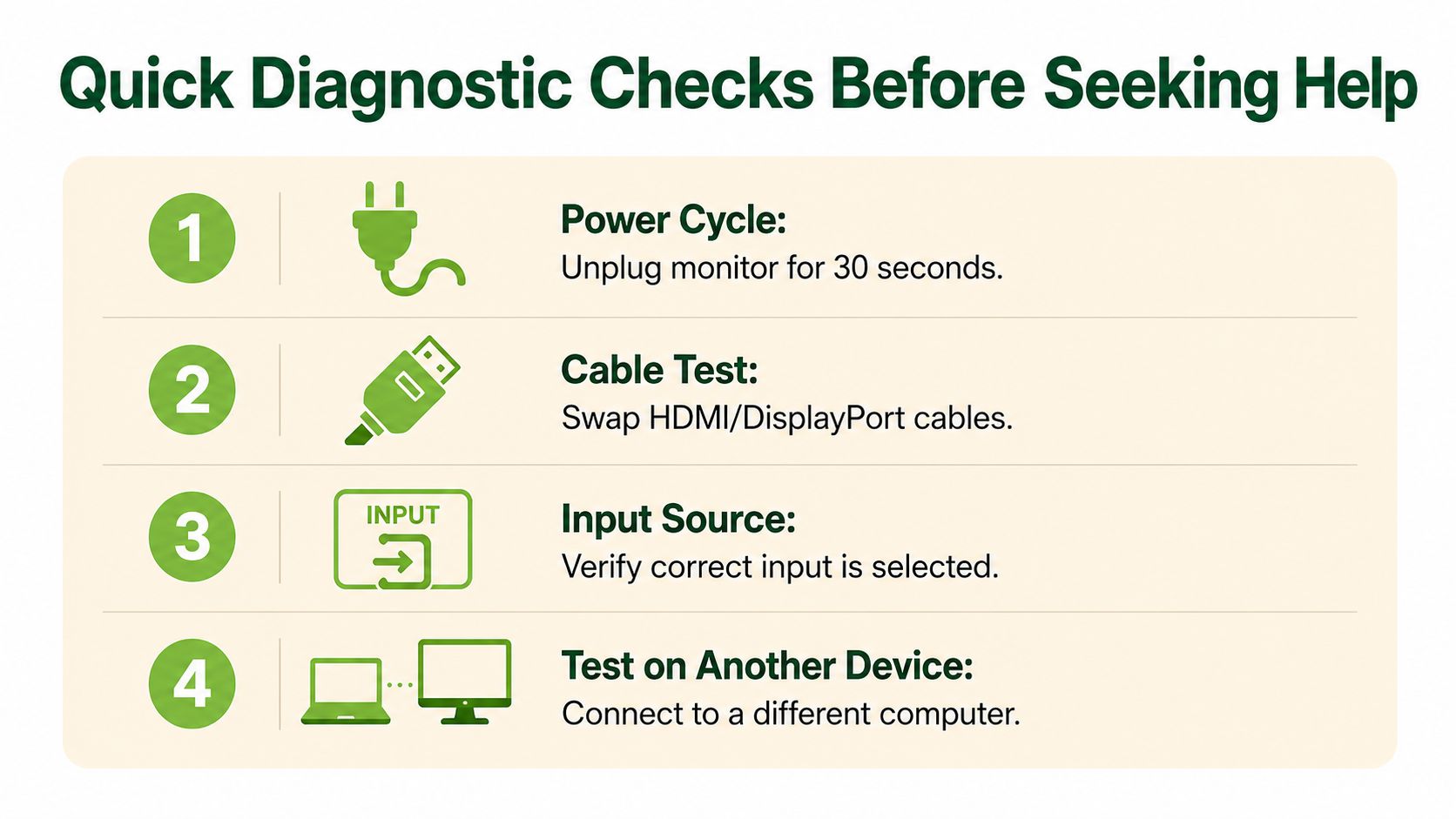
Check the basics in a fixed order
- Power cycle the monitor. Unplug it from the wall for a short reset, then reconnect it properly. This clears temporary faults that can lock up the display controller.
- Swap the cable. Test HDMI or DisplayPort with another known-good cable. Bad cables cause more “dead monitor” panic than people expect.
- Verify the input source. If the monitor is waiting on the wrong input, it'll look broken even when it isn't.
- Test on another device. Connect the monitor to a different computer or laptop so you can isolate whether the fault sits in the display or in the original machine.
The logic here is simple. If the monitor works on a second device, the screen probably isn't the problem. If it fails across multiple devices, you've ruled out the graphics card and the original computer. That's useful because repair shops can move faster when you bring them a tighter fault description.
For deeper troubleshooting habits, this guide on diagnosing and troubleshooting computer hardware is a good companion read. It won't repair the screen for you, but it does help you think like a technician instead of guessing under pressure.
If the monitor shows an on-screen menu, its panel and logic are often still alive, even when the picture from your PC isn't.
What to note before you hand it over
Bring a short fault summary. Write down whether the issue is constant or intermittent, whether the power light stays on, and whether the screen ever flashes a logo or image. That one-minute note can save a long back-and-forth at the counter.
Also check whether the fault changes with brightness, cable type, or a different wall socket. These details matter because they point toward board, cable, or power delivery problems instead of a full panel failure. A technician can still run the bench tests, but your notes make the diagnosis cleaner.
Common Monitor Faults and Repairability
A monitor that flickers, stays black, or shows visible damage does not all land in the same repair bucket. Board faults, panel faults, and physical damage lead to very different repair decisions, and the right call depends on which part has failed. A screen that looks ugly can still be within panel tolerance, while a board issue may be cheap enough to fix without replacing the whole unit.
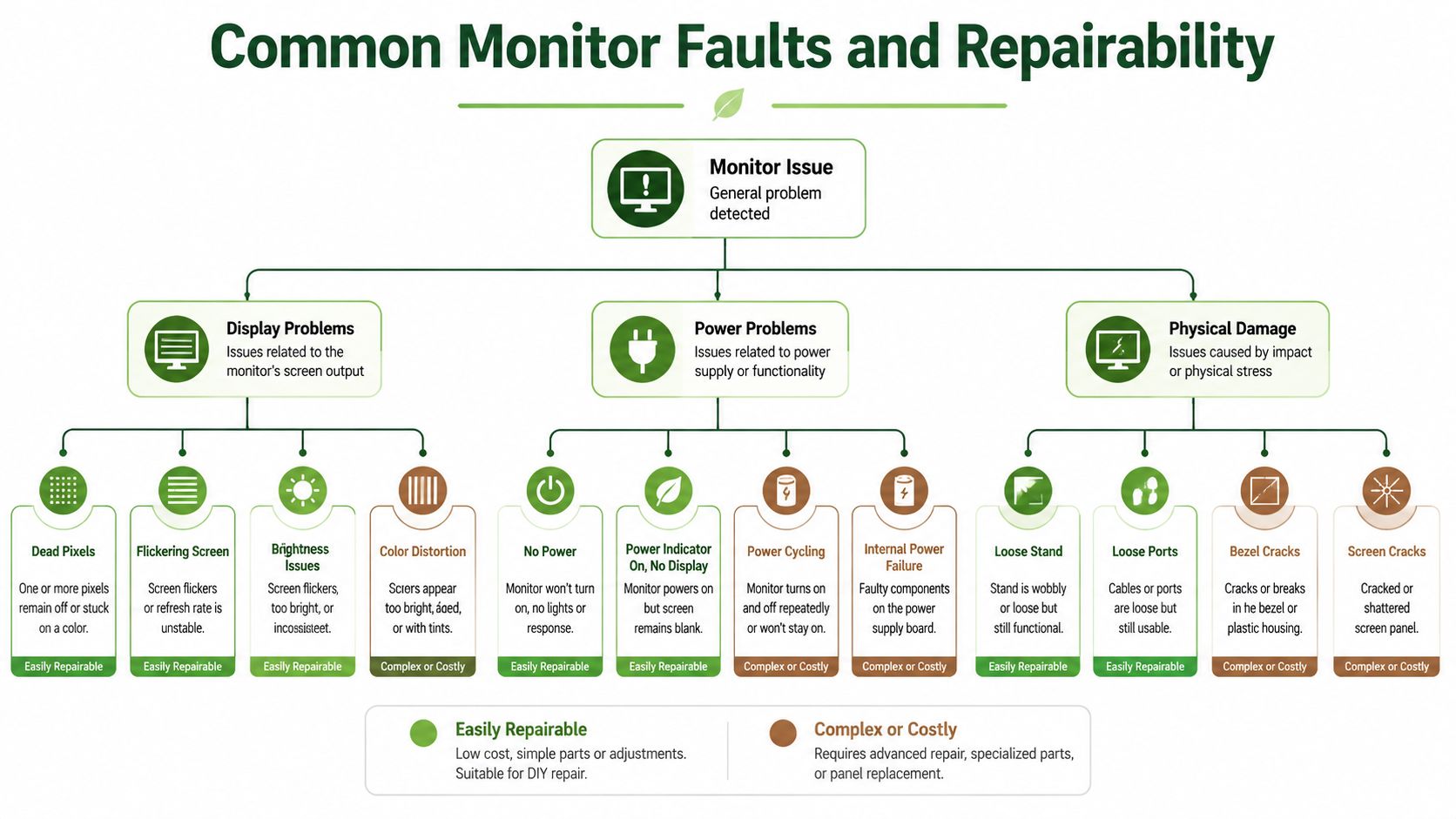
Start with the fault class
- Display faults. Dead pixels, colour tinting, flicker, and backlight problems usually point to the panel, the signal path, or the control board. Some are worth fixing, especially on higher-value monitors, while others are only sensible if the rest of the unit is still in good shape.
- Power faults. No power, random shut-offs, and unstable startup behaviour usually come from the power board or the internal supply path. These are often repairable, and the quote is usually more manageable than people expect.
- Physical damage. Cracked glass, bezel damage, pressure marks, and bent frames cut into repair value fast. Once the panel itself is damaged, the economics usually stop making sense unless the monitor is a premium model.
Warranty rules also matter here, because not every visible flaw counts as a defect large enough to qualify for replacement. Philips Singapore says a monitor panel only qualifies for repair or replacement when total dot defects exceed five, with stricter rules for three adjacent dark subpixels and spacing between black dot defects, while ViewSonic Singapore's warranty policy allows 3 total bright or dark pixels on 17"–19" LCDs, 5 on 20"–35" LCDs, and 8 on 37"+ LCDs (Philips and ViewSonic policy document). A screen can look poor to you and still sit inside the manufacturer's tolerance.
Practical rule: count the defects first, then check the panel size and warranty wording before asking for a replacement.
Power board faults are usually the first repair quote worth hearing out. They often involve component-level work instead of a full panel swap, which keeps the job more reasonable. Input port damage can also be fixable if the problem sits on the port or the board, not in the glass. Backlight faults are less straightforward, because they can come from the illumination system, the board, or the panel assembly.
Physical panel damage is the point where repair usually stops being smart. Once the panel is cracked, pressure-damaged, or badly delaminated, replacement of the assembly is usually what gets discussed. Before you agree to that, compare the repair quote with the monitor's remaining value, because a full panel job can cost more than the monitor is worth.
For a clearer view of how screen assembly faults are handled, this LCD screen repair page is a useful reference. The same repair logic often applies when the problem is in the screen assembly rather than the outer casing.
Realistic Costs and Turnaround Times in Singapore
Singapore pricing is not mystery pricing, and that's a good thing. You should expect a clear labour or diagnostic entry point, a parts cost if anything needs replacing, and a turnaround time that depends heavily on whether the required assembly is already local. If a quote sounds vague, press for a breakdown.
Huawei Singapore states that from 2 January 2024, its out-of-warranty repair labour and admin fee for PC, MateBook, and monitors is SGD 85.00 inclusive of GST, while mobile phones, tablets, audio, and wearables are charged SGD 55.00 inclusive of GST (Huawei Singapore repair fee notice). Since Singapore raised GST from 8% in 2023 to 9% in 2024, that fee is a clean, date-stamped marker of the local repair-cost floor for monitor-related work.
Monitor Repair Cost and Time Benchmarks
| Repair Type | Cost Range (SGD) | Typical Turnaround | Warranty |
|---|---|---|---|
| Out-of-warranty labour and admin entry fee | 85.00 | Varies by parts and diagnosis | Not stated in the benchmark |
| Local PC monitor repair listing | 60 to 150 | Same-day turnaround is stated as typical | 90-day warranty |
| OEM-linked repair process | Not stated | 2 to 3 weeks is typical, longer if parts must be ordered | Not stated |
The local service listing that places PC monitor repair at S$60 to S$150 with same-day turnaround and a 90-day warranty is useful because it gives you a working retail benchmark, not just a manufacturer fee floor (local service listing). That tells you some jobs stay in the quick-turn bucket, especially when the fault is simple and parts are on hand.
By contrast, MSI Singapore's guidance says the full repair and replacement process typically takes 2 to 3 weeks, with extra time if parts must be ordered (MSI Singapore repair guidance). That is the standard trade-off. Bench diagnosis can be fast, but the job only closes when the right board or panel arrives.
A fair quote tells you what you're paying for, what part is being replaced, and whether the timeline depends on supplier stock.
For a price-comparison mindset, this phone screen repair Singapore price guide can help you think about the structure of repair quotes, even though the device category is different. The main lesson carries over cleanly, the cheaper-looking headline price is only useful if you also know the labour, parts, and return timeline.
Making the Smart Decision Repair, Replace, or Recycle
A broken monitor does not automatically deserve a repair ticket. If the fault is minor and the panel is still worth keeping, repair makes sense. If the screen is cracked, the unit is ageing, or the quote starts creeping close to replacement territory, stop and rethink the job. Sometimes the smarter call is to reuse it through proper channels or send it for recycling.
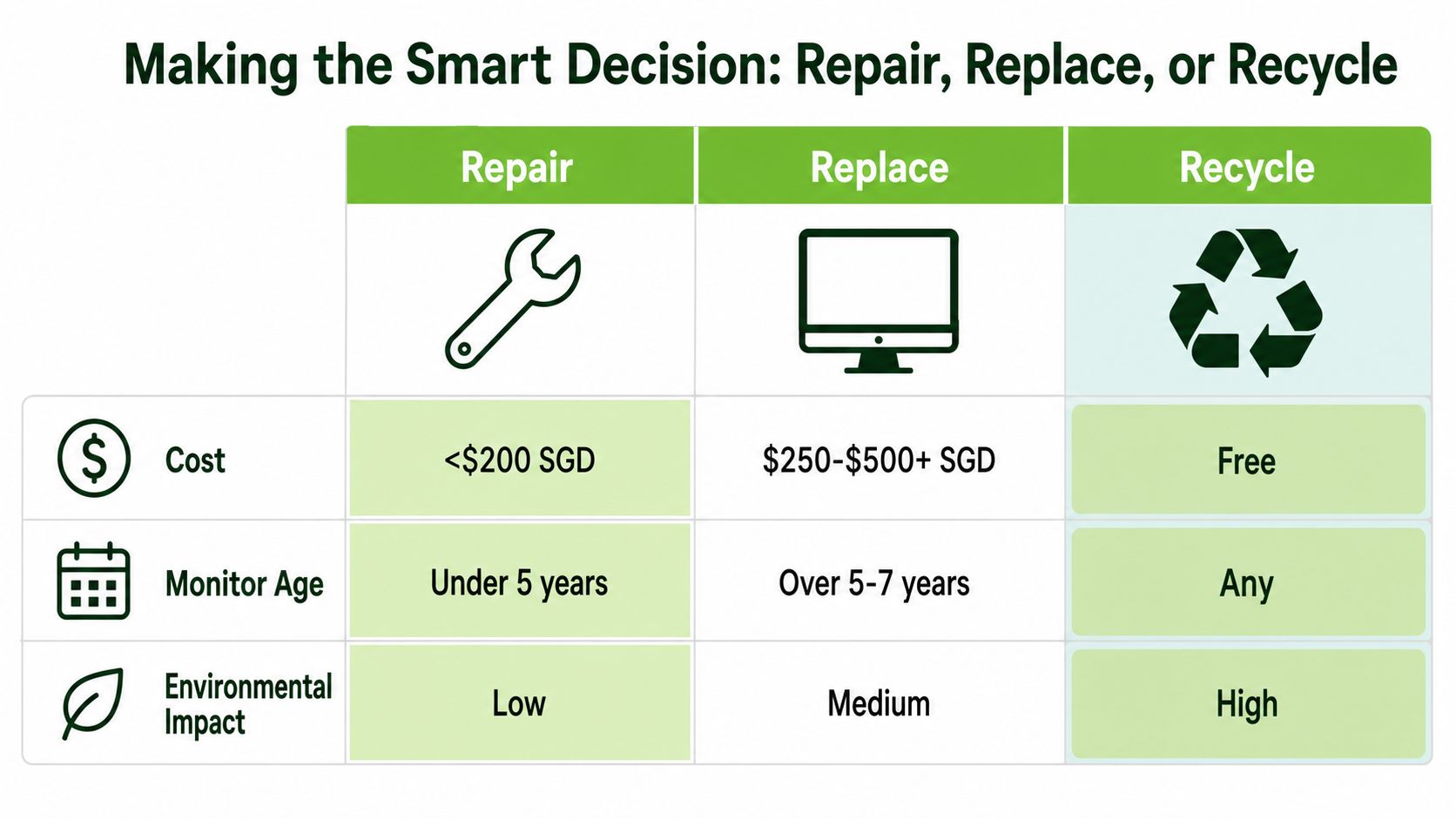
The decision comes down to three things, cost, age, and how much life is left in the monitor. A board fault on a decent model is usually worth quoting. A cracked panel on an older set usually is not. A monitor with multiple symptoms, weak resale value, or hard-to-source parts should move out of the repair queue and into the reuse or recycling path.
Singapore already has the right channels for that choice. NEA's donation, resale, and repair channels give you a practical route for equipment that still has usable life, while formal disposal covers gear that has reached the end of the line (NEA channels). That approach is better than forcing every faulty monitor into a repair bill. If the unit can still serve someone else, reuse is the cleaner financial move. If it cannot, recycle it properly.
For a separate market comparison, this guide on screen repair savings for Houston users shows the same basic rule at work. The location changes. The math does not.
A simple rule works well here. If the monitor has one clear fault and the rest of the unit is sound, get a repair quote. If the panel is physically damaged, replacement should be the default unless the monitor is unusually valuable. If it is old, cheap, and already showing several problems, stop spending on it and move on.
For the disposal side, use this where to recycle electronics guide to sort out the next step. That is the right move when repair no longer gives you a sensible return.
Choosing a Reliable Repair Service Provider
A good repair shop saves money. A careless one turns a fixable monitor into another replacement bill. In Singapore, judge a provider by how clearly they explain the fault, whether the quote is written, how they handle parts, and whether they give you a warranty that means something. If they dodge those basics, leave.
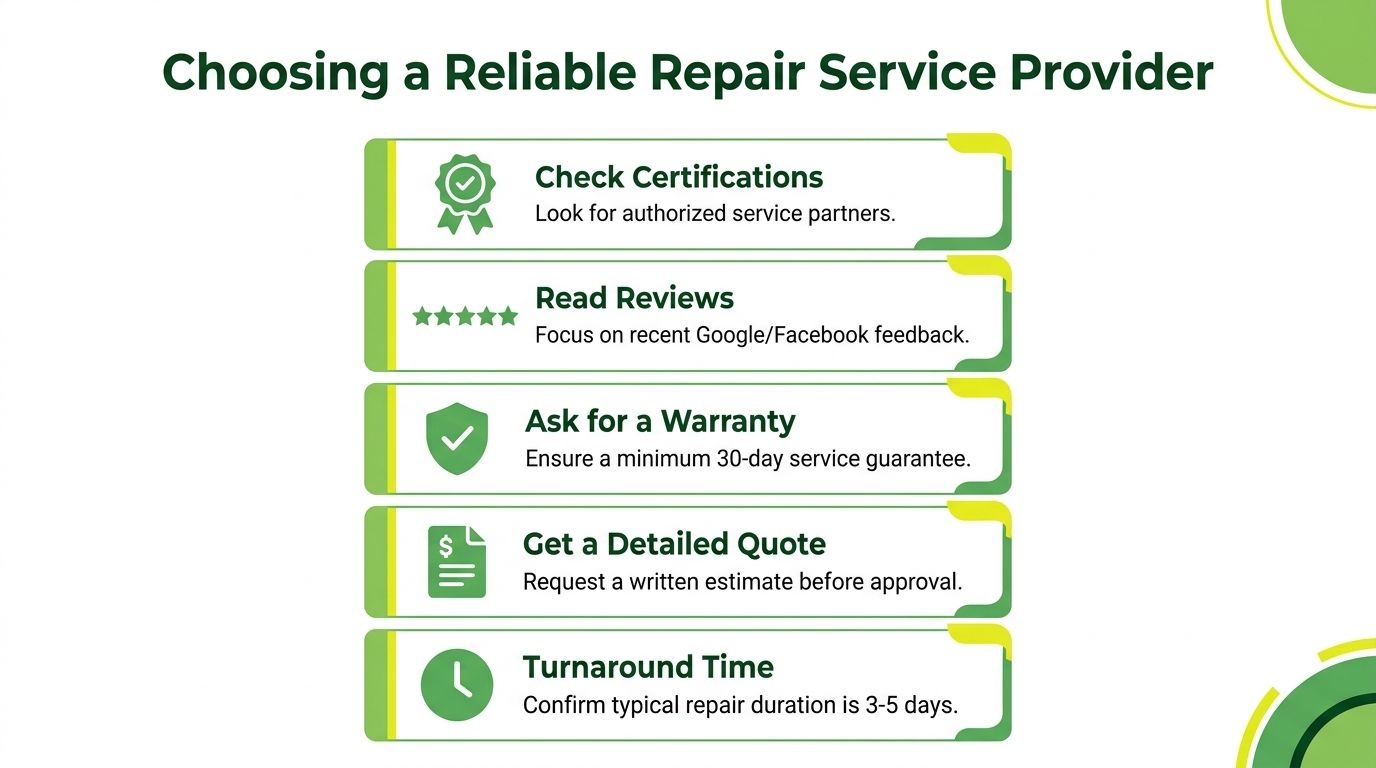
A quick conversation usually tells you enough.
If the staff member cannot explain whether the fault is in the power board, backlight, or panel path, that is a warning sign. If they can explain the issue in plain English and tell you what part has to be replaced, you are dealing with someone who knows the job. The quote should be broken out clearly, labour, parts, and any extra handling charges. A vague number on a receipt is not a proper estimate.
What to ask before you approve the job
- Ask who handles the device. A central repair workflow is fine, but you should know where the monitor goes and how it is tracked.
- Ask for the quote in writing. A proper estimate should separate labour, parts, and any extra charges.
- Ask about the warranty. A clear service guarantee matters more than a sales pitch.
- Ask how they source parts. Local stock, ordered parts, and board swaps all affect timing.
- Ask about data-sensitive handling. This matters more for business users whose displays sit inside a managed setup.
Singapore's repair channels are built around proper service routes, not guesswork over a counter. That is why local support structures matter, and why parts logistics can stretch a simple job when the right component is not on hand. A provider that understands the service path will tell you whether the repair is straightforward or whether the delay is coming from parts, not labour. That is the kind of honesty you want before you commit.
If the provider will not explain the fault path in plain English, they probably do not want you comparing options.
If you are replacing the screen instead of repairing it, choose the next display with your actual use in mind. This find a great ultrawide monitor resource is useful if your old panel is gone and you want something that fits a gaming or productivity setup better.
Red flags and green flags
A bad provider hides behind vague language, refuses to commit to a quote, and sidesteps questions about part availability. A stronger provider names the fault, gives you a realistic lead time, and tells you straight if the repair is not worth doing. That straight answer saves money.
One option in Singapore that sits closer to device lifecycle management than casual repair retail is myhalo, which offers repair, resale, buyback, and secure data handling services for electronic devices. That model makes sense when a monitor is part of a wider refresh plan, not just a one-off breakage.
Beyond Repair Device Lifecycle and Sustainability
A monitor does not end its life the moment it starts failing. It can still move into repair, reuse, resale, parts harvesting, or responsible recycling, and that order matters in Singapore. The country's formal e-waste setup is built around managed channels, not casual dumping, so the right decision is often about value, not sentiment.
If a monitor is still repairable, repair it. If the repair bill makes no sense, move it into reuse or recycling without dragging your feet. A dead screen may still have usable parts, and some units are better suited to certified recovery than another round of fault-finding.
For readers who want a practical recycling reference, this where to recycle computer monitors guide is useful because it keeps the focus on proper end-of-life handling rather than casual disposal. That is the right approach for homes, schools, and SMEs that want cleaner device management.
Best habit: treat every broken monitor as a lifecycle decision, not just a repair bill.
Data security still matters for monitors used with PCs, workstations, and shared office setups. The screen itself usually does not hold files, but the handling chain still matters when the device sits inside a broader managed environment. For corporate users, the safer workflow is to capture serial numbers, document handover, and keep disposition records alongside repair or retirement decisions.
Repair, reuse, and recycling all serve the same practical goal when they are handled properly. They cut waste, extend device life, and keep usable hardware from turning into clutter. If you are clearing out old screens, dealing with a failed display, or planning a refresh cycle, reach out to myhalo for repair, resale, buyback, or secure device handling that fits Singapore's zero e-waste direction.