
You open the office cupboard looking for a charger and find retired laptops, old phones and cables nobody recognises. Some devices might still work, but you're unsure what's stored on them or where they should go. Keeping them feels safer than making the wrong decision.
A thoughtful IT asset disposal process turns that uncertainty into manageable decisions. With Declutter your e-clutter for unused technology, Safe data for privacy protection and Save data for recovering important files before retirement, the aim is simple: protect what matters while giving useful devices another chance.
Table of Contents
- Why Your Retired Tech Needs a Plan
- Understanding Singapore E-Waste Reality
- Choosing Reuse Over Destruction
- Securing Data Beyond Factory Resets
- Documenting Chain of Custody for Audits
- Partnering for Safe and Sustainable Outcomes
Why Your Retired Tech Needs a Plan
That cupboard usually represents unfinished decisions, not carelessness. Perhaps a colleague left without returning a laptop charger, an old desktop holds finance documents, or a cracked phone contains photographs nobody backed up. It's understandable to hesitate when clearing space might mean losing something valuable.
IT asset disposition, often shortened to ITAD, means managing equipment retirement deliberately. Disposal doesn't automatically mean destruction. It means deciding what happens to the device, its stored information and any remaining value.
Start with ownership and purpose
Consider an office laptop that's too slow for its current user. Before calling it waste, someone needs to confirm who owns it, whether its files are still needed and whether repair could make it useful elsewhere.
Our recommendation is to give each retirement decision a named owner. That person doesn't need to perform every technical task, but they should know who approves data recovery, who assesses equipment and who confirms completion.
- Identify the equipment: Separate company assets, leased devices and personal belongings before arranging collection.
- Clarify the concern: Distinguish missing files from privacy worries and hardware faults. Each needs a different response.
- Choose a controlled holding area: Keep unprocessed devices separate from equipment cleared for release.
A reassuring starting point: You don't need to solve the whole cupboard today. Start by identifying what's there and who can authorise its next step.
Connect retirement to everyday management
A disposal plan works better when it belongs within IT lifecycle management, rather than becoming an occasional clear-out. Procurement, maintenance and retirement decisions should support one another.
For teams choosing what to monitor, Forge Reliability's resource on KPIs for asset lifecycle management offers a broader asset-management perspective. Use it as a starting point for questions about your own equipment, not as a Singapore compliance checklist.
Convenience begins with clarity. Once everyone knows their role, responsible retirement becomes a routine task rather than an anxious guessing game.
Understanding Singapore E-Waste Reality
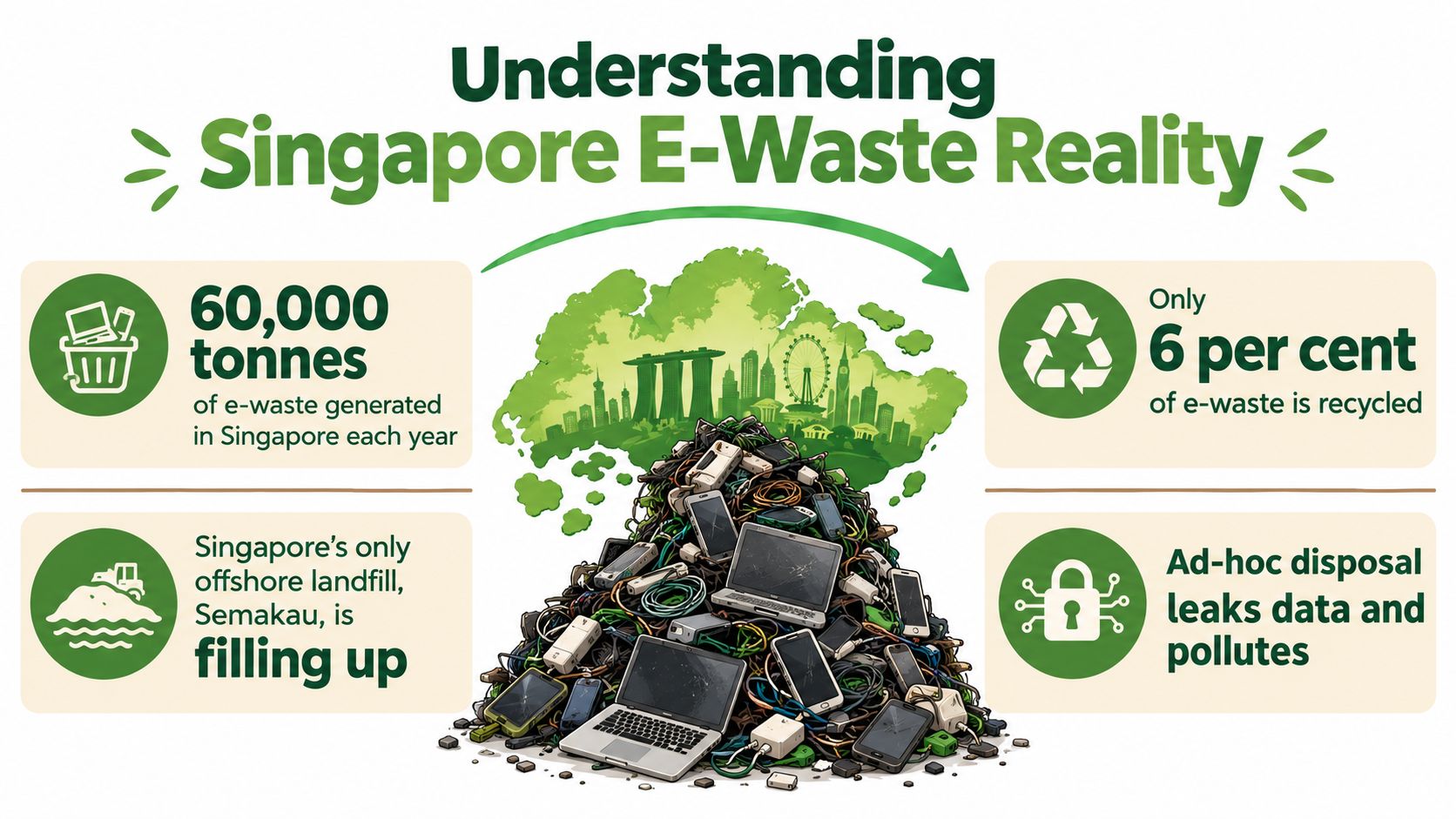
Singapore generates approximately 60,000 tonnes of electronic waste annually, while a study conducted between April 2016 and October 2017 found that only 6% was recycled, according to the National Environment Agency's nationwide e-waste system announcement. That recycling figure describes a historical gap, not today's recycling rate.
The illustration highlights the scale of the challenge. Read its recycling percentage in that historical context.
Why an ordinary clear-out isn't enough
A bag of unwanted cables and a laptop containing customer information may both look like clutter, but they need different handling. Material collection addresses the physical equipment. Data protection addresses the information inside it. Neither should be assumed to cover the other.
Singapore's regulated framework also involves more than placing electronics in a convenient bin. The Ministry of Sustainability and the Environment's explanation of the Resource Sustainability Act describes producer financing, collection arrangements, transport to NEA-licensed recyclers and reporting requirements.
For an organisation, the practical lesson is to check the route before handing anything over:
- Confirm acceptance: Ask whether the collection service accepts your equipment category and business quantities.
- Separate responsibilities: Establish who handles information security and who handles material treatment.
- Check the destination: Know which facility receives equipment that cannot remain in use.
These checks make professional handling meaningful. A collection appointment alone doesn't tell you whether a device was assessed, its information protected or its materials properly treated.
The following video offers another way to engage with the e-waste topic.
Responsible disposal isn't about feeling guilty for owning technology. It's about recognising that an unwanted device still needs a suitable destination, and choosing that destination with care.
Choosing Reuse Over Destruction
Retired from your organisation doesn't necessarily mean finished as a device. A laptop that no longer suits design work may still suit a less demanding role. Treat that as a possibility to assess, not a promise that every old machine deserves repair.
NEA has reported approximately 11 kg of e-waste per person annually in Singapore, reinforcing the importance of considering useful equipment before treating it as waste (NEA's study on shared responsibility for e-waste).
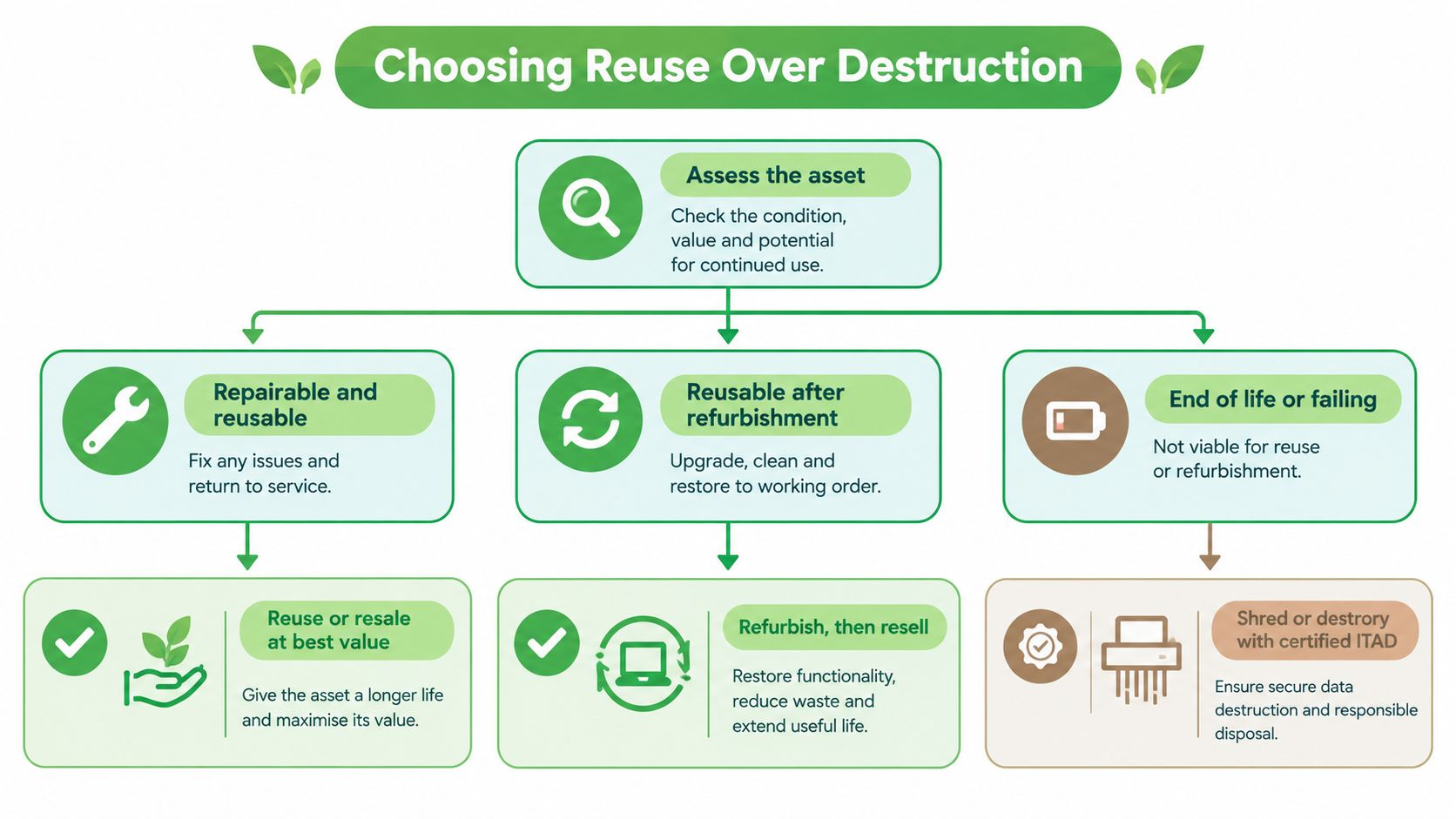
Use the hierarchy below as a starting point, with secure data treatment as a condition for any second life.
Match the route to the condition
Assess repairability, battery condition, component health, likely use and residual market value. Then compare the work required with the usefulness you expect to recover.
| Asset condition | Suggested route | Decision to resolve |
|---|---|---|
| Working and suitable for another user | Redeploy, resell or donate | Is there a realistic next use? |
| Repairable with a clear purpose | Repair or refurbish | Does the expected value justify the work? |
| Unsuitable as a complete device | Harvest usable components | Which parts can support other repairs? |
| Beyond practical recovery | Recycle through an appropriate facility | How will residual materials be treated? |
| Storage cannot be securely sanitised | Destroy the affected medium | Can the remaining equipment still be reused? |
A damaged drive doesn't automatically require destroying the entire computer. Separating storage decisions from hardware decisions helps avoid unnecessary loss of useful equipment.
Verify usefulness rather than assuming it
A device that switches on isn't automatically ready for another owner. Ask what functional checks were completed and how faults were recorded. Understanding quality assurance testing helps you ask more useful questions about refurbishment.
Preserve the highest practical value, but don't pass an unresolved fault or data risk to the next owner.
For a wider manufacturing perspective, the American Additive Manufacturing analysis is a related sustainability reading option, not a source of Singapore ITAD rules. Keep your actual disposition decision grounded in the asset's condition, security requirements and verified destination.
Securing Data Beyond Factory Resets
A factory reset isn't, by itself, proof of secure sanitisation. The important question isn't whether the welcome screen appears. It's whether the method used was appropriate for the storage medium and whether its outcome was verified.
The PDPC's guidance on disposing of personal data connects disposal with the Protection Obligation under section 24 and the Retention Limitation Obligation under section 25 of the PDPA. Organisations must protect personal data and stop retaining it when there's no longer a legal or business purpose.
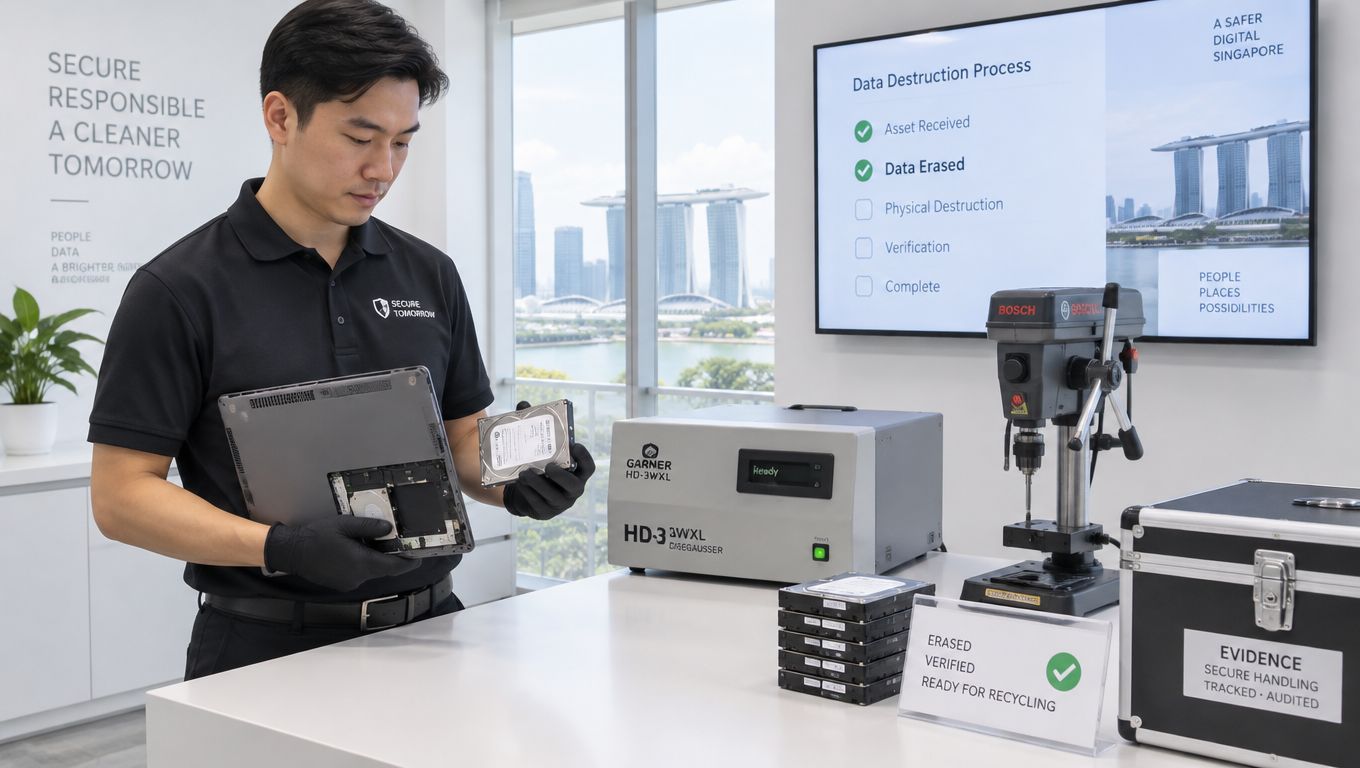
The image below shows physical processing of storage media, one possible route within a controlled disposal procedure.
Understand the method behind the promise
An SSD, or solid-state drive, stores information in flash memory. Its internal management of memory cells can complicate conventional overwriting. The PDPC's ICT data-protection guidance addresses specialised sanitisation and recommends destroying the full-disk-encryption key before reformatting or overwriting an encrypted SSD.
That method is called cryptographic erasure. In plain language, it removes the key needed to access encrypted information. It isn't something to assume has happened merely because someone deleted files or reset a device.
A practical security check should establish:
- Storage identity: Match the drive to the device and record its serial number.
- Method suitability: Confirm the storage type, encryption status and selected sanitisation procedure.
- Verification outcome: Require evidence that the procedure completed successfully.
- Failure handling: Keep failed media out of resale and arrange appropriate destruction.
Recover first, erase afterwards
If a damaged device contains essential work or treasured photographs, decide whether to attempt Save data recovery before authorising irreversible treatment. Recovery and destruction serve opposite purposes, so the approval sequence matters.
Safe data should mean a defined process with evidence, not reassurance. Ask for a clear explanation of the method and an asset-linked certificate. The practical questions in this secure data destruction guide can help you discuss the service confidently without becoming a storage specialist.
Documenting Chain of Custody for Audits
A certificate becomes useful when you can connect it to the correct asset. A general statement that a batch was processed leaves an important question unanswered: was your particular drive included?
Chain of custody means recording who controlled equipment as it moved through the process. Under Singapore's regulated framework, producers and scheme operators have collection and treatment recordkeeping responsibilities, as described in NEA's explanation of the EPR system-system-for-e-waste-management-system). For a corporate asset owner, connected records are also a practical way to demonstrate responsible handling, without assuming every organisation has identical statutory duties.
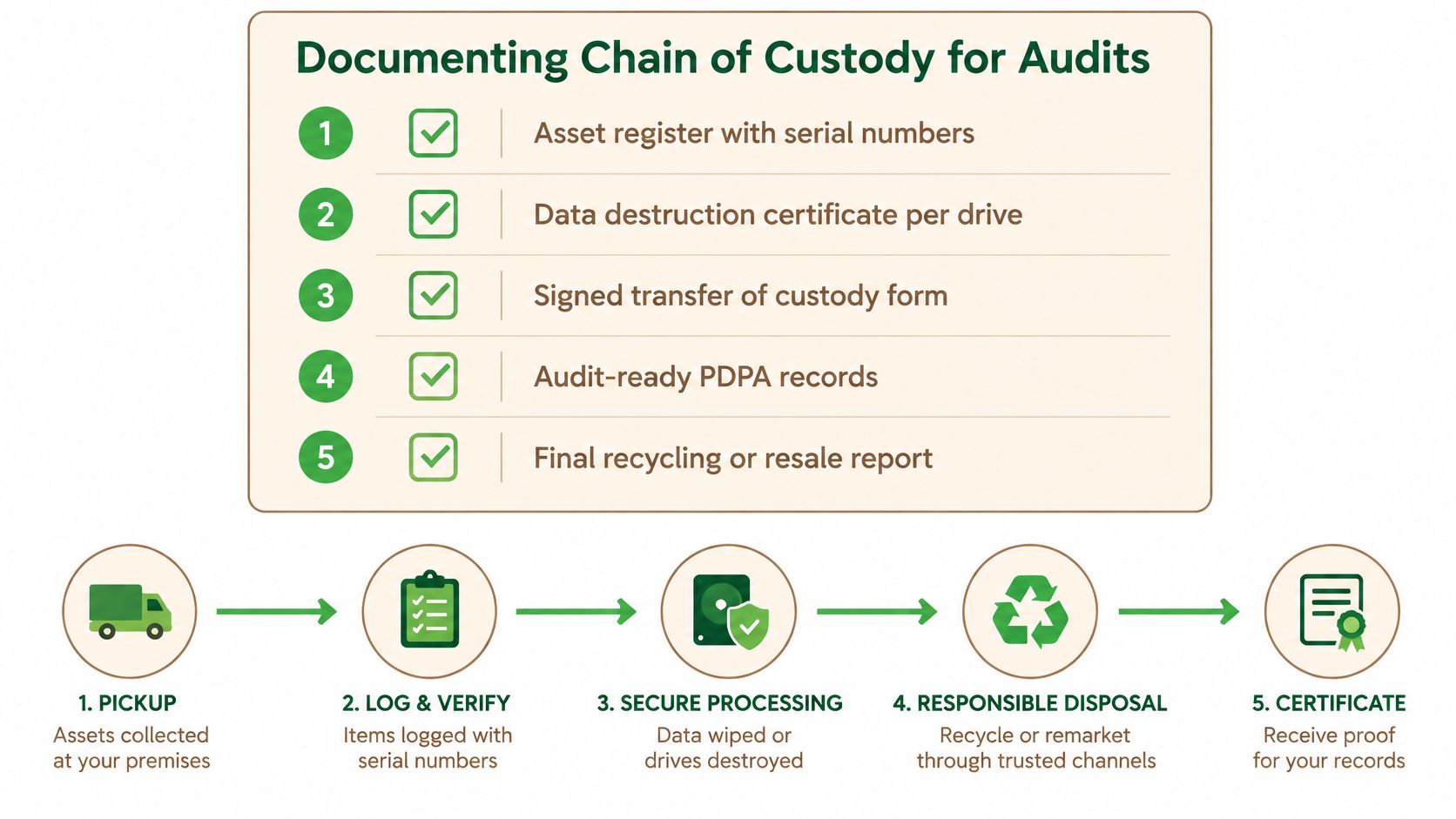
The checklist below brings those records together.
Build a connected evidence file
Keep the records together rather than scattering them across collection emails and invoices.
- Asset register: Identify the device, storage media, condition and authorised disposition.
- Handover record: Record the releasing and receiving parties, collection details and any discrepancies.
- Treatment evidence: Attach the sanitisation or destruction result to the relevant serial number.
- Final outcome: Record resale, redeployment, parts recovery or recycling, with supporting documentation.
A sustainability certificate can support environmental reporting, but it shouldn't replace the underlying evidence of what happened.
Reconcile before closing the job
Compare the collection list with the completion report. Investigate missing serial numbers, unexpected substitutions and assets without a final outcome before marking the disposal complete.
Audit habit: Close the job when the records match, not when the collection vehicle leaves.
For a familiar logistics comparison, Aeros Couriers' guide for Australian small businesses is related reading on signed delivery. It isn't Singapore compliance guidance, but it offers a useful prompt to distinguish acknowledgement of receipt from evidence of subsequent treatment.
Partnering for Safe and Sustainable Outcomes
Choose a partner who can explain decisions, not just arrange a collection. A suitable provider should be comfortable discussing recoverable value, security controls and downstream treatment without hiding behind technical language.
Regulated collection can make a meaningful difference. In a published account of the national scheme's progress, the government's explanation of where e-waste goes reported 4,300 tonnes of consumer e-waste collected since July 2021, more than three times the annual amount collected through earlier voluntary schemes. Treat this as a reported milestone, not a current cumulative total.
Ask for evidence before approving collection
You don't need to know every technical standard to ask good purchasing questions. Ask the provider to show how its proposed service addresses your actual equipment and information risks.
- Environmental route: Which recycler will receive residual equipment, and can the provider substantiate the relevant NEA licensing?
- Security capability: What erasure or destruction procedure applies, and what evidence will you receive?
- Reuse assessment: Will the provider evaluate refurbishment, resale and parts recovery before recommending whole-device destruction?
- Commercial clarity: How are recovered value, service charges and any deductions explained?
- Exceptions: What happens if a device is missing, a drive fails verification or the agreed destination changes?
If a provider claims certification, request the current certificate and check its scope. A credential should relate to the service being offered, rather than serve as a decorative badge.
Make zero e-waste an accountable ambition
A zero e-waste world is a vision worth working towards, but don't confuse an aspiration with proof that every collected item avoided waste. Ask for outcomes you can substantiate and describe unresolved items openly.
For a household, the right support may begin with assessment of an unused phone. For a school or procurement team, it may involve a coordinated retirement project with named approvals and completion records. Both deserve a service that feels convenient, safe and responsible.
You're not buying removal. You're choosing help to recover useful value, protect information and make a responsible decision about what remains. That's a positive contribution to a community that treats technology as something to care for, not casually discard.
myhalo offers repair, buyback, corporate ITAD and secure data management, with certificates available on request, as one option for putting this reuse-first process into practice. Visit myhalo to discuss Declutter your e-clutter, Safe data or Save data, and bring along your device list so the team can help you choose a suitable next step.