
Staying safe online can feel overwhelming, but you’re not alone. This friendly guide explains the common types of malware attacks in clear, down-to-earth language so you can protect your computer system, your sensitive data, and your peace of mind. We’ll walk through what malicious software is, how a malware infection can spread, and simple steps to prevent malware attacks without the jargon. Whether you’ve heard about ransomware attacks in the news or worry your device is infected with malware, we’ll help you detect malware early, remove malware safely, and build everyday habits to protect against malware.
Understanding Types of Malware
Malware definition in simple terms: malicious software designed to harm, exploit a vulnerability, or steal. Different types of malware behave uniquely—some spread malware quietly, others demand a ransom, and some hide inside legitimate software. Understanding malware types such as virus, worm, trojans, spyware, adware, and fileless malware helps you spot a malware attack before it escalates. We’ll also touch on mobile malware and traditional malware found on desktops, plus how attackers use phishing emails and social engineering to trick you into a download. With a little cybersecurity know-how, you can prevent malware attacks with confidence by understanding various types of malware..
What is Malware?
Malware is a broad term for any form of malware—malicious code crafted by an attacker to infiltrate a computer system, disrupt operations, or exfiltrate sensitive data. A concise malware definition: software or scripts designed to infect, persist, and steal information or enable remote access. A malware attack might encrypt files for ransom, spy on keystrokes to capture a password, or turn your device into part of a ddos attack. Cyber threats evolve quickly, but knowing the ways that malware can spread is crucial. spyware, computer viruses, and trojan horses are all types of malware sets the stage for smarter malware protection.
Different Types of Malware
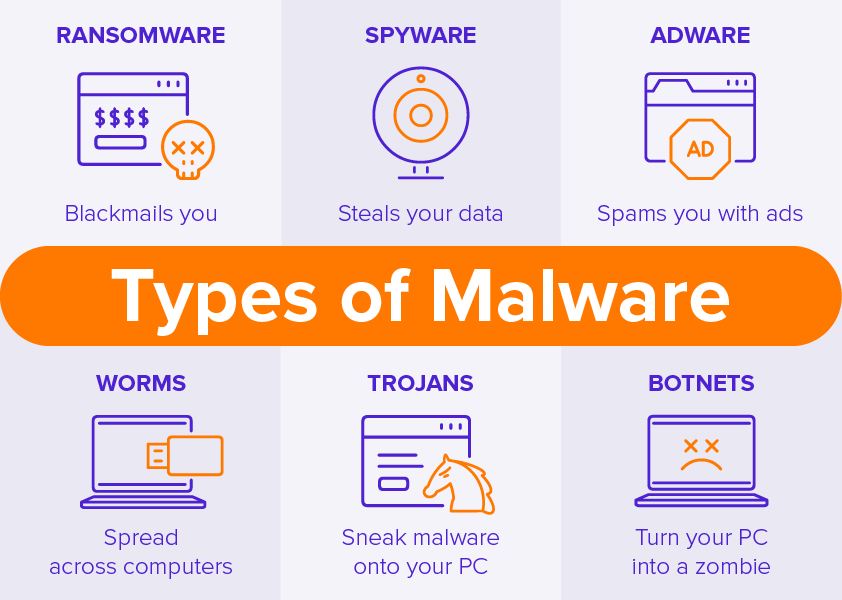
Common types of malware include the computer virus that replicates by infecting files, the worm that spreads without user action, and trojans that pose as legitimate software to deliver malicious code. Ransomware encrypts files until a ransom is paid, while spyware is malware used to steal data silently. Adware floods you with unwanted ads, and fileless malware lives in memory to evade security software. Mobile malware is a growing concern as it targets security vulnerabilities in smartphones and tablets. targets phones and tablets, and some malware types enable remote access tools used to steal credentials. These different types of malware illustrate how cyber attacks vary, so layered malware protection is essential to protect against malware.
| Malware Type | Key Behavior |
|---|---|
| Computer virus | Replicates by infecting files |
| Worm | Spreads without user action |
| Trojans | Pose as legitimate software to deliver malicious code |
| Ransomware | Encrypts files until a ransom is paid |
| Spyware | Steals data silently |
| Adware | Shows unwanted ads |
| Fileless malware | Lives in memory to evade security software |
| Mobile malware | Targets phones and tablets |
| Remote access tools (malware-enabled) | Used to steal credentials |
Common Types of Malware Attacks
Common types of malware attacks often start with phishing or social engineering that lure you to click a download or open phishing emails. Ransomware attacks encrypt files and demand ransom; trojans slip in through seemingly safe apps; worms spread malware across networks; and viruses corrupt or modify files. Spyware and keyloggers capture a password or sensitive data; adware pushes intrusive ads; fileless malware exploits a vulnerability in memory; and botnets fuel a DDoS attack. Examples of malware show how quickly devices get infected with malware, but with updated security software, cautious browsing, and backups, you can detect malware early and prevent malware attacks.
| Malware Type | Typical Behavior |
|---|---|
| Ransomware | Encrypts files and demands ransom |
| Trojans | Hide in seemingly safe apps |
| Worms | Spread across networks, various types of malware can wreak havoc on interconnected systems. |
| Viruses | Corrupt or modify files |
| Spyware / Keyloggers | Capture passwords or sensitive data using various types of malware. |
| Adware | Push intrusive ads |
| Fileless malware | Exploits memory vulnerabilities |
| Botnets | Fuel DDoS attacks |
In-Depth Look at Common Types of Malware
Now that we’ve set the scene, let’s explore the common types of malware more closely so you can spot a malware attack early and protect against malware with confidence. Each type of malware behaves differently—some spread malware quietly, others encrypt files for a ransom, and a few hide inside legitimate software to trick even careful users. By understanding how a virus, worm, trojans, spyware, adware, and fileless malware operate, you’ll be better prepared to detect malware, remove malware safely, and prevent malware attacks that target your computer system and sensitive data.
Viruses and Computer Viruses
A computer virus is a form of malware designed to attach to files or programs, then infect new hosts when you run or download them. This type of malware needs user action to spread, but once active, the malicious code can corrupt data, slow performance, and open doors for other cyber threats. Traditional malware viruses often modify files, while modern malware types may also attempt to use malware to steal a password or enable remote access. Good cybersecurity habits and updated security software help detect, quarantine, and prevent infections.
Worms and Their Impact
Unlike a virus, a worm slithers through networks without your click, exploiting a vulnerability to replicate rapidly. This type of malware can overwhelm systems, degrade bandwidth, and even trigger a ddos attack by enlisting devices into botnets. Because worms spread malware automatically, they pose unique malware threats to businesses and homes alike. Regular patching, phishing awareness, and limiting remote access reduce risk. If you suspect you’re infected with malware after unusual network spikes or slowdowns, isolate the device, run security software, and remove malware to stop the chain reaction and safeguard sensitive data.
Ransomware: A Growing Threat
Ransomware is malicious software that encrypts your files and demands a ransom to unlock them. Many ransomware attacks start with phishing or social engineering that tricks someone into a download, but they can also exploit unpatched software. When files encrypt, panic can set in, yet paying a ransom is risky and doesn’t guarantee data recovery. Strong backups, multi-factor authentication, and vigilant practices help prevent malware attacks of this kind. If hit, disconnect, report the incident, and work with professionals to detect malware, contain the breach, and recover safely without rewarding the attacker.
Spyware and Its Risks
Spyware is malware used to steal information quietly, capturing keystrokes, a password, browsing habits, or even audio and video. This type of malware often arrives bundled with seemingly legitimate software or via phishing emails, then hides while it exfiltrates sensitive data to an attacker. Because spyware is stealthy, symptoms are subtle—sluggish performance or strange pop-ups can be clues. To protect against malware like this, install reputable security software, review app permissions, and avoid unknown downloads. If you believe you’re infected with malware, disconnect from the internet, run a full scan to remove malware, and change credentials from a clean device.
Trojans: Deceptive Malware
Trojans, or a trojan horse, disguise malicious code as helpful tools or content, luring you to download and run them. This type of malware can open backdoors for remote access, use malware to steal data, or deploy additional types of malware attacks such as ransomware. Because trojans rely on trust, social engineering and polished fake websites are common tactics used to get malware. Verify sources, check digital signatures, and be skeptical of “free” offers to avoid security vulnerabilities.. Security software that analyzes behavior can detect malware even when it masquerades as legitimate software, helping you prevent malware attacks before they compromise your computer system.
Adware: Annoyance or Threat?
Adware often floods you with ads, but it can cross the line into a malware attack when it tracks behavior, injects malicious code, or pushes risky downloads. While some adware is merely irritating, other variants are dangerous malware types that hijack browsers, redirect searches, and expose you to phishing or further infections. Because adware can be used to steal attention and data, treat it seriously. Remove unfamiliar extensions, review installs, and run security scans to detect malware lurking behind pop-ups. Choosing privacy-focused settings and avoiding shady installers keeps this traditional malware at bay while protecting both your time and your sensitive data.
Fileless Malware: The Invisible Threat
Fileless malware lives in memory, abusing trusted tools and leaving few traces on disk. By exploiting a vulnerability or leveraging scripts, it can persist, move laterally, and evade traditional file-based detection. Because this invisible threat blends into normal activity, behavior-based security, strict access controls, and prompt patching are essential. Be cautious with macros, remote access tools, and admin privileges that can be used to steal credentials. If you suspect fileless activity, capture volatile memory quickly and work with experts to detect malware indicators and prevent malware attacks from spreading.
Detecting and Preventing Malware Attacks
Let’s bring your cybersecurity confidence to life with simple ways to detect malware early and prevent malware attacks before they grow. Whether the type of malware is a computer virus, worm, trojans, or fileless malware, the goal is the same: protect your computer system and sensitive data with calm, clear steps. We’ll cover signs of a malware infection, how to remove malware safely, and everyday habits that block common types of malware attacks. Our approach is friendly and honest—no jargon, just practical tips that work against traditional malware and modern malware threats alike. With the right security software and good habits, you can outsmart an attacker and enjoy safer, happier tech.
How to Detect Malware
Detect malware by watching for sudden slowdowns, crashes, or unknown processes that suggest malicious software may infect your device. Unexpected pop-ups, disabled security software, strange browser redirects, and new toolbars can point to adware or kinds of malware. Unexplained file changes or unexpected encryption suggest ransomware, while excessive network traffic can hint at a worm or a ddos attack role. Review recent downloads, especially from phishing emails or social engineering lures posing as legitimate software. Run a full scan with reputable security software and enable behavior-based monitoring to catch fileless malware, and check login activity for suspicious remote access that could be used to steal a password.
Methods to Remove Malware
If you think you’re infected with malware, act kindly toward your future self: isolate the device from the network to stop the spread malware risk. Use security software to run deep scans that identify the form of malware—computer virus, ransomware, spyware, or trojan horse—and quarantine or remove malware. For stubborn malware types or fileless malware, reboot into safe mode, update definitions, and rescan. Restore clean backups instead of paying ransoms, and do not rush to pay a ransom; even when a ransom is paid, attackers may not return data. Change passwords from a clean device and patch vulnerabilities, and review startup items and downloads to evict lingering malicious code.
Protect Against Malware: Best Practices
To prevent malware attacks, layer friendly, everyday defenses. Keep systems patched and enable automatic updates, and use trusted security software with web, email, and behavior protection. Practice download discipline—verify sources, avoid shady links, and treat phishing emails with caution to block social engineering tricks. Enable multi-factor authentication so a stolen password isn’t a free pass to remote access. Back up important files offline to blunt ransomware, and limit admin rights to reduce cyber attacks impact. Educate your household or team about common types of malware and examples of malware tactics. These honest habits deliver strong, layered protection across devices, including mobile malware and traditional malware.
Cyber Threats and Malware Delivery
Cyber threats keep evolving, but with calm, friendly guidance you can stay ahead of the attacker. Most types of malware attacks rely on simple moments—an urgent phishing email, a tempting download, or a tiny vulnerability in a computer system. Whether the form of malware is a computer virus, worm, trojans, adware, or fileless malware, each malware attack is malware designed to infect, spread malware, and sometimes encrypt files for ransomware. Honest cybersecurity habits, thoughtful security software, and awareness of social engineering go a long way. We’ll explore common malware delivery paths, how to detect malware early, and caring ways to respond so your sensitive data stays safe and our digital community remains resilient and joyful.
Common Malware Delivery Methods
Attackers love familiar doors. Phishing emails nudge you toward a risky download or a fake login to steal a password, while poisoned ads and adware installers smuggle malicious code that can infect a device. Drive-by downloads exploit a vulnerability in a browser plug‑in, and trojan horse apps pose as legitimate software on desktop or mobile malware stores. Malicious macros and scripts power fileless malware, and exposed Remote Desktop can grant remote access for ransomware attacks. Removable media can spread a worm or computer virus across networks. To protect against malware, verify sources, disable unneeded macros, patch quickly, and use reputable security filters for web, email, and downloads.
| Threat/Vector | How it works |
|---|---|
| Phishing emails | Prompt risky downloads or fake logins to steal passwords |
| Poisoned ads & adware installers | Smuggle malicious code that can infect a device |
| Drive-by downloads | Exploit vulnerabilities in browser plug‑ins |
| Trojan horse apps | Pretend to be legitimate software on desktop or mobile stores |
| Malicious macros & scripts | Enable fileless malware |
| Exposed Remote Desktop | Can grant remote access for ransomware attacks |
| Removable media | Spread worms or computer viruses across networks |
| Key protections | Verify sources, disable unneeded macros, patch quickly, and use reputable security filters |
Recognizing Signs of Malware Infection
Trust your instincts. A sudden slowdown, crashing apps, or a noisy fan can hint at a worm or crypto‑mining malware designed to quietly use your computer system. Browser redirects, new toolbars, and pop‑ups suggest adware or trojans. Files encrypting without warning point to ransomware, while unexpected password prompts or logins may reveal spyware used to steal credentials. Disabled security tools, blocked updates, or odd network spikes can signal a ddos attack role or remote access by an attacker. Review recent downloads and phishing messages, check startup items, and compare running processes with known-good baselines. When in doubt, pause, disconnect, and begin safe removal.
Responding to a Malware Attack
If you think you’re infected with malware, kindness to your future self starts with quick, steady steps. Disconnect from networks immediately to stop the spread malware risk, then capture notes on symptoms and recent downloads. Use trusted security software to detect malware and quarantine or remove malware, and for tricky fileless malware or trojans, scan from safe mode or a clean rescue disk. If files encrypt in a ransomware attack, restore from clean backups to mitigate the impact of various types of malware infections.; paying a ransom is risky even when a ransom is paid. Reset passwords from a clean device, patch vulnerabilities, and review remote access settings. Finally, reflect on lessons learned—update training on social engineering and refresh layered malware protection to prevent malware attacks next time.