
Most iPhone screen repairs in Singapore fall between about S$80 and S$400 at independent shops, while Apple's own service provides a S$575 to S$699 benchmark. The right tier depends on your model, display type, and how long you plan to keep the phone.
You're halfway through a Grab ride from Dhoby Ghaut, trying to reply to a message, when the phone slips. One sharp crack spreads across the screen. It still lights up, but every swipe feels risky, and you're suddenly weighing repair cost, data privacy, Face ID, resale value, and the inconvenience of being without your phone.
The sensible answer isn't always the cheapest quote. Singapore is a strongly iPhone-heavy market, with Apple holding 47.22% of the mobile vendor market as of April 2026, according to a Singapore phone repair market report citing Statcounter data. The same report puts screen-related faults at 41% of phone repairs, so screen replacement is a central repair decision for local users, not an unusual problem.
This guide gives you a practical way to judge the damage, compare Apple Authorised Service with independent and mail-in options, prepare your phone safely, and check the repair before you leave. Singapore's repair-first direction also means you've got a meaningful alternative to replacing a usable device. The aim is simple: retain as much value as possible, protect your data, and avoid paying for a part you don't need.
Table of Contents
- When a Cracked iPhone Screen Hits You in Singapore
- How to Assess Your iPhone Screen Damage Before Repair
- Your Three Repair Options in Singapore Compared
- Preparing Your iPhone for a Safe Hand-Off
- Understanding Repair Costs and Panel Quality Tiers
- Post-Repair Checks Before You Leave the Counter
- Repair First, Waste Less, and Your Next Move
When a Cracked iPhone Screen Hits You in Singapore
A cracked screen rarely arrives at a convenient moment. The first decision is whether the damage needs immediate attention, not which shop offers the lowest quote. If the display still lights up and responds normally, keep the phone away from water, cover sharp edges, and arrange an inspection soon. A protector can reduce cuts for a short time, but it cannot repair broken glass or restore the phone's original seal.
Singapore's iPhone-heavy market makes repair familiar territory for local technicians. Screen faults are among the most common jobs at repair shops, so a reputable technician should recognise your model quickly, explain whether the glass or full display assembly needs replacement, and give a clear quote. Choose a shop that checks the phone before recommending parts.
Practical rule: Confirm whether the damage is limited to the glass or has reached the display assembly before choosing a repair lane.
You have three practical options. Apple Authorised Service offers genuine parts and official support, but usually costs more and may take longer. An independent specialist can provide faster service and different panel grades, provided you confirm the part quality and warranty. Mail-in or door-to-door repair saves a trip, while adding shipping, handling, and data-security considerations.
Judge the decision by total value retained, not the cheapest sticker price. Include your iPhone's model, display technology, warranty position, data sensitivity, expected resale value, and remaining years of use. A repair-first choice also keeps a working device in circulation, supporting Singapore's repair direction and reducing pressure on its e-waste system. For a phone that still meets your needs, a properly chosen screen swap can preserve more value than replacement.
How to Assess Your iPhone Screen Damage Before Repair
Start with the easiest check. Clean the screen, remove any loose protector, and inspect the crack under good light. If you see hairline cracks or a spider-web pattern but the picture, brightness, and touch response remain normal, the outer glass may be the main problem. A replacement protector can help temporarily, but it won't restore damaged glass or the phone's original seal.
Next, open a plain white page and a dark image. Look for black blobs, coloured vertical lines, dead pixels, flickering, faded colours, or uneven brightness. Those signs point to damage below the surface. Run your finger slowly across every area, including the corners and keyboard, and watch for dead zones or ghost touches, where the phone responds without you touching it.
Check the features tied to the display
True Tone changes the screen's colour balance to match surrounding light. Open Settings, go to Display & Brightness, and toggle True Tone. If the option has disappeared after an earlier repair, or the screen looks noticeably different when it's switched on and off, ask the technician whether the replacement can preserve the feature.
Test Face ID by locking and then locking the phone several times. A cracked display doesn't always cause Face ID failure, but damage or mishandling around the front sensor assembly can. A major brightness drop may also indicate backlight damage on an LCD model, or a failing OLED panel on newer phones.
Understand why the model changes the quote
Older iPhones typically use LCD panels. iPhone X and later models, except the SE line, use OLED displays, where each pixel produces its own light. The display, touch sensor, and supporting layers are commonly bonded into one assembly, so OLED repairs usually cost more and require careful handling.
iPhone 14 and iPhone 15 owners should ask about screen pairing and software warnings. A cheap used pull screen, meaning a display removed from another phone, may create compatibility or calibration problems if the shop can't complete the required configuration.
Take clear photos of the front, frame, corners, and any display fault before handing the phone over. For a little extra protection while deciding, see this guide on putting a screen protector on a cracked screen. Your photographs give the technician a useful quote reference and create a condition baseline for any warranty discussion.
Your Three Repair Options in Singapore Compared
There isn't one universally correct repair provider. The best choice depends on whether you prioritise official parts, speed, price, data handling, or the ability to speak directly with the technician.
| Repair Lane | Typical Cost (SGD) | Turnaround | Warranty | Parts & Data Notes |
|---|---|---|---|---|
| Apple Authorised Service Provider | S$575 for screen damage, or S$699 for screen and back-glass damage | Appointment and parts availability determine timing | Apple service terms apply | Genuine Apple parts and official procedures. Ask about backup and device access requirements |
| Independent specialist shop | About S$80 to S$150 for older LCD models, and S$200 to S$400+ for newer OLED Pro Max models | Common walk-in repairs often take 25 to 60 minutes when parts are available | Shop-specific terms. Check the written duration and exclusions | Parts grades vary. Confirm whether data stays on the phone and whether the shop uses refurbished original displays |
| Mail-in or door-to-door service | Quote depends on model and selected panel tier | Longer than while-you-wait service because collection and return are involved | Provider-specific | Convenient for limited mobility, but shipping, handling, and device access need clear safeguards |
Apple's Singapore iPhone repair pricing gives you a useful official benchmark: S$575 for screen damage and S$699 for screen plus back-glass damage. Independent pricing guides report older models around S$80 to S$150, while newer OLED Pro Max replacements can reach S$200 to S$400+ depending on the part and model. A Singapore phone repair comparison also notes that common walk-in repairs are often completed within 25 to 60 minutes, but only when the correct part is in stock.
Apple Authorised Service
Choose this lane if genuine parts, Apple support, warranty considerations, or AppleCare+ coverage matter more than price and speed. It's the cleanest route for a premium phone you intend to resell or keep for a long time. Ask whether the work is performed by an Apple Authorised Service Provider, not just described as “original quality”.
Independent specialists
This is usually the practical middle ground. You can compare LCD, OLED, original-grade, refurbished original, and aftermarket options, then ask for a written warranty. Use the Singapore phone repair shop guide to shortlist locations, but still confirm the exact model, parts tier, activation lock policy, and data handling before approving work.
Mail-in and door-to-door services
These suit people who can't reach a nearby shop or prefer collection from home or work. Confirm who transports the device, whether it's insured during handling, how the passcode is managed, and what happens if the technician finds additional damage. Convenience is useful, but it shouldn't replace a clear chain of responsibility.
Preparing Your iPhone for a Safe Hand-Off
A screen repair shouldn't require you to panic about your photos, chats, banking apps, or Singpass access. Spend a few minutes preparing the device before the technician opens it. A backup protects you if an unexpected hardware problem occurs during inspection, while account sign-out prevents activation lock from blocking the repair.
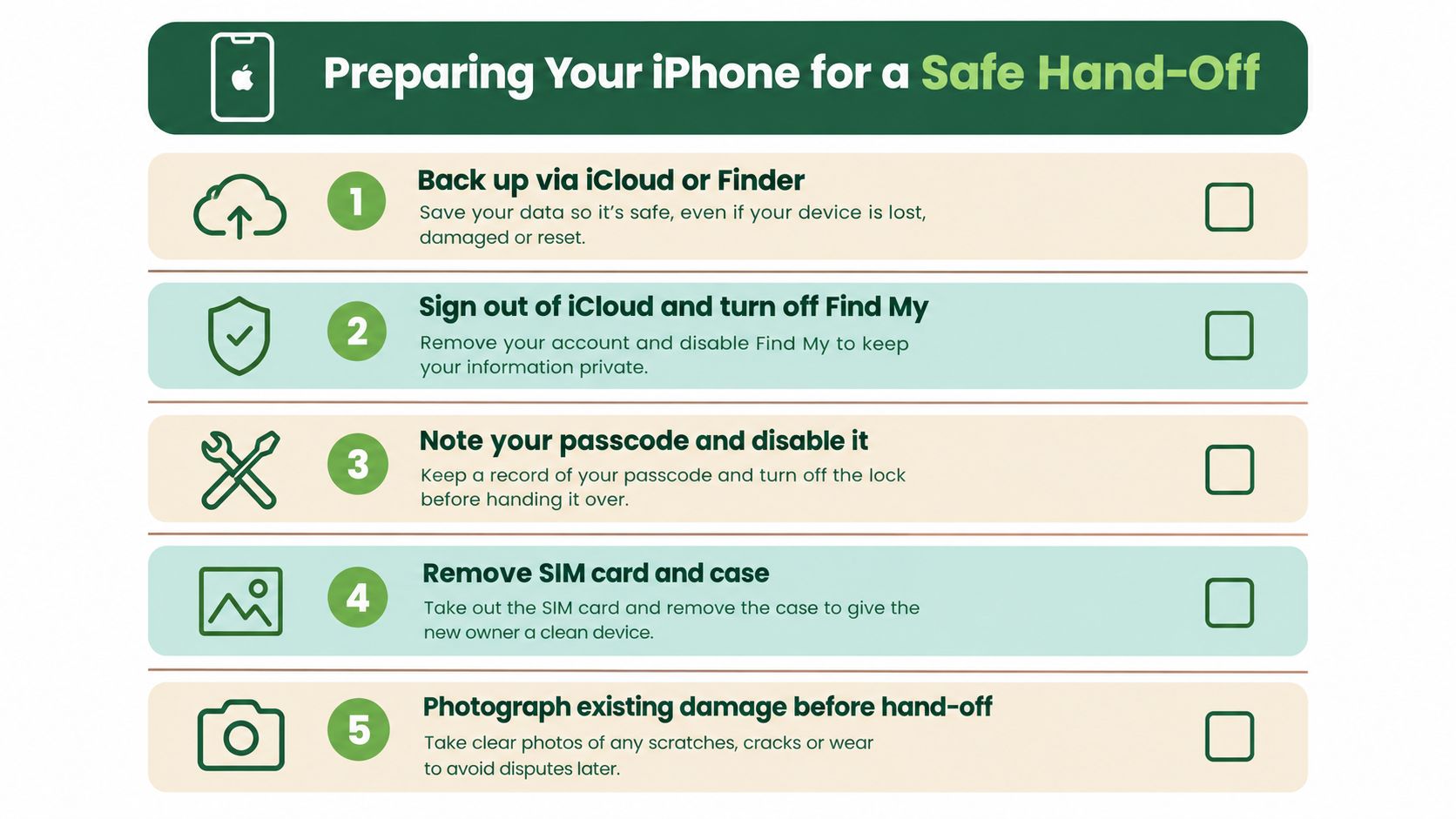
Follow this hand-off routine
Back up first. Use iCloud or Finder and verify that the latest backup completed. If the screen still responds, open a few recently created photos and messages after the backup so you know the important data is present.
Sign out where needed. Sign out of iMessage and FaceTime, then follow the shop's instructions for Apple ID access. This reduces activation-lock friction and keeps the technician from needing unnecessary account intervention.
Turn off Find My. Do this only after the backup is verified. Find My iPhone must often be disabled before service can proceed, particularly where parts replacement or diagnostics require device status checks.
Remove personal extras. Take out the SIM card and remove the case. If you want an additional privacy layer, remove banking apps or Singpass after confirming you can reinstall and access them later.
Record the condition. Photograph the front, back, sides, camera area, and any existing dents. Note Face ID, True Tone, brightness, speaker, and microphone behaviour before hand-off.
Keep the passcode private where possible. If a technician needs device access for testing, enter the passcode yourself at the counter and stay present during checks. For a more detailed backup routine, use this iPhone backup guide.
Safe data means more than deleting an app. Back up first, minimise access, and ask exactly how the shop handles your device during testing.
Understanding Repair Costs and Panel Quality Tiers
Two quotes can differ sharply because “screen replacement” does not identify the part being fitted. The tier affects brightness, touch response, calibration, durability, and the amount of original value your iPhone retains. A cheaper repair can cost more later if the panel performs poorly or needs replacing again.
Singapore's repair-first approach makes a screen swap worth assessing before you replace the whole phone. Keeping a usable device in service also reduces e-waste, while Singapore's collection and recycling infrastructure gives unwanted electronics a proper disposal route. Choose the repair that preserves the phone's working life, not just the lowest sticker price.
A Singapore original-grade repair listing shows how widely independent pricing can vary, with published prices from about S$30 to S$165 depending on the model and repair type. Treat that range as a prompt to ask what part and process the quote covers, not as a promise for your specific phone.
| Service Lane | LCD Models, iPhone 8 and SE 2/3 | OLED Models, iPhone X to 14 | OLED Pro and Pro Max, 15 to 16 series | Warranty |
|---|---|---|---|---|
| Apple Authorised Service | Official quote required | Official quote required | Official quote required | Apple service terms |
| Mid-tier independent | Typically near the older LCD range | Typically in the mid independent range | Often toward the upper independent range | Provider-specific |
| Budget independent | May be lower, depending on fault and part | May use aftermarket or refurbished parts | Ask carefully about panel source and calibration | Shorter or limited terms may apply |
What “glass-only” refurbishment involves
Glass-only refurbishment removes the damaged top layer while retaining the original display, provided the OLED and touch layer remain intact. This can preserve the panel's original brightness and calibration. It requires specialised equipment, and a phone with hidden touch or display damage may not be a suitable candidate.
A full-assembly replacement changes the bonded display unit. Choose this route when touch is unreliable, black spots or lines appear, or the original panel has taken serious impact. Ask whether the replacement is aftermarket, refurbished original, original-grade, or genuine Apple. Confirm how the repair affects True Tone, Face ID, brightness, and touch response.
Match the tier to your ownership plan
For an older iPhone you plan to upgrade soon, a properly specified independent repair may keep the device useful without paying for a premium service tier. For a Pro model you will keep or resell, spend more attention on panel quality, written warranty, calibration, and installation quality. Those factors protect more of the phone's remaining value.
Use this iPhone screen repair price guide to understand common quote categories, then request a model-specific diagnosis. Do not approve a full replacement until the technician confirms whether the original OLED can be refurbished safely.
Post-Repair Checks Before You Leave the Counter
Treat collection like a quality inspection, not a quick grab-and-go. You're still at the counter, the technician is available, and any issue is easier to address before you leave the shop.
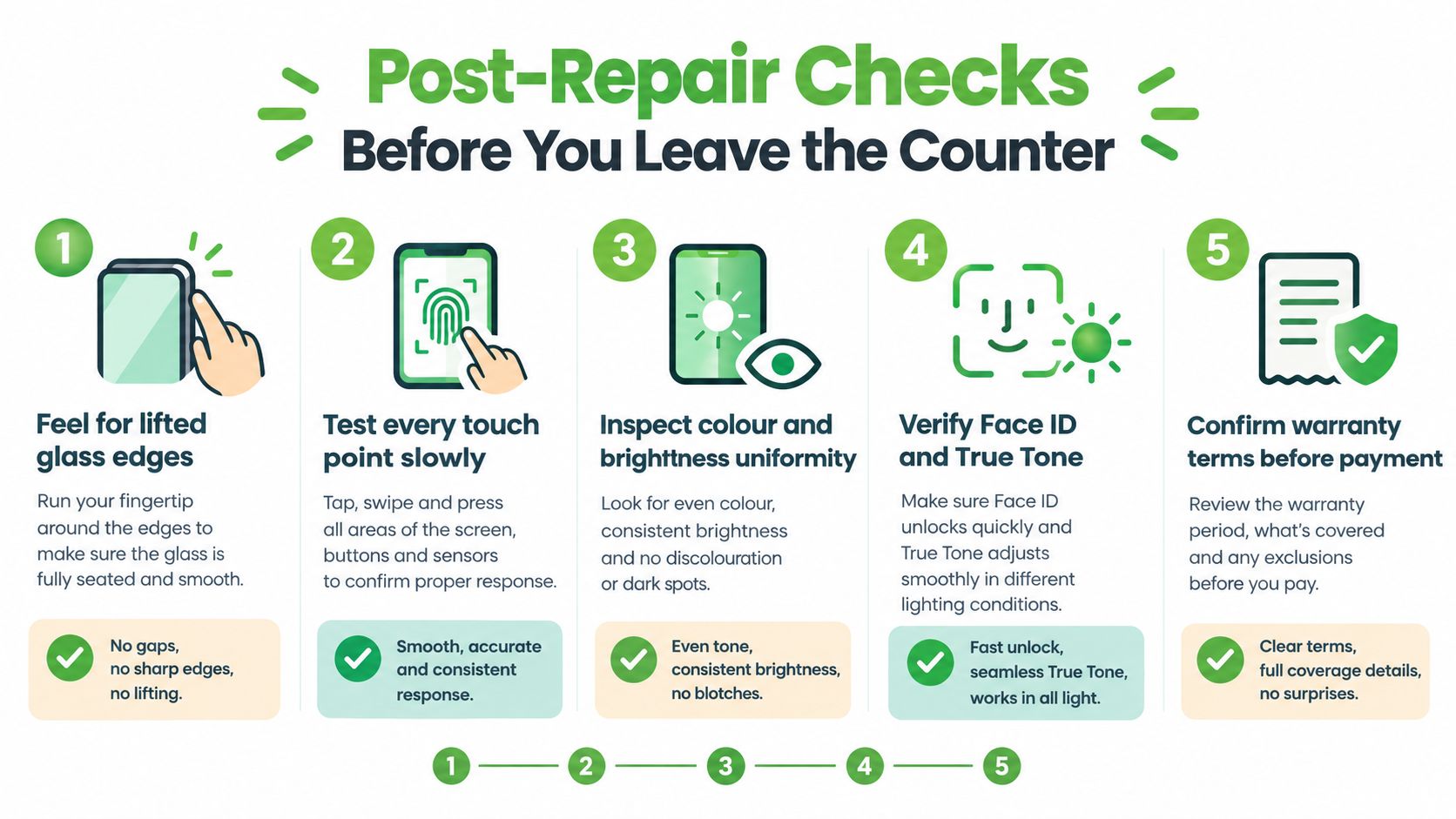
Run the physical and display checks
Feel around the entire perimeter with a clean finger. The glass should sit evenly in the frame, without lifted corners, sharp edges, gaps, or adhesive showing. Slowly swipe from corner to corner, type a short message, open the keyboard, and drag an app icon across the screen. This reveals dead zones and ghost touches that a quick test can miss.
Use a white page and a black image to inspect brightness and colour uniformity. Look for dark patches, flickering, uneven illumination, yellow or blue tint, and pixels that don't change. Compare the screen with your pre-repair photos if you noticed a specific fault before service.
Test the features people often overlook
Lock and use Face ID more than once. Open Settings, then Display & Brightness, and test True Tone and Night Shift. Play audio through the earpiece and loudspeaker, record a short voice memo, and make a test call to check the microphone and proximity sensor.
Inspect the selfie camera for dust under the lens. Ask the technician to explain the warranty, what it covers, and how to make a claim. Also ask about the waterproofing disclaimer. A third-party screen repair can use fresh adhesive, but you shouldn't assume it restores the iPhone's original factory water-resistance rating.
Do not sign off because the screen lights up. Sign off after touch, brightness, Face ID, audio, cameras, and warranty terms all make sense.
Repair First, Waste Less, and Your Next Move
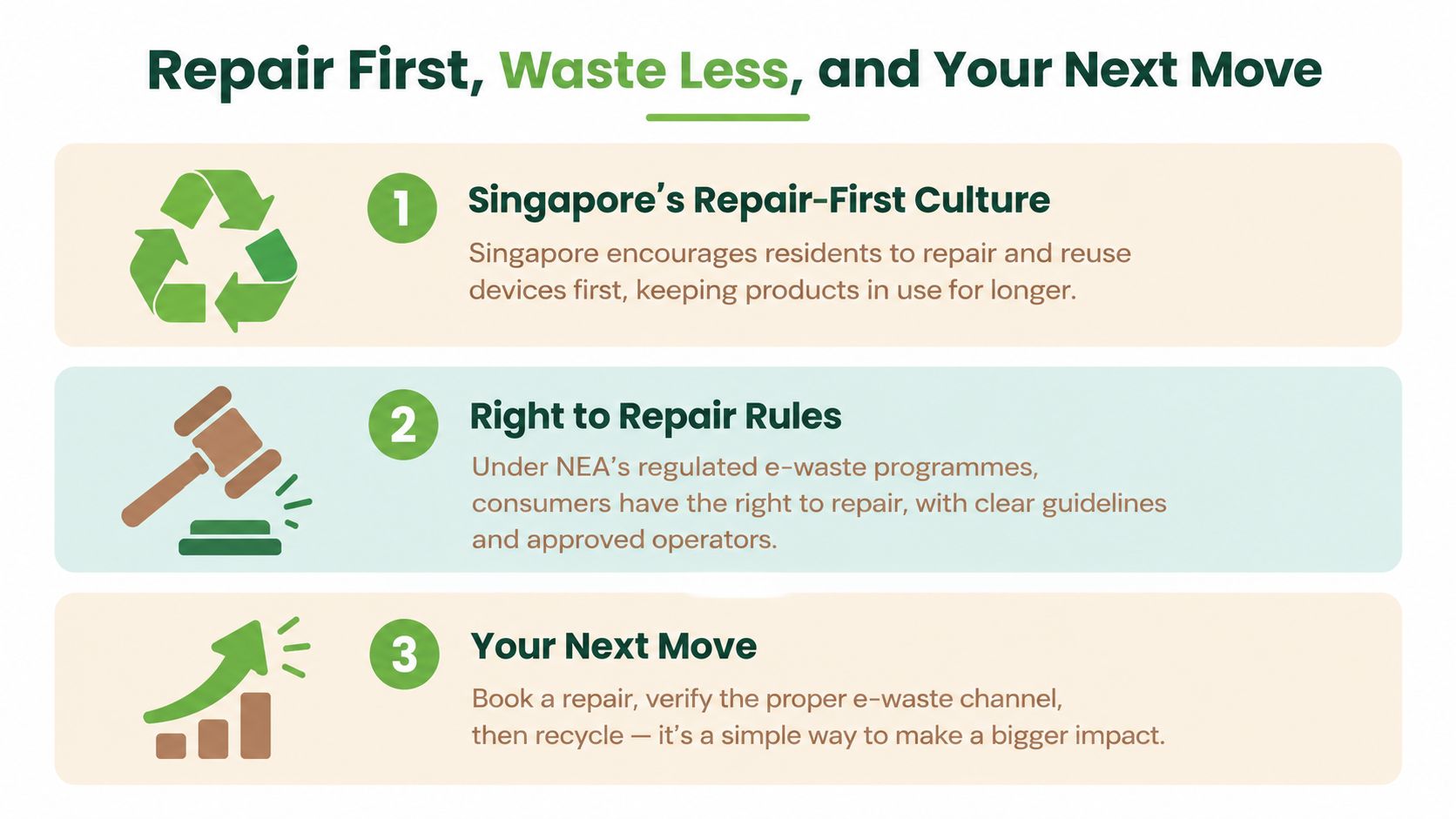
Your iPhone may only need a screen swap, not a replacement. Repairing it can keep the phone usable, preserve resale value, protect your data, and give you time to choose your next device properly. Singapore's National Environment Agency recommends repair first where practical, while its collection system handles electronics that cannot be repaired or reused. The NEA guidance on Singapore's e-waste system explains how the wider system works.
The local waste figures make that choice concrete. Singapore generates about 60,000 tonnes of e-waste a year, equivalent to roughly 70 mobile phones per person. The country introduced an e-waste extended producer responsibility scheme in 2021, and more than 16,000 tonnes of regulated consumer e-waste had been collected through it by December 2023, according to The Straits Times and the NEA guidance above. One repaired iPhone does not solve that problem, but keeping a working device in use avoids an unnecessary replacement and delays disposal.
Decide by total value retained
Judge the repair by what remains usable, not by the lowest quote. A good screen replacement should preserve responsive touch, clear brightness, working Face ID, resale condition, and control of your data. A cheap panel that looks dim, loses calibration, or fails soon after installation can cost more than the initial saving.
Check your consumer rights if the replacement or repaired device is defective. Under Singapore's Lemon Law, consumers can request repair, replacement, a price reduction, or a refund for defective goods when the request is made within six months of purchase, according to LawGoWhere's consumer guidance. For harder disputes, the Consumer Protection (Fair Trading) Act provides the main civil redress framework, with CASE assistance channels available for consumer support.
Take these four steps today
Confirm the model and damage tier. Identify the exact iPhone model. Establish whether the problem appears limited to the glass or affects the complete display.
Compare two repair routes. Get quotes from Apple Authorised Service and an independent specialist, or compare two independent shops. Ask about the panel source, calibration, turnaround, warranty, and whether technicians need access to your data.
Prepare the phone properly. Back up your data, manage Apple ID and Find My, remove the SIM and case, and photograph the phone before hand-off.
Choose the responsible outcome. Use an in-store repair or courier collection according to the shop's handling process. If repair no longer makes financial sense, use an approved e-waste route, trade-in service, or upcycling channel rather than leaving the phone unused in a drawer.
If you want someone else to assess the options, myhalo's counters at Bugis Junction and Sim Lim Square handle iPhone screen replacement, data recovery, and responsible trade-in or recycling for devices that are not worth repairing. Check its current repair and collection options before deciding.
Your files and memories still matter even when the phone is damaged. Protect your privacy, recover what you can, and retain as much working device value as possible before choosing whether to repair, trade in, reuse, or recycle it.