
That old phone in your drawer still feels personal. It might hold family photos, saved passwords, banking alerts, work chats, or a notes app full of half-forgotten details about your life. The same goes for retired laptops, tablets, USB drives, and office hard disks that no one quite knows what to do with.
In Singapore, a lot of people keep old devices far longer than they need to, not because they're lazy, but because they're careful. They don't want to throw something away and later wonder who can still read what was on it. That hesitation makes sense. A device can look dead, wiped, or harmless, yet still carry recoverable information if it hasn't been handled properly.
That's where ISO 27001 data destruction becomes useful. Think of it as a clear, practical security standard for making sure data is removed in a way that's organised, documented, and hard to dispute. It's not just for big enterprises with compliance teams. The ideas behind it are simple enough for anyone to understand, and they're especially helpful when you're trying to balance privacy, convenience, and responsible e-waste disposal.
If your shelves are filling up with old tech, this is also a reminder that home isn't the place to dump old devices. A safer next step exists, and it doesn't have to feel complicated.
Table of Contents
- Worried About Data on Old Devices You Are Not Alone
- Understanding ISO 27001 Data Destruction Requirements
- From Wiping to Shredding Secure Data Destruction Methods
- Why a Secure Chain of Custody Is Non-Negotiable
- Your Practical ISO 27001 Data Destruction Checklist
- Declutter with Total Confidence and Zero E-Waste
Worried About Data on Old Devices You Are Not Alone
A common scene looks like this. One old iPhone with a cracked screen. A previous work laptop that still boots. A tablet the kids used during home-based learning. Maybe even a portable hard drive with years of documents. None of them are in daily use, but none of them feel safe to let go of either.
That feeling usually isn't about the hardware. It's about the data. People worry about photos resurfacing, email accounts being accessed, or someone recovering documents they thought were gone. Businesses feel the same tension at a larger scale. A stack of retired staff laptops may represent a security problem, not just an operations task.
Why people keep old devices for too long
A factory reset is a familiar concept. Fewer people know whether a factory reset is enough. That gap creates indecision. So the device stays in a drawer, or in a storeroom, or in a box under a desk.
Old devices often become “temporary storage” for unresolved security decisions.
For homes, that means clutter and anxiety. For organisations, it can mean failed processes, missing records, and uncertainty over whether data was ever properly removed.
Peace of mind comes from process
ISO 27001 helps because it turns a vague fear into a repeatable process. Instead of asking, “Do I think this device is safe now?”, you ask better questions:
- What method removed the data
- Who handled the device
- Was the step recorded
- Can that action be verified later
Those questions matter whether you're clearing one family laptop or an office full of end-of-life devices.
At myhalo, those same concerns sit behind the ideas of Safe data and Declutter your e-clutter. One focuses on protecting privacy. The other focuses on moving unused tech back into reuse, recycling, or responsible disposition without creating unnecessary stress. That combination matters because people don't just want security. They want a process that feels manageable.
Understanding ISO 27001 Data Destruction Requirements
A device drop-off can look harmless. Someone leaves an old laptop at a recycling point in Singapore, assumes the data is gone, and walks away. ISO 27001 treats that moment very differently. It treats it as a controlled security event that needs rules, records, and proof.
That mindset helps because data destruction is not only about deleting files. It is about stopping recovery, preventing mix-ups during handover, and showing an auditor exactly what happened to each asset.
What ISO 27001 means in plain language
ISO 27001 is a framework for protecting information throughout its full life cycle. That includes the last stage, when equipment is reused, recycled, returned, or destroyed. If data can still be recovered at that point, the organisation still carries the risk.
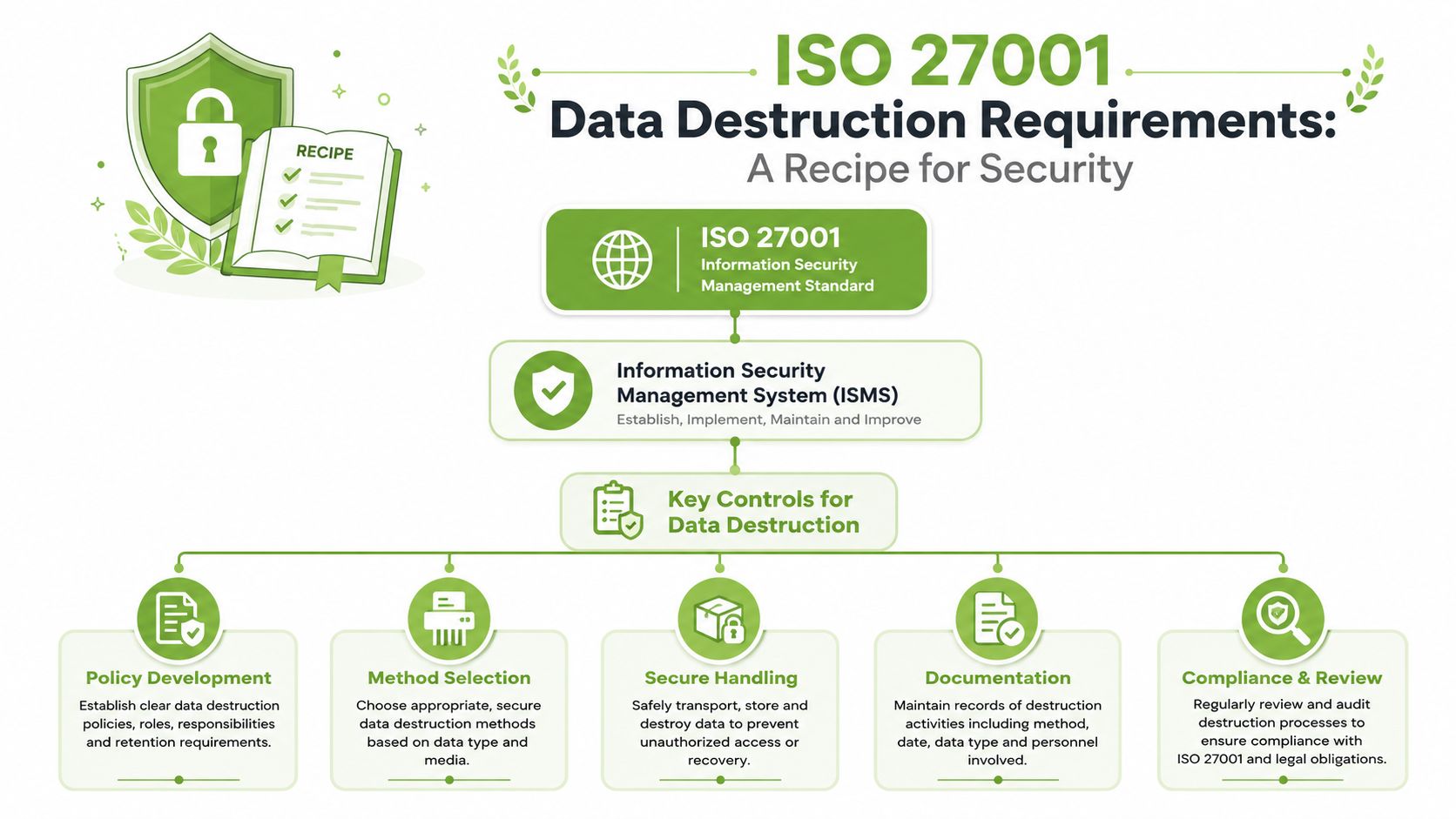
A helpful way to read the standard is to compare it to closing a bank account. You do not just stop using the account and hope everything sorts itself out. You verify the balance, confirm the closure steps, and keep the records. Retiring a data-bearing device works the same way.
Many teams also connect device disposal to wider security practice with partners such as Wisely's cybersecurity expertise, because disposal failures often start earlier with weak asset tracking, unclear ownership, or missing policies.
The two controls that matter most
For ISO 27001 data destruction, two controls do most of the heavy lifting.
Control A.7.14 covers secure disposal or re-use of equipment. The core idea is simple. Before a laptop, phone, server, or removable drive leaves your control, any storage media inside it must be sanitised or destroyed in a way that matches the risk. The official ISO 27001:2022 control set lists this under secure disposal or re-use of equipment in ISO's overview of the standard and controls. For a Singapore business, this matters at the very practical point of device drop-off. Once equipment leaves the office, home, clinic, or branch location, you need confidence that no one can recover customer records, employee files, or internal documents from it.
Control A.8.10 covers information deletion. This control focuses on the result, not the button someone clicked. Deleting a folder or performing a quick reset may remove access for the user, but it may not make the information unrecoverable. The UK National Cyber Security Centre explains this distinction clearly in its guidance on securely erasing data from devices. That is why ISO 27001 expects organisations to choose deletion methods that fit the device, the media type, and the sensitivity of the data.
A short way to remember the difference is this:
- A.7.14 asks: what happens to the equipment.
- A.8.10 asks: what happens to the information on it.
You need both answers.
What auditors and security teams actually look for
Auditors are usually not looking for dramatic language. They are looking for evidence that the organisation can repeat the process and prove it worked.
That usually means four things:
- an asset can be identified
- the destruction or sanitisation method was suitable
- the people handling it were authorised
- the outcome was documented and verifiable
Many real-world failures often occur. A business may have a policy saying drives should be wiped, but no record of which drive was wiped, who released it, or whether the device was dropped off with a licensed vendor. For individuals, the gap is similar. A phone may be handed over for recycling with good intentions, but without any clear proof that the data was erased first.
Practical rule: If you cannot verify that data was made unrecoverable, treat the device as still risky.
That is why organisations often document approved sanitisation steps in detail, using procedures such as data erasure methods for different device types. The method matters, but the audit trail matters too. A secure process should answer a simple question months later without guesswork. Which device was it, what was done to it, and can you prove it?
From Wiping to Shredding Secure Data Destruction Methods
When people hear “data destruction”, they often picture a hard drive going through a shredder. That's one valid method, but it isn't the only one. ISO 27001 recognises different methods because different devices, risks, and reuse goals call for different treatments.
A simple way to compare the three methods
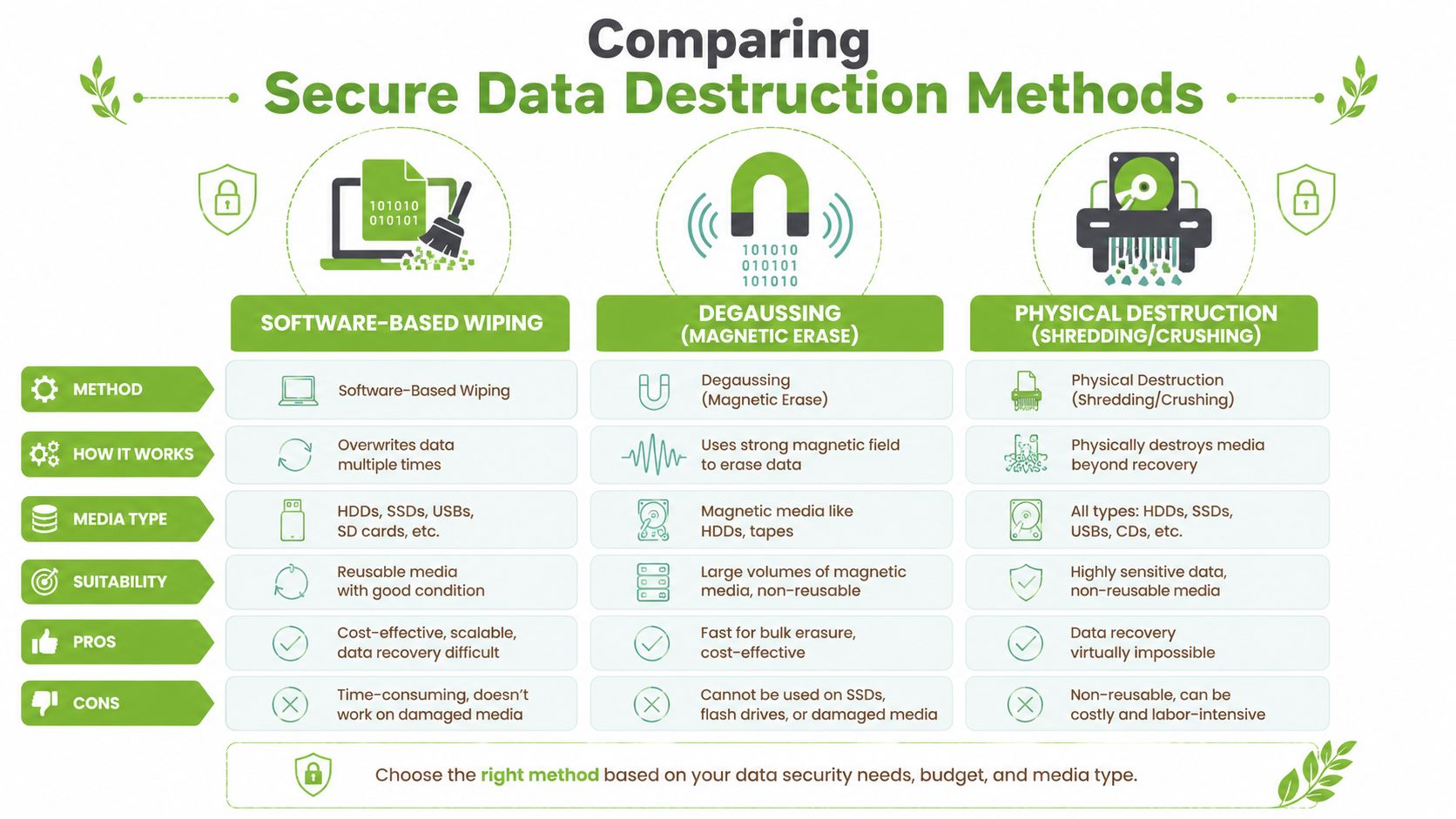
The standard's practical language often gets summarised into three documented approaches based on risk: Clear, Purge, and Destroy. For ISO 27001 Control 8.10, that means logical overwrite, cryptographic erase, or physical shredding and crushing, with cryptographic erase only acceptable if the encryption keys are verifiably destroyed. In Singapore, auditors expect serial-number-level Certificates of Destruction that identify the method used, as noted in this overview of ISO 27001 data destruction.
Here's the plain-language version:
| Method | Best for | What it does | Main limitation |
|---|---|---|---|
| Software wiping | Reusable devices | Overwrites or sanitises data logically | May not suit damaged media or highest-risk cases |
| Degaussing | Magnetic media such as some HDDs and tapes | Uses a strong magnetic field to disrupt data | Doesn't work for SSDs |
| Physical destruction | Highly sensitive or failed media | Shreds, crushes, or otherwise destroys the storage | Device can't be reused |
A quick packing note matters too. If you're moving drives or laptops before destruction, use secure containers that won't split open in transit. Even simple logistics choices, such as using sturdy cardboard boxes for organised collection, can reduce handling mistakes before the security process begins.
Later in the workflow, some organisations choose physical destruction services documented through providers such as shredding services in Singapore when reuse isn't appropriate.
After the overview, this short video gives a helpful visual sense of secure destruction in practice.
How to choose the right method
Don't choose by habit. Choose by media type, data sensitivity, and whether the asset needs to be reused.
- If you plan to redeploy or resell a device, software-based sanitisation may fit, provided the process is documented and verified.
- If the device uses magnetic storage, degaussing can be effective, but it isn't universal.
- If the drive is damaged, highly sensitive, or impossible to validate properly, physical destruction is often the clearest option.
A common point of confusion is the SSD. People sometimes assume a magnet can wipe anything. It can't. SSDs store data differently, so degaussing isn't the right answer there. That's why proper method selection matters so much.
The safest method is not always the most destructive one. It's the one that matches the storage media, the risk level, and the need for evidence.
Why a Secure Chain of Custody Is Non-Negotiable
Many articles about data destruction focus only on the final moment. The shredder. The crush. The wipe report. That misses the part where devices are most vulnerable. The journey between handover and destruction.
The risky moment most people forget
A secure chain of custody is a documented record of who controlled a device, where it was, and what happened to it at each step. This system resembles registered mail for sensitive technology. As with registered mail, you don't just care that the parcel arrived. You care who accepted it, where it sat, and whether the route can be reconstructed later.
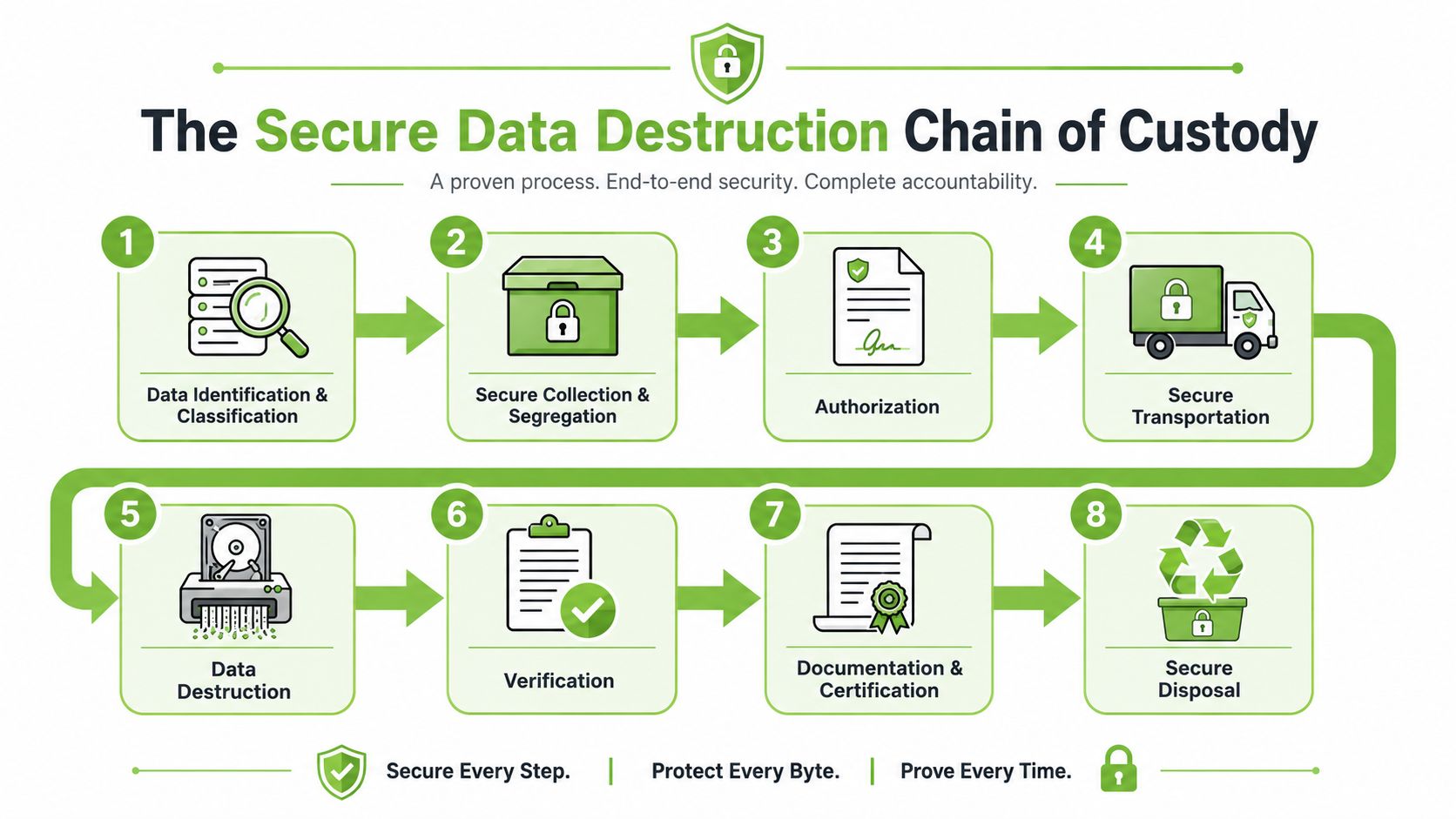
This matters a lot in Singapore's hybrid model, where devices may be handed over at a retail counter and then moved elsewhere for processing. ISO 27001 Annex A 7.14 requires a secure chain of custody from collection to destruction, and one Singapore-focused discussion notes that 40% of data breaches in the local ITAD sector occurred during unmonitored transit between customer drop-off and vendor sanitisation, according to this article on secure disposal or re-use of equipment.
What a proper custody trail looks like
A real chain of custody should answer straightforward questions:
- Who accepted the device
- How it was identified, such as by asset tag or serial number
- Where it was stored before processing
- When it moved
- Who performed sanitisation or destruction
- What record confirms completion
That's especially relevant for IT teams managing laptop retirement projects and end-of-life planning through Singapore ITAD laptop asset disposal and disposition, where dozens or hundreds of devices may move in batches.
Security can fail before destruction begins. If the custody trail breaks, the assurance breaks with it.
For individuals, the concept is useful too. If you hand over a phone at a counter, you should know whether it is logged, segregated, and tracked until the final action is completed. If nobody can explain that path clearly, your data isn't being treated carefully enough.
Your Practical ISO 27001 Data Destruction Checklist
A laptop reaches end of life. Someone drops it off at a collection point in Singapore. The screen is cracked, the battery is weak, and it looks harmless. Yet inside, it may still hold saved passwords, payroll files, customer emails, or scans of identity documents. ISO 27001 matters here because it turns that messy real-world moment into a clear process you can check, record, and audit.
The easiest way to use this section is to treat it like a pre-handover check. Before any device leaves your hands, confirm three things. What data risk does it carry? What destruction or sanitisation method fits that media type? What evidence will prove the job was completed properly? Guidance from Singapore's data protection ecosystem, including IMDA's guide to disposal of personal data on physical medium.pdf), helps show why the method and the record both matter.
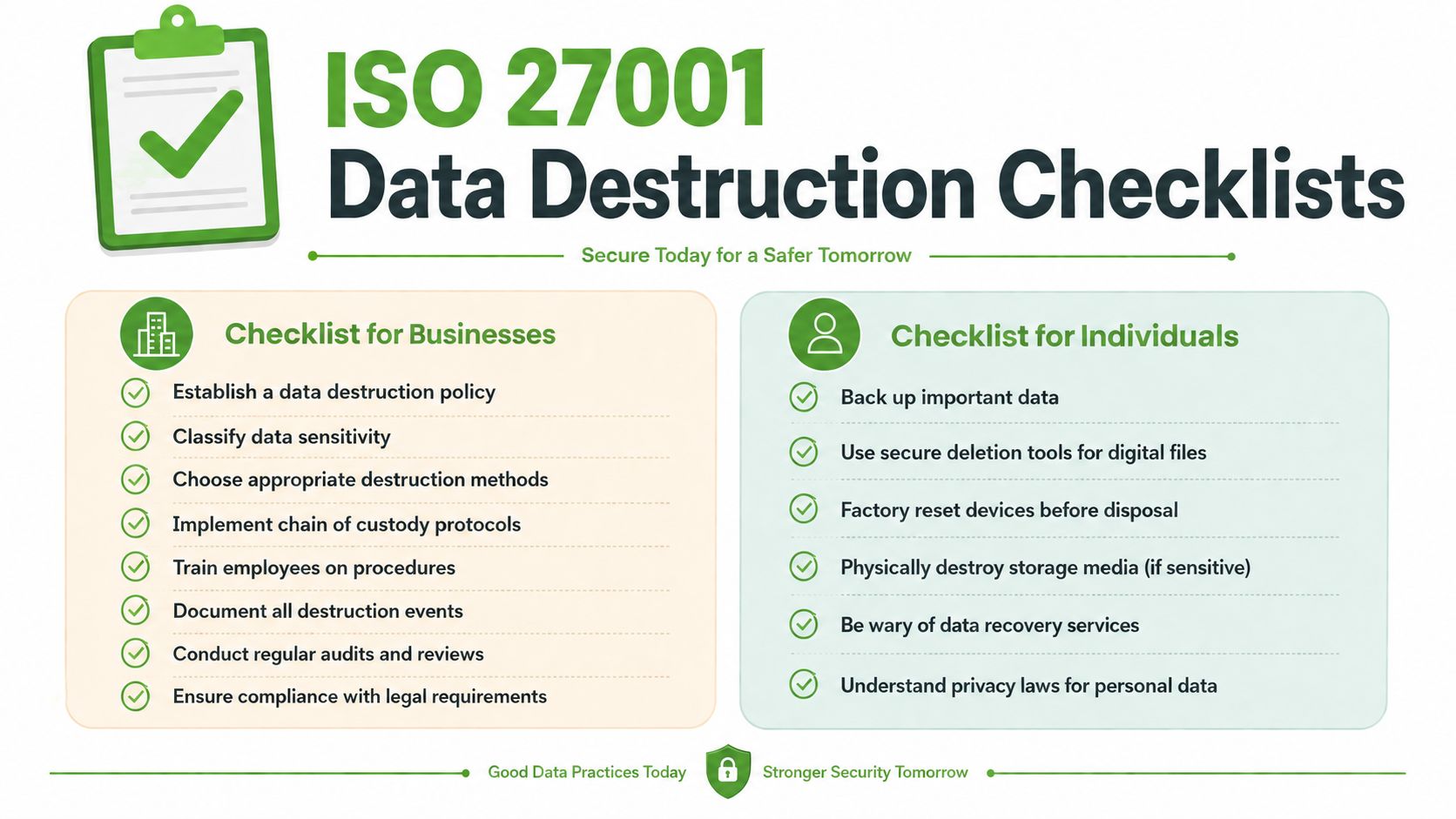
Checklist for businesses
For organisations, a good checklist works like a flight checklist. It reduces guesswork, catches small mistakes early, and leaves an audit trail after the device is gone.
- Create a complete asset list. Record laptops, desktops, phones, servers, external drives, tapes, and paper records that are leaving service.
- Identify the data sensitivity. A device used for HR, finance, healthcare, or customer support should not be treated the same as a kiosk PC with little local storage.
- Choose the right method for the media. HDDs, SSDs, mobile devices, backup tapes, and paper each need different handling. One method does not fit every format.
- Define pass or fail rules before handover. If sanitisation cannot be verified, route the item to physical destruction instead of making assumptions.
- Record device-level details. Serial number, asset tag, media type, selected method, date, and operator should all be traceable.
- Verify vendor evidence. Ask what completion records you will receive, such as a destruction report or Certificate of Destruction tied to the specific batch or device.
- Check operational controls at drop-off. The riskiest point is often the handover itself. Confirm how devices are logged, separated, stored, and protected before processing.
- Train the people who touch retired equipment. A written policy is not enough if devices sit in an open storeroom waiting for pickup.
- Retain records for audit and review. Keep disposal evidence with asset, security, and compliance documentation so you can prove what happened later.
Checklist for individuals
For personal devices, the same logic applies, just with fewer moving parts. Your old phone is a tiny filing cabinet. If you would not hand a stranger your open filing cabinet, do not hand over a device without checking the basics first.
- Save what you want to keep. Back up photos, contacts, messages, notes, and files first.
- Sign out of accounts and remove device locks. Apple ID, Google, Microsoft, work profiles, and activation locks can affect both privacy and reuse.
- Reset the device. This helps, but it is still different from a documented destruction or sanitisation process.
- Consider what lived on the device. Banking apps, personal documents, health records, and work data call for a more controlled disposal route.
- Ask how the provider handles handover and proof. You should be able to get a clear answer on what happens after you leave the counter.
- Prefer a route that supports reuse when safe. Secure processing and lower e-waste can work together.
One practical option in Singapore is myhalo, which supports ISO-aligned handling for device processing within a wider repair, reuse, buyback, and responsible disposition model. That makes sense for businesses that need auditable records and for individuals who want a careful, privacy-focused way to part with old tech without treating every device as rubbish.
A factory reset removes a layer of risk. It does not replace a documented process that shows how the device was handled and what happened to the data.
Declutter with Total Confidence and Zero E-Waste
You drop off an old laptop at a collection point in Singapore, feel relieved that the clutter is gone, then pause. Where does it go next. Who handles it. What proof exists that the data is gone before the device is reused, recycled, or dismantled.
That last mile matters.
By the end of a device's life with you, privacy and sustainability meet in the same decision. ISO 27001 data destruction gives that decision a clear shape. It calls for controlled handling, records you can check later, and a defined outcome for both the data and the hardware. That is what turns disposal from a hopeful guess into a process you can trust.
For businesses, this supports audits, policy compliance, and incident prevention. For individuals, it answers a simpler question. Can I let this device go without worrying that my photos, logins, messages, or work files are still riding along with it?
A good process works like an airport baggage system with security checks at every handoff. The device is received, tracked, processed, and documented so nothing disappears into a blind spot. In a busy city like Singapore, where many devices change hands through retail counters, office clear-outs, movers, and recycling drives, those handoff moments are often where risk begins.
The environmental side matters too. Secure data destruction does not mean every device must be crushed. If a device can be sanitised safely and verified properly, reuse and repair may keep it in circulation longer. If it cannot, it should still move through responsible recycling with the same care given to the data. Privacy protection and lower e-waste can support each other when the process is designed well.
That is why myhalo focuses on ISO-aligned handling within a repair, reuse, buyback, and responsible disposition model. The aim is practical and auditable. Protect data first, then direct each device toward the right next step instead of treating every old phone or laptop as rubbish.
Ready to clear out old tech with less doubt and less waste? Explore myhalo and see how easy it can be to protect your privacy while supporting a zero e-waste goal.