

Your phone is still turning on, but it's acting tired. It drops to 10% before lunch, gets warm on a short call, or suddenly shuts down when you need Maps, PayNow, or your boarding pass. That's usually when a search for battery replacement near me occurs, and those searching hope the nearest option won't overcharge them, use poor parts, or leave their data exposed.
In Singapore, that worry is real for both phones and laptops because our devices carry work chats, family photos, banking apps, and years of logins. Many people also keep old gadgets at home because they're unsure what to do next. In fact, working adults in Singapore keep an average of 3.3 inactive small electronic devices at home, many of which still contain critical data, according to myhalo's published background data. A battery swap sounds simple, but the safest route includes a few steps before repair and a few checks after.
Table of Contents
- Is It Really Time for a New Battery?
- How to Find a Trusted Repair Service in Singapore
- Your Pre-Replacement Checklist for Data Safety
- What to Expect During and After Your Repair
- Give Your Old Battery a Zero E-Waste Goodbye
Is It Really Time for a New Battery?
Battery problems are easy to confuse with app issues, charging cable faults, or a phone that's overloaded with background activity. The clearest starting point is battery health.
Start with battery health
For iPhones, open Settings > Battery > Battery Health & Charging and look at Maximum Capacity. In Singapore, 80% battery health is the widely accepted replacement threshold because it signals that capacity has degraded enough to affect daily usability, according to this Singapore battery replacement guide. Once you're at or below that point, the battery usually isn't holding charge the way it should.
On many Android phones, the battery section may not show a simple percentage in the same way. You may need the built-in device care menu or a diagnostic app from the manufacturer. The principle is the same. If the battery's health has dropped far enough that the phone can't deliver stable power, performance becomes inconsistent.
Practical rule: Check health first, then judge the symptoms. Don't replace a battery just because one bad app drained power over a single day.
If you're also dealing with an ageing laptop, the warning signs are similar. This guide on signs your laptop needs a new battery is useful for spotting the same decline on a bigger device.
Look for the symptoms that matter
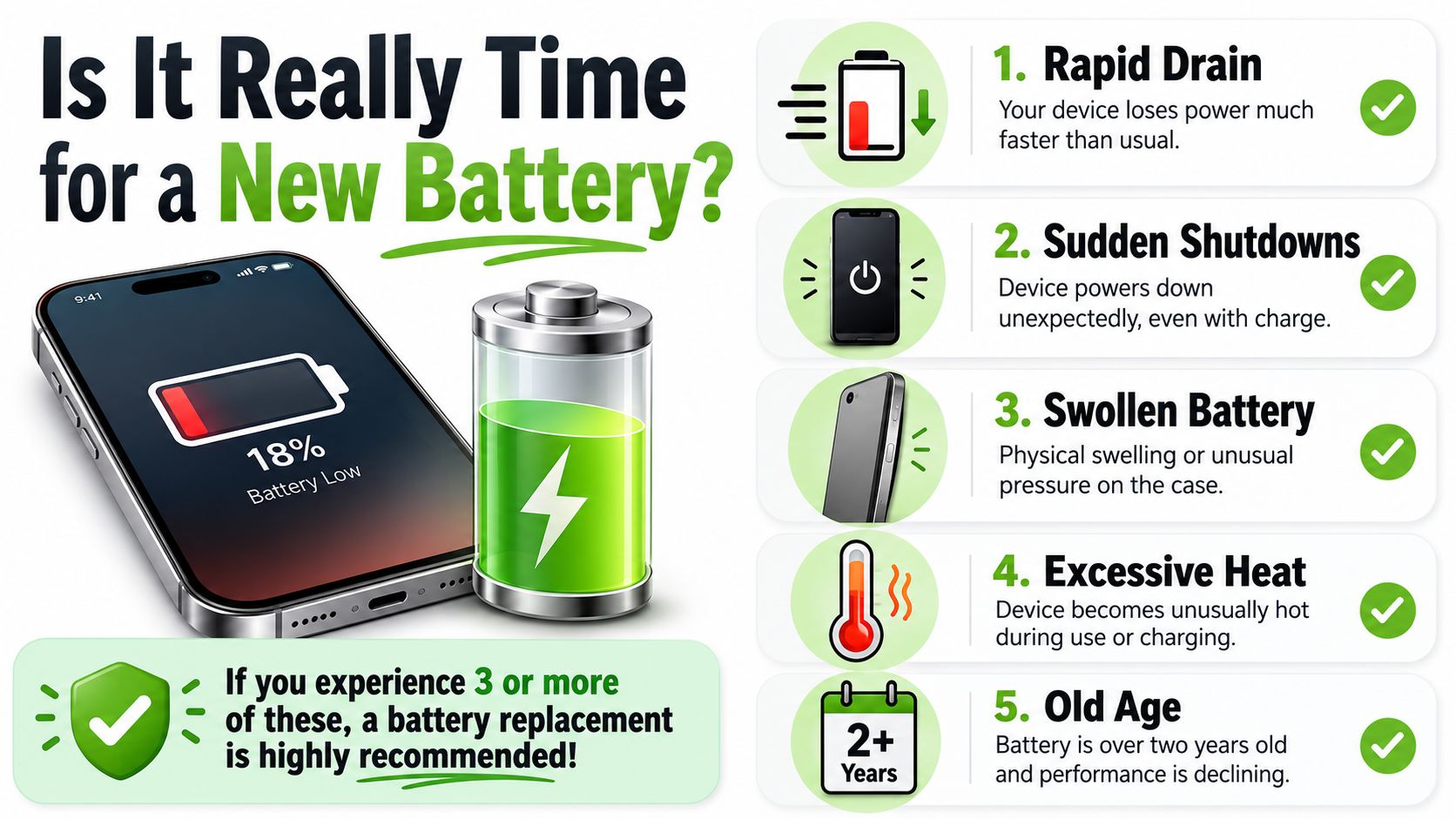
A battery near the end of its life usually behaves in patterns. Watch for these:
- Rapid drain during normal use. Your phone loses charge much faster than it used to, even on messaging, browsing, or music.
- Unexpected shutdowns. The phone powers off with charge still showing on screen.
- Slow or throttled performance. Apps open slowly, scrolling stutters, or the device feels oddly sluggish.
- Heat during light tasks. Warmth during gaming can be normal. Excessive heat while charging or doing simple tasks is not.
- Physical swelling. If the screen lifts slightly, the back cover bulges, or buttons feel tight, stop using the device and get it checked quickly.
A swollen battery is no longer just a convenience issue. It's a safety issue.
A good test is simple. Charge the phone fully, use it the way you normally do for half a day, and pay attention to whether the drop feels proportionate. If the device struggles through ordinary daily use and the health reading is low, replacement is usually the smarter move than carrying a power bank everywhere.
How to Find a Trusted Repair Service in Singapore
Typing battery replacement near me into search can pull up plenty of fast-sounding options. Speed matters, but it shouldn't be the only filter. The right shop is the one that gives you a clear quote, uses parts they can explain, and doesn't get evasive when you ask about warranty or diagnostics.

Green flags that deserve your attention
Start with the boring questions. They save money.
- Transparent pricing. In Singapore, third-party iPhone battery repairs using compatible batteries cost about S$80 and are usually completed within 60 to 90 minutes, while official Apple replacements using genuine components range from S$109 to S$169 and preserve battery health metrics and warranty compliance, according to myhalo's pricing explainer. A shop should be able to tell you clearly where it sits on that spectrum.
- Clear warranty terms. Ask what the warranty covers, how long it lasts, and what would void it.
- A real inspection process. A responsible technician checks whether the issue is the battery and not the charging port, cable, board, or software.
- A traceable business presence. Physical counters, service records, and established profiles matter. If you want a quick general framework for identifying legitimate vendors, that checklist is worth a look before you commit.
One practical option in Singapore is myhalo's guide to trusted iPhone repairs, especially if you prefer a provider with both online support and physical counters at Bugis Junction and Sim Lim Square.
Red flags that usually cost more later
The risky shops often sound convenient at first.
If a seller won't explain the part quality, the warranty, and the expected post-repair behaviour, you're not getting a proper quote. You're getting a gamble.
Watch out for:
- Vague wording such as “OEM-grade” or “original quality” with no explanation of what will be installed.
- Pressure to pay before diagnosis when the device hasn't even been checked.
- No answer on battery health display. On some devices, especially iPhones, post-repair battery health reporting can differ depending on the repair path.
- No paperwork. If there's no receipt or repair record, warranty disputes become messy fast.
A quick comparison before you book
| What to ask | Strong answer | Weak answer |
|---|---|---|
| Price | Clear range before visit | “Come down first, then see” |
| Part type | Explained plainly | Avoids specifics |
| Repair time | Gives a realistic window | Promises instantly, no inspection |
| Warranty | Written and specific | Verbal and vague |
| Post-repair checks | Lists what they'll test | “Should be okay” |
A trustworthy repair service doesn't mind careful customers. In fact, the better shops expect these questions.
Your Pre-Replacement Checklist for Data Safety
A battery swap is straightforward. Protecting your photos, chats, banking access, and work logins takes a bit more care. A smart search for battery replacement near me should include one more filter. How safely the shop handles your device before the screwdriver even comes out.
What to do before handing over your device
The aim is practical. Make sure your data can be restored, limit what anyone can access during repair, and leave yourself with an easy way to confirm everything is normal after collection.
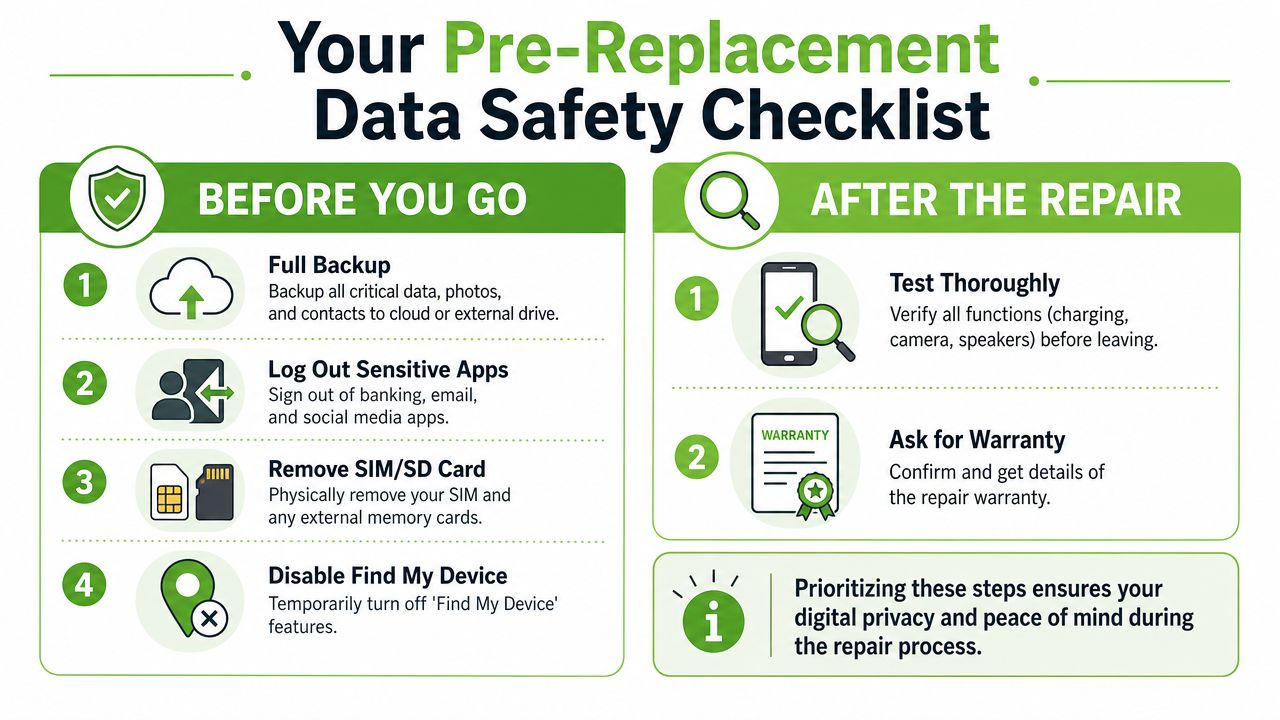
Use this checklist before you pass over the phone:
Back up first
Save photos, chats, notes, contacts, and work files to the cloud or an external drive. If you need help, this guide to backing up your iPhone before repair keeps the process clear and manageable.Log out of sensitive apps
Sign out of banking apps, password managers, secure email, and company tools where possible. If an app supports biometric login only, check that you still know the password before logging out.Remove SIM and memory cards
Take them out before handover if your device uses them. It reduces privacy risk and prevents a small but annoying problem. Cards getting misplaced during a busy repair day.Turn off device tracking only if the repair requires it
Some repairs need features like Find My to be disabled temporarily. Do that only after you have confirmed the shop, the location, and the handover process.Keep a simple record of the device condition
Snap a few photos of the screen, frame, and back glass. It takes less than a minute and helps if you need to clarify whether a mark was already there.
Data habit: Backups are not just for damaged phones. They are for anyone who would hate rebuilding daily life from scratch.
Old and spare devices often hold more personal data than people realise. Messages, documents, saved passwords, and account access can still be sitting there long after the phone stopped being your main device. For that reason alone, battery replacement should be handled like a data-safety task, not just a hardware fix.
What to check once the repair is done
Powering on is only the first check. Before you leave, confirm the phone behaves normally and that you know exactly what warranty support looks like if something feels off later.
Use this short exit test:
- Charging behaviour. Plug in briefly and confirm it starts charging properly.
- Basic functions. Open the camera, test the speaker, microphone, and buttons.
- Screen fit and casing. Check that nothing looks lifted, uneven, or loose.
- Heat level. Mild warmth can happen during setup. Unusual heat should be flagged immediately.
- Battery message or health reporting. Ask the technician what you should expect on your specific model, especially on iPhones where battery status reporting can vary depending on the repair path.
- Warranty details. Get them in writing, including what is covered and how to claim if the battery drains abnormally in the first few days.
Good repair practice does not stop at installation. It includes careful handling before repair, clear testing after repair, and responsible disposal of the old battery. That last part matters too. At myhalo, the goal is not only to get your phone working again, but to do it without turning one failed battery into more e-waste or one rushed repair into a privacy problem.
🌿 The myhalo Promise: We believe that joining the zero e-waste movement should feel good and be completely effortless. Through our Safe data guarantee, your privacy is protected, while our Declutter your e-clutter programme makes dealing with old devices convenient, safe, and responsible.
What to Expect During and After Your Repair
A battery replacement shouldn't eat up your day. Good shops make the process predictable, and that matters when you're squeezing an errand into lunch break or between meetings.

How the appointment usually goes
A proper visit starts with device verification and a quick inspection. The technician checks the model, confirms the symptom, and looks for anything that might affect the repair such as prior damage, loose screens, or non-battery faults.
For people who want a shorter turnaround, myhalo's repair service page states 30 to 60 minute battery replacement services for iPhone and Samsung devices in Singapore, using genuine parts and ISO 9001-certified repair standards.
That's the service side. Your side is simple. Arrive backed up, stay reachable, and don't skip the collection checks.
A quick visual of the repair flow helps if you've never done this before:
The checks that matter before you leave
Don't judge the repair on battery percentage alone. A newly replaced battery can still be at a partial charge when you collect it.
Focus on this short list:
- Battery health or service status. Check the device settings where relevant.
- Charging stability. Confirm the cable sits properly and charging begins normally.
- Temperature. The phone shouldn't feel unusually hot during basic setup.
- Fit and finish. Edges should sit flush. No lifting, no gaps.
- Warranty receipt. Keep a copy somewhere searchable.
If anything feels off, say it on the spot. Small issues are easier to resolve before you leave than after a few days of guessing whether the behaviour is normal.
Give Your Old Battery a Zero E-Waste Goodbye
The part most “battery replacement near me” guides skip is the old battery itself. That's a miss, especially in Singapore where convenience is important but responsible disposal matters too.
Ask what happens to the removed battery
Many repair pages talk about speed, price, and onsite help. Far fewer explain disposal. That gap matters because battery waste doesn't disappear once it leaves your phone or car.
According to the underserved market analysis provided in the source material, Singapore's National Environment Agency recorded over 10,000 tonnes of e-waste in 2023, with 60% officially recycled, and many battery replacement search results still don't clearly explain old-battery recycling practices. When a technician removes a battery, the smart follow-up question is simple. Will they take it into a proper recycling stream?
If you want a practical local read on this, see battery recycling near you in Singapore.
Repair is part of a bigger device lifecycle
A battery swap is more than a quick fix. It can keep a usable device working longer, delay unnecessary replacement, and reduce the pile of half-working electronics sitting in drawers.
That's closely tied to a zero e-waste mindset. Repair first when the device is still worth saving. Recycle responsibly when the part comes out. If the device itself is beyond practical repair, move it into a secure reuse, buyback, parts harvesting, or disposal pathway instead of leaving it forgotten at home.
That approach is simpler for users and better for the systems around us. You don't have to choose between convenience and doing the responsible thing. The right repair partner should make both happen together.
Your precious files and memories matter to us. Whether you need to protect your privacy with Safe data or rescue lost files with Save data, our caring team is right here to help. If you'd like a practical next step for repair, recycling, or device recovery, visit myhalo today.