
You're probably here because a new MacBook looks amazing right up until you see the checkout total. In Singapore, that feeling is common. Students want something dependable for class, working adults need a laptop that won't freeze during meetings, and plenty of people want the Apple experience without paying full retail.
At the same time, buying second-hand tech can feel risky. You might worry about hidden faults, weak batteries, poor repairs, or whether the seller is being fully honest about what “refurbished” means. That hesitation makes sense, especially when your laptop is something you'll rely on every day.
There's also another side to this story. Many people already have older devices sitting in drawers. Working Singaporean adults statistically hold an average of 3.3 inactive small electronic devices at home, many still partly functional or still holding personal data, which is exactly why responsible reuse matters so much in Singapore's tech culture, as noted in myhalo's Linktree overview.
Table of Contents
- Dreaming of a MacBook Without the Price Tag?
- What "Refurbished MacBook" Really Means in Singapore
- Your Essential Inspection Checklist Before You Buy
- Comparing Your Buying Options in Singapore
- The myhalo Difference Convenient, Safe, and Responsible
- Beyond Buying Extending Your MacBook's Life
- Ready to Join the Zero E-Waste Movement?
Dreaming of a MacBook Without the Price Tag?
A lot of people start the same way. You see someone working smoothly on a MacBook in a café, or your colleague opens ten tabs, edits a deck, jumps into a call, and the machine still feels fast. Then you check the price of a brand-new model and pause.
That's where the refurbished MacBook Singapore market becomes so interesting. It gives buyers a way to step into Apple hardware without taking the full hit of a new-device budget. For many people, that makes the difference between “maybe one day” and “I can buy this now”.

In Singapore, used MacBook Pro resale values typically range from SGD 350 to SGD 1,300, depending on model, condition, configuration, and battery health, according to CompAsia's guide to used MacBook Pro pricing in Singapore. The same source gives a very practical example: a refurbished MacBook Pro with an M1 Pro chip, 16GB RAM, and 512GB storage was listed at SGD 1,699, compared with its original SGD 3,236 retail price.
That kind of gap is why refurbished buying keeps growing in appeal. You're not just buying “old tech”. You're often buying capable hardware that still handles schoolwork, office apps, browsing, media editing, and everyday productivity comfortably.
A familiar Singapore buying dilemma
Say you're replacing a laptop that's slowing down. You want something reliable, but you also don't want to overspend. A refurbished MacBook can feel like the middle path. It's more reassuring than a random as-is listing, but often much more affordable than buying new.
Practical rule: A refurbished device only feels like a bargain if the seller is clear about condition, testing, and after-sales support.
That's also where sustainability becomes very real, not abstract. Every time a usable laptop gets a second life, one less device is wasted early. For people who care about both value and responsible consumption, that's a satisfying win.
Why buyers still hesitate
Most buyers aren't confused about wanting to save money. They're confused about risk. “Refurbished” sounds safe, but sellers use that word very loosely.
Common worries usually sound like this:
- Battery worry: Will it hold charge properly, or die halfway through the day?
- Performance worry: Is it healthy inside, or just cleaned up on the outside?
- Support worry: If something goes wrong, who helps me?
- Privacy worry: If I trade in my old laptop, what happens to my data?
Those are the right questions to ask. Once you know how to separate a properly refurbished MacBook from a basic used listing, the whole process becomes much less stressful.
What "Refurbished MacBook" Really Means in Singapore
The word refurbished sounds straightforward, but in practice it can describe very different things. That's why buyers often get mixed up. One seller might mean “professionally tested and restored”, while another might call it a “used laptop that still turns on”.
The easiest way to understand it is to borrow a car-buying analogy. A private used car sale is one thing. A certified pre-owned car from a dealer is something else. Laptops work the same way.
Not all refurbished devices sit in the same tier
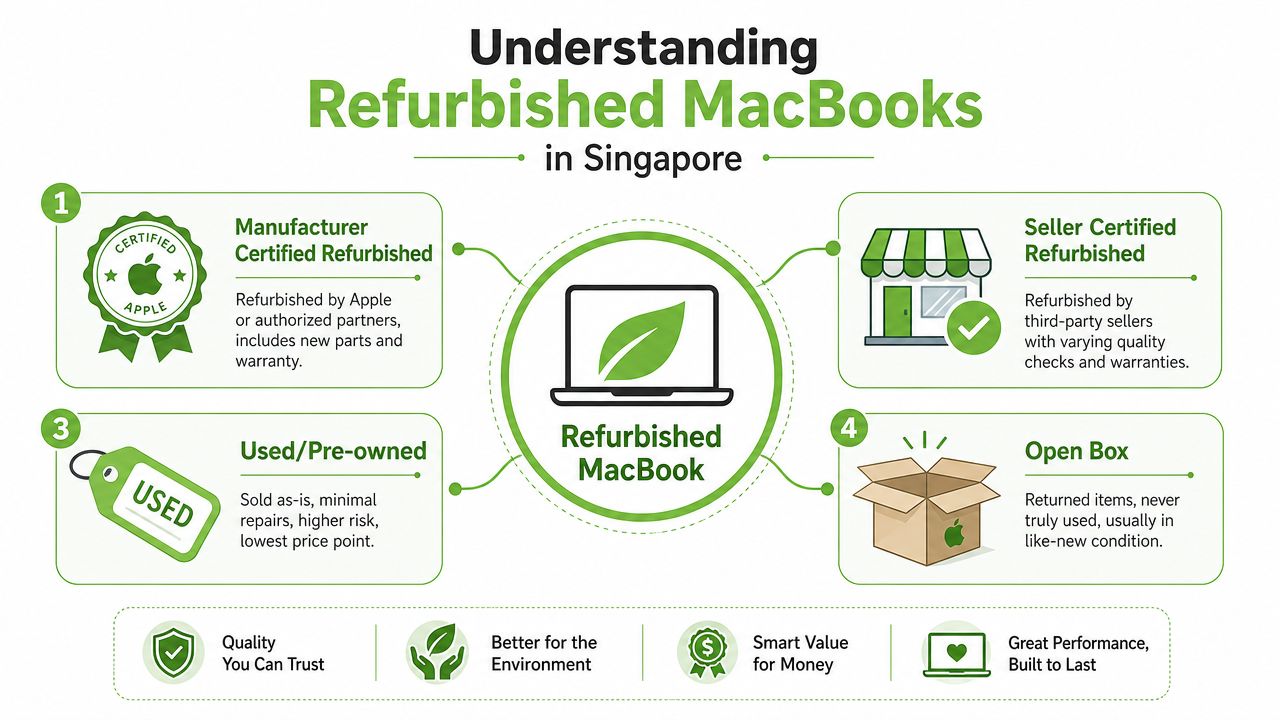
Here's the simple breakdown most buyers need.
- Apple Certified Refurbished: This is Apple's own refurbishment channel. Apple's Singapore refurbished store offers up to 15% savings compared with new products, along with a one-year warranty and full functional testing, as shown on Apple Singapore's Certified Refurbished store.
- Third-party certified refurbished: These are devices restored and sold by independent sellers. Standards vary a lot, so the trust level depends on the seller's process, grading clarity, and local warranty terms.
- Used or pre-owned: These are usually sold as-is by individuals or small traders. They can be cheap, but the risk is higher because checks may be minimal.
- Open box: These are returned or lightly handled units that may look nearly new, but availability is less predictable.
If you want a broader framework before comparing listings, this quick guide for buying refurbished electronics is a useful starting point.
Why this matters before you pay
A major point that many buyers miss is the difference between Apple's official refurbishment and third-party “certified” labels. According to RefurbMe's discussion of refurbished MacBook pros and cons, Apple's official certified refurbishment includes a new battery, a new outer shell, and a 1-year warranty, while many third-party certified listings often provide only 90 days of warranty and may exclude AppleCare+ eligibility.
That difference changes the buying decision in a big way. Two laptops can look equally clean in photos, but one may come with stronger protection, while the other may leave you with only short local coverage.
If a seller says “certified”, don't stop there. Ask who certified it, what was replaced, what warranty applies, and whether official Apple protection options still exist.
A trustworthy refurbished MacBook Singapore listing should answer those questions clearly, in plain language. If the details are vague, the price alone shouldn't convince you.
Your Essential Inspection Checklist Before You Buy
A good listing gets your attention. A proper inspection protects your money. If you're buying in person, collect your own evidence. If you're buying online, ask the seller to confirm these checks in writing before payment.
Start with what your eyes, hands, and ears can verify. Then move into system checks and seller policies.
Start with the parts you can see and touch
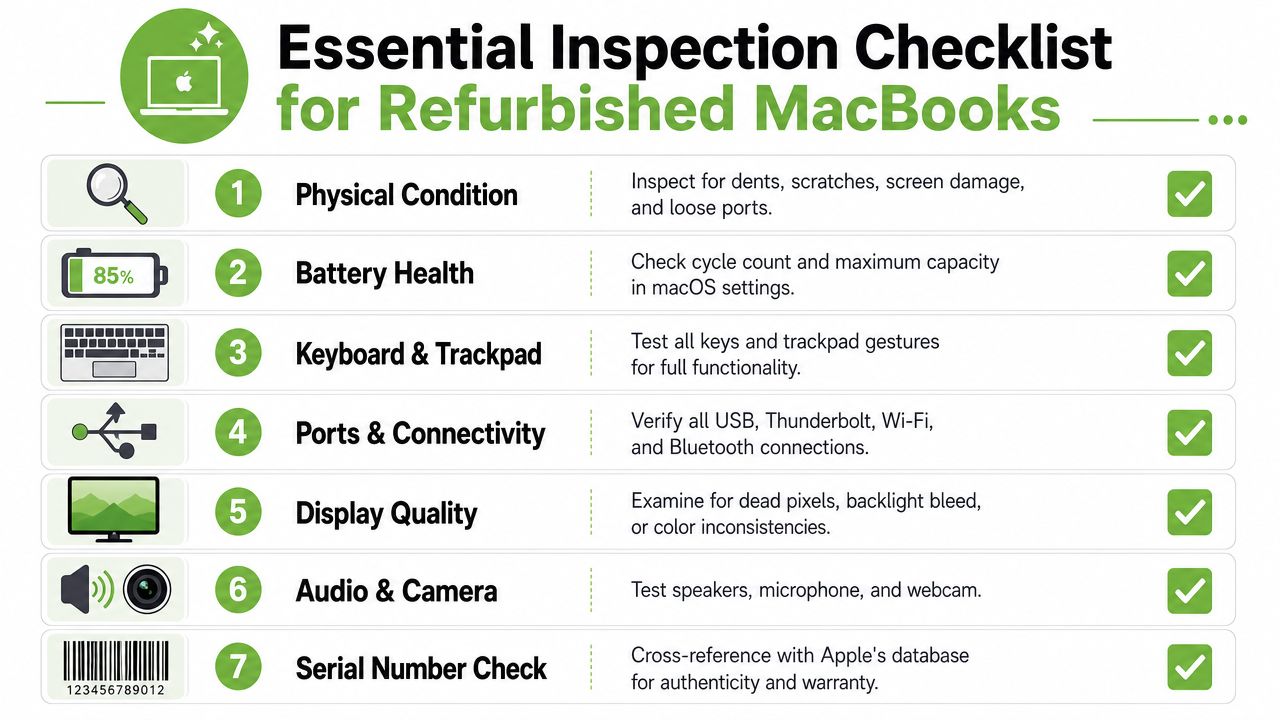
Cosmetic condition isn't only about looks. It can also hint at how carefully the laptop was handled.
- Outer casing: Check for dents, deep scratches, warped corners, or signs of impact.
- Screen panel: Look for dead pixels, discolouration, pressure marks, or uneven brightness.
- Keyboard feel: Press every key. Sticky or inconsistent keys can signal wear or past liquid exposure.
- Trackpad response: Test clicking, dragging, scrolling, and gestures.
- Ports: Plug in a charger and, if possible, test connected accessories.
This is also a good point to play audio and open the camera app. Weak speakers, crackling sound, or a blurry webcam may not be deal-breakers for everyone, but you should know before you buy.
For a second reference point, this checklist for purchasing second-hand Macs gives a handy overview of common checks buyers often forget.
Then check the MacBook's deeper health
Battery health gets a lot of attention, and rightly so. A battery affects portability, convenience, and long-term value. On a MacBook, you can check system information to review battery details and general hardware status.
But there's another issue that deserves far more attention in Singapore. Thermal health.
According to Electronics Bazaar's checklist on avoiding bad refurbished MacBook deals, many guides focus heavily on battery and cosmetic grading but overlook thermal health and component stress testing, even though dust buildup, worn fans, and degraded thermal paste can cause silent failures in poorly refurbished units. The same source notes that this matters even more in Singapore's hot and humid climate.
That means you should ask direct questions such as:
- Has the device been stress-tested under load?
- Were the cooling system and internal fans inspected?
- Was internal dust cleaned out?
- Did the seller check for overheating or abnormal fan behaviour?
Here's a visual walkthrough that complements the checklist above:
A MacBook can look excellent on the outside and still have hidden heat issues inside. In Singapore, that's not a small detail.
Don't leave without policy details in writing
Even after a strong inspection, policy matters. If the laptop fails a week later, the paperwork becomes more important than the photos.
Before paying, confirm:
- Warranty length and scope. Does it cover hardware faults only, or also battery issues?
- Return or exchange terms. How many days do you have, and what condition must the laptop be in?
- Serial number transparency. A clear serial number helps with authenticity checks.
- Activation Lock status. The laptop should be fully signed out and ready for a new owner.
A careful buyer isn't being difficult. A careful buyer is reducing avoidable risk.
Comparing Your Buying Options in Singapore
Once you know what “refurbished” can mean, the next question is where to buy. In Singapore, buyers usually choose between Apple's official store, independent certified sellers, and open marketplaces.
Each path has a trade-off. Safer options usually cost more. Cheaper options usually require more diligence.
A quick side-by-side view
According to a Singapore-focused discussion compiled on Reddit's askSingapore thread about trustworthy places to buy older Apple devices, Apple Certified Refurbished models offer a fixed 15% discount off retail with a mandatory one-year warranty, while third-party certified sellers in the region may provide 25–40% savings by using shorter local warranties instead of the official Apple warranty.
Here's a practical comparison.
| Channel | Typical Savings | Warranty | Data Security | Best For |
|---|---|---|---|---|
| Apple Certified Refurbished | Up to 15% | One-year warranty | Strong buying confidence, but not a trade-in data solution by default | Buyers who want official Apple refurbishment standards |
| Third-party certified sellers | 25–40% | Usually shorter local warranty | Depends on seller process | Buyers balancing savings and some reassurance |
| Open marketplaces | Qualitatively the lowest prices in many cases | Often none or informal | Depends entirely on the individual seller | Buyers comfortable with higher risk |
| Trade-in plus purchase route | Depends on device value and seller terms | Varies by seller | Best when the trade-in process is clearly documented | Buyers replacing an older laptop and wanting less hassle |
If you're also weighing whether to sell your current machine first, these trade-in articles for Singapore buyers can help you think through timing and options.
How to choose the right channel for your budget
If you want the lowest-stress route, Apple's official refurbished programme is the easiest to understand. The standards are clearer, but the discount ceiling is also narrower.
If you want more savings, third-party certified sellers can be a sensible middle ground. The trick is not to treat all of them as equal. Compare actual warranty terms, grading definitions, and testing transparency.
Open marketplaces can work too, but only if you're ready to inspect thoroughly and accept the possibility of no real after-sales protection. That route suits experienced buyers more than first-time shoppers.
A useful rule is to match the channel to your tolerance for uncertainty. If you hate troubleshooting, pay for structure. If you're highly confident with checks and don't mind some risk, you may be comfortable exploring looser channels.
The myhalo Difference Convenient, Safe, and Responsible
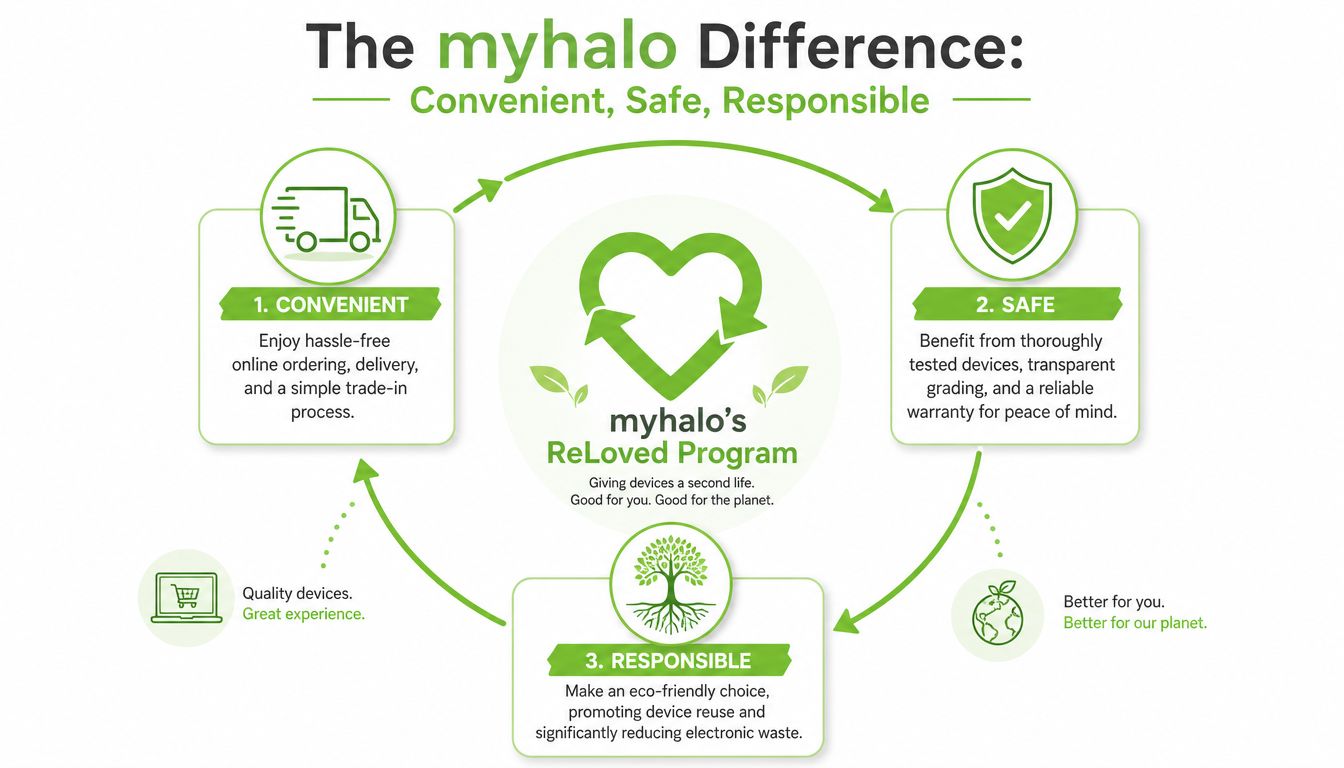
A refurbished MacBook isn't only about the laptop itself. The process around it matters just as much. That includes how a seller handles data, how clearly devices are graded, and how much friction is removed from trade-in or resale.
Safe handling matters as much as price
For many people, the biggest hidden stress isn't buying the next laptop. It's letting go of the old one safely. Personal files, passwords, photos, work documents, and browser data can all remain on a device if erasure is sloppy.
According to Vulcan Post's feature on myhalo's trade, repair, and upcycle operations, myhalo enforces strict data security protocols aligned with ISO 27001 and Cyber Security Essential certifications, with data wiping carried out in a restricted locked area accessible only to appointed staff, and erasure records encrypted on its server for up to two years.
That kind of process matters because data security shouldn't depend on hope. It should depend on documented handling.
Buyer mindset: A lower price means less if the seller can't explain how they protect your old data or verify what was done to the device.
Convenience should reduce friction, not add confusion
The refurbished buying journey gets much easier when the same ecosystem supports purchase, trade-in, repair, and responsible disposal. That's where a lifecycle approach makes practical sense.
One example in Singapore is myhalo's contactless trade-in system, where the Quote & Go platform uses an AI-backed algorithm capable of generating over 150,000 possible trade-in valuation outcomes with a guaranteed price, according to Media OutReach's report on the Quote & Go launch. For shoppers, that means less guesswork when deciding whether an older MacBook is worth selling, repairing, or replacing.
For refurbished devices themselves, Certified ReLoved laptops are professionally tested, graded, and restored to full functionality, and they come with a 30-day warranty plus a 14-day exchange guarantee, as shown on myhalo's shop collection information.
That combination of convenience, safe data handling, and reuse fits a simple idea. A zero e-waste lifestyle should feel manageable, not complicated.
Beyond Buying Extending Your MacBook's Life
A smarter laptop purchase is only one part of a healthier tech habit. The bigger opportunity is to keep devices useful for longer, whether through repair, resale, part harvesting, or secure handover when you're done with them.
Repair before replacement when it makes sense
If your current MacBook still does most things you need, replacing it may not be the first move. Sometimes the actual problem is a weak battery, a failing keyboard, poor thermal performance, or a storage issue that makes the whole machine feel older than it is.
That's why repair can be such a valuable middle option. A device that feels “finished” may still have plenty of practical life left after proper diagnosis and servicing. For users, that means less disruption. For the environment, it means one less laptop pushed out early.
A circular tech habit is easier than it sounds
A circular approach means this. Repair when sensible. Reuse when possible. Trade in when you're ready to move on. Upcycle what can't be resold.
That model works especially well for homes and offices that accumulate unused gadgets over time. Devices often sit idle because people aren't sure what they're worth, whether data can be cleared safely, or whether repair is still viable. Once those questions are answered, the next step becomes much easier.
The nice part is that this doesn't need to feel extreme. You don't need to become a tech expert or live perfectly. You just need a practical path that helps you get more life out of the devices you already own, and a responsible exit route when you're done.
Ready to Join the Zero E-Waste Movement?
Choosing a refurbished MacBook in Singapore is a practical move, but it's also more than that. You can reduce your upfront cost, get a capable machine for daily use, and help keep good hardware in circulation instead of letting it sit idle or become waste too early.
If you remember only a few things, keep these in mind:
- Know the refurbishment tier: Official Apple refurbishment and third-party certified listings are not the same.
- Inspect beyond cosmetics: Battery checks matter, but thermal health matters too.
- Read the warranty carefully: Support terms often explain the true value behind the listed price.
- Think in lifecycle terms: Buying, repairing, trading in, and secure data handling all connect.
For readers who want to explore the bigger sustainability mission behind responsible tech reuse, take a look at myhalo's zero e-waste initiative.
The refurbished MacBook Singapore market can absolutely work in your favour. You just need a calm checklist, the right questions, and a seller that communicates clearly.
Ready to feel lighter and do good? Let's clear out those old devices together and make tech ownership more convenient, safe, and responsible. Explore myhalo to buy, repair, trade in, or responsibly pass on the devices you no longer use.