
When you buy a laptop, one of the first questions you’ll face is: how long should I keep it before upgrading?
Some people change laptops every 3 years. Others stretch to 5–8 years. But what’s the right answer? In this blog, we are going to read about the factors which effect the average laptop lifespan in Singapore.
According to EU research (Coolproducts campaign, 2019), in order not to impact global warming potential, we’d have to use a laptop for 20 to 44 years (EEB Report).
But let’s be realistic — laptops simply aren’t designed to last that long.
So what’s the balance between sustainability, performance, and practicality in Singapore? Let’s break it down.
Technical Obsolescence vs Functional Obsolescence
There are two main ways a laptop becomes “old”:

Technically Obsolete
Controlled by hardware brands (Intel, AMD, NVIDIA) and operating systems (Windows, macOS).
- Example: Windows eventually stops supporting older processors, or your laptop can’t handle the latest graphics drivers.
- Typically happens around 8 years.
Functionally Obsolete
When your laptop technically works, but can’t keep up with your needs.
- Example: Slows down when you try to run Zoom + Chrome tabs + Photoshop.
- This varies by user — a student may stretch a laptop to 6 years, while a gamer might upgrade in 3.
The Realistic Laptop Lifespan in Singapore
Let’s decode the average lifespan of a laptop and the factors which effect them. The following pointers tell us how long you can realistically expect a laptop to last before performance issues or hardware limitations set in.

- 3 Years: This is often the corporate replacement cycle. Many company laptops in Singapore are swapped at 3 years because they’re not well maintained, leading to battery wear, clogged fans, and hardware stress.
- 5 Years: Recommended minimum lifespan for consumers without maintenance. At this point, performance begins to lag and parts like batteries or SSDs may need replacing.
- 8 Years: Achievable lifespan if you do regular maintenance (both hardware and software). Beyond this, OS support fades and replacement parts become harder to source.
Rule of thumb: With good care, 8 years is a safe guide before a laptop becomes technically obsolete.
Why Laptop Maintenance Matters in Singapore
We all know cars need regular maintenance. Oil changes, servicing, tyre checks. But laptops? Most people never maintain them at all.
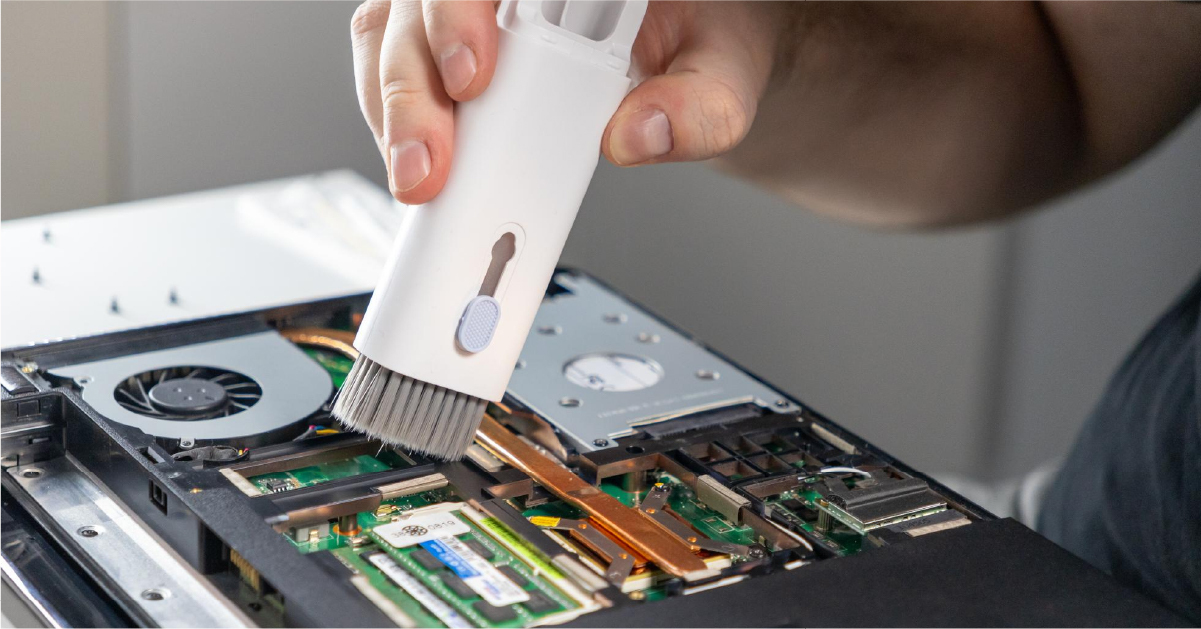
What laptops need and how to increase a laptop lifespan in Singapore:
- Dust cleaning (every ~18 months): Dust blocks airflow, making laptops overheat.
- Changing thermal paste (~every 3 years): Thermal paste is the conductive material that transfers heat from the CPU/GPU to the cooling system. Over time it dries up, reducing efficiency.
- Fan lubrication: A dry fan causes noise and reduced cooling efficiency.
- Software maintenance: Regularly updating your operating system, drivers, and security patches keeps performance smooth and prevents vulnerabilities.
Doing this prevents your laptop from thermal throttling — when the CPU or GPU slows itself down to avoid overheating, cutting performance by as much as half.
In Singapore, you don’t have to do this yourself. myhalo offers a Thermal Rescue service at our circularXchange at Bugis Junction or online. The service cleans dust, replaces thermal paste, and refreshes your cooling system. On average, customers see up to a 17% increase in laptop speed and an extended device lifespan — all for just $89 per service.
Book a Thermal Rescue with myhalo
What Is Throttling?
When your CPU or GPU overheats, it automatically slows down to reduce temperature. This is called throttling.

- Without maintenance, your laptop may run at 50% of its potential power.
- With clean fans and fresh thermal paste, it can run at full speed for years longer.
Real-Life Example
I’m still using a 12-year-old Intel i7 3rd Gen desktop, and it’s still very fast. Why?
- Regular dust cleaning.
- Fresh thermal paste.
- Occasional fan replacements.
- Software updates and cleanup.
It proves that with the right care — or with myhalo’s Thermal Rescue service — even “obsolete” hardware can remain functional and powerful. Not to undemine the years of lifespan it can add to your laptop’s lifespan.
Extending Laptop Lifespan in Singapore = Lower Cost of Ownership
Keeping a laptop longer isn’t just good for the planet — it’s good for your wallet.
- Extend lifespan from 3 years → 8 years: That’s like getting two laptops for the price of one.
- Lower total cost of ownership: Instead of spending every few years on a new machine, small investments in maintenance (like battery replacements or thermal servicing) stretch your value.
- Better sustainability: Fewer devices discarded, less e-waste, and a smaller carbon footprint.
- Thermal Rescue helps: For only $89, you can boost performance by up to 17% and keep your laptop running smoothly for years longer.
The smarter choice isn’t to replace your laptop quickly, but to maintain it so it delivers top performance for as long as possible and eventually increase the laptop lifespan in Singapore.
Don’t Want the Trouble? myhalo Can Help
Not everyone wants to open up their laptop and deal with dust, fans, or thermal paste. And that’s okay — because myhalo can do it for you.

- Option 1: Extend lifespan with Thermal Rescue → Visit us at Bugis Junction circularXchange, Bugis Junction #03-25/26 or book online, and let us handle the full cleanup and servicing.
- Option 2: Trade-in your old laptop and get a new one → Simply swap your current device for another unit. New laptops start from as low as $299.
Browse laptops from $299
Trade in your old laptop now
With myhalo, you can choose — either extend the life of your current laptop, or trade it in for a fresh start.
Final Thought:
Your laptop doesn’t need to be replaced just because it’s 3 years old. With proper care — or a Thermal Rescue by myhalo at Bugis Junction — it can last 8 years or more. And if you prefer a brand-new start, you can trade in with myhalo and get another laptop from just $299.